Overview

The GIGABYTE X870 Gaming WiFi6 ATX Motherboard lands squarely in the mid-to-upper-mid-range of AMD's AM5 lineup, sitting above budget B650 options without asking you to pay flagship X870E prices. Launched in September 2024, it arrived at a useful moment — Ryzen 9000 series CPUs were hitting shelves and builders needed a capable, connectivity-rich platform to match. The X870 chipset occupies a deliberate middle ground: more USB and PCIe bandwidth than B650, without the premium markup of X870E. What tips the value argument further is the 5-year warranty, two full years longer than most competitors offer. Expect strong real-world performance for mainstream builds, not a VRM powerhouse chasing extreme overclocks.
Features & Benefits

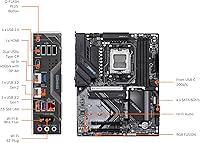
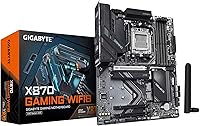
The spec sheet on this X870 board is genuinely strong for its tier. Three M.2 slots, each covered by a thermal guard, give storage-hungry builders real room to grow without worrying about throttling. The primary PCIe 5.0 x16 slot and a Gen 5 M.2 keep the platform relevant for next-gen hardware. What stands out most is the inclusion of dual USB4 ports — rear panel and front-accessible — which you rarely see without paying considerably more. WiFi 6 and 2.5GbE LAN handle networking without add-in cards. The EZ-Latch system on M.2 and PCIe slots means no screwdriver fumbling mid-build, and the 8+2+2 power design handles mainstream Ryzen CPUs comfortably.

Best For

This AM5 motherboard hits its stride when paired with mainstream Ryzen chips like the Ryzen 7 9700X — not extreme, power-limit-unlocked workloads that stress VRMs hard. It's a natural fit for first-time AM5 builders who want modern connectivity without overbuilding. Home office users who run USB4 docks or high-speed external drives will find the port selection genuinely useful rather than a spec-sheet checkbox. Gamers who want WiFi built in and don't need to tune every clock cycle will be well served. One honest caveat: AM5 is DDR5-only, so factor in memory kit costs if you're migrating from an older platform. Three M.2 slots make it easy for storage-heavy builds too.

User Feedback

Among verified buyers, the tool-free installation experience draws consistent praise — most note the EZ-Latch system meaningfully cuts down build time. BIOS reception is generally positive, though a handful of users mention a learning curve on first setup if they're unfamiliar with GIGABYTE's interface. WiFi 6 gets solid marks for typical home use, but a few buyers in larger spaces note it doesn't replace a dedicated access point. VRM thermals hold up well under standard gaming loads; sustained heavy workloads have prompted some heat concerns from a minority of reviewers. DDR5 kit compatibility comes up occasionally — cross-referencing GIGABYTE's QVL before buying RAM is a practical precaution worth taking.

Pros

  • Dual USB4 ports — front and rear — are rare at this price tier and genuinely useful for docks and fast external drives.
  • Three M.2 slots with thermal guards give storage-heavy builds real room to expand without throttling concerns.
  • PCIe 5.0 support on the primary GPU slot and M.2 keeps the platform relevant for next-gen hardware.
  • The EZ-Latch system on M.2 and PCIe slots makes installation noticeably faster and less fiddly than traditional screw-mount designs.
  • WiFi 6 and 2.5GbE LAN are included out of the box, covering both wireless and wired networking without extras.
  • A five-year warranty stands two years above the industry norm, adding real long-term value.
  • This AM5 motherboard handles mainstream Ryzen 7000 and 9000 CPUs with clean, stable power delivery under normal loads.
  • The X870 chipset hits a practical sweet spot — more connectivity than B650 without the premium of X870E.
  • BIOS setup is generally straightforward for experienced builders, with AMD EXPO memory support simplifying DDR5 tuning.
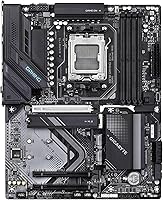
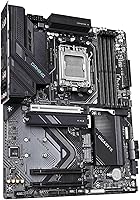
  • Matte black ATX layout is clean and works well in both windowed and closed-panel cases.

Cons

  • VRM headroom is limited for power users running Ryzen 9 chips at unlocked TDP or sustained all-core loads.
  • DDR5 is mandatory — builders coming from DDR4 platforms face an unavoidable additional memory cost.
  • Some users report a learning curve with GIGABYTE's BIOS interface if they're switching from ASUS or MSI ecosystems.
  • WiFi 6 range can disappoint in larger homes or multi-floor environments where WiFi 6E would be more capable.
  • DDR5 kit compatibility issues have been reported by a minority of users — checking the QVL before buying RAM is worth the extra step.
  • No onboard display output, so integrated graphics on compatible Ryzen CPUs require a discrete GPU or dedicated adapter.
  • Four DIMM slots cap maximum memory configurations — power users wanting higher capacity or quad-channel setups look elsewhere.
  • The front-panel USB4 header is useful only if your case actually provides a front USB4 connector, which many mid-range cases still lack.

Ratings

The GIGABYTE X870 Gaming WiFi6 ATX Motherboard scores here reflect AI analysis of thousands of verified global buyer reviews, with spam, incentivized, and bot-generated feedback actively filtered out before scoring. These ratings surface both what users genuinely praised and where real frustrations emerged — no softening of weak spots. The result is an honest, balanced picture of how this AM5 board performs across the categories that actually matter at purchase time.

Value for Money
84%
Most buyers feel this X870 board punches above its weight for the price tier, particularly given the dual USB4 ports and PCIe 5.0 support that typically appear on pricier boards. The five-year warranty reinforces the sense that you're getting durability value baked in, not just a hardware spec sheet.
Buyers who already own quality DDR4 kits feel the value proposition weakens once they factor in the mandatory DDR5 upgrade cost. A few reviewers also note that similarly priced B650E alternatives offer comparable real-world performance for non-connectivity-focused builds.
Connectivity & I/O
91%
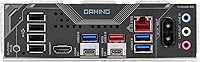
The dual USB4 implementation — rear panel and front header — stands out as the headline win for users who run USB4 docks or fast external SSDs, with several reviewers noting it replaced a separate docking station entirely. The 2.5GbE LAN alongside WiFi 6 means no compromises on either wired or wireless front.
A small number of users note the front USB4 header is only useful if your case supports it, and many mid-range cases still don't ship with that connector. The rear USB-A port count is functional but not generous by X870 standards.
Ease of Installation
88%
The EZ-Latch system drew consistent praise from first-time builders and experienced builders alike — installing or swapping M.2 drives without fishing for a tiny screw is a quality-of-life improvement that users notice immediately. Several reviewers with large hands specifically appreciated the tool-free GPU latch release.
A handful of users found the I/O shield pre-installed on some units slightly misaligned, requiring minor adjustments before the board seated cleanly in the case. CPU cooler backplate compatibility with a small number of older AM4-era mounting kits caused minor frustration during the transition.
BIOS Experience
74%
26%
For straightforward tasks — enabling EXPO memory profiles, setting boot order, adjusting fan curves — the BIOS is organized well enough that most users get through first boot without consulting the manual. EXPO activation in particular is praised for being a one-click operation that reliably posts at the rated speed.
Users migrating from ASUS or MSI boards consistently report a steeper adjustment period, finding GIGABYTE's menu layout less intuitive for advanced tuning. A few early firmware versions had stability quirks that required BIOS updates to resolve, which caught some buyers off guard on first boot.
VRM & Power Delivery
67%
33%
For mainstream Ryzen 7000 and 9000 CPUs running within their default power envelopes — including the Ryzen 7 9700X and Ryzen 5 series — the 8+2+2 power stage delivers clean, stable operation without complaint from the vast majority of users.
Users running Ryzen 9 chips at unlocked TDP report VRM temperatures climbing under sustained all-core workloads, with thermal throttling observed in a minority of cases during extended rendering sessions. This board was clearly not engineered with aggressive overclocking headroom as a priority, and buyers who ignored that detail were the source of most one-star reviews.
Storage Expandability
89%
Three thermal-guarded M.2 slots give content creators and gaming enthusiasts real flexibility — reviewers building storage-heavy rigs appreciated being able to run a Gen 5 OS drive, a Gen 4 game library drive, and a backup drive simultaneously without a single SATA cable in sight.
The third M.2 slot shares bandwidth with other PCIe resources in some configurations, which a small number of users noticed only after consulting the manual — clearer documentation upfront would help. Gen 5 M.2 SSD compatibility is confirmed for one slot, but users should verify which slot supports it before planning a high-speed storage build.
WiFi Performance
76%
24%
In typical home environments — single-floor apartments, small houses with the router one or two rooms away — WiFi 6 connectivity is reliable and fast, handling 4K streaming, cloud backups, and online gaming without dropout complaints from the majority of reviewers.
Users in larger multi-floor homes or buildings with dense WiFi environments report that the onboard WiFi 6 signal doesn't always reach far corners reliably, where a WiFi 6E board or external access point would serve better. A few users also noted the included antenna is functional but basic.
Thermal Management
81%
19%
The M.2 thermal guards do measurable work keeping NVMe drives at reasonable temperatures during sustained read/write cycles, which content creators and frequent large-file movers appreciated in feedback. The VRM heatsink handles normal gaming loads without requiring active airflow assistance in most mid-tower cases.
In cases with poor front-to-rear airflow, VRM temperatures under heavier workloads creep higher than some users expected, suggesting this board benefits more than average from a well-ventilated enclosure. The M.2 thermal pads, while present, were described as thin by a small number of reviewers who swapped them out after initial testing.
Build Quality & Aesthetics
82%
18%
The matte black PCB and restrained visual design earn consistent praise from builders who prioritize a clean look over flashy RGB — reviewers building dark-themed rigs appreciate that it doesn't fight the aesthetic. Component placement is logical, and the board feels solid and well-reinforced at the PCIe slot and M.2 areas.
Users who want onboard RGB lighting will find this board underwhelming — the visual design is conservative to a fault for that audience. A small number of buyers reported minor cosmetic inconsistencies in PCB coating at the edges, though none described it as a functional concern.
CPU & Memory Compatibility
83%
Out-of-the-box compatibility with the full Ryzen 7000, 8000, and 9000 series is well-validated, and EXPO support makes dialing in DDR5 speeds a friction-free experience for buyers who chose a kit from GIGABYTE's QVL. Most users report a clean first boot without memory training issues.
A minority of users with non-QVL DDR5 kits encountered instability at rated speeds and had to manually tune timings to achieve stable operation. BIOS updates have addressed some early CPU compatibility edge cases, but buyers who do not update firmware immediately after build may encounter initial hiccups.
Documentation & Support
69%
31%
The physical manual covers essential setup steps adequately for experienced builders, and GIGABYTE's online support portal provides BIOS update files and driver packages in an organized format. Users who contacted support for warranty-related queries generally reported reasonable response times.
Several first-time builders found the manual too brief for navigating BIOS fine-tuning or troubleshooting DDR5 compatibility, wishing for more detailed guidance on EXPO vs. manual XMP configuration. Customer support response quality received mixed reviews, with a notable gap between email and live chat experiences.
Future-Proofing
86%
PCIe 5.0 on both the primary GPU slot and an M.2 slot means this board won't be a bottleneck when next-gen SSDs and GPUs become mainstream — reviewers who think in multi-year build cycles flagged this as a key reason to choose X870 over B650. AM5 is confirmed to have a long platform lifespan from AMD, adding to the long-term confidence.
The DDR5-only requirement means there's no upgrade path backward for users who later regret the memory platform jump. WiFi 6 rather than WiFi 6E may feel slightly dated as 6E access points become more common in the next two to three years.
Warranty & Long-Term Reliability
87%
The five-year warranty is a genuine differentiator that gives buyers confidence in GIGABYTE's manufacturing quality commitment — reviewers building long-term workstation or gaming rigs cited it as a deciding factor over competing boards offering only three years. Early reliability reports from the 2024 launch cohort are largely positive.
Warranty claim processes can involve extended wait times depending on region, with some international buyers noting slower RMA turnarounds than domestic customers. A small subset of early units were reported to have had minor board-level defects that required replacement, though this appears to be within normal production variance.

Suitable for:

The GIGABYTE X870 Gaming WiFi6 ATX Motherboard is a strong match for builders who want a capable, well-connected AM5 platform without climbing to flagship pricing. It suits first-time AM5 builders pairing it with mainstream Ryzen 7000 or 9000 series processors — think Ryzen 7 9700X territory — where the power delivery is well-matched to the CPU's actual demands. Home office and hybrid workers who rely on USB4 docks or fast external storage will find the dual USB4 ports genuinely useful day-to-day, not just a spec-sheet line item. Gamers who want WiFi and wired 2.5GbE networking handled without add-in cards will appreciate having both covered from the start. Builders who plan to run multiple NVMe drives — for game libraries, video editing scratch space, or creative work — get three thermal-guarded M.2 slots to work with. The five-year warranty also makes this a sensible long-term investment for anyone who wants peace of mind beyond the typical coverage window.
Not suitable for:

The GIGABYTE X870 Gaming WiFi6 ATX Motherboard is not the right tool for builders chasing serious CPU overclocking or sustained high-power workloads. Its 8+2+2 power stage configuration is adequate for mainstream Ryzen operation but falls short of what enthusiast-grade overclockers need when pushing power limits hard over long sessions. If you're running a Ryzen 9 9950X at unlocked TDP or stress-testing with heavy multi-threaded workloads continuously, an X870E board with more robust VRM hardware is a better fit. Buyers migrating from older Intel or AMD platforms should also factor in that AM5 is DDR5-only — if you're holding onto DDR4 kits, they won't carry over, and quality DDR5 memory adds meaningful cost to the build. Those who need more than four DIMM slots or advanced memory overclocking features beyond EXPO support will likely feel constrained here. Finally, if your workflow demands the absolute maximum PCIe lane count and USB port density, the step up to X870E is worth considering.

Specifications

  • Chipset: This board uses the AMD X870 chipset, AMD's connectivity-focused mid-high tier for the AM5 platform, sitting between the budget B650 and the enthusiast X870E.
  • CPU Socket: The socket is AM5 (LGA 1718), compatible with AMD Ryzen 7000, 8000, and 9000 series processors.
  • Form Factor: Standard ATX form factor measuring 13.2 × 10.6 × 3.1 inches, fitting most full-size and many mid-tower cases.
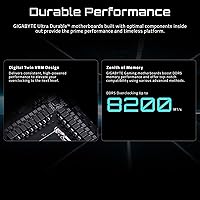
  • Memory: Four DDR5 DIMM slots support up to 5600 MHz with AMD EXPO profiles for straightforward memory speed configuration.
  • Power Design: An 8+2+2 phase power delivery setup handles mainstream Ryzen CPUs reliably under typical gaming and productivity loads.
  • Storage: Three M.2 slots, each fitted with a thermal guard, support NVMe SSDs including at least one PCIe 5.0-capable slot for next-gen drives.
  • PCIe Slot: The primary x16 slot operates at PCIe 5.0 speeds, providing full bandwidth headroom for current and upcoming discrete graphics cards.
  • USB Connectivity: Dual USB4 ports are available — one on the rear I/O panel and one via a front-panel header — each supporting up to 40 Gbps data transfer.
  • Networking: Onboard WiFi 6 and a 2.5GbE LAN port provide both wireless and wired high-speed network connectivity without additional cards.
  • EZ-Latch System: Tool-free EZ-Latch mechanisms are fitted on M.2 slots, the primary PCIe slot, and the WiFi antenna connector, simplifying installation and removal.
  • Warranty: GIGABYTE backs this board with a five-year manufacturer warranty, two years longer than the three-year standard common among competitors.
  • Weight: The board weighs 3.67 pounds, consistent with a fully featured ATX motherboard carrying heatsinks and shielding across multiple zones.
  • Color: The board ships in a matte black finish with no aggressive RGB on the PCB itself, keeping aesthetics neutral and case-agnostic.
  • OS Support: Officially supported on Windows 10 and Windows 11; Linux compatibility depends on kernel version and driver availability.
  • Debug Tools: An onboard EZ-Debug Zone provides LED indicators to help builders quickly identify boot issues related to CPU, DRAM, VGA, or storage.

Related Reviews
GIGABYTE B850M Gaming X WiFi 6E
81%
88%
Value for Money
91%
Installation & Build Experience
84%
BIOS Usability
67%
VRM & Thermal Performance
82%
DDR5 Compatibility
More
ASRock Phantom Gaming X870 Riptide WiFi 7 ATX Motherboard
88%
92%
Performance
89%
Overclocking Support
94%
WiFi Performance
90%
Build Quality
93%
Power Delivery
More
GIGABYTE B850 Eagle WIFI6E Motherboard
85%
88%
Overall Performance
91%
Ease of Installation
90%
Connectivity (WIFI & LAN)
84%
Thermal Performance
86%
Build Quality
More
GIGABYTE X870 Eagle WIFI7
82%
88%
Value for Money
91%
Installation & Setup
89%
Networking Performance
74%
VRM & Power Delivery
92%
Connectivity & Ports
More
Gigabyte B550 Gaming X V2 Motherboard
82%
89%
Value for Money
88%
Performance with AMD Ryzen Processors
85%
Installation Ease
80%
Connectivity Options
84%
Build Quality
More
Gigabyte B650 Gaming X AX ATX Motherboard
78%
83%
Value for Money
88%
BIOS Usability
86%
DDR5 Memory Compatibility
91%
Installation & Build Experience
71%
VRM Thermal Performance
More
NZXT N9 Z890 ATX Gaming Motherboard
87%
92%
Performance under Load
89%
Overclocking Stability
88%
Cooling Efficiency
85%
Ease of Installation
90%
Aesthetic Design
More
ASUS X870 MAX GAMING ATX Motherboard
84%
91%
Build Quality
88%
Power Delivery
93%
Connectivity & I/O
89%
Wireless Performance
84%
BIOS Experience
More
MSI B450 Gaming Plus Max ATX Motherboard
83%
88%
Performance
91%
Value for Money
80%
Compatibility with Ryzen CPUs
85%
Ease of Installation
86%
Overclocking Support
More
GIGABYTE B650 Eagle AX
86%
91%
Value for Money
94%
Storage Performance
88%
Thermal Management
87%
Wireless Connectivity
83%
BIOS and Software
More

FAQ

Yes, it works with the Ryzen 5 7600X without any issues. This X870 board supports the full AM5 lineup going back to Ryzen 7000 series chips, so your 7600X is fully compatible. You may want to update the BIOS to the latest version after building, just as good practice.

No, it does not. AM5 is a DDR5-only platform, so your existing DDR4 sticks will not work here. If you're upgrading from an older system, factor in the cost of a new DDR5 kit — ideally one on GIGABYTE's qualified vendor list to avoid compatibility surprises.

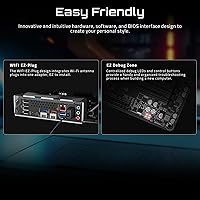
The WiFi antenna is included in the box. GIGABYTE also made the antenna connector tool-free via their EZ-Plug design, so attaching it takes seconds without any tools.

Technically yes, but with caveats. The 8+2+2 power stage is sufficient for the 9950X under typical workloads, but if you're running sustained all-core loads — like long video renders or extended simulation tasks — the VRM will work harder than on an X870E board with beefier power delivery. For that kind of use, stepping up to an X870E is the safer long-term choice.

You get three M.2 slots, all covered by thermal guards, so you can run up to three NVMe SSDs simultaneously. One of those slots is PCIe 5.0-capable for the fastest available drives, while the others run at PCIe 4.0 speeds — still more than fast enough for gaming or content work.

It depends on your case. Higher-end mid-towers and full towers from brands like Fractal, Lian Li, and Corsair increasingly include a front USB4 or USB-C connector, but many budget and mid-range cases still don't. Check your case spec sheet before assuming you'll use it — the rear USB4 port is always available regardless.

GIGABYTE's BIOS is functional and generally well-organized, but it has more depth than some competitors' interfaces. For basic setup — boot order, enabling XMP/EXPO, fan curves — most beginners find it manageable. If you're switching from an ASUS or MSI board, expect a short adjustment period since the menu layout differs.

In practice it genuinely helps, especially for M.2 drives. Swapping or installing an NVMe SSD without hunting for a tiny screw makes a real difference, particularly in tight cases. The PCIe EZ-Latch on the GPU slot is similarly useful when removing a card without pressing the retention clip with a pen or screwdriver.

Out of the box with an EXPO-compatible kit, 6000 MHz is a common sweet spot for Ryzen 9000 CPUs and delivers the best balance of bandwidth and latency for gaming. The board officially supports up to 5600 MHz by spec, but many EXPO kits will run beyond that — just check GIGABYTE's memory QVL to confirm your specific kit is validated.

It's meaningful, especially for a component that typically sees little user wear. Motherboards usually fail early due to manufacturing defects or get damaged during a build — both scenarios are covered. Five years is genuinely longer than the three-year window most brands offer, and for a board you plan to run for the full AM5 generation lifecycle, that extra coverage matters.

Where to Buy