Overview

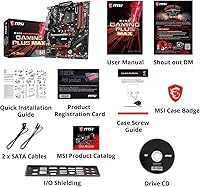
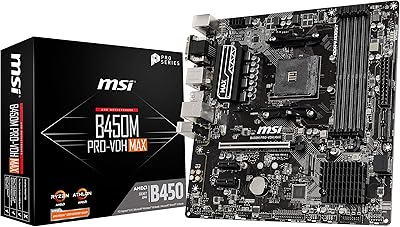
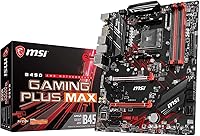
The MSI B450 Gaming Plus Max Motherboard is one of those boards that doesn't try to dazzle you with extras — it just gets the job done. Built on the AM4 socket in a full ATX layout, it's designed to work with AMD Ryzen processors all the way up to the 3rd generation, which makes it a flexible pick whether you're starting fresh or carrying over a CPU from an older build. As part of MSI's budget-friendly B450 lineup, it skips the premium chipset bells and whistles in favor of a solid, no-nonsense foundation. With DDR4 memory support and the connectivity most everyday gaming rigs actually need, it feels like a board built for practical builders rather than spec-sheet bragging rights.
Features & Benefits

Where this motherboard earns its keep is in the small, practical touches that add up during daily use. The Turbo M.2 slot noticeably speeds up storage access, so boot times and game loading feel snappier than you'd expect from a board in this price range. DDR4 Boost technology works behind the scenes to keep memory signals stable, which translates to steadier performance rather than flashy benchmark numbers. USB 3.2 Gen2 ports make transferring large files to external drives quick and painless, and the Realtek ALC892/ALC897 audio codec delivers respectable sound quality without needing a dedicated sound card. StoreMI technology is a nice bonus too, letting you blend an SSD and HDD into a hybrid setup that balances speed and storage capacity, while memory can be pushed up to 4133 MHz if you're willing to tinker with overclocking settings.

Best For

This AM4 board makes the most sense for a specific kind of builder rather than everyone shopping for a new rig. If you're putting together your first AMD Ryzen system on a reasonable budget, it gives you everything needed to get up and running without overspending on features you won't use. It's also a smart pick for anyone upgrading an older AM4 setup who doesn't need the latest premium chipset extras — just a reliable platform that supports newer Ryzen chips. Builders who want decent onboard audio and flexible storage options without buying add-in cards will appreciate what's included here. And if RGB lighting and built-in Wi-Fi aren't priorities for you, this is the kind of board that lets you put your budget toward a better CPU or graphics card instead.

User Feedback

Feedback from people who've actually installed this build tends to be encouraging, with many noting that BIOS setup was straightforward and Ryzen compatibility worked as expected right out of the box. A handful of buyers mention needing to update the BIOS before fully utilizing a 3rd generation Ryzen chip, which is worth knowing ahead of time so it doesn't catch you off guard during setup. The price-to-performance ratio comes up again and again in owner reviews, with many feeling they got more board than they paid for. On the downside, a few more demanding users point out that the VRM setup is fairly basic, so heavy overclocking isn't really its strong suit. Even with that caveat, overall satisfaction stays high, reflected in a strong average rating across thousands of buyers.

Pros

  • Turbo M.2 slot noticeably speeds up boot times and game loading
  • Supports 1st through 3rd Gen Ryzen processors for long-term upgrade flexibility
  • StoreMI lets you combine an SSD and HDD into one hybrid drive
  • Onboard Realtek audio sounds solid without needing a separate sound card
  • USB 3.2 Gen2 ports make large file transfers noticeably faster
  • Most buyers report an easy, hassle-free BIOS setup process
  • Strong price-to-performance ratio according to thousands of owner reviews
  • DDR4 memory support up to 4133 MHz gives some headroom for tuning

Cons

  • VRM design is fairly basic, limiting serious overclocking ambitions
  • 3rd Gen Ryzen chips may require a BIOS update before full compatibility
  • No built-in Wi-Fi, so you'll need a separate adapter or ethernet
  • Lacks RGB lighting features some gaming builds are designed around
  • Audio codec is capable but not on par with dedicated sound cards
  • Entry-level chipset means fewer high-end features compared to X-series boards
  • Limited overclocking ceiling compared to boards built for enthusiast tuning

Ratings

These scores for the MSI B450 Gaming Plus Max Motherboard were generated by AI after analyzing thousands of verified user reviews from buyers worldwide, with spam, bot activity, and incentivized feedback filtered out. The goal is to give you an honest snapshot of where this board genuinely shines and where it falls short, based on real build experiences rather than marketing claims.
Value for Money
91%
Buyers consistently mention getting more board than expected for the price, especially compared to pricier B450 and X470 alternatives. For a first Ryzen build or a budget refresh, this AM4 board hits a sweet spot most reviewers feel good about recommending to friends on a tight budget.
A small number of users feel the savings come with noticeable trade-offs, particularly around VRM quality and missing extras like Wi-Fi. If you're comparing strictly on a feature-by-feature basis against higher-tier boards, the gap becomes more obvious.
Ryzen Compatibility
88%
Support spans 1st through 3rd Gen Ryzen chips, which reviewers appreciate when reusing an older CPU or planning a future upgrade path. Most builders report smooth recognition once the BIOS is current, making it a flexible long-term AM4 platform.
Some 3rd Gen Ryzen owners ran into boot issues out of the box due to outdated factory BIOS versions. This created a frustrating chicken-and-egg situation for anyone without access to an older compatible CPU to perform the initial update.
BIOS & Setup Experience
84%
Many first-time builders specifically call out how approachable the BIOS interface felt, with clear menus for memory and boot settings. Initial setup for most Ryzen configurations went smoothly without needing outside troubleshooting help.
Updating the BIOS for 3rd Gen support trips up newer builders who aren't familiar with the process. A few reviews mention the update steps could be documented more clearly for less experienced users.
Build Quality & VRM Design
67%
33%
For standard, non-overclocked daily use, the board feels sturdy and well put together, with users reporting reliable long-term operation in basic gaming and home rigs. The PCB layout is described as practical and easy to work with during installation.
The VRM setup is consistently flagged as entry-level, with several reviewers cautioning against pushing higher-end Ryzen CPUs too hard under sustained load. Enthusiasts looking to overclock aggressively report thermal concerns and recommend pairing it only with modest CPUs.
Storage Performance (M.2 & StoreMI)
86%
The Turbo M.2 slot earns praise for noticeably cutting down boot and game load times compared to SATA-only setups. StoreMI is highlighted as a clever way to combine an SSD and HDD without spending extra on a larger primary drive.
A handful of users found StoreMI's setup process slightly confusing on first attempt, requiring some trial and error. The single M.2 slot also limits expansion for builders wanting multiple NVMe drives down the line.
Memory & Overclocking Headroom
71%
29%
DDR4 support up to 4133 MHz gives casual tuners some room to experiment, and DDR4 Boost is credited with steadier performance during everyday multitasking and gaming sessions. Most users find stock speeds perform reliably without extra tweaking.
Reaching those higher rated memory speeds isn't guaranteed and often depends on the specific RAM kit used. Reviewers note that aggressive memory overclocking can require patience and BIOS tweaking that beginners may find tedious.
Audio Quality
79%
21%
The Realtek ALC892/ALC897 codec delivers clear, balanced sound that most casual gamers and media users find perfectly adequate for headsets and basic speaker setups. Reviewers note it eliminates the need for a separate sound card in everyday use.
Audiophiles and competitive gamers using high-end headsets sometimes notice a flatter soundstage compared to boards with premium audio chips. It's functional rather than exceptional, which a few detailed reviews point out directly.
USB & Connectivity
83%
USB 3.2 Gen2 support speeds up transfers for external drives, and the six USB 2.0 ports give plenty of room for peripherals like keyboards, mice, and controllers. Builders appreciate not running out of ports in typical desktop setups.
There's no built-in USB-C front panel header on this model, which some modern case owners find limiting. A few reviewers also wished for additional rear USB 3.2 ports given how many peripherals a gaming setup tends to accumulate.
Display Output Flexibility
77%
23%
DVI and HDMI outputs let users with Ryzen APUs run a display without buying a dedicated GPU right away, which reviewers find handy during a staged build or GPU shortage. It's described as a practical safety net.
There's no DisplayPort output, which some users with newer high-refresh monitors found inconvenient. This pushes certain builders toward HDMI adapters or limits their display options until a discrete GPU is installed.
Multi-GPU Support
58%
42%
Crossfire compatibility is appreciated by a small subset of builders repurposing older dual-GPU setups, giving this AM4 board some flexibility for niche configurations. It's seen as a nice-to-have rather than a core selling point.
Most reviewers note that multi-GPU gaming has fallen out of favor industry-wide, making this feature largely irrelevant for modern builds. Limited PCIe lane bandwidth on a B450 board also constrains real-world multi-GPU performance.
Wireless Connectivity
52%
48%
Users who already have ethernet access or a separate Wi-Fi adapter don't see this as a dealbreaker, since wired connections often perform better for gaming anyway. It keeps the board's price down for buyers who don't need wireless.
The lack of built-in Wi-Fi and Bluetooth is one of the most repeated complaints in reviews, especially from builders without easy access to an ethernet jack. It often means budgeting for a separate adapter.
Durability & Long-term Reliability
81%
19%
Many long-term owners report stable operation over months or years of regular gaming use without component failures. The board is frequently described as a dependable workhorse for everyday builds rather than a fragile budget option.
A small number of reviews mention capacitor or port wear after extended heavy use, particularly in builds running demanding CPUs near their thermal limits. This reinforces that it's best suited to moderate, not extreme, usage.
Documentation & BIOS Update Process
69%
31%
Once builders find the right resources, most describe the BIOS flashback process as manageable, with MSI's online support pages filling in gaps left by the printed manual. Experienced builders rarely struggle with it.
The included documentation is considered fairly basic, leaving newer builders to search online forums for clarity on BIOS updates and compatibility lists. This adds friction for buyers without prior PC-building experience.

Suitable for:

The MSI B450 Gaming Plus Max Motherboard makes the most sense for someone building their first AMD Ryzen system without wanting to overspend on features they'll never touch. It's a strong fit for budget-conscious gamers who care more about getting a reliable, functional rig running than chasing premium chipset extras. Anyone upgrading an older AM4 setup will appreciate that it supports newer Ryzen chips without forcing a full platform change. Builders who want decent onboard audio and flexible storage options, including the ability to combine an SSD and HDD through StoreMI, get real value here without needing extra add-in cards. It also suits people who'd rather put their money toward a better CPU or GPU than pay for built-in Wi-Fi or RGB lighting they may not even use. In short, it's a sensible, no-frills starting point for a value-focused gaming build.
Not suitable for:

On the flip side, this board isn't the right call for anyone planning serious overclocking or chasing maximum performance from a high-end Ryzen chip. The VRM setup is fairly basic, so enthusiasts who want to push their CPU hard will likely outgrow it quickly. Buyers who need built-in Wi-Fi, premium RGB control, or a more robust power delivery system should look toward a higher chipset tier instead. People setting up a 3rd generation Ryzen CPU should also be prepared for a possible BIOS update before everything works smoothly, which can be an inconvenience if you don't have an older compatible chip on hand first. The MSI B450 Gaming Plus Max Motherboard simply isn't designed for buyers who view a motherboard as the centerpiece of a high-performance rig rather than a practical foundation.
Specifications

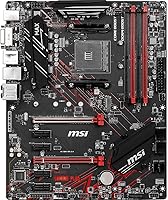
  • CPU Socket: The board uses an AM4 socket, supporting 1st, 2nd, and 3rd Gen AMD Ryzen processors.
  • Chipset: It is built around the AMD B450 chipset, designed for mainstream Ryzen builds.
  • Form Factor: The board follows the standard ATX form factor for compatibility with most mid-tower and full-tower cases.
  • Dimensions: The board measures 12 x 9.6 x 2 inches.
  • Weight: The board weighs 2.51 pounds.
  • Memory Support: It supports DDR4 memory with speeds up to 4133 MHz when overclocked.
  • Storage Interface: A Turbo M.2 slot is included for faster NVMe or SATA SSD storage access.
  • Hybrid Storage: StoreMI technology allows users to combine an SSD and HDD into a single accelerated drive.
  • USB Connectivity: The board includes USB 3.2 Gen2 ports for high-speed data transfer.
  • USB 2.0 Ports: Six USB 2.0 ports are available for additional peripheral connections.
  • Audio Codec: Onboard audio is handled by a Realtek ALC892/ALC897 codec.
  • Operating System Support: The board is compatible with Windows 10 and Windows 7.
  • Display Outputs: DVI and HDMI ports are included for connecting a monitor when using a Ryzen processor with integrated graphics.
  • Multi-GPU Support: The board supports AMD Crossfire configurations for multi-GPU setups.
  • Brand: The motherboard is manufactured by MSI under the B450 Gaming Plus Max model line.

Related Reviews
MSI B650 Gaming Plus WiFi
80%
83%
Value for Money
88%
BIOS & Software Experience
91%
Power Delivery & Stability
84%
Wireless Connectivity
79%
Memory Performance & Overclocking
More
MSI X670E Gaming Plus WiFi AM5 Motherboard
80%
86%
Build Quality
89%
Power Delivery
91%
PCIe 5.0 & Storage Support
71%
DDR5 Memory Compatibility
78%
BIOS Experience
More
MSI B850 Gaming Plus WiFi Motherboard
83%
88%
VRM & Power Delivery
85%
Cooling System
84%
Memory Overclocking
91%
PCIe 5.0 & GPU Support
79%
Storage & M.2 Layout
More
MSI MPG B550 Gaming Plus ATX Motherboard
77%
88%
Value for Money
81%
Build Quality
83%
BIOS & Software Experience
76%
CPU Compatibility
61%
Overclocking Headroom
More
MSI B760 Gaming Plus WiFi Motherboard
87%
92%
Performance
88%
Stability during Gaming
90%
Connectivity (Wi-Fi 6E & LAN)
85%
Thermal Performance
87%
Build Quality
More
MSI MAG B550 Tomahawk MAX WiFi
88%
93%
Build Quality
91%
Thermal Management
94%
Wireless Connectivity
88%
Installation Ease
87%
Value for Money
More
INLAND AMD Ryzen 5 7600X & MSI B650 CPU-Motherboard Combo
77%
88%
Gaming Performance
91%
Ease of Setup
71%
Value for Money
84%
Motherboard Build Quality
67%
Thermal Management
More
MSI MEG Z690 Unify ATX Gaming Motherboard
83%
93%
Build Quality
91%
VRM Performance
86%
BIOS Experience
94%
Storage Expandability
88%
Connectivity
More
MSI B450M PRO-VDH MAX AM4 Motherboard
80%
86%
Value for Money
88%
CPU Compatibility
89%
BIOS & Setup Ease
85%
Stability & Reliability
83%
Storage & M.2 Support
More
MSI A520M-A PRO V1 AM4 Motherboard
74%
91%
Value for Money
88%
Ease of Installation
74%
CPU Compatibility
78%
Build Quality
81%
BIOS Experience
More

FAQ

Yes, this AM4 board officially supports 3rd Gen Ryzen processors like the 5 3600. Just keep in mind that depending on when the board was manufactured, you may need to update the BIOS first, especially if you don't have an older Ryzen chip on hand to do the update with.

Not necessarily, if you're using a Ryzen processor with integrated Vega graphics, you can run a display through the DVI or HDMI ports without a dedicated GPU. If you're using a non-APU Ryzen chip, then yes, you'll need a separate graphics card.

MSI boards in this lineup typically include a BIOS flashback feature, but it's worth checking your specific board revision since not all versions have it. If yours doesn't, you may need to borrow an older, compatible Ryzen CPU temporarily to perform the update.

Light overclocking is possible since the board supports DDR4 memory tuning, but the VRM design is fairly basic. If you're planning aggressive, sustained overclocking, a board with a more robust power delivery system would serve you better.

No, this AM4 board does not include built-in Wi-Fi or Bluetooth. You'll need to use a wired ethernet connection or add a separate Wi-Fi adapter.

It's well-suited for everyday gaming, especially when paired with a mid-range GPU. The Turbo M.2 slot and USB 3.2 Gen2 support also help with faster load times and file transfers during regular use.

Since it follows the standard ATX form factor, it will fit most mid-tower and full-tower cases designed for ATX motherboards. Just double check your case's specifications before buying to be safe.

The Realtek ALC892/ALC897 codec delivers solid, clear sound for everyday gaming and media use. It won't match a dedicated sound card, but most users won't feel the need for one.

Yes, this board includes StoreMI technology, which lets you combine an SSD and HDD into a single hybrid drive. This gives you a nice mix of speed and storage capacity without needing a higher-end board.

It's a solid pick for first-time builders, especially if you're working with a budget and want straightforward Ryzen compatibility. Many buyers mention an easy BIOS setup process, which makes the overall build experience less intimidating.