Overview

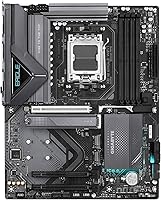
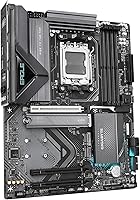
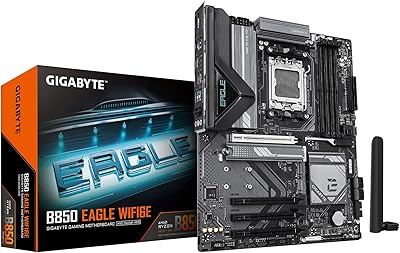
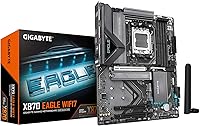
The GIGABYTE X870 Eagle WIFI7 arrived in late 2024 as a practical answer to a real builder problem: how do you get onto the AM5 platform with a genuinely capable board without spending flagship money? It supports Ryzen 7000, 8000, and 9000 series processors on the AMD AM5 socket, fitting neatly into an ATX case with a clean matte black finish that won't clash with most builds. What separates it from cheaper options in the X870 tier isn't flash — it's the 5-year warranty, which is unusually generous at this price point and signals that GIGABYTE is backing this board with real confidence.
Features & Benefits

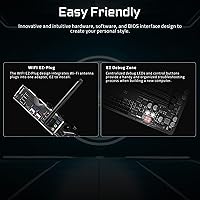
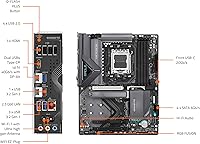
The connectivity package on this Eagle WiFi 7 board is where things get interesting for a board in this tier. WiFi 7 and 2.5GbE LAN come standard, meaning you won't need a separate network card even in a demanding home office or streaming setup. Dual USB4 ports — front and rear USB-C — handle fast external drives and docks without adapters. Four M.2 slots, each covered by a thermal guard, give you plenty of NVMe room without worrying about throttling under sustained loads. PCIe 5.0 keeps the board relevant for next-generation GPUs and storage. The EZ-Latch system makes swapping drives and graphics cards genuinely less annoying than on most competing boards.

Best For

This GIGABYTE motherboard hits a particular sweet spot for builders moving to AM5 who want WiFi 7 connectivity without stretching their budget to an X870E board. It's worth clarifying: X870E is the higher-end chipset tier with more PCIe lanes and beefier VRM designs — the X870 Eagle sits below that, but for most Ryzen 9000 gaming or productivity rigs, that distinction rarely matters in practice. Content creators running multiple NVMe drives will appreciate the four M.2 slots. Home or small office users looking to eliminate a separate network card will find the built-in networking genuinely useful. Long-term platform support also makes this a smart pick for anyone planning future CPU upgrades on the AM5 socket.

User Feedback

Across nearly 1,800 ratings, the X870 Eagle holds a solid 4.3-star average, which reflects real-world satisfaction rather than just early-adopter enthusiasm. Easy installation comes up repeatedly — buyers appreciate the toolless latches and a BIOS interface that doesn't require a manual to navigate. That said, a recurring complaint involves needing a BIOS update before a newer Ryzen CPU will post, which is a frustrating hurdle if you don't have an older processor available. A handful of users flagged DOA units or minor hiccups with GIGABYTE's companion software. Compared to pricier alternatives, most reviewers feel this board delivers honest value — reliable daily performance backed by a warranty that gives you genuine long-term peace of mind.

Pros

  • WiFi 7 and 2.5GbE LAN are both included, eliminating the need for a separate networking card.
  • Dual USB4 ports — front and rear — handle fast external drives and docks without adapters.
  • Four M.2 slots with thermal guards support multi-drive NVMe setups without throttling concerns.
  • The EZ-Latch system makes GPU and M.2 swaps noticeably faster and less fiddly than typical boards.
  • PCIe 5.0 support keeps this Eagle WiFi 7 board compatible with the next wave of GPUs and storage.
  • A five-year warranty is unusually generous for a mid-range board and adds real long-term confidence.
  • AMD EXPO support makes DDR5 memory setup straightforward without deep manual tuning.
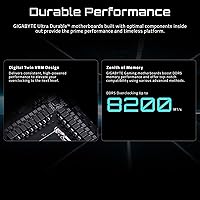
  • The 14+2+2 VRM handles mainstream Ryzen workloads reliably without thermal complaints under normal use.
  • Matte black finish is versatile and does not clash with most case and cooling colour schemes.
  • Competitive pricing relative to the feature set makes this X870 Eagle a genuinely efficient use of budget.

Cons

  • BIOS updates are often required before newer Ryzen 9000 CPUs will post, which demands access to an older processor.
  • GIGABYTE's companion software has recurring stability and bloat issues that frustrate many users.
  • VRM headroom is insufficient for sustained all-core overclocking on top-tier high-core-count Ryzen CPUs.
  • One M.2 slot shares bandwidth with the primary PCIe slot in certain configurations, which can affect throughput.
  • Running all four DIMM slots at high DDR5 frequencies can introduce stability issues with some memory kits.
  • A small but notable share of buyers have received DOA units or boards with pre-existing hardware defects.
  • RGB lighting options are minimal, which limits visual customization for builders with windowed cases.
  • RMA and customer support experiences vary significantly by region, making warranty value inconsistent in practice.
  • WiFi 7 benefits are only realized if you already own a WiFi 7 router, which most households currently do not.
  • Chipset heatsink coverage and overall thermal headroom in poorly ventilated cases leaves little margin for error.

Ratings

The GIGABYTE X870 Eagle WIFI7 has been evaluated by our AI system after analyzing thousands of verified global user reviews, with spam, bot submissions, and incentivized feedback actively filtered out. Scores reflect a balanced picture — genuine strengths are credited, but recurring frustrations are weighted honestly and not softened. Whether this board earns its place in your build comes down to how its real-world performance stacks up across the categories that actually matter to enthusiast builders.

Value for Money
88%
Most buyers feel this Eagle WiFi 7 board punches above its weight for the price tier, especially given the inclusion of WiFi 7, dual USB4, and a five-year warranty — features typically reserved for boards costing significantly more. Builders coming from older platforms consistently flag this as one of the more complete mid-range AM5 options available.
A segment of reviewers who compared it directly to X870E boards felt the gap in PCIe lane availability and VRM headroom was worth a modest premium, making the value calculation less clear-cut for high-end CPU pairings. Those planning aggressive overclocking may find the price-to-capability ratio shifts unfavorably.
Installation & Setup
91%
The EZ-Latch system draws consistent praise from builders who have wrestled with traditional GPU and M.2 retention clips. Swapping drives mid-build or reseating a graphics card no longer requires a screwdriver or contorting your hand into awkward angles inside the case, which makes iterative builds noticeably less frustrating.
A recurring pain point involves BIOS compatibility — users pairing this board with newer Ryzen 9000 CPUs sometimes found the board would not post out of the box without a prior BIOS update, which requires access to an older supported processor. This is a platform-wide issue but still catches first-time AM5 builders off guard.
Networking Performance
89%
Having both WiFi 7 and 2.5GbE LAN built in removes the need for a separate networking card, which is a real cost and slot saver in compact or budget-conscious builds. Home office users running large file transfers or streamers pushing high-bitrate content to a NAS consistently report stable, fast throughput on both interfaces.
A small number of users noted that realizing the full benefit of WiFi 7 requires a compatible router, which many households do not yet have — making this feel like forward-looking value rather than an immediate day-one upgrade for some buyers.
VRM & Power Delivery
74%
26%
The 14+2+2 power design handles mainstream Ryzen workloads — including the Ryzen 9 9900X and 9950X — without complaint under typical gaming and productivity loads. Thermal guards on the VRM heatsinks help maintain stable temperatures during extended rendering or multi-threaded tasks.
This is not a board for serious manual overclocking. Builders pushing high-core-count CPUs to their limits under sustained all-core workloads have reported thermal warnings, and the VRM configuration does not offer the overhead that dedicated enthusiast or X870E boards provide. It is honest mid-range power delivery, not premium.
Connectivity & Ports
92%
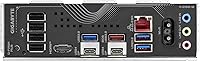
Dual USB4 ports — available at both the rear I/O and the front panel header — give this X870 Eagle an edge over several competitors at the same price. Running an external NVMe enclosure, a Thunderbolt-compatible dock, or a high-resolution display adapter through USB4 works without any driver fuss on Windows 11.
Some users building media workstations wished for a second USB4 rear port dedicated entirely to data rather than sharing duty with display output. The overall USB port count is adequate but not lavish, and those coming from older high-end boards may notice fewer legacy USB-A ports than expected.
Storage Expansion
86%
Four M.2 slots is genuinely generous for a board at this price point, and the thermal guards on each slot prevent the throttling issues that plague budget boards running multiple NVMe drives under sustained read and write loads. Content creators juggling project drives, scratch disks, and OS volumes will rarely feel constrained.
One of the M.2 slots shares bandwidth with the primary PCIe slot depending on configuration, which can affect throughput in specific multi-drive setups. This is clearly documented but easy to overlook during the planning phase of a build.
BIOS Experience
78%
22%
GIGABYTE's UEFI BIOS on this board is well-organized compared to what the brand shipped a few years ago. AMD EXPO profiles load reliably and memory tuning is accessible without requiring deep manual configuration, which most enthusiast builders appreciate when setting up DDR5 kits above base spec.
Out-of-the-box BIOS versions have occasionally been outdated enough to cause compatibility issues with launch-window Ryzen 9000 CPUs. Flashing an update is straightforward once you are in the BIOS, but the Q-Flash process can feel opaque to builders who have not done it before.
Build Quality & Aesthetics
82%
18%
The matte black finish is restrained and versatile — it does not clash with coloured cooling setups and avoids the aggressive gamer aesthetics that date quickly. PCB construction feels solid, and the heatsink coverage across VRM and M.2 areas is more comprehensive than you typically see at this tier.
RGB implementation is modest, which will disappoint builders who want a show-quality lighting setup. The board is functional-looking rather than visually striking, which is a deliberate trade-off but worth knowing if your case has a large side window.
DDR5 Memory Compatibility
79%
21%
AMD EXPO support makes it straightforward to run DDR5 kits at their advertised speeds without extensive manual timings. Builders using popular 6000 MHz and 6400 MHz kits from major brands report clean POST and stable operation across a range of configurations.
A subset of users with less common DDR5 kits — particularly high-frequency modules above 6400 MHz — encountered instability that required manual timing adjustments. Four DIMM slots also means population rules matter more at high speeds, and running all four slots can limit achievable frequencies.
PCIe 5.0 Readiness
83%
Having a PCIe 5.0 x16 primary slot means this GIGABYTE motherboard is already compatible with next-generation GPUs without needing a board swap. Builders on a longer upgrade cycle appreciate knowing the platform will not become a bottleneck when PCIe 5.0 graphics cards become mainstream.
At the time most buyers purchased this board, PCIe 5.0 GPU support was still limited, meaning this feature is largely forward-looking value right now rather than a practical day-one benefit. The PCIe 5.0 M.2 slot availability is also more restricted than on higher-tier X870E boards.
Thermal Management
80%
20%
VRM heatsinks cover the power delivery area adequately for normal use, and the M.2 thermal guards make a measurable difference in drive temperatures during sustained workloads like large video exports or game installs across multiple NVMe drives simultaneously.
In cases with poor airflow, a few users observed higher-than-expected VRM temperatures during extended all-core loads. The board does not ship with a chipset fan, which keeps acoustics low but places more responsibility on case airflow planning.
Software & Utilities
61%
39%
GIGABYTE's APP Center provides a single entry point for fan control, RGB management, and system monitoring, which is convenient for builders who prefer GUI-based tuning over BIOS adjustments during daily use.
GIGABYTE's companion software has a mixed reputation, and this board is no exception. Multiple reviewers flagged installation issues, bloat, and occasional crashes in the utility suite. Most experienced builders skip it entirely and handle tuning through the BIOS or third-party tools instead.
Warranty & Long-Term Support
93%
A five-year warranty is a standout commitment at this price tier and gives buyers genuine confidence in the long-term investment. Several users specifically cited the warranty as a deciding factor over competing boards that offer only two or three years of coverage.
A small number of users who needed to exercise the warranty reported that RMA processing times were longer than expected, and communication from GIGABYTE support could be inconsistent. The warranty terms are strong on paper, but real-world service experience varies by region.
Out-of-Box Reliability
71%
29%
The majority of buyers report straightforward first boots with no hardware issues, and the overall DOA rate appears low relative to the sales volume. For a board launched into a busy chipset cycle, initial quality control has been broadly acceptable.
DOA units and early-life failures do appear in the review pool at a rate that warrants attention. Some users received boards with bent socket pins or non-functional M.2 slots out of the box, and while these cases are a minority, they are frequent enough to suggest variability in manufacturing consistency.

Suitable for:

The GIGABYTE X870 Eagle WIFI7 is a strong fit for enthusiast builders who want a capable AM5 platform without stretching into flagship territory. If you are pairing a Ryzen 9000 series CPU with a modern GPU for gaming or creative work and expect to run multiple NVMe drives, this board covers all of that without requiring compromises. Content creators who move large files regularly will appreciate the dual USB4 ports and four M.2 slots — those are not features you typically find bundled together at this price point. Home office or small office users will also benefit from the integrated WiFi 7 and 2.5GbE LAN, which effectively replaces a separate networking card and frees up an expansion slot. The five-year warranty adds a layer of long-term confidence that makes this a sensible choice for anyone planning to keep their system running for several years without major hardware swaps.
Not suitable for:

Builders with serious overclocking ambitions should look elsewhere — the GIGABYTE X870 Eagle WIFI7 has a competent VRM for standard and lightly boosted workloads, but it is not designed to push high-core-count CPUs to their absolute thermal and frequency limits for extended periods. Anyone expecting the expanded PCIe lane count or more robust power delivery of an X870E board will find this one falls short, and that distinction matters if you are planning a multi-GPU or high-bandwidth storage configuration. Ultra-compact build enthusiasts are also out of luck since this is a full ATX board, and the physical footprint rules it out for Mini-ITX or Micro-ATX cases entirely. Buyers who rely heavily on first-party software utilities for system monitoring or fan control may find GIGABYTE's companion app frustrating — it has a reputation for instability that has not fully been resolved. Finally, anyone who wants a visually striking RGB-heavy centerpiece board for a windowed showcase build will find the restrained matte black aesthetic underwhelming.

Specifications

  • CPU Socket: Uses the AMD AM5 (LGA 1718) socket, supporting Ryzen 7000, 8000, and 9000 series processors.
  • Chipset: Built on the AMD X870 chipset, offering PCIe 5.0 support and broad AM5 platform compatibility.
  • Form Factor: Standard ATX form factor measuring 13.2 × 10.6 × 3.1 inches, compatible with most full-size and mid-tower cases.
  • Memory Support: Four DDR5 DIMM slots with AMD EXPO support, rated up to 5600 MHz at the base JEDEC specification.
  • Storage Slots: Four M.2 slots, each fitted with a thermal guard to reduce NVMe drive temperatures under sustained workloads.
  • PCIe Standard: Primary x16 slot runs at PCIe 5.0, enabling forward compatibility with next-generation GPUs and PCIe 5.0 NVMe storage.
  • USB Connectivity: Includes dual USB4 ports (one rear I/O, one front panel header) alongside four USB 2.0 ports for legacy peripherals.
  • Wireless Networking: Integrated WiFi 7 adapter delivers multi-link operation and significantly higher theoretical throughput than WiFi 6E.
  • Wired Networking: A 2.5GbE LAN port provides wired network speeds up to 2.5 Gbps without requiring a dedicated add-in network card.
  • Power Design: 14+2+2 phase VRM configuration handles stable power delivery for mainstream and mid-range Ryzen processor workloads.
  • EZ-Latch: Tool-free EZ-Latch retention mechanism is used on both the primary PCIe GPU slot and M.2 drive slots for easier installation.
  • VRM Thermals: Dedicated VRM heatsinks cover the power delivery components to manage temperatures during extended CPU workloads.
  • Board Weight: The board weighs 3.94 pounds, typical for a fully featured ATX motherboard with integrated heatsink coverage.
  • Color & Finish: Matte black PCB and heatsink finish with restrained aesthetics, suitable for builds that do not prioritize heavy RGB lighting.
  • Operating System: Officially supported on Windows 10 and Windows 11; Linux compatibility depends on kernel version and driver availability.
  • Warranty: Covered by a five-year manufacturer warranty, which is notably longer than the two- or three-year coverage common at this price tier.
  • USB 2.0 Ports: Four USB 2.0 ports are available for connecting keyboards, mice, and other low-bandwidth legacy devices.
  • Release Date: The board was first made available in late September 2024, launching alongside the broader AMD Ryzen 9000 series ecosystem.

Related Reviews
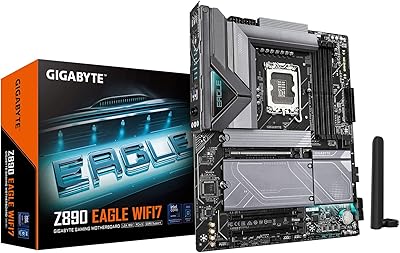
GIGABYTE Z890 Eagle WIFI7 Motherboard
86%
93%
Performance with DDR5 & PCIe 5.0
88%
Ease of Installation (EZ-Latch)
85%
Cooling Efficiency
92%
Networking Speed (WIFI7 & 2.5GbE LAN)
86%
Build Quality
More
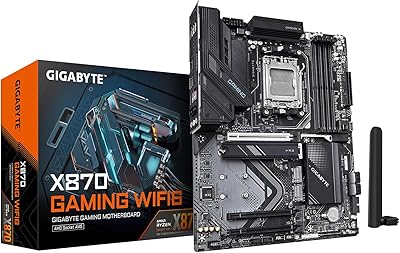
GIGABYTE X870 GAMING WIFI6
86%
95%
CPU Compatibility
92%
Memory Support
90%
PCIe Expansion
88%
M.2 Storage Management
85%
USB Connectivity
More
GIGABYTE B850 Eagle WIFI6E Motherboard
85%
88%
Overall Performance
91%
Ease of Installation
90%
Connectivity (WIFI & LAN)
84%
Thermal Performance
86%
Build Quality
More
GIGABYTE Z890 AORUS Elite WIFI7 Motherboard
89%
92%
Overall Performance
89%
Power Delivery and Stability
91%
Ease of Installation
94%
Connectivity and Ports
88%
Wi-Fi and Networking
More
GIGABYTE X870E AORUS Elite WIFI7
84%
88%
Build Quality & Materials
82%
BIOS Experience
84%
DDR5 Memory Compatibility & Overclocking
91%
Connectivity & I/O
83%
Thermal Management
More
ASUS X870 MAX GAMING WIFI7 W Motherboard
88%
93%
Performance Under Load
95%
Power Delivery and Stability
91%
Cooling Efficiency
88%
Future-Proofing (PCIe 5.0, Wi-Fi 7)
87%
Setup and Installation
More
GIGABYTE B850 AORUS Elite WIFI7 ICE Motherboard
84%
89%
Performance
92%
Ease of Installation
85%
Cooling & Thermals
90%
Network Performance
65%
BIOS & Firmware
More
GIGABYTE B650 Eagle AX
86%
91%
Value for Money
94%
Storage Performance
88%
Thermal Management
87%
Wireless Connectivity
83%
BIOS and Software
More
Gigabyte GeForce RTX 4070 Super Eagle OC 12GB
88%
94%
Gaming Performance
91%
Content Creation Performance
92%
Ray Tracing & Visual Quality
88%
Cooling Efficiency
86%
Noise Levels
More
GIGABYTE GC-WIFI7 WiFi 7 PCIe Expansion Card
88%
92%
Performance
86%
Ease of Setup
89%
Wi-Fi Speed & Stability
88%
Bluetooth Connectivity
85%
Compatibility with Desktop Systems
More

FAQ

Possibly, yes — and this is one of the more common frustrations buyers run into. If the board ships with an older BIOS version, a Ryzen 9000 series CPU may not post at all. You would need access to a supported older Ryzen processor to boot the board and flash the update first. Check the BIOS version on the box against GIGABYTE's compatibility chart before assuming your CPU will work out of the box.

The X870E is the higher-end chipset tier from AMD and typically offers more PCIe lanes, a stronger VRM, and additional connectivity options. The X870 Eagle sits in the mainstream X870 tier — it is more than capable for gaming and productivity builds, but if you plan aggressive manual overclocking or a complex multi-device workstation setup, the X870E headroom becomes more relevant. For most Ryzen 9000 builds, the practical difference is minimal.

Running all four DIMM slots simultaneously can limit your maximum stable frequency compared to using just two sticks. With four populated slots, most users find they need to dial back expectations slightly — targeting 5600 MHz to 6000 MHz is realistic, whereas pushing above 6400 MHz with all four slots occupied often introduces instability. Two-stick configurations give you more headroom for higher-speed kits.

No — the board is fully backward compatible with WiFi 6E, WiFi 6, and older standards. You will not get WiFi 7 speeds without a WiFi 7 router, but the adapter works fine with whatever router you already have. Think of the WiFi 7 support as future-proofing rather than an immediate day-one upgrade.

It handles those workloads well for most creators. Four M.2 slots let you separate your OS drive, project media, scratch disk, and archive storage cleanly. Dual USB4 ports support fast external drive enclosures for offloading footage. The VRM is solid for sustained rendering under normal conditions, though extreme CPU overclocking on top-tier Ryzen chips is not where this board shines.

Instead of the traditional small plastic tab you need to press or pry to release your GPU or M.2 drive, EZ-Latch uses a larger lever mechanism that is much easier to operate with one finger — even inside a tight case. Most builders who have used it say it makes drive swaps noticeably less fiddly, especially when you are working around large GPU coolers.

If your case supports standard ATX motherboards, yes. The board measures 13.2 × 10.6 inches, which is the standard ATX footprint. Virtually all mid-tower and full-tower cases that advertise ATX support will accommodate it without any modification.

Honestly, most experienced builders skip it. GIGABYTE's APP Center utility suite has a mixed track record — users frequently report installation quirks, occasional crashes, and bloat. Fan control and performance tuning are better handled directly through the BIOS, and third-party tools like HWiNFO64 cover monitoring needs more reliably. The software is optional, so there is no functional penalty for ignoring it.

GIGABYTE offers a five-year warranty, which provides solid coverage on paper. In practice, the RMA experience varies depending on your region. Some buyers report smooth and fast replacements, while others have encountered slow response times and inconsistent communication from support. It is worth registering your product immediately after purchase to have your warranty documentation in order if you ever need it.

The X870 Eagle supports Ryzen 7000, 8000, and 9000 series processors on the AM5 socket. If you have an existing Ryzen 7000 CPU, it will work on this board — just verify BIOS compatibility for your specific chip model on GIGABYTE's support page. This also makes the board a practical choice if you plan to upgrade your CPU to a Ryzen 9000 chip down the road without swapping the board.