Overview

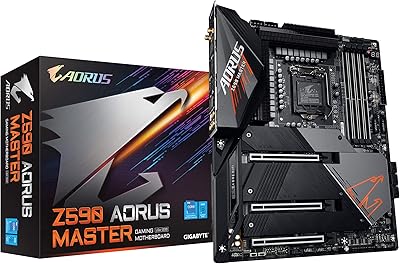
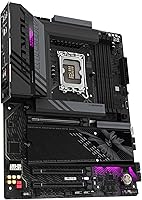
The GIGABYTE Z890 AORUS Elite Motherboard sits in a practical sweet spot within GIGABYTE's AORUS lineup — capable enough for serious builds, but without the flagship price tag that most people don't actually need. Built around Intel's Z890 chipset with an LGA1851 socket, it targets Arrow Lake Core Ultra 200 Series processors specifically. The standard ATX footprint drops into any mid-tower or full-tower case without issue. Launched in late 2024, it comes backed by a 5-year warranty, which is notably generous at this tier. With over 1,700 buyer ratings averaging 4.3 stars, there's real-world confidence behind it — not just spec-sheet promises.
Features & Benefits

The 16+1+2 power stage, rated at 80A per phase with VRM Thermal Armor, is what makes this board genuinely capable with high-TDP Arrow Lake chips under sustained loads. Four M.2 slots with EZ-Latch tool-free installation remove the tedium of tiny screws, and thermal coverage on each slot helps protect NVMe drives during long transfers. The primary slot runs PCIe 5.0, keeping the platform current for next-gen GPUs and the fastest SSDs on the market. What truly sets the AORUS Elite apart at this price tier is landing both WiFi 7 and Thunderbolt 4 together — a combination that usually demands a considerably higher spend.

Best For

This mid-range Intel motherboard makes the most sense for builders moving to Arrow Lake who want a well-rounded feature set without stretching the budget unnecessarily. Content creators handling large files or high-resolution footage will find Thunderbolt 4's bandwidth genuinely useful for fast external storage or display connections. Gamers benefit from WiFi 7 support alongside PCIe 5.0 GPU compatibility without having to compromise on either. The EZ-Latch system is a particular draw for DIY builders who swap components regularly. Home office users with heavier network demands will appreciate the 2.5GbE wired LAN as a dependable backbone alongside the wireless option.

User Feedback

Buyers consistently highlight how straightforward the physical build process is — the EZ-Latch mechanism earns specific praise, and the BIOS is generally described as clean and navigable for a Z890 platform. Where feedback turns more cautious is around DDR5 XMP compatibility: some users report needing a BIOS update before certain memory kits run at their rated speeds, which is common on early-platform boards but worth knowing before you start. On value, most reviewers position the AORUS Elite favorably against MSI and ASUS Z890 alternatives at comparable prices. The 5-year warranty earns genuine appreciation, especially from buyers who treat a build as a long-term investment.

Pros

  • WiFi 7 and Thunderbolt 4 together at this price tier is rare and genuinely useful for modern workflows.
  • The EZ-Latch system on M.2 and PCIe slots makes building and upgrading noticeably less frustrating.
  • A 5-year warranty provides real peace of mind for a platform investment meant to last.
  • PCIe 5.0 on the primary slot keeps the board compatible with current and next-gen GPUs and SSDs.
  • Four M.2 slots with thermal guards give storage-heavy builders plenty of room to expand.
  • The 16+1+2 power stage handles high-TDP Arrow Lake processors without requiring premium cooling solutions.
  • 2.5GbE wired LAN is a meaningful step up over the gigabit ethernet still found on many competing boards.
  • The EZ-Debug Zone with onboard LEDs takes the guesswork out of diagnosing POST failures during a build.
  • Buyer sentiment consistently praises the BIOS layout as clean and approachable for non-expert builders.
  • The AORUS Elite holds up favorably in direct comparisons against MSI and ASUS Z890 alternatives at similar prices.

Cons

  • Some DDR5 memory kits require a BIOS update before running at their advertised XMP speeds — plan for this before your first boot.
  • Out-of-the-box BIOS may not be current, which adds a step for buyers who want to hit the ground running.
  • The GIGABYTE software ecosystem can feel cluttered; most experienced builders prefer to skip it entirely.
  • VRM thermal performance under extreme sustained all-core loads may leave enthusiast overclockers wanting more headroom.
  • No built-in 10GbE option, which is a gap for users with high-throughput NAS setups or professional networking needs.
  • The ATX size limits case compatibility — compact or small form factor builds are simply off the table.
  • Thunderbolt 4 is limited to a single port, which may not be enough for users running multiple high-bandwidth peripherals simultaneously.
  • RGB ecosystem integration can be inconsistent with third-party lighting setups depending on software versions.
  • Some users report that initial memory training with certain DDR5 kits can add time to early boot sequences.

Ratings

The GIGABYTE Z890 AORUS Elite Motherboard has been scored by our AI system after analyzing thousands of verified global buyer reviews, with spam, bot-generated entries, and incentivized feedback actively filtered out before any scoring was applied. The results reflect a genuinely balanced picture — where this board earns its reputation and where real buyers have run into friction. Both the standout strengths and the honest pain points are weighted into every score below.
Value for Money
88%
Buyers consistently position the AORUS Elite as one of the better deals on the Z890 platform, particularly given that WiFi 7 and Thunderbolt 4 are included without a flagship price premium. Competing boards at a similar price point typically sacrifice one or the other, making the feature-to-cost ratio here a recurring talking point in positive reviews.
A small but vocal group of buyers feels the price point is only justified if you actually use the advanced connectivity features — those who needed a basic Arrow Lake board found cheaper Z890 options more appropriate. A few users also noted that DDR5 kit requirements add unexpected cost to the overall build.
Build & Component Quality
84%
The physical construction earns consistent praise — the board feels substantial, the VRM Thermal Armor sits flush and secure, and the M.2 Thermal Guards show no flex during installation. Builders upgrading from older platforms noted a visible improvement in overall board finish and slot reinforcement compared to previous GIGABYTE mid-range generations.
Some users pointed out that the aesthetic, while clean, is understated compared to competing ASUS ROG or MSI MEG boards at similar pricing — RGB enthusiasts may find it underwhelming. A few reviews also flagged minor inconsistencies in the PCIe EZ-Latch mechanism feeling slightly stiff on first use.
Installation & Build Experience
91%
The EZ-Latch system on both M.2 and PCIe slots is one of the most frequently praised aspects across all buyer segments — it removes the small screws that most builders quietly dread. First-time builders in particular called out how approachable the physical assembly felt, and the clearly labeled debug LEDs helped several users resolve minor POST issues without forum diving.
A handful of reviewers mentioned the included accessory kit feels minimal — specifically the absence of additional M.2 screws or a more comprehensive cable set. The WIFI antenna plug, while EZ-Plug in design, occasionally caused confusion for builders who skipped the manual during setup.
BIOS Experience
79%
21%
The BIOS interface on Z890 AORUS boards has matured noticeably, and most buyers described it as navigable without requiring deep technical knowledge. XMP enabling, fan curve adjustments, and boot priority management are all accessible within a few clicks, which is exactly what the target buyer for this board needs.
Out-of-the-box BIOS versions have prompted complaints, with several buyers needing to flash an update before DDR5 kits ran at rated speeds — a step that catches less experienced builders off guard. GIGABYTE's firmware update process, while functional, is not as polished as the one-click systems on some competing boards.
DDR5 Memory Compatibility
73%
27%
Once the BIOS is current, the vast majority of popular DDR5 kits from G.Skill, Corsair, and Kingston run at their XMP-rated speeds without manual intervention. Buyers running 6000 MHz and 6400 MHz kits reported stable operation after initial setup, which is a reasonable outcome for the Z890 platform overall.
The pre-update BIOS creating XMP compatibility friction is a recurring theme — enough to lower confidence among buyers who expected a plug-and-play experience. A smaller subset of users reported needing multiple reboots during memory training cycles before their kits stabilized, which added stress to what should be a straightforward process.
VRM & Thermal Performance
82%
18%
Under typical gaming and productivity loads — including sustained multi-core workloads on mid-tier Core Ultra 7 chips — the VRM runs comfortably and without thermal throttling. The Thermal Armor helps meaningfully in cases with decent airflow, and buyers running moderately overclocked configurations reported no instability across extended sessions.
Users pushing high-TDP Core Ultra 9 chips under all-core stress tests noted that the VRM area runs warm enough to warrant active airflow rather than passive case ventilation. This is not a dealbreaker, but it is a design reality that enthusiast-level overclockers should factor in before committing to this board over a more premium alternative.
Networking Performance
93%
WiFi 7 delivers noticeably lower latency and higher throughput compared to the WiFi 6E boards this replaces in many builds — competitive gamers and streamers running wireless noted the difference immediately when switching from older platforms. The 2.5GbE wired port is genuinely appreciated by home lab users and NAS owners who had previously needed a separate add-in card to exceed gigabit speeds.
WiFi 7 performance is naturally limited by router compatibility, and buyers still on WiFi 6 hardware will not see the full benefit until they upgrade their network equipment. A small number of users reported that the included WiFi antenna, while functional, benefits from being repositioned for optimal signal strength in larger spaces.
Thunderbolt 4 Connectivity
86%
Content creators and prosumers praised the Thunderbolt 4 port as a practical addition that removed the need for a discrete add-in card or a docking-station workaround. Editors connecting high-speed external NVMe enclosures and 4K monitors simultaneously through a single Thunderbolt dock reported clean, stable performance without bandwidth complaints.
Having only one Thunderbolt 4 port limits users who run multiple high-bandwidth Thunderbolt peripherals simultaneously — a second port would have made this a more compelling professional workstation board. A few buyers noted that Thunderbolt device recognition occasionally required a system restart after sleep cycles, which is a firmware-level quirk rather than a hardware failure.
Storage Expansion
89%
Four M.2 slots with individual thermal guards give storage-hungry builders genuine room to grow — video editors and game library collectors praised having multiple high-speed NVMe drives installed simultaneously without thermal compromises. The EZ-Latch tool-free design made swapping or upgrading drives significantly less fiddly compared to traditional screw-secured slots.
Buyers who attempted to populate all four M.2 slots alongside multiple PCIe add-in cards noted the importance of reviewing the manual for bandwidth-sharing configurations, as some slot combinations can limit throughput. The thermal guards, while protective, add a small amount of difficulty when accessing the slots in tight cable-managed builds.
PCIe 5.0 Readiness
83%
Gamers and early adopters appreciated having a native PCIe 5.0 x16 slot that is compatible with the latest discrete GPUs and Gen 5 NVMe drives without any adapter or compromise. For buyers treating this as a multi-year platform, the forward compatibility built into the primary slot makes the investment feel more durable.
PCIe 5.0 benefits are largely theoretical for most buyers today — current GPU and SSD adoption at Gen 5 speeds remains limited, meaning many users are paying for headroom they will not use immediately. This is a platform-level reality rather than a board-specific flaw, but it is worth being clear-eyed about when weighing the feature list.
Software & Utility Ecosystem
61%
39%
GIGABYTE's App Center provides access to fan control, RGB management, and system monitoring tools in one place, which is convenient for builders who prefer a GUI over BIOS-level adjustments. Some buyers found the EasyTune overclocking utility approachable enough for light tuning without manual voltage adjustments.
The bundled software is a consistent point of frustration — multiple users described it as bloated, slow to load, and occasionally unstable after Windows updates. Experienced builders overwhelmingly preferred to skip the GIGABYTE software entirely and use third-party alternatives, which suggests the utility ecosystem is not adding meaningful value for most buyers.
Diagnostics & Troubleshooting
87%
The EZ-Debug LED zone earned specific appreciation from builders who encountered POST failures — being able to immediately identify whether the issue was CPU, DRAM, VGA, or BOOT related saved significant diagnostic time. Several first-time builders credited the debug LEDs with helping them resolve a loose memory stick or improperly seated GPU without needing external help.
The debug system only provides four broad categories, which means intermediate-level issues — such as a specific BIOS setting conflict or a power connector seating problem — still require manual investigation. A small number of users felt a POST code display with numeric readouts would have been a worthwhile addition at this price point.
Warranty & Long-Term Support
92%
The 5-year warranty is a genuine standout for a mid-range motherboard and earned specific appreciation from buyers who treat a PC build as a long-term investment rather than a disposable purchase. Several reviewers explicitly stated that the extended coverage influenced their decision to choose this board over similarly priced ASUS and MSI alternatives offering 3-year terms.
GIGABYTE's regional warranty and RMA processes have received mixed feedback in terms of response speed — some buyers in certain markets reported longer-than-expected turnaround times when submitting claims. The warranty is strong on paper, but buyers in regions with less direct GIGABYTE service infrastructure may experience a less smooth claims process.
Aesthetic & Visual Design
68%
32%
The clean all-black finish with subtle AORUS branding is well-received by builders who prefer a restrained, professional look — particularly those building in cases with tempered glass panels where a cluttered board design would feel out of place. The absence of aggressive factory RGB keeps cable routing visually tidy without forcing buyers to disable lighting they never wanted.
RGB enthusiasts and builders who want a visually striking board will likely find the AORUS Elite underwhelming compared to options from ASUS ROG Strix or MSI MEG at comparable pricing. The subdued styling is a deliberate design choice, but it does mean this board does not photograph impressively in showcase builds, which matters to a meaningful slice of the PC building community.

Suitable for:

The GIGABYTE Z890 AORUS Elite Motherboard is a strong fit for builders who are stepping into the Intel Core Ultra 200 Series platform and want a capable, future-aware foundation without the premium overhead of a flagship board. If you are a content creator working with large video files or high-resolution assets, the onboard Thunderbolt 4 port gives you real bandwidth for fast external drives or connecting a 4K display without an adapter — that is genuinely useful, not just a checkbox feature. Gamers who want PCIe 5.0 GPU support and WiFi 7 in a single purchase will find this board covers both without requiring a more expensive alternative. DIY enthusiasts who regularly swap storage or upgrade components will appreciate the tool-free EZ-Latch system on both M.2 and PCIe slots, which makes the process noticeably less fiddly. Home office users who need a dependable 2.5GbE wired connection for large file transfers, while keeping WiFi 7 as a flexible fallback, will find the networking options here genuinely well-matched to demanding daily use.
Not suitable for:

The GIGABYTE Z890 AORUS Elite Motherboard is not the right choice for anyone still running an older Intel platform — it is strictly LGA1851, meaning previous-generation chips simply will not fit, and there is no upgrade path backward. Overclockers chasing maximum CPU headroom may find that a higher-tier Z890 board with beefier VRM configurations offers more thermal confidence under extreme, sustained all-core loads. Buyers who primarily need a compact build will need to look elsewhere, since this is a full ATX board and will not physically fit in mITX or mATX cases. If you have no need for WiFi 7 or Thunderbolt 4 and are working with a strict budget, there are simpler Z890 options that cut those features in exchange for a lower price — you should not pay for connectivity you will never use. AMD platform builders are obviously excluded here entirely, as this board is purpose-built for Intel's Arrow Lake ecosystem.
Specifications

  • CPU Socket: Uses the LGA1851 socket, compatible exclusively with Intel Core Ultra 200 Series (Arrow Lake) processors.
  • Chipset: Built on the Intel Z890 chipset, which supports PCIe 5.0, DDR5 memory, and full overclocking capabilities.
  • Form Factor: Standard ATX form factor measuring 9.61 x 10.55 inches, fitting most mid-tower and full-tower cases.
  • Memory Support: Four DDR5 DIMM slots supporting XMP profiles, with a base speed of 5600 MHz and capacity up to 256 GB.
  • Power Design: Features a 16+1+2 power stage configuration with 80A Smart Power Stages and VRM Thermal Armor for sustained load stability.
  • Storage Slots: Includes four M.2 slots, each equipped with M.2 Thermal Guard and tool-free EZ-Latch installation.
  • Primary PCIe: The primary x16 slot runs PCIe 5.0, supporting current and next-generation discrete GPUs and high-speed SSDs.
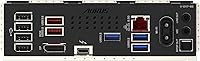
  • Wireless: Integrated WiFi 7 (802.11be) with WIFI EZ-Plug antenna connector for fast, low-latency wireless networking.
  • Wired LAN: Onboard 2.5GbE LAN port provides significantly higher wired throughput than standard gigabit ethernet connections.
  • Thunderbolt 4: A single Thunderbolt 4 port delivers up to 40 Gbps bandwidth for external storage, displays, and docking stations.
  • Front USB: Includes a front panel USB-C header, allowing cases with front USB-C ports to connect without an adapter.
  • Diagnostics: The EZ-Debug Zone features onboard LED indicators for CPU, DRAM, VGA, and BOOT to isolate POST failures quickly.
  • Warranty: Backed by a 5-year manufacturer warranty, which is notably longer than the 3-year standard offered by most competitors.
  • Board Weight: The board weighs 1.53 pounds, consistent with a fully featured ATX motherboard with thermal armor and shielding.
  • Color & Finish: Ships in an all-black finish with no factory RGB elements on the PCB itself, keeping aesthetics clean and case-agnostic.
  • OS Support: Officially supported on Windows 10 and Windows 11; Linux compatibility varies by driver availability for onboard peripherals.
  • Availability Date: First made available in October 2024, placing it squarely in the current Arrow Lake platform generation.

Related Reviews

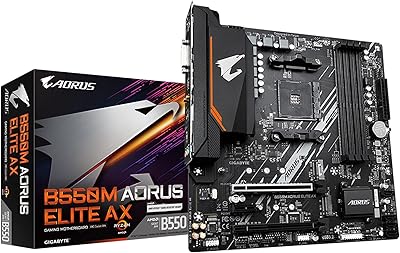
GIGABYTE B550M AORUS Elite AX Motherboard
79%
91%
Value for Money
88%
Wireless Performance
86%
BIOS Experience
84%
Build & Component Quality
83%
Thermal Management
More
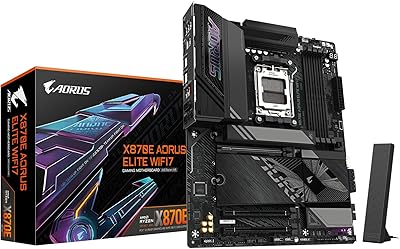
GIGABYTE X870E AORUS Elite WIFI7
84%
88%
Build Quality & Materials
82%
BIOS Experience
84%
DDR5 Memory Compatibility & Overclocking
91%
Connectivity & I/O
83%
Thermal Management
More
Gigabyte B760M Aorus Elite AX DDR5 Motherboard
87%
89%
Overall Performance
92%
Value for Money
85%
Build Quality
91%
Stability and Reliability
90%
Connectivity Options
More
GIGABYTE B850 AORUS Elite WIFI7 ICE Motherboard
83%
83%
Value for Money
88%
Build Quality
86%
Ease of Installation
67%
BIOS Experience
91%
Connectivity & I/O
More
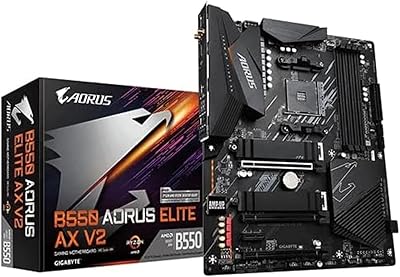
GIGABYTE B550 AORUS ELITE AX V2 Motherboard
87%
88%
Performance
91%
Build Quality
85%
Installation Ease
89%
Wi-Fi & Connectivity
92%
Thermal Management
More
GIGABYTE B650 AORUS Elite AX ICE Motherboard
80%
88%
VRM & Power Delivery
67%
Memory Compatibility
74%
BIOS Experience
93%
Build Aesthetics
86%
Storage Flexibility
More
AMD Ryzen 9 7900X GIGABYTE B650 Bundle
78%
93%
Multi-Core Performance
89%
Single-Core Speed
61%
Thermal Management
87%
Motherboard Build Quality
83%
Value for Money
More
AMD Ryzen 5 7600X B650 AORUS Combo
81%
93%
Gaming Performance
74%
Multi-Threaded Workloads
89%
Motherboard Build Quality
61%
Thermal Performance
88%
BIOS & Setup Experience
More
INLAND AMD Ryzen 7 7800X3D & GIGABYTE X670 Bundle
81%
93%
Gaming Performance
88%
Motherboard Build Quality
91%
Out-of-Box Compatibility
71%
Value for Money
74%
Thermal Management
More
GIGABYTE Z890 Eagle WIFI7 Motherboard
81%
88%
Value for Money
84%
Build Quality
91%
Ease of Installation
83%
BIOS Experience
77%
Power Delivery
More

FAQ

No — the LGA1851 socket is physically and electrically incompatible with older Intel platforms like LGA1700. This board is designed specifically for Intel Core Ultra 200 Series (Arrow Lake) processors, so you will need a current-gen chip to use it.

It depends on when the board was manufactured and shipped. Units produced after a certain firmware revision may already include a current BIOS, but it is worth checking the GIGABYTE support page for your specific board revision before your first build. If your DDR5 kit is not running at its rated XMP speed initially, a BIOS update is usually the fix.

No, this board only supports DDR5 memory. DDR4 modules use a different pin configuration and will not fit the DIMM slots — there is no DDR4 compatibility mode on Z890 boards.

Thunderbolt 4 runs at up to 40 Gbps, which means it can handle a 4K external display, a fast NVMe enclosure, and a USB hub simultaneously through a single cable and dock. For video editors or photographers who move large files regularly, that single port can replace a tangle of cables and adapters.

WiFi 7 hardware is backward compatible with WiFi 6 and WiFi 5 routers, so the board will still connect and work fine with your current setup. You just will not see the full WiFi 7 throughput until you upgrade your router — but having the support built in means you are ready when you do.

The GIGABYTE Z890 AORUS Elite Motherboard provides four M.2 slots, and on the Z890 platform Intel has significantly reduced slot conflicts compared to older chipsets. That said, it is always worth checking the manual for your specific slot configuration, as some combinations with additional PCIe cards can affect available lanes.
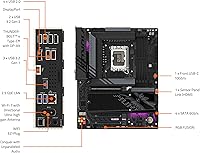
There are four small LEDs near the board labeled CPU, DRAM, VGA, and BOOT. During startup, if the system gets stuck, whichever LED stays lit points to where the problem is — so if the DRAM light stays on, you know the system is not detecting your memory correctly. It is a much faster way to diagnose a failed POST than guessing or decoding beep codes.

The 16+1+2 stage design with 80A per phase and VRM Thermal Armor is genuinely capable for most Core Ultra 9 scenarios, including moderate overclocking. Under extended all-core stress tests with the highest-TDP chips, some users have noted the VRMs run warm — not dangerously so, but ensuring good case airflow is a sensible precaution rather than an afterthought.

GIGABYTE handles warranty claims through their regional support centers, and the process is generally straightforward for hardware defects — you submit a claim, ship the board, and receive a replacement or repaired unit. The 5-year coverage is one of the longer warranties available on any Z890 board at this price level, which is a meaningful long-term reassurance.

The primary PCIe 5.0 x16 slot is intended for a discrete GPU, but Z890 also enables PCIe 5.0 on M.2 storage slots depending on the specific slot position and configuration. Check the manual for which M.2 slot supports Gen 5 speeds — it is typically the primary slot closest to the CPU — so you can install your fastest SSD there for maximum read and write performance.

Where to Buy