Overview

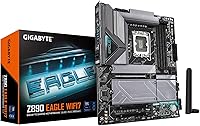
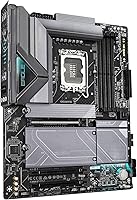
The GIGABYTE Z890 Eagle WIFI7 Motherboard arrived in October 2024 alongside Intel's Arrow Lake platform launch, offering a compelling mid-range option for builders who want modern connectivity without stretching their budget to flagship territory. Built around the LGA1851 socket and Intel Z890 chipset, this Z890 Eagle board defines what you can and cannot upgrade down the road — it supports the full Intel Core Ultra 200 lineup, which matters if you plan to swap CPUs later. It packs WiFi 7 and PCIe 5.0 into a price tier where many boards still offer last-gen networking. The 5-year warranty adds real peace of mind. You are not buying bleeding-edge aesthetics here, but the feature-to-price ratio is genuinely strong.
Features & Benefits

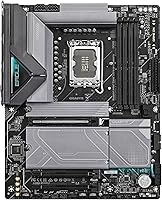
The Eagle WIFI7 packs a 14+1+2 power stage design with 60A DrMOS and VRM Thermal Armor, giving it enough headroom to handle higher-TDP Core Ultra 200 processors under sustained workloads without throttling. On the storage side, four M.2 slots with individual Thermal Guards mean you can populate all of them with Gen5 NVMe drives and not worry about heat-induced slowdowns. Networking covers both bases — 2.5GbE LAN for wired reliability and WiFi 7 for fast wireless, useful if your rig lives in a home office that needs both. USB4 and front-panel USB-C round out the I/O, handling fast external storage without needing an add-in card. The EZ-Latch system makes M.2 and PCIe card installation genuinely painless.

Best For

This GIGABYTE Z890 motherboard hits a sweet spot for first-time Arrow Lake builders who want a complete, capable platform without funding someone else's RGB light show. If you are upgrading from an older Intel board and want WiFi 7 and PCIe 5.0 built in from day one, this is a natural landing spot. It also suits anyone running a hybrid home office and gaming setup — having both 2.5GbE wired and WiFi 7 wireless on the same board removes the need for a separate adapter. Builders who run multiple NVMe drives will appreciate the four M.2 slots. And if you tend to dread tool-free M.2 installation turning into a wrestling match, the EZ-Latch mechanism makes the whole process far less frustrating.

User Feedback

With a 4.6-star average from nearly 400 ratings, the Z890 Eagle board has clearly landed well with most buyers. Easy BIOS navigation and smooth first-boot experiences come up repeatedly in positive reviews, along with comments praising stable VRM temperatures even under heavier Core Ultra 200 workloads. That said, some users have reported initial hiccups getting XMP profiles to post on first boot — not unusual for DDR5 in general, but worth keeping in mind. A handful of reviews flag WiFi antenna placement as awkward depending on case layout, and a few mention wanting more frequent BIOS updates from GIGABYTE. On balance, the negatives tend to be minor setup friction rather than deeper hardware concerns, which is a healthy sign for a board at this tier.

Pros

  • WiFi 7 and 2.5GbE LAN come standard, covering both wired and wireless needs without any add-in cards.
  • Four M.2 slots with individual Thermal Guards give multi-drive builders plenty of NVMe real estate without overspending.
  • The 14+1+2 VRM with 60A DrMOS handles sustained Core Ultra 200 workloads without thermal throttling for the vast majority of users.
  • EZ-Latch on both M.2 and PCIe slots makes installation noticeably faster and less frustrating than traditional screw-based retention systems.
  • PCIe 5.0 support means this Z890 Eagle board is ready for next-gen NVMe SSDs today, with no upgrade needed.
  • The 5-year warranty provides genuine confidence at a price tier where shorter coverage periods are common.
  • USB4 and a front-panel USB-C header handle fast peripherals and external drives without requiring a separate controller card.
  • DDR5 support across four DIMM slots allows up to 256GB of RAM, comfortably covering demanding creative and multitasking workloads.
  • Most buyers report a straightforward first-boot experience and an intuitive BIOS layout, reducing setup friction for first-time platform builders.

Cons

  • Some DDR5 kits struggle to post with XMP enabled on first boot, requiring manual BIOS adjustments before running at rated speeds.
  • VRM headroom, while adequate for typical builds, may fall short for users pushing very high-TDP chips under extreme sustained loads.
  • WiFi antenna placement can be awkward depending on case layout, potentially limiting signal quality in tighter or unusual setups.
  • BIOS update cadence has drawn criticism from users who want faster firmware fixes and more responsive feature rollouts from GIGABYTE.
  • Board aesthetics are plain and utilitarian — builders who want a visually striking centerpiece will need to look at higher-tier options.
  • No Thunderbolt 4 support, which is a meaningful gap for creative professionals relying on high-speed docking stations or fast external storage.
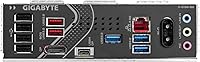
  • Rear I/O USB-A port count can feel limited for users migrating from older builds that relied heavily on legacy connectivity.
  • The companion software outside the BIOS is not as polished or reliable as what some competing brands offer at a comparable price point.

Ratings

Based on AI analysis of verified global buyer reviews for the GIGABYTE Z890 Eagle WIFI7 Motherboard — with spam, bot-generated, and incentivized feedback actively filtered out — the scores below reflect an honest picture of where this board genuinely excels and where real users have run into friction. Both the strongest endorsements and the recurring pain points are transparently captured across 15 distinct rating categories. Whether you are evaluating this as your first Arrow Lake build or weighing it against competing Z890 boards, these scores are designed to help you decide with confidence.
Value for Money
88%
At its price point, this Z890 Eagle board packs in WiFi 7, PCIe 5.0, four M.2 slots, and USB4 — a combination that typically costs significantly more on competing brands. Builders consistently note they got more connectivity per dollar than comparable boards from rivals, making it a strong foundation for a capable Arrow Lake build.
A handful of users upgrading from premium older platforms feel the board trades VRM muscle and premium aesthetics for price, which matters if you are running a top-tier CPU under sustained all-core loads. Those chasing extreme overclocking headroom or a visually premium build may find the price-to-feature balance less compelling.
Build Quality
84%
The board feels solid and well-constructed out of the box, with reinforced PCIe and M.2 slots that hold up to repeated installation cycles. The VRM Thermal Armor and M.2 Thermal Guards are not just decorative — they feel substantial and snug, and builders appreciate that GIGABYTE did not cut visible corners on physical construction.
A small number of users noted that the board's black aesthetic, while clean, is somewhat plain and lacks the refined finish of higher-tier Z890 boards. A few also flagged minor QC inconsistencies in heatsink fitment, though these appear to be isolated cases rather than a widespread manufacturing concern.
Ease of Installation
91%
The EZ-Latch system is the standout here — users repeatedly report that installing M.2 drives and PCIe cards without a screwdriver is not a gimmick but a genuine time-saver. First-time builders especially appreciated the EZ-Debug LED indicators, which made identifying boot problems straightforward rather than a frustrating guessing game.
Some users running larger coolers or tall RAM modules found that the DIMM slot placement created minor clearance friction, requiring a bit of planning around cooler orientation. The WiFi antenna cable routing can also be tricky in compact mid-tower cases where rear I/O access is limited.
BIOS Experience
83%
GIGABYTE's BIOS strikes a practical balance between an accessible Easy Mode for newcomers and a well-stocked Advanced Mode for experienced builders who want to tune memory timings, fan curves, or voltages. Most users report clean first-boot component detection and minimal head-scratching to get a stable system running.
The main recurring complaint is around BIOS update cadence — some users feel GIGABYTE is slower to release updates than competing brands, which can leave known issues unresolved for longer than expected. A few users also reported that the BIOS UI, while functional, feels less visually polished compared to ASUS or MSI alternatives.
Power Delivery
77%
23%
For mainstream Core Ultra 200 builds — gaming rigs, workstations running mixed loads, and everyday multitaskers — the 14+1+2 power stage handles day-to-day demands without issue. Users running mid-range to high-end Core Ultra 7 chips under typical gaming and productivity workloads report clean, stable voltages with no thermal throttling.
Users pushing Core Ultra 9 processors at full all-core load for extended periods — think long Blender renders, heavy video encoding, or overclocking stress tests — have flagged VRM temperatures climbing higher than on premium Z890 boards. The 60A DrMOS components are capable but not class-leading, and enthusiasts demanding maximum sustained headroom should look one tier higher.
Connectivity & I/O
86%
USB4 on the rear I/O and a front-panel USB-C header cover fast peripheral needs — users docking high-speed external SSDs or connecting modern monitors appreciate not needing an add-in card. The dual-networking setup with 2.5GbE LAN and WiFi 7 coexisting on the same board is consistently called out as a practical standout feature.
The total USB-A port count on the rear I/O falls short of what some users coming from older platforms with six or more USB-A ports are accustomed to. A few reviewers also pointed out the absence of Thunderbolt 4, which is a real limitation for creative professionals who rely on TB4 docks or ultra-fast external storage.
WiFi 7 Performance
79%
21%
Users with a WiFi 7 router report noticeably faster wireless throughput and lower latency compared to their previous WiFi 6E setups — gamers in particular appreciate the reduced ping variability during online sessions. The antenna connection via EZ-Plug is clean and tool-free, which several builders flagged as a welcome small convenience.
A recurring complaint involves antenna placement — the rear I/O mount works fine in open builds, but in dense or compact mid-tower setups, the antenna can end up positioned behind cables or case panels, noticeably degrading wireless signal strength. A small number of users also reported needing driver reinstalls after BIOS updates to restore stable WiFi connectivity.
Memory Compatibility
72%
28%
When DDR5 kits are properly configured with XMP enabled in the BIOS, the Eagle WIFI7 runs them stably at rated speeds — users with popular Corsair, G.Skill, and Kingston DDR5 kits generally report clean performance once initial setup is complete. Support for up to 256GB across four slots is a meaningful advantage for heavy multitasking and content creation workloads.
First-boot XMP failures are the most common complaint here — a notable share of users found their DDR5 kit defaulted to base JEDEC speeds until XMP was manually enabled, and a few experienced multiple failed POST attempts before stabilizing. Compatibility with some higher-frequency or lesser-known DDR5 kits has occasionally required BIOS updates to fully resolve.
Thermal Management
81%
19%
The M.2 Thermal Guards do a solid job keeping NVMe drives from throttling under sustained read and write workloads — users running multiple Gen4 and Gen5 SSDs simultaneously rarely report heat-related slowdowns during everyday use. The VRM Thermal Armor adds passive cooling over the power stages that helps maintain stable operation during moderate-to-heavy CPU tasks.
Users running all four M.2 slots simultaneously with high-performance Gen5 drives have noted that system airflow plays a bigger role in thermal outcomes than the guards alone can compensate for. The VRM cooling, while adequate for most builds, becomes less effective in poorly ventilated cases or when ambient temperatures push above typical room conditions.
Storage Flexibility
89%
Four M.2 slots is genuinely rare at this price point, and users building video editing rigs or multi-tiered storage setups frequently cite it as the deciding factor. PCIe 5.0 M.2 support means the board is ready for Gen5 SSDs without any hardware changes, giving the platform a solid runway for future storage upgrades.
Populating all four M.2 slots may result in some PCIe bandwidth sharing depending on configuration — a detail that requires a careful read of the manual before finalizing a build. Users who populate all slots with Gen5 drives should also ensure their case has adequate airflow, as concentrated SSD heat in a confined area can challenge even the individual Thermal Guards.
Software & Drivers
63%
37%
Core drivers install cleanly on Windows 10 and Windows 11, and most users get fully functional audio, LAN, and USB without hunting down individual packages. GIGABYTE's App Center provides a centralized hub for monitoring and fan control that meets the basic needs of most builders without requiring third-party tools.
GIGABYTE's companion software outside the BIOS draws consistent criticism for feeling bloated, dated, and occasionally unstable — several users recommend skipping the bundled software suite entirely in favor of third-party alternatives for fan control and monitoring. WiFi driver updates have also caused connectivity hiccups for some users following BIOS version changes, requiring manual reinstallation to restore normal function.
Aesthetics & Design
67%
33%
For builders who prefer a clean, understated look rather than flashy RGB strips and aggressive styling, the board's all-black layout with heatsink accents actually works well. Several users noted it does not look cheap despite its accessible pricing, and it pairs comfortably with dark cases and discrete component choices.
Buyers expecting the level of visual polish found on AORUS, ROG, or Apex boards will be disappointed — the Eagle WIFI7 is clearly designed for function over form. Onboard RGB is minimal, and there is no armor shroud or premium lighting diffuser to give the board a flagship presence inside a windowed case.
Warranty & Support
87%
A 5-year warranty from GIGABYTE on a board at this price tier is genuinely uncommon and gives long-term builders meaningful peace of mind — especially those who plan to keep a platform for several years before their next major upgrade. Users who have gone through warranty claims generally report a straightforward process with GIGABYTE's support channels.
Response times from GIGABYTE's customer support have drawn mixed feedback — while the warranty coverage itself is solid, some users report slow turnaround times or difficulty reaching knowledgeable staff for complex technical issues. Online resources and documentation, while available, can feel sparse for niche troubleshooting scenarios outside common build problems.
Gaming Readiness
82%
18%
The combination of PCIe 5.0 for GPU bandwidth, WiFi 7 for low-latency wireless, 2.5GbE for wired gaming, and DDR5 support makes this Z890 Eagle board a competitive platform for modern gaming builds. Users running current-gen GPUs at 1440p and 4K report no CPU bottleneck or platform-side performance issues in gaming-focused workloads.
Hardcore competitive gamers looking to maximize frame rates through aggressive overclocking may find the VRM a ceiling before the CPU reaches its full potential. There is also no built-in Thunderbolt for high-refresh-rate external display setups over a single cable, which matters to a niche segment of gaming monitor users.
Future-Proofing
85%
WiFi 7, PCIe 5.0, USB4, and DDR5 position the Eagle WIFI7 well for the next several years — all of these standards are still early in mainstream adoption, meaning the platform should stay relevant through multiple peripheral generations. The LGA1851 socket supports the full Intel Core Ultra 200 lineup, leaving room for a CPU upgrade without swapping the board.
The LGA1851 platform is tied exclusively to the current Arrow Lake generation — Intel's historical pattern of short socket lifespans means there is no guarantee of support for future CPU architectures beyond the current lineup. Users who prioritize the longest possible upgrade path may find this a notable limitation compared to AMD's historically longer socket retention.

Suitable for:

The GIGABYTE Z890 Eagle WIFI7 Motherboard is the kind of board that makes the most sense for builders who want to enter the Intel Core Ultra 200 platform without overspending on features they will never use. If you are coming from an older Intel platform and your current setup lacks WiFi 7 and PCIe 5.0 support, this board slots in as a practical and future-ready upgrade that covers those bases from day one. It is equally well-suited to hybrid workers and gamers who need both a reliable 2.5GbE wired connection and a fast wireless fallback — having both on the same board is a genuine convenience that removes the need for additional adapters. DIY builders who dread M.2 installation headaches will appreciate the EZ-Latch mechanism, which eliminates the screwdriver entirely for both M.2 and PCIe slots. Anyone planning a multi-NVMe-drive setup will find four M.2 slots more than sufficient without needing to step into workstation-class board territory.
Not suitable for:

If you are chasing the absolute best overclocking performance from your Core Ultra 200 chip, the GIGABYTE Z890 Eagle WIFI7 Motherboard is probably not the board you want. The power delivery is solid for the majority of workloads, but it does not match the heavier VRM configurations found on pricier Z890 options, which matters if you plan to push a very high-TDP chip hard under extended, sustained loads. Builders who prioritize premium aesthetics or an elaborate RGB lighting setup will also find this board underwhelming — it is workmanlike in appearance rather than visually striking. If your workflow demands Thunderbolt 4 connectivity or a denser array of rear USB-A ports for legacy devices, the I/O selection may feel limiting compared to higher-tier alternatives. Finally, if you expect aggressive DDR5 XMP profiles to post without any manual intervention on the first boot, be prepared for the possibility that some memory kits will need a BIOS adjustment to run at rated speeds.
Specifications

  • CPU Socket: Uses the LGA1851 socket, which is exclusively compatible with Intel Core Ultra 200 series (Arrow Lake) processors and no prior Intel CPU generations.
  • Chipset: Runs on the Intel Z890 chipset, providing full CPU overclocking support, memory XMP tuning, and complete PCIe 5.0 lane distribution.
  • Form Factor: ATX form factor, designed to fit standard mid-tower and full-tower PC cases with full-size motherboard support.
  • Dimensions: Physical board dimensions measure 13.2 × 10.6 × 3.1 inches.
  • Board Weight: The motherboard weighs 4.33 pounds.
  • Memory Type: Supports DDR5 memory exclusively across 4 DIMM slots, with XMP memory profile compatibility for running kits above the base rated speed.
  • Max Memory: Maximum supported RAM capacity is 256GB DDR5 across all four populated DIMM slots.
  • Memory Speed: Base DDR5 memory speed is 5600MHz, with XMP profiles enabling higher frequencies depending on the specific kit installed.
  • Power Delivery: Features a 14+1+2 power stage design using 60A DrMOS components, providing stable voltage regulation for Core Ultra 200 processors under sustained workloads.
  • PCIe Support: Includes a primary PCIe 5.0 x16 slot for discrete graphics cards and PCIe 5.0-capable M.2 storage, enabling compatibility with Gen5 NVMe SSDs.
  • M.2 Slots: Provides four M.2 slots, each equipped with an individual Thermal Guard heatspreader to manage SSD temperatures during intensive read and write operations.
  • Wireless: Integrated WiFi 7 (802.11be) wireless module with a tool-free WIFI EZ-Plug antenna connector included in the box.
  • Wired LAN: Onboard 2.5GbE LAN port delivers high-speed wired networking without requiring a separate network expansion card.
  • USB Ports: Rear I/O includes a USB4 port supporting up to 40Gbps device connectivity, with an additional front-panel USB-C header available via the Sensor Panel Link connector.
  • VRM Thermals: VRM Thermal Armor covers the power delivery components to passively dissipate heat away from the MOSFETs during CPU-intensive sustained loads.
  • Assembly System: M.2 EZ-Latch, PCIe EZ-Latch, and WIFI EZ-Plug connectors allow tool-free installation and removal of NVMe drives, expansion cards, and the wireless antenna.
  • Debug Tools: An onboard EZ-Debug Zone provides LED diagnostic indicators for CPU, DRAM, VGA, and boot device status during POST, simplifying troubleshooting without an external speaker or display.
  • Warranty: Backed by a 5-year limited manufacturer warranty from GIGABYTE.

Related Reviews

GIGABYTE X870 Eagle WIFI7
82%
88%
Value for Money
91%
Installation & Setup
89%
Networking Performance
74%
VRM & Power Delivery
92%
Connectivity & Ports
More
GIGABYTE Z890 AORUS Elite Motherboard
83%
88%
Value for Money
84%
Build & Component Quality
91%
Installation & Build Experience
79%
BIOS Experience
73%
DDR5 Memory Compatibility
More
GIGABYTE B850 Eagle WIFI6E AM5 Motherboard
78%
88%
Value for Money
84%
Build Quality
91%
BIOS & Setup Experience
82%
Connectivity & I/O
83%
WiFi 6E Performance
More
GIGABYTE X870E AORUS Elite WIFI7
84%
88%
Build Quality & Materials
82%
BIOS Experience
84%
DDR5 Memory Compatibility & Overclocking
91%
Connectivity & I/O
83%
Thermal Management
More
GIGABYTE B850 AORUS Elite WIFI7 ICE Motherboard
83%
83%
Value for Money
88%
Build Quality
86%
Ease of Installation
67%
BIOS Experience
91%
Connectivity & I/O
More
GIGABYTE B650 Eagle AX
86%
91%
Value for Money
94%
Storage Performance
88%
Thermal Management
87%
Wireless Connectivity
83%
BIOS and Software
More
GIGABYTE B550M Motherboard
87%
89%
Performance
91%
Ease of Installation
85%
Build Quality
92%
Storage Performance (PCIe 4.0 & M.2 Slots)
87%
Compatibility with Ryzen Processors
More
GIGABYTE B850M DS3H mATX Motherboard
77%
88%
Value for Money
79%
Build Quality
91%
Ease of Installation
67%
BIOS Experience
83%
CPU Compatibility
More
GIGABYTE Z390 UD ATX Intel Motherboard
72%
92%
PCIe Expansion
88%
Value for Money
86%
Long-term Reliability
83%
Build Quality
74%
VRM & Power Delivery
More
Gigabyte B450M DS3H Micro-ATX Motherboard
70%
88%
Value for Money
91%
Ease of Installation
87%
BIOS Experience
52%
VRM & Power Delivery
84%
Stability & Reliability
More

FAQ

Unfortunately, no. The GIGABYTE Z890 Eagle WIFI7 Motherboard supports DDR5 exclusively — there are no DDR4 slots on this board at all. If you are upgrading from an older DDR4 platform, you will need to factor in the cost of a new DDR5 kit alongside this board.

No. This board uses the LGA1851 socket, which is only compatible with Intel Core Ultra 200 series (Arrow Lake) processors. Older LGA1700 chips from previous Intel generations will not physically fit in this socket and cannot be made to work with an adapter.

Not at all. WiFi 7 is built directly into the board, and a dual-antenna set is included in the box, connecting via the tool-free EZ-Plug system on the rear I/O. You just attach the antennas, install your drivers, and you are ready to connect wirelessly.

It fits the vast majority of mid-tower and full-tower cases, but worth noting: the board measures 13.2 × 10.6 inches, which is slightly larger than the strict minimum ATX specification. Before ordering, it is worth checking your specific case's listed maximum motherboard dimensions, particularly if you have a compact mid-tower.

Yes, there are four M.2 slots, each with its own Thermal Guard heatspreader, and you can populate all four simultaneously. That said, using all four slots may involve some PCIe lane sharing in certain configurations, so it is worth reviewing the motherboard manual's slot priority chart before committing to a specific drive layout.

It depends on the specific kit. Many DDR5 modules will boot at their base 5600MHz speed without any intervention, but to reach their advertised XMP frequency, you typically need to manually enable the XMP profile in the BIOS. Some kits have also needed a retry or two to post cleanly at XMP speeds, which is a common DDR5 platform behavior, not unique to this board. Once XMP is enabled and stable, it tends to stay that way.

It is fairly restrained on the RGB side. There is some onboard lighting, but this Z890 Eagle board is not built around aesthetics the way a higher-tier AORUS or ROG board would be. If a visually striking light-up build is a priority for you, you will likely want to look at a more premium option or rely on your case fans and GPU for the visual impact.

For most real-world workloads including gaming, general productivity, and moderate content creation, the 14+1+2 VRM with 60A DrMOS components handles Core Ultra 9 chips just fine. Where you might push the limits is under extended all-core stress testing or very long rendering sessions — in those scenarios, a higher-end Z890 board with a heavier VRM configuration would offer more headroom. For the majority of users, it will not be an issue.

Most first-time builders find it approachable. GIGABYTE's BIOS includes an Easy Mode with a simplified layout for basic setup and an Advanced Mode when you want to dig into memory tuning or fan curves. The onboard EZ-Debug LED indicators light up to tell you exactly where a boot problem lies — CPU, RAM, GPU, or storage — which makes troubleshooting far less stressful than a blank screen with no feedback.

The Eagle WIFI7 is backed by a 5-year limited manufacturer warranty from GIGABYTE, which is a genuinely strong coverage period for a board at this price point. If a defect appears within that window, you can contact GIGABYTE support to start a warranty claim. Just hold onto your purchase receipt, since you will need it to verify the purchase date.