Overview

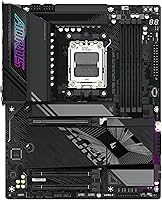
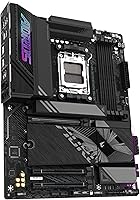
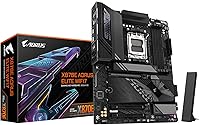
The GIGABYTE X870E AORUS Elite WIFI7 sits firmly in the enthusiast tier of AMD motherboards — not a budget option by any stretch, but a board that earns its price through sheer feature density and platform longevity. Built around the AM5 socket, it supports Ryzen 7000, 8000, and 9000 series processors, meaning buyers aren't locked into a short-lived platform. The ATX form factor and matte black finish feel deliberate rather than decorative, keeping the focus on substance over flash. Perhaps the most underrated selling point is the 5-year warranty, a rare commitment in this category that signals real confidence in the build quality.
Features & Benefits

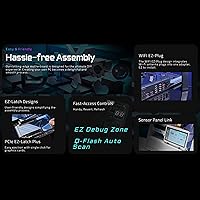
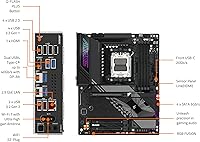
This X870E board covers the connectivity bases that premium builders actually care about. PCIe 5.0 runs to both the primary GPU slot and M.2 slots, so a high-end NVMe drive won't bottleneck against older interface limits. Four M.2 slots, each with thermal guards, make multi-drive workstation setups practical rather than theoretical. The dual USB4 ports — one rear, one front panel — handle everything from high-speed external drives to compatible peripherals. Pairing WIFI7 with 2.5GbE LAN means wired users aren't penalized and wireless users get genuinely low-latency connectivity. The EZ-Latch mechanism for tool-free M.2 and GPU release is one of those small details that genuinely saves frustration during a build.

Best For

The AORUS Elite WIFI7 makes the most sense for builders who are either already on the Ryzen 9000 platform or planning to move there soon. Content creators and workstation users running multiple NVMe drives for project files, renders, or OS separation will genuinely use all four M.2 slots. Gamers and streamers who want WIFI7 for low-latency wireless without giving up wired backup will find the dual network setup practical. DDR5 overclockers benefit from AMD EXPO profile support that makes hitting higher memory speeds relatively straightforward. If you're building a system intended to last several years, the AM5 platform longevity and five-year warranty make the investment considerably easier to justify.

User Feedback

Across buyer reviews, this GIGABYTE flagship earns consistent praise for its out-of-box BIOS experience — most users report it boots and detects hardware cleanly without needing to hunt for updates before getting started. Build quality and EZ-Latch convenience draw repeated positive comments, particularly from builders who have dealt with fiddly retention screws on older boards. The criticism that does appear tends to be specific rather than systemic: first-time GIGABYTE users sometimes find the BIOS layout unfamiliar compared to ASUS or MSI interfaces, and a handful mention a learning curve getting EXPO profiles stable on certain memory kits. Overall, the rating distribution skews strongly positive, with most negative feedback reflecting setup preferences rather than hardware defects.

Pros

  • Five-year warranty provides rare long-term peace of mind in a component category that rarely offers it.
  • All four M.2 slots include thermal guards, keeping NVMe drive temperatures stable under sustained multi-drive workloads.
  • Dual USB4 ports — front and rear — handle high-speed peripherals and external drives without requiring adapters.
  • WIFI7 delivers noticeably lower latency in congested multi-device households compared to older wireless standards.
  • AMD EXPO profile support is reliable across most mainstream DDR5 kits, making memory setup quick and stable.
  • EZ-Latch tool-free M.2 and GPU release is a small feature that genuinely reduces frustration during builds and upgrades.
  • The AORUS Elite WIFI7 covers Ryzen 7000, 8000, and 9000 series processors, protecting your investment across CPU generations.
  • PCIe 5.0 routing to both GPU and primary M.2 slot keeps the platform relevant as next-gen components become affordable.
  • Out-of-box BIOS performance is solid — most users report clean first boots without needing immediate manual intervention.
  • The 16+2+2 power phase design handles high-TDP Ryzen 9 chips at PBO settings without thermal throttling concerns.

Cons

  • Buyers switching from ASUS or MSI boards face a genuine BIOS learning curve that can slow initial setup.
  • Some DDR5 kits require multiple BIOS updates before EXPO profiles run fully stable, which is not always clearly documented.
  • The GIGABYTE software suite feels less polished and less actively maintained compared to rivals like ASUS Armoury Crate.
  • WIFI7 benefits are only accessible if you also own a WIFI7 router, adding a separate cost many buyers overlook.
  • VRM temperatures climb faster than expected in cases with poor airflow during combined overclocking and full M.2 load.
  • No 10GbE LAN option exists, which competing boards at a similar price occasionally offer for network-heavy workstation use.
  • Warranty terms and service center availability vary significantly by region, reducing the practical value for some international buyers.
  • The dense ATX layout can create CPU cooler clearance issues near the top M.2 slot with large aftermarket coolers.
  • Background utility processes from GIGABYTE APP Center have caused minor system instability for a small but consistent group of users.

Ratings

The GIGABYTE X870E AORUS Elite WIFI7 earns a strong overall standing among enthusiast AM5 motherboards, based on AI-driven analysis of verified global buyer reviews with spam, bot, and incentivized feedback actively filtered out. Scores reflect the real distribution of user sentiment — not just the highlights — so both the genuine strengths and the friction points are represented honestly across every category below.
Build Quality & Materials
88%
Buyers consistently describe the board as feeling solid and well-finished out of the box, with reinforced PCIe slots and sturdy M.2 retention that holds up across multiple drive swaps. The matte black PCB and heatsink coverage give it a purposeful, workstation-like feel rather than the RGB-heavy aesthetic some competitors lean on.
A small number of users noted that the plastic shrouding around the I/O area feels slightly less premium than the rest of the board. At this price point, some builders expected metal-reinforced headers throughout, not just on the primary slots.
BIOS Experience
82%
18%
Most buyers — even those building for the first time on an AMD platform — report that the BIOS is well-organized and boots into a working state without manual intervention. EXPO memory profiles load cleanly, and fan curve controls are accessible without digging through nested menus.
First-time GIGABYTE users switching from ASUS or MSI boards mention a noticeable adjustment period, as menu labeling and layout differ enough to cause initial confusion. A handful of reviewers also reported needing a BIOS update before certain Ryzen 9000 CPUs were recognized, which requires having a compatible CPU on hand first.
DDR5 Memory Compatibility & Overclocking
84%
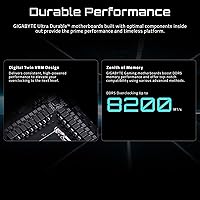
AMD EXPO profile support is reliable across most major DDR5 kits, and users running memory at 6000 MHz and above report stable daily operation without manual voltage tweaking. For enthusiasts who want to push speeds further, the 16+2+2 power phase design provides enough overhead to experiment without hitting instability walls early.
A subset of users with less common or newer DDR5 kits reported needing multiple BIOS revisions before achieving stable EXPO operation. High-speed overclocking above 6400 MHz remains finicky and is not a guaranteed experience on this board without significant manual tuning.
Connectivity & I/O
91%
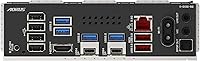
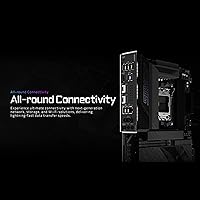
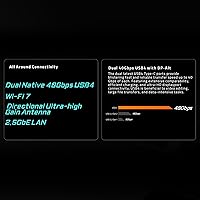
The dual USB4 implementation — covering both the rear panel and the front header — is one of the standout practical advantages here, especially for creators who regularly transfer large files to external NVMe enclosures. Having 2.5GbE LAN alongside WIFI7 means neither wired nor wireless users are making a compromise.
The rear I/O is dense, and a few users with larger hands or tightly spaced cases found plugging in multiple USB-A and USB-C cables simultaneously somewhat awkward. There is no 10GbE LAN option, which competing boards at a similar price tier occasionally offer for network-intensive workstation use.
Thermal Management
83%
VRM heatsink coverage is substantial and performs well under sustained Ryzen 9000 workloads, with most users reporting no thermal throttling during extended rendering or gaming sessions. The M.2 thermal guards keep drive temperatures in check even when all four slots are populated with high-speed NVMe drives running simultaneously.
Under extreme overclocking combined with full M.2 utilization, a few users noted that VRM temperatures climbed higher than expected in cases with limited airflow. Those building in compact or poorly ventilated enclosures should plan active case airflow intentionally rather than relying solely on passive heatsink coverage.
PCIe 5.0 Readiness
86%
Having PCIe 5.0 routed to both the GPU slot and primary M.2 slot future-proofs the platform meaningfully, particularly as PCIe 5.0 NVMe drives become more affordable and mainstream. Builders investing in a high-end system today won't find this board becoming a bottleneck within the next hardware generation.
PCIe 5.0 is not yet fully exploited by most current-generation GPUs, so buyers expecting an immediate real-world performance difference over PCIe 4.0 boards today may be disappointed. The benefit is largely forward-looking rather than something that pays off immediately at the time of purchase.
EZ-Latch & Installation Experience
89%
The tool-free M.2 and GPU release mechanism is genuinely useful and stands out clearly during a build, especially for anyone who has snapped a small M.2 retention screw into a case before. Users building and reconfiguring systems regularly — content creators swapping drives, for example — appreciate this feature disproportionately more than one-time builders.
A small number of users reported that the EZ-Latch GPU retention clip requires a firm press to engage fully, and did not always feel intuitively locked without double-checking. This is a minor ergonomic note rather than a reliability concern, but it is worth being aware of during first installation.
WIFI7 Performance
87%
Buyers in WIFI7-capable environments report noticeably lower latency and more consistent throughput compared to their previous WIFI6E boards, particularly in multi-device households where network congestion is a daily reality. Gamers and streamers specifically called out the improvement in connection stability during peak usage hours.
The full benefits of WIFI7 are only accessible to users who also have a WIFI7 router, which remains a meaningful additional cost that many buyers have not yet made. In WIFI6 or WIFI6E environments, the onboard wireless performs well but offers no real advantage over comparable boards with older wireless standards.
Value for Money
74%
26%
For builders who will actively use the quad M.2 slots, USB4, and WIFI7 together, the feature density at this price point is genuinely competitive against boards like the ASUS ProArt X870E-Creator or MSI MEG X870E ACE that charge noticeably more for similar capability. The 5-year warranty also spreads the effective cost-per-year of ownership considerably.
Buyers who only need one or two M.2 slots and basic wireless connectivity are clearly overpaying relative to capable X870 (non-E) boards that cost less. The X870E chipset tax is real, and unless the additional PCIe lanes and USB4 bandwidth are actively needed, the value equation is harder to justify.
Software & Utility Suite
69%
31%
GIGABYTE's APP Center provides fan control, RGB management, and system monitoring in one place, which is adequate for most users who want a basic interface without installing third-party tools. The EasyTune overlay for quick performance adjustments is straightforward enough for casual overclockers.
Compared to ASUS Armoury Crate or MSI Center, the GIGABYTE software ecosystem feels less polished and less regularly updated, and several users reported minor stability issues with background utility processes. Those who care deeply about a refined software experience may find this the weakest link in an otherwise strong package.
Power Delivery & Overclocking Headroom
85%
The 16+2+2 phase power design handles high-TDP Ryzen 9 processors at stock and moderately overclocked settings without any reported instability among the majority of reviewers. Builders running the Ryzen 9 9950X at PBO (Precision Boost Overdrive) with aggressive limits report clean sustained operation.
Extreme manual overclocking beyond PBO — particularly at high core counts — pushes the VRM harder than some competing X870E boards with beefier phase counts. For the vast majority of builders this is irrelevant, but dedicated overclockers chasing competitive benchmark numbers may want a more overkill power stage.
Form Factor & Layout
81%
19%
The standard ATX footprint ensures broad case compatibility, and the component layout is sensibly arranged with the 24-pin power connector in a conventional position and M.2 slots distributed in a way that avoids blocking DRAM slots during installation. Cable routing space near the GPU slot is better than average.
The board is on the denser side of ATX layouts, and users with large aftermarket CPU coolers occasionally reported clearance concerns around the top M.2 slot near the CPU socket area. Checking cooler clearance specifications beforehand is more important here than on boards with more conservative component placement.
Out-of-Box Performance
88%
Multiple reviewers noted that paired with a Ryzen 9000 series CPU, the board posted expected benchmark numbers right out of the box without requiring manual optimization. Memory trained quickly on first boot with EXPO enabled, which is not always guaranteed on high-end DDR5 platforms.
A small fraction of buyers reported an extra boot cycle or two on initial startup while the system trained memory and calibrated EXPO, which can feel alarming to less experienced builders. This is normal behavior for X870E boards generally, but clearer documentation in the box would reduce unnecessary concern.
Warranty & Long-Term Support
92%
A five-year warranty is exceptional in the motherboard market where two or three years is the standard, and it provides genuine confidence for buyers building a long-term workstation or gaming rig they intend to keep running for years. GIGABYTE's warranty claim process is generally reported as responsive by users who have had to use it.
Some users noted that warranty coverage varies by region, and the process for international buyers can involve shipping costs or regional service center delays that reduce the practical value of the extended term. Reading the fine print for your specific region before purchase is advisable.

Suitable for:

The GIGABYTE X870E AORUS Elite WIFI7 is built for builders who are serious about the AMD AM5 platform and want a board that won't become a limiting factor as components improve over the next few years. Content creators and video editors running multiple NVMe drives simultaneously will genuinely use all four M.2 slots, and the PCIe 5.0 lanes mean those drives won't hit interface ceilings anytime soon. Gamers and streamers who want reliable wireless without dropping their wired connection will find the WIFI7 and 2.5GbE LAN combination practically useful rather than just a spec sheet checkbox. DDR5 enthusiasts who want to push memory speeds via AMD EXPO profiles will appreciate the stable power delivery and broad kit compatibility. Anyone pairing this board with a Ryzen 9000 series processor and planning to keep the system running for four or five years will find the five-year warranty and solid platform longevity work strongly in their favor.
Not suitable for:

The GIGABYTE X870E AORUS Elite WIFI7 is a harder sell for buyers whose actual workloads don't demand the features driving the price. If you only need one or two M.2 slots, a single USB-C port, and standard WIFI6E wireless, a capable X870 non-E board at a meaningfully lower cost will serve you just as well day to day. Budget-focused builders who are prioritizing CPU or GPU spend should look elsewhere — putting a large share of a build budget into a motherboard makes sense only when the connectivity features are being actively used. First-time PC builders who are unfamiliar with GIGABYTE's BIOS environment may also find the initial setup more intimidating than expected, particularly if a BIOS update is needed before their CPU is recognized. Anyone building a compact Mini-ITX or Micro-ATX system is immediately excluded by the ATX form factor, regardless of interest in the feature set.
Specifications

  • CPU Socket: Uses the AMD AM5 socket (LGA 1718), supporting Ryzen 7000, 8000, and 9000 series processors.
  • Chipset: Built on the AMD X870E chipset, the top-tier AMD consumer chipset offering maximum PCIe lane allocation and USB4 support.
  • Form Factor: Standard ATX form factor measuring 13.4 × 10.8 × 3.3 inches, compatible with all full-size ATX and most E-ATX cases.
  • Memory Slots: Four DDR5 DIMM slots supporting dual-channel memory with AMD EXPO profiles and speeds up to 5600 MHz at JEDEC standard.
  • M.2 Storage: Four M.2 slots with individual thermal guards, all supporting NVMe PCIe drives, with the primary slot running PCIe 5.0.
  • PCIe Slots: Primary x16 GPU slot runs at PCIe 5.0 speeds, with additional slots operating at PCIe 4.0 for expansion cards.
  • USB Ports: Includes dual USB4 ports (40Gbps each) — one on the rear I/O panel and one via a front panel header — plus multiple USB-A and USB-C ports across the rear.
  • Wireless: Integrated WIFI7 (802.11be) with Bluetooth 5.4, supporting tri-band operation and multi-link for lower latency in congested environments.
  • Wired Networking: Single 2.5 Gigabit Ethernet port (2.5GbE LAN) providing faster-than-standard wired throughput without requiring a dedicated NIC.
  • Power Design: 16+2+2 phase digital VRM design providing stable power delivery for high-TDP Ryzen processors under sustained workloads and overclocking.
  • Display Output: Rear I/O includes a video output for use with AMD Ryzen processors that include integrated graphics (Ryzen 8000G series and select models).
  • EZ-Latch: Tool-free EZ-Latch mechanism on both the primary PCIe x16 slot and M.2 slots allows GPU and NVMe drive removal without a screwdriver.
  • Sensor Panel: Includes a dedicated Sensor Panel Link connector for attaching a compatible GIGABYTE LCD system monitoring display accessory.
  • Board Weight: The board weighs 3.94 pounds, consistent with a fully-featured ATX motherboard with extensive heatsink and VRM coverage.
  • Color & Finish: Matte black PCB and heatsink finish throughout, with no pre-installed RGB elements cluttering the aesthetic for understated builds.
  • Warranty: Backed by a 5-year manufacturer warranty from GIGABYTE, which is among the longest coverage periods available on consumer motherboards.
  • Compatible OS: Officially supported on Windows 11; Linux compatibility is functional but not officially documented by GIGABYTE for this model.
  • Release Date: First made available on September 30, 2024, positioning it as a current-generation board designed around the Ryzen 9000 platform launch.

Related Reviews
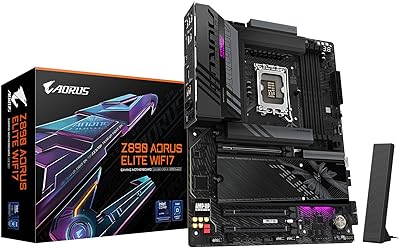
GIGABYTE Z890 AORUS Elite WIFI7 Motherboard
89%
92%
Overall Performance
89%
Power Delivery and Stability
91%
Ease of Installation
94%
Connectivity and Ports
88%
Wi-Fi and Networking
More
GIGABYTE B850 AORUS Elite WIFI7 ICE Motherboard
84%
89%
Performance
92%
Ease of Installation
85%
Cooling & Thermals
90%
Network Performance
65%
BIOS & Firmware
More
GIGABYTE Z790 AORUS Elite AX
82%
91%
VRM & Power Delivery
88%
Build Quality & PCB
89%
BIOS Experience
74%
DDR5 Memory Compatibility
86%
M.2 Storage Expansion
More
GIGABYTE B550M AORUS Elite AX Motherboard
85%
88%
Performance
91%
Value for Money
87%
Ease of Installation
89%
Build Quality
84%
Thermals
More
GIGABYTE B550 AORUS ELITE AX V2 Motherboard
87%
88%
Performance
91%
Build Quality
85%
Installation Ease
89%
Wi-Fi & Connectivity
92%
Thermal Management
More
Gigabyte B760M Aorus Elite AX DDR5 Motherboard
87%
89%
Overall Performance
92%
Value for Money
85%
Build Quality
91%
Stability and Reliability
90%
Connectivity Options
More
GIGABYTE B650 AORUS Elite AX ICE Motherboard
89%
91%
Performance
93%
Stability & Reliability
89%
Thermal Performance
85%
Ease of Installation
90%
Design & Aesthetics
More
AMD Ryzen 5 7600X + GIGABYTE B650 AORUS ELITE AX Motherboard
87%
93%
Gaming Performance
89%
Overclocking Potential
88%
Setup & Installation
91%
Future-Proofing
74%
Thermals & Cooling
More
AMD Ryzen 9 7900X + GIGABYTE B650 AORUS ELITE AX Motherboard
89%
94%
Performance
91%
Overclocking Stability
88%
Compatibility with Modern Components
93%
Gaming Experience
89%
Thermal Management
More
INLAND AMD Ryzen 7 7800X3D & GIGABYTE X670 AORUS Elite Motherboard Bundle
89%
94%
Performance for Gaming
88%
Ease of Setup
90%
Overclocking Capability
93%
Connectivity and Compatibility
92%
Processor Speed
More

FAQ

No, it will not. The AM5 socket is physically and electrically incompatible with Ryzen 5000 series processors, which use the older AM4 socket. This board supports Ryzen 7000, 8000, and 9000 series CPUs only.

It depends on when the board was manufactured. Units shipped after mid-2024 typically include a BIOS version that already supports Ryzen 9000 processors out of the box. If you are unsure, check the BIOS version sticker on the box or contact GIGABYTE support — some early units may require a BIOS flash using an older compatible CPU first.

All four M.2 slots support NVMe drives, but not all run at PCIe 5.0 speeds. The primary M.2 slot uses PCIe 5.0, while the remaining slots operate at PCIe 4.0. For most workloads — including video editing with multiple project drives — PCIe 4.0 NVMe speeds are more than sufficient, so real-world performance across all four slots is strong regardless.

You do not need a WIFI7 router to use the onboard wireless — the adapter is backward compatible with WIFI6E, WIFI6, and older standards. That said, the full speed and multi-link benefits of WIFI7 only activate when connected to a WIFI7 access point, so if your router is older, you will simply get WIFI6E or WIFI6 performance instead.

AMD Ryzen processors on the AM5 platform do support ECC memory at a hardware level, and this board does not explicitly block it. However, ECC support is not officially certified or guaranteed by GIGABYTE for this consumer model, so workstation users with strict ECC requirements should verify compatibility with their specific memory kit before committing.

After installing your memory, enter the BIOS on first boot and look for the memory settings section — GIGABYTE labels this area under the Tweaker menu. From there, enable AMD EXPO (or XMP if using an Intel-optimized kit) and select your desired speed profile. Save and exit, and the board will reboot with the new memory speed active. Most mainstream DDR5 kits train without issues, though some higher-speed kits may need a BIOS update first.

It is genuinely useful, particularly if you build or reconfigure systems regularly. Removing an M.2 drive without hunting for a tiny screw — especially in a fully-built system with cables routed — saves real time and prevents the frustration of dropping small hardware inside a case. For one-time builders it is a nice convenience; for anyone who swaps drives or GPUs regularly, it becomes one of those features you quickly take for granted.

The NH-D15 and similar large tower coolers generally fit on AM5 boards with standard ATX layouts, but clearance near the top M.2 slot can be tight depending on the cooler's mounting orientation and your specific case. It is worth checking Noctua's online compatibility tool with this board listed before purchasing, and orienting the cooler's fan stack away from the DRAM and M.2 area where possible.

Officially the board is rated for up to 5600 MHz at JEDEC standard, but with AMD EXPO profiles many users run at 6000 to 6400 MHz daily without issues. Pushing beyond 6400 MHz is possible but increasingly board- and CPU-dependent, and may require manual tuning of timings and voltages. For most builders, 6000 MHz CL30 DDR5 is the sweet spot for stability and performance on this platform.

Both boards are strong competitors at a similar price tier. The ASUS ROG Strix X870E-E has a slight edge in software polish with Armoury Crate and marginally more aggressive RGB customization for aesthetics-focused builders. This GIGABYTE flagship counters with the 5-year warranty — ASUS offers 3 years — and the EZ-Latch convenience that ASUS lacks on equivalent models. Feature parity is close enough that the decision often comes down to brand familiarity, software preference, and which board is available at the better price at time of purchase.