Overview

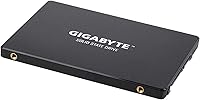
The GIGABYTE GP-GSTFS31480GNTD 480GB SATA SSD is a no-frills entry from a brand most people associate with motherboards and graphics cards rather than storage. That history actually works in its favor — GIGABYTE brings component-level know-how to a straightforward 2.5-inch SATA drive aimed squarely at everyday upgraders. Don't expect NVMe-class performance here; the SATA III interface has a hard ceiling, and this drive sits comfortably within it. What you do get is a widely compatible form factor that slots into virtually any desktop or laptop with a standard bay. With nearly 1,000 community ratings and a strong overall score, it has clearly earned some real-world trust.
Features & Benefits

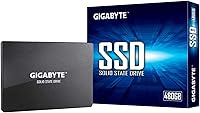
At 480GB, this GIGABYTE SATA SSD hits a practical sweet spot — enough room for a Windows installation, a handful of games, and your day-to-day files without breaking the bank. Sequential read speeds reach up to 550 MB/s, which is close to what SATA III can physically deliver, so you're getting solid throughput for the interface. The 2.5-inch form factor and standard SATA connector make installation genuinely straightforward — no brackets, no adapters in most setups. At just 2.6 ounces, it tucks into compact builds without a second thought. There's no proprietary software to wrestle with either; connect it, and you're up and running.

Best For

This 480GB drive makes the most sense for someone still running a traditional spinning hard drive who wants a real-world speed difference without spending a lot. Boot times drop noticeably, apps open faster, and the overall system just feels more responsive — most users notice that shift right away. IT teams or small businesses deploying several machines at once will find the value proposition hard to ignore at this price tier. It also works well as a secondary drive in a desktop rig, storing games or media alongside a faster primary. If you need NVMe speeds, look elsewhere — but for budget-conscious upgrades, this covers the basics reliably.

User Feedback

Across nearly 1,000 ratings, the GIGABYTE budget SSD earns its strong score largely through consistency rather than spectacle. Most buyers highlight the easy installation and the noticeable jump in responsiveness compared to whatever spinning drive it replaced — which, for most people, is exactly what they paid for. The value-for-money sentiment comes up repeatedly, and rightly so. Where more technical users push back is on the DRAM-less design, which can lead to slower sustained write speeds during large file transfers. For everyday computing — browsing, documents, casual gaming — that limitation rarely surfaces. The consensus: a reliable, no-drama drive that does what it promises for typical home and office use.

Pros

  • Noticeable speed improvement over traditional hard drives, especially for boot times and app launches.
  • 480GB capacity comfortably handles a Windows install, everyday apps, and a modest game library.
  • Standard 2.5-inch SATA form factor fits virtually any desktop or laptop with a spare drive bay.
  • Sequential read speeds near the SATA III ceiling make the most of the interface.
  • Weighing just 2.6 ounces, this 480GB drive is easy to handle and install in tight builds.
  • No proprietary software required — connect it and the system recognizes it immediately.
  • Broad compatibility with both older and newer systems that use SATA connections.
  • Strong community rating across nearly 1,000 real-world buyers points to consistent reliability.
  • Competitive value at this capacity tier for users who do not need NVMe performance.
  • Trusted GIGABYTE hardware engineering behind the drive adds some reassurance for the brand-conscious buyer.

Cons

  • DRAM-less design can cause a drop in sustained write speeds during large, back-to-back file transfers.
  • SATA III interface limits peak performance significantly compared to NVMe M.2 alternatives.
  • Not ideal as a sole primary drive for users with large and growing game or media libraries.
  • No included mounting bracket or adapter, which may be needed in some desktop chassis configurations.
  • Write speed specifications are not prominently disclosed, making direct performance comparisons harder.
  • Users on systems with available M.2 slots are leaving noticeable performance gains on the table by choosing SATA.
  • The GIGABYTE budget SSD offers no hardware encryption support, which may matter in business or sensitive-data contexts.
  • Long-term endurance ratings are not clearly published, making it harder to assess lifespan for write-heavy workloads.

Ratings

The scores below for the GIGABYTE GP-GSTFS31480GNTD 480GB SATA SSD were generated by our AI system after analyzing verified purchase reviews from buyers worldwide, with spam, bot activity, and incentivized feedback actively filtered out. Each category reflects the honest balance of praise and frustration that real users expressed, from everyday home upgraders to small business IT teams. Both the standout strengths and the genuine limitations are represented transparently so you can make a confident, informed decision.
Value for Money
88%
Buyers consistently describe this 480GB drive as one of the more sensible purchases they have made for a budget system upgrade. Getting near-SATA-ceiling read speeds at this capacity without a significant financial commitment is something users in the home office and student segments particularly appreciate.
A small segment of reviewers feel the price-per-gigabyte advantage narrows when comparing against competing budget SSDs from brands like Kingston or Crucial, which sometimes undercut at similar capacities. Enthusiasts note that paying a bit more for a DRAM-equipped alternative would deliver better sustained performance per dollar.
Read Performance
81%
19%
Sequential read speeds reaching up to 550 MB/s are about as good as SATA III physically allows, and most users notice this immediately when booting Windows or launching applications. For anyone coming from a mechanical hard drive, the difference in load times feels dramatic rather than incremental.
Users who have also owned NVMe drives find the read speeds adequate but unremarkable by modern standards. Benchmarking enthusiasts point out that real-world sustained reads on longer transfers can dip below the advertised ceiling, which is typical for this class of drive but still worth noting.
Write Performance
63%
37%
For light writing tasks — saving documents, installing apps, downloading files — the GIGABYTE budget SSD performs smoothly and without noticeable hesitation. Casual users who are not regularly moving large batches of files will rarely encounter any friction in day-to-day writing operations.
The absence of a DRAM cache is the most cited technical complaint across user reviews. During large sustained write operations, such as copying a full game folder or backing up several gigabytes of video, write speeds can throttle significantly, which power users and content creators find frustrating.
Installation Ease
93%
Nearly every reviewer who mentioned the setup process described it as completely painless. The standard SATA connector and 2.5-inch form factor mean it drops directly into any compatible bay, and Windows recognizes it instantly without needing drivers or companion software.
A few users in desktop builds with only 3.5-inch bays were caught off guard by the need for a separate adapter bracket, which is not included. This is a minor friction point but one that first-time builders occasionally overlook when ordering.
Build Quality
74%
26%
The drive feels solid for a budget-tier product, and the compact black enclosure is clean and unobtrusive inside a case. At 2.6 ounces, it sits securely in its bay without any flex or rattle, which users found reassuring during initial handling.
The enclosure is plastic rather than the aluminum shell found on premium SSDs, which some buyers feel undermines confidence in long-term durability. There is no visible heat dissipation feature, though under normal workloads thermal throttling has not been a widely reported issue.
Compatibility
91%
The SATA III interface with backward compatibility to SATA II makes this one of the most universally accepted internal drives available. Users have reported successful installs across a wide range of machines, from decade-old desktop towers to mid-range laptops with standard drive bays.
Buyers with thin-and-light laptops or newer systems that only offer M.2 slots discovered this drive simply does not apply to their build. While that is an interface limitation rather than a product defect, a handful of reviewers felt the listing could have been clearer about this constraint.
Reliability
83%
With nearly 1,000 ratings skewing heavily positive and very few reports of early failure, this GIGABYTE SATA SSD has built a credible reliability track record over several years in the market. Home users and small business deployers alike report months or years of trouble-free operation under typical workloads.
GIGABYTE has not publicly published a detailed TBW endurance rating for this model, which makes it harder to objectively assess longevity for write-intensive environments. A small number of reviewers reported unit failures within the first year, though the rate appears consistent with the broader budget SSD category.
Capacity Satisfaction
78%
22%
The 480GB capacity lands in a genuinely useful range for most everyday users. Fitting a full Windows installation, productivity software, and a handful of games with room to spare is achievable, and home office users particularly appreciate not having to manage storage constantly.
Gamers with large modern title libraries found 480GB fills up faster than expected, with several titles now exceeding 100GB individually. Users who planned to use this as their sole drive for both OS and gaming often ended up wishing they had opted for a 960GB or 1TB variant instead.
Software Experience
69%
31%
The complete absence of required proprietary software is actually a selling point for most buyers. The drive works out of the box with native OS tools, which non-technical users find far less intimidating than alternatives that push companion management apps.
There is no bundled cloning or migration utility, which is a notable omission for users hoping to copy their existing OS from an old hard drive. Competing budget SSDs from other brands sometimes include a free cloning software license, making the migration process considerably less daunting for beginners.
Thermal Management
71%
29%
Under standard mixed workloads — browsing, streaming, light file management — users report no heat-related issues, and the drive remains comfortable to touch even after extended sessions. For typical home or office use, thermal behavior is effectively a non-issue.
During prolonged heavy write sessions, some technically inclined users measured elevated temperatures that they attribute partly to the lack of any heat-spreading enclosure. While outright thermal throttling is rarely reported, the drive does run warmer than aluminum-shelled alternatives under sustained stress.
Brand Confidence
76%
24%
GIGABYTE carries strong name recognition in the PC component space, and buyers who have used their motherboards or GPUs tend to extend that trust to this storage product. The brand association gives some reassurance that the drive is not a no-name white-label unit.
GIGABYTE is not primarily known as a storage brand, and some buyers express uncertainty about the long-term support and warranty service compared to dedicated storage manufacturers like Samsung or Western Digital. A few users found it harder to locate clear warranty claim information than expected.
Packaging & Delivery
79%
21%
The drive arrives in simple, protective packaging that keeps it secure during shipping. Most users reported receiving the unit in perfect condition with no cosmetic damage, which is the baseline expectation for a delicate electronic component.
The packaging includes no accessories beyond the bare drive — no SATA cable, no mounting hardware, and no documentation beyond the minimum. First-time builders who assumed a cable would be included were occasionally left needing an additional purchase before they could complete their install.

Suitable for:

The GIGABYTE GP-GSTFS31480GNTD 480GB SATA SSD is a smart pick for anyone still running an aging spinning hard drive who wants a meaningful real-world improvement without a steep investment. Students, home office workers, and casual users who primarily browse the web, work with documents, and store media files will get everything they need from this drive. Desktop builders seeking a dependable secondary storage option for games or large file archives will also find the 480GB capacity genuinely useful. IT professionals or small business owners deploying affordable storage across multiple machines will appreciate how straightforward the installation is — no software, no fuss, just a standard SATA connection. If your system has a free 2.5-inch bay and a SATA port, this drive is about as plug-and-play as internal storage gets.
Not suitable for:

The GIGABYTE GP-GSTFS31480GNTD 480GB SATA SSD is not the right choice for users who need high-throughput storage for demanding workloads like 4K video editing, large database operations, or heavy creative production pipelines. The SATA III interface caps performance well below what modern NVMe drives deliver, so anyone with a system that supports M.2 slots and genuinely needs that bandwidth should look elsewhere. The DRAM-less design also means sustained write performance under heavy load can trail behind more capable drives, which enthusiasts and power users will notice during large file transfers. Gamers who want the fastest possible load times on a current-gen system would be better served by an NVMe alternative. Similarly, users who need more than 480GB as a primary drive for a growing game library or professional media archive may find themselves running out of room sooner than expected.
Specifications

  • Capacity: The drive offers 480GB of flash storage, providing ample space for an operating system, core applications, and a moderate media or game library.
  • Form Factor: Built in the standard 2.5-inch internal form factor, it fits directly into most desktop and laptop drive bays without any modification.
  • Interface: Uses a SATA III 6Gb/s interface, ensuring broad compatibility with virtually all modern and legacy motherboards that include a SATA port.
  • Read Speed: Sequential read speeds reach up to 550 MB/s, which sits near the practical ceiling of the SATA III specification.
  • Dimensions: The drive measures 5.94 x 4.8 x 0.85 inches, conforming to the standard 2.5-inch SSD physical profile.
  • Weight: At 2.6 ounces, this is a lightweight internal drive that adds negligible mass to any desktop or laptop build.
  • Flash Memory: The drive uses NAND flash memory rated at 480GB usable capacity for data storage.
  • DRAM Cache: This drive does not include a dedicated DRAM cache, which can limit sustained write performance under heavy consecutive write workloads.
  • Installation: Designed for internal installation, the drive connects via a standard SATA data cable and SATA power connector with no proprietary hardware required.
  • Color: The drive enclosure is finished in black, consistent with the standard aesthetic of most internal storage hardware.
  • Compatible Devices: Compatible with desktops and laptops that feature a standard 2.5-inch drive bay and a SATA III or SATA II port.
  • Brand: Manufactured by GIGABYTE, a company with an established reputation in PC component hardware including motherboards, graphics cards, and peripherals.
  • Model Number: The official model designation is GP-GSTFS31480GNTD, which identifies this specific 480GB variant within the GIGABYTE SSD lineup.
  • Community Rating: The drive holds a 4.6 out of 5 star rating based on 984 verified user ratings on Amazon.
  • Market Rank: It ranks at number 490 in the Internal Solid State Drives category on Amazon, reflecting strong sales performance relative to peers.
  • Software: No proprietary management software is bundled or required; the drive is recognized natively by Windows, macOS, and Linux upon connection.
  • Availability Date: This model was first made available for purchase in May 2019, giving it a multi-year track record in the consumer storage market.

Related Reviews
SanDisk SSD Plus 480GB Internal SSD
83%
91%
Value for Money
86%
Read Performance
67%
Write Performance
94%
Installation Ease
71%
Long-term Reliability
More
Kingston A400 480GB 2.5″ Internal SSD
84%
93%
Value for Money
78%
Read/Write Performance
91%
Installation Ease
82%
Build Quality
74%
Long-Term Reliability
More
Crucial BX500 480GB Internal SSD
82%
91%
Value for Money
83%
Read Speed Performance
67%
Write Speed Consistency
88%
Long-Term Reliability
93%
Installation Ease
More
Vansuny 2TB SATA III Internal SSD
75%
91%
Value for Money
84%
Read/Write Performance
89%
Installation Ease
88%
Compatibility
57%
Brand Trust
More
ORICO S500PRO 1TB 2.5″ SATA SSD
81%
91%
Value for Money
78%
Read & Write Speed
88%
Build Quality
89%
Installation Experience
83%
Compatibility
More
fanxiang S101 4TB Internal SSD
77%
91%
Value for Money
82%
Read Speed Performance
71%
Write Speed & Cache Behavior
67%
Long-term Reliability
93%
Ease of Installation
More
ORICO S500PRO 512GB 2.5″ SATA SSD
79%
91%
Value for Money
83%
Real-World Speed
88%
Build Quality
93%
Installation Experience
86%
PS4 Compatibility
More
ORICO S500PRO 4TB SATA SSD
86%
91%
Performance
88%
Build Quality
90%
Value for Money
89%
Installation Ease
75%
Reliability Under Load
More
Crucial BX500 4TB SATA SSD
82%
91%
Value for Money
74%
Read/Write Performance
93%
Installation & Compatibility
67%
Endurance & Longevity
83%
Build Quality & Form Factor
More
ORICO Y20 2TB SATA SSD
75%
91%
Value for Money
78%
Read & Write Speed
74%
Installation Ease
76%
Build Quality
63%
Long-Term Reliability
More

FAQ

Yes, it will. The drive uses a SATA III 6Gb/s interface but is backward compatible with SATA II ports. You will see slightly lower maximum speeds on a SATA II connection, but the drive will function without any issues.

No additional software is needed. This GIGABYTE SATA SSD is recognized natively by Windows, macOS, and most Linux distributions as soon as it is connected. If you are using it as a fresh secondary drive, you will just need to initialize and format it through your operating system's disk management tool.

For most people, yes. A Windows 11 installation typically uses around 20 to 30GB, leaving you with well over 400GB for applications and games. If you play several large modern titles simultaneously, you may find yourself managing space, but for casual gaming and everyday use it is a comfortable amount.

The difference is very noticeable in everyday use. Boot times that used to take a minute or more on a spinning drive typically drop to under 15 seconds. Apps open almost instantly, and file transfers within the drive feel significantly snappier. It is one of the most impactful upgrades you can make to an older machine.

It works well as a primary boot drive for an operating system and applications. Many users run Windows or Linux directly from this 480GB drive without any issues. It also serves perfectly as a secondary drive for storing games, documents, or media alongside a faster primary.

A DRAM cache helps a drive handle large, sustained write operations more efficiently. Without one, you may see write speeds slow down noticeably during tasks like copying several large video files at once. For typical everyday use — booting Windows, opening apps, casual gaming — you are unlikely to hit that limitation at all. It is mainly a concern for users doing heavy file work regularly.

No mounting bracket or adapter is included in the box. Some desktop cases have dedicated 2.5-inch bays, so you can slide the drive straight in. If your case only has 3.5-inch bays, you will need a separate 2.5-inch to 3.5-inch adapter bracket, which is inexpensive and widely available.

It can be used in laptops that have a standard 2.5-inch SATA drive bay, which is common in older and mid-range laptops. Thin and light ultrabooks, however, typically use M.2 NVMe storage and do not have a 2.5-inch bay, so those are not compatible. Check your laptop's specifications before purchasing.

Under everyday workloads like web browsing, documents, and light gaming, this type of SATA SSD typically lasts for many years without issue. GIGABYTE has not prominently published a specific TBW (terabytes written) endurance rating for this model, so users doing very write-intensive work may want to factor that in. For casual home and office use, longevity is generally not a concern.

Warranty terms can vary depending on where you purchase the GIGABYTE budget SSD, so it is worth checking directly with the retailer or GIGABYTE at the time of purchase. GIGABYTE typically offers a limited warranty on their storage products, and most major retailers also provide their own return window. Keeping your purchase receipt and registering the product with GIGABYTE is always a good idea.

Where to Buy