
Overview

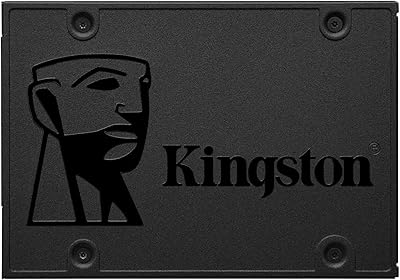
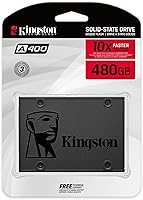
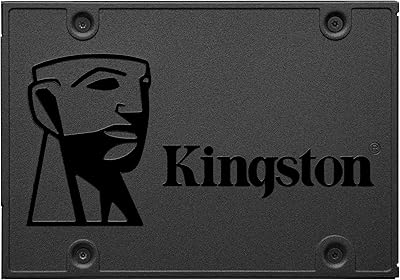
The Kingston A400 480GB 2.5″ Internal SSD has been a go-to option for budget-conscious upgraders since its release, and it still earns that reputation today. Kingston positioned it squarely at the entry level — a practical answer to the question of whether swapping out a slow spinning hard drive is worth the effort. At 480GB, the capacity hits a useful middle ground: enough room for an operating system, everyday applications, and a reasonable media collection without paying for storage you won't use. The 7mm slim form factor means it fits in most laptops and desktops without drama. Just don't expect NVMe-level speed — this is a SATA-based drive, and it performs exactly as well as that implies.

Features & Benefits

The A400 runs on a SATA III interface, pushing reads up to 500MB/s and writes up to 450MB/s — numbers that translate to noticeably snappier boot times and faster app launches compared to any mechanical drive. The 2.5″ 7mm chassis keeps things physically compact, which matters in thinner notebooks where space is tight. Because it has no moving parts, it runs quietly and generates very little heat during normal use, a genuine comfort in portable machines. It also handles shock and vibration better than a traditional hard drive, so a bumped bag during a commute isn't a cause for concern. Backward SATA II compatibility makes it a viable upgrade even for machines that predate the current standard.

Best For

This Kingston SSD makes the most sense for anyone working with an older machine that still has plenty of life in it but is being dragged down by a slow hard drive. It's an especially strong fit for students and casual users who want faster boot times without spending heavily on premium storage. The slim 2.5″ form factor also suits small form factor desktops and laptops that lack an M.2 slot. If you need a secondary storage drive in a desktop where raw speed isn't a priority, the A400 fills that role without complaint. It's not the right pick for video editing workstations or enthusiast builds, but for everyday computing on a tight budget, it does the job well.

User Feedback

With well over 200,000 ratings and a 4.7-star average, the reception for this budget SATA drive is hard to dismiss. Most buyers point to easy installation and the immediate improvement in boot speed as the clear highlights. Critical reviews are relatively rare and tend to come from users who expected NVMe-class performance or pushed the drive through write-heavy workloads it wasn't designed for. A handful of buyers mention wishing Kingston had included a cloning utility or a mounting adapter in the box — reasonable gripes for first-time upgraders. Long-term reliability feedback is largely reassuring, with many owners reporting years of trouble-free daily use, which ultimately says more about real-world value than any benchmark number.

Pros

  • Boot times drop dramatically compared to any mechanical hard drive, often from over a minute to under 20 seconds.
  • The 7mm slim profile fits a wide range of laptops and desktops without adapters or modifications.
  • Shock and vibration resistance makes the A400 far more reliable than a spinning drive in a travel bag.
  • 480GB of storage is a practical amount for everyday computing without paying for space you won't use.
  • SATA II backward compatibility means it works in machines well over a decade old.
  • Silent operation — no platters, no clicking, no audible noise under any normal workload.
  • Kingston's brand reliability gives buyers confidence in long-term everyday durability.
  • Installation is physically straightforward, even for first-time upgraders with minimal technical experience.
  • Runs cool enough that it rarely contributes to thermal issues in thin or compact systems.

Cons

  • No cloning utility or mounting bracket is included, leaving first-time upgraders to source tools separately.
  • Sustained write speeds drop under heavy load once the cache buffer fills, which is noticeable during large file transfers.
  • TLC NAND endurance ratings are on the lower end, making it a weaker choice for write-intensive long-term use.
  • The plastic housing feels noticeably less premium than drives in higher price tiers.
  • 480GB fills up faster than expected once games, media, or creative project files enter the picture.
  • Real-world speeds regularly fall short of the advertised sequential read ceiling under typical mixed workloads.
  • No hardware accessories in the box means users in older desktop cases may need a 2.5-to-3.5-inch adapter bracket.
  • Warranty support quality has been inconsistent across regions, according to a subset of international buyers.

Ratings

The Kingston A400 480GB 2.5″ Internal SSD has accumulated one of the largest verified review pools in its category, giving our AI rating system a rich and statistically reliable dataset to work with. These scores were generated by analyzing confirmed buyer feedback from multiple global markets, with spam, bot-submitted, and incentivized reviews actively filtered out. The result is an honest picture of where this budget SATA drive genuinely delivers and where real-world buyers have run into limitations.

Value for Money
93%
Buyers consistently describe the A400 as one of the most cost-effective ways to breathe new life into an older machine. For the asking price, the jump from a mechanical hard drive is dramatic enough that most users feel they got far more than they paid for.
A small segment of buyers who compared it directly to slightly pricier NVMe options felt the per-dollar performance gap has narrowed enough to make the upgrade less clear-cut than it once was. For pure storage efficiency on a tight budget, though, complaints are rare.
Read/Write Performance
78%
22%
Day-to-day tasks like booting Windows, launching browsers, and opening office applications feel noticeably faster after installation. Users upgrading from spinning hard drives routinely report cutting boot times from over a minute down to under 20 seconds.
Sustained write speeds under heavy load drop noticeably once the drive exhausts its cache buffer, which matters if you regularly move large files or work with video. Enthusiasts running benchmarks also point out that real-world speeds often fall short of the advertised ceiling.
Installation Ease
91%
The physical swap is straightforward — the standard 2.5″ form factor fits without modification in the vast majority of laptops and desktops, and the drive is light enough to handle without any special tools. Many first-time upgraders specifically called out how painless the hardware side of the process was.
Kingston does not include a cloning utility or a mounting bracket in the box, which caught some buyers off guard. Users migrating an existing OS had to source third-party software separately, adding a step that frustrated less technically confident buyers.
Build Quality
82%
18%
The solid-state construction means there are no spinning platters to fail from a knock or a dropped bag, and buyers who use their laptops on the go appreciate that extra resilience. The slim 7mm chassis feels sturdy despite its light weight.
The outer casing is plain black plastic rather than the metal housing found on mid-range and premium drives. A few buyers noted it feels less premium than expected, though most acknowledged it has no practical impact on performance or longevity.
Long-Term Reliability
74%
26%
The majority of long-term owners — many with two or more years of daily use — report no failures or significant performance degradation under typical workloads. Kingston's brand reputation in the storage space lends additional confidence to this sentiment.
Endurance ratings are on the lower end compared to more expensive drives, and users who run write-intensive tasks over extended periods have flagged early warning signs in SMART data. For heavy workloads, the TLC NAND does have a more finite lifespan than higher-tier alternatives.
Compatibility
89%
SATA II backward compatibility means this drive works in systems that are over a decade old, which is exactly what most of its buyers need. Whether it is an aging ThinkPad or a budget desktop tower, the A400 slots in without fuss.
It is strictly a 2.5″ SATA drive, so it offers no path forward for users whose systems only have an M.2 slot or who are building a modern machine where SATA is being phased out. That is a use-case limitation rather than a product defect, but it catches some buyers unprepared.
Boot & Load Times
88%
This is where the A400 makes its clearest argument. Users switching from a 5400 RPM laptop hard drive described the difference as transformative for everyday computing — faster startups, quicker application launches, and a system that feels responsive rather than sluggish.
The improvements, while real, are constrained by the SATA interface ceiling. Buyers who upgraded from an older SATA SSD or who benchmarked against NVMe drives found the speed gains less dramatic, and a handful felt underwhelmed when their expectations exceeded what SATA can deliver.
Noise & Heat
94%
No moving parts means the drive operates in complete silence, which matters in quiet work environments or when the laptop fan is the only sound you want to hear. Operating temperatures stay well within normal range during everyday use, and the drive rarely becomes a heat contributor in thermal-sensitive thin notebooks.
There is little to criticize here within the context of standard use. In prolonged heavy workloads inside poorly ventilated enclosures, temperatures can climb, but this is a system-level issue rather than a flaw specific to this drive.
Capacity Adequacy
81%
19%
480GB sits in a practical range for a primary drive — enough space for a full OS install, a suite of productivity or creative applications, and a reasonable library of documents and media without feeling cramped from day one.
Power users who store large media libraries, game installations, or raw photo archives locally found 480GB fills up faster than expected and wished they had gone with a larger capacity variant. For lean setups, it works well; for storage-heavy workflows, it can feel limiting within a year.
Form Factor Versatility
86%
The 7mm height is thin enough to fit comfortably in the recessed 2.5″ bays found in slim notebooks, while also working perfectly in standard desktop trays. Buyers with older ultrabooks that lacked M.2 slots found this form factor was the only upgrade path available to them.
Users with very modern ultrabooks or mini-PCs that have moved entirely to M.2 will find no use for a 2.5″ drive unless they add an external enclosure. The form factor is well-suited to its target audience but does reflect the drive's age in the product cycle.
Packaging & Unboxing
71%
29%
The drive arrives well protected and ready to install. For a no-frills budget product, the packaging does its job without unnecessary bulk, and the drive itself shows up in clean, undamaged condition according to the overwhelming majority of buyers.
There are no accessories in the box — no screws, no adapter bracket, no software code. Buyers who expected even a basic accessory kit were left to source parts themselves. It is a minor frustration, but one that surfaces repeatedly in reviews from first-time builders and upgraders.
Brand Trust & Support
83%
Kingston has a long-standing reputation in the memory and storage market, and buyers take comfort in knowing the brand has reliable warranty and customer support infrastructure behind it. That familiarity reduces purchase anxiety, especially for less technical users.
A small number of buyers who experienced early failures reported that warranty claims required more patience and documentation than expected. Support quality also appeared to vary by region, with some international buyers describing the process as slower than they hoped.
Real-World Everyday Use
87%
For the core tasks most buyers need — web browsing, document editing, video calls, and light media consumption — the A400 keeps up without hesitation. The performance ceiling simply does not get in the way of typical daily computing.
Anyone who regularly works with large video files, runs virtual machines, or compiles code will find the drive becomes the bottleneck sooner than a faster alternative would. It handles everyday workloads well, but stretching it into professional or power-user territory exposes its limits.

Suitable for:

The Kingston A400 480GB 2.5″ Internal SSD was built for a very specific and common scenario: someone sitting in front of an older laptop or desktop that still has plenty of usable hardware life but is being crippled by a slow mechanical hard drive. Students who need a machine that boots quickly between classes, remote workers refreshing a hand-me-down ThinkPad, or parents setting up a budget computer for their kids will all see an immediate and meaningful difference after installation. It also makes strong sense as a secondary storage drive in a desktop tower where you need a reliable, affordable home for documents, backups, or less frequently accessed files without tying up a faster NVMe slot. Older small form factor PCs and slim notebooks that lack an M.2 slot have very few upgrade paths available — this drive covers that gap cleanly. If your goal is to extend the useful life of an existing machine without spending heavily, this is one of the most cost-effective ways to do it.

Not suitable for:

The Kingston A400 480GB 2.5″ Internal SSD is not the right tool if your workload regularly involves moving large files, editing high-resolution video, running virtual machines, or compiling software — tasks that will expose the inherent ceiling of its SATA interface and TLC NAND endurance fairly quickly. Enthusiasts building a new system from scratch should look at NVMe drives instead, since the price gap between SATA and entry-level NVMe has narrowed considerably, and the performance difference is substantial for anything beyond light computing. If you need more than 480GB for a primary drive — for example, if you store a large game library or raw photo archive locally — you may find yourself space-constrained within a year of regular use. Users who want a plug-and-play migration experience should also know upfront that no cloning software or mounting hardware is included in the box, which adds a step for anyone unfamiliar with manual OS migration. Finally, if your machine only accepts M.2 storage, this drive simply will not fit.

Specifications

  • Capacity: The drive offers 480GB of usable storage, suitable for an operating system, productivity applications, and a moderate media library.
  • Interface: Uses SATA Rev. 3.0 running at 6Gb/s, with full backward compatibility for systems running SATA Rev. 2.0.
  • Sequential Read: Rated for sequential read speeds of up to 500MB/s under optimal conditions.
  • Sequential Write: Rated for sequential write speeds of up to 450MB/s under optimal conditions.
  • Form Factor: Standard 2.5″ form factor fits the majority of laptops, desktops, and small form factor systems with a SATA bay.
  • Height: The 7mm chassis height makes this drive compatible with slim and ultrabook-style notebooks that cannot accommodate a 9.5mm drive.
  • Dimensions: Physical dimensions measure 3.94 inches long by 2.75 inches wide by 0.28 inches tall.
  • Weight: The drive weighs 1.44 ounces, adding negligible mass to any portable system.
  • NAND Type: Uses TLC (Triple-Level Cell) NAND flash memory, which balances cost efficiency with acceptable endurance for everyday workloads.
  • Operating Temp: Rated for safe operation within a temperature range of 0°C to 70°C.
  • Shock Resistance: Solid-state construction provides inherent resistance to physical shock and vibration, improving reliability in mobile use cases.
  • Noise Output: Produces no audible noise during operation due to the complete absence of moving mechanical components.
  • Color: The drive ships in a standard black housing with no indicator lights or external connectors beyond the SATA data and power ports.
  • Model Number: The official model identifier is SA400S37/480G, used for warranty registration and compatibility verification.
  • Manufacturer: Designed and sold by Kingston Digital, Inc., a division of Kingston Technology with decades of experience in consumer storage.
  • Compatibility: Officially compatible with laptops and desktop systems using standard 2.5″ SATA drive bays.
  • Power Input: Draws power directly from the system via the standard SATA power connector; no external power source is required.
  • In Box Contents: The retail package contains only the drive itself — no mounting bracket, cloning software, or installation accessories are included.

Related Reviews
Kingston A400 240GB SATA 3 2.5″ Internal SSD
84%
89%
Performance (Read/Write Speed)
92%
Value for Money
86%
Durability (Shock Resistance)
91%
Ease of Installation
83%
Compatibility
More
Kingston SQ500S37/480G 480GB Q500 SATA3 2.5 SSD
85%
92%
Value for Money
88%
Performance for General Use
93%
Ease of Installation
89%
Compatibility with PCs & Laptops
84%
Durability & Reliability
More
Kingston KC600 2TB SATA3 2.5″ SSD
87%
91%
Performance
88%
Ease of Installation
93%
Data Security (Encryption)
90%
Reliability
85%
Capacity for Large Files
More
Kingston KC600 1TB SATA3 2.5″ SSD
85%
88%
Performance
91%
Speed and Responsiveness
85%
Ease of Installation
87%
Durability and Build Quality
89%
Data Security
More
Verbatim 256GB Vi550 SATA III 2.5″ Internal SSD
86%
92%
Performance
88%
Value for Money
85%
Build Quality
90%
Ease of Installation
87%
Durability
More
LinkMore XG550 1TB 2.5″ SATA III Internal SSD
84%
89%
Performance
92%
Value for Money
86%
Read Speed
85%
Write Speed
94%
Ease of Installation
More
Crucial MX300 2TB SATA 2.5 Inch Internal SSD
86%
92%
Performance
89%
Value for Money
88%
Durability
91%
Ease of Installation
94%
Read Speed
More
Crucial MX500 500GB 3D NAND SATA 2.5 Inch Internal SSD
87%
92%
Read Speed
88%
Write Speed
91%
Reliability
78%
Compatibility with Older Systems
84%
Temperature Management
More
ADATA SU650 1TB 3D-NAND SATA 2.5 inch Internal SSD

86%
88%
Performance
92%
Value for Money
85%
Installation Ease
87%
Speed (Read/Write)
78%
Software Experience
More
Vantec NexStar JX 3.5″ HDD Enclosure
76%
93%
Ease of Setup
78%
Transfer Speed — USB
86%
Transfer Speed — eSATA
74%
Thermal Management
67%
Build Quality
More

FAQ

In most cases, yes. The A400 uses a standard 2.5″ form factor, which is the same physical size as the mechanical hard drives found in the vast majority of laptops made over the past 15 years. The 7mm height also means it fits in slimmer bays without needing a spacer. Just confirm your laptop has a SATA connection rather than a proprietary or M.2-only slot before purchasing.

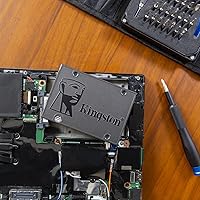
A small Phillips-head screwdriver is usually all you need for the physical swap. The trickier part is migrating your existing operating system or doing a fresh install — neither of which comes bundled with this drive. You will need to download a free cloning tool like Macrium Reflect or use your OS installation media separately.

The improvement is very noticeable if you are coming from a mechanical hard drive. Boot times typically drop from 60–90 seconds down to 15–20 seconds, and applications open much more responsively. Day-to-day tasks like switching between browser tabs, loading documents, and waking from sleep all feel significantly snappier. That said, this is a SATA drive — if you are upgrading from another SSD, the difference will be far less dramatic.

Yes, it works with Windows 11 without any issues. The drive is simply a storage device, so operating system compatibility is determined by your computer's hardware and BIOS rather than the drive itself. As long as your system supports booting from a SATA drive, you can install any modern OS on it.

Most buyers report trouble-free performance well beyond two or three years of daily use for standard tasks like web browsing, document editing, and media playback. TLC NAND has a lower write endurance ceiling than MLC or enterprise-grade drives, so if your workload involves constant large file writes, longevity becomes more of a concern. For typical home or student use, it should serve you reliably for the long haul.

Absolutely — it works well in that role. Many desktop builders use a faster NVMe drive for the OS and install the A400 as a secondary bay for documents, downloads, and media. It is a cost-effective way to add bulk storage without spending on NVMe speeds you do not need for archived files.

It might have a small amount of physical play without a spacer, but most laptops that use a 9.5mm bay ship with a rubber gasket or tray that accommodates 7mm drives. If yours does not, inexpensive 7mm-to-9.5mm foam spacers are widely available online for a dollar or two, and they solve the issue completely.

No additional drivers are needed. SATA SSDs are recognized natively by Windows, macOS, and Linux without any manufacturer software. The drive will show up immediately in your system once connected and formatted, or right after your OS installation completes.

Yes, it will. The A400 is fully backward compatible with SATA 2.0, so it will function correctly in older systems. You will not reach the drive's maximum rated speeds since SATA 2.0 caps out at a lower bandwidth, but it will still be substantially faster than any mechanical hard drive — so the upgrade is still very much worth doing.

Kingston covers this drive with a three-year limited warranty. If you experience a failure within that window, you can initiate a claim through Kingston's support site. Keep in mind that warranty service quality has been reported as variable by region, so it is worth registering the product and keeping proof of purchase somewhere accessible.

Where to Buy