Overview

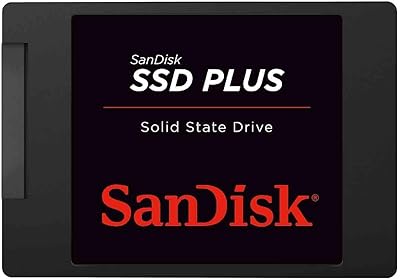
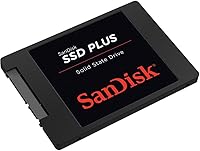
The SanDisk SSD Plus 480GB Internal SSD has been a quietly reliable fixture in the budget storage market since 2016, and its staying power says something. If your laptop is still limping along with a spinning hard drive, this SATA upgrade drive offers a meaningful jump in responsiveness without demanding a premium price. It won't compete with NVMe drives on raw speed, but that's not the point. The 480GB capacity hits a practical middle ground — enough room for your OS, applications, and a solid chunk of personal files. Sitting at #115 in Amazon's Internal Solid State Drives category with over 83,000 ratings, it clearly resonates with a wide range of everyday users.
Features & Benefits

On the spec sheet, this budget SSD delivers read speeds up to 535 MB/s and write speeds up to 445 MB/s over a SATA III interface — respectable numbers that translate to noticeably snappier boot times and faster application loads compared to a traditional hard drive. The 2.5-inch, 7mm form factor means it drops into most laptops and desktop bays without hunting for an adapter. SanDisk's nCache 2.0 technology helps manage burst write tasks, keeping everyday workloads feeling consistent rather than stuttering under pressure. It's also shock-resistant up to 1500G, a practical advantage over mechanical drives. A 3-year limited warranty rounds things out reasonably for a drive at this price tier.

Best For

This SATA upgrade drive makes the most sense for anyone reviving an aging laptop that's grinding through boot-ups and slow application launches. Replacing a 5400 RPM hard drive with this SSD produces the kind of speed difference you actually notice within the first day. It's also a strong pick for secondary or backup PCs where cutting-edge NVMe performance would simply be overkill. Students and home office users will find the capacity comfortable for daily tasks without running out of space too quickly. That said, if you're building a high-performance workstation or doing intensive video editing, you'd want to look beyond SATA. Everyday computing needs are really where this drive earns its place.

User Feedback

With more than 83,000 ratings averaging 4.7 stars, the satisfaction here is consistent and hard to dismiss as a fluke. Most buyers highlight two things above all: the dramatic speed improvement over whatever spinning drive they replaced, and how painless the installation process was — even for people who had never opened a laptop before. On the critical side, some users note that write speeds, while functional, don't lead the pack at this price point, and a smaller group raises questions about long-term endurance under heavy or sustained write loads. It's not the ideal choice for workstations handling constant large file transfers. For typical home or office use, though, the feedback pattern is overwhelmingly positive and remarkably consistent.

Pros

  • Replacing a spinning hard drive with this budget SSD produces a dramatic, immediately noticeable speed improvement.
  • Boot times drop from minutes to seconds — one of the most satisfying upgrades for an aging PC.
  • The 2.5-inch, 7mm form factor fits the vast majority of laptops and desktops without requiring any adapter.
  • 480GB offers a practical balance of capacity and cost for everyday personal or office use.
  • Shock resistance up to 1500G means this drive holds up better than mechanical alternatives if a laptop gets bumped or dropped.
  • Installation is straightforward enough for first-time upgraders, with no technical expertise required.
  • A 3-year limited warranty adds a reasonable safety net for a budget-tier purchase.
  • Over 83,000 ratings averaging 4.7 stars reflects consistent, widespread satisfaction across a broad user base.
  • nCache 2.0 technology keeps typical workloads feeling smooth rather than stuttering on burst writes.
  • SanDisk is a well-established storage brand, which matters for driver support and long-term reliability confidence.

Cons

  • Write speeds trail several competing SATA drives available at a similar price point.
  • Long-term endurance under heavy or sustained write workloads has drawn concern from a subset of reviewers.
  • SATA III interface imposes a hard speed ceiling that no firmware update can overcome — NVMe this is not.
  • 480GB may feel tight within a year or two for users who store large media libraries or multiple game installs.
  • No included cloning software or mounting hardware is bundled, adding minor friction for first-time installers.
  • Some users report that real-world write performance dips noticeably below the advertised maximum under sustained load.
  • The drive does not support NVMe or PCIe — buyers with M.2-only motherboards cannot use it at all.
  • At heavy workloads, the nCache buffer can become saturated, causing temporary slowdowns on large sequential writes.

Ratings

The scores below are generated by AI after analyzing thousands of verified global buyer reviews for the SanDisk SSD Plus 480GB Internal SSD, with spam, bot activity, and incentivized feedback actively filtered out. The result is an honest, data-driven snapshot that reflects both what users genuinely love and where real frustrations surface. Nothing is sugar-coated — the ratings capture the full picture so you can make a confident, informed decision.

Value for Money
91%
At its price point, this budget SSD consistently earns praise for delivering a transformative upgrade experience without requiring a significant financial commitment. Users replacing aging laptops report feeling like they got a new machine for a fraction of the cost, which resonates strongly across student and home-office buyer segments.
A handful of buyers note that some competing SATA drives from Crucial and Kingston occasionally undercut this drive on price while matching or slightly exceeding its write performance, making the value proposition feel less automatic than it once was.
Read Performance
86%
Day-to-day tasks that depend on read speed — booting Windows, launching browsers, opening large documents — feel genuinely fast on this drive. Users coming from 5400 RPM mechanical hard drives consistently describe the improvement as dramatic, with boot times dropping from minutes to well under 30 seconds.
While the up-to-535 MB/s read ceiling is respectable for SATA, buyers who later moved to NVMe systems noted this drive's read speeds felt modest in hindsight. For anyone already on a modern SSD, the performance delta simply isn't there.
Write Performance
67%
33%
For typical home and office workloads — saving files, installing applications, light photo editing — write performance is perfectly adequate and rarely becomes a bottleneck. Users focused on everyday computing report no noticeable sluggishness during normal use sessions.
This is where the most recurring criticism surfaces. Sustained write tasks like large file transfers or continuous backups can cause speeds to dip noticeably once the nCache 2.0 buffer is saturated. Several reviewers specifically mention that competing drives at the same price handle sustained writes more consistently.
Installation Ease
94%
Across tens of thousands of reviews, easy installation is one of the most frequently repeated compliments. Even buyers who had never opened a laptop before describe the physical swap as straightforward, and the standard 2.5-inch form factor means no adapters or compatibility gymnastics in most cases.
SanDisk does not include cloning software or a mounting bracket in the box, which creates a minor friction point for first-timers who then need to source those tools separately. It's a small omission but one that pops up consistently enough in reviews to be worth noting.
Long-term Reliability
71%
29%
The majority of buyers who have owned this SATA upgrade drive for one to three years report no failures or degradation in everyday use, and the 3-year warranty provides a reasonable backstop for defects. For light to moderate workloads, the reliability track record across such a large review base is genuinely reassuring.
A recurring minority concern relates to endurance under heavier sustained workloads — users running this drive in NAS arrays or as a primary drive for frequent large writes have reported earlier-than-expected wear indicators. The TBW rating is not prominently disclosed, which leaves some buyers uncertain about long-term durability planning.
Boot Time Improvement
93%
This is arguably the single most celebrated real-world outcome in user reviews. People who upgraded from mechanical hard drives report their machines going from painfully slow multi-minute startups to snappy sub-20-second boots, which fundamentally changes the day-to-day experience of using an older PC.
Users who already had a SATA SSD installed see no meaningful improvement, as expected — the gains are almost entirely relative to mechanical drives. This makes the impact highly dependent on what the drive is replacing rather than being an absolute performance statement.
Compatibility
88%
The standard 2.5-inch, 7mm form factor covers an enormous range of laptops, desktops, and even server arrays, making compatibility concerns relatively rare among buyers. Most users report a straightforward physical fit on the first try without needing spacers or adapters.
Buyers with ultra-thin laptops that use proprietary storage connections, or newer machines with M.2-only slots, occasionally purchase this drive without realizing it won't physically work in their system. Compatibility research before purchasing is still essential and a handful of return reviews reflect this.
Build & Physical Durability
82%
18%
The 1500G shock resistance rating translates into real-world confidence, particularly for users installing this drive in laptops they carry daily. Several reviewers specifically mention appreciating the lack of moving parts compared to their old hard drives when it comes to handling drops and bumps.
The enclosure itself feels lightweight and slightly plasticky to the touch, which leaves some buyers with a less premium tactile impression than drives from competing brands. This is cosmetic rather than functional, but it does register in a minority of reviews.
Capacity Adequacy
79%
21%
For students, casual home users, and anyone using their PC primarily for productivity and light media, 480GB hits a comfortable sweet spot — enough for Windows, a full suite of applications, and a solid personal file collection without constant housekeeping.
Power users, gamers, or anyone maintaining a large media library report feeling constrained within one to two years, particularly as modern game installs routinely exceed 50–100GB. For those users, jumping straight to a 1TB option at the time of purchase would have been the smarter call.
Application Load Speed
87%
Office applications, browsers, and everyday software open noticeably faster than on a mechanical hard drive, and users in home-office environments specifically highlight how much smoother multi-application workflows feel after the upgrade. The nCache 2.0 buffer helps keep burst-heavy task sequences feeling responsive.
For heavier creative applications like video editors or large-dataset tools, the improvement over a hard drive is still real but the performance ceiling becomes more apparent. Users running demanding software find that this drive handles the load acceptably rather than impressively.
Energy Efficiency
83%
As a solid-state drive with no spinning components, this SATA upgrade drive draws significantly less power than the mechanical drives it typically replaces. Laptop users frequently report modest but noticeable improvements in battery life after making the switch, which is a welcome side effect.
Precise TDP figures and idle power consumption data are not clearly published by SanDisk, which makes direct efficiency comparisons with competing drives difficult for technically-minded buyers. Most users notice the benefit anecdotally rather than through measurable data.
Warranty & Support
74%
26%
A 3-year limited warranty is standard and reasonable for this price tier, and SanDisk's brand presence means support channels are accessible and generally responsive compared to lesser-known storage brands. Most buyers feel adequately covered for a budget purchase.
Some users report that the warranty claims process requires more documentation and patience than expected, and SanDisk's support response times draw occasional criticism in reviews. The warranty also does not cover data recovery, which is worth factoring in for anyone storing irreplaceable files.
Noise & Vibration
96%
Being a fully solid-state device, this budget SSD operates in complete silence — no spinning platters, no clicking heads, no vibration feedback. Users who previously dealt with audible hard drive noise during heavy workloads consistently describe the silence as a quality-of-life improvement they hadn't anticipated valuing so much.
There is essentially nothing negative to report here from a user feedback standpoint; the only context where this ceases to be an advantage is in comparison with other SSDs, where silence is equally universal and therefore not a differentiator.
Packaging & Unboxing
72%
28%
The drive arrives well-protected and in compact, no-fuss packaging that gets the job done without waste. Buyers ordering online report units arriving in good condition without any transit damage concerns.
The packaging includes only the bare drive — no installation guide beyond basic safety documentation, no mounting screws, and no cloning software. Buyers expecting an accessory kit or setup guide are often disappointed, particularly first-time upgraders who need a little more hand-holding to get started.

Suitable for:

The SanDisk SSD Plus 480GB Internal SSD is a strong fit for anyone whose primary goal is breathing new life into an older laptop or desktop that still runs on a mechanical hard drive. If your machine takes two or three minutes to boot, applications hang on launch, or file transfers feel painfully slow, swapping in this SATA upgrade drive will produce a day-one improvement that's hard to miss. Students and home office workers who rely on their computers for browsing, document editing, video calls, and light media consumption will find the 480GB capacity comfortable and the speed uplift genuinely worthwhile. It's also a smart pick for secondary machines, guest PCs, or backup systems where spending more on a high-end NVMe drive would simply not be justified by the workload. For anyone building a budget-friendly system or giving a hand-me-down PC a second life, this budget SSD delivers reliable, no-fuss performance at a price that's easy to justify.
Not suitable for:

Buyers chasing the fastest possible storage performance should look elsewhere — the SanDisk SSD Plus 480GB Internal SSD operates over a SATA III interface, which means it is fundamentally capped well below what modern NVMe drives can achieve. If your motherboard or laptop supports M.2 NVMe slots and you're doing tasks like 4K video editing, large game installs, or frequent heavy file transfers, the write speed ceiling here will become a real bottleneck. Power users who stress drives with sustained, high-volume writes have flagged endurance concerns in reviews, so those running workstation-level workloads should consider drives with higher TBW (terabytes written) ratings. This SATA upgrade drive also won't help if your system already has an SSD — the upgrade delta disappears entirely in that scenario. Finally, if your older laptop uses a proprietary storage connector rather than a standard 2.5-inch SATA bay, compatibility needs to be confirmed before buying.
Specifications

  • Capacity: The drive offers 480GB of usable flash storage, suitable for an operating system, applications, and a substantial personal file library.
  • Interface: It connects via SATA III at 6 Gb/s, the standard interface found in the vast majority of laptops and desktop motherboards manufactured in the last decade.
  • Form Factor: The 2.5-inch, 7mm height profile fits standard laptop drive bays and desktop caddies without requiring a spacer or adapter in most cases.
  • Read Speed: Sequential read performance reaches up to 535 MB/s under optimal conditions, a significant improvement over a typical 5400 RPM mechanical hard drive.
  • Write Speed: Sequential write speed is rated at up to 445 MB/s, adequate for everyday workloads though not competitive with NVMe drives in sustained transfer scenarios.
  • Cache Technology: SanDisk's nCache 2.0 technology uses a portion of the NAND as a write buffer to help maintain consistent burst write performance during typical PC tasks.
  • Shock Resistance: The drive is rated to withstand shocks up to 1500G, making it considerably more resilient to physical impact than any spinning hard drive.
  • Vibration Resistance: It tolerates operating vibration of 5gRMS across a frequency range of 10–2000 Hz, and non-operating vibration of 4.9gRMS from 7–800 Hz.
  • Temperature Range: The drive operates reliably between 0°C and 70°C, covering the full range of standard consumer computing environments.
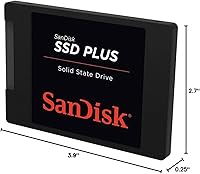
  • Dimensions: Physical dimensions measure 3.9 x 2.7 x 0.25 inches, consistent with the 2.5-inch SATA SSD standard.
  • Weight: At just 1.12 ounces, this SATA upgrade drive adds negligible weight to any laptop or desktop system.
  • Warranty: SanDisk backs this budget SSD with a 3-year limited manufacturer warranty covering defects in materials and workmanship.
  • Install Type: This is an internal drive only and requires physical installation inside a compatible laptop, desktop, or server enclosure.
  • Compatibility: It is compatible with any system or server array that accepts a standard 2.5-inch, 7mm SATA drive, including many older laptops and budget desktops.
  • Brand: Manufactured by SanDisk, a well-established storage brand with a long track record in both consumer and enterprise flash storage products.
  • Model Number: The official model identifier is SDSSDA-480G-G26, useful for confirming compatibility or registering a warranty claim.
  • Color: The drive enclosure is black, though it is installed internally and not visible during normal use.
  • Market Ranking: This drive holds a ranking of #115 in the Internal Solid State Drives category on Amazon, reflecting strong and sustained sales volume.

Related Reviews
SanDisk SSD PLUS 240GB Internal SSD

87%
88%
Performance
92%
Speed Improvement vs HDD
90%
Durability / Shock Resistance
87%
Value for Money
94%
Ease of Installation
More
SanDisk SSD Plus 2TB Internal SSD
82%
88%
Read Speed Performance
74%
Write Speed Performance
94%
Installation & Compatibility
91%
Value for Money
86%
Long-Term Durability & Reliability
More
SanDisk 2TB SSD Plus M.2 NVMe SSD
86%
89%
Performance
92%
Ease of Installation
88%
Reliability
91%
Value for Money
90%
Capacity
More
SanDisk Ultra 3D 500GB Internal SSD
87%
94%
Performance
91%
Value for Money
88%
Durability
93%
Read Speed
90%
Write Speed
More
SanDisk Ultra 3D NAND 2TB Internal SSD
89%
91%
Performance
89%
Read Speed
88%
Write Speed
90%
Build Quality
87%
Durability
More
SanDisk Ultra 3D NAND 4TB Internal SSD
91%
94%
Sequential Read Speed
91%
Sequential Write Speed
96%
Endurance & Reliability
88%
Ease of Installation
90%
Compatibility
More
SanDisk SSD Plus M.2 NVMe 500GB
90%
94%
Sequential Read Speed
87%
Sequential Write Speed
88%
Random Read/Write Performance
91%
Reliability & Longevity
95%
Ease of Installation
More
SanDisk Ultra 3D 1TB Internal SSD
79%
91%
Real-World Speed Improvement
88%
Installation Ease
84%
Value for Money
79%
Reliability and Longevity
93%
Compatibility
More
INLAND 2TB Performance Plus NVMe Internal Gaming SSD
88%
94%
Performance
93%
Speed (Read/Write)
90%
Compatibility with PS5
88%
Durability
92%
Ease of Installation
More
Kingston A400 480GB 2.5″ Internal SSD
84%
93%
Value for Money
78%
Read/Write Performance
91%
Installation Ease
82%
Build Quality
74%
Long-Term Reliability
More

FAQ

In most cases, yes. If your laptop has a standard 2.5-inch SATA drive bay — which the majority of laptops made in the past 15 years do — this SATA upgrade drive will slot right in. Just confirm your bay accepts 7mm-height drives, as a small number of older machines use 9.5mm bays, though a cheap spacer shim can bridge that gap if needed.

A small Phillips-head screwdriver is usually all the hardware you need to open the drive bay. For software, you'll want either a fresh OS installation via USB or a disk cloning tool to migrate your existing system — SanDisk does not include cloning software in the box, so you'd need a free option like Macrium Reflect or similar.

The difference is substantial and immediate. Boot times that previously took two to three minutes typically drop to under 20 seconds, and applications open almost instantly. It's one of the most impactful upgrades you can make to an older machine without replacing the whole system.

No, this is a SATA SSD, which is a different and older interface standard than NVMe. SATA drives like this one are capped at around 500–550 MB/s read speeds, while NVMe drives can reach 3,000–7,000 MB/s on modern hardware. For everyday use — browsing, documents, light media — the difference won't be noticeable, but for heavy workloads like 4K video editing or large game installs, NVMe has a clear edge.

Yes, you can place it in a 2.5-inch USB-to-SATA enclosure and use it as a portable external drive. Just keep in mind that actual transfer speeds will be limited by the USB standard of the enclosure, not the drive itself.

For most everyday users — students, home office workers, casual media consumption — 480GB is comfortably sufficient. If you store large video files, maintain a big photo library, or install many large games, you might feel the squeeze within a year or two, and a 1TB option might be worth considering instead.

SanDisk provides a 3-year limited warranty, which covers manufacturing defects. If the drive fails within that window under normal use, you'd contact SanDisk's support team directly to initiate a replacement. Keep your purchase receipt, as proof of purchase is typically required.

For typical home or office tasks, you're unlikely to notice any slowdown. The concern raised in some reviews relates to sustained heavy write workloads — think large sequential file transfers running continuously, or professional-level data crunching. If your usage is browsing, office apps, and streaming, this simply won't be an issue day to day.

It works with any system that has a physical 2.5-inch SATA bay, including Windows PCs and older Intel-based Macs that used that form factor. Note that most modern MacBooks have moved to proprietary internal storage and don't have accessible SATA bays, so this is primarily a PC and older Mac upgrade option.

Honestly, yes — the budget SATA SSD market is competitive, and drives from Crucial, Kingston, and Western Digital also sit at similar price points with comparable or occasionally better write endurance ratings. That said, this SanDisk drive's 4.7-star average across a very large number of verified buyers suggests it holds its own reliably, and SanDisk's brand support is a legitimate factor worth weighing.