Overview

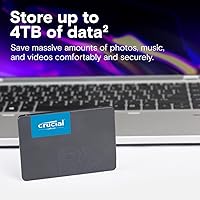
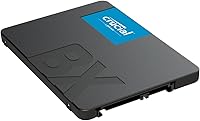
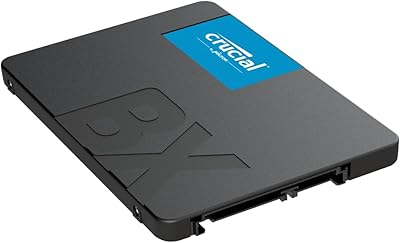
The Crucial BX500 4TB SATA SSD arrived in early 2024 as a straightforward answer to a very common problem: aging computers still running slow mechanical hard drives. At 4TB, it sits toward the upper end of what you'll find in the 2.5-inch SATA format, making it a genuinely high-capacity option without demanding a modern motherboard. Crucial backs the drive with Micron 3D NAND, the same memory technology the parent company has refined over four decades. Just know going in that SATA has an inherent speed ceiling — if your machine has an open M.2 slot, an NVMe drive will outrun it. But for straightforward upgrades, this Crucial drive hits a practical sweet spot.
Features & Benefits

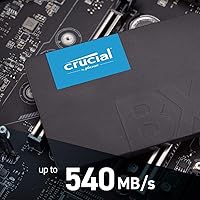
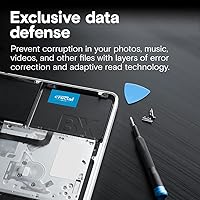
The most immediately noticeable spec is the 540MB/s read speed — not record-breaking by modern standards, but roughly six times faster than a typical 7200RPM hard drive. Day-to-day tasks like booting Windows or launching applications feel dramatically snappier. The drive also supports AES-256 hardware encryption, a quiet but useful inclusion for anyone storing sensitive files without wanting to lean on software-based solutions. Battery life also tends to improve on laptops after swapping to this SATA SSD, thanks to its substantially lower power draw. The 3-year warranty and Micron's manufacturing pedigree add a degree of confidence that cheaper no-name drives simply cannot match.

Best For

This Crucial drive makes the most sense for people upgrading an older laptop or desktop that lacks an M.2 slot entirely. It is also a natural fit for secondary bulk storage in a desktop build where you want capacity without paying NVMe prices — think large media libraries, game archives, or backup targets. Light NAS setups and home servers with SATA bays are another strong use case; 4TB gives real breathing room without a steep cost. Students refreshing an older machine will likely get the biggest satisfaction here. If raw speed is your priority and your system supports NVMe, the BX500 4TB is probably not your first choice.

User Feedback

With over 129,000 ratings averaging 4.7 out of 5, the feedback pool here is large enough to be genuinely meaningful. The dominant theme in positive reviews is immediate responsiveness gains — people dropping this into an old laptop running a spinning drive almost universally report a dramatic improvement. Installation gets consistent praise for being simple and plug-and-play. On the critical side, a recurring complaint involves the missing mounting bracket, which matters in desktop cases designed for 3.5-inch bays. A smaller subset raises fair questions about write endurance under heavy sustained workloads, a reasonable consideration given TLC NAND's inherent limitations over years of intensive use.

Pros

  • Transforms an old, sluggish laptop into a noticeably faster machine without replacing the hardware entirely.
  • 4TB in a single 2.5-inch drive eliminates the juggling act of managing multiple smaller storage volumes.
  • Plug-and-play SATA compatibility means virtually no risk of the drive not fitting your existing system.
  • Micron 3D NAND manufacturing heritage adds a layer of credibility that generic budget SSDs cannot match.
  • AES-256 hardware encryption is quietly useful for anyone storing sensitive personal or work files.
  • Battery life improvements on older laptops are a real, frequently reported benefit after the swap.
  • The BX500 4TB consistently ranks near the top of its class for cost per gigabyte in the SATA segment.
  • Silent operation removes the clicking and vibrating that made aging hard drives so distracting.
  • Crucial Storage Executive provides free health monitoring and firmware updates with minimal setup.
  • A 3-year warranty offers adequate peace of mind for home and light office use cases.

Cons

  • No mounting bracket included, which is a real inconvenience for standard desktop tower installations.
  • Write speeds fall well short of read speeds, and sustained performance dips once the cache fills.
  • TLC NAND endurance ratings are not suited for daily high-volume write workloads over several years.
  • Buyers with M.2 slots are leaving significant speed on the table by choosing SATA at this price point.
  • The Acronis cloning software offer has a redemption deadline that is easy to miss post-purchase.
  • Random IOPS performance is mediocre, making multitasking under heavier loads feel less responsive than NVMe alternatives.
  • Three-year warranty coverage is shorter than what several competing drives offer at similar price points.
  • No SATA data cable is included, which catches first-time builders off guard during desktop installations.
  • Firmware update history for this model is sparse, raising minor questions about long-term software support.
  • The price gap between the 2TB and 4TB variants is steeper than the capacity difference alone would justify.

Ratings

The Crucial BX500 4TB SATA SSD has been rated and scored by our AI system after analyzing tens of thousands of verified global buyer reviews, with spam, bot activity, and incentivized feedback actively filtered out. The result is an honest, balanced snapshot of how real users — from students reviving old laptops to home server builders — actually experience this drive. Both the genuine strengths and the recurring frustrations are reflected transparently in every score below.

Value for Money
91%
Buyers consistently point to the cost-per-gigabyte as one of the strongest selling points in the entire SATA SSD category. For users upgrading from a spinning hard drive on a tight budget, getting 4TB of solid-state storage at this price tier feels like a genuinely good deal, and most reviewers say so unprompted.
A small but vocal segment feels the pricing edges close to entry-level NVMe territory in certain markets, making the value proposition slightly less obvious for buyers who do have an M.2 slot available. The lack of included accessories also stings a little at this capacity level.
Read/Write Performance
74%
26%
Coming from a mechanical hard drive, the speed difference is immediately obvious — boot times drop dramatically, large file transfers that used to crawl now feel routine, and everyday application launches are noticeably snappier. For the SATA interface, the drive performs close to its rated ceiling consistently.
Buyers already familiar with NVMe drives will find the throughput unimpressive. Sequential write speeds are considerably lower than reads, and sustained write performance can dip further once the SLC cache is exhausted — something heavy-use scenarios like large video transfers will expose fairly quickly.
Installation & Compatibility
93%
The 2.5-inch form factor means this drive drops into almost any laptop or desktop with a SATA bay without adapters, drivers, or configuration hassle. A large portion of reviewers specifically mention completing the entire swap — clone, install, and boot — within an hour, often with no technical background.
Desktop users with cases designed around 3.5-inch drive bays will need a separate mounting bracket, which Crucial does not include in the box. This is a minor but recurring complaint, especially from buyers who assumed a 4TB capacity drive aimed at desktop use would come better equipped for it.
Endurance & Longevity
67%
33%
For typical home and office workloads — web browsing, document editing, media playback, and general file storage — the TLC NAND holds up well within normal daily write volumes. Users running the drive as a secondary storage or media archive report no reliability concerns after extended periods.
The BX500 line is not designed for write-intensive workloads, and the TBW rating reflects that. Power users writing large amounts of data daily — video editing scratch disks, database servers, or heavy virtualization — will likely find the endurance ceiling limiting over a multi-year ownership period.
Build Quality & Form Factor
83%
The drive feels solid and well-constructed for its class, and the slim 7mm profile fits even ultraslim laptop bays without issue. At just over an ounce, it is practically weightless, which matters to laptop users conscious of adding bulk.
The plastic-and-metal casing is functional but not particularly premium. There is no heatspreader, which is fine given SATA thermal constraints, but the overall packaging feels utilitarian rather than polished — not a dealbreaker, but noticeable against pricier competitors.
Software & Setup Experience
78%
22%
Crucial's Storage Executive software is available as a free download and handles firmware updates and drive health monitoring without requiring technical know-how. Cloning an existing drive using the bundled Acronis True Image offer is something many buyers appreciate for a clean, hassle-free migration.
The Acronis offer has a time-limited redemption window that some buyers miss, and the software suite itself is not pre-installed — users need to seek it out. A handful of reviewers found the cloning software less intuitive than expected, particularly when dealing with drives larger than the source.
Energy Efficiency
88%
Laptop users report a measurable improvement in battery runtime after replacing their old spinning hard drive with this SATA SSD. The lower power draw also means the system runs cooler and quieter, which is a quality-of-life improvement that goes beyond raw speed for notebook users.
While power consumption is excellent relative to HDDs, NVMe drives in low-power states can actually match or beat SATA SSDs on efficiency on modern systems. The advantage is most pronounced on older hardware where the HDD comparison is the relevant benchmark.
Thermal Performance
82%
18%
Under typical workloads, the drive stays well within safe operating temperatures without needing any active cooling. Reviewers running it in compact laptop chassis or cramped desktop cases do not report thermal throttling under everyday conditions.
Prolonged sequential writes — think transferring a full 4TB library in one session — can push temperatures higher, and there is no heatsink option from Crucial for this form factor. In enclosed NAS enclosures with limited airflow, sustained write temps are worth monitoring.
Capacity Availability
89%
4TB in a 2.5-inch SATA drive is genuinely useful for anyone consolidating storage — replacing a smaller SSD plus an old HDD with a single, fast drive is a compelling use case. Media collectors, game library hoarders, and backup-focused users all cite the sheer headroom as the primary reason they chose this over a smaller model.
The 4TB variant sits at a higher price jump relative to the 2TB model than the per-gigabyte math would suggest. Buyers who only need 2TB or less will find better value at lower capacities within the same BX500 lineup.
Random Access Speed (IOPS)
69%
31%
For typical desktop tasks — opening folders, loading save files in games, or running a system scan — the IOPS figures are more than adequate and represent a huge step up from any HDD. Casual users will never notice a limitation here.
The BX500 is not designed to compete on IOPS, and workloads that stress random access heavily — like running multiple virtual machines simultaneously or hosting a small database — will expose the drive's limits. Enthusiasts benchmarking with tools like CrystalDiskMark will see figures well below premium SSDs.
Noise & Vibration
97%
With no moving parts, the drive is completely silent under all conditions. Users upgrading from noisy, aging hard drives frequently mention the absence of seek noise and vibration as a surprisingly satisfying improvement to their overall computing experience.
There is genuinely little to criticize here — silent operation is a baseline expectation for any SSD. The only marginal consideration is that the silence makes any remaining system noise, like a loud fan, more noticeable by contrast.
Warranty & Brand Support
79%
21%
Crucial's 3-year limited warranty is standard for the budget-to-mid-range SATA segment, and the brand's long association with Micron gives buyers reasonable confidence in post-sale support. RMA processes are generally described as functional and not overly bureaucratic.
Three years is shorter than the 5-year warranty offered by some competing drives at comparable price points, and the warranty does not cover data recovery. For buyers storing irreplaceable files, the standard coverage may feel thin without a separate backup strategy in place.
Packaging & Unboxing
71%
29%
The drive arrives well-protected and clearly labeled, and the minimalist packaging is unlikely to result in shipping damage under normal handling. Eco-conscious buyers appreciate the relatively low-waste box design.
The unboxing experience is purely functional — there is no mounting hardware, no installation guide beyond a basic leaflet, and no cable included. At higher capacity price points, buyers often expect at least a SATA cable or 3.5-inch adapter to be bundled in.

Suitable for:

The Crucial BX500 4TB SATA SSD is purpose-built for a very specific and common upgrade scenario: older laptops and desktops that rely on a mechanical hard drive and lack an M.2 slot for NVMe storage. If you have a machine from the mid-2010s that boots slowly, lags during everyday tasks, and chews through battery life, swapping in this Crucial drive will produce a night-and-day improvement without requiring a new computer. It is also a strong pick for anyone building out a home media server or light NAS enclosure where SATA bays are plentiful and raw throughput is less important than sheer capacity at a reasonable cost. Students on a budget who need to consolidate storage — replacing both an aging SSD and a slow secondary HDD with one 4TB drive — will find the value proposition particularly compelling. Secondary storage roles in desktop builds, such as housing a large game library or serving as a local backup target, are another natural fit where this drive performs comfortably within its design limits.
Not suitable for:

The Crucial BX500 4TB SATA SSD is the wrong tool if your system has an available M.2 slot and you are chasing real performance gains — an NVMe drive at a comparable price point will outrun it by a factor of four or five in sequential throughput, and the difference is tangible in demanding workloads. Content creators transferring large video files regularly, or anyone running write-heavy applications like databases or virtual machine clusters, will likely hit the TLC NAND endurance ceiling faster than the 3-year warranty covers. Enthusiasts building a new system from scratch should not even consider SATA as a primary boot drive unless legacy compatibility is a genuine constraint. The drive also ships without a 3.5-inch mounting adapter, so desktop users with standard mid-tower cases will need to source one separately — a minor hassle that a few buyers discover too late. If long-term write endurance, peak random IOPS, or a 5-year warranty are non-negotiable requirements, competing drives in adjacent categories serve those needs better.
Specifications

  • Capacity: The drive offers 4TB of usable storage, making it one of the larger options available in the 2.5-inch SATA form factor.
  • Interface: It connects via SATA 6 Gb/s, which is backward compatible with SATA 3 Gb/s ports at reduced speeds.
  • Form Factor: The standard 2.5-inch form factor fits the vast majority of laptops, desktops, and NAS enclosures with a SATA drive bay.
  • Sequential Read: Maximum sequential read speed is rated at up to 540 MB/s under optimal conditions.
  • NAND Type: The drive uses Micron 3D NAND flash memory, which offers improved data retention and endurance compared to older planar NAND designs.
  • Encryption: Hardware-level AES-256 encryption is supported, enabling data security without relying on software-based encryption overhead.
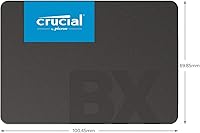
  • Dimensions: Physical dimensions measure 3.95 x 2.75 x 0.28 inches, with a 7mm z-height suitable for slim laptop bays.
  • Weight: The drive weighs just 1.23 ounces, adding negligible mass to any laptop or desktop installation.
  • Warranty: Crucial provides a 3-year limited warranty covering defects in materials and workmanship from the date of purchase.
  • Model Number: The official model identifier is CT4000BX500SSD1, used for warranty registration, firmware updates, and compatibility verification.
  • Compatibility: The drive is designed for internal installation in desktop PCs and laptops; it is not intended for external enclosure use without a separate SATA-to-USB adapter.
  • Power Draw: Solid-state design results in substantially lower power consumption than mechanical hard drives, contributing to improved battery life in laptop installations.
  • Operating Temp: The drive is rated for operation between 0°C and 70°C, covering standard consumer computing environments.
  • Vibration Resistance: With no moving parts, the drive is inherently resistant to shock and vibration that would otherwise risk data loss on a spinning hard drive.
  • Availability: This model became available in April 2024, positioning it as a relatively recent addition to the established BX500 product line.
  • Brand: Manufactured by Crucial, a brand owned by Micron Technology, one of the world's largest producers of NAND flash memory.
  • Connectivity: Uses a standard SATA data and power connector; no proprietary connectors or adapters are required for compatible systems.
  • Installation Type: Designed exclusively for internal installation; a 3.5-inch adapter bracket is not included and must be sourced separately for standard desktop tower bays.

Related Reviews
Crucial BX500 2TB SSD
85%
86%
Performance
91%
Value for Money
89%
Speed (Boot-Up and File Loading)
92%
Energy Efficiency
75%
Durability (Long-Term Use)
More
Crucial BX500 480GB SSD
88%
91%
Value for Money
89%
Performance Boost
85%
Speed (Read/Write)
92%
Power Efficiency
90%
Compatibility
More
fanxiang S101 4TB SATA SSD
85%
88%
Performance
91%
Read Speed
76%
Reliability
90%
Ease of Installation
85%
Shock Resistance
More
Crucial X6 4TB Portable SSD
87%
92%
Read Speed
90%
Portability
85%
Value for Money
88%
Durability
95%
Setup/Installation
More
ORICO S500PRO 4TB SATA SSD
86%
91%
Performance
88%
Build Quality
90%
Value for Money
89%
Installation Ease
75%
Reliability Under Load
More
Crucial P3 Plus 4TB NVMe SSD
86%
92%
Performance
95%
Speed and Responsiveness
75%
Installation & Setup
90%
Durability and Reliability
88%
Compatibility
More
Transcend SSD230S 4TB SATA III SSD
88%
88%
Performance
92%
Value for Money
90%
Reliability
85%
Compatibility
91%
Ease of Installation
More
Crucial X9 Pro for Mac 4TB Portable SSD
84%
91%
Performance
88%
Build Quality & Durability
85%
Portability & Size
82%
Software Bundle
94%
Compatibility with Apple Devices
More
SAMSUNG 870 QVO 4TB SATA III SSD
85%
88%
Performance
91%
Ease of Installation
84%
Reliability
92%
Value for Money
87%
Speed
More
ORICO Y20M M.2 2280 SATA SSD 4TB
85%
96%
Storage Capacity
91%
Value for Money
82%
Read Speed Performance
80%
Write Speed Performance
89%
Energy Efficiency
More

FAQ

Yes, and the difference is dramatic if you are coming from a spinning hard drive. Boot times, application launches, and general file access will all feel significantly snappier. Most users report the improvement is obvious within the first few minutes of use.

For most laptops you just need a small Phillips-head screwdriver to remove the back panel and swap the drive. Crucial offers free Storage Executive software for health monitoring, and there is an Acronis True Image cloning offer that helps you migrate your existing data without reinstalling your operating system — just make sure to redeem it promptly as it has an expiration window.

Yes, that is exactly the scenario this drive is built for. SATA 6 Gb/s is backward compatible with older SATA 3 Gb/s ports, so you will still get a massive improvement over a hard drive even on an older motherboard, just with a slight speed reduction from the interface ceiling.

No, and this catches a fair number of desktop buyers off guard. If your case only has 3.5-inch drive bays, you will need to pick up a 2.5-inch to 3.5-inch adapter bracket separately. They are inexpensive and widely available, but it is worth factoring in if you are building or upgrading a desktop tower.

For typical home and office workloads it is reliable and consistent. The TLC NAND has a finite write endurance rating, so if you are constantly writing huge amounts of data every day — think video editing or database work — you will want to check the TBW spec against your expected usage. For media storage, backup drives, or general everyday computing, longevity is not a practical concern for most users.

Absolutely, and that is one of the most common use cases. It works as a primary system drive on both Windows and macOS machines that have a SATA bay. Just make sure your system does not have an M.2 slot going unused — if it does, an NVMe drive will give you faster boot times at a comparable price.

Cloning always carries some risk, so it is smart to back up any irreplaceable files before you start. The Acronis software Crucial points you toward is well-established and generally reliable, but cloning a failing drive to a new one is where problems can occur. If your existing drive is already showing errors, a clean install is a safer path than cloning.

It will function in a NAS with SATA bays, and many home NAS users use it successfully for bulk storage or media serving. That said, it is not rated or optimized for 24/7 NAS workloads the way enterprise or NAS-specific drives are, so it is best suited for light home server use rather than a business-critical setup that runs continuously under heavy load.

Under typical workloads it stays well within safe temperature ranges and requires no active cooling. During prolonged, sustained writes — like filling the entire 4TB in one session — temperatures will rise, but thermal throttling is not commonly reported in standard home environments with reasonable airflow.

Crucial handles warranty claims through their support portal, where you register the drive using the model number and proof of purchase. The 3-year limited warranty covers manufacturing defects. It does not cover data recovery, so maintaining a separate backup of important files is strongly recommended regardless of warranty coverage.