Overview

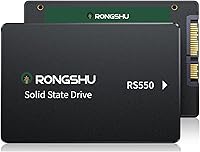
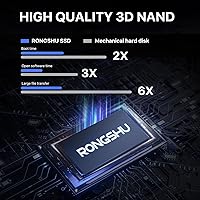
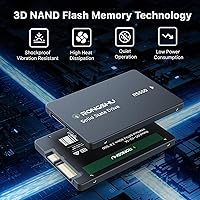
The RONGSHU RS550 1TB SATA SSD is a no-frills storage upgrade from Shenzhen Heshan Technology, aimed squarely at anyone still running an aging spinning hard drive. This budget SATA SSD slots into any standard 2.5-inch bay via SATA III, delivering up to 550 MB/s — roughly three times what a typical mechanical drive can manage. It uses 3D NAND TLC flash, which puts it a notch above the cheaper QLC alternatives flooding this price segment. The RONGSHU drive is not a household name, but it has already climbed to #213 in Amazon's Internal Solid State Drives category, suggesting real buyers are picking it up and mostly sticking with it.

Features & Benefits

The most practical gain this budget SATA SSD delivers is speed you actually feel. SLC caching handles burst workloads well — booting Windows, launching apps, copying a folder — and those tasks feel snappier than you would expect at this price. The 3D NAND TLC construction is a real differentiator over cheaper QLC drives; TLC tolerates more rewrites, which matters for daily file shuffling. Power draw is low, the drive runs completely silent, and the build includes basic shock resistance — useful if your laptop takes a knock. The one honest caveat: sustained large writes, like moving a huge video library, may slow once the SLC cache fills and the drive settles to its native TLC speed.

Best For

This 1TB upgrade drive is a strong fit for a specific scenario: you have a laptop or desktop that still works but crawls through boot and feels sluggish every time you open something. Swapping out the old mechanical drive for this budget SATA SSD is often the single most impactful upgrade you can make on such a machine. Students and home office workers get dependable everyday storage without a steep investment. Budget gamers can load it up with titles that do not demand NVMe-level performance. Where it makes less sense is heavy creative use — video editors and photographers moving large files constantly will likely hit the cache ceiling and want something more capable.

User Feedback

With 273 ratings averaging 4.6 out of 5, the early reception for the RONGSHU drive is genuinely encouraging for an unknown brand. Buyers consistently mention easy installation and a clear improvement in boot times after the swap — both credible, real-world outcomes. On the downside, there are legitimate gaps worth flagging: no published TBW figures make it hard to gauge long-term endurance, and warranty support clarity does not match what you get from Kingston, Crucial, or similar names. The review pool is still relatively modest, so a surge of longer-term feedback could shift this picture in either direction. A promising early signal, but worth revisiting once more time passes.

Pros

  • Booting from this budget SATA SSD instead of a spinning HDD feels like a completely different machine.
  • The 1TB capacity hits a sweet spot for students and home users who need real storage room.
  • 3D NAND TLC flash is a genuine step up from cheaper QLC drives common at this price point.
  • Installation is a straight swap — no adapters, no driver headaches, just plug in and go.
  • The drive runs completely silent and stays cool, which matters in cramped laptop enclosures.
  • Shock and vibration resistance adds meaningful durability for users who travel with their laptops.
  • Broad OS compatibility means it works whether you are running Windows 11, an older Linux distro, or macOS.
  • A 4.6-star average across 273 early ratings suggests most buyers are genuinely happy with the purchase.
  • At this price tier, 550 MB/s read speed is competitive with much more expensive SATA drives.
  • SLC caching handles everyday burst tasks — app launches, file copies, browser use — without hesitation.

Cons

  • No published TBW rating makes it impossible to confidently assess long-term endurance before buying.
  • Sustained large file writes slow down once the SLC cache fills, which is a real bottleneck for heavy users.
  • RONGSHU has no meaningful brand history or reputation to fall back on if something goes wrong.
  • Warranty terms and after-sale support are unclear compared to established storage brands.
  • The review pool is still relatively small, so long-term reliability trends are not yet established.
  • Not a fit for any system with an M.2 slot — buyers with modern machines are leaving performance on the table by choosing SATA.
  • Performance claims are based on a specific high-end test rig; real-world speeds on older hardware will likely be lower.
  • No included cloning software or mounting hardware, which may add friction for first-time upgraders.

Ratings

The RONGSHU RS550 1TB SATA SSD scores below are generated by our AI rating engine after analyzing verified global buyer reviews, with spam, bot-submitted, and incentivized feedback actively filtered out before any scoring is applied. The results reflect a transparent, unvarnished picture of where this budget SATA drive genuinely delivers and where real buyers have run into friction. Both the highlights and the honest shortcomings are represented so you can make a clear-eyed decision.

Value for Money
91%
Buyers consistently point to the price-to-capacity ratio as the standout reason they chose this drive. Getting a full terabyte of SSD storage at a price point that undercuts many established brands by a significant margin makes it a genuinely compelling option for anyone stretching a tight upgrade budget on an older machine.
The value equation holds firmly only if the drive lasts. Without published TBW figures, buyers are essentially making a faith-based calculation about longevity, and if the drive fails earlier than a name-brand alternative, the apparent savings evaporate quickly.
Installation Ease
88%
Most buyers report a straightforward plug-and-play experience. The standard 2.5-inch SATA form factor means no adapters, no proprietary connectors, and no surprises — just remove the old drive, seat this one in its place, and boot from your preferred OS or installation media.
No cloning software or mounting hardware is included, which creates a small but real friction point for first-time upgraders. Buyers who want to carry their existing OS and data over have to source their own tools, and that extra step catches some users off guard.
Read Performance
84%
In everyday use — launching applications, booting Windows, opening large folders — the SLC cache does its job and the drive feels quick and responsive. Buyers coming from spinning hard drives describe the difference as striking, which is exactly the comparison that matters most for this product's target audience.
The advertised 550 MB/s peak is measured on a high-end test rig that most buyers will never own. Real-world throughput on older SATA II motherboards or budget laptops runs noticeably lower, and a handful of reviewers noted that their benchmarks came in meaningfully below the headline figure.
Write Performance
76%
24%
For typical workloads — saving documents, downloading files, installing software — write performance feels solid and consistent. The SLC cache handles these short burst operations well, and buyers doing normal daily computing rarely encounter a moment where writes feel sluggish or delayed.
Sustained write performance is where the drive shows its budget-tier nature. Once the SLC cache fills during a large transfer — moving a game library or backing up a media folder — speeds drop to native TLC rates, which are noticeably slower and have drawn specific criticism from buyers who regularly move large files.
Boot Speed Improvement
89%
This is the single most universally praised outcome across buyer reviews. Users who swapped a 5400 RPM hard drive for this budget SATA SSD report Windows boot times dropping from over a minute to under 20 seconds in many cases. That visceral, immediate improvement is what drives the strong satisfaction scores.
Boot speed improvements are naturally more dramatic on machines with very slow baseline drives, and buyers with newer systems may perceive less of a transformation. A small number of reviewers on already-decent systems reported the improvement felt less significant than expected.
Flash Endurance
67%
33%
The choice of 3D NAND TLC over QLC is a meaningful differentiator at this price tier, as TLC cells genuinely tolerate more write cycles before degradation becomes a concern. Buyers using the drive for typical home or office workloads should see reasonable longevity under those conditions.
The absence of any disclosed TBW rating is a concrete problem for buyers trying to plan around the drive's lifespan. Without that number, there is no reliable benchmark to compare against competing drives, and endurance concerns surface repeatedly in longer-form buyer reviews.
Brand Trust
53%
47%
The early sales trajectory and the 4.6-star rating across 273 verified purchases suggest that the product functions as described for the majority of buyers. The manufacturer, Shenzhen Heshan Technology, is a real registered entity, which provides a baseline level of legitimacy compared to fully anonymous listings.
RONGSHU carries no meaningful brand recognition outside of Amazon's marketplace, and that anonymity creates genuine anxiety for some buyers. Questions about warranty enforcement, long-term parts availability, and reliable customer service remain largely unanswered, and several reviewers flagged this directly.
Noise and Heat
93%
With no moving parts whatsoever, the drive is completely silent under any workload — something buyers upgrading from noisy spinning disks notice and appreciate immediately. Heat output is minimal, and users in tight laptop enclosures report no thermal issues attributable to the drive itself.
This is an area with very little meaningful downside to report based on buyer feedback. The only marginal concern is that fanless designs in very confined enclosures depend on the surrounding system's airflow, which is a chassis-level issue rather than anything the drive itself introduces.
OS Compatibility
87%
Buyers across Windows versions from XP through 11, various Linux distributions, and older Intel-based Macs all report clean detection and trouble-free operation. The universal SATA interface means the drive requires no special drivers or firmware configuration on any supported platform.
A small number of macOS users noted that using it as a primary boot drive on newer Apple silicon machines is not possible given the architecture differences, though this is an inherent hardware limitation rather than a fault of the drive specifically.
Build Quality
72%
28%
The drive feels solid in hand — not flimsy or hollow — and the rated shock and dust resistance gives users a reasonable degree of confidence when installing it in a laptop that travels. For a drive at this price point, the physical construction is better than some buyers expected.
There is no independent verification of the shock or dust resistance claims, and the plastic casing does not inspire the same confidence as the metal enclosures found on more expensive drives. A few buyers noted the housing felt lighter and less substantial than name-brand alternatives they had previously owned.
Warranty Clarity
41%
59%
The product is sold through Amazon, which provides some baseline consumer protection through the platform's own return and dispute resolution policies, giving buyers at least a practical short-term safety net when something goes wrong within the return window.
The manufacturer's own warranty terms are not clearly stated in any accessible documentation, which is a real problem for buyers expecting multi-year coverage. Several reviewers expressed frustration about the lack of transparency here, and it remains one of the most cited reasons for hesitation among buyers who ultimately chose a competing brand.
Packaging and Unboxing
69%
31%
The drive arrives adequately protected for shipping, and buyers report no instances of damage in transit based on available feedback. The minimal packaging keeps costs down, which is consistent with the overall budget positioning of the product.
There is nothing beyond the bare drive in the box — no documentation, no mounting screws, no adapter bracket, and no data migration tool. For buyers who are not technically confident, that lack of supporting materials adds friction to what should be a simple upgrade process.
Compatibility with Older Machines
86%
This is genuinely one of the strongest use-case fits for the drive. Laptops and desktops from the mid-2000s onward with SATA ports accept it without issue, and the backward compatibility with SATA II connections means even older systems can benefit from the upgrade, albeit at reduced throughput.
A small subset of buyers with very old machines running early SATA I interfaces noted reduced compatibility, and others found that their older laptop BIOS did not immediately recognize the drive without a firmware update — a wrinkle that requires some technical confidence to resolve.

Suitable for:

The RONGSHU RS550 1TB SATA SSD was built for one job, and it does that job well: giving a slow, HDD-equipped machine a meaningful second life. If you have a laptop from the mid-2010s that still boots from a spinning disk, swapping in this budget SATA SSD is probably the single most impactful thing you can do for it short of buying a new computer entirely. Students who need a reliable, spacious drive for coursework, documents, and light media libraries will find the 1TB capacity generous at this price tier. Home office workers running standard productivity software — browsers, spreadsheets, video calls — will notice faster startup and snappier file access without needing to spend on premium storage. Budget-conscious gamers looking to offload titles from an overloaded primary drive onto a secondary one will also get solid value, as game load times on SATA are a clear step up from mechanical alternatives.

Not suitable for:

The RONGSHU RS550 1TB SATA SSD is not the right tool for buyers who need high-throughput, sustained write performance or the peace of mind that comes with an established brand name. Video editors, photographers processing large RAW libraries, or anyone regularly moving tens of gigabytes at a stretch will likely push past the SLC cache ceiling and experience a drop to slower native TLC write speeds — that is a real-world constraint, not a niche edge case. There are no published TBW figures on this drive, which makes it difficult to estimate how it will hold up over years of heavy daily use, and that ambiguity is a legitimate concern for anyone planning to rely on it as a primary drive in a work-critical machine. Buyers who want NVMe speeds — for fast boot drives, intensive workloads, or modern systems that support M.2 slots — should simply skip SATA entirely and invest in a budget NVMe option instead. If brand accountability and long-term warranty support matter to you, established names like Crucial, Kingston, or Western Digital offer comparable pricing with more transparent endurance data and customer service track records.

Specifications

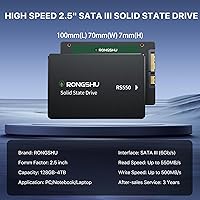
  • Capacity: This drive offers 1TB of usable storage, providing ample space for operating systems, applications, games, and personal files on a single 2.5-inch unit.
  • Form Factor: The 2.5-inch form factor is the standard size for laptop hard drive bays and desktop drive cages, making it a direct drop-in replacement for most older machines.
  • Interface: It connects via SATA III running at 6 Gb/s, and is backward compatible with SATA II ports, though at reduced maximum throughput.
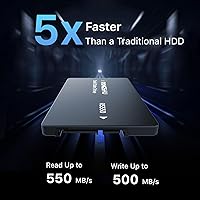
  • Sequential Read: Sequential read speed reaches up to 550 MB/s under controlled benchmark conditions using CrystalDiskMark 8.0.x on a high-end Intel test platform.
  • Sequential Write: Sequential write speed reaches up to 500 MB/s under the same benchmark conditions, which is competitive for a SATA-class drive at this price tier.
  • Flash Type: The drive uses 3D NAND TLC (Triple-Level Cell) flash memory, which offers better write endurance and reliability than QLC (Quad-Level Cell) alternatives common in budget storage.
  • Cache Technology: An SLC (Single-Level Cell) caching layer accelerates burst read and write operations, noticeably improving responsiveness for everyday tasks like booting and file transfers.
  • Dimensions: The drive measures 3.94 x 2.76 x 0.28 inches, conforming to the standard 2.5-inch slim profile used in most laptops and desktop drive bays.
  • Weight: At 1.31 ounces, the drive is extremely lightweight and adds negligible mass to any laptop or desktop system it is installed in.
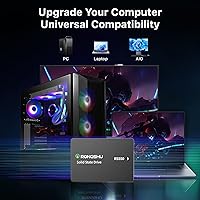
  • OS Compatibility: Compatible operating systems include Windows XP (SP2 and above) through Windows 11, macOS, and major Linux distributions, covering virtually all common computing environments.
  • Durability: The drive is rated shock resistant and dust resistant, and supports hot-swapping, making it more rugged than traditional spinning hard drives for mobile and general use.
  • Power Profile: The drive operates at low voltage with minimal heat output, which reduces thermal stress on surrounding components and extends overall system battery life in laptops.
  • Noise Level: With no moving parts, the drive operates in complete silence under all workloads, eliminating the clicking and spinning noise associated with mechanical hard drives.
  • Model Series: This drive belongs to the RS550 product series manufactured by Shenzhen Heshan Technology Co., Ltd, marketed under the RONGSHU brand.
  • BSR Ranking: As of its listing data, the drive holds the #213 position in Amazon's Internal Solid State Drives category, reflecting strong early sales momentum.
  • User Rating: The drive has accumulated 273 customer ratings with an average score of 4.6 out of 5 stars, indicating a high level of early buyer satisfaction.
  • Release Date: The product was first made available in May 2025, making it a relatively recent entrant in the budget SATA SSD segment.

Related Reviews

RONGSHU 1TB NVMe SSD
87%
91%
Performance
94%
Read Speed
89%
Write Speed
88%
Installation Ease
75%
Thermal Management
More
ORICO S500PRO 1TB SATA SSD
87%
91%
Performance
94%
Read Speed
88%
Write Speed
89%
Ease of Installation
85%
Build Quality
More
Transcend 1TB SATA III SSD
83%
92%
Value for Money
88%
Performance (Speed)
78%
Ease of Installation
90%
Reliability/Durability
85%
Compatibility
More
RAOYI 1TB 2.5″ SATA III Internal SSD
73%
88%
Value for Money
76%
Read/Write Performance
92%
Installation Ease
89%
Compatibility
61%
Brand Reliability
More
ORICO Y20M 1TB M.2 SATA SSD
80%
71%
Compatibility Clarity
78%
Read/Write Performance
91%
Installation Ease
83%
Value for Money
74%
Drive Longevity & Health Features
More
GiGimundo G500 1TB 2.5″ SATA SSD
84%
92%
Performance (Speed)
89%
Ease of Installation
85%
Build Quality (Durability)
91%
Value for Money
87%
Compatibility
More
Silicon Power A55 1TB Internal SSD
77%
92%
Value for Money
74%
Read/Write Performance
88%
Boot & System Responsiveness
83%
Build Quality & Form Factor
91%
Installation Experience
More
Western Digital WD Green 1TB Internal SSD
83%
91%
Real-World Speed Improvement
63%
Sustained Write Performance
94%
Ease of Installation
88%
Value for Money
82%
Long-Term Reliability
More
Ediloca EN206 1TB M.2 SATA SSD
84%
87%
Performance
92%
Value for Money
90%
Ease of Installation
88%
Compatibility with Devices
84%
Build Quality
More
Fikwot FN203 M.2 SATA SSD 1TB
85%
86%
Performance
91%
Installation Ease
88%
Reliability
89%
Read Speed
82%
Write Speed
More

FAQ

In most cases, yes. If your laptop uses a standard 2.5-inch hard drive bay with a SATA connector — which covers the vast majority of laptops made between roughly 2008 and 2020 — this drive will slot right in. The only situation where it might not fit is if your machine uses an older, thicker 2.5-inch drive with a 9.5mm height, as this drive is the slimmer 7mm profile. A quick check of your laptop's specs or a look at the existing drive label should confirm compatibility before you buy.

You generally just need a small Phillips-head screwdriver to open the drive bay panel on your laptop or mount the drive in a desktop cage. The drive itself requires no drivers — your operating system will recognize it automatically. If you want to transfer your existing data instead of doing a fresh install, you would need third-party cloning software like Macrium Reflect Free, since no software is included in the box.

The difference is dramatic for everyday tasks. Boot times on a modern operating system typically drop from over a minute to under 20 seconds. App launches, file browsing, and browser performance all feel noticeably snappier. The improvement is most pronounced on older machines where the hard drive was the primary bottleneck — which is exactly the scenario this budget SATA SSD is built for.

For general everyday use — browsing, documents, media, light productivity — yes, it should hold up well. That said, there are no published TBW (Terabytes Written) figures for this drive, which makes it harder to quantify long-term endurance precisely. If you are storing irreplaceable data, treat it like any drive and keep backups. For a primary drive in a low-to-medium workload environment, it is a reasonable choice at this price point.

The drive handles large transfers fine, but there is a nuance worth knowing. The SLC cache accelerates writes up to a point, and once that cache fills — which can happen during very large sustained transfers — the drive drops to its native TLC write speed, which is meaningfully slower. For occasional large moves, you probably will not notice much. If you are regularly shuffling dozens of gigabytes at a stretch, the slowdown becomes more apparent.

Yes. The drive itself is OS-agnostic — it is just a storage device. macOS and Linux will both recognize it without any special setup. Keep in mind that if you want to use it as a boot drive on a Mac, you may need to format it appropriately using Disk Utility, and older Intel-based Macs with a 2.5-inch bay are the most compatible scenario.

TLC (Triple-Level Cell) stores 3 bits of data per cell, while QLC (Quad-Level Cell) stores 4. That extra bit in QLC drives density but reduces how many times each cell can be written before it wears out. In practical terms, TLC holds up better under regular daily use over time. At the budget end of the market, many competing drives cut costs by using QLC, so the TLC choice here is a genuine positive worth noting.

It is a fair concern, and worth being clear-eyed about. RONGSHU is not an established name like Crucial or Kingston, and that does mean less transparency around warranty support and long-term brand accountability. That said, the manufacturer — Shenzhen Heshan Technology — is a real company, and the 4.6-star average across a growing pool of buyers suggests the product functions as advertised. The honest answer is that with any no-name brand drive, keeping backups is simply non-negotiable.

Warranty details are not prominently disclosed in the product listing, which is itself something to factor into your decision. When buying budget storage from a lesser-known brand, it is worth checking the seller's return policy on the platform you purchase from as a practical safety net, since manufacturer warranty claims can be harder to navigate with smaller brands.

Absolutely — this is actually one of the most sensible uses for it. Installing your game library on this 1TB upgrade drive while keeping your primary OS on a faster NVMe gives you plenty of space at low cost. SATA speeds are more than sufficient for loading most game assets, and the silent, low-heat operation is well suited to a desktop environment where it will run for long stretches.