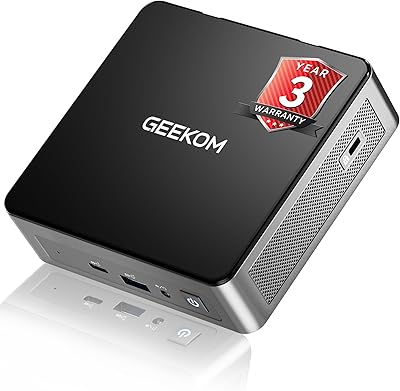
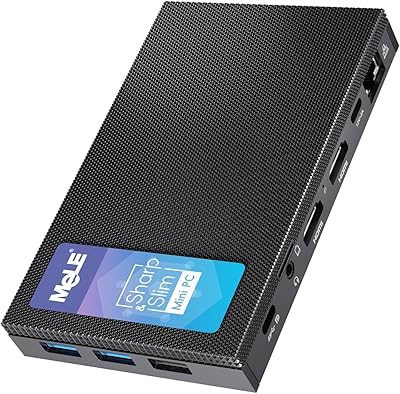
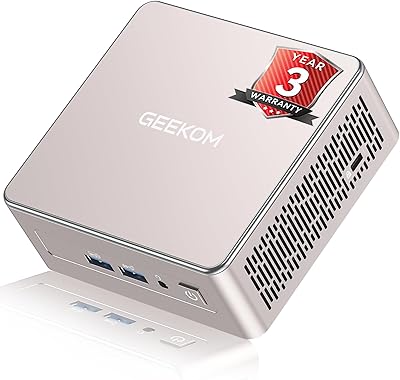
Overview

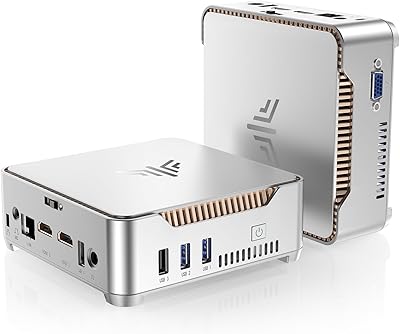
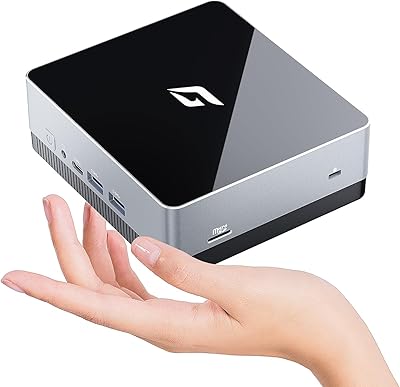
The PELADN WI-6 Mini PC (N100, 16GB DDR4, 512GB SSD) is one of those rare budget desktops that genuinely earns its place on a desk — or behind a monitor, or tucked inside a media cabinet. It measures just 5x5x2 inches and weighs under two pounds, yet it handles everyday computing without feeling underpowered. Intel's 12th-gen Alder Lake N100 chip does the heavy lifting, and the unit ships with an OS preinstalled, which means most users are up and running within minutes of unboxing. No tower clutter, no tangled cable mess — just a palm-sized footprint that quietly gets the job done.
Features & Benefits

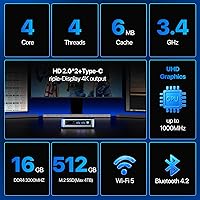
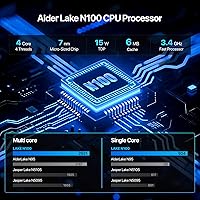
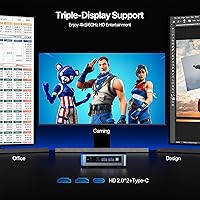
What makes this mini PC interesting is how much connectivity it packs into such a small chassis. The N100 chip bursts to 3.4GHz while drawing as little as 6 watts at idle, keeping power consumption low and heat manageable. The real standout is triple 4K display support — two HDMI 2.0 ports and a Type-C output let you run three monitors at 3840x2160 and 60Hz simultaneously, which is genuinely unusual at this price tier. Add Wi-Fi 6, Gigabit Ethernet, and 16GB of DDR4 RAM, and this compact desktop handles spreadsheets, video calls, and browser-heavy workloads without complaint. An active cooling fan keeps sustained performance stable during longer sessions.

Best For

This mini PC suits remote workers and students who want a proper desktop experience without sacrificing desk space. It also makes a compelling case for home theater builds — the triple 4K output is rare at this price, and connecting it to a large display or projector works without drama. Small businesses will appreciate it for digital signage or lightweight point-of-sale terminals. The PELADN WI-6 is also a natural fit for laptop users ready to switch to a stationary machine but unwilling to deal with a bulky tower. Linux enthusiasts get an accessible entry point too, since the hardware is well-supported by Ubuntu and similar distributions.

User Feedback

Buyers rate this compact desktop at 4.3 out of 5, with recurring praise focused on fast boot times and smooth day-to-day browsing performance. The triple-monitor capability earns consistent admiration from users who expected to spend significantly more for that feature. On the critical side, several buyers flag uncertainty around the preinstalled OS — activation status and the exact build included are not always clearly disclosed, so it is worth clarifying before purchasing. Fan noise surfaces occasionally in reviews; it is not silent under sustained load, though most describe it as a tolerable background hum rather than a distraction. A few users also wish for better expandability, specifically a second M.2 slot.

Pros

  • Triple 4K display output across three monitors is genuinely rare at this price point.
  • Boots to a usable desktop in well under 15 seconds thanks to the onboard SSD.
  • Wi-Fi 6 and Gigabit Ethernet together cover both wireless and wired connectivity needs well.
  • The compact 5x5x2 inch chassis fits behind a monitor or inside a media cabinet with ease.
  • 16GB of DDR4 RAM handles real multitasking without the sluggishness common in budget mini PCs.
  • Active cooling keeps the N100 running at consistent speeds rather than throttling under load.
  • Linux compatibility is solid out of the box, making it a practical platform for open-source users.
  • At under two pounds, repositioning or VESA-mounting the unit takes minimal effort.
  • The port layout is practical and well-organized, covering most peripheral needs without a hub.

Cons

  • OS licensing status is unclear at purchase and has caught multiple buyers off guard post-delivery.
  • Only one M.2 slot means storage upgrades require replacing the existing drive entirely.
  • Fan noise becomes noticeable during sustained CPU-heavy tasks, which is a concern in quiet spaces.
  • The Type-C port is primarily display-focused, limiting its usefulness for data transfer or charging.
  • Integrated graphics cannot handle modern games or GPU-accelerated creative workloads.
  • Wi-Fi range at distance from the router is mediocre compared to laptops with larger antenna arrays.
  • The external power brick adds a separate component that partially undermines the clean compact setup.
  • Bundled cables are short, often requiring aftermarket replacements depending on desk configuration.
  • No SD card slot, which is a gap for photographers or users who regularly work with memory cards.

Ratings

The PELADN WI-6 Mini PC (N100, 16GB DDR4, 512GB SSD) has been scored by our AI system after processing verified buyer reviews from global markets, with spam, incentivized, and bot-generated feedback actively filtered out before analysis. The scores below reflect genuine satisfaction patterns across thousands of real-world users — from home office setups to small business deployments. Both the strengths that make this compact desktop genuinely appealing and the friction points that may give certain buyers pause are transparently represented.
Value for Money
88%
For buyers who want a capable everyday desktop without a large outlay, this mini PC consistently over-delivers. The combination of 16GB RAM, a fast SSD, and triple 4K output at this price tier is difficult to match with competing options, and most users feel they received more than they paid for.
A small segment of buyers feel the OS situation — where activation status is ambiguous at purchase — creates hidden costs that erode the perceived value. If a full licensed OS purchase is required post-delivery, the total cost picture shifts noticeably.
Performance for Daily Tasks
83%
Web browsing, video calls, document editing, and media playback all run without frustration on this compact desktop. The N100 chip handles a dozen browser tabs alongside a spreadsheet and a video stream without the stuttering that plagues older budget chips like the J4125.
Users who push the machine toward video transcoding, large data sets, or any sustained CPU-heavy task will hit a ceiling fairly quickly. This is an efficient chip, not a fast one — sustained workloads expose that distinction clearly.
Triple-Display Support
91%
The ability to run three independent 4K monitors at 60Hz is a genuine standout for a machine at this price point. Users setting up multi-monitor home offices or media walls report that all three outputs work reliably without signal degradation or compatibility quirks.
The integrated Intel UHD Graphics handles display output well but has real limits — expecting smooth playback across three high-resolution streams simultaneously will push it. Some users also note that Type-C display compatibility depends heavily on the monitor or adapter used.
Build Quality & Design
74%
26%
The chassis feels solid for its class, with a clean matte finish and a compact form that looks professional on a desk or mounted behind a monitor. At under two pounds, it is easy to reposition, and the port layout on the front and rear is logically organized.
The plastic housing does not inspire premium confidence, and a few buyers note the blue color variant looks slightly different from product images. Thermal management is functional but the unit does get warm to the touch during extended use, which concerns some users.
Setup & Out-of-Box Experience
71%
29%
Physically setting up this mini PC is refreshingly quick — plug in monitors, connect power, and the machine boots into a preinstalled OS without needing a USB installer or technical knowledge. Non-technical buyers consistently report getting to a usable desktop in under ten minutes.
The OS preinstallation creates real confusion around licensing. Several buyers discovered post-purchase that Windows required a separate activation key or that the installed build was not a full retail version. This is a recurring complaint that PELADN has not addressed clearly in its product listing.
Connectivity & Port Selection
86%
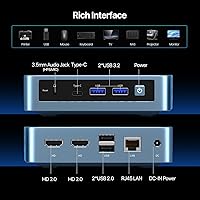
Wi-Fi 6, Gigabit Ethernet, Bluetooth 4.2, two USB 3.0 ports, two USB 2.0 ports, and a 3.5mm combo audio jack cover virtually every peripheral scenario a home or small-office user will encounter. The Gigabit LAN in particular is appreciated by users who prefer wired stability for video calls.
There is no SD card slot, and USB-C is reserved primarily for display output rather than data or charging, which limits its versatility. Power users wanting more USB 3.0 ports will need a hub, which adds desk clutter this form factor was designed to avoid.
Fan Noise & Thermal Management
68%
32%
The active cooling fan keeps the N100 running at consistent speeds during prolonged sessions, preventing the thermal throttling that silent passive-cooled mini PCs often suffer. Most users describe the fan noise during normal use as a low, unobtrusive hum.
Under sustained CPU load — during large file transfers, extended video playback, or background updates — the fan ramps up noticeably. Users working in quiet environments, such as shared bedrooms or library-style home offices, flag this as more disruptive than expected.
Storage Performance
84%
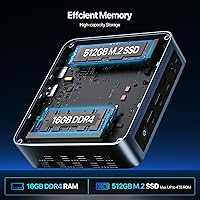
The 512GB SSD delivers quick boot times — buyers commonly report reaching the desktop in under fifteen seconds — and application launch speeds that feel responsive even when several programs are open simultaneously. File transfers to and from USB 3.0 devices are also satisfyingly quick.
The SSD is not user-replaceable without some disassembly, and there is only one M.2 slot, leaving no room for a storage upgrade without replacing the existing drive entirely. Users who planned to add a second drive were caught off guard by this limitation.
Expandability & Upgradability
53%
47%
The single M.2 slot can technically be swapped for a higher-capacity drive, giving users some flexibility if they need more storage down the line. The RAM soldered configuration at least comes generously provisioned at 16GB, reducing the urgency of upgrading.
There is no second M.2 slot and no RAM upgrade path since memory appears fixed in this configuration. For buyers who like to grow into a machine over several years, this is a real structural limitation that makes the unit feel more disposable than expandable.
Multi-Monitor Compatibility
79%
21%
Users running dual-monitor setups report plug-and-play reliability with standard HDMI cables, and the machine correctly identifies and configures displays on first boot in most cases. The Type-C port adds genuine flexibility for users with USB-C monitors.
Triple-monitor configurations require more careful setup, and some users needed to adjust refresh rate settings manually to achieve stable 4K output on all three screens. Adapter quality for the Type-C port significantly affects whether the third display works without signal drop.
Linux & OS Compatibility
81%
19%
Ubuntu and other mainstream Linux distributions install and run cleanly on this compact desktop, with most hardware including Wi-Fi and Bluetooth recognized without manual driver work. This makes it a practical entry point for developers or enthusiasts who prefer open-source environments.
The preinstalled OS situation remains murky regardless of whether users intend to run Windows or Linux. Buyers who expected a fully licensed Windows installation and then switched to Linux still felt misled by the product listing, which does not communicate OS details clearly.
Size & Portability
93%
At 5x5x2 inches and under two pounds, this is one of the easier mini PCs to tuck behind a monitor, slide into a drawer, or carry between rooms. VESA mounting compatibility makes permanent installation behind a display clean and cable-friendly.
The compact size means the power brick is external and adds a separate component to manage. Some buyers find the bundled cables short, requiring longer aftermarket options for certain desk configurations.
Wireless Performance
77%
23%
Wi-Fi 6 support gives this mini PC a meaningful edge over older budget desktops still shipping with Wi-Fi 5 adapters. Users in homes with Wi-Fi 6 routers report stable, fast connections suitable for HD video streaming and large file downloads.
In environments with older routers, the Wi-Fi 6 advantage disappears and several users report that range at distance from the router is mediocre compared to laptops with larger antennas. The Ethernet port remains the more reliable choice for bandwidth-sensitive tasks.
Media Playback
82%
18%
4K video playback via local files or streaming services runs smoothly on this compact desktop, and the triple-display capability is a practical asset for users who want a media server or home theater hub connected to a large TV and secondary displays simultaneously.
Hardware-accelerated decoding covers common formats well, but niche or high-bitrate formats occasionally cause dropped frames. The integrated GPU is not designed for any level of gaming beyond very lightweight titles, and buyers expecting casual gaming performance are likely to be disappointed.

Suitable for:

The PELADN WI-6 Mini PC (N100, 16GB DDR4, 512GB SSD) is a strong fit for anyone who needs a capable everyday desktop without dedicating significant desk real estate to it. Remote workers and students who spend their days in browsers, video calls, and productivity apps will find it handles those tasks comfortably without the bulk or noise of a traditional tower. The triple 4K display support makes it surprisingly attractive for home theater setups or multi-monitor productivity rigs where space and budget are both constrained. Small businesses looking for lightweight, low-maintenance workstations — for point-of-sale terminals, digital signage, or basic administrative tasks — will appreciate how little this compact desktop demands in terms of space and power consumption. Linux enthusiasts also have a genuinely accessible platform here, since Ubuntu and similar distributions install cleanly with minimal driver friction. If you are coming from an aging laptop and want to transition to a stationary machine without committing to a full-size desktop, this mini PC offers a logical, low-risk upgrade path.
Not suitable for:

The PELADN WI-6 Mini PC (N100, 16GB DDR4, 512GB SSD) is not the right choice for buyers who need sustained computational muscle. The N100 chip is efficient by design, not fast by ambition — tasks like video editing, software compilation, large dataset processing, or any workload that keeps the CPU pegged for extended periods will expose its ceiling quickly. Gamers should look elsewhere entirely; the integrated Intel UHD Graphics can manage very light casual titles at best, and expecting anything resembling a smooth gaming experience on modern titles would be a mistake. Buyers who like to upgrade their machines over time will also find this compact desktop limiting — with a single M.2 slot and no clear RAM upgrade path, the hardware you receive is largely the hardware you are stuck with. The OS situation is another consideration: if you need a fully licensed, retail version of Windows out of the box, confirm activation status before purchasing, as the listing language around this is genuinely ambiguous and has frustrated buyers post-delivery. Finally, users in very quiet environments who are sensitive to fan noise may find the unit slightly intrusive under sustained load.
Specifications

  • Processor: Intel Alder Lake N100 (12th Gen) with a base frequency of 2.0GHz and a burst frequency of up to 3.4GHz.
  • TDP: Power draw ranges from 6W at base load up to 15W under sustained burst, keeping energy consumption very low compared to standard desktop CPUs.
  • RAM: 16GB DDR4 SDRAM is installed at the factory; this configuration is fixed and cannot be upgraded via a standard slot.
  • Storage: 512GB M.2 SSD provides the primary storage, with no secondary drive bay available for expansion without replacing the existing drive.
  • GPU: Intel UHD Graphics (integrated) handles display output and light media decoding; no discrete graphics card is present.
  • Display Outputs: Two HDMI 2.0 ports and one USB Type-C port support simultaneous triple-display output at up to 3840x2160 resolution and 60Hz refresh rate.
  • Wireless: Wi-Fi 6 (802.11ax) is supported alongside a 1000Mbps (Gigabit) RJ45 Ethernet port for wired network connections.
  • Bluetooth: Bluetooth 4.2 is built in, supporting standard peripherals such as keyboards, mice, and headsets without a USB dongle.
  • USB Ports: Four USB ports are provided in total: two USB 3.0 ports and two USB 2.0 ports, distributed across the front and rear panels.
  • Audio: A single 3.5mm combo jack supports both headphone output and microphone input simultaneously.
  • Dimensions: The unit measures 5 x 5 x 2 inches (approximately 127 x 127 x 51mm), making it small enough to sit behind most monitors.
  • Weight: The PELADN WI-6 weighs 1.79 pounds (approximately 812 grams) without the external power adapter.
  • Cooling: An active cooling fan is included inside the chassis to manage CPU temperatures during sustained workloads and prevent thermal throttling.
  • Operating System: An OS is preinstalled at the factory; the unit also supports Linux distributions including Ubuntu with broad hardware driver compatibility.
  • VESA Mounting: The chassis is compatible with VESA mounting brackets, allowing the unit to be attached directly to the back of a compatible monitor or display arm.
  • Warranty: PELADN provides a one-year warranty serviced through the seller contact system via the buyer's Amazon order history.
  • Color: The reviewed unit is available in Blue; finish is matte plastic across the top and side panels.
  • Power Input: Power is supplied via an external DC jack adapter; the power brick is not integrated into the chassis and adds a separate component to the setup.

Related Reviews
CyberGeek Nano A1 Ubuntu Linux Mini PC, Intel 12th Gen N100, 16GB RAM, 512GB SSD

85%
88%
Performance
90%
Connectivity
85%
Build Quality
84%
Usability
76%
Software/OS Experience
More
Beelink Mini S12 Pro (N100, 16GB, 500GB)

83%
83%
Everyday Performance
91%
Value for Money
76%
Build Quality & Design
84%
Thermal Management & Noise
88%
Connectivity & Ports
More
ACEMAGICIAN Kron Mini K1 Mini PC, Ryzen 7 7730U, 16GB RAM, 512GB SSD
85%
88%
Value for Money
91%
Performance for Everyday Tasks
94%
Compact Design & Portability
90%
Setup & Ease of Use
78%
Gaming Performance (Light)
More
Blackview MP60 Mini PC, 16GB RAM, 512GB SSD
88%
88%
Performance
94%
Compactness and Design
85%
Multitasking Capability
91%
Energy Efficiency
90%
Display and Connectivity
More
GEEKOM Air12 Mini PC 16GB/512GB
82%
88%
Value for Money
82%
Everyday Performance
71%
Build Quality
74%
Thermal Management & Noise
91%
Connectivity & Port Selection
More
KAMRUI GK3Plus Mini PC (N95, 16GB RAM, 512GB SSD)
81%
89%
Multitasking Performance
92%
Value for Money
86%
Thermal Management
84%
Display Versatility
81%
4K Media Playback
More
MeLE Mini PC Quieter 4C, 16GB RAM, 512GB SSD
87%
85%
Performance
90%
Build Quality
88%
Display Quality
93%
Energy Efficiency
92%
Noise Level
More
GEEKOM A5 2025 Edition Mini PC, 16GB RAM, 512GB SSD
88%
86%
Performance
90%
Build Quality
92%
Value for Money
95%
Ease of Setup
88%
Connectivity
More
KAMRUI Essenx E2 N150 Mini PC, 16GB RAM, 512GB SSD
86%
88%
Performance
92%
Value for Money
90%
Cooling and Noise Level
85%
Dual Display Support
80%
Build Quality
More
BOSGAME Mini PC E3 (N150, 16GB/512GB)
79%
88%
Value for Money
74%
Processing Performance
91%
Multi-Display Support
89%
Connectivity & Ports
76%
Build Quality & Design
More

FAQ

This is genuinely one of the most common points of confusion with this unit. The listing states an OS is preinstalled, but it does not clearly confirm whether Windows comes with a valid retail activation key. Some buyers receive a fully activated copy, while others find they need to purchase a license separately to unlock full functionality. It is worth contacting the seller directly before purchasing to confirm exactly what OS version and activation status you will receive.

It genuinely does support triple-display output — two HDMI 2.0 ports and one Type-C port all carry independent display signals simultaneously. Multiple buyers have confirmed this works in practice. That said, for the Type-C port you will need a monitor with a compatible USB-C input or a quality active adapter, since passive adapters can cause signal instability on that third display.

During light tasks like web browsing, document editing, or video streaming, most users describe the fan as a quiet background hum that is easy to ignore. It does ramp up under heavier loads such as large file transfers or extended video rendering, becoming more noticeable at that point. For a quiet home office or library-style environment, this is worth factoring in — it is not a silent fanless device.

Unfortunately, no. The 16GB DDR4 is fixed in this configuration and cannot be swapped out through a user-accessible slot. The good news is that 16GB is a reasonable starting point for everyday tasks, so most users will not feel the constraint unless they move into memory-intensive workflows like virtual machines or large data processing.

Yes, and it works well. Ubuntu in particular installs cleanly on the PELADN WI-6 Mini PC (N100, 16GB DDR4, 512GB SSD), with Wi-Fi, Bluetooth, and display outputs all recognized without manual driver installation in most cases. It is one of the more Linux-friendly mini PCs at this price point, which is part of why it appeals to developers and tinkerers.

Yes, for standard 4K streaming this compact desktop performs reliably. The N100 chip includes hardware-accelerated decoding for common video codecs, which takes the load off the CPU and allows smooth playback. Where it can struggle is with very high-bitrate local video files in niche formats that fall outside its hardware decoder support.

Very light gaming is possible — older titles from the early 2010s and many indie games with modest GPU requirements will run at low-to-medium settings. Do not expect smooth performance from modern AAA titles or anything released in the last few years at reasonable settings. The integrated Intel UHD Graphics is not designed for gaming; it is a display and media output solution first.

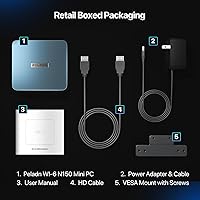
Typically the box includes the mini PC unit itself, an external power adapter with a DC cable, and HDMI cable, and a brief setup guide. Monitor cables beyond the included HDMI are generally not provided, so if you plan to use all three display outputs from day one, make sure you have a suitable cable or adapter for the Type-C port ready in advance.

Yes, the chassis is VESA-compatible, which is one of the more practical features of this form factor. You will need a VESA mount adapter plate specific to mini PCs, which are widely available and inexpensive. Once mounted, the unit disappears behind the display entirely, leaving only cable runs visible.

For users tired of a laptop's thermal throttling, limited port selection, and degrading battery life, this mini PC is a compelling stationary alternative. You get a more stable thermal environment, proper Gigabit Ethernet, and a chip that does not compromise performance to protect a battery. The trade-off is that you need a separate monitor, keyboard, and mouse — but if you already have those, the transition is straightforward and the performance per dollar is strong.