Overview

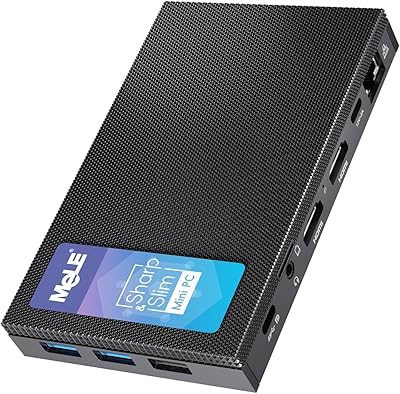
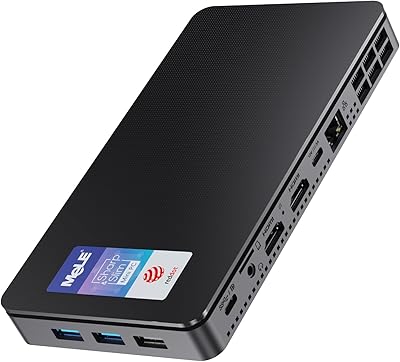
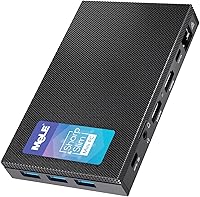
The MeLE Quieter3C Mini PC N5105 16GB/512GB is about as unassuming as desktop computers get — a flat, palm-sized slab that weighs less than a coffee mug and barely clears an inch in height. Powering it is Intel's 11th Gen N5105, a quad-core chip that handles everyday tasks without complaint: web browsing, document editing, video calls, and light media playback. Don't expect it to muscle through demanding workloads — that's simply not what this machine was designed for. At its price point, it sits comfortably among passive-cooled mini PCs, offering a genuinely silent alternative to noisier budget desktops for anyone who values a clean, low-footprint setup.
Features & Benefits

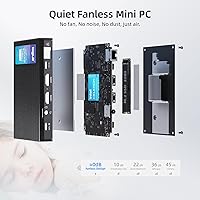
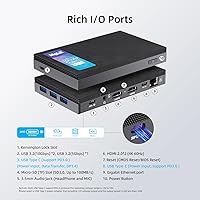
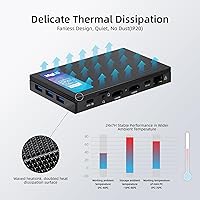
Silence is the headline feature here, and the MeLE Quieter3C delivers on it completely — no fan means zero acoustic output, ever. The passive cooling design keeps things running around the clock, though the chassis does get noticeably warm under load, reaching between 55°C and 70°C on the surface. That's within international safety standards, so it isn't dangerous, just worth knowing before you rest it on your lap. On the connectivity side, you get dual HDMI ports capable of 4K output, plus a USB-C port that handles video, data, and PD charging simultaneously. The 16GB of onboard RAM paired with a fast NVMe SSD keeps daily tasks moving at a decent clip, and the M.2 slot means you can drop in a larger drive later if needed.

Best For

This compact desktop really shines in situations where quiet matters more than raw power. Set it up behind a TV and it becomes a capable, near-invisible home theater PC — no fan noise interrupting your movie. It's equally at home as a digital signage or kiosk machine, where its auto power-on and PXE boot support make unattended deployments straightforward. For daily office work — emails, spreadsheets, video calls — it handles the load without breaking a sweat. The USB-C PD support is a surprisingly practical perk for anyone who needs a portable computing solution powered by a power bank. If you're replacing an old thin client or just want a no-fuss, low-noise desktop, this hits the mark well.

User Feedback

Owners of the MeLE Quieter3C are largely happy with their purchase, and the consistent theme across reviews is appreciation for how quiet and compact it is in practice. Setup gets called out as genuinely painless, and most buyers note the included accessories cover the basics. On the downside, the soldered RAM comes up regularly — 16GB is fine today, but knowing you can never upgrade it does sting for buyers thinking long-term. A few reviewers were caught off guard by how warm the chassis gets, though once explained in context, most accept it as a reasonable trade-off for fanless design. Wi-Fi 5 divides opinion, with some finding it perfectly adequate and others wishing MeLE had stepped up to a newer wireless standard.

Pros

  • Completely silent operation makes it ideal for bedrooms, living rooms, and noise-sensitive workspaces.
  • The slim, palm-sized chassis is smaller and lighter than most streaming sticks and set-top boxes.
  • Dual HDMI 4K outputs plus USB-C video give flexible multi-display options rarely seen at this price tier.
  • Ships with a fast NVMe drive — boot times and everyday app responsiveness feel well above its budget class.
  • The M.2 expansion slot lets you drop in a larger NVMe drive up to 4TB as storage needs grow.
  • USB-C PD support means this fanless mini PC can run off a compatible power bank for mobile deployments.
  • Auto power-on and PXE boot make it genuinely practical for unattended commercial or kiosk installations.
  • Plug-and-play setup is consistently praised — most buyers are up and running within minutes of unboxing.
  • Gigabit Ethernet delivers stable wired performance for users who prioritize reliability over wireless convenience.
  • Fanless passive design eliminates the most common long-term hardware failure point found in traditional desktops.

Cons

  • Soldered RAM means 16GB is a permanent ceiling — no upgrade path exists if needs grow over time.
  • Chassis surface temperatures between 55°C and 70°C under load catch many first-time buyers off guard.
  • Wi-Fi 5 lags behind the Wi-Fi 6 standard now common in competing mini PCs at similar price points.
  • Ships without an operating system — buyers expecting a ready-to-use machine will need to install one themselves.
  • The USB-C port requires a minimum 24W power supply to boot, ruling out many common power banks.
  • No RAM or CPU upgrades are possible, making the hardware obsolete on a fixed, non-extendable timeline.
  • Sustained heavy workloads trigger thermal throttling, reducing performance noticeably during prolonged intensive tasks.
  • Internal M.2 slot is NVMe-only — budget SATA drives purchased for expansion will not be compatible.
  • Sparse official documentation makes configuring advanced features like PXE boot harder than it needs to be.
  • Limited warranty and repair options mean a board-level failure is likely to result in full unit replacement.

Ratings

The MeLE Quieter3C Mini PC N5105 16GB/512GB earns its 4.2-star standing through a consistent pattern of praise for silent operation and compact practicality, backed by feedback from verified global buyers whose reviews were processed by our AI to filter out incentivized and bot-generated submissions. This analysis reflects the full picture — where the machine genuinely delivers and where real owners have run into limitations — so you can make a fully informed call before purchasing.

Noise Level
97%
This is where the MeLE Quieter3C earns its name without any asterisks. Buyers running it in bedrooms, home offices, and living rooms consistently report hearing absolutely nothing — not a hum, not a tick. For anyone who has ever been driven mad by a whirring fan during late-night work sessions, this is a genuine relief.
There is almost nothing to criticize here, though a small number of users noted that the passive cooling causes the metal chassis to radiate warmth, which some interpreted as a sign something was wrong. It is not — it is just physics — but first-time fanless PC owners may find it unsettling initially.
Build Quality & Design
83%
The aluminum-finished chassis feels solid and purposeful for its size, and buyers frequently comment on how much smaller it is in person than they expected. At just 7.2 ounces, it tucks behind a monitor with a VESA mount or sits flat on a desk without demanding any real estate.
The plastic bottom panel feels slightly cheaper compared to the top surface, and a handful of reviewers mentioned the port layout feels a touch cramped when multiple cables are plugged in simultaneously. Nothing that affects function, but it's noticeable if you care about the finer details.
Thermal Management
71%
29%
The passive cooling system does its job — the chip stays within operating limits under sustained load, and the unit is rated for continuous 24/7 use. For kiosk or digital signage deployments running light tasks around the clock, this thermal approach is well-suited and proven reliable by commercial users.
Surface temperatures between 55°C and 70°C under load catch buyers off guard regularly, and it is one of the most common complaints in reviews. While this meets international safety standards, placing the unit in an enclosed cabinet or poorly ventilated space will push temperatures higher and could affect long-term stability.
Everyday Performance
74%
26%
For the tasks this compact desktop was built for — browser tabs, Office documents, Zoom calls, and YouTube playback — the N5105 chip keeps things moving without frustrating lag. The NVMe storage makes boot times and app launches feel snappier than you might expect from a budget-tier machine.
Push it toward anything more demanding — light photo editing, running multiple virtual machines, or even a particularly heavy browser session with 20-plus tabs — and the performance ceiling becomes obvious. The CPU simply was not engineered for sustained heavy compute, and buyers who overlooked this have left disappointed reviews.
Memory & Storage Configuration
68%
32%
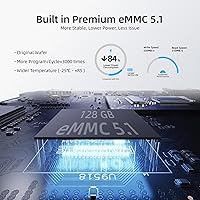
Shipping with 16GB of RAM and a 512GB NVMe drive is a genuinely competitive configuration for this class of mini PC. Day-to-day multitasking feels comfortable, and the fast NVMe speeds mean file operations and OS responsiveness are noticeably better than older eMMC-based competitors.
The RAM is soldered directly to the board and cannot be upgraded under any circumstances — this is a real long-term concern that several buyers have flagged. If software bloat or heavier workloads push memory demand upward in two or three years, there is no upgrade path available without replacing the entire unit.
Display & Video Output
88%
Dual HDMI ports with 4K output plus a USB-C video option gives this fanless mini PC genuine flexibility for multi-monitor setups. Home theater users especially appreciate being able to drive a 4K TV cleanly, and the USB-C port adds a third display output option that competitors at this price rarely offer.
Driving two 4K displays simultaneously at high refresh rates can tax the integrated GPU noticeably, and a few users reported occasional stuttering during video playback in demanding dual-screen configurations. For most media and productivity use cases this is fine, but it is worth knowing the graphics headroom is limited.
Connectivity & Ports
81%
19%
Four USB 3.0 ports plus the multifunctional USB-C connector gives you enough to run a keyboard, mouse, external drive, and webcam simultaneously without reaching for a hub. The Gigabit Ethernet port provides a stable wired connection that business and home network users have praised for reliability.
There is no USB4 or Thunderbolt support, which limits high-bandwidth peripheral options for more advanced users. A few buyers also flagged that the USB-C port requires a minimum 24W power supply to boot the machine, meaning not every power bank will actually work — something the product listing buries in fine print.
Wireless Performance
66%
34%
The Intel AC9560 module delivers stable, consistent Wi-Fi 5 performance that handles streaming, video calls, and file transfers without dropping connections. Bluetooth 5.1 pairs reliably with keyboards, mice, and headphones, and buyers using it as a living room PC or travel machine have found the wireless performance more than adequate.
Wi-Fi 5 is the most polarizing spec on this machine. Buyers in dense apartment buildings or those with Wi-Fi 6 routers feel the lack of a newer wireless standard is a missed opportunity at this price point. Real-world throughput is capped noticeably below what Wi-Fi 6 could provide on the same network infrastructure.
Storage Expandability
86%
The M.2 PCIe 3.0 slot accepting drives up to 4TB is a major practical advantage, and the additional Micro SD slot means you can layer on extra storage without replacing anything. For media server use or archiving large libraries, this gives the compact desktop a longer useful life than most rivals.
The M.2 slot is NVMe-only and does not accept SATA drives, which is worth checking before buying a budget drive for the slot. Accessing the internal slot also requires opening the case, and while the process is straightforward, a few users found the screws awkwardly positioned given how thin the chassis is.
USB-C PD Charging Capability
79%
21%
The ability to power this compact desktop from a compatible USB-C power bank is a genuinely useful feature that sets it apart from most mini PCs in this category. Travel users and mobile deployment setups have found this particularly practical, especially for presentations or field use where wall outlets are not guaranteed.
The 24W minimum power requirement to reliably boot the machine rules out a large number of common power banks and laptop chargers. Several buyers learned this the hard way and had to purchase a higher-wattage PD charger separately, which added unexpected cost and frustration to their initial setup experience.
Setup & Out-of-Box Experience
84%
Plug-and-play setup is one of the more consistently praised aspects across buyer reviews. The unit ships with the necessary cables and mounting hardware, and most users had it up and running in under ten minutes. The hardware itself requires no fiddling — install your OS of choice and you are essentially done.
Shipping without a pre-installed operating system means first-time PC builders may feel stranded without guidance. While experienced users see this as a feature, buyers expecting a ready-to-use machine out of the box have left negative reviews that are really more about expectations not being set correctly than the hardware itself.
Value for Money
77%
23%
For a passively cooled machine with 16GB RAM, a fast NVMe drive, and a multi-output display setup, the price lands in a reasonable spot relative to competing fanless mini PCs. Buyers using it for commercial deployments like digital signage often cite strong cost-per-unit value when purchasing for larger installations.
A small but vocal group of reviewers feel the soldered RAM and Wi-Fi 5 module hold the value proposition back compared to newer mini PCs at similar or slightly higher price points. If longevity is a priority, paying a bit more for a machine with upgradeable memory may make more financial sense over a three-to-five-year horizon.
Auto Power-On & PXE Boot
89%
Commercial and prosumer buyers specifically seek out this feature, and the MeLE Quieter3C implements it reliably. IT administrators deploying these units as kiosk or signage machines particularly value the PXE boot support, which allows network-based OS imaging and remote management without physical intervention at each unit.
These features are irrelevant to most home users and receive no mention in the setup documentation, so buyers who stumble into needing them have had to rely on community forums for configuration guidance. Dedicated documentation for PXE and auto power-on configuration would make this genuinely more useful for SMB deployments.
Long-Term Reliability
73%
27%
The fanless design removes the single most common point of failure in traditional desktops — a fan motor that wears out over time. Buyers running this compact desktop as always-on servers or display systems report stable operation over extended periods, and MeLE's track record in the mini PC space provides some reasonable confidence.
The soldered RAM and non-user-serviceable internals mean that if anything fails on the board, repair options are essentially nonexistent outside of warranty. A few long-term owners also noted thermal throttling becoming more noticeable after extended continuous operation, suggesting heat management under 24/7 loads deserves close attention.

Suitable for:

The MeLE Quieter3C Mini PC N5105 16GB/512GB is a strong fit for anyone whose top priority is a completely silent, space-efficient computer that handles everyday tasks without drama. Home theater enthusiasts who want a capable media PC tucked behind their TV — without the hum of a fan ruining quiet scenes — will find it particularly satisfying. It is equally well-suited to small businesses or IT teams deploying kiosk stations, digital signage, or always-on displays, since the auto power-on and PXE boot features make remote management genuinely practical. Remote workers who need a tidy home office machine for email, video calls, and documents will get reliable daily performance without the machine ever drawing attention to itself. Travelers and mobile users who have a high-wattage USB-C power bank will also appreciate the rare ability to run a full desktop from portable power, making it useful in environments where wall outlets are not always available.
Not suitable for:

The MeLE Quieter3C Mini PC N5105 16GB/512GB is the wrong choice for anyone expecting meaningful performance beyond light computing tasks. If you regularly work with video editing software, run local AI models, compile large codebases, or play even moderately demanding PC games, the N5105 chip will become a bottleneck quickly and frustratingly. Buyers who anticipate needing more memory down the line should also look elsewhere — the RAM is permanently soldered to the board, so 16GB is your ceiling for the entire life of the machine, with no exceptions. Power users who need Thunderbolt connectivity, high-bandwidth external GPU support, or Wi-Fi 6 speeds will find the port and wireless specs limiting compared to pricier mini PC alternatives. Finally, anyone planning to run the unit inside a sealed or poorly ventilated enclosure should be cautious — the passive cooling design depends on ambient airflow, and restricting it will push surface temperatures higher than the already-warm baseline.
Specifications

  • Processor: Intel Celeron N5105 (11th Gen Jasper Lake), quad-core, running up to 2.9GHz burst frequency with a 10W TDP.
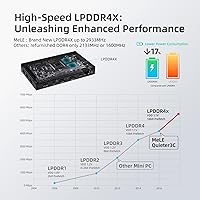
  • RAM: 16GB LPDDR4 running at 2933MHz, soldered directly to the motherboard with no upgrade path available.
  • Storage: 512GB NVMe SSD (M.2 2280 PCIe 3.0) with sequential read speeds up to 1700MB/s and write speeds up to 1500MB/s.
  • Storage Expansion: One internal M.2 PCIe 3.0 NVMe slot supports drives up to 4TB, plus a Micro SD slot for up to 1TB of additional storage.
  • Display Output: Two full-size HDMI ports supporting up to 4K resolution, plus one USB-C port capable of video output at up to 4096x2160 pixels.
  • Graphics: Intel UHD Graphics (integrated), handling dual 4K display output and light media playback without a discrete GPU.
  • Wireless: Intel AC9560 Wi-Fi 5 module delivering up to 560Mbps, paired with Bluetooth 5.1 for peripheral connectivity.
  • Ethernet: Single Gigabit Ethernet port with real-world throughput measured at approximately 880Mbps under typical network conditions.
  • USB Ports: Four USB 3.0 Type-A ports and one USB-C port supporting simultaneous data transfer, video output, and PD charging.
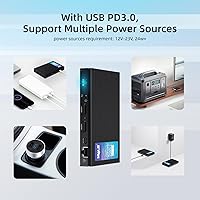
  • Power Input: USB-C PD charging compatible, requiring a minimum 24W power supply to reliably boot and operate the unit.
  • Cooling System: Fully fanless passive cooling design rated for 24/7 continuous operation, with chassis surface temperatures reaching 55°C to 70°C under sustained load.
  • Dimensions: 5.12 x 3.15 x 0.79 inches (130 x 80 x 20mm), making it one of the slimmest mini PCs in its class.
  • Weight: 7.2 ounces (204g), light enough to mount behind a monitor using an included VESA bracket.
  • Operating System: Ships without a pre-installed OS; compatible with Windows 10, Windows 11, and most mainstream Linux distributions.
  • Special Features: Supports auto power-on after power loss and PXE network boot, both relevant for commercial kiosk and signage deployments.
  • Bluetooth: Bluetooth 5.1 for pairing wireless keyboards, mice, headphones, and other accessories without requiring a USB dongle.
  • Memory Type: LPDDR4 single-channel configuration running at 2933MHz, shared between system operations and integrated graphics.
  • Security Chip: Requires one CR2032 coin cell battery (included) for the real-time clock and BIOS settings retention.

Related Reviews

MeLE Mini PC Quieter 4C, 16GB RAM, 512GB SSD
87%
85%
Performance
90%
Build Quality
88%
Display Quality
93%
Energy Efficiency
92%
Noise Level
More
ACEMAGICIAN Kron Mini K1 Mini PC, Ryzen 7 7730U, 16GB RAM, 512GB SSD
85%
88%
Value for Money
91%
Performance for Everyday Tasks
94%
Compact Design & Portability
90%
Setup & Ease of Use
78%
Gaming Performance (Light)
More
GEEKOM Air12 Mini PC 16GB/512GB
82%
88%
Value for Money
82%
Everyday Performance
71%
Build Quality
74%
Thermal Management & Noise
91%
Connectivity & Port Selection
More
KAMRUI GK3Plus Mini PC (N95, 16GB RAM, 512GB SSD)
81%
89%
Multitasking Performance
92%
Value for Money
86%
Thermal Management
84%
Display Versatility
81%
4K Media Playback
More
Blackview MP60 Mini PC, 16GB RAM, 512GB SSD
88%
88%
Performance
94%
Compactness and Design
85%
Multitasking Capability
91%
Energy Efficiency
90%
Display and Connectivity
More
MeLE Overclock 4C Mini PC, 32GB RAM, 512GB Storage
89%
89%
Performance
91%
Build Quality
96%
Portability
90%
Display Support
88%
Connectivity
More
PELADN WI-6 Mini PC (N100, 16GB DDR4, 512GB SSD)
79%
88%
Value for Money
83%
Performance for Daily Tasks
91%
Triple-Display Support
74%
Build Quality & Design
71%
Setup & Out-of-Box Experience
More
GEEKOM A5 2025 Edition Mini PC, 16GB RAM, 512GB SSD
88%
86%
Performance
90%
Build Quality
92%
Value for Money
95%
Ease of Setup
88%
Connectivity
More
BOSGAME Mini PC E3 (N150, 16GB/512GB)
79%
88%
Value for Money
74%
Processing Performance
91%
Multi-Display Support
89%
Connectivity & Ports
76%
Build Quality & Design
More
KAMRUI Essenx E2 N150 Mini PC, 16GB RAM, 512GB SSD
86%
88%
Performance
92%
Value for Money
90%
Cooling and Noise Level
85%
Dual Display Support
80%
Build Quality
More

FAQ

No — the MeLE Quieter3C Mini PC N5105 16GB/512GB ships completely OS-free. You will need to install your own operating system, whether that is Windows 10, Windows 11, or a Linux distribution. A USB drive with your installer and a license key (for Windows) are all you need to get started.
Under typical workloads like browsing and video playback, the chassis stays on the warmer side of comfortable — noticeably warm to the touch but not alarming. Under heavier sustained use, the surface can reach between 55°C and 70°C, which sounds high but falls well within internationally recognized safety standards. Just avoid tucking it into a sealed cabinet where heat cannot dissipate.

Unfortunately, no. The 16GB of RAM is soldered permanently to the motherboard, so what you buy is what you have for the life of the machine. If you think you might need more than 16GB down the road, it is worth factoring that into your decision now rather than after purchase.

Yes, but with an important caveat — the power bank needs to support USB-C PD output at a minimum of 24W to reliably boot the unit. Many standard power banks top out at 18W or 20W, which is not enough. Check your power bank's PD output spec before assuming it will work.

Yes. The compact desktop has two HDMI ports, both capable of 4K output, plus the USB-C port which also supports video. In practice, running two displays simultaneously works well for productivity tasks. Driving two 4K screens at high refresh rates with video playing can push the integrated graphics, so expectations should be managed for demanding visual workloads.

Almost, but not quite. The M.2 slot only supports NVMe PCIe drives — it does not accept SATA-based M.2 drives, which are common and often cheaper. Before buying an expansion drive, double-check that it is NVMe and not SATA, and that it is the standard 2280 (22mm x 80mm) form factor.

Yes, comfortably. Video conferencing, web browsing, Office apps, and even light multitasking across all three at once sit well within what the N5105 chip handles without complaint. Where it starts to struggle is if you are simultaneously running a heavy browser with dozens of tabs, screen sharing in 4K, and processing something in the background all at once.

Yes — auto power-on is a built-in feature accessible through the BIOS settings. It is particularly useful for digital signage, kiosks, or any always-on application where you cannot physically press the power button after an outage. Most users enable it during initial setup and never need to think about it again.

In most everyday scenarios — streaming, video calls, file downloads — the Wi-Fi 5 module handles things without any noticeable issue. Where you might feel the gap is on a busy Wi-Fi 6 network in a dense environment, where the newer standard offers better congestion handling and higher potential throughput. If you can run an Ethernet cable to it, that removes the question entirely and gives you the most stable connection available.

The unit ships with a power adapter, an HDMI cable, a VESA mounting bracket with screws for attaching it behind a compatible monitor, and a short user guide. It covers the basics well enough to get set up without hunting for extra cables, though you will still need to provide your own keyboard, mouse, and operating system installation media.