Overview

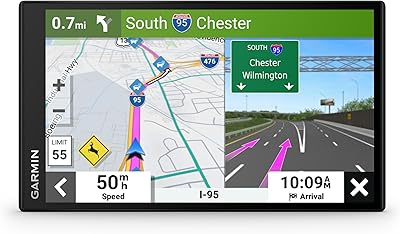
The Garmin dēzlCam OTR725 GPS Truck Navigator arrived in late 2024 as Garmin's answer to a question every OTR driver eventually asks: why carry a separate dashcam when your navigator could handle both jobs? Unlike consumer GPS units shoehorned into a truck cab, this truck navigator was engineered specifically for commercial driving — the routing logic, the screen real estate, the dock-level awareness. That 6.95-inch display is genuinely readable under harsh midday glare, which matters more than spec sheets let on. The price sits firmly in premium territory, but when you're consolidating two dedicated devices into one capable unit, the value case becomes fairly straightforward.
Features & Benefits

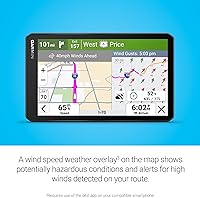
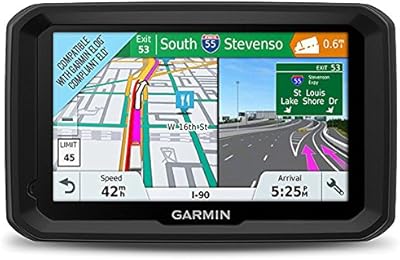
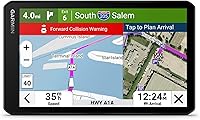
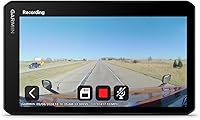
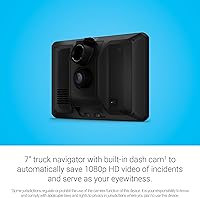
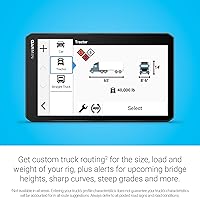
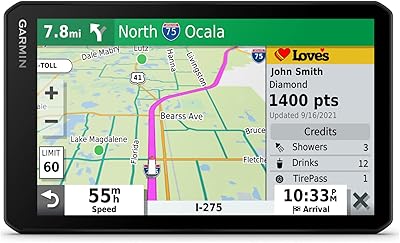
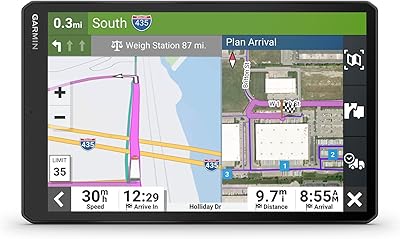
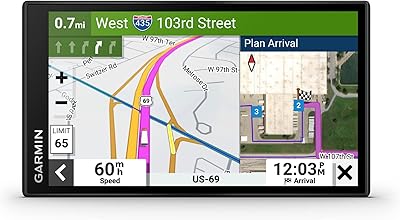
The built-in 1080p dashcam is the feature that most clearly separates the dezlCam OTR725 from standard truck navigators. With a 140-degree field of view and automatic incident recording, it saves footage to the pre-installed 16GB microSD when something goes wrong — though drivers with long daily runs may want to upgrade that card. Truck-specific routing factors in your rig's dimensions and weight, flagging low bridges and tight curves before they become a problem. The BirdsEye Direct satellite imagery is particularly useful when approaching unfamiliar terminals, giving you an overhead look at dock layouts before you pull in. Wind speed overlays add a useful safety layer, though that feature requires the dezl app on a paired smartphone.

Best For

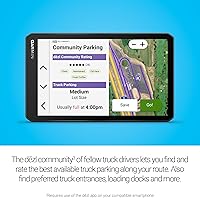
Garmin's trucking GPS makes the most sense for owner-operators and OTR drivers who want a single, purpose-built device handling both navigation and incident documentation. It's especially well-suited to drivers who regularly deal with unfamiliar distribution centers, fulfillment warehouses, or industrial freight terminals where a generic map app simply doesn't know where the trucks go. The community-sourced dock and parking data is a genuine plus — though its usefulness scales with how active the dezl community is along your regular corridors. Drivers who prioritize liability protection on high-traffic routes will find the automatic dashcam recording particularly reassuring. Anyone managing wind-sensitive loads will also appreciate the route-level wind alerts.

User Feedback

Drivers consistently praise the screen's daylight readability, noting it holds up well even when the sun is hitting the windshield at low angles. The build quality draws generally positive remarks, with the pre-installed suction mount holding steady over long-haul miles. On the critical side, some users flag the dashcam's low-light performance as a weak point — footage can look grainy at night compared to dedicated dashcam units. Truck routing gets mixed reviews; it's accurate in most scenarios but occasionally conflicts with posted signs, so drivers know to defer to the road. The dezl app pairing works reliably, though community data quality varies significantly depending on the routes you run.

Pros

  • Combining a truck navigator and dashcam in one unit removes the clutter of running two separate devices in the cab.
  • The 6.95-inch high-resolution display holds up well in direct sunlight, which is a real daily advantage for in-cab visibility.
  • Automatic incident recording gives drivers documented proof without needing to manually save footage after an event.
  • Truck routing accounts for vehicle height, weight, and tight curves, reducing the risk of getting directed into bad situations.
  • BirdsEye satellite imagery is genuinely useful when pulling into unfamiliar docks or industrial yards for the first time.
  • CAT Scale location access helps drivers verify legal weight limits quickly without hunting through a separate app.
  • The pre-installed suction mount is reported to hold reliably over long hauls, with solid overall build quality.
  • Community-shared loading dock data can meaningfully cut down the guesswork when navigating complex freight destinations.
  • Wind speed route alerts add practical safety awareness for drivers hauling high-profile or wind-sensitive loads.
  • The dezl app pairing works consistently and expands functionality without requiring complicated setup.

Cons

  • Dashcam footage quality drops noticeably in low-light and nighttime conditions compared to dedicated dashcam units.
  • The pre-installed 16GB microSD card fills up quickly for drivers logging long daily routes with continuous recording.
  • Wind alerts and some community features require a connected smartphone running the dezl app, adding an unwanted dependency for some drivers.
  • Community dock and parking data is only as useful as the local dezl user base, which can be thin on less-traveled routes.
  • Truck routing occasionally conflicts with posted road signs, requiring drivers to stay alert and use their own judgment.
  • The premium price makes it a tough sell if you only need one of the two core functions, not both.
  • There is no offline mode for app-dependent features, meaning connectivity gaps can leave certain tools unavailable.
  • The 16GB microSD storage ceiling may frustrate drivers who want longer rolling footage buffers without manual card management.

Ratings

The scores below for the Garmin dēzlCam OTR725 GPS Truck Navigator were generated by AI after analyzing verified purchase reviews from buyers worldwide, with spam, bot-submitted, and incentivized feedback actively filtered out. Each category reflects both what real drivers genuinely appreciate and where the device falls short in day-to-day commercial use. Nothing here is sugar-coated — the pain points are as visible as the strengths.
Screen Clarity
91%
Drivers consistently call out the display as one of the best they have used in a truck cab. Even in harsh midday sun with the windshield acting like a magnifier, the screen remains readable without squinting or repositioning. That kind of visibility makes a real difference when you are watching a route change at highway speed.
A small number of users note that glare from certain cab angles — particularly low morning or late afternoon sun — can still create temporary readability issues. Anti-glare coating performance seems to vary slightly depending on the cab orientation and mounting position chosen.
Truck Routing Accuracy
78%
22%
For most common OTR corridors and interstate freight lanes, the custom routing engine handles height, weight, and bridge restrictions reliably. Drivers report that it genuinely keeps them off roads that would be problematic for a loaded rig, which is a meaningful safety and compliance advantage over a repurposed consumer GPS.
Where it gets complicated is on less-mapped industrial or rural routes, where the routing occasionally conflicts with posted signs or sends drivers toward turns that require correction. Most experienced drivers adapt quickly, but the discrepancies do erode confidence in the system over time, particularly for newer OTR operators.
Dashcam Daytime Quality
83%
In daylight, the 1080p footage with a 140-degree field of view captures enough detail to be genuinely useful for incident documentation. Drivers who have had to share footage with insurers or fleet managers report that the video holds up well enough to tell a clear story of what happened and when.
The wide-angle lens, while useful for coverage, does introduce some barrel distortion at the edges that can make distance judgment tricky when reviewing clips. It is functional for documentation but not exceptional by dedicated dashcam standards, even in ideal conditions.
Dashcam Night Quality
54%
46%
The camera does capture usable footage at night on well-lit highway stretches, and automatic incident saving still functions regardless of lighting conditions. For drivers primarily running daytime routes, the nighttime limitation is largely a non-issue in practice.
This is the most consistently flagged weakness across user feedback. In low-light or full night conditions, footage quality drops noticeably — grain increases, detail softens, and license plates at any real distance become difficult to read. Drivers who run significant overnight miles should weigh this carefully against a dedicated low-light dashcam alternative.
App Integration
72%
28%
When the dezl app pairing works, it adds genuinely useful layers to the device — wind overlays, community dock data, and parking ratings all come through reliably over a stable Bluetooth and cellular connection. Drivers on busy freight corridors with strong signal report a smooth and low-friction experience.
The dependency on a connected smartphone is a real limitation for drivers in rural or low-coverage areas, where several of the most useful features simply stop working. A handful of users also report occasional pairing drops that require manual reconnection, which is frustrating when you are mid-route.
Community Dock Data
66%
34%
On heavily traveled freight routes and near major distribution hubs, the community-shared loading dock and truck entrance database can save meaningful time at unfamiliar destinations. Drivers who regularly hit the same high-traffic lanes report that the data is often accurate and updated by fellow dezl users.
Coverage is inconsistent once you leave the busiest corridors — on regional or rural routes, the database can feel empty. The quality of the feature scales directly with dezl community adoption in a given area, and that adoption is still uneven across North America.
Mount Stability
81%
19%
The pre-installed suction cup mount holds up well under normal highway driving conditions, and most drivers report no issues over extended hauls on interstate surfaces. The unit feels secure and does not wobble or shift during routine driving, which matters when it is doubling as a dashcam.
On rough road surfaces, unpaved approaches to industrial yards, or in cabs that run extremely hot in summer months, the suction seal can weaken over time. A few users report needing to reseat the mount periodically, which is a minor but recurring maintenance task.
Wind Alert Usefulness
69%
31%
For drivers hauling high-profile loads or oversized freight, having wind speed overlaid directly on the navigation map is a practical safety feature that most navigators simply do not offer. Drivers who operate in the Plains states or mountain corridors find this particularly relevant during seasonal weather shifts.
The feature is entirely dependent on app connectivity, which means it disappears exactly when you might need it most — in remote areas with poor signal. The alerts can also feel imprecise in certain terrain, flagging conditions that turn out to be less severe than the warning implied.
CAT Scale Locator
86%
Having CAT Scale locations built directly into the navigator removes a step that many drivers previously handled through a separate app or website. The search is fast, and the database covers U.S. and Canada comprehensively enough that drivers on most major freight lanes find it reliable for pre-departure weight checks.
Real-time scale availability and current operating hours are not always confirmed, so drivers occasionally arrive at a location that is closed or has changed its hours. The feature is best treated as a location finder rather than a live status checker.
BirdsEye Satellite Imagery
79%
21%
Being able to pull up an overhead satellite view of a destination before you arrive is more useful than it sounds. Drivers navigating large fulfillment centers or multi-dock industrial yards report that even a quick glance at the overhead layout helps them approach the right entrance on the first attempt.
The imagery quality varies by location — rural or recently developed areas sometimes show outdated aerial views that do not reflect current facility layouts. It is a planning aid rather than a live view, and users who treat it as such get the most out of it.
Build Quality
84%
The physical unit feels solid and well-assembled, consistent with what Garmin truck GPS buyers expect from the dezl lineup. Drivers report no issues with buttons, port covers, or screen responsiveness degrading over months of continuous daily use in variable cab temperatures.
At 8.5 ounces, the device is not heavy, but a few drivers note that the depth profile — at under an inch thick — occasionally makes the unit feel less premium in hand than the price suggests. It is sturdy, but not the most tactilely impressive device at this tier.
Value for Money
71%
29%
For drivers who genuinely need both a dedicated truck GPS and a dashcam, consolidating into a single unit at this price makes reasonable financial sense when you factor in what two quality standalone devices would cost separately. The trucking-specific features also justify the premium over a standard consumer navigator.
If you already own a capable dashcam or a solid truck GPS, the overlap makes the combined price harder to rationalize. Drivers who only need one of the two core functions will likely find better value in a purpose-built single-function device at a lower price point.
Setup & Ease of Use
88%
Out of the box, the device is ready to use quickly — the suction mount comes pre-installed, the microSD is already in place, and the interface follows Garmin's familiar dezl layout that many truck drivers have used before. Entering truck dimensions is straightforward and well-guided.
Getting the most out of the connected features requires downloading the dezl app, pairing via Bluetooth, and granting location permissions — steps that add some friction for drivers who just want to plug in and go. First-time Garmin users may need a few minutes to orient themselves to the menu structure.
Incident Recording Reliability
82%
18%
The automatic incident detection and clip-saving works consistently based on driver reports — when something happens on the road, the footage is typically saved without any manual action required. For drivers who have been in situations where they needed to prove what occurred, this reliability is the most important thing.
The system depends entirely on the pre-installed microSD having available space, and if the card is near capacity, the protected clip storage can be compromised. Drivers who run long shifts without clearing the card periodically may find themselves in a situation where incident clips cannot be saved properly.

Suitable for:

The Garmin dēzlCam OTR725 GPS Truck Navigator is purpose-built for professional long-haul and OTR drivers who want a single, reliable device handling both navigation and incident documentation without compromise. Owner-operators will find particular value here — the combination of truck-specific routing and an always-on dashcam directly addresses two of the most practical daily concerns on the road: getting where you need to go safely and having footage if something goes wrong. Drivers who regularly pull into unfamiliar distribution centers, freight terminals, or industrial warehouses will benefit from the BirdsEye satellite imagery, which lets you scout dock layouts and truck entrances before you ever make the turn. The community-sourced parking and loading dock data is a genuine operational advantage for anyone running high-traffic corridors where that information is well-populated. If wind-sensitive cargo is part of your regular work, the route-level wind speed overlay adds a layer of situational awareness that most navigators simply don't offer.
Not suitable for:

The Garmin dēzlCam OTR725 GPS Truck Navigator is not the right call for drivers who expect dashcam performance on par with a dedicated standalone unit — particularly in low-light or nighttime conditions, where the integrated camera shows its limitations compared to purpose-built options. Buyers running remote or lightly traveled routes may find the community-sourced dock and parking data sparse or unreliable, since those features depend heavily on active dezl app users in a given area. The wind speed overlay and some connected features require a paired smartphone running the dezl app, which adds a dependency that not every driver wants to manage. At its price point, it's a hard sell for recreational vehicle users, light-duty pickup drivers, or anyone who doesn't need truck-specific routing, since the core value proposition is tightly tied to commercial trucking scenarios. Drivers who already own a high-quality dedicated dashcam and a solid truck GPS may struggle to justify replacing both with this one device if their existing setup is working well.
Specifications

  • Screen Size: The device features a 6.95-inch high-resolution LCD touchscreen optimized for in-cab readability across a range of lighting conditions.
  • Dash Cam Resolution: The built-in dash cam records in 1080p HD, providing clear daytime footage suitable for incident documentation.
  • Field of View: The dash cam captures a 140-degree wide-angle field of view to cover more of the road environment ahead.
  • Onboard Storage: A 16GB microSD card comes pre-installed to store recorded footage and map data right out of the box.
  • Dimensions: The unit measures 4.2 x 0.8 x 7 inches, making it compact enough for dashboard mounting without obstructing sightlines.
  • Weight: At 8.5 ounces, the device is lightweight enough that the included suction cup mount handles the load without issue.
  • Connectivity: Bluetooth is the primary wireless connection method, used for pairing with a compatible smartphone running the dezl app.
  • Map Coverage: North American maps come pre-loaded, covering roads, truck routes, and points of interest across the U.S., Canada, and Mexico.
  • Routing Type: Custom truck routing factors in user-defined vehicle height, weight, and length to avoid restricted roads, low bridges, and sharp curves.
  • Satellite Imagery: BirdsEye Direct provides high-resolution overhead satellite imagery of destinations, useful for pre-arrival planning at docks and freight yards.
  • Weather Overlay: A wind speed overlay displays potentially hazardous wind conditions on the map and triggers route alerts when high winds are detected, requiring the dezl app.
  • Scale Finder: The device includes an integrated CAT Scale locator covering the U.S. and Canada to help drivers verify legal load weights before departure.
  • Community Features: Via the dezl app, drivers can access community-shared loading dock locations, security gate entries, truck entrances, and crowd-sourced truck parking ratings.
  • Mounting Type: A vehicle suction cup mount comes pre-installed on the unit, compatible with dashboard and windshield panel surfaces.
  • Power Supply: The unit is powered via a vehicle power cable with a CLA adapter included in the box, with no need for a separate charger.
  • Battery: A built-in lithium-ion battery is included, allowing brief unpowered use, though the device is designed for continuous in-vehicle operation.
  • Incident Recording: The device automatically saves video clips to the microSD card when a driving incident is detected, without requiring manual intervention from the driver.
  • Display Input: The touchscreen supports direct finger input, allowing drivers to interact with the interface without any additional peripheral hardware.

Related Reviews
Garmin dezlCam OTR710 Truck GPS Navigator
74%
83%
Truck Routing Accuracy
71%
Dash Cam Quality
68%
Cloud Vault Storage
88%
Screen Readability
79%
BirdsEye Satellite Imagery
More
Garmin dēzl OTR1010 10″ GPS Truck Navigator
76%
88%
Screen Quality
84%
Truck Routing Accuracy
91%
BirdsEye Satellite Imagery
67%
PrePass Integration
63%
Value for Money
More
Garmin dezl OTR610
Garmin dezl OTR610
77%
88%
Truck Routing Accuracy
91%
Display Quality
83%
Arrival Planning & Dock View
74%
PrePass Integration
86%
Ease of Setup
More
Garmin dezl 580 LMT-S Truck GPS Navigator
81%
89%
Routing Accuracy
92%
Ease of Use
62%
Screen Size/Visibility
95%
Traffic and Weather Updates
58%
Voice Command Performance
More
Garmin Dezl OTR500 5.5-inch Truck GPS Navigator
75%
91%
Truck Routing Accuracy
88%
Display Quality
74%
PrePass Integration
72%
Load-to-Dock Guidance
69%
Ease of Setup
More
Garmin DriveSmart 55 GPS Navigator
74%
88%
Screen Readability
83%
Routing Accuracy
79%
Live Traffic Updates
91%
Ease of Use
57%
Voice Recognition
More
Garmin GPS 18x USB Navigation Receiver
67%
91%
Signal Accuracy
47%
Software Compatibility
78%
Build Quality
63%
Ease of Setup
84%
Long-Term Durability
More
Garmin Drive 53 GPS Navigator
76%
88%
Display Quality
91%
Ease of Use
86%
Navigation Accuracy
41%
Battery Life
63%
Mount & Stability
More
Garmin Nüvi 2539LMT GPS Navigator
78%
91%
Ease of Use
88%
Navigation Accuracy
93%
Map Update Value
82%
Traffic Avoidance
74%
Display Quality
More
Garmin eTrex SE Handheld GPS Navigator
81%
97%
Battery Life
91%
GPS Accuracy
88%
Build Quality
63%
Display Quality
79%
Ease of Use
More

FAQ

It does both. The dezlCam OTR725 records continuously while driving, with footage looping over older clips as the card fills up. When an incident is detected, that clip is automatically saved separately so it doesn't get overwritten. Keep in mind that the pre-installed 16GB card has a finite capacity, so drivers on long daily runs may want to upgrade to a larger microSD card.

No, the core navigation works completely standalone without a smartphone. Your phone only becomes necessary if you want the wind speed weather overlay, community-shared dock data, or truck parking features through the dezl app. If you drive in areas with spotty cell service, the navigation itself will still function normally.

Yes, that's one of the key reasons drivers choose this unit over a generic GPS. You can input your rig's height, weight, length, and width, and the routing engine uses that data to avoid restricted roads, low bridges, and other hazards. Always defer to posted road signs, but having those parameters set correctly makes a real difference on unfamiliar routes.

It depends heavily on your regular corridors. On busy freight lanes and high-traffic industrial areas, the community data can be genuinely helpful for finding truck entrances or locating parking. On less-traveled or rural routes, you may find the database sparse since it relies on other dezl app users contributing information. It's a useful bonus feature, not something to rely on exclusively.

The 1080p daytime footage is solid and captures enough detail to be useful for documentation purposes. Low-light and nighttime footage is a weaker point — it's functional but noticeably grainier than what you'd get from a dedicated dashcam. For most incident scenarios in daylight, the footage quality is adequate for insurance and liability purposes.

The device records in a continuous loop, so older footage gets overwritten automatically once the card is full. Incident-triggered clips are saved separately and protected from being overwritten, but they do take up space. If you're running long shifts, it's worth checking available storage periodically or upgrading to a higher-capacity card.

Regulations on dashcams and GPS devices mounted to windshields vary by state and jurisdiction. Some states have restrictions on what can be mounted to a windshield or how a dashcam can be used. Garmin notes this directly — it's worth checking local laws before use, particularly if you cross multiple state lines regularly.

When you're approaching a destination, you can pull up an overhead satellite view of the area to get a sense of the layout before you arrive — where the truck entrance is, how the dock bays are oriented, whether there's a gate you need to approach. It's a planning tool rather than a live feed, and it works best at larger facilities that are clearly visible in satellite imagery.

Generally, yes — user feedback on the mount is mostly positive. The suction cup comes pre-installed and holds reliably on clean glass or smooth dash surfaces. Like any suction mount, extreme heat or a dirty surface can weaken the grip over time, so it's worth checking the seal periodically and cleaning the mounting surface if you notice any movement.

The CAT Scale locator pulls from data stored on the device, so basic location lookup should work without an active data connection. However, real-time information like scale availability or updated hours may require connectivity. For the core task of finding nearby scale locations on a route, you don't need to be online.