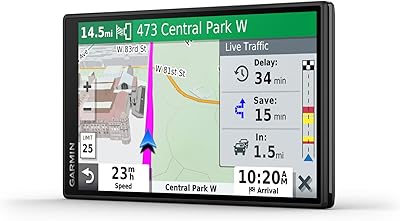
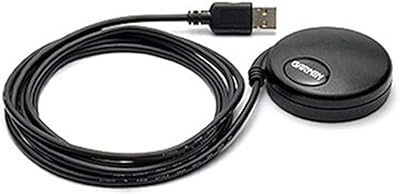
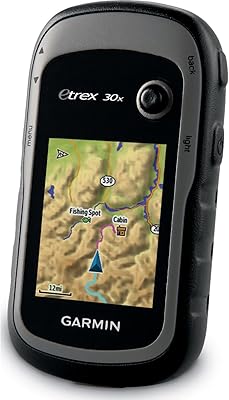
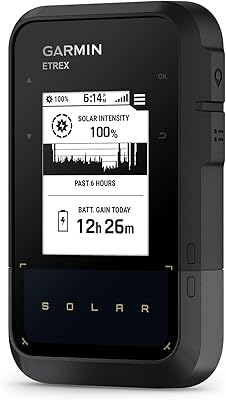
Overview

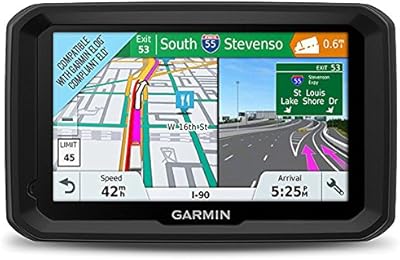
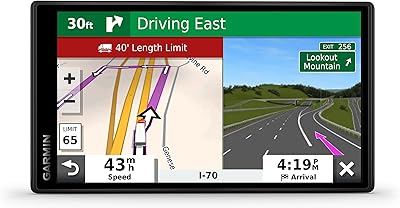
The Garmin dezlCam OTR710 Truck GPS Navigator is one of the few devices on the market that genuinely combines truck-specific routing with a built-in dash cam in a single unit — and at a premium price point, it sets high expectations. Garmin has long been a trusted name in navigation, and their dezl lineup is purpose-built for commercial drivers, not repurposed from consumer-grade hardware. The 7-inch touchscreen is large enough to read at a glance while managing traffic, which matters when you're hauling freight on an unfamiliar interstate. This review cuts through the marketing to assess whether the dezlCam OTR710 delivers real-world value for owner-operators and long-haul drivers who depend on their equipment daily.
Features & Benefits

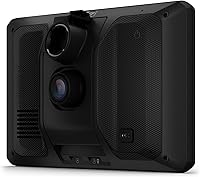
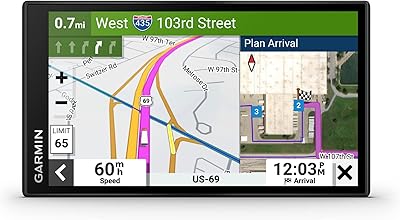
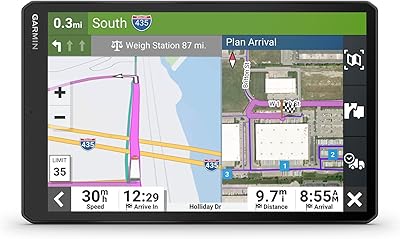
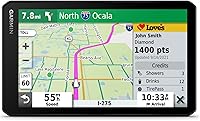
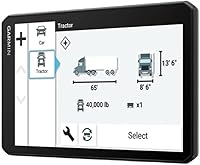
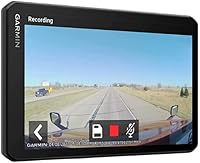
What sets this truck navigator apart from a standard GPS is how deeply the routing engine understands commercial vehicles. Enter your rig's height, weight, and load type, and it will actively route you around low bridges, weight-restricted roads, and sharp curves — though drivers should always defer to posted signs, as no routing software is perfect. The BirdsEye Satellite Imagery is a genuinely useful addition: previewing a loading dock or security gate before you arrive saves real time. The built-in dash cam handles automatic incident detection and pushes saved footage to cloud Vault storage via the dezl app. The route planner also helps map fuel stops and rest breaks around Hours of Service requirements.

Best For

The dezlCam OTR710 is built for a specific kind of driver — someone who runs their own operation, covers long distances regularly, and can't afford to guess whether a route is truck-legal. If you're frequently pulling into unfamiliar distribution centers or navigating weight-restricted rural roads, this Garmin unit addresses those pain points directly. It's also a strong fit for drivers who want the legal protection of documented incident footage without carrying a separate dash cam. That said, if you mostly run familiar routes on well-traveled interstates and already have a decent GPS, the added investment may be harder to justify. This is a tool for professionals who push into new territory often.

User Feedback

Drivers who've run this Garmin unit for extended periods tend to praise the routing accuracy on truck-specific roads and genuinely appreciate having navigation and dash cam footage in one place rather than two separate mounts on the windshield. Screen brightness and readability get consistent positive marks. On the critical side, some users report that the suction cup mount struggles in extreme heat, and a few note that touchscreen response slows in very cold cabs. The Vault cloud storage works well for most, though accessing footage through the app has a learning curve. Routing in rural or less-mapped areas occasionally produces suggestions that miss local road realities — a reminder that driver judgment always comes first.

Pros

  • Truck-specific routing accounts for height, weight, and hazmat load — genuinely useful on roads where a wrong turn is a real problem.
  • Having navigation and a dash cam in one unit eliminates windshield clutter and simplifies the cab setup considerably.
  • BirdsEye satellite imagery helps drivers scope out unfamiliar loading docks and entrances before arrival, saving real time.
  • Automatic incident detection means the dash cam saves footage without the driver needing to press anything mid-situation.
  • Cloud-based Vault storage keeps footage off the device and accessible remotely via the dezl app — useful for insurance claims.
  • The 7-inch screen is large and bright enough for at-a-glance reading without squinting, even in direct sunlight.
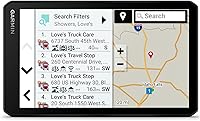
  • Built-in Truck and Trailer Services directory makes it easy to filter stops by brand or amenity like showers or CAT scales.
  • Wi-Fi connectivity allows map and software updates without needing a computer, which is practical for drivers who are rarely at a desk.
  • The route planner integrates fuel and rest stop planning in a way that aligns with Hours of Service realities.
  • Garmin's long track record in navigation means software support and map updates are more reliable than lesser-known brands.

Cons

  • The suction cup mount has been reported to fail in extreme cab heat, which is a real concern for summer driving.
  • Touchscreen responsiveness can lag noticeably in very cold conditions — frustrating when you need a quick input.
  • Routing in rural or less-mapped regions occasionally suggests roads that are technically legal but impractical for larger rigs.
  • The dezl app has a learning curve, and accessing Vault footage is not as intuitive as it should be for a premium device.
  • The 480 x 272 display resolution feels dated compared to modern tablet screens, even if real-world readability holds up.
  • Drivers in jurisdictions with dash cam restrictions will need to disable camera functionality, limiting the device's value proposition.
  • No lifetime map update guarantee is included out of the box — ongoing map costs are worth factoring into the total investment.
  • The device does not replace a dedicated ELD or hours-of-service logging tool, which some buyers may expect at this price tier.

Ratings

The scores below reflect an AI-driven analysis of verified owner reviews for the Garmin dezlCam OTR710 Truck GPS Navigator, collected globally and filtered to remove incentivized, duplicate, and bot-generated feedback. Each category score is calibrated to reflect what real long-haul drivers — not casual reviewers — actually experienced after extended use on North American roads. Both the strengths that earned this unit its reputation and the friction points that frustrated buyers are represented transparently.

Truck Routing Accuracy
83%
Drivers consistently report that the routing engine performs well on major freight corridors, correctly avoiding low bridges and weight-restricted roads that consumer GPS devices would blindly send you down. Owner-operators hauling oversize loads particularly appreciated the hazmat and height-profile customization, which works reliably on well-mapped highways.
Routing quality drops noticeably on rural back roads and in less-populated regions where map data is thinner. A recurring pattern in reviews involves the unit suggesting technically legal but poorly conditioned routes, reminding drivers that posted signs and personal judgment remain essential co-pilots.
Dash Cam Quality
71%
29%
The built-in camera captures footage that is genuinely usable for insurance documentation and incident reporting — the automatic detection feature saves clips without driver intervention, which matters when something happens fast. For a navigator-integrated camera, it delivers more than most drivers expected.
Compared to a dedicated dual-channel dash cam at a similar price tier, the video quality falls short, particularly in low-light or nighttime conditions. Drivers who prioritize sharp, detailed footage for legal disputes may find themselves wanting more resolution than the integrated camera provides.
Cloud Vault Storage
68%
32%
The concept of cloud-backed incident footage is well-executed at a system level — footage uploads automatically through the dezl app, and drivers appreciate not having to manually pull a memory card after an incident to retrieve evidence. For owner-operators without fleet IT support, this is a meaningful convenience.
The dezl app itself has a steeper learning curve than the hardware deserves, and several users report confusion accessing archived footage for the first time. Connectivity-dependent sync means footage may not upload immediately in areas with poor cell coverage, which is a real limitation for rural routes.
Screen Readability
88%
The 7-inch display earns consistent praise from drivers for brightness and legibility, even in harsh direct sunlight during east-facing morning drives or late-afternoon westbound hauls. Text sizes and map contrast are well-calibrated for a cab environment where glances need to be short and decisive.
The 480 x 272 resolution is noticeably lower than what modern tablets offer, and some drivers find map graphics slightly soft when viewing detailed intersection layouts. It is not a dealbreaker for practical use, but it is a visible compromise for a device at this price point.
BirdsEye Satellite Imagery
79%
21%
Drivers making first-time deliveries to large distribution centers call this feature genuinely valuable — being able to identify the truck entrance versus the visitor lot before pulling off the highway prevents costly circling in a loaded rig. The imagery quality is sharp enough to read dock layouts clearly.
Satellite imagery freshness varies by location, and some industrial facilities have undergone layout changes that the imagery does not yet reflect. Coverage in remote or less-trafficked delivery zones is inconsistent, limiting the feature's reliability for drivers who operate off well-traveled freight lanes.
Mount Stability
61%
39%
The suction cup mount holds adequately on clean, flat windshields under normal driving conditions, and setup takes only seconds without tools. For drivers in moderate climates who park in shaded areas, the mount performs without issue across extended daily use.
Heat is the mount's consistent enemy — summer temperatures inside a parked cab regularly cause suction failure, and this is one of the most frequently cited frustrations across long-term owner reviews. Curved or textured windshields compound the problem, and a meaningful number of drivers have replaced the stock mount with a third-party alternative.
Touchscreen Responsiveness
66%
34%
Under normal operating temperatures, the touchscreen responds promptly to input and handles route adjustments or POI searches without noticeable lag. The interface layout is well-designed for gloved use, with large tap targets that suit drivers in work gloves during colder months.
Cold-weather performance is a documented weak point — drivers operating in northern states and Canada during winter report sluggish or unresponsive touch inputs in an unheated cab at startup. The issue typically resolves once the cab warms up, but it is an inconvenience that shows up consistently enough to affect the score.
Route Planner & HOS Utility
76%
24%
Independent drivers without dispatcher support find the integrated route planner genuinely useful for pre-trip planning — plotting fuel stops, rest areas, and overnight options in a single pass saves meaningful time versus doing it manually on a phone. The HOS-aligned stop suggestions reflect a real understanding of trucker workflow.
The route planner is a planning aid, not a certified ELD, and some buyers purchase the unit expecting it to handle hours-of-service compliance logging — it does not. Drivers who need legally compliant HOS tracking will still need a separate certified device, which can feel like an overlap at this price.
Truck & Trailer Services Directory
74%
26%
Being able to filter truck stops by brand — Love's, Pilot, Flying J — or by specific amenity like CAT scales or showers is a practical time-saver that drivers who've used generic GPS directories immediately notice and appreciate. The database covers major North American chains reliably.
Smaller independent truck stops and regional chains have spottier representation in the directory, and hours or amenity data occasionally lags behind real-world changes. Drivers who rely on lesser-known regional stops for competitive fuel pricing may find themselves cross-referencing with a separate app.
Bluetooth & Wireless Connectivity
77%
23%
Bluetooth pairing with phones and headsets works reliably, and hands-free call audio is clear enough for roadside conversations without pulling over. Wi-Fi-based map and software updates are a genuine convenience — no laptop required, just a parking lot with hotspot access.
Some users report that Bluetooth connections occasionally drop and require re-pairing after the device restarts, which is a minor but recurring annoyance. Wi-Fi update speeds are acceptable but not fast, and large map updates can take considerable time if the unit has not been updated in several months.
Setup & Initial Configuration
72%
28%
Most drivers report getting the unit powered up, mounted, and navigating within 15 to 20 minutes out of the box, which is a reasonable setup experience for a device with this many configuration options. The vehicle profile wizard walks through height, weight, and load type entry in a logical sequence.
Configuring the dezl app for Vault sync and cloud storage requires a few extra steps that are not immediately intuitive from the in-box documentation alone. Drivers less comfortable with app-based setup find themselves consulting online forums or Garmin support, which adds friction to the first-use experience.
Long-Term Durability
81%
19%
Drivers who have owned the unit for a year or more generally report that the hardware holds up well to the vibration, temperature swings, and daily handling that a working cab environment demands. Garmin's build quality reputation carries over into this model, with few reports of hardware failures under normal operating conditions.
A small but consistent subset of long-term owners report screen adhesion or button degradation after 18 or more months of heavy use, particularly in rigs with significant vibration. Garmin's warranty and support process receives mixed marks — straightforward for clear defects, but slower for borderline hardware wear cases.
Software & Map Updates
69%
31%
Garmin's update infrastructure is more reliable than most competitors in the dedicated GPS space, and the Wi-Fi update process means drivers can keep maps current without needing a computer. Software bug fixes and feature improvements have been pushed post-launch, which reflects ongoing product support.
Lifetime map updates are not guaranteed without an active plan, and the cost structure for ongoing updates is not always clearly communicated at point of sale. Some drivers have found that map data in less-trafficked freight corridors lags by six months or more even after a fresh update cycle.
Value for Money
73%
27%
For owner-operators who genuinely use both the truck-specific routing and the dash cam regularly, the consolidated hardware represents meaningful value compared to purchasing a quality standalone unit of each separately. The feature set at this tier is difficult to match with a single competing device.
Drivers who primarily need one function — either navigation or dash cam recording — will find the premium pricing harder to justify, particularly when capable single-purpose alternatives exist at lower cost. The ongoing potential expense of map updates and app-dependent cloud storage adds to the total cost of ownership beyond the sticker price.

Suitable for:

The Garmin dezlCam OTR710 Truck GPS Navigator is purpose-built for owner-operators and independent long-haul drivers who spend serious time on unfamiliar roads and need routing that actually understands what a commercial vehicle can and cannot do. If you regularly pull into distribution centers you've never visited, the BirdsEye satellite imagery alone can save you from an embarrassing — or costly — wrong-entrance situation. Drivers who've been carrying a separate GPS and a stick-on dash cam will immediately appreciate consolidating both into one clean windshield mount. It's also a smart fit for anyone who's had a roadside incident and wished they had footage to back up their account with an insurer or dispatcher. Fleet-adjacent drivers running independently without a dispatch system to lean on will find the route planner and HOS-aware stop suggestions genuinely useful for planning a compliant, efficient day on the road.
Not suitable for:

The Garmin dezlCam OTR710 Truck GPS Navigator is a harder sell for drivers who run the same familiar regional routes week after week and already know every bridge clearance and weigh station on their circuit. At a premium price point, it's also not the right call for occasional or recreational truck drivers who don't need professional-grade routing. Drivers who prioritize dash cam video quality above all else should know that the built-in camera, while competent, doesn't match a dedicated dual-channel dash cam at a comparable price tier. Those who prefer a minimalist cab setup or who rely on fleet-provided ELD systems with integrated navigation may find the dezlCam OTR710 redundant rather than additive. And if your primary concern is budget, there are capable truck GPS units available at a significantly lower cost — though none bundle the dash cam and cloud storage into the same package.
Specifications

  • Screen Size: The device features a 6.95-inch touchscreen display designed for easy viewing in a working cab environment.
  • Resolution: The display outputs at 480 x 272 pixels, which is standard for dedicated GPS navigators in this category.
  • Dash Cam: A built-in HD dash cam records continuously and automatically saves footage when an incident is detected.
  • Cloud Storage: Recorded incident videos are stored securely in the online Vault, accessible via the dezl smartphone app on a compatible phone.
  • Satellite Imagery: BirdsEye Satellite Imagery provides high-resolution aerial views of destinations, including loading docks and facility entrances.
  • Truck Routing: The routing engine accepts custom vehicle profiles including height, weight, length, and hazmat classification to generate truck-appropriate routes.
  • Road Alerts: The device actively warns drivers of upcoming low bridges, weight limits, sharp curves, and steep grades along the planned route.
  • Connectivity: The unit supports Bluetooth, Wi-Fi, and USB connectivity for hands-free calling, app synchronization, and software updates.
  • Included Storage: A pre-installed 16GB microSD card is included in the box for local dash cam footage storage.
  • Map Coverage: Maps cover North America, including the United States, Canada, and Mexico, preloaded on the device.
  • Dimensions: The unit measures 6.97 x 4.17 x 1.38 inches, making it a substantial but manageable presence on the windshield.
  • Weight: The device weighs 9.6 ounces, which is typical for a 7-inch GPS unit with integrated camera hardware.
  • Battery: One lithium-ion battery is built in and included; the device is primarily designed for use with the included vehicle power cable.
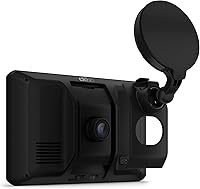
  • Mount Type: A vehicle suction cup mount is included in the box for windshield installation without any additional hardware required.
  • Services Directory: The onboard Truck and Trailer Services directory allows drivers to search and filter truck stops by brand name or specific amenity.
  • Input Method: The device is operated via a touchscreen interface, with no physical buttons required for standard navigation tasks.
  • Wireless Standards: Bluetooth and Wi-Fi are both supported for wireless connectivity, enabling hands-free phone calls and over-the-air updates.
  • In the Box: The package includes the navigator unit, vehicle suction cup mount, pre-installed 16GB microSD card, vehicle power cable, and documentation.

Related Reviews

Garmin dezl OTR610
Garmin dezl OTR610
77%
88%
Truck Routing Accuracy
91%
Display Quality
83%
Arrival Planning & Dock View
74%
PrePass Integration
86%
Ease of Setup
More
Garmin dēzl OTR1010 10″ GPS Truck Navigator
76%
88%
Screen Quality
84%
Truck Routing Accuracy
91%
BirdsEye Satellite Imagery
67%
PrePass Integration
63%
Value for Money
More
Garmin dezl 580 LMT-S Truck GPS Navigator
81%
89%
Routing Accuracy
92%
Ease of Use
62%
Screen Size/Visibility
95%
Traffic and Weather Updates
58%
Voice Command Performance
More
Garmin Dezl OTR500 5.5-inch Truck GPS Navigator
75%
91%
Truck Routing Accuracy
88%
Display Quality
74%
PrePass Integration
72%
Load-to-Dock Guidance
69%
Ease of Setup
More
Garmin Nüvi 2539LMT GPS Navigator
78%
91%
Ease of Use
88%
Navigation Accuracy
93%
Map Update Value
82%
Traffic Avoidance
74%
Display Quality
More
Garmin GPS 18x USB Navigation Receiver
67%
91%
Signal Accuracy
47%
Software Compatibility
78%
Build Quality
63%
Ease of Setup
84%
Long-Term Durability
More
Garmin DriveSmart 55 GPS Navigator
74%
88%
Screen Readability
83%
Routing Accuracy
79%
Live Traffic Updates
91%
Ease of Use
57%
Voice Recognition
More
Garmin Drive 53 GPS Navigator
76%
88%
Display Quality
91%
Ease of Use
86%
Navigation Accuracy
41%
Battery Life
63%
Mount & Stability
More
Garmin DriveSmart 71 EX Car GPS Navigator
79%
83%
Display Clarity & Readability
88%
Navigation Accuracy & Routing
79%
Live Traffic & Rerouting
71%
Voice Assist Usability
74%
Map Update Process
More
Garmin eTrex Solar Handheld GPS Navigator
80%
91%
Battery Life
88%
GPS Accuracy
93%
Build Quality
58%
Display Quality
67%
Solar Performance
More

FAQ

It does both — when you enter your vehicle profile with the correct height, the routing engine will try to plot a route that avoids problematic clearances from the start. That said, it will still alert you if a potential hazard appears on a route segment. As with any navigation tool, always defer to posted signs and your own judgment, especially on lesser-mapped rural roads.

It is a solid, capable camera for documentation purposes, but it is not going to replace a high-end dual-channel dash cam if video quality is your primary concern. Think of it as a well-integrated convenience rather than a best-in-class camera. For most insurance and liability scenarios, the footage it captures is more than adequate.

Footage is saved locally to the included 16GB microSD card regardless of app setup. The dezl app and Vault cloud storage are needed if you want to access or back up footage remotely from a smartphone. If the card fills up and cloud sync is not active, older footage will be overwritten in the standard loop-recording fashion.

You can absolutely use it with any vehicle — the truck-specific routing only activates when you set up a vehicle profile with commercial dimensions. If you leave the vehicle profile as a standard car or light truck, it routes like a regular GPS. That said, the Garmin dezlCam OTR710 Truck GPS Navigator is optimized and priced for professional commercial use, so casual drivers may find it more device than they need.
This is one of the more consistent complaints from drivers who park in direct sun. The suction cup mount can lose its grip in extreme heat, particularly on textured or curved windshields. A number of drivers recommend checking the mount each morning as part of a startup routine, or exploring third-party mounts that attach to the dash vent instead.

The device connects via Wi-Fi to pull map and software updates, which is convenient. However, lifetime map updates are not automatically included — check Garmin's current update policy at time of purchase, as subscription terms can change. Keeping maps current is important for routing accuracy, so factor that into your long-term cost.

Yes, Bluetooth is supported for hands-free calling, and it pairs with compatible headsets and phones. The connection process is straightforward and similar to pairing any other Bluetooth device. Audio quality on calls through the unit is generally described as acceptable for road use, though not exceptional.

Screen brightness is one of the more praised aspects of this unit. Most drivers report that it holds up well in direct sunlight, which matters when you are driving east in the morning or west in the late afternoon. Mounting angle plays a role too, so positioning it to reduce glare from inside the cab helps.

The route planner is HOS-aware in the sense that it can help you plan fuel stops, rest breaks, and overnight stays in a way that aligns with driving hour limits — but it is a planning tool, not a certified ELD. You will still need a compliant ELD device for legal hours-of-service logging. These two tools complement each other rather than one replacing the other.

The setup process is fairly intuitive — you navigate to the vehicle profile section and enter your rig's height, weight, length, and load type. It takes a few minutes the first time. The key is being accurate with your measurements, since the routing is only as reliable as the profile you give it. Most drivers set it once and leave it.

Where to Buy