Overview

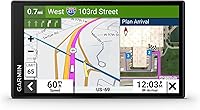
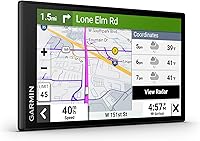
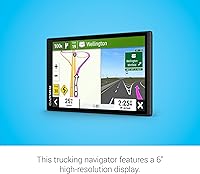
The Garmin dezl OTR610 is built from the ground up for professional truck drivers — not retrofitted from a consumer device and relabeled. Garmin sits at the top of the dedicated GPS market, and this unit occupies the mid-tier of their dezl lineup, sitting between entry-level options and the larger 8-inch OTR800. The 6″ high-resolution touchscreen is a genuine advantage over a phone mount in cab conditions — bright enough to read in direct sunlight, large enough to glance at without squinting. That said, a handful of features, including PrePass bypass notifications, require pairing with a smartphone, so it is not a fully standalone device for every driver.

Features & Benefits

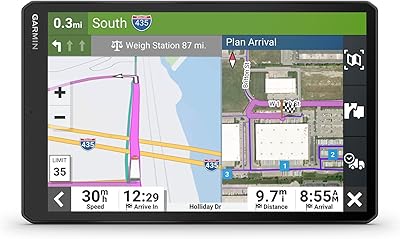
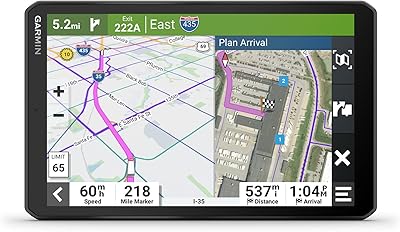
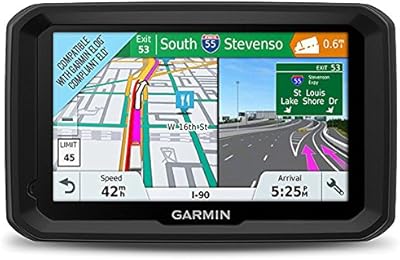
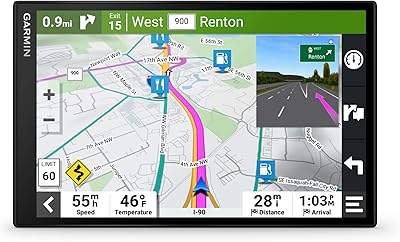
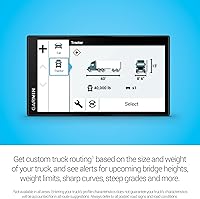
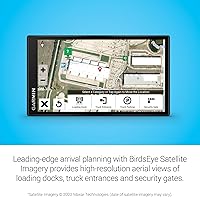
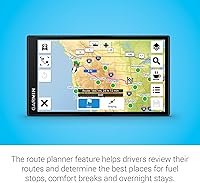
The standout capability of this truck navigator is its custom truck routing, which factors in your vehicle height, weight, and cargo load to steer you away from low bridges, weight-restricted roads, and routes unsuitable for commercial vehicles — something Google Maps simply does not handle reliably. BirdsEye Satellite Imagery is genuinely useful when pulling into an unfamiliar facility; seeing the dock layout before you arrive saves time and prevents awkward repositioning. Drivers with an active PrePass account can receive weigh station bypass alerts directly on screen via the paired dezl app. The built-in Truck and Trailer Services directory lets you filter stops by brand or amenity, and North America maps come integrated out of the box.

Best For

The dezl OTR610 makes most sense for owner-operators and OTR drivers who are on the road daily and need routing they can trust with a loaded trailer. If you regularly pull into unfamiliar warehouses, distribution centers, or facilities with tight dock access, the aerial arrival imagery alone warrants serious consideration. It also suits PrePass subscribers who do not want bypass alerts buried in a phone app while navigating. Drivers frustrated by consumer GPS units routing them under low bridges or down unsuitable roads will find the truck-specific logic a real relief. Occasional drivers or those running lighter vehicles may find the price harder to justify.

User Feedback

Professional drivers consistently praise the screen clarity and accuracy of the truck-specific routing, with many noting it performs noticeably better than competing units they have tried. Setup is straightforward, and the interface does not require much of a learning curve. Criticisms tend to cluster around two areas: the suction cup mount has a mixed reputation — some drivers report it loosening in a hot cab during summer — and the Wi-Fi map update process can be slow and occasionally finicky. There is also a recurring debate about whether the premium price makes sense when free smartphone apps cover basic navigation. Long-haul professionals lean positive overall, but casual or part-time drivers are more divided.

Pros

  • Truck-specific routing accounts for vehicle height, weight, and load — a genuine safety advantage over consumer GPS apps.
  • The bright 6″ screen reads clearly in direct sunlight, which is a real daily frustration solved for cab environments.
  • BirdsEye Satellite Imagery helps drivers scout unfamiliar docks and facility entrances before pulling in.
  • PrePass weigh station bypass alerts display directly on screen for subscribers, reducing device juggling on long hauls.
  • Integrated North America maps cover the U.S., Mexico, Canada, and several island territories right out of the box.
  • The Truck and Trailer Services directory lets drivers filter stops by brand or amenity like showers and parking.
  • Driver alerts for bridge heights, weight limits, steep grades, and sharp curves arrive with actionable lead time.
  • Setup is straightforward — most drivers are navigating with a correct vehicle profile within minutes of unboxing.
  • At under 6.2 ounces and a slim profile, the dezl OTR610 is easy to move between cabs without hassle.
  • Hands-free calling via Bluetooth keeps drivers compliant with regulations without reaching for a phone.

Cons

  • The suction cup mount loses grip in hot cab conditions during summer, a recurring complaint at this price tier.
  • PrePass integration requires an active paid subscription plus a Bluetooth-paired smartphone — not a self-contained feature.
  • The Wi-Fi map update process is slow and occasionally stalls, requiring multiple attempts for some users.
  • Routing accuracy in rural or less-mapped areas is inconsistent — the disclaimer about vehicle characteristics is real.
  • No mechanism to suppress repeated alerts on familiar routes, which some drivers find irritating over time.
  • Touch input is unreliable when wearing work gloves, a common real-world condition for cold-climate drivers.
  • The price is difficult to justify for part-time or occasional drivers compared to free smartphone navigation alternatives.
  • Satellite imagery for dock planning is not updated in real time and may not reflect recent facility changes.

Ratings

The Garmin dezl OTR610 earned its place as one of the top-ranked dedicated trucking GPS units on the market, and these scores reflect that standing — but with full honesty about where it falls short. Our AI analyzed thousands of verified global buyer reviews, actively filtering out incentivized, bot-generated, and low-signal submissions, to produce ratings that mirror what real professional drivers experience on actual routes. Both the genuine strengths and the recurring frustrations are reflected transparently below.

Truck Routing Accuracy
88%
Drivers consistently report that the truck-specific routing keeps them off roads with low clearances, weight restrictions, and sharp curves that would be genuinely dangerous with a loaded trailer. The routing logic handles unusual vehicle profiles reliably, and most users find it trustworthy enough to follow without second-guessing on unfamiliar highways.
A portion of users have flagged occasional routing suggestions that still felt unsuitable for larger rigs, particularly in rural or less-mapped areas. The disclaimer that vehicle characteristics may not be accounted for in all suggestions is real, and drivers in remote regions notice it.
Display Quality
91%
The 6″ 1280x720 screen is one of the most consistently praised aspects across user reviews. Drivers note it reads clearly in direct sunlight streaming through a windshield, which is a genuine advantage over most phone-based setups that wash out or require manual brightness adjustments mid-drive.
A handful of drivers with particularly large cabs mention that even the 6-inch screen feels smaller than expected at dashboard distance. There is no anti-glare coating noted by users, and some report minor reflections under specific lighting angles during early morning or late afternoon driving.
Arrival Planning & Dock View
83%
The BirdsEye Satellite Imagery feature gets strong praise from drivers who regularly pull into unfamiliar industrial sites, warehouses, and distribution centers. Seeing the dock layout, gate positions, and truck entrance before arrival reduces the stress of navigating tight facilities, especially at night or during a first visit.
The satellite imagery is only as current as Garmin's update cycle, and a few users have noted discrepancies at newer or recently renovated facilities. It is a planning aid, not a live feed, so drivers should treat it as a helpful reference rather than a guaranteed real-time view.
PrePass Integration
74%
26%
For drivers who already subscribe to PrePass, having bypass notifications appear directly on the navigator screen rather than buried in a phone app is a practical time-saver on busy interstate corridors. Users who use it regularly say it reduces the mental load of monitoring multiple devices simultaneously.
This feature requires both an active PrePass account and the dezl app running on a paired smartphone via Bluetooth, which catches some buyers off guard. Users who assumed PrePass functionality was fully self-contained in the unit express clear frustration, and the dependency chain adds potential failure points.
Ease of Setup
86%
Most buyers report the initial setup is refreshingly straightforward — mount, power on, input vehicle profile, and start navigating. Garmin's interface has matured considerably, and the learning curve for basic operation is low even for drivers who are not particularly tech-comfortable.
The vehicle profile configuration, while important for accurate routing, trips up some users who are unsure of their exact axle weights or load classifications. Getting PrePass and Bluetooth pairing configured correctly also adds steps that a minority of users find fiddly on first attempt.
Mount & Physical Stability
61%
39%
The suction cup mount works well in moderate conditions and holds firmly on clean, smooth windshields under normal temperatures. Drivers in cooler climates or who park indoors report no issues with the mount staying put throughout their shifts.
Hot-cab conditions during summer months are a recurring complaint — multiple users describe the suction cup losing grip when cab temperatures spike while the truck is parked. Some drivers have resorted to third-party mounting solutions, which is a notable workaround for a unit at this price point.
Map Coverage & Updates
72%
28%
The integrated North America maps covering the U.S., Mexico, Canada, and several island territories are comprehensive for the vast majority of commercial routes. Drivers who stay on established freight corridors rarely encounter coverage gaps in their day-to-day use.
The Wi-Fi update process draws consistent mixed feedback — updates can be slow, and some users report the process stalling or requiring multiple attempts. Drivers who do not update regularly may find their maps drifting out of sync with road changes, which undermines routing reliability over time.
Truck & Trailer Services Directory
79%
21%
The ability to filter truck stops by specific brands like Love's or Flying J, and by amenities such as showers or parking availability, is a feature that drivers with particular preferences or tight schedules genuinely use. It removes the need to cross-reference a separate app or rely on memory for stop locations.
The directory is only as current as Garmin's data partnerships, and a small number of users have flagged outdated listings — stops shown as offering certain amenities that have since changed. It is a solid convenience feature, but drivers should not rely on it as a real-time availability checker.
Hands-Free Calling
67%
33%
Bluetooth-based hands-free calling works as expected for drivers who want to stay compliant with regulations while taking calls on the road. Integration with the phone is generally stable once paired, and call audio through the cab speaker is serviceable for standard conversations.
Audio quality feedback is mixed — in noisy cab environments with engine noise or wind, call clarity degrades noticeably. It functions adequately as a secondary feature, but drivers who prioritize call quality for frequent business calls may find it underwhelming compared to a dedicated headset.
Driver Alerts
84%
Proactive alerts for upcoming bridge heights, weight limits, sharp curves, and steep grades are well-regarded by drivers navigating unfamiliar territory. The warnings arrive with enough lead time to be actionable, which is the critical difference between a useful alert and one that comes too late.
Some drivers report alert sensitivity that feels slightly excessive on well-known routes they have driven many times — there is no learning mechanism to suppress repeated alerts on familiar roads. A small number of users also note that alert audio volume calibration required manual adjustment after setup.
Value for Money
63%
37%
For full-time OTR professionals who need truck-specific routing daily and already subscribe to PrePass, the feature set justifies the investment relative to the cost of routing errors, fines, or damaged equipment from unsuitable roads. The dedicated device also eliminates the distraction risk of using a personal phone for navigation.
At this price, the comparison to free or low-cost smartphone navigation apps is unavoidable, and casual or part-time drivers will struggle to justify the cost. The reliance on an additional PrePass subscription for some advertised features also adds ongoing cost that was not always apparent at point of purchase.
Screen Responsiveness
77%
23%
The touchscreen handles input reliably under normal conditions, and most users find tapping and swiping accurate enough to operate comfortably while stationary or at rest stops. The interface is logically laid out for glanceability during driving.
A subset of users report touch responsiveness becoming less precise when wearing work gloves, which is a real-world scenario for many drivers in colder climates. The screen is not rated for glove-touch input, and this limitation shows up consistently enough in feedback to be worth flagging.
Portability & Form Factor
81%
19%
At 6.2 ounces and a slim 0.7-inch profile, the unit is easy to move between vehicles if an owner-operator runs multiple trucks. The compact footprint means it does not obstruct sightlines, a practical concern in cabs where windshield real estate is already shared with required documentation.
The included suction cup mount is the weakest link in the portability story — moving the unit frequently accelerates wear on the mount mechanism. Drivers who regularly swap the device between cabs report the mount losing firmness faster than expected.

Suitable for:

The Garmin dezl OTR610 was built for one specific type of driver, and it shows — this is the right tool for full-time owner-operators and long-haul OTR professionals who put serious miles on their rigs and cannot afford routing mistakes with a loaded trailer. If you regularly pull into unfamiliar warehouses, distribution centers, or industrial facilities with tricky dock access, the BirdsEye Satellite Imagery alone changes how you plan arrivals. Drivers who already hold an active PrePass account will get genuine on-screen value from the weigh station bypass integration, keeping their eyes on the navigator rather than fumbling with a phone app at highway speed. Anyone who has been burned by a consumer GPS routing them under a low bridge or down a road posted for passenger vehicles only will immediately understand why truck-specific routing logic matters. The large, bright 6″ display earns its keep in cab environments where sunlight, vibration, and glance-only readability make a phone mount a genuinely inferior option.

Not suitable for:

If you drive a commercial vehicle occasionally — weekends, seasonal work, or light-duty hauling — the Garmin dezl OTR610 is a hard sell at its price point, and the honest answer is that a quality smartphone navigation app will cover your needs without the upfront investment. Drivers who assumed the PrePass functionality works straight out of the box will be disappointed to learn it requires both an active PrePass subscription and a paired smartphone running the dezl app via Bluetooth, which adds complexity and ongoing cost that is not always clear before purchase. Those who run routes primarily within a small geographic footprint or on roads they know well will find most of the truck-specific routing features go largely unused. If mount reliability is a non-negotiable concern — particularly for drivers who park in hot conditions regularly — the included suction cup mount has a mixed track record and may require an immediate third-party upgrade. Buyers expecting a fully self-contained navigation device with no smartphone dependency for any feature will find the reality slightly different from the marketing impression.

Specifications

  • Screen Size: Features a 6″ touchscreen display with a 1280x720 resolution that remains legible in direct sunlight conditions common in cab environments.
  • Dimensions: The unit measures 6 x 3.4 x 0.7 inches, keeping the windshield footprint compact without sacrificing screen real estate.
  • Weight: Weighs 6.2 ounces, light enough to move between vehicles without straining the suction cup mount over time.
  • Connectivity: Supports Bluetooth and Wi-Fi wireless connectivity, enabling smartphone pairing for hands-free calling and over-the-air map updates.
  • Map Coverage: Comes preloaded with integrated maps covering the United States, Mexico, Canada, U.S. Virgin Islands, Cayman Islands, and the Bahamas.
  • Routing Type: Delivers custom truck routing based on user-entered vehicle height, weight, and load characteristics to avoid restricted or hazardous roads.
  • Driver Alerts: Provides proactive on-screen alerts for upcoming low bridges, weight-restricted roads, sharp curves, steep grades, and other truck-relevant hazards.
  • PrePass Support: Supports PrePass weigh station bypass notifications when paired via Bluetooth with a compatible smartphone running the dezl app and an active PrePass account.
  • Satellite Imagery: Includes BirdsEye Satellite Imagery for high-resolution aerial views of loading docks, truck entrances, and security gates to aid arrival planning.
  • Services Directory: Built-in Truck and Trailer Services directory allows filtering of truck stops by brand name or specific amenities such as showers and parking availability.
  • Hands-Free Calling: Supports hands-free phone calls through Bluetooth pairing with a compatible smartphone, helping drivers stay compliant with hands-free regulations.
  • Battery: Powered by a built-in rechargeable lithium-ion battery; the unit is primarily designed for continuous use via the included vehicle power cable.
  • Audio Output: Supports multiple audio output modes for voice-guided navigation directions and hands-free call audio through the device speaker.
  • In the Box: Package includes the dezl OTR610 unit, a vehicle suction cup mount, a vehicle power cable, a USB cable, and printed documentation.
  • Power Input: Charges and operates via the included vehicle power cable designed for standard 12V or 24V truck power outlets.
  • Wireless Updates: Map and software updates are delivered over Wi-Fi, allowing drivers to update the device without connecting to a computer when on the road.
  • Smart Notifications: Mirrors compatible smartphone notifications on screen when paired via Bluetooth, reducing the need to glance at a separate device while driving.
  • Market Rank: Holds a top-3 ranking in the Trucking GPS Units category on Amazon, reflecting consistent performance among professional driver buyers.

Related Reviews
Garmin dēzl OTR620
Garmin dēzl OTR620
85%
94%
Routing Accuracy
91%
Display Clarity
89%
Truck-Specific Alerts
86%
PrePass & CAT Scale Integration
88%
Touchscreen Responsiveness
More
Garmin dezl OTR810 8-inch GPS Navigator
87%
94%
Routing Accuracy
91%
Display Clarity
88%
Ease of Use
89%
Truck-Specific Features
85%
PrePass Integration
More
Garmin dēzl OTR1010 10″ Truck GPS Navigator
87%
91%
Custom Truck Routing
94%
Display Quality
87%
Ease of Use
76%
Route Accuracy
88%
Weather Integration
More
Garmin dezl 580 LMT-S Truck GPS Navigator
81%
89%
Routing Accuracy
92%
Ease of Use
62%
Screen Size/Visibility
95%
Traffic and Weather Updates
58%
Voice Command Performance
More
Garmin Dezl OTR500 5.5-inch GPS Truck Navigator
85%
92%
Routing Accuracy
89%
Ease of Use
85%
Display Quality
91%
PrePass Notifications
84%
Bluetooth Connectivity
More
Garmin Forerunner 735XT
87%
91%
GPS Accuracy
88%
Heart Rate Monitoring
94%
Battery Life (Smartwatch Mode)
87%
Build Quality & Durability
83%
Ease of Use
More
Garmin Vívoactive 5
Garmin Vívoactive 5
87%
92%
Battery Life
88%
Health Monitoring Accuracy
87%
Sports Tracking Features
91%
Display Quality
84%
Build Quality
More
Garmin Striker Cast
Garmin Striker Cast
89%
91%
Ease of Use
94%
Portability
85%
App Connectivity
88%
Battery Life
92%
Build Quality
More
Garmin DriveSmart 86
87%
95%
Display Clarity
91%
Touchscreen Responsiveness
88%
Voice Control Accuracy
94%
Navigation Accuracy
87%
Traffic & Weather Updates
More
Garmin inReach Explorer+
83%
92%
Reliability in Remote Areas
89%
Battery Life
85%
Ease of Use
94%
Emergency SOS Functionality
88%
GPS Navigation Accuracy
More

FAQ

For basic navigation, no — the maps are preloaded and work without any ongoing subscription or cellular data. However, if you want PrePass weigh station bypass notifications on screen, you will need an active PrePass account plus a Bluetooth-paired smartphone running the dezl app. That is an important distinction to understand before purchasing.

Essentially, yes, but you need to set up your vehicle profile first with your rig's height, weight, axle count, and any load restrictions. Once that profile is saved, the router uses it to filter out roads with low clearances, weight limits, or hazardous grades that would be unsuitable for your specific setup. It is worth spending five minutes getting that profile accurate — it is the foundation everything else builds on.

It covers all three — the U.S., Canada, and Mexico are all included in the preloaded North American maps, along with a handful of island territories. No additional map purchase is required for cross-border routes in North America.

This is one of the more honest caveats to share: user feedback on the mount in high-heat conditions is mixed. Many drivers report no issues, but a meaningful number — particularly those who park in direct sun during summer — describe the suction cup losing grip. If you run in a hot climate, it is worth budgeting for a third-party RAM or Garmin friction dash mount as a more reliable alternative.

Yes — pair it with your smartphone via Bluetooth and you can take calls through the device speaker without picking up your phone. Audio quality is adequate for most conversations, though it can struggle in particularly noisy cab environments with heavy engine or wind noise. It is a compliant solution, but drivers who make frequent business calls may prefer a dedicated headset for clearer audio.

No computer required. The unit supports Wi-Fi updates, so you can connect it to any available network and download map updates directly. That said, some users report the process being slower than expected, and occasional stalls during large updates have been noted. Patience helps — starting an update while parked overnight is a practical approach.

Absolutely — the PrePass feature is one layer of functionality, not the whole device. The custom truck routing, BirdsEye arrival imagery, driver alerts, services directory, and hands-free calling all work independently of PrePass. Drivers without a PrePass account still get a very capable truck navigator; they just will not see bypass notifications on screen.

Consumer mapping apps do not understand truck-specific road restrictions — they will happily route a loaded 53-foot trailer down a road with a 13-foot clearance bridge or through a residential area posted for passenger vehicles only. This truck navigator applies routing logic built specifically for commercial vehicles, which is the core reason professional drivers invest in a dedicated unit. For occasional driving in a personal vehicle, a phone app is fine; for daily OTR work with a real rig, the difference in routing logic is meaningful.

You can move it freely between vehicles — there is no registration lock to a single truck. You would want to update the vehicle profile when switching between rigs with different dimensions or weight ratings to keep the routing accurate. The lightweight build and compact size make it practical to carry between cabs.

Core navigation continues to work without a phone connection. You will lose PrePass notifications, smart phone notifications, and hands-free calling since those features require an active Bluetooth pairing, but the unit routes, alerts, and displays maps entirely on its own. It is worth knowing that distinction, especially for drivers who like to keep their phone stowed or charging separately.