Overview

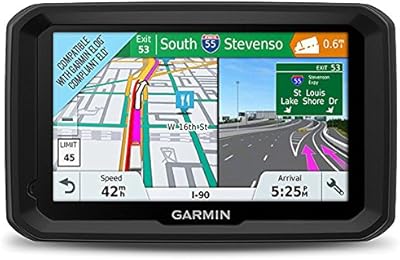
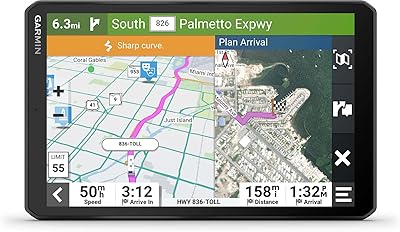
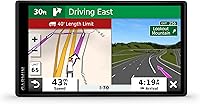
The Garmin Dezl OTR500 5.5-inch Truck GPS Navigator is built from the ground up for professional drivers — not adapted from a consumer device with a few truck-friendly tweaks bolted on. The 5.5-inch touchscreen delivers a sharp 1280x720 display that holds up well in direct sunlight through a cab windshield. It runs on Android with Bluetooth on board, keeping the platform current without overcomplicating things. The box includes a suction cup mount, power cable, and USB cable, so you are road-ready from the start. The price places it firmly in professional-grade territory, and that positioning is intentional — this is a working tool priced accordingly, not an impulse buy.
Features & Benefits

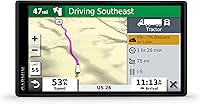
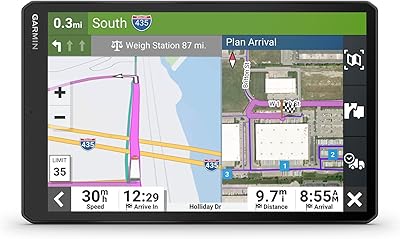
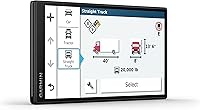
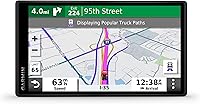
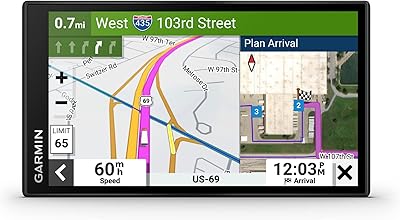
What separates this truck navigator from a phone or a standard GPS is the depth of trucking-specific intelligence baked in. You enter your rig's dimensions and weight upfront, and from there the device builds routes that actually account for bridge clearances, weight-restricted roads, and sharp curves — automatically. PrePass integration puts weigh station bypass notifications on screen, though coverage depends on your enrollment status and varies by state. When approaching a delivery site, load-to-dock guidance surfaces nearby loading zones and staging areas — a genuine time-saver at unfamiliar industrial facilities. The Truck and Trailer Services directory and community route data drawn from fellow truckers round things out practically.

Best For

The Dezl OTR500 makes the most sense for owner-operators and independents who run long hauls and cannot afford routing surprises mid-trip. If your loads involve oversized dimensions or strict weight limits, having those parameters drive your route from departure rather than causing costly detours is worth a great deal. It is also well-suited for drivers tackling unfamiliar delivery zones — the kind of industrial parks where even experienced operators can waste an hour hunting for a dock. Fleets looking to reduce dispatcher calls for last-mile navigation will find it earns its keep quickly. Truckers already enrolled in PrePass will especially appreciate having that functionality integrated rather than managed as a separate device.

User Feedback

Drivers who have put this Garmin unit through real-world routes generally come away impressed with how reliably it steers them clear of low-clearance trouble — that alone earns consistent praise from heavy-haul operators. Compared to older dezl models, most users notice a meaningful jump in screen clarity and routing intelligence. The friction points tend to be practical rather than fundamental: the suction mount can loosen in an extremely hot cab, and the initial vehicle profile setup trips up some first-time users. A handful of buyers note that PrePass bypass accuracy is not perfectly consistent across every corridor. On balance, most long-haul drivers conclude the price is well justified once they are relying on it daily.

Pros

  • Truck-specific routing automatically avoids low bridges, weight-restricted roads, and hazardous grades once your vehicle profile is set.
  • The 5.5-inch screen is bright and sharp enough to read clearly in direct sunlight through a windshield.
  • PrePass integration puts weigh station bypass decisions on screen, reducing stress on busy interstate corridors.
  • Load-to-dock guidance helps drivers locate staging areas and loading zones at unfamiliar industrial sites.
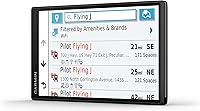
  • The Truck and Trailer Services directory lets you filter stops by brand and amenities, saving time on rest and fuel planning.
  • Community-sourced trucker routes surface real-world road choices from experienced drivers in specific regions.
  • Android-based platform keeps the underlying tech current and responsive compared to older dedicated GPS devices.
  • Comes ready to mount and power from the box — no extra accessories needed to get started.
  • Compact and lightweight enough to move between vehicles without hassle.
  • Drivers upgrading from older dezl models consistently report a noticeable improvement in routing intelligence and display quality.

Cons

  • The suction cup mount can lose grip in extremely hot cab environments, especially on sun-exposed windshields.
  • PrePass bypass notifications are not reliable in every state or corridor — coverage depends on enrollment and regional infrastructure.
  • Setting up the vehicle profile correctly takes time upfront, and errors there undermine the routing accuracy the device is built around.
  • Map updates require connecting to a computer, which some drivers find inconvenient compared to over-the-air update options.
  • The price is a real barrier for drivers who only occasionally need truck-specific routing.
  • Load-to-dock guidance works best in well-mapped urban areas and can be hit-or-miss at smaller or newer industrial sites.
  • No built-in dash cam or live traffic subscription is included, which some competitors bundle at similar price points.
  • Bluetooth connectivity is present but limited in scope — do not expect deep smartphone integration beyond basic pairing.
  • The dock guidance learning curve catches some first-time users off guard, requiring a few trips to use it confidently.

Ratings

The scores below reflect an AI-driven analysis of verified global user reviews for the Garmin Dezl OTR500 5.5-inch Truck GPS Navigator, with spam, bot-submitted, and incentivized feedback actively filtered out before scoring. Each category captures what real professional drivers praised and complained about after extended use on the road — not just out-of-box impressions. Both the standout strengths and the genuine friction points are weighted transparently into every number you see here.

Truck Routing Accuracy
91%
Drivers hauling oversized or weight-restricted loads consistently report that once the vehicle profile is correctly configured, the routing keeps them off low bridges, restricted roads, and weight-limited crossings with impressive reliability. Veteran long-haul operators note it outperforms older dedicated GPS devices and most phone-based trucking apps on this front.
Custom truck routing is not available in all areas, and a handful of drivers report occasional routing anomalies in rural or recently changed road networks. The accuracy ceiling depends entirely on the user entering their vehicle dimensions correctly upfront — errors in setup lead directly to routing errors on the road.
Display Quality
88%
The 1280x720 screen earns real praise for its brightness and sharpness in cab environments, where many cheaper GPS screens wash out in direct afternoon sunlight. Drivers switching from older dezl models or entry-level units describe the clarity upgrade as immediately noticeable during daytime runs.
Extreme sun angles — particularly on south-facing windshields in summer — can still produce glare that requires repositioning the mount. A small number of users also note that the screen brightness auto-adjustment does not always respond fast enough when moving in and out of shaded highway sections.
PrePass Integration
74%
26%
For enrolled PrePass carriers running major interstate corridors, having bypass decisions displayed directly on the GPS screen removes a meaningful source of driving stress and reduces the cognitive load of managing a separate PrePass transponder display. Drivers on high-volume freight lanes in the Midwest and Southeast report the most consistent benefit.
Coverage is uneven — PrePass notifications are far less reliable in mountain states, less-trafficked corridors, and regions where state weigh station infrastructure has not been fully integrated. Drivers who are not already PrePass members get no value from this feature at all, which deflates its score for a meaningful portion of buyers.
Load-to-Dock Guidance
72%
28%
At well-mapped, established distribution centers and large logistics hubs, the dock guidance feature genuinely reduces the time drivers spend circling an unfamiliar facility trying to locate the correct entrance or staging area. Fleet operators report a measurable drop in dispatcher calls for last-mile navigation when drivers are equipped with this unit.
Smaller warehouses, newer industrial developments, and independent shippers are often missing from the dock database, making the feature unreliable for drivers who regularly service off-the-beaten-path accounts. The learning curve for understanding how to interpret dock suggestions also trips up some new users during their first few deliveries.
Ease of Setup
69%
31%
The physical setup — mounting, powering, and getting to the navigation screen — is straightforward, and the included accessories mean you are not hunting for compatible hardware out of the box. Most drivers report being up and running within minutes of opening the package.
Configuring the vehicle profile accurately requires careful attention, and the interface for entering dimensions and weight classifications is not as intuitive as it could be for first-time users. Drivers who rush this step or misunderstand the input fields often experience routing issues that they initially attribute to the device rather than their own setup.
Map Update Experience
61%
39%
Garmin provides lifetime map updates for this unit, which is a genuine long-term value benefit — drivers are not paying subscription fees to keep their maps current over months and years of use. The Garmin Express software handles the process once the connection is established.
The update process requires plugging into a computer via USB, which is an inconvenience for drivers who live out of their trucks or do not have regular access to a laptop. Several users report that Garmin Express can be slow or finicky, and large map update files mean the process can take longer than expected.
Mount & Stability
63%
37%
The suction cup mount holds adequately in moderate temperature conditions and installs without tools, which makes it easy to move between a day cab and a sleeper or switch rigs between loads. The dual compatibility with both windshield and dashboard surfaces gives drivers some flexibility in positioning.
In high-heat cab environments — especially during summer when interior temperatures can spike well above ambient — the suction cup is a consistent complaint, with multiple users reporting it losing grip mid-route. Drivers in hot-climate states frequently recommend supplementing with a friction pad or aftermarket dash mount to avoid the unit dropping unexpectedly.
Community Route Data
78%
22%
The popular trucker routes feature adds a layer of practical, crowd-sourced intelligence that static map data cannot replicate — particularly useful when navigating industrial areas, port facilities, or regional distribution zones that experienced local drivers know have unofficial but widely used preferred approaches.
The quality and density of community route data varies significantly by region, with rural and less-trafficked areas showing noticeably thinner coverage. Drivers venturing into new markets for the first time may find the community data sparse precisely when they need it most.
Hazard & Alert System
83%
Proactive alerts for sharp curves, steep downgrades, and bridge height restrictions give drivers valuable reaction time, particularly on unfamiliar mountain routes or when approaching narrow rural underpasses at night. Drivers hauling tall loads specifically call out the bridge height warnings as a feature they rely on daily.
Alert timing can occasionally feel abrupt on faster-moving routes, giving less lead time than some drivers would prefer for a measured speed reduction before a grade or curve. A small number of users also report redundant alerts on well-known roads they drive regularly, with no option to suppress familiar warnings.
Truck Services Directory
81%
19%
The ability to filter truck stops by brand and amenities — showers, scales, certified repair bays — is a practical daily-use feature that saves time when planning a rest stop or fuel break under time pressure. Drivers on tight delivery schedules appreciate being able to confirm amenity availability before committing to an exit.
Directory listings are occasionally out of date, with a handful of users noting that listed amenities were unavailable upon arrival at a particular stop. Independent truck stops and regional chains are less consistently represented than the major national brands.
Bluetooth Functionality
66%
34%
Hands-free calling via Bluetooth pairing is a genuinely useful safety feature for long-haul drivers who need to communicate without picking up a phone, and the pairing process works reliably with most modern smartphones. It covers the baseline expectation buyers have for Bluetooth on a connected device at this price point.
Bluetooth integration is limited to basic hands-free calling — there is no deep smartphone app mirroring, no live traffic data pulled from the phone, and no audio streaming. Drivers expecting a richer connected experience similar to what automotive infotainment systems offer will find this underwhelming.
Value for Money
76%
24%
Professional drivers who run daily long-haul routes and rely on the clearance routing and PrePass integration consistently conclude that the device pays for itself in avoided fines, detours, and dispatcher overhead within a reasonable number of months. Owner-operators in particular tend to view it as a working expense rather than a discretionary purchase.
For anyone who drives commercially only occasionally, or whose routes do not involve meaningful clearance or weight restrictions, the price is difficult to justify against a capable phone-based trucking app that costs a fraction of the price. The value equation is real, but it is conditional on professional-frequency use.
Device Durability
79%
21%
The physical build of the Dezl OTR500 holds up well to the vibration, temperature swings, and general rough handling that cab environments subject electronics to over months of daily use. Drivers who have run the unit for a year or more generally report no hardware degradation beyond normal wear.
A few users report issues with the power port connection becoming loose over time with repeated plugging and unplugging cycles across different vehicles. The unit is not rated for water resistance, which is worth keeping in mind for drivers who operate with windows open in wet conditions.

Suitable for:

The Garmin Dezl OTR500 5.5-inch Truck GPS Navigator is the right call for professional drivers who spend serious time behind the wheel of a semi, a heavy-haul rig, or any commercial vehicle where clearance restrictions and weight limits are daily realities. Owner-operators who run long-haul routes across North America will get the most out of it — particularly those who regularly navigate unfamiliar industrial areas, distribution centers, or tight delivery corridors where a wrong turn means more than a minor inconvenience. Drivers already enrolled in PrePass will find the on-screen weigh station bypass notifications genuinely useful, cutting down on the guesswork and stress that comes with approaching a scale house. Fleets looking to cut back on last-mile dispatcher intervention will also find this Garmin unit earns its place on the dash. If your load dimensions or weight class meaningfully restricts your road options, having a device that accounts for those parameters from the moment you enter your destination is a practical advantage that adds up fast over thousands of miles.
Not suitable for:

The Garmin Dezl OTR500 5.5-inch Truck GPS Navigator is not the right fit for drivers who only occasionally operate a commercial vehicle and do not need dedicated trucking intelligence baked into their navigation. Pickup truck drivers, RV travelers, or light-duty fleet operators will find the price hard to justify when a general-purpose GPS or a well-configured phone mount would cover their actual needs. The truck-routing benefits also require you to manually set up your vehicle profile — height, weight, and load type — and buyers who skip or rush that step will not get full value from the device. PrePass integration sounds compelling on paper, but if you are not already enrolled in the PrePass program or operate primarily in states where coverage is limited, that feature becomes much less useful. If your budget is tight and your routing needs are straightforward, this truck navigator is priced for daily professional use, and the cost is difficult to rationalize without that context.
Specifications

  • Screen Size: Features a 5.5-inch touchscreen display sized for easy viewing from a truck cab without requiring the driver to lean forward.
  • Resolution: The display outputs at 1280 x 720 pixels, delivering sharp map detail and readable text at typical driving distances.
  • Operating System: Runs on Android, providing a responsive and modern software foundation for the device's trucking applications.
  • Connectivity: Bluetooth is built in for wireless pairing with compatible devices such as headsets or smartphones.
  • Map Coverage: Comes preloaded with North America maps, covering the continental United States, Canada, and Mexico.
  • Truck Routing: Supports custom routing based on user-entered vehicle height, weight, length, width, and hazardous materials classifications.
  • PrePass Integration: Displays on-screen PrePass weigh station notifications and bypass decisions, subject to carrier enrollment and state coverage.
  • Dock Guidance: Provides load-to-dock navigation that identifies potential loading zones and storage areas when approaching a delivery destination.
  • Mount Type: Includes a vehicle suction cup mount compatible with both dashboard and windshield installation.
  • Dimensions: The unit measures 5.4 x 3 x 0.7 inches, keeping it compact enough to avoid obstructing sightlines in the cab.
  • Weight: The device weighs 5.3 ounces, making it easy to reposition or move between vehicles as needed.
  • Battery Type: Equipped with a built-in rechargeable lithium polymer battery, which is included in the box.
  • Power Input: Powered via the included vehicle power cable designed for standard 12V or 24V truck power outlets.
  • In-Box Contents: Package includes the navigator, vehicle suction cup mount, vehicle power cable, USB cable, and documentation.
  • Community Routes: Surfaces popular routes submitted by fellow truckers to help drivers navigate unfamiliar regions with real-world road intelligence.
  • Hazard Alerts: Delivers proactive on-route alerts for sharp curves, steep grades, and low bridge clearances ahead on the planned path.
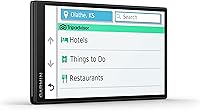
  • Services Directory: Includes a Truck and Trailer Services directory that lets drivers filter nearby truck stops by brand name and available amenities.
  • ASIN: The Amazon Standard Identification Number for this product is B08YS2PCXS, corresponding to model number 010-02603-00.

Related Reviews
Garmin dezl OTR610
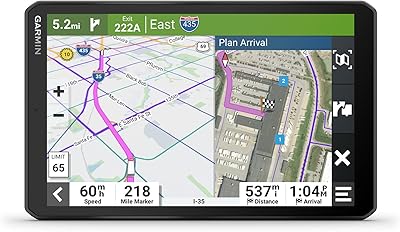
Garmin dezl OTR610
77%
88%
Truck Routing Accuracy
91%
Display Quality
83%
Arrival Planning & Dock View
74%
PrePass Integration
86%
Ease of Setup
More
Garmin dēzl OTR1010 10″ Truck GPS Navigator
87%
91%
Custom Truck Routing
94%
Display Quality
87%
Ease of Use
76%
Route Accuracy
88%
Weather Integration
More
Garmin dezl OTR810 8-inch GPS Navigator
87%
94%
Routing Accuracy
91%
Display Clarity
88%
Ease of Use
89%
Truck-Specific Features
85%
PrePass Integration
More
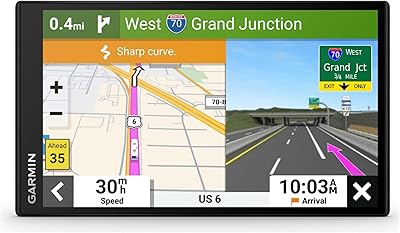
Garmin dezl 580 LMT-S Truck GPS Navigator
81%
89%
Routing Accuracy
92%
Ease of Use
62%
Screen Size/Visibility
95%
Traffic and Weather Updates
58%
Voice Command Performance
More
Garmin RV 795 7-Inch GPS Navigator
75%
91%
Screen Clarity
83%
RV-Specific Routing
86%
Campground Database
72%
Value for Money
84%
Ease of Setup
More
Garmin dēzlCam OTR710 7” GPS Truck Navigator
82%
78%
Routing Accuracy
90%
Ease of Use
88%
Display Quality
85%
Dash Cam Functionality
70%
GPS Performance in Remote Areas
More
Rand McNally RandTab6 6-inch GPS Truck Navigator
84%
94%
Route Customization
91%
Real-Time Traffic Updates
75%
Battery Life
89%
Screen Clarity & Touchscreen Usability
85%
Ease of Setup & Installation
More
Rand McNally RANDTAB8 8-inch GPS Truck Navigator
75%
88%
Routing Accuracy
91%
HazMat & Load Configuration
86%
Screen Readability
83%
POI Database Quality
79%
Mount & Physical Stability
More
Garmin RV 895 RV GPS Navigator 8-inch
85%
93%
Custom Routing for RVs
88%
Touchscreen Display
67%
Battery Life
90%
Satellite Imagery
85%
Ease of Use
More
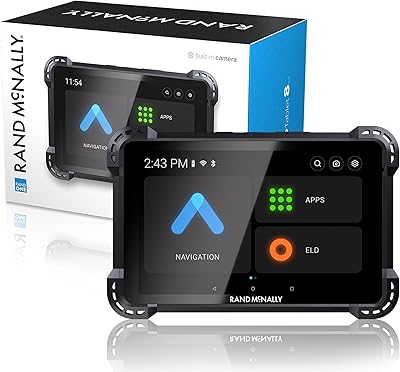
LOVPOI A9 9-inch Truck GPS Navigator
65%
78%
Truck-Specific Routing
81%
Screen Readability
76%
Voice Alert System
71%
Map Coverage & Accuracy
83%
Ease of Setup & Mounting
More

FAQ

You need to enter your vehicle profile manually — height, weight, length, width, and any hazmat classifications. The device does not auto-detect your rig. This is a one-time setup that drives all the clearance-based routing decisions, so it is worth taking the time to get it right before your first trip.

You need to be an active PrePass participant for the bypass notifications to work — the Dezl OTR500 integrates with the program but does not enroll you in it. Coverage also varies by state and corridor, so it will not display bypass decisions everywhere you drive. If you are already enrolled and run major interstates regularly, the integration is genuinely useful.

Map updates are handled through Garmin Express, which requires connecting the unit to a computer via the included USB cable. It is not an over-the-air update process, so you will need to plug in periodically to keep maps current. Garmin typically provides free lifetime map updates for this device, but it is worth confirming that detail when you register the product.

This is a commonly reported issue. In very high-heat cab environments — particularly on a sun-facing windshield in summer — the suction cup can lose its grip over time. Some drivers reinforce it with a non-slip dash pad or switch to a friction dash mount for added stability. It is a real limitation worth planning around if you drive in hot climates.

You can technically use it in any vehicle, but most of the value comes from the trucking-specific features — clearance routing, weigh station alerts, dock guidance. If you are driving a pickup or van and do not have commercial vehicle restrictions to worry about, a general-purpose GPS or a well-configured phone app would serve you just as well at a lower cost.

The core trucking features are very similar between the two. The main differences are screen size — the OTR800 runs a larger 8-inch display — and the OTR800 adds a built-in dashcam and a different mount system. If screen real estate and the integrated camera matter to you, the larger model is worth the additional cost. For most drivers who just need solid truck routing and PrePass integration, this unit covers the essentials.

It works well for established, well-mapped facilities but can be inconsistent at smaller independent warehouses or newer industrial sites that have not yet been fully mapped. Think of it as a useful starting point rather than a guaranteed guide — always confirm dock locations with your dispatcher or delivery instructions when pulling into an unfamiliar site for the first time.

Bluetooth allows pairing with a smartphone for hands-free calling, which is a practical safety feature on long hauls. It does not offer deep smartphone integration like app mirroring or live traffic data pulled from your phone. It is a useful supplementary feature, but not the device's main selling point.

The 1280x720 display is noticeably brighter and sharper than older dedicated GPS screens, and most drivers report it is readable under normal daylight conditions. Extreme sun angles can still cause some glare, which is true of nearly any screen in a cab environment. Positioning the mount to minimize direct reflection helps considerably.

For occasional drivers, a phone-based app like CoPilot Truck or PC Miler is likely sufficient. Where this Garmin unit earns its keep is in daily professional use — it functions independently of cell coverage, does not drain your phone battery, and provides a stable, always-on dedicated display in the cab. Drivers who run remote routes or regularly deal with clearance-critical loads tend to view the price as a working tool cost rather than a consumer electronics purchase.

Where to Buy