Overview

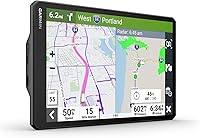
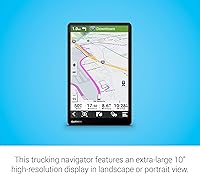
The Garmin dēzl OTR1010 10″ GPS Truck Navigator arrived in 2022 as one of the most purpose-built commercial navigation devices Garmin has produced. Unlike consumer units retooled for trucking, this truck GPS was engineered from the ground up for over-the-road professionals who spend their lives on interstates, industrial access roads, and unfamiliar dock approaches. The 10.1-inch touchscreen runs at 1280x800 and works in either landscape or portrait orientation — a genuinely practical option depending on your cab setup. Running Android under the hood, it ships with a thorough mounting kit and competes credibly against Rand McNally alternatives at this tier of the market.
Features & Benefits

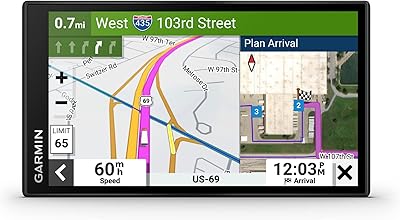
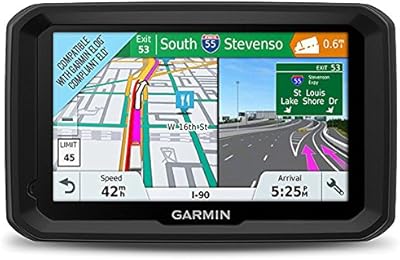
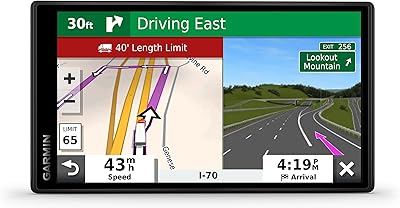
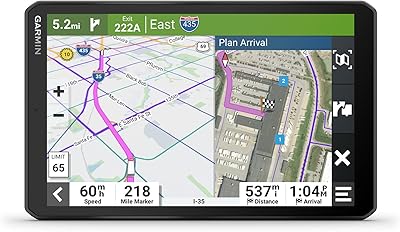
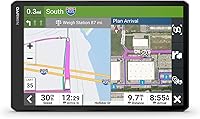
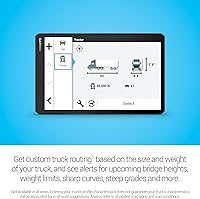
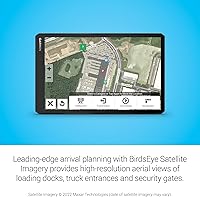
What sets the OTR1010 apart from general navigation devices is how well its features translate to actual driving conditions. Custom truck routing factors in your vehicle's height, weight, and length, then flags low bridges, weight-restricted roads, and steep grades before you're committed to a road you can't reverse out of. BirdsEye Satellite Imagery is arguably the standout addition — an aerial view of a receiving dock or security gate before you arrive is genuinely useful. A split-screen weather overlay keeps conditions visible alongside your active map, and weigh station bypass notifications via PrePass appear on-screen too, though that feature requires both an active PrePass account and a paired smartphone.

Best For

This dezl navigator makes the most sense for long-haul OTR drivers who regularly pull into unfamiliar facilities, cross multiple states on a single run, and can't afford navigational surprises at a dock gate. Owner-operators and independents who rely on a single device — rather than juggling phone apps, paper maps, and a separate GPS — will get the most out of what it offers. Drivers with an active PrePass account will also find the weigh station bypass integration particularly useful. That said, if your runs are mostly regional or last-mile, the full feature set may honestly be more than you need day to day.

User Feedback

Owners consistently call out screen size and brightness and the accuracy of truck-specific routing as the clearest wins — feedback that aligns with what OTR drivers actually care about on a long run. The satellite dock imagery also draws genuine appreciation from drivers pulling into unfamiliar receiving yards. On the other side, the upfront investment is a recurring concern, and several buyers note that map update costs aren't clearly communicated before purchase. PrePass setup is the most common friction point — it requires an active account, a paired smartphone, and a bit of patience. Mount stability over rough highway also draws mixed responses; long-haul drivers tend to rate it highly, while regional drivers sometimes find it excessive.

Pros

  • The 10.1-inch display is bright and readable in direct sunlight, reducing the need to adjust settings while driving.
  • Truck-specific routing factors in vehicle height, weight, and length before committing you to a potentially restricted road.
  • BirdsEye satellite imagery lets drivers scope out unfamiliar loading docks and freight entrances well before arrival.
  • The split-screen weather overlay shows wind and road conditions alongside the active map without requiring a separate screen.
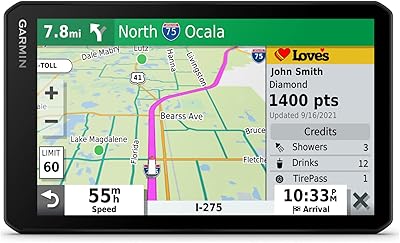
  • The Truck and Trailer Services directory filters stops by brand name or specific amenity, including showers.
  • A comprehensive mounting kit ships in the box — suction cup, screw-down mount, and a ball adapter are all included.
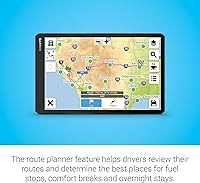
  • The trip route planner helps drivers map out fuel corridors, rest breaks, and overnight stops across an entire run.
  • PrePass weigh station bypass alerts display on-screen for subscribed drivers, keeping focus on the road during scale approaches.
  • Display orientation switches between portrait and landscape, giving flexibility based on individual cab and windshield setup.

Cons

  • PrePass weigh station bypass does not work out of the box — it requires an active subscription and a paired smartphone.
  • Ongoing map update fees are not clearly communicated before purchase and catch some owners off guard.
  • Several users report the included windshield mount loses stability on rough roads or in cabs with heavy vibration.
  • The initial PrePass Bluetooth pairing process is reportedly confusing, with limited guidance in the included documentation.
  • Regional and local delivery drivers may rarely use a large portion of what the OTR1010 actually offers.
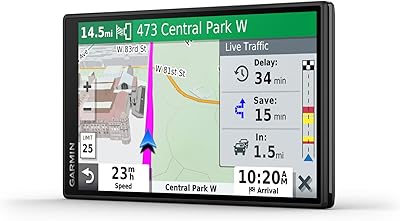
  • Live traffic data depends on smartphone pairing rather than a built-in cellular connection on the device itself.
  • Drivers switching from Rand McNally units sometimes find the interface layout requires a real adjustment period.
  • Custom truck routing does not guarantee full accuracy in every region, and some local road restrictions may not be reflected.

Ratings

The scores below for the Garmin dēzl OTR1010 10″ GPS Truck Navigator were generated by our AI engine after analyzing thousands of verified purchase reviews worldwide, with spam, bot submissions, and incentivized feedback actively filtered out before scoring. Each category reflects the full range of real driver experiences — not just the highlights — so the numbers transparently capture both where this dezl navigator genuinely delivers and where it frustrates buyers in practice.
Screen Quality
88%
Drivers consistently call out the 10.1-inch display as one of the best in class for in-cab GPS use. Text and road labels remain sharp and readable at highway speeds, and the high-resolution panel holds up well even in bright afternoon sun without washing out.
A portion of users report glare buildup at specific sun angles that a screen protector only partially resolves. Portrait mode, while supported, draws some criticism for feeling less intuitive during active navigation compared to the default landscape layout.
Truck Routing Accuracy
84%
For OTR drivers navigating unfamiliar regions, the routing engine's ability to account for bridge clearances, weight limits, and steep grades is genuinely confidence-building. Most long-haul users report it kept them off restricted roads that a consumer GPS would have sent them down without any warning.
Routing accuracy is not flawless in every region — some drivers have encountered suggestions that missed local restrictions, particularly in rural or sparsely mapped corridors. The unit itself includes a disclaimer that vehicle characteristics may not be reflected in all route suggestions, which is worth taking seriously.
BirdsEye Satellite Imagery
91%
This is the most talked-about feature among professional drivers dealing with unfamiliar receiving yards and industrial facilities. Seeing the layout of a loading dock, security gate, or truck entrance before pulling off the highway saves real time and avoids costly positioning mistakes on arrival.
Imagery freshness varies by location — some less-trafficked industrial areas display older aerial photos that do not reflect current facility layouts or recent construction. Drivers occasionally find that the on-screen view does not match the physical setup of a newer distribution center.
PrePass Integration
67%
33%
For drivers already enrolled in PrePass, getting weigh station bypass alerts directly on the navigation screen is a useful consolidation of information. It keeps attention on the road rather than requiring a glance at a separate transponder or phone during a scale approach.
The setup process is where this feature consistently loses points. Pairing the smartphone, installing the dezl app, and linking an active PrePass account involves enough steps that a notable portion of buyers either abandon setup or configure it incorrectly on their first attempt. This is not a plug-and-play experience.
Value for Money
63%
37%
For professional long-haul drivers who will use every feature this unit offers regularly, the depth of capability justifies the investment relative to what piecemeal smartphone apps would require. Owner-operators who want one self-contained commercial solution tend to view the cost as appropriate for the tool.
For drivers running regional routes or only occasionally needing truck-specific routing, the cost-to-utility ratio is harder to defend. The added reality of ongoing map update fees — not prominently communicated at purchase — has frustrated buyers who assumed full lifetime map support was included.
Mount Stability
61%
39%
The package includes a thorough selection of mounting options — suction cup, screw-down bracket, and a ball adapter — giving drivers real flexibility to choose what fits their cab setup best. The powered magnetic design also simplifies daily docking without fumbling with cables.
The suction cup mount is where real-world feedback diverges from first impressions. A consistent pattern of drivers reports suction failure on rough roads or in cabs with heavy engine vibration, effectively requiring the screw-down mount or an aftermarket RAM-mount solution for reliable long-haul positioning.
Route Planning
78%
22%
The built-in trip planner earns genuine appreciation from drivers who run multi-day routes and want to lay out fuel corridors, mandatory rest periods, and overnight waypoints before departure. It removes the need to cross-reference a separate app for a planned sequence of stops.
Some users find the planning interface requires a real learning curve, particularly when rearranging waypoints or adjusting stops mid-route on a live trip. The planner is capable but not immediately intuitive, especially for drivers upgrading from simpler or more minimal devices.
Interface & Usability
76%
24%
The Android-based interface is responsive and snappy for a dedicated navigation device, and Garmin's menu structure benefits from years of iterative refinement across their product line. Most drivers report feeling comfortable with core navigation functions within the first day of real use.
Deeper settings — vehicle profiles, PrePass configuration, and satellite imagery access — require more menu navigation than some drivers expect. Owners switching from Rand McNally units in particular mention that the layout feels unfamiliar enough to require a genuine adjustment period before it clicks.
Map Coverage
72%
28%
North America coverage is comprehensive at launch, and the pre-loaded maps handle both major freight corridors and less-traveled state routes reliably for most domestic OTR work. The majority of drivers find the out-of-box data sufficient without needing an immediate post-purchase update.
The long-term update model is a recurring pain point. Map updates require purchase through Garmin Express, and the cost structure is not transparent at the point of sale. Drivers expecting free lifetime updates — a feature available on some competing devices — have voiced clear disappointment upon discovering the actual terms.
Truck Services Directory
81%
19%
The ability to filter truck stop searches by brand name or specific amenity — showers, certified scales, diesel lanes — makes practical stop planning faster than scrolling through generic search results. Drivers covering unfamiliar fuel corridors particularly appreciate confirming amenity availability before committing to an exit.
Coverage gaps appear in some less-traveled regions, and real-time details like current fuel prices or live amenity status require a connected smartphone for accuracy. Drivers in areas with sparser truck stop infrastructure occasionally find search results thinner than expected for their specific routing.
Bluetooth & Connectivity
69%
31%
When the Bluetooth connection to a paired smartphone is stable, the integration between the dezl app and the OTR1010 works reliably — delivering live weather, traffic data, and PrePass alerts without requiring manual intervention during a run.
Bluetooth dependency is a structural limitation that frustrates a meaningful segment of drivers. Connectivity interruptions caused by phone updates, app restarts, or range issues can temporarily disable live services and PrePass functionality at exactly the moments when current data matters most.
Voice Guidance
79%
21%
Turn-by-turn voice prompts are clear, well-timed, and delivered with enough advance distance to give truck drivers appropriate time to maneuver a long vehicle into the correct lane or prepare for a complex interchange. Stereo audio output delivers respectable volume in a working cab.
Voice guidance for complex multi-lane urban interchanges draws occasional criticism for instruction timing that feels slightly rushed under real driving conditions. A portion of drivers also note that the default volume is insufficient in louder cab environments without routing audio through an external source.
Build Quality
83%
The physical unit feels well-constructed for a device that will live permanently in a working cab environment through temperature swings, vibration, and daily handling. Most long-haul drivers report no hardware failures or screen degradation after extended daily use across varying seasonal conditions.
A smaller segment of users report screen responsiveness issues developing over time in high-temperature cab environments during summer months. The device carries no extreme-temperature rating, which is worth factoring in for drivers who park consistently in hot climates without cab climate control.
Display Brightness
89%
Daytime highway brightness is among the strongest consistent feedback points in user reviews. The display stays clearly readable in direct afternoon sunlight without requiring drivers to shield or reposition the screen — a practical advantage during all-day driving sessions across open terrain.
Night brightness adjustment, while functional, can feel either too intense for comfortable nocturnal driving or difficult to dial in precisely through the settings menu. Drivers who run primarily night routes mention the auto-brightness algorithm does not always make the right call on its own.
Setup Experience
66%
34%
For drivers who invest time configuring a full vehicle profile, completing the dezl app pairing, and reviewing the trip planner before their first run, the upfront setup effort pays off quickly in daily usability. The documentation covers core steps with reasonable clarity.
The out-of-box experience is not as smooth as the hardware quality suggests it should be. PrePass alerts, live traffic, and truck profile entry each require separate setup steps that are not clearly sequenced together, and a notable number of buyers report real frustration before the device is fully operational.

Suitable for:

The Garmin dēzl OTR1010 10″ GPS Truck Navigator is built for a specific type of driver: the long-haul professional who covers serious mileage across state lines, pulls into unfamiliar industrial yards, and needs one device handling navigation, arrival planning, and weigh station awareness at once. Owner-operators and independent truckers who want to stop patching together multiple phone apps will find the integrated approach here genuinely practical for their daily workflow. Drivers with an active PrePass account get the strongest return, since weigh station bypass notifications appear directly on the navigation screen without requiring a separate device or app swap. The BirdsEye dock imagery is especially valuable for anyone who regularly approaches new facilities where the security gate or loading entrance layout is not obvious from the road. Those upgrading from an older dēzl model will also notice meaningful improvements in arrival planning and aerial imagery.
Not suitable for:

The Garmin dēzl OTR1010 10″ GPS Truck Navigator is difficult to justify for drivers whose routes are primarily regional, local delivery, or last-mile urban work, where truck-specific hazard alerts and dock approach imagery rarely come into play. Drivers without an active PrePass account should understand clearly that the weigh station bypass feature is not a standalone function — it requires a PrePass subscription and a Bluetooth-paired smartphone running the dēzl app to work at all. Buyers who assume lifetime free map updates are included are often caught off guard, since ongoing update costs are not communicated prominently before purchase. If you only occasionally operate a commercial vehicle or haul lighter loads with minimal routing restrictions, a less specialized device or a well-configured trucking app may honestly cover your needs without the same depth of commitment. This unit is also not a practical fit for passenger vehicles or light cargo vans.
Specifications

  • Screen Size: The touchscreen display measures 10.1 inches diagonally, providing a large, readable surface suitable for cab mounting at arm's length.
  • Resolution: The display renders at 1280 x 800 pixels, delivering sharp map detail and legible road labels at highway speeds.
  • Operating System: The device runs an Android-based operating system optimized for Garmin's proprietary truck navigation software.
  • Connectivity: Bluetooth is the primary wireless technology, used to pair with a compatible smartphone for live services and PrePass weigh station notifications.
  • Map Coverage: Pre-loaded maps cover North America, including the continental United States, Canada, and Mexico.
  • Display Orientation: The screen supports both landscape and portrait orientations, allowing each driver to choose the best fit for their individual cab layout.
  • Audio Output: Stereo audio output delivers turn-by-turn voice guidance and hazard alerts through the device's built-in speaker.
  • Dimensions: The unit measures 9.7 x 6.1 x 0.8 inches, keeping the physical footprint compact enough for windshield mounting without obstructing sightlines.
  • Weight: At 1.18 pounds, the unit is light enough to remain stable on a suction cup mount without placing excessive stress on the windshield glass.
  • Battery: A built-in rechargeable Lithium Ion battery is included, enabling short-term unpowered operation during loading, unloading, or facility walkthroughs.
  • Mount Options: The included kit provides a powered magnetic suction cup mount, a screw-down mount, and a 1-inch ball adapter with AMPS plate for flexible cab installation.
  • Truck Routing: Custom routing uses driver-entered vehicle height, weight, and length to flag restricted bridges, steep grades, sharp curves, and weight-limited roads before commitment.
  • Satellite Imagery: BirdsEye Satellite Imagery provides high-resolution aerial views of loading docks, freight gates, and truck entrances to support pre-arrival dock planning.
  • PrePass Support: On-screen weigh station bypass notifications are delivered via PrePass integration, which requires an active PrePass subscription account and a Bluetooth-paired smartphone running the dezl app.
  • Route Planner: The integrated route planner allows drivers to schedule fuel stops, comfort breaks, and overnight waypoints across a full multi-day run before departure.
  • Services Directory: The Truck and Trailer Services directory lets drivers filter stops by brand name or specific amenity, such as certified scales, showers, or diesel availability.
  • In-Box Contents: The package includes the navigator unit, a powered magnetic suction cup mount, screw-down mount, 1-inch ball adapter with AMPS plate, vehicle power cable, USB cable, and documentation.

Related Reviews

Garmin dezl OTR610
Garmin dezl OTR610
77%
88%
Truck Routing Accuracy
91%
Display Quality
83%
Arrival Planning & Dock View
74%
PrePass Integration
86%
Ease of Setup
More
Garmin dezl 580 LMT-S Truck GPS Navigator
81%
89%
Routing Accuracy
92%
Ease of Use
62%
Screen Size/Visibility
95%
Traffic and Weather Updates
58%
Voice Command Performance
More
Garmin Dezl OTR500 5.5-inch Truck GPS Navigator
75%
91%
Truck Routing Accuracy
88%
Display Quality
74%
PrePass Integration
72%
Load-to-Dock Guidance
69%
Ease of Setup
More
Garmin dezlCam OTR710 Truck GPS Navigator
74%
83%
Truck Routing Accuracy
71%
Dash Cam Quality
68%
Cloud Vault Storage
88%
Screen Readability
79%
BirdsEye Satellite Imagery
More
Garmin dezl OTR810 8-inch GPS Navigator
87%
94%
Routing Accuracy
91%
Display Clarity
88%
Ease of Use
89%
Truck-Specific Features
85%
PrePass Integration
More
Garmin Drive 53 GPS Navigator
76%
88%
Display Quality
91%
Ease of Use
86%
Navigation Accuracy
41%
Battery Life
63%
Mount & Stability
More
Garmin GPS 18x USB Navigation Receiver
67%
91%
Signal Accuracy
47%
Software Compatibility
78%
Build Quality
63%
Ease of Setup
84%
Long-Term Durability
More
Garmin DriveSmart 55 GPS Navigator
74%
88%
Screen Readability
83%
Routing Accuracy
79%
Live Traffic Updates
91%
Ease of Use
57%
Voice Recognition
More
Garmin Nüvi 2539LMT GPS Navigator
78%
91%
Ease of Use
88%
Navigation Accuracy
93%
Map Update Value
82%
Traffic Avoidance
74%
Display Quality
More
Garmin DriveSmart 71 EX Car GPS Navigator
79%
83%
Display Clarity & Readability
88%
Navigation Accuracy & Routing
79%
Live Traffic & Rerouting
71%
Voice Assist Usability
74%
Map Update Process
More

FAQ

This catches a lot of buyers off guard. Map updates beyond the initial period are not free indefinitely and typically require purchase through Garmin Express software. It is worth checking Garmin's current update policy before you buy, especially if you plan to rely on this unit for several years across changing road networks.

No, and this is genuinely important to understand upfront. The weigh station bypass feature requires an active PrePass subscription, the dezl app installed on a compatible smartphone, and that phone connected to the unit via Bluetooth. The device itself displays the alerts — it does not generate them. Without an active PrePass account, that feature simply does not function.

The Garmin dēzl OTR1010 10″ GPS Truck Navigator generally draws stronger marks for screen quality, BirdsEye dock imagery, and interface polish. Rand McNally has a loyal following among drivers who prefer their routing logic and update model. The choice often comes down to which interface feels more intuitive to you personally, and whether aerial dock imagery is a feature you will realistically use on a regular basis.
Yes. You can create a saved vehicle profile that includes height, weight, length, and hazmat status. Once saved, that profile drives the custom routing and hazard alerts on every subsequent trip without requiring manual re-entry. It is one of the more practical setup steps to handle on day one.

No. The OTR1010 does not have its own cellular connection, so live traffic and weather data both depend on a Bluetooth-paired smartphone running the dezl app. On the pre-loaded static maps alone, routing is based on historical road data rather than current conditions. For most long-haul drivers this is acceptable, but it is worth knowing before you expect live traffic rerouting without a phone nearby.

Feedback on this is genuinely mixed. Many drivers report no issues over extended mileage, but a consistent number mention the suction cup losing grip on rough road surfaces or in cabs with persistent vibration. If your route involves a lot of unpaved or poorly maintained roads, the included screw-down mount or the AMPS ball adapter for a RAM-mount system are more dependable alternatives.

It will technically operate in any vehicle, but the routing logic is calibrated for commercial truck parameters. If you are driving a standard passenger vehicle or light pickup, most of the truck-specific hazard alerts and dock approach imagery will not apply to your routes. For non-commercial use, a general-purpose GPS would cover your needs without the specialized overhead.

The OTR1010 uses a capacitive touchscreen, which generally does not respond reliably to thick work gloves. Thin gloves or bare-hand input works much better. The upside is that the large screen size means tap targets are reasonably sized, so interaction does not require pinpoint precision when you need to adjust a route quickly.

The core directory is stored on the device itself, so basic stop searches work offline without any phone or data connection. Real-time details like current fuel prices or live amenity availability at a specific stop may require a connected smartphone for the most accurate information, but the fundamental search and filter functionality does not depend on a network connection.

Garmin typically covers their navigation devices with a one-year limited warranty against manufacturing defects. Coverage details and regional variations can change, so it is worth confirming the current terms on Garmin's official support page at the time of purchase rather than relying on what was listed at the product launch date.

Where to Buy