Overview

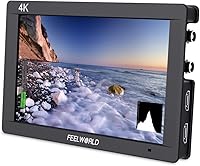
The Feelworld FW703 7″ Field Monitor sits comfortably in the mid-range bracket, targeting indie filmmakers and serious DSLR shooters who want more than a basic flip-out screen without spending broadcast money. The 7-inch IPS panel delivers a noticeably sharp image — enough to pull focus with confidence and catch exposure problems before they become editing headaches. What separates it from cheaper options is dual SDI and HDMI connectivity, which opens the door to a wider range of cameras and rigs. The build is lightweight plastic, compact enough for hot shoe mounting or gimbal integration. Solid toolkit, realistic expectations — just don’t confuse it for a broadcast-grade substitute.
Features & Benefits

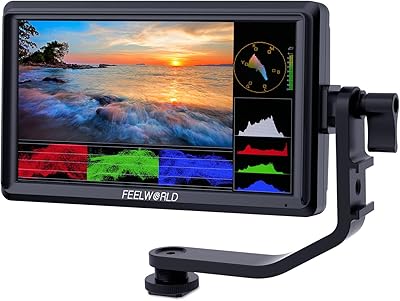
The pixel density on this field monitor is higher than you’d typically find at this price point — images look crisp enough that you can trust critical focus checks without squinting. Rec.709 color calibration is a genuine asset here; colors don’t drift in ways that would mislead you mid-shoot. The FW703 also includes a full suite of broadcast monitoring tools — waveform, vectorscope, and RGB histogram — which are normally locked behind pricier units. Brightness is honest for interior and shaded work, but take this outside in midday sun and you’ll be leaning hard on the included sunshade. The bundled battery plate and hot shoe mount are a practical, no-fuss addition.

Best For

This on-camera monitor makes the most sense for solo shooters and small crews who are tired of squinting at a built-in 3-inch LCD but aren’t ready to invest in professional broadcast gear. It’s a natural fit for DSLR and mirrorless users upgrading their monitoring setup for the first time — the learning curve is low, and the improvement in framing accuracy is immediate. Gimbal operators will appreciate the weight; at 320 grams, it won’t upset a typical two-axis or three-axis rig. Studio and controlled interior shooting are where it performs best. If your work regularly takes you outside in bright sunlight, factor in the brightness ceiling before committing.

User Feedback

The FW703 holds a 4.2-star average across well over 100 ratings, which for a niche video accessory reflects a fairly consistent buyer experience. People regularly call out the sharp, accurate display as the highlight — several mention trusting it for color decisions in the field. The build draws the most consistent criticism; the plastic shell gets flagged as feeling light, and a number of users note that menu navigation takes some getting used to. Outdoor shooters flag brightness as a real limitation in direct sun. One practical note: the battery and power adapter are not included in the box, so budget for those separately before your first shoot.

Pros

  • The IPS panel delivers a noticeably sharp image that holds up well for focus-critical monitoring on set.
  • Rec.709 color calibration gives shooters genuine confidence in color accuracy without expensive post-correction.
  • Waveform, vectorscope, and RGB histogram tools are rare at this price point and immediately useful for exposure work.
  • 3G-SDI in and out expands compatibility well beyond basic HDMI-only monitors, connecting to a wider camera range.
  • At 320 grams, the FW703 is light enough for gimbal use without throwing off rig balance.
  • The included sunshade, hot shoe mount, and battery plate mean you can set up and shoot without extra purchases.
  • Contrast performance handles shadow detail reliably enough for log footage monitoring in typical shooting conditions.
  • The compact footprint fits cleanly on most camera bodies and integrates easily into cage and rig builds.

Cons

  • The plastic shell accumulates visible wear quickly and feels noticeably less durable than metal-bodied alternatives.
  • Brightness is insufficient for confident use in direct sunlight, even with the sunshade attached.
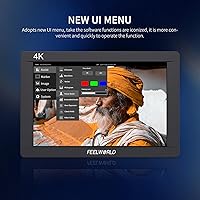
  • The menu navigation has a real learning curve — expect several sessions before workflows feel natural.
  • Neither a battery nor a power adapter is included in the box, adding to the true out-of-pocket cost.
  • IPS glow is noticeable when monitoring dark scenes in low-ambient-light environments.
  • Peaking sensitivity adjustment is coarse, which can cause over-triggering in high-contrast frames.
  • The built-in speaker is thin and low-volume, offering little practical value beyond a basic signal check.
  • Some long-term users report button responsiveness degrading after heavy repeated use over time.
  • The 7-inch size can feel visually dominant and top-heavy on smaller mirrorless camera bodies without a cage.

Ratings

The scores below were generated by AI after analyzing verified buyer reviews for the Feelworld FW703 7″ Field Monitor from across global markets, with spam, incentivized, and bot-flagged submissions actively filtered out. This on-camera monitor earned genuine praise in several areas while drawing consistent criticism in others, and both sides are reflected honestly here. Nothing has been softened or inflated — the numbers represent what real shooters experienced in the field.
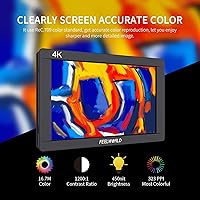
Image Clarity
88%
Users consistently describe the display as noticeably sharper than monitors they’d previously used in this price range. Focus pullers and solo shooters alike report being able to trust it for critical sharpness checks on set, which is the core job of any field monitor.
A handful of reviewers note that under mixed or poor lighting conditions, fine detail can appear slightly softer than expected. It’s not a widespread complaint, but shooters doing macro or highly detailed work mentioned it.
Color Accuracy
83%
The Rec.709 calibration earns real trust from users who shoot for video delivery. Several reviewers specifically mention that skin tones render naturally, and that the monitor doesn’t push saturation artificially the way cheaper panels tend to.
Some users who compared the FW703 against more expensive reference monitors noted slight variations in color temperature out of the box. It’s accurate enough for most production work, but color-critical finishing still needs a calibrated post suite.
Brightness & Outdoor Usability
58%
42%
For indoor studio shoots, event videography under controlled lighting, or shaded outdoor setups, the brightness level is genuinely sufficient. The included sunshade helps in partially lit exterior conditions and most users found it adequate for those environments.
In direct sunlight, this is a clear weak point. Multiple reviewers flag that even with the sunshade attached, midday outdoor shoots make the screen difficult to read confidently. Shooters who work primarily outside should treat this as a meaningful limitation before buying.
Build Quality
61%
39%
The plastic construction keeps weight low, which genuinely matters on a gimbal or a long handheld rig shoot. Users on extended shoots appreciate not having a heavy monitor throwing off their balance, and the compact footprint fits cleanly on most camera hot shoes.
The plastic shell is the most cited complaint across reviews. Compared to metal-bodied competitors, it feels noticeably less durable, and a few long-term owners mention scuffs and minor flex around the casing after regular field use. It doesn’t feel fragile, but it doesn’t feel rugged either.
Monitoring Tools
86%
Having waveform, vectorscope, and RGB histogram available at this price point is a genuine advantage. Users upgrading from basic LCD screens describe these tools as immediately useful for getting correct exposure without relying on guesswork or post-production fixes.
The tools function well, but the menu system for accessing and adjusting them frustrates some users. A few reviewers mention a learning curve of several shooting sessions before the workflow feels natural, particularly for those new to dedicated field monitors.
Connectivity & Compatibility
81%
19%
3G-SDI in and out gives this monitor a connection profile that most budget competitors simply don’t offer. Users pairing it with cinema cameras or feeding signal to a secondary recorder find the flexibility genuinely useful on set.
The SDI implementation is 3G, not 12G, so users with high-end cameras outputting higher bandwidth signals may hit a ceiling. For the majority of indie and prosumer shooters this is a non-issue, but it’s worth knowing before assuming full broadcast compatibility.
Menu & Interface Usability
62%
38%
Once users invest time learning the button layout and menu logic, most report that day-to-day navigation becomes muscle memory. The physical buttons are responsive and the interface covers all the necessary functions without being buried in submenus.
The initial learning curve is steeper than expected for a monitor at this level. Several buyers describe the menu structure as unintuitive, particularly when trying to configure monitoring tools quickly between shots. A few users wished for a touchscreen or clearer labeling.
Out-of-Box Accessories
78%
22%
The included sunshade, hot shoe mount, and F970 battery plate mean most users can mount and start shooting the same day without ordering extra parts. For a mid-range field monitor this level of practical inclusion is appreciated and noted positively across many reviews.
The battery and power adapter are not included, which catches a meaningful number of first-time buyers off guard. It’s a cost that needs to be factored into the purchase — particularly the battery, which isn’t universal across camera systems.
Value for Money
84%
The combination of a sharp IPS panel, Rec.709 calibration, SDI connectivity, and broadcast monitoring tools at this price tier is hard to match in the current market. Most reviewers conclude it punches meaningfully above its cost when evaluated feature by feature.
A small segment of buyers feel the build quality undermines the value argument. Spending mid-range money on a plastic-bodied unit that shows wear quickly leaves some users wishing they had stretched to a more durable option, even if that meant fewer features.
Size & Portability
87%
At 320 grams, this on-camera monitor is genuinely travel-friendly. Gimbal operators and run-and-gun shooters who need to keep their kit light and mobile consistently cite the slim profile and low mass as a practical day-to-day advantage.
The 7-inch size, while great for solo shooters, can feel slightly large on smaller mirrorless camera bodies where the monitor visually dominates the rig. A minority of users mention it creates a top-heavy feel without a proper cage or counterbalance.
Focus Assist Tools
76%
24%
Peaking and magnification tools help solo operators pull focus without an assistant. Users running single-person documentary or corporate shoots mention relying heavily on these features, and they perform reliably for the intended use case.
The peaking sensitivity calibration is described as coarse by a handful of experienced operators. It works for general use but those accustomed to higher-end monitors with finer peaking control occasionally found it over-triggering on edges in contrasty scenes.
Audio Monitoring
67%
33%
The built-in speaker and headphone jack provide a convenient way to catch obvious audio sync issues or check that a mic is live without reaching for a separate recorder. For a simple sanity check on location, it does the job.
The speaker output is thin and low volume, and serious audio monitoring really requires headphones. Users who hoped to use the speaker for more than a basic level check were generally disappointed, though most acknowledge it isn’t a primary function of a video monitor.
Durability Over Time
63%
37%
A reasonable number of users report the FW703 holding up well through regular professional use over one to two years. The electronics appear reliable, with few reports of panel failure or port degradation under normal shooting conditions.
The plastic casing accumulates visible wear faster than metal alternatives. Some users who shoot frequently in the field report cosmetic damage to the shell within months. There are occasional reports of button responsiveness degrading over heavy extended use.
Contrast & Blacks
74%
26%
With a 1200:1 contrast ratio, shadow detail is rendered well enough that users can make informed decisions about dark areas of a frame without significant guesswork. For log footage monitoring, the blacks hold up better than some competing IPS panels in the range.
IPS glow is present in low-light viewing conditions, which some users notice when monitoring dark scenes in a dim environment. It’s a known characteristic of IPS technology at this tier rather than a defect, but it’s worth knowing if dark scene monitoring is a regular requirement.

Suitable for:

The Feelworld FW703 7″ Field Monitor is a strong fit for indie filmmakers, solo videographers, and small production crews who need a reliable, feature-rich monitoring solution without committing to broadcast-level spending. DSLR and mirrorless shooters who have been making do with their camera’s built-in screen will immediately appreciate the jump in display sharpness and the ability to check exposure using proper waveform and histogram tools. It also works well for content creators doing studio work, interviews, or event videography in controlled lighting conditions where the brightness holds up comfortably. Gimbal operators benefit from the low weight, since adding a heavy monitor to a balanced rig means starting the calibration process over — this one is light enough to minimize that headache. If you’re shooting corporate videos, short films, or YouTube-level production and want a monitor that gives you real confidence on set without a steep learning curve once you’re past the menu, this on-camera monitor earns its place in the kit bag.
Not suitable for:

The Feelworld FW703 7″ Field Monitor is not the right call for shooters whose work is primarily outdoors in bright or unpredictable natural light — the brightness ceiling is a genuine operational limitation, not something a sunshade fully compensates for. Videographers working in broadcast or high-end commercial environments where clients expect professional-grade hardware will find the plastic build underwhelming and potentially a credibility issue on set. If you need to pipe through signals from a high-end cinema camera at maximum bandwidth, the 3G-SDI spec may not meet your requirements, and you’ll want to verify compatibility before assuming it covers your workflow. Buyers hoping for a rugged, knock-around monitor that can take daily abuse on demanding location shoots should look at more durable alternatives — the shell is functional, but it’s not built for rough handling. Finally, if you need a true color reference display for finishing and grading decisions, this field monitor is a production tool, not a mastering display.
Specifications

  • Screen Size: The monitor features a 7-inch IPS panel with wide viewing angles suitable for on-camera and rig-mounted use.
  • Resolution: Native resolution is 1920x1200 pixels at a 16:10 aspect ratio, delivering a pixel density of approximately 323 PPI.
  • Brightness: Peak brightness is rated at 450 cd/m², which is adequate for indoor and shaded exterior shooting environments.
  • Contrast Ratio: The panel offers a 1200:1 contrast ratio, providing solid shadow separation for standard video monitoring tasks.
  • Color Standard: Factory color calibration follows the Rec.709 standard to ensure consistent and accurate color reproduction for video production.
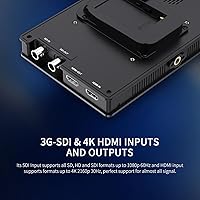
  • Video Inputs: Accepts signal via 3G-SDI and full-size HDMI inputs, supporting 4K HDMI and HD-SDI sources from a wide range of cameras.
  • Video Outputs: Provides loop-through via 3G-SDI and HDMI outputs, allowing signal to be passed to a secondary recorder or monitor.
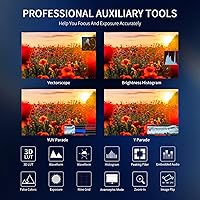
  • Monitoring Tools: Built-in broadcast tools include waveform monitoring, vectorscope, RGB histogram, focus peaking, and image magnification.
  • Audio: Equipped with a stereo headphone output jack and a built-in speaker for basic on-set audio level checks.
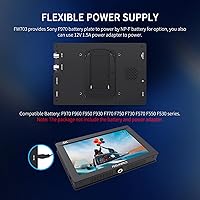
  • Power Input: Accepts DC power input and is compatible with Sony-style F970 battery plates using the included mounting adapter.
  • Battery & Adapter: No battery or DC power adapter is included in the box; these must be purchased separately before first use.
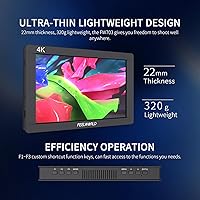
  • Unit Weight: The monitor body weighs 320 grams, making it light enough for gimbal integration without significant balance disruption.
  • Dimensions: Physical dimensions of the monitor unit are 180 x 120 x 22 mm, offering a compact footprint for on-camera mounting.
  • Shell Material: The outer casing is constructed from plastic, prioritizing low weight over premium tactile feel or rugged impact resistance.
  • Mounting: Includes a standard hot shoe mount adapter for direct camera attachment, compatible with most DSLR and mirrorless hot shoe configurations.
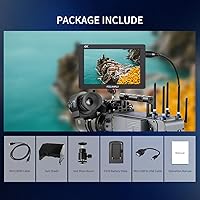
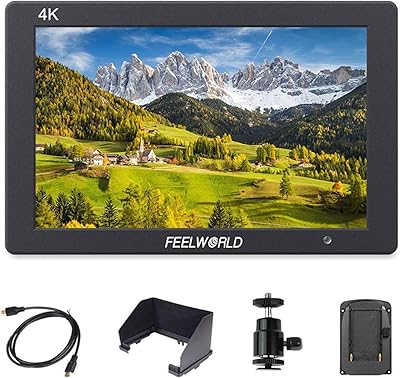
  • Included Accessories: Package contains the monitor, a mini HDMI cable, a sunshade hood, a hot shoe mount, and an F970 battery plate adapter.
  • Aspect Ratio: The 16:10 aspect ratio provides slightly more vertical screen area than a standard 16:9 panel, useful for monitoring overlaid tools.
  • SDI Standard: SDI connectivity supports up to 3G-SDI specification, which covers HD signals up to 1080p60 but does not support 6G or 12G-SDI bandwidths.

Related Reviews
Feelworld FW759 7″ Field Monitor
72%
83%
Image Clarity
58%
Brightness & Outdoor Usability
81%
Focus Peaking Performance
89%
Portability & Form Factor
54%
Build Quality & Durability
More
FEELWORLD FW279 7 Inch 2200nit Ultra Bright DSLR Camera Field Monitor
85%
94%
Display Brightness
91%
Image Quality
88%
Portability
85%
Build Quality
83%
Ease of Use
More
LILLIPUT A7S 7″ Camera Field Monitor
84%
88%
Display Quality
91%
Portability & Weight
86%
Brightness in Outdoor Conditions
80%
Customizability of Buttons
83%
Durability & Build Quality
More
NEEWER F700 7″ Field Monitor
78%
91%
Outdoor Visibility
86%
Touch Screen Responsiveness
54%
Fan Noise
88%
3D LUT Support
89%
Battery & Power Versatility
More
FEELWORLD T7PLUS 7-Inch 4K Video Monitor
86%
92%
Display Quality
89%
Portability
88%
Color Accuracy
90%
Build Quality
85%
Brightness in Outdoor Conditions
More
FEELWORLD FW568 6″ Field Monitor
77%
88%
Image Clarity & Sharpness
84%
Color Accuracy
91%
LUT Support & Preview
87%
Exposure & Focus Assist Tools
63%
Brightness & Outdoor Usability
More
VILTROX DC-A1 7-inch Field Monitor
86%
94%
Brightness Performance
90%
Display Clarity
85%
Touchscreen Responsiveness
88%
Portability
75%
Build Quality
More
NEEWER F100 7-inch Field Monitor
78%
83%
Image Quality
66%
Outdoor Visibility
71%
Build Quality
68%
Ball Head & Mounting
78%
Battery Life
More
FEELWORLD LUT7 7-inch 2200nit Touchscreen Camera Monitor
81%
94%
Brightness for Outdoor Use
78%
Touchscreen Responsiveness
85%
Build Quality
90%
Picture Quality/Display
88%
Mounting and Flexibility
More
VILTROX DC-L2 7″ 4K Camera Field Monitor
86%
93%
Display Quality
89%
Portability
70%
Battery Life
85%
Ease of Use
88%
Build Quality
More

FAQ

Yes, the FW703 accepts standard HDMI input and is compatible with Sony mirrorless cameras that output via HDMI. Just confirm your camera outputs a clean HDMI signal, as some Sony bodies require you to disable onscreen overlays in the settings for a clean feed to an external monitor.

Honestly, this is one area where you need realistic expectations. The 450 nit brightness works fine in shaded outdoor environments and indoors, but in direct midday sunlight the image becomes genuinely difficult to read even with the sunshade attached. If outdoor shooting in open sun is a regular part of your work, you’d want to look at monitors with at least 1000 nits.

The monitor uses a Sony-style F970 battery via the included battery plate adapter, but neither the battery nor the power adapter comes in the box. You’ll need to budget for an F970-compatible battery and a DC power adapter before your first shoot. It’s a common setup across many field monitors, so compatible batteries are widely available.

Most consumer DSLRs don’t have SDI outputs, so for a typical DSLR shooter the SDI port won’t see much use day-to-day. Where it becomes valuable is if you ever pair the monitor with a cinema camera, a broadcast camcorder, or use it in a rig that involves signal routing to a separate recorder. Think of it as future-proofing your kit rather than an immediate necessity.

Yes, it’s compatible with most DJI gimbals that support an external monitor, including the Ronin series. At 320 grams it’s light enough to mount without dramatically upsetting balance, though you’ll still need to rebalance the gimbal after attaching it. Just make sure your gimbal’s monitor mounting arm or bracket can accommodate the monitor’s footprint before purchasing.

Both tools are accessible through the monitor’s on-screen menu and overlay directly on the live image. The waveform shows luminance levels across the frame so you can spot over- or under-exposure in real time, while the RGB histogram gives you a channel-by-channel breakdown of color distribution. They’re the same tools used in broadcast monitoring — the main caveat is that the menu system takes some getting used to before switching between them feels quick.

The HDMI input accepts a 4K signal from your camera, but the panel itself displays at 1920x1200 — so it downscales 4K for monitoring purposes. The loop-through HDMI output passes the original 4K signal along to a recorder or secondary device without scaling. This is standard behavior for monitors in this category and doesn’t affect your recorded footage quality.

This is one of the most common early frustrations with this on-camera monitor. The best approach is to spend 20 to 30 minutes at home working through the menu before you’re on set under pressure. Feelworld has tutorial videos on their official channel that walk through the interface, and the included manual covers the function layout. Most users report that after two or three shooting sessions it becomes second nature.

The monitor accepts DC power input, and there are third-party D-tap to DC cables that let you draw power from a V-mount or Anton Bauer battery via a power distribution plate. This is a common setup for shooters who already use large-format batteries on their rig. Just verify the output voltage of your adapter matches the monitor’s DC input spec before connecting.

The plastic shell is the most vulnerable part of the package. Under regular professional use — carried in a padded bag, handled carefully on set — the electronics tend to remain reliable, and most users report no issues with ports or panel performance over time. What does show wear is the casing itself, which picks up scuffs and scratches with regular use. If you’re rough with gear or work in demanding field conditions, it’s worth considering a protective case or cage attachment.