Overview

The NEEWER F700 7″ Field Monitor launched in late 2024 as a mid-range option aimed squarely at solo shooters and small video crews who want more than a basic camera-top LCD without paying professional-grade prices. What makes this field monitor stand out in a crowded category is the combination of high-brightness output, a responsive touch interface, and a substantial built-in battery — all in one package. That said, expectations should be calibrated honestly. The feature list punches above its weight class, but a few real-world caveats keep it from being a flawless buy.
Features & Benefits

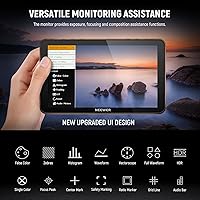
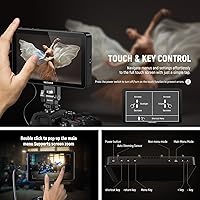
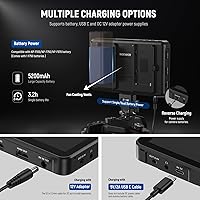
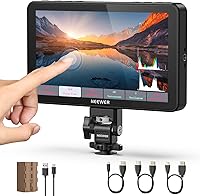
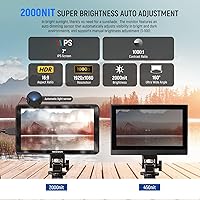
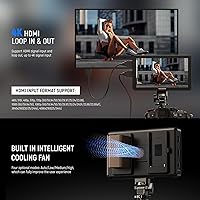
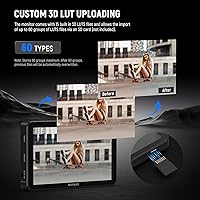
At 2000 nits, the IPS panel holds up confidently in bright outdoor conditions — something cheaper monitors simply can't claim. The touch screen pairs nicely with three physical shortcut buttons across the top, letting you pull up False Color or Peak Focus without digging through menus. The 4K HDMI loop passes signal through without interruption, which matters when you're daisy-chaining to a recorder. Exposure tools are genuinely complete: Zebras, Waveform, Vectorscope, and Histogram are all present. The LUT system supports up to 60 custom uploads loaded via SD card — useful for on-set color previewing, though this is monitoring, not grading. The included 5200mAh battery recharges over USB-C, and the DC output can power a camera directly.

Best For

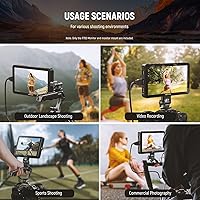
This 7-inch monitor fits naturally into a few specific shooting styles. Run-and-gun videographers will appreciate not needing a separate battery solution on location. DSLR and mirrorless shooters stepping up from a kit screen will find the jump in visibility immediately worthwhile, especially outdoors in bright sun. Indie filmmakers using LUT previews on set to approximate a grade will get real utility from the custom upload system. Documentary crews dealing with shifting light will lean on the auto-brightness feature. For content creators building a compact camera rig, the touchscreen keeps daily operation intuitive without needing a dedicated AC power supply.

User Feedback

Buyers consistently praise the brightness — many note it's genuinely usable in full daylight, which isn't always true of monitors claiming similar figures on paper. The touch response gets positive marks too, and most people consider the bundled battery and cable an honest value-add rather than filler. On the other side, first-time field monitor users mention a learning curve with the menus, which aren't the most intuitive out of the box. The built-in fan is a recurring topic: it runs audibly, which won't matter on a loud set but can be distracting during quiet interviews. Build quality feels solid for the price tier, though the plastic housing is noticeably lighter than metal-chassis competitors.

Pros

  • Holds up in bright outdoor daylight where similarly priced monitors visibly struggle
  • Touchscreen interface is accurate enough for quick overlay adjustments mid-shoot
  • Supports up to 60 custom 3D LUT uploads — well above average for this price range
  • Included NP-F750 battery recharges over USB-C, reducing on-location power complexity
  • HDMI loop-through passes 4K signal cleanly without interrupting an attached recorder
  • DC output lets the F700 double as a camera power source, a genuinely useful bonus
  • Physical shortcut buttons speed up access to False Color and Peak Focus on busy sets
  • Auto-brightness adjustment handles shifting light conditions without manual intervention
  • Full suite of exposure tools — Zebras, Waveform, Vectorscope, Histogram — all included
  • Firmware updates via SD card have improved menu behavior since the October 2024 launch

Cons

  • Built-in fan noise is clearly audible in quiet environments and cannot be turned off
  • Plastic chassis feels noticeably less solid compared to metal-bodied alternatives nearby in price
  • Menu structure has a steep initial learning curve with limited guidance from the included documentation
  • Headphone output volume is fixed, with no on-monitor audio level adjustment available
  • Battery runtime under full brightness with the fan active is shorter than the capacity suggests
  • Touch accuracy degrades near screen edges, causing occasional missed inputs during fast navigation
  • No sunshade included, which is a meaningful omission given the outdoor-focused brightness spec
  • Cold shoe mount introduces wobble under heavier rig configurations
  • SD card-based LUT loading feels outdated compared to USB-based workflows on newer monitors
  • Vectorscope display lacks detail resolution that more experienced users may expect at this screen size

Ratings

The NEEWER F700 7″ Field Monitor scores here reflect AI-driven analysis of verified purchaser reviews gathered globally, with spam, incentivized posts, and bot activity actively filtered out before scoring. Across thousands of real buyer experiences — from working videographers to indie filmmakers — both the genuine strengths and the frustrating pain points are represented without sugarcoating. The result is an honest picture of where this field monitor earns its place and where it asks for a trade-off.
Outdoor Visibility
91%
Shooters consistently report being able to frame and expose shots confidently in harsh midday sun — a scenario where most monitors in this price range fall apart. The auto-brightness adjustment is praised for reducing the manual fiddling that breaks shooting flow on fast-moving documentary work.
A small number of users in extreme high-altitude or snow-reflected light situations still find they need to cup the screen. The lack of an included sunshade means an extra purchase is required to hit true sunlight-readable performance for everyone.
Touch Screen Responsiveness
86%
Most users describe the touch interface as accurate and snappy enough for practical on-set adjustments, particularly when pulling up exposure overlays mid-shot. The option to disable touch entirely is a genuinely appreciated failsafe for shooters who worry about accidental taps on a live recording.
A segment of buyers note the touch layer feels slightly less precise near screen edges, which causes occasional missed taps when navigating menus quickly. In cold-weather outdoor conditions, gloved operation is essentially off the table.
Fan Noise
54%
46%
The active cooling does its job — thermal throttling complaints are rare even during extended shooting sessions, and the monitor stays comfortable to handle. Shooters on busy event sets or outdoor locations with ambient noise rarely even notice the fan running.
In quiet interview setups, narrative shoots, or any environment with a sensitive nearby microphone, the fan is audibly present and regularly flagged in reviews as a legitimate problem. There is no option to disable it, which is a real limitation for a certain class of user.
3D LUT Support
88%
The ability to load up to 60 custom LUTs via SD card is well above what most competing monitors at this price offer, and users working with established color pipelines appreciate being able to preview their grade on location. The 15 preloaded LUTs cover common log-to-rec709 transforms usefully.
LUT accuracy is functional rather than reference-grade — sophisticated colorists note that the panel's color volume means previews are directional, not precise. Loading LUTs via SD card rather than USB is a minor workflow friction that some buyers find dated.
Battery & Power Versatility
89%
The bundled NP-F750 with USB-C recharging is the kind of practical inclusion that solo shooters genuinely value — one less battery system to manage on location. The DC 8V output functioning as a camera dummy battery means this field monitor can double as a power source, which buyers frequently call out as a standout feature.
Actual runtime under full brightness with the fan active comes in shorter than some buyers expect from the stated capacity. Users who shoot multi-hour events report needing a spare NP-F battery to get through a full day comfortably.
Build Quality & Durability
71%
29%
For a monitor at this tier, the assembly feels reasonably tight and the buttons have satisfying tactile feedback without feeling cheap. Several users report regular use over months without any structural issues, loose ports, or screen coating problems.
The plastic chassis is a clear step below metal-bodied monitors in a similar price bracket, and buyers who handle it alongside pricier alternatives immediately notice the difference in perceived solidity. Corner resistance during bag transport is a concern some long-term users raise.
Exposure Monitoring Tools
87%
Having False Color, Zebras, Waveform, Vectorscope, Histogram, and Peak Focus all present and accessible via shortcut buttons is genuinely useful for working shooters who use these tools constantly. Users transitioning from basic camera LCDs consistently describe the exposure feedback as a meaningful upgrade to their shooting accuracy.
A few experienced users find the Vectorscope display less detailed than what higher-end monitors render at the same screen size. The shortcut button mapping, while configurable, takes some initial setup time before it becomes second nature.
HDMI Connectivity
83%
The 4K HDMI loop-through passes signal cleanly without introducing delay or degradation, which matters when pairing the monitor with an external recorder in a production chain. Buyers report broad format compatibility across camera brands without needing to hunt for workaround settings.
Only a single HDMI input and output is available, which limits flexibility on more complex multi-camera setups. A small number of users report occasional signal handshake delays when hot-swapping HDMI sources, though this appears to resolve on reconnection.
Menu Usability
63%
37%
Once a user invests the time to map the F1, F2, and F3 shortcut buttons to their most-used functions, daily operation becomes considerably more intuitive. Returning users report that the logic behind the menu structure starts to click after a few shooting sessions.
Out of the box, the menu hierarchy is not immediately intuitive for first-time field monitor users, and the manual does not do enough to bridge the gap. Several buyers mention spending meaningful time online searching for setup guides before feeling confident with the interface.
Mounting & Rig Compatibility
79%
21%
The cold shoe mount with 180-degree tilt adjustment covers the majority of typical mounting scenarios, and the quarter-inch thread options on both bottom and side give useful flexibility for unconventional rig configurations. Most buyers have no trouble integrating it into an existing cage or arm setup.
The cold shoe mount, while functional, feels less robust than dedicated monitor arm solutions, and heavy rig configurations can introduce some wobble. Users who prefer the monitor in portrait orientation for specific framing tasks find the mount adjustment range limiting.
Value for Money
84%
When buyers factor in the included battery, USB-C cable, and cold shoe mount, the effective cost per feature compares favorably to competing monitors that sell accessories separately. The brightness-to-price ratio in particular is frequently cited as the core reason buyers chose this monitor over alternatives.
Buyers comparing it directly to monitors a step above in price — even marginally more expensive options — notice tangible differences in panel refinement and build. At this price point the value proposition is strong, but it is not a clear budget winner when more is available for a relatively small price step up.
Portability & Weight
81%
19%
At around 1.56 pounds without a battery attached, this 7-inch monitor is light enough to use comfortably on a camera-mounted rig for extended handheld shooting. Run-and-gun operators in particular appreciate not having to compensate significantly for the added front weight.
Adding the NP-F750 battery pushes the total weight up noticeably, and shooters sensitive to rig balance — especially on gimbals — may find the combined mass requires counterweight adjustment. The size, while portable, does not collapse or fold for easy pocket carry between setups.
Audio Monitoring
67%
33%
The 3.5mm headphone jack covers the basic need for on-set audio monitoring without requiring an external mixer, which is a convenient addition for solo operators checking levels while reviewing a take. Most users confirm it functions reliably with standard headphones.
There is no audio level control on the monitor itself, and the headphone output volume is fixed — a recurring frustration for users wanting to adjust levels without touching camera settings. The audio bar display is functional but lacks the granularity that dedicated audio monitors offer.
Firmware & Software Updates
72%
28%
SD card-based firmware updating is straightforward once users locate the correct update file, and several buyers report that post-launch firmware releases have meaningfully refined menu behavior and LUT handling since the October 2024 launch.
The update process itself is not clearly documented, and a subset of users have encountered confusion about file naming conventions or card formatting requirements. NEEWER's communication around what each firmware update actually changes could be significantly more transparent.

Suitable for:

The NEEWER F700 7″ Field Monitor was clearly designed with a specific type of shooter in mind, and for that buyer it delivers real value. Solo videographers and small crews who spend significant time outdoors — think documentary work, event coverage, or location-based content creation — will get the most out of the high-brightness panel, which holds up in conditions that would render a standard camera LCD nearly useless. DSLR and mirrorless shooters who have outgrown their camera's built-in screen but aren't ready to invest in a professional broadcast monitor will find this field monitor hits a practical sweet spot: enough brightness, enough tools, and enough portability to meaningfully improve daily shooting. Indie filmmakers who build LUT-based workflows will appreciate the custom upload system for on-set color previewing — it's not a grading reference, but it's a reliable directional check. Content creators assembling a compact rig on a careful budget will also benefit from the included battery and USB-C charging setup, which reduces the accessory shopping list considerably.
Not suitable for:

Buyers expecting the F700 to perform quietly in controlled, sound-sensitive environments should approach with caution. The built-in cooling fan runs audibly during normal operation, and in a quiet interview room or narrative shoot with an open microphone nearby, it becomes a genuine on-set problem — there is no way to disable it. Shooters who prioritize build durability over features may also find the plastic construction a difficult trade-off, especially if the monitor will live in a bag that gets thrown around on location or shared across a crew. Colorists or directors of photography who want a reference-grade panel for critical color decisions should look elsewhere — this 7-inch monitor is a practical shooting tool, not a calibrated display, and treating it as one will lead to frustration. Users who work in complex multi-camera setups or need more than one simultaneous HDMI connection will hit the limits of its single-input design quickly. Finally, buyers who dislike spending time in device menus before getting productive should know that the interface has a genuine learning curve out of the box.

Specifications

  • Screen Size: The IPS panel measures 7 inches diagonally, providing a viewing area large enough for confident critical monitoring without making the overall unit unwieldy on a camera rig.
  • Resolution: The display renders at 1920x1080 pixels, delivering full HD clarity that makes fine focus and exposure detail clearly legible during a shoot.
  • Brightness: Rated at 2000 nits, the panel is bright enough to remain usable in direct outdoor sunlight, which is its primary practical advantage over budget-tier alternatives.
  • Contrast Ratio: A 1000:1 contrast ratio provides adequate separation between shadows and highlights for on-set exposure monitoring purposes.
  • Viewing Angle: The IPS panel maintains accurate color and contrast across a 160-degree viewing angle, making it readable even when checked from a wide offset position.
  • HDMI I/O: A full-size 4K HDMI input and loop output allow the monitor to sit transparently in a signal chain between camera and recorder without disrupting the video feed.
  • Supported Formats: Compatible input formats include 480i through 4096x2160 at 24/25Hz, covering the standard frame rates used by DSLR, mirrorless, and cinema cameras.
  • Monitoring Tools: Built-in exposure and focus aids include False Color, Zebras, Histogram, Oscillogram, Full Waveform, Vectorscope, HDR, Peak Focus, Single Color, and Audio Bar.
  • 3D LUT Support: The monitor ships with 15 preloaded 3D LUTs and accepts up to 60 additional custom LUT files loaded from an SD card for on-set color previewing.
  • Touchscreen: The full touchscreen interface supports tap-and-swipe navigation and can be disabled entirely via settings to prevent accidental input during recording.
  • Shortcut Buttons: Three programmable shortcut buttons (F1, F2, F3) on the top edge allow quick access to frequently used monitoring functions without entering the main menu.
  • Battery: The included NP-F750 battery carries a 5200mAh capacity and recharges directly via the USB-C port using the supplied cable.
  • Power Options: In addition to NP-F series batteries, the monitor accepts power via DC port or USB-C, and outputs DC 8V at 1.5A to function as a dummy battery for compatible cameras.
  • Audio Output: A 3.5mm headphone jack enables real-time audio monitoring from the HDMI signal source; headphones are not included.
  • Cooling System: An active internal fan provides continuous heat dissipation during extended operation, keeping internal temperatures stable under sustained high-brightness use.
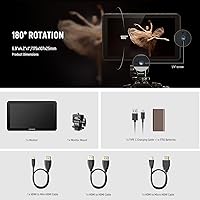
  • Mounting Options: A cold shoe mount with 180-degree tilt adjustment is included, and quarter-inch threaded holes on the bottom and side allow integration with standard camera cages and monitor arms.
  • Dimensions: The unit measures approximately 4.96 x 7.8 x 3.74 inches, making it compact enough for on-camera mounting while large enough for practical field use.
  • Weight: The monitor body weighs 1.56 pounds without battery attached, which is manageable for handheld rigs but should be factored into gimbal balance calculations.
  • SD Card Slot: An SD card slot supports both custom LUT file uploads and firmware update installation, keeping the unit field-serviceable without a computer connection.
  • Aspect Ratio: The display uses a standard 16:9 aspect ratio, matching the native output of most modern video cameras and eliminating letterboxing during typical shooting.

Related Reviews

NEEWER F100 7-inch Field Monitor
78%
83%
Image Quality
66%
Outdoor Visibility
71%
Build Quality
68%
Ball Head & Mounting
78%
Battery Life
More
LILLIPUT A7S 7″ Camera Field Monitor
84%
88%
Display Quality
91%
Portability & Weight
86%
Brightness in Outdoor Conditions
80%
Customizability of Buttons
83%
Durability & Build Quality
More
VILTROX DC-A1 7-inch Field Monitor
86%
94%
Brightness Performance
90%
Display Clarity
85%
Touchscreen Responsiveness
88%
Portability
75%
Build Quality
More
VILTROX DC-L2 7″ 4K Camera Field Monitor
86%
93%
Display Quality
89%
Portability
70%
Battery Life
85%
Ease of Use
88%
Build Quality
More
Feelworld FW759 7″ Field Monitor
72%
83%
Image Clarity
58%
Brightness & Outdoor Usability
81%
Focus Peaking Performance
89%
Portability & Form Factor
54%
Build Quality & Durability
More
VILTROX DC-L1 7-Inch Touchscreen Camera Field Monitor
87%
93%
Display Quality
89%
Portability
85%
Power Options
91%
Sunshade Effectiveness
88%
Ease of Use
More
VILTROX DC-70 II 7″ Field Monitor
75%
88%
Value for Money
83%
Focus Peaking Performance
61%
Display Resolution & Sharpness
78%
Build Quality & Durability
74%
HDMI Connectivity
More
FEELWORLD FW279 7 Inch 2200nit Ultra Bright DSLR Camera Field Monitor
85%
94%
Display Brightness
91%
Image Quality
88%
Portability
85%
Build Quality
83%
Ease of Use
More
Osee T7 7-Inch 3000 Nits FHD DSLR Camera Field Monitor
86%
93%
Display Quality
89%
Portability
96%
Brightness
87%
Build Quality
82%
Ease of Use
More
Atomos Shogun 7
Atomos Shogun 7
77%
93%
Display Brightness & Visibility
89%
HDR Monitoring Accuracy
91%
ProRes RAW Recording
84%
Dolby Vision Output
78%
Build Quality & Durability
More

FAQ

The F700 works with any camera that outputs a standard HDMI signal, which covers virtually all modern DSLR, mirrorless, and cinema cameras regardless of brand. As long as your camera has an HDMI output and produces a supported resolution and frame rate, you should have no compatibility issues.

Based on user reports, the cooling fan runs continuously during normal operation rather than switching on only under thermal load. This is worth knowing upfront if you plan to use it in quiet interview or narrative settings, as the fan is audible in low-ambient-noise environments.

Yes, the NEEWER F700 7″ Field Monitor supports custom 3D LUT uploads via SD card, accepting up to 60 files in addition to the 15 preloaded options. LUTs need to be in the standard .cube format, which is what most color grading software exports by default.
Under moderate brightness settings, the included NP-F750 battery gives you a solid working session, but users running the panel at full brightness with the fan active consistently report runtime shorter than the capacity figure suggests. For a full event day, carrying at least one spare NP-F battery is a practical precaution.

Not reliably. The touch layer requires bare skin contact, and even thin gloves break responsiveness significantly. In cold conditions, the three physical shortcut buttons and the standard tactile controls are your best option for keeping things moving without removing gloves.

It can actually do both. The DC output port delivers 8V at 1.5A, which is compatible with cameras that accept a dummy battery adapter — a useful backup power option when you want to keep a camera running while also monitoring its output through the same unit.

Firmware updates are installed by placing the update file on an SD card and loading it through the monitor's menu. The process itself is straightforward once you have the correct file, though NEEWER's documentation on file naming and card format requirements could be clearer — checking their official support page for the specific update instructions is recommended.

No, disabling touch input only deactivates the screen's touch layer. The physical shortcut buttons and any other hardware controls remain fully functional, so you can lock out accidental screen taps without losing button-based navigation.

Real-world users consistently confirm it holds up in direct afternoon sunlight better than most monitors at this price range. That said, adding the optional sunshade accessory makes a noticeable difference in extreme conditions — the monitor ships without one, so factor that in if outdoor shooting is your primary use case.

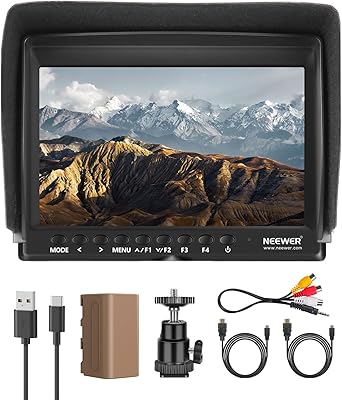
The monitor ships with the NP-F750 battery, a USB-C charging cable, and a cold shoe mount. You will need an HDMI cable to connect your camera (standard accessories, not included), and an SD card if you plan to upload custom LUTs or install firmware updates. A sunshade is sold separately if you need one.