Overview

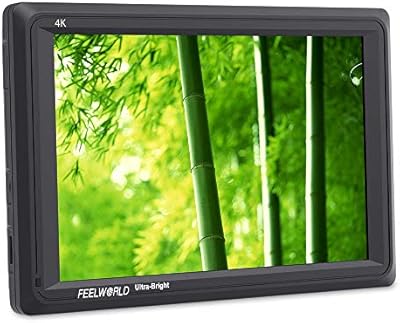
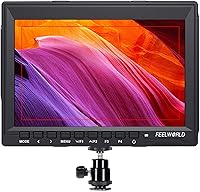
The Feelworld FW759 7″ Field Monitor has carved out a steady place in the entry-to-mid monitor market since its release in 2016 — a solid stretch for any piece of video gear. At just 17mm thick and 300 grams, this field monitor is remarkably light for its screen size, making it a practical pick for shooters who spend long days on location. It isn’t designed for color-critical work or professional DIT use; think of it instead as a reliable framing aid that gives you a much better view of what your camera is capturing than any rear LCD can. With over 1,200 ratings averaging 4.2 stars, it has earned its reputation quietly over time.
Features & Benefits

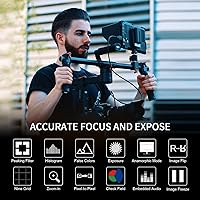
The 7-inch IPS panel delivers 1280×800 resolution with a 16:10 ratio, which feels natural when monitoring footage from a typical DSLR or mirrorless body. At 400 cd/m², brightness is fine for indoor sets and shaded locations — but put it in direct sunlight and you’ll be squinting even with the sunshade attached. The 4K HDMI input handles signals up to 3840×2160p at 30Hz, so there’s no awkward downscaling issue with modern cameras. Focus peaking is the standout assist tool here; manual lens shooters will use it on practically every shot. Image flip and zoom add genuine on-set utility, and a built-in speaker with headphone output round things out — a small but useful detail many competitors skip entirely.

Best For

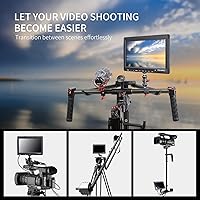
This on-camera display is well-suited to solo creators and vloggers who want more screen real estate than a 3-inch camera LCD provides. Gimbal and stabilizer users in particular will appreciate the sub-300g weight — every gram matters when you’re balancing a rig for hours. Manual lens shooters who rely on focus peaking daily will also find it earns its place on the hot shoe. Smaller crews running tight budgets can use the FW759 as a shared director’s monitor without stretching their kit spend. What it isn’t built for is critical color evaluation; if accurate color reproduction or high-brightness outdoor monitoring is your priority, you’ll need to look at more capable — and considerably pricier — options.

User Feedback

Owners tend to praise image clarity and color for what they paid, with many noting it outperforms expectations at its price tier. Portability earns consistent compliments, especially from gimbal shooters who’ve tried heavier alternatives. The sunshade is a welcome inclusion, though a number of users describe it as feeling flimsy after repeated attachment and removal. The OSD menu is a genuine pain point — navigating it the first few times is unintuitive enough that some buyers go looking for a tutorial. Perhaps the most common frustration: the battery and power cord are not included, which catches buyers off guard at setup. The plastic housing also draws skepticism from anyone putting it through regular outdoor use.

Pros

  • At 300 grams and 17mm thin, the FW759 adds minimal bulk to gimbal and handheld rigs.
  • The 7-inch IPS panel is a meaningful upgrade over any camera’s built-in rear display.
  • Focus peaking works reliably for manual lens shooters who pull focus frequently on set.
  • 4K HDMI input ensures clean signal compatibility with most modern DSLRs and mirrorless bodies.
  • A built-in speaker and headphone output offer basic audio monitoring — uncommon at this price tier.
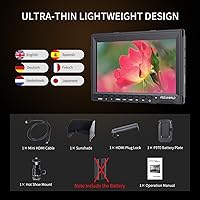
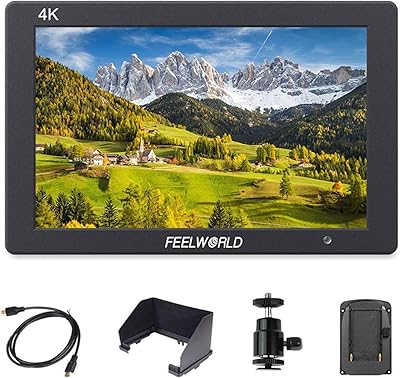
  • The accessory package includes a hot shoe mount, battery plate, mini HDMI cable, and HDMI plug lock.
  • Over 1,200 verified buyers give it a 4.2-star average, providing genuine long-term confidence.
  • Image clarity and color rendering consistently exceed buyer expectations for the price category.
  • Portability makes this on-camera display a practical travel companion for location-based shooters.

Cons

  • Battery and power cord are not included, adding an unplanned expense that frustrates many first-time buyers.
  • The OSD menu is unintuitive and carries a real learning curve for new users.
  • 400 cd/m² brightness is inadequate in direct sunlight, even with the sunshade fitted.
  • The plastic housing raises durability concerns for shooters who use gear heavily in the field.
  • The included sunshade is widely described as flimsy and prone to loosening with regular use.
  • No signal output means the FW759 cannot be integrated into a pass-through monitoring chain.
  • 4K input is capped at 30Hz, which may be limiting for high-frame-rate monitoring workflows.
  • Color accuracy is insufficient for any critical color evaluation or professional grading reference.
  • Shallow, imprecise buttons reduce confidence when adjusting settings quickly during a shoot.

Ratings

The Feelworld FW759 7″ Field Monitor scores below are produced by AI after analyzing thousands of verified global buyer reviews, with spam, bot activity, and incentivized feedback actively filtered out. The ratings reflect honest, real-world usage patterns from solo creators, gimbal operators, and small production crews — not just spec-sheet impressions. Both what this on-camera display does well and where it falls short are represented transparently.
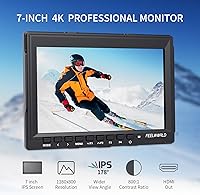
Image Clarity
83%
For a monitor in this price bracket, the IPS panel consistently impresses buyers who upgrade from their camera’s built-in LCD. Colors look reasonably accurate and the 1280×800 resolution gives a noticeably sharper framing reference, particularly useful when checking subject placement and composition on a busy set.
The resolution is adequate but not exceptional — shooters used to higher-end monitors will notice the ceiling fairly quickly. Fine detail rendering in complex scenes can feel soft, which limits its usefulness for critical focus confirmation without engaging the peaking assist.
Brightness & Outdoor Usability
58%
42%
At 400 cd/m², the FW759 handles indoor studio work and shaded outdoor shoots without much trouble. For event videographers working inside venues or under canopies, the brightness level is generally sufficient to read exposure and framing reliably.
Direct sunlight is a real problem. Even with the included sunshade, many buyers report struggling to see the image clearly on bright days — a significant limitation for documentary or travel shooters who regularly work outdoors. This is the most consistently cited practical shortcoming in real-world feedback.
Focus Peaking Performance
81%
19%
Manual lens users — especially those shooting with vintage glass or cinema lenses — find the focus peaking implementation genuinely useful in daily use. The highlight overlay is visible enough to make fast, accurate focus pulls achievable in a way that a 3-inch camera LCD simply cannot support.
The peaking isn’t the most refined on the market; at times it can over-highlight edges in high-contrast scenes, leading to slightly ambiguous reads. Users accustomed to premium monitors from Atomos or SmallHD may find the assist tools feel basic by comparison.
Portability & Form Factor
89%
At 17mm thick and just 300 grams, this is one of the lighter 7-inch monitors available at its price point. Gimbal users in particular praise how little it disrupts rig balance, and travel shooters appreciate being able to drop it into a camera bag without reorganizing everything else.
The slim chassis does come with trade-offs — the plastic build feels noticeably less robust than the weight savings might suggest, and a few buttons feel shallow and imprecise. For shooters who pack and unpack gear daily, the overall sense of fragility can be a quiet concern.
Build Quality & Durability
54%
46%
The all-plastic shell does its job well enough for occasional use and controlled environments. Buyers who use the FW759 primarily in studio settings or on low-intensity shoots report no significant issues over extended ownership periods.
Field shooters who put gear through real-world stress — outdoor runs, documentary work, frequent mounting and dismounting — question how long the plastic housing will hold up. Flex in the chassis and concerns about connector port longevity are the most commonly raised durability issues in longer-term reviews.
HDMI Compatibility
86%
Support for 4K UHD input up to 3840×2160p at 30Hz means the FW759 works cleanly with a wide range of modern DSLRs, mirrorless bodies, and camcorders without any signal handshake issues. Buyers rarely report compatibility problems, which matters when you’re setting up quickly on a shoot.
The monitor tops out at 30Hz for 4K input, which is fine for most video work but worth noting for shooters who prefer monitoring at higher frame rates. There is no output pass-through, so it functions purely as a display endpoint rather than part of a signal chain.
OSD Menu & Usability
51%
49%
Once users spend time learning the OSD layout, the core settings — brightness, contrast, peaking sensitivity — are accessible without too much digging. Buyers who stick with it report that muscle memory kicks in after a few sessions.
The initial experience is frustrating for a meaningful number of buyers. The menu logic is non-intuitive, button labeling is unclear, and navigating between settings mid-shoot can break concentration. This is a recurring criticism across reviews and represents a real usability gap compared to competitors at a similar price.
Sunshade Quality
57%
43%
The fact that a sunshade is included at all adds genuine value — many competing monitors at this price ship without one. For shaded outdoor environments and studio work near windows, it does reduce glare adequately and helps maintain image readability.
Long-term users consistently describe the sunshade as flimsy. The attachment mechanism feels imprecise, and several buyers report it loosening or warping after regular use. It reads more like a starter accessory than a durable piece of kit, and serious outdoor shooters often end up replacing it.
Audio Monitoring
72%
28%
Having both a stereo headphone output and a built-in speaker on a budget field monitor is a legitimate differentiator. Solo shooters who want basic audio confirmation while operating camera and monitor simultaneously find this more useful than it might sound on paper.
The built-in speaker is not powerful enough for noisy environments, and the headphone output is functional rather than high-fidelity. This is a monitoring utility feature, not a mixing tool — buyers expecting precise audio reference will be underwhelmed.
Accessory Package
68%
32%
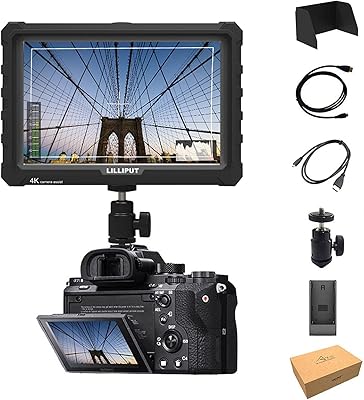
The included hot shoe mount, F970 battery plate, mini HDMI cable, and HDMI plug lock make for a reasonably complete out-of-box experience. Most buyers can mount the FW759 and get a signal running without purchasing additional hardware immediately.
The omission of a battery and power cord is the single most consistently flagged frustration across buyer feedback. It catches a significant number of first-time buyers off guard at setup, adding an unplanned cost and delaying first use — a transparency issue that reflects poorly despite being disclosed in the product listing.
Gimbal & Stabilizer Compatibility
88%
The weight and slim profile of this on-camera display make it a natural fit for gimbal rigs. Shooters using systems like the DJI RS series or Zhiyun Crane report minimal impact on balance calibration, which is exactly what you want when adding a monitor to an already-loaded rig.
While the physical weight works in its favor, the mounting system has occasional compatibility quirks with certain third-party gimbal accessories. A small number of users report needing adapter plates or custom mounting solutions to get a stable, wobble-free fit on specific rigs.
Value for Money
79%
21%
For budget-conscious solo creators and small crews, the FW759 delivers a functional, genuinely usable monitoring solution at an accessible price point. Buyers who align their expectations with its intended use case — framing and focus aid, not professional color work — consistently feel it punches above its cost.
The value equation weakens once you factor in the battery and power cord purchase that most buyers don’t anticipate. If the OSD frustrates you enough to spend time hunting tutorials, or if the plastic build fails early, the effective value drops considerably from its initial impression.
Color Accuracy
66%
34%
For everyday framing and exposure monitoring, the color representation is serviceable and noticeably better than what a typical camera LCD provides. Buyers using this on-camera display for run-and-gun documentary or event video generally find color rendering acceptable for their needs.
This is not a calibrated display and should not be treated as one. Colorists and anyone making critical grading decisions based on what they see on screen will find the color accuracy insufficient. The 800:1 contrast ratio also limits shadow detail visibility in darker scenes.
Setup Speed
74%
26%
Physical setup — mounting via hot shoe, connecting HDMI, attaching the sunshade — is quick and intuitive. Shooters who need to get operational fast on a run-and-gun job or event will find the hardware side of setup rarely causes delays.
The OSD configuration side of setup is where time gets lost. First-time users routinely spend longer than expected adjusting picture settings and assist tools to their preference, which is a friction point when time on set is limited.

Suitable for:

The Feelworld FW759 7″ Field Monitor is a strong fit for solo video creators and vloggers who have outgrown their camera’s rear LCD and want a larger, clearer framing reference without adding significant weight to their rig. Gimbal operators will appreciate how little the 300-gram body affects balance on a stabilized setup — this is genuinely one of its most practical advantages in day-to-day use. Shooters working with manual lenses will get real value from the focus peaking assist, which makes accurate focus pulls far more reliable than squinting at a 3-inch screen. Small production crews running lean budgets can also use the FW759 as a shared director’s monitor on narrative or documentary shoots where color-critical monitoring is handled separately. If your primary needs are confident framing, basic focus assistance, and portability, this on-camera display covers those bases at an accessible price point.
Not suitable for:

The Feelworld FW759 7″ Field Monitor is not the right tool for colorists, professional DIT operators, or anyone who needs to make grading or exposure decisions based on what they see on screen. At 400 cd/m², it struggles in direct sunlight even with the sunshade attached, which makes it a poor choice for outdoor documentary work, sports videography, or any situation where you’re regularly shooting in bright natural light. Professionals who move gear in and out of cases daily may find the plastic build raises legitimate durability concerns over time. Buyers expecting a fully ready-to-shoot package should also know upfront that a battery and power cord are not included — that’s an added cost that isn’t always obvious before checkout. And if an unintuitive menu is a dealbreaker for you, be prepared for a frustrating initial setup experience with this on-camera display.
Specifications

  • Screen Size: The display measures 7 inches diagonally, offering a significantly larger viewing area than a typical camera rear LCD.
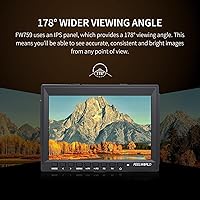
  • Panel Type: An IPS panel is used, providing wider viewing angles and more consistent color representation compared to TN alternatives.
  • Resolution: Native resolution is 1280×800 pixels at a 16:10 aspect ratio, suited to monitoring standard video output from DSLR and mirrorless bodies.
  • Brightness: Peak brightness is rated at 400 cd/m², which is adequate for indoor and shaded outdoor environments but limited in direct sunlight.
  • Contrast Ratio: The display offers an 800:1 contrast ratio, delivering acceptable shadow and highlight separation for general monitoring use.
  • Dimensions: The unit measures 176×130×17 mm, with the 17mm thickness being a key design feature for use on slim rigs and gimbals.
  • Weight: The monitor body weighs 300 grams, keeping rig impact minimal and making it one of the lighter options in the 7-inch monitor category.
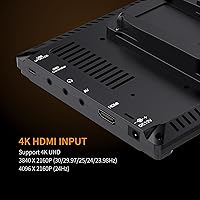
  • HDMI Input: Supports 4K UHD HDMI input at resolutions up to 3840×2160p (30/29.97/25/24/23.98Hz) and 4096×2160p (24Hz) via full-size HDMI.
  • Additional Input: An AV input is included for composite video sources, extending compatibility to legacy cameras and video equipment.
  • Audio Output: A stereo headphone jack and a built-in speaker are both provided, enabling basic audio level monitoring without a separate device.
  • Shell Material: The outer chassis is constructed from plastic, which contributes to the low overall weight but limits long-term durability under heavy field use.
  • Assist Functions: Built-in monitoring tools include focus peaking, image freeze, image flip, and digital zoom to support accurate framing and focus confirmation on set.
  • Mounting: A hot shoe mount is included in the package, allowing direct attachment to the camera’s accessory shoe without additional hardware.
  • Battery System: The monitor accepts Sony F970-style batteries via the included battery plate; neither a battery nor a power cord is supplied in the box.
  • Included Accessories: The package contains a mini HDMI cable, sunshade, hot shoe mount, F970 battery plate, HDMI plug lock, and an operation manual.
  • Connectivity: Input connections consist of a full-size HDMI port, a mini HDMI port, and an AV input port alongside the OSD controller interface.
  • Color Gamut: The panel covers a wide color gamut as specified by the manufacturer, intended to support accurate color representation for general monitoring tasks.
  • First Available: The monitor was first made available in June 2016, giving it a substantial track record and a large base of real-world user feedback.
  • Manufacturer: The FW759 is manufactured by Zhangzhou SEETEC Optoelectronics Technology Co., Ltd, the parent company behind the Feelworld monitor brand.
  • BSR Rank: The monitor holds a top-ten ranking in the Video Monitors category on Amazon, reflecting consistent and sustained buyer demand over time.

Related Reviews

FEELWORLD FW279 7 Inch 2200nit Ultra Bright DSLR Camera Field Monitor
85%
94%
Display Brightness
91%
Image Quality
88%
Portability
85%
Build Quality
83%
Ease of Use
More
NEEWER F700 7″ Field Monitor
78%
91%
Outdoor Visibility
86%
Touch Screen Responsiveness
54%
Fan Noise
88%
3D LUT Support
89%
Battery & Power Versatility
More
LILLIPUT A7S 7″ Camera Field Monitor
84%
88%
Display Quality
91%
Portability & Weight
86%
Brightness in Outdoor Conditions
80%
Customizability of Buttons
83%
Durability & Build Quality
More
FEELWORLD T7PLUS 7-Inch 4K Video Monitor
86%
92%
Display Quality
89%
Portability
88%
Color Accuracy
90%
Build Quality
85%
Brightness in Outdoor Conditions
More
FEELWORLD FW568 6″ Field Monitor
77%
88%
Image Clarity & Sharpness
84%
Color Accuracy
91%
LUT Support & Preview
87%
Exposure & Focus Assist Tools
63%
Brightness & Outdoor Usability
More
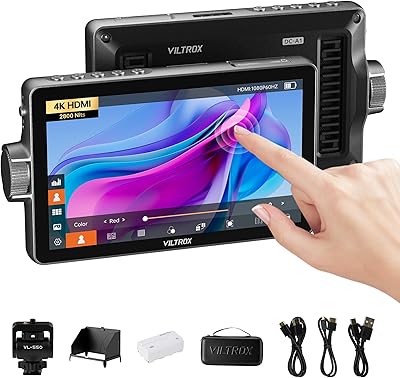
VILTROX DC-A1 7-inch Field Monitor
86%
94%
Brightness Performance
90%
Display Clarity
85%
Touchscreen Responsiveness
88%
Portability
75%
Build Quality
More
NEEWER F100 7-inch Field Monitor
78%
83%
Image Quality
66%
Outdoor Visibility
71%
Build Quality
68%
Ball Head & Mounting
78%
Battery Life
More
VILTROX DC-L2 7″ 4K Camera Field Monitor
86%
93%
Display Quality
89%
Portability
70%
Battery Life
85%
Ease of Use
88%
Build Quality
More
FEELWORLD LUT7 7-inch 2200nit Touchscreen Camera Monitor
81%
94%
Brightness for Outdoor Use
78%
Touchscreen Responsiveness
85%
Build Quality
90%
Picture Quality/Display
88%
Mounting and Flexibility
More
Feelworld F5 ProX 5.5″ Field Monitor
78%
91%
Screen Brightness
83%
Image Clarity & Resolution
86%
Monitoring Tools
67%
Touchscreen Responsiveness
58%
Build Quality & Durability
More

FAQ

No, and this is probably the most important thing to know before ordering. The Feelworld FW759 7″ Field Monitor ships with a battery plate that accepts Sony F970-compatible batteries, but neither the battery itself nor a DC power cord is included in the box. Budget for that separately before your first shoot, or you’ll be stuck at setup.
Almost certainly yes. The FW759 accepts 4K HDMI input up to 3840×2160p at 30Hz, which covers the clean HDMI output of most Sony Alpha, Canon EOS, and Nikon Z-series bodies. If your camera outputs a clean HDMI signal, this on-camera display will pick it up without any fuss.

It depends heavily on conditions. In shade, under an overcast sky, or inside a tent or vehicle, 400 cd/m² is workable. In direct sunlight, though, it genuinely struggles — even with the sunshade attached. If a lot of your work happens outdoors in bright conditions, you’ll want to factor that in as a real limitation rather than assume the sunshade solves it.

Focus peaking highlights the sharpest edges in your frame with a colored overlay — typically white or red — so you can visually confirm what is in focus without relying on magnification alone. On the FW759, it works well enough for practical use, especially if you’re pulling focus on manual lenses. It’s not as refined as what you’d find on an Atomos unit, but for the price it gets the job done reliably.

Yes, and this is actually where the FW759 shines. At 300 grams and 17mm thin, it has minimal impact on gimbal balance, and many users report being able to balance it on DJI RS-series and Zhiyun Crane rigs with only minor counterweight adjustments. Just make sure your cable management is clean so the HDMI connection doesn’t introduce tension on the rig.

Honestly, expect to spend 20 to 30 minutes with the manual the first time. The button layout and menu logic are not immediately intuitive, and a handful of settings are buried in sub-menus that aren’t obvious at first glance. Once you’ve navigated it a few times, it becomes muscle memory — but it’s worth doing a dry run at home before relying on it on a shoot.

For light-to-moderate use — studio work, events, occasional location shoots — the plastic chassis holds up fine for most users. Where it becomes a concern is with heavy daily use in rough outdoor conditions, frequent mounting and dismounting, or work where gear regularly gets knocked around. If that describes your workflow, it’s worth considering whether a more robust option is worth the additional cost.

No. The FW759 is an input-only display — there is no HDMI output or pass-through. All incoming signals terminate at the screen itself, so it cannot sit in a signal chain between your camera and an external recorder like a Ninja or Shogun.

It’s included and genuinely helpful in moderately lit outdoor conditions, but the general consensus from long-term users is that it feels flimsy. The attachment mechanism works initially but tends to loosen after repeated removal and reattachment. It’s a useful starter accessory, but shooters who rely on it heavily often end up buying a sturdier third-party replacement within a few months.

It really isn’t designed for that, and trying to use it that way will likely lead to inaccurate results. The panel is not factory-calibrated for color accuracy, and the 800:1 contrast ratio limits shadow detail in darker scenes. Think of this on-camera display as a framing and focus tool — for anything requiring color-critical decisions, a properly calibrated monitor is the right call.