Overview

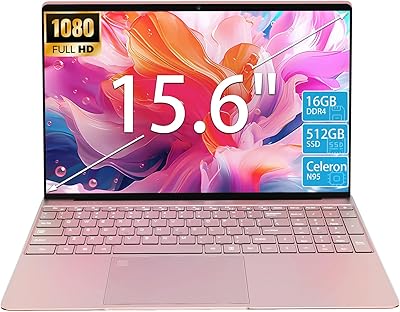
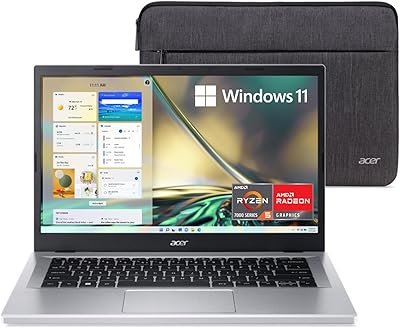
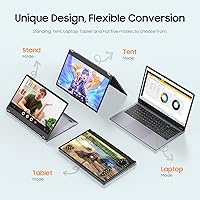
The EYY Yoga 3200U 15.6″ 2-in-1 Laptop (16GB/512GB) enters a crowded budget convertible market with a spec sheet that looks stronger than its price suggests. Powering it is AMD's Ryzen 3 3200U — a dual-core chip from 2019, so don't expect miracles under heavy load, but it handles everyday browsing, document editing, and light multitasking without much complaint. The 360-degree hinge lets you flip between laptop, tablet, tent, and stand modes, which adds real versatility for a machine at this price. EYY isn't a household name, and that naturally raises questions about long-term reliability and support. Going in with calibrated expectations is smart.
Features & Benefits

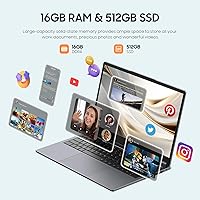
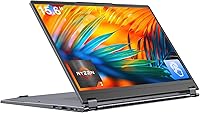
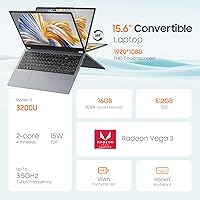
What stands out most on this 2-in-1 notebook is how much RAM you get. Sixteen gigabytes in dual-channel configuration is genuinely uncommon at this price tier and makes a real difference when you're juggling browser tabs, a spreadsheet, and a video call simultaneously. The 512GB SSD keeps things snappy — boot times are fast, and apps open without the sluggish pauses you'd expect from an older spinning hard drive. The 15.6″ IPS touchscreen delivers decent color and wide viewing angles, though brightness in well-lit environments can feel limiting. The backlit keyboard is a practical bonus for evening work. One caution worth noting: confirm whether the bundled Office Suite is a full lifetime license rather than a short-term trial.

Best For

This convertible laptop makes the most sense for college students who need a flexible, do-it-all machine for note-taking, writing papers, and watching lectures without spending a lot. It also works well for remote workers focused on light tasks — email, video calls, and basic document work — where the 2-in-1 form factor adds a welcome layer of convenience. If you need a secondary home machine or an affordable option for an older family member, this 2-in-1 notebook fits that role reasonably well. Skip it if your work involves video editing, 3D rendering, or gaming — the integrated Vega 3 graphics and aging processor simply aren't built for that kind of sustained workload.

User Feedback

Buyers who pick up the EYY Yoga tend to respond positively to the screen clarity and the amount of RAM they're getting at this price — two things that genuinely punch above expectations. That said, recurring complaints focus on battery life, with many users reporting real-world runtime well under the advertised six hours during normal use. Build quality draws mixed reactions too; the chassis feels plasticky to some, and a few buyers have flagged concerns about hinge durability over time. Thermal performance under prolonged use can also lead to noticeable fan noise. EYY's 365-day warranty is reassuring in principle, though actual support responsiveness appears to vary considerably among buyers.

Pros

  • 16GB of dual-channel RAM is rare at this price tier and makes everyday multitasking noticeably smoother.
  • The 512GB SSD delivers fast boot times and snappy app loading compared to budget HDD machines.
  • A 360-degree hinge adds genuine flexibility for students switching between typing and reading modes.
  • The full HD IPS touchscreen offers decent color accuracy and wide viewing angles for the price.
  • Backlit keyboard is a practical bonus for late-night study sessions or evening work shifts.
  • Wired RJ45 Ethernet is a useful port that many slim budget laptops quietly drop.
  • Windows 11 Pro pre-installed means buyers are ready to work straight out of the box.
  • WiFi 5 and Bluetooth 5.1 handle typical home and campus wireless demands reliably.
  • The bundled Office Suite removes an immediate software cost for students and home office users.

Cons

  • Real-world battery life consistently falls short of the advertised six hours under normal use.
  • The Ryzen 3 3200U is a 2019 dual-core chip — it shows its age under anything heavier than light tasks.
  • The all-plastic build feels noticeably budget-grade, with lid flex and keyboard deck flex under pressure.
  • Hinge durability after extended daily flipping between modes is an open and unresolved question.
  • Screen brightness struggles in well-lit rooms or near windows, making outdoor or bright-environment use uncomfortable.
  • No USB-C port limits compatibility with modern accessories, docks, and faster charging solutions.
  • Two of the three USB ports are the older 2.0 standard, slowing file transfers from modern devices.
  • EYY has little established reputation, and warranty support responsiveness has been inconsistent across buyers.
  • The Office Suite license type is not clearly disclosed — buyers risk discovering it is a trial after purchase.
  • At 5.59 lbs, this convertible laptop becomes tiring to hold in tablet mode for more than a few minutes.

Ratings

The scores below for the EYY Yoga 3200U 15.6″ 2-in-1 Laptop (16GB/512GB) were generated by our AI system after analyzing verified purchase reviews from buyers worldwide, with spam, bot-submitted, and incentivized feedback actively filtered out. This convertible sits in an interesting spot — it offers specs that look compelling on paper for the price, but real buyer experiences reveal a more nuanced picture. Both the genuine strengths and the recurring frustrations are reflected transparently in the categories below.
Value for Money
78%
22%
For budget-conscious buyers — particularly students or households needing a second machine — the combination of 16GB RAM and a 512GB SSD at this price point is hard to argue with. Most comparable branded machines with similar memory configurations cost noticeably more, making this feel like a reasonable trade-off for those who prioritize specs over brand prestige.
The value equation depends heavily on the machine holding up over time, which is where EYY's unknown track record introduces real uncertainty. A few buyers have reported issues emerging within months, and if after-sales support is slow or difficult, that initial cost saving can feel hollow quickly.
Performance
62%
38%
For light daily use — typing up assignments, running browser sessions with several tabs open, joining video calls — the Ryzen 3 3200U keeps things moving without obvious stuttering. The dual-channel RAM helps noticeably here, giving the older processor more breathing room than you might expect at this price.
The 3200U is a 2019-era dual-core chip, and that age shows the moment workloads get heavier. Exporting a short video, running multiple productivity apps simultaneously, or even some browser-heavy workflows can push the processor to its limits, resulting in sluggishness and heat buildup that users found frustrating.
RAM & Multitasking
83%
Sixteen gigabytes of DDR4 in dual-channel mode is the standout spec here and buyers noticed it. Switching between a document, a video call, and a streaming tab felt noticeably smoother than rival budget machines with only 8GB, which is a real daily-use advantage for students and home office workers.
While the RAM headroom is generous, the processor and storage interface can become the bottleneck under sustained multitasking. A few technically savvy buyers noted that having great RAM paired with an aging CPU is a bit like widening a highway that leads to a single-lane bridge.
Storage Speed
74%
26%
The 512GB SATA SSD is a meaningful upgrade over the spinning hard drives still found in some competing budget machines. Boot times were consistently cited as fast, and opening standard applications like Word, Chrome, or Zoom felt snappy enough that most everyday users were satisfied.
It is worth noting this uses a SATA interface rather than the faster NVMe standard, so file transfer speeds and sustained read/write performance are noticeably slower than what mid-range or premium laptops deliver. For most students this will not matter, but power users moving large files will feel the ceiling.
Display Quality
71%
29%
The 15.6-inch IPS panel at full HD resolution holds up well for everyday tasks and casual media consumption. Colors are reasonably accurate, viewing angles are wide enough for showing content to someone sitting beside you, and the touch layer responds reliably — useful when flipping into tablet or tent mode.
Brightness is the recurring weak point. In a well-lit room or near a window, the screen can wash out enough to be genuinely uncomfortable. Several buyers also noted that the display feels less vivid than the product images suggest, which is typical for budget IPS panels but worth knowing before purchase.
Battery Life
47%
53%
Under very light use — a document open, WiFi connected but mostly idle — some users managed to stretch usage close to the five-hour mark, which is acceptable for shorter study sessions or working from a coffee shop for a couple of hours.
The 38Wh battery is small by modern standards, and real-world experience consistently falls short of the advertised six hours. Most buyers doing typical student or work tasks reported three to four hours before needing to reach for the charger. Carrying the charger everywhere effectively becomes a requirement, which undermines portability.
Build Quality & Durability
54%
46%
The machine is thin and relatively light for a 15.6-inch convertible, and the overall assembly feels acceptable straight out of the box. First impressions from unboxing reviews tend to be neutral to mildly positive, with the gray finish looking clean and understated.
The all-plastic chassis is where the budget origins show most plainly. Users described flex in the lid and keyboard deck under moderate pressure, and a handful flagged early concerns about the hinge feeling less sturdy after repeated flipping between modes. Long-term durability remains a real open question.
Keyboard & Typing Experience
69%
31%
The backlit keyboard is a genuinely useful addition for students who study in the evening or workers pulling late hours. Key size is reasonable for a 15.6-inch chassis, and the backlighting is consistent enough to make typing in dim conditions comfortable without being distracting.
Key travel is on the shallow side, which some touch typists find tiring over longer writing sessions. A few buyers also noted that the keyboard flex when typing firmly adds to the impression of a chassis that could be more rigid, even if it does not directly impact functionality.
Touchscreen & Convertible Functionality
66%
34%
The 360-degree hinge works as advertised and the touch layer responds well to finger input, making tablet mode genuinely usable for browsing, sketching rough notes, or watching content lying flat. For students who like to annotate PDFs or take handwritten notes in class, this flexibility adds real value.
In tablet mode, the weight of 5.59 lbs becomes more apparent — holding the machine in your hands for extended periods is tiring. There is also no included stylus, which limits the usefulness of handwriting input unless buyers source one separately, adding to the overall cost.
Thermal Management
55%
45%
Under light tasks like document editing or video streaming, the EYY Yoga runs quietly and stays comfortable to the touch. The fan rarely becomes intrusive during routine use, which makes it pleasant enough for library or quiet office environments.
Sustained workloads cause the fan to ramp up noticeably and the bottom of the chassis can get warm in ways that make lap use less comfortable. Several buyers noted that performance also throttles under prolonged load, suggesting the cooling solution is working close to its limit rather than with any margin to spare.
Connectivity & Ports
76%
24%
Having a physical RJ45 Ethernet port is a practical advantage that many slim budget laptops skip, and it is genuinely appreciated by users who work in offices or dorm rooms with wired connections. Bluetooth 5.1 pairing was described as reliable, and WiFi 5 handled typical home and campus network demands without issue.
The port selection, while functional, leans on older standards — two USB 2.0 ports in 2025 feel dated, especially when transferring files from modern storage devices. There is no USB-C or Thunderbolt port, which limits compatibility with newer accessories and docks that buyers may already own.
Webcam Quality
51%
49%
The front camera gets the job done for standard video calls on Teams, Zoom, or Google Meet in reasonably lit environments. For students joining class sessions or remote workers on routine calls, the image is clear enough that the camera does not become a conversation topic.
In lower light, quality drops off sharply, producing grainy, washed-out footage that does not reflect well in professional video meetings. Buyers expecting anything beyond basic call functionality will likely be disappointed, and the camera is not a component that inspires confidence for anyone working in media or content creation.
Software & OS Setup
67%
33%
Windows 11 Pro is a solid inclusion at this price, and having it pre-installed means most buyers can be up and running quickly without navigating activation headaches. The included Office Suite is a practical bonus for students and office workers who need word processing and spreadsheet tools immediately.
There is genuine ambiguity around whether the bundled Office Suite is a full lifetime license or a trial, and EYY's product listing does not resolve this clearly. Several buyers discovered the trial nature after purchase, which felt misleading. Confirming the license terms before buying is strongly advised.
Brand Trust & After-Sales Support
49%
51%
EYY does offer a stated 365-day warranty, which at least sets a formal baseline for buyer protection. Some users reported receiving reasonably prompt email responses to basic questions, which is better than what the brand's obscurity might lead you to expect.
EYY is a brand with little established reputation in Western markets, and buyer experiences with warranty claims are inconsistent — some resolved smoothly, others stalled with slow or unhelpful responses. For a machine that needs to last through a full academic year or work contract, that uncertainty is a real risk worth weighing carefully.

Suitable for:

The EYY Yoga 3200U 15.6″ 2-in-1 Laptop (16GB/512GB) is a practical fit for college students who need a capable everyday machine without stretching their budget — someone who spends most of their time writing papers, attending virtual lectures, and browsing the web will find it more than adequate. The 360-degree hinge makes it a genuinely versatile companion in a classroom or library, where switching between typing and reading in tablet mode is a real convenience rather than a gimmick. Remote workers handling email, video calls, and standard office documents will also get solid mileage out of it, especially since the generous RAM keeps common multitasking scenarios feeling fluid. It works well as a secondary household laptop — the kind you leave on the coffee table for casual browsing, streaming, or a family member who needs basic computing access without complex demands. Anyone buying their first Windows machine on a tight budget will find the pre-installed Windows 11 Pro and bundled Office Suite a time-saving starting point, provided they verify the license terms before committing.
Not suitable for:

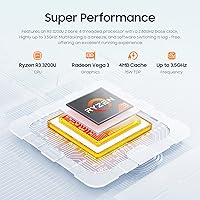
The EYY Yoga 3200U 15.6″ 2-in-1 Laptop (16GB/512GB) is not the right tool for anyone whose work pushes hardware harder than a basic productivity session. Video editors, graphic designers, and anyone working with large media files will hit the ceiling of the 2019-era Ryzen 3 3200U quickly — the processor simply was not built for sustained creative workloads, and the integrated Vega 3 graphics offer no meaningful relief. Gamers should look elsewhere entirely; even modest modern titles will struggle on this hardware configuration. If you rely on a laptop running unplugged through a full workday, the small 38Wh battery will leave you hunting for an outlet well before the afternoon is over, making it a poor choice for frequent travelers or anyone without reliable access to a power source. Buyers who need strong long-term durability, a solid manufacturer support network, or USB-C connectivity for modern peripherals and docks will also find this 2-in-1 notebook falling short of expectations.
Specifications

  • Processor: AMD Ryzen 3 3200U dual-core processor clocked up to 3.5 GHz, based on AMD's 2019 Picasso architecture.
  • Graphics: AMD Radeon Vega 3 integrated graphics, sharing system memory with no dedicated VRAM.
  • RAM: 16GB DDR4 SDRAM configured as two 8GB modules running in dual-channel mode for improved bandwidth.
  • Storage: 512GB solid-state drive using a SATA interface, offering fast boot times compared to traditional spinning hard drives.
  • Display: 15.6″ IPS touchscreen panel with a 1920x1080 full HD resolution and wide viewing angles.
  • Hinge Design: 360-degree convertible hinge supports laptop, tablet, tent, and stand modes for flexible use across different settings.
  • Operating System: Windows 11 Pro comes pre-installed, with an Office Suite also included — license type should be confirmed before purchase.
  • Battery: 38Wh lithium battery rated for approximately 6 hours, though real-world runtime typically falls between 3 and 4 hours under normal use.
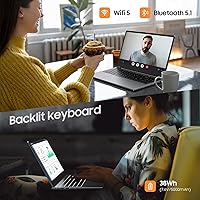
  • Keyboard: Full-size backlit English keyboard layout designed for comfortable typing in low-light environments.
  • Webcam: Front-facing webcam suitable for standard video conferencing on platforms such as Zoom or Microsoft Teams.
  • Wireless: WiFi 5 (802.11ac) and Bluetooth 5.1 provide stable wireless connectivity for home, campus, and office networks.
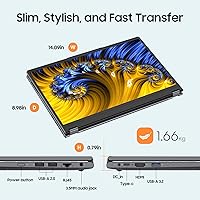
  • Ports: One USB 3.0 port, two USB 2.0 ports, and one RJ45 Ethernet jack; no USB-C or Thunderbolt ports are present.
  • Dimensions: The chassis measures 14 x 8.98 x 0.79 inches, keeping the profile reasonably slim for a 15.6″ convertible.
  • Weight: The machine weighs 5.59 lbs, which is acceptable for desk use but noticeable when held in tablet mode for extended periods.
  • Color: Available in a single gray colorway with a matte plastic finish across the lid and base.
  • Chipset: AMD integrated chipset supports the Ryzen 3 3200U platform without a discrete graphics card.
  • Warranty: EYY provides a stated 365-day warranty with email-based customer support, though response quality has been reported as inconsistent.

Related Reviews
Acer Aspire 1 Laptop, 15.6″ FHD, Intel Celeron N4500, 16GB RAM, 512GB SSD
83%
83%
Performance for Everyday Tasks
89%
Display Quality
85%
Battery Life
78%
Build Quality
91%
Portability & Weight
More
Lenovo IdeaPad 1 15IAU7 Laptop, 15.6″ FHD Touchscreen, Intel Core i3-1215U, 16GB RAM, 512GB SSD
79%
84%
Performance
92%
Value for Money
89%
Portability/Weight
86%
Display Quality
75%
Battery Life
More
HP 2020 15 15.6″ HD Touchscreen Laptop, Intel Core i5-1035G1, 16GB RAM, 512GB SSD
82%
89%
Performance
75%
Display Quality
90%
Portability
80%
Battery Life
85%
Build Quality
More
KurieTim N95 15.6″ Laptop, 16GB RAM, 512GB SSD
82%
85%
Performance
80%
Battery Life
92%
Value for Money
78%
Build Quality
87%
Display Quality
More
UOWAMOU BTC501 15.6″ Laptop 512GB
71%
88%
Value for Money
67%
Performance & Speed
79%
Display Quality
91%
RAM & Storage
58%
Wi-Fi & Connectivity
More
Molegar 2025 15.6″ Laptop, 16GB RAM, 512GB SSD, Intel N5095
80%
86%
Performance
78%
Battery Life
92%
Portability
81%
Display Quality
89%
Value for Money
More
SAINTDISE ANL5-N5095 Laptop 15.6-inch, 16GB RAM, 512GB SSD
82%
89%
Value for Money
85%
Performance for Everyday Tasks
67%
Battery Life
91%
Display Quality
87%
Fingerprint Reader Convenience
More
CHUWI FreeBook 13.4″ 16GB/512GB
72%
83%
Build Quality
88%
Display Quality
76%
Touchscreen Responsiveness
67%
Performance (CPU & RAM)
61%
Stylus Experience
More
CHUWI MiniBook X N150 16GB/512GB
71%
84%
Display Quality
72%
Performance & Speed
93%
Portability & Form Factor
67%
Build Quality
58%
Battery Life
More
Acer Aspire 3 A315-24PT-R0UX 15.6″ Laptop 16GB 512GB SSD
86%
91%
Performance
87%
Battery Life
88%
Display Quality
93%
Portability
82%
Build Quality
More

FAQ

This is one of the most common questions buyers raise, and unfortunately the product listing does not make it entirely clear. Based on available buyer feedback, there is a real possibility the included Office Suite is a limited trial rather than a permanent license. Before purchasing, it is worth contacting the seller directly to confirm, or budgeting for a separate Microsoft 365 subscription if you need Office long-term.

For that specific scenario, this 2-in-1 notebook actually holds up reasonably well thanks to the 16GB of dual-channel RAM. Having a video call open alongside several browser tabs and a document is well within its comfort zone. Where things start to slow is if you add more demanding applications on top of that, or if the machine has been running for a while and thermals start to build up.

Your skepticism is well-founded. The 38Wh battery is genuinely small by current laptop standards, and real buyers consistently report getting closer to three to four hours under typical use — browsing, a video call or two, and some document work. The six-hour figure appears to reflect very light use with screen brightness turned down. Treating this as a laptop you will need to charge at least once during a full day is the safer assumption.

Not really. The AMD Radeon Vega 3 is integrated graphics sharing system memory, and the Ryzen 3 3200U is a 2019 dual-core processor — together, they are simply not built for modern gaming. Very old or extremely lightweight games might run at low settings, but anything released in the last few years will struggle. If gaming is a priority, this is not the right machine.

The touch layer works reliably for finger input, so swiping, scrolling, and tapping feel natural. In tablet mode it is genuinely usable for reading, browsing, and PDF annotation. The main limitation is weight — at nearly 5.6 lbs, holding the machine in your hands for a long reading session becomes tiring fairly quickly. It works best propped up in tent or stand mode rather than held like a traditional tablet.

No stylus is included in the box. The touchscreen supports finger input but does not come with any pen accessory. If handwritten notes or drawing are important to you, you would need to source a compatible stylus separately, and compatibility is not officially confirmed by EYY — so there is some trial and error involved there.

Under light tasks like document editing, streaming, or casual browsing, the fan stays quiet and largely unobtrusive. If you push the machine harder — longer video calls, more tabs, or anything computationally demanding — the fan does ramp up noticeably and some buyers described it as distracting in quiet environments. It is not unusually loud for a budget machine, but it is not silent either when under load.

Unfortunately, this convertible laptop does not have a USB-C port, which rules out USB-C hubs, USB-C monitors, and USB-C charging accessories entirely. For an external display, you would need a monitor with a compatible input that can connect via a standard USB adapter, though display output options are limited. If USB-C connectivity is a regular part of your workflow, this is a real limitation worth factoring in before buying.

EYY is a lesser-known brand with limited public track record in Western markets, which is a fair concern to raise. They do offer a one-year warranty with email support, and some buyers report satisfactory responses to basic queries. However, warranty claim experiences have been inconsistent according to buyer feedback — some resolved smoothly, others less so. If strong after-sales support is important to you, that uncertainty is worth weighing seriously against the savings this machine offers over more established brands.

For most students and everyday users, 512GB is a comfortable amount — it handles a full Windows installation, an Office Suite, documents, photos, and browser data without running tight quickly. Whether storage is user-upgradeable depends on the internal design, and EYY has not published clear information on this. Assuming upgradeability without confirming first is risky, so if you anticipate needing more space, an external USB drive is the safer way to expand.