
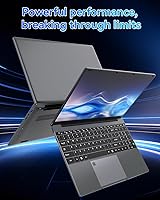
Overview

The SAINTDISE ANL5-N5095 15.6-inch Laptop is a straightforward budget machine aimed at users who need basic computing without a hefty price tag. It runs on an Intel Celeron N5095 processor — capable enough for light tasks but nowhere near a powerhouse. One thing buyers absolutely must know upfront: this unit ships with DOS, not Windows. You will need to install your own operating system before it is usable, which can catch unprepared buyers completely off guard. SAINTDISE is not a household name, and that means after-sales support and long-term reliability are genuine question marks worth considering before you commit.

Features & Benefits

Where this budget Celeron laptop genuinely surprises is its hardware configuration relative to its price. You get 16GB of LPDDR4 RAM paired with a 512GB SSD — that combination is above average for this tier, and day-to-day tasks like browser tabs, office apps, and media playback feel reasonably fluid because of it. The full HD display handles document work and streaming without complaint. A fingerprint reader is a welcome inclusion at this price. Connectivity covers WiFi 5 and Bluetooth 4.2, which is adequate for most users. There is also an M.2 expansion slot if you want more storage later, though the port selection — just two USB 3.0 ports — is on the lean side.

Best For

This entry-level 15.6-inch laptop makes the most sense for students, casual home users, and anyone who needs a simple secondary machine. If your daily needs are email, spreadsheets, YouTube, and the odd video call, it holds its own without complaint. It is also a solid pick for Linux enthusiasts — since it ships without Windows anyway, dropping a lightweight distro on it is arguably the best way to squeeze the most from the Celeron hardware. Light travelers will appreciate the sub-1.5 kg frame. Just do not expect to run demanding software or heavy multitasking — the Celeron N5095 has a firm performance ceiling that makes it unsuitable for power users.

User Feedback

Buyers who go in with realistic expectations tend to come away reasonably satisfied. The display gets consistent praise for being clear enough for everyday use, and many highlight value for money as a standout quality. That said, battery life draws the most criticism — real-world usage lands closer to three hours than four, so a charger is practically non-negotiable for full-day use. The OS setup catches less tech-savvy buyers off guard when they realize Windows is not pre-installed. Keyboard feel and trackpad precision are described as functional but unremarkable. A few reviewers note the chassis feels plasticky, which is par for the course here. The biggest lingering concern remains brand support — warranty service from a lesser-known manufacturer can be unpredictable.

Pros

  • 16GB of RAM is unusually generous for a laptop at this price, reducing the need to constantly close browser tabs.
  • The 512GB SSD provides ample everyday storage, and an M.2 expansion slot means you can grow it later.
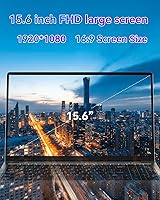
  • A full HD 1920x1080 display looks sharp and clear for documents, video calls, and streaming.
  • Fingerprint login is a rare and welcome convenience at this budget tier.
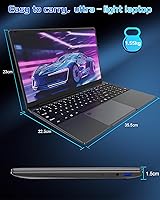
  • Weighing just 1.5 kg, this budget Celeron laptop is genuinely easy to carry around all day.
  • WiFi 5 support keeps wireless speeds competitive with modern routers.
  • The slim 2 cm profile makes it easy to slip into a bag alongside books or other gear.
  • Two USB 3.0 ports handle fast file transfers from external drives and peripherals without a speed penalty.

Cons

  • Ships with DOS only — buyers must source, install, and potentially pay for their own operating system before the machine is usable.
  • Real-world battery life is closer to three hours, making a charger a constant travel companion.
  • The Celeron N5095 struggles noticeably when juggling multiple demanding apps or browser-heavy workflows.
  • SAINTDISE has minimal brand presence, and warranty support can be difficult to reach or unreliable.
  • Port selection is thin — just two USB 3.0 ports leaves little room for peripherals without a hub.
  • Build quality feels plasticky and light in a way that raises questions about long-term durability.
  • No Windows license is included, which adds hidden cost for buyers who need it.
  • The trackpad and keyboard are reported as functional but unremarkable, which matters for heavy typists.
  • Integrated UHD graphics make this entry-level 15.6-inch laptop unsuitable for any graphically demanding task.
  • The 5000 mAh battery capacity is modest, and the listing overstates expected runtime versus real-world results.

Ratings

The SAINTDISE ANL5-N5095 15.6-inch Laptop scores below are produced by our AI system after analyzing verified global buyer reviews, with spam, bot-generated, and incentivized submissions actively filtered out before scoring. This machine sits in a competitive budget tier, and the ratings honestly reflect where it punches above its weight — and where it falls noticeably short. Strengths and frustrations are weighted equally so you get a clear, unvarnished picture before committing.

Value for Money
78%
22%
For buyers who understand what they are getting, the hardware-to-price ratio is hard to argue with — 16GB of RAM and a 512GB SSD at this price point would cost considerably more from a name-brand manufacturer. Students and secondary-machine buyers consistently cite this as the primary reason they chose it.
The value calculation changes the moment you factor in the cost of a Windows license, since the machine ships with DOS only. Buyers who did not account for that extra spend often felt the deal was less compelling than it first appeared.
Performance
54%
46%
For basic single-tasking — a browser with a handful of tabs, a word processor, or a video stream — the Celeron N5095 keeps up without obvious hesitation. Users doing light document work at home or in class rarely hit a wall during short sessions.
Push it beyond the basics and the processor shows its limits quickly. Reviewers who tried running multiple applications simultaneously, working with larger files, or even keeping several browser tabs open alongside other tools reported noticeable slowdowns and frustration.
Display Quality
73%
27%
The full HD 1920x1080 panel draws consistent praise for being crisp and clear at this price level. Users watching videos, reading documents, or browsing found the image sharp enough that the screen never felt like the weak link in day-to-day use.
Viewing angles and brightness are average at best — working outdoors or at an angle in a bright room is uncomfortable. Color accuracy is not a strength, which matters less for everyday tasks but rules out any light creative or photo-editing work.
Battery Life
41%
59%
In very light use — reading documents with WiFi off and screen brightness turned down — some users managed to stretch past the three-hour mark, which is at least functional for a short commute or a single lecture block.
Real-world battery performance is the most consistent complaint across reviews. With WiFi active and typical workloads running, most users report two to three hours before needing a charger — well below what the listing implies and a genuine limitation for anyone without easy access to an outlet.
Portability
83%
At just 1.5 kg and 2 cm thick, this machine is genuinely light for a 15.6-inch laptop. Students carrying it between classes and commuters slipping it into a bag alongside other gear consistently note that the weight never becomes a burden over a full day.
The large 15.6-inch footprint does limit how compact it feels in a packed bag compared to 13-inch or 14-inch alternatives. The short battery life also undermines portability — a charger brick adds weight and clutter that partially negates the slim, light chassis.
Build Quality
47%
53%
The laptop is thin and light, and for buyers who handle it carefully at a desk or in a padded bag, the construction holds up well enough for typical daily use. The slim profile at least gives it a more modern appearance than chunkier budget rivals.
The all-plastic body flexes noticeably under pressure, especially the display lid. Multiple reviewers flagged concerns about long-term durability, and the overall feel of the chassis does not inspire confidence if the machine will be carried around regularly and handled by less careful users.
Keyboard & Trackpad
58%
42%
The keyboard layout is full-sized for a 15.6-inch chassis, which gives enough key spacing for comfortable typing during longer writing sessions. Casual users writing emails and documents report the experience as acceptable for the price.
Key travel is shallow and feedback is mushy, which becomes tiring during extended typing. The trackpad is described as functional but inconsistent — precision suffers during faster movements, and the click mechanism feels cheap compared to what mid-range laptops deliver.
Connectivity
69%
31%
WiFi 5 delivers genuinely fast wireless throughput on modern routers, and Bluetooth 4.2 handles wireless mice, speakers, and headphones without issues. For typical home or office environments, the wireless side of this machine does not disappoint.
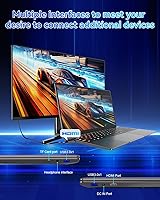
Wired connectivity is where it falls short — just two USB 3.0 ports is limiting, and there is no USB-C, HDMI, or SD card slot to speak of. Anyone using more than two peripherals at once will need a hub as a mandatory additional purchase.
Setup Experience
36%
64%
For technically confident buyers — particularly Linux users — the bare-OS approach is actually a clean slate. Installing a lightweight Linux distribution is straightforward and results in a snappy, well-configured machine that makes good use of the available hardware.
For the average buyer expecting a plug-and-play experience, the DOS-only situation is a significant frustration. Reviewers who were not prepared for it described the initial setup experience as confusing and off-putting, and sourcing a Windows license added unexpected time and cost.
Security Features
76%
24%
A fingerprint reader is a genuinely uncommon addition at this price point, and users who set it up under Windows Hello or compatible Linux tools appreciated the convenience of fast, secure login without typing a password every session.
The fingerprint reader is only as useful as the operating system supporting it — and since the laptop ships without one, buyers must get everything installed and configured before the feature works at all. Driver compatibility on some Linux distros is also hit-or-miss.
Storage Configuration
81%
19%
A 512GB SSD as the base drive is a solid starting point that covers most everyday needs without running out of space too quickly. The M.2 expansion slot is a smart inclusion that lets users add more capacity later rather than being permanently capped.
The SSD is SATA-based rather than NVMe, which means read and write speeds are noticeably slower than what you would get from a similarly priced NVMe drive. For most everyday tasks this will not matter, but it is worth knowing for anyone transferring large files regularly.
After-Sales Support
38%
62%
A small number of buyers reported resolving minor issues through the seller's contact channels without major difficulty, suggesting that support exists in some capacity and is not entirely absent.
SAINTDISE has a very limited support footprint, and user experiences with warranty claims or troubleshooting help are inconsistent at best. Several reviewers noted slow response times or difficulty getting clear answers, which is a real risk for buyers who rely on manufacturer support.
RAM Capacity
84%
16GB of LPDDR4 is well above what most competitors offer in this price bracket, and it makes a tangible difference for keeping multiple browser tabs or office documents open without the system grinding to a halt. It is arguably the standout spec on paper.
Since the RAM is soldered and not user-upgradeable, what you buy is what you keep forever. While 16GB is generous today, the inability to expand in the future limits the machine's long-term flexibility as software demands grow.
Thermal Management
55%
45%
During light, everyday workloads, the laptop runs quietly and stays cool to the touch. Users browsing, streaming, or typing in documents rarely notice fan noise or uncomfortable surface temperatures.
Under sustained load — prolonged downloads, video playback at high brightness, or anything that pushes the processor — the fan ramps up noticeably and the bottom of the chassis gets warm. Thermal throttling under extended stress is a real concern that caps already modest performance further.

Suitable for:

The SAINTDISE ANL5-N5095 15.6-inch Laptop is a practical pick for students, first-time laptop owners, and casual home users who keep their computing needs simple — think web browsing, writing documents, streaming video, and the occasional video call. It works especially well as a secondary or backup machine in a household or small office where nobody needs raw processing power. Tech-savvy buyers comfortable installing Linux or a licensed copy of Windows will find the hardware configuration — particularly the 16GB of RAM and 512GB SSD — surprisingly capable for the money. Light travelers who want something portable without spending mid-range money will appreciate the sub-1.5 kg chassis. If fingerprint login matters to you but your budget rules out pricier options, this machine checks that box too.

Not suitable for:

Anyone expecting a plug-and-play Windows experience should look elsewhere — the SAINTDISE ANL5-N5095 15.6-inch Laptop ships with DOS only, and setting up a usable operating system requires time, comfort with tech, and potentially extra spending on a Windows license. The Intel Celeron N5095 has a hard performance ceiling, making this machine a poor fit for anyone running demanding software, editing video, working with large spreadsheets, or multitasking heavily across many applications. Battery life hovers around three hours in real-world use, so professionals who need all-day untethered computing will find it frustrating. Buyers who rely on after-sales support should also be cautious — SAINTDISE has a limited track record, and warranty service from lesser-known brands can be inconsistent. Those who want a laptop they can simply open and use without any setup are better served by a more established brand.

Specifications

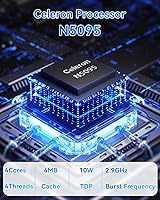
  • Processor: Intel Celeron N5095 quad-core CPU running at a 2.0 GHz base frequency with a burst speed of up to 2.9 GHz.
  • RAM: 16GB of LPDDR4 memory running at 2933 MHz, soldered to the motherboard.
  • Storage: 512GB solid-state drive provides the primary storage, with no mechanical hard drive included.
  • Expandable Storage: One M.2 2280 B-key SATA SSD slot allows for an additional drive of up to 1TB.
  • Display: 15.6-inch IPS-style panel with a full HD resolution of 1920x1080 pixels.
  • Graphics: Intel UHD integrated graphics share system memory and handle everyday video output and media playback.
  • Operating System: Ships with DOS pre-installed; buyers must independently source and install their preferred OS such as Windows or Linux.
  • Battery: Built-in 5000 mAh lithium-ion battery rated for approximately 3 to 4 hours of real-world use.
  • Weight: The laptop weighs 1.5 kg (3.3 lbs), making it among the lighter options in the 15.6-inch budget category.
  • Dimensions: Body measures 35.7 x 22.5 x 2 cm (approximately 13.98 x 8.86 x 0.79 inches).
  • WiFi: Supports 802.11ac (WiFi 5) across the 2.4 GHz and 5 GHz bands for modern wireless connectivity.
  • Bluetooth: Bluetooth 4.2 enables low-energy connections with peripherals such as mice, keyboards, and headphones.
  • USB Ports: Two USB 3.0 Type-A ports are included for fast data transfers with external drives and accessories.
  • Security: An integrated fingerprint reader supports biometric login once a compatible operating system is installed.
  • Brand & Model: Manufactured by SAINTDISE under model designation ANL5-N5095, first listed in August 2024.

Related Reviews

HP 15.6-inch Laptop 15-ef0021nr, Ryzen 3 3200U, 8GB RAM, 256GB SSD

82%
92%
Value for Money
85%
Performance
83%
Build Quality
89%
Portability
81%
Battery Life
More
Dell Inspiron 3593 15.6-inch Laptop
68%
74%
Everyday Performance
81%
SSD Speed & Storage
52%
Display Quality
63%
Battery Life
57%
Build Quality
More
Liokesa 15.6-Inch Laptop Backpack
86%
89%
Value for Money
87%
Comfort and Ergonomics
84%
Durability and Build Quality
92%
Storage and Organization
90%
Water Resistance
More
Vonxury 16L Water-Resistant Laptop Backpack

79%
93%
Value for Money
91%
Organization Layout
88%
Laptop Protection
89%
Weight & Portability
74%
Water Resistance
More
Bluboon 15.6 Inch Laptop Backpack
84%
89%
Organization & Storage
84%
Comfort & Ergonomics
90%
Portability & Weight
78%
USB Charging Port Convenience
85%
Laptop Protection
More
Laptop Backpack 15.6 Inch Beige Khaki
85%
91%
Value for Money
88%
Comfort & Ergonomics
85%
Durability
80%
Design & Aesthetics
84%
Anti-Theft Features
More
Kuosdaz S6 Laptop Backpack 15.6″
81%
88%
Overall Design & Aesthetics
79%
Build Quality & Durability
84%
Laptop Protection
86%
Storage & Organization
81%
USB Charging Port
More
FALANKO 15.6-Inch Women's Laptop Backpack
79%
91%
Value for Money
88%
Organization & Pockets
84%
Laptop Protection
86%
Anti-Theft & Security
67%
Build Quality & Durability
More
Montana West 15.6-Inch Laptop Backpack
82%
88%
Comfort & Ergonomics
90%
Design & Style
82%
Functionality & Features
80%
Durability & Build Quality
85%
Ease of Use
More
WANDF 15.6-Inch Laptop Backpack for Women
85%
88%
Comfort & Ergonomics
85%
Organization & Storage
82%
Durability & Build Quality
90%
Water Resistance
84%
Style & Design
More

FAQ

No, it does not. The SAINTDISE ANL5-N5095 15.6-inch Laptop ships with DOS only, which means there is no usable desktop operating system out of the box. You will need to install Windows yourself — which requires purchasing a license separately — or opt for a free Linux distribution like Ubuntu. This is one of the most important things to know before buying.

Realistically, plan for around three hours of active use. The listing mentions both three and four hours in different places, but most real-world usage — especially with WiFi on and a browser open — lands closer to the three-hour mark. It is not an all-day machine, so keeping the charger handy is practical advice.

The RAM is soldered to the board, so 16GB is what you get permanently. Storage, however, is expandable — there is an M.2 2280 B-key SATA slot where you can add a second SSD of up to 1TB. That gives you a reasonable upgrade path if the 512GB fills up over time.

For light work — web browsing, Google Docs or LibreOffice, streaming video, and email — it is adequate. Where it starts to struggle is with heavier multitasking, large spreadsheets, or anything that pushes the CPU hard for extended periods. Think of it as a capable commuter, not a workhorse.

The fingerprint reader does work, but it requires a compatible OS and the right drivers to function. Under Windows 10 or 11 it generally pairs well with Windows Hello. On Linux, compatibility depends on the distribution and kernel version — it works on some setups, but is not guaranteed across all distros.

It is plastic throughout, which is standard for this price bracket. The chassis is not flimsy, but it does have some flex, particularly in the lid. Do not expect a premium feel — this is a practical tool, not a showpiece. Treat it carefully and it should hold up for everyday use.

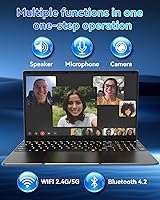
Yes, comfortably for one-on-one or small group calls. The Celeron N5095 and 16GB of RAM handle typical video conferencing without issue as long as you are not running too many other applications simultaneously. The built-in display and WiFi 5 support make the experience reasonably smooth.

You get two USB 3.0 ports, and that is about it for the essentials. If you use a USB mouse, an external drive, and a dongle at the same time, you will immediately run out of ports. A small USB hub is a worthwhile accessory to pick up alongside this machine.

It can be, with the right expectations. Students who need a machine for note-taking, research, writing papers, and light media use will find this entry-level Celeron laptop serviceable. The main caveat is the OS setup step — students who are not tech-confident may find getting it up and running a bit daunting without some help.

SAINTDISE is a relatively new and lesser-known brand, and that is a genuine consideration. Warranty terms are typically listed on the product page, but user experiences with their support have been mixed. If having reliable after-sales service is a priority for you, it is worth factoring that uncertainty into your decision before purchasing.