Overview

The Molegar T152A 15.6″ Laptop enters a crowded budget segment with a straightforward pitch: a full-sized Windows 11 machine at a price point that won't require much deliberation. It runs on Intel's Celeron N5095, a quad-core chip that handles everyday computing — browsing, documents, video calls — without complaint, but don't expect it to push through anything more demanding. Molegar is a relatively new name on Amazon, which is worth noting; the brand carries a seller warranty, but long-term support remains an open question. That distinctive 180-degree flat-opening hinge sets it apart physically, and if you go in with realistic expectations, it's a capable, no-fuss machine.
Features & Benefits

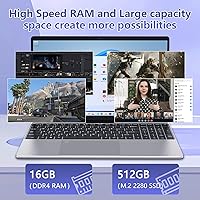
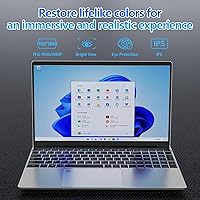
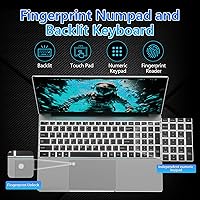
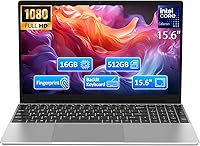
The T152A packs 16GB of DDR4 RAM, which is genuinely uncommon at this price tier — most competing machines ship with 8GB, and the extra headroom makes a real difference when you have a dozen browser tabs open alongside a spreadsheet or PDF. The 512GB SSD keeps boot times short and file access snappy, a clear step up from the spinning drives that still haunt some cheap laptops. The IPS display hits 1080p and looks decent for everyday content, though serious color work is out of scope. The backlit keyboard, fingerprint reader, and numeric keypad round out a surprisingly well-equipped package for the category.

Best For

This budget 15.6-inch machine was built for a specific kind of buyer, and it knows it. Students who need a reliable laptop for online classes, note-taking, and research will find it comfortable and capable enough to carry through a full school day. It also suits remote workers or retirees whose computing revolves around email, video calls, and light document editing. Households looking for an affordable secondary device — something for the kids or a shared home office setup — get solid value here. The slim, portable build fits easily into most bags, and the flat-opening hinge makes collaborative viewing or cramped desk setups far more manageable.

User Feedback

Early buyers of this Molegar laptop have settled it at a 4.2-star average, a reasonable result for a brand still establishing its footprint. The most consistent praise centers on value for money — buyers report being genuinely surprised by the keyboard feel and screen quality given what they paid. On the downside, some users note the N5095 starts to show its limits when juggling several heavier applications simultaneously, and a handful have raised concerns about after-sales support from a lesser-known brand. Battery life also draws mixed reactions; under typical workloads, expect closer to four or five hours rather than the six hours the spec sheet suggests.

Pros

  • Ships with 16GB of DDR4 RAM, which is unusually generous for this price bracket.
  • The 512GB SSD makes boot times and file access noticeably faster than budget HDD alternatives.
  • A full 1080p IPS display looks clean and comfortable for everyday reading and video watching.
  • The backlit keyboard, fingerprint reader, and numeric keypad are rarely bundled this affordably.
  • At just over five pounds, this Molegar laptop is easy to carry between home, class, or a coffee shop.
  • The 180-degree flat-opening hinge is a practical and uncommon feature that helps in tight or shared workspaces.
  • WiFi 5 and Bluetooth 4.2 connectivity cover all standard wireless needs without dropped connections.
  • Windows 11 comes pre-installed, so there is no additional OS cost or setup headache out of the box.
  • Early buyers consistently highlight the keyboard feel as comfortable for extended typing sessions.
  • The slim 0.75-inch profile fits easily into standard laptop sleeves and backpacks without bulk.

Cons

  • The Celeron N5095 processor shows real strain when running more than a few demanding applications at once.
  • Battery life falls short of the advertised six hours under typical screen brightness and workload conditions.
  • Molegar is a newer brand with limited long-term warranty and customer service track record to rely on.
  • The Mini HDMI port requires an adapter for most standard monitors and projectors, adding extra cost.
  • Review volume is still relatively low given the March 2025 launch, making long-term reliability harder to gauge.
  • Integrated Intel UHD graphics make any form of gaming or GPU-accelerated creative work impractical.
  • The 38Wh battery capacity is on the smaller side, leaving heavy users tethered to a charger mid-day.
  • No dedicated cooling system means the chassis can run warm during sustained processor loads.
  • Bluetooth 4.2 is functional but behind the current standard, which may matter for newer wireless peripherals.

Ratings

The scores below reflect an AI-driven analysis of verified global buyer reviews for the Molegar T152A 15.6″ Laptop, with spam, bot-generated, and incentivized feedback actively filtered out before any scoring was applied. Each category captures both the genuine praise and the honest frustrations that real users reported after daily use, giving you a transparent look at where this machine earns its keep and where it falls short.

Value for Money
88%
Buyers consistently flag this as the T152A's strongest suit. Getting 16GB of RAM, a 512GB SSD, a fingerprint reader, and a backlit keyboard in a single affordable package genuinely surprises most new owners, and that sentiment dominates the positive reviews.
A handful of buyers feel the value calculation changes once you factor in the unknown long-term reliability of a newer brand. If the machine needs servicing after the warranty window closes, the savings can erode quickly.
Everyday Performance
67%
33%
For the tasks this budget 15.6-inch machine is built around — web browsing, video calls, writing documents, and light spreadsheet work — it moves along without frustrating pauses. The 16GB of RAM keeps the experience noticeably smoother than the 8GB alternatives cluttering this price tier.
Push it into anything heavier and the Celeron N5095 makes itself known quickly. Users running multiple video streams, larger downloads alongside active applications, or any software with real processing demands report sluggishness and occasional fan noise as the chip works at its ceiling.
Display Quality
74%
26%
The 1080p IPS panel earns genuine appreciation for everyday use. Buyers watching lectures, streaming shows, or reading long documents comment that the screen holds up well at normal viewing distances, and the thin bezels give it a cleaner look than most machines in this range.
Brightness is the most cited limitation — users working near windows or in well-lit rooms find themselves squinting or repositioning. Color accuracy is adequate for casual use but falls noticeably short for anyone who needs to assess images or design work with any precision.
Battery Life
54%
46%
Under very light workloads — basic document editing or low-brightness video playback — some users do get close to five hours of screen-on time, which is functional for a half-day out. The low-power Celeron chip does help the battery last longer than it might with a more aggressive processor.
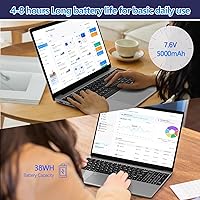
The six-hour manufacturer claim does not reflect typical real-world conditions. Most buyers report four to four-and-a-half hours under normal mixed use, which means carrying the charger is effectively mandatory for a full school day or office shift. That 38Wh capacity is simply modest.
Keyboard & Typing Experience
81%
19%
The keyboard stands out as a genuine bright spot that users do not expect at this price. Key travel feels solid, the layout is full-sized with a numeric keypad, and the backlight works well for evening study or low-light office environments. Several buyers specifically called it comfortable for long writing sessions.
The backlight has only a single brightness level, which some users find either too dim or slightly distracting in pitch-dark rooms. Flex in the keyboard deck under firm typing pressure was noted by a smaller number of buyers, suggesting the chassis rigidity behind it is not class-leading.
Build Quality & Materials
63%
37%
The slim 0.75-inch profile looks clean and feels reasonably solid for casual daily handling. Buyers who use it on a desk or carry it in a padded sleeve report no obvious structural issues during normal use, and the silver finish stays looking presentable after weeks of regular handling.
The plastic construction shows its budget origins when you handle it more firmly — there is noticeable flex around the display lid and near the palm rests. A few buyers mentioned the chassis feels less rigid than they hoped after extended daily use, which raises questions about long-term durability if the machine gets knocked around.
RAM & Multitasking
86%
Sixteen gigabytes of DDR4 RAM is the spec that most positively reshapes buyer expectations. Users running a dozen browser tabs, a video call, and a document simultaneously report that memory is rarely the bottleneck, which is a meaningful advantage over the 8GB machines dominating this price bracket.
The RAM advantage is real but bounded by the processor sitting beside it. When the Celeron N5095 reaches its workload ceiling, adding more RAM cannot compensate, so buyers occasionally misattribute slowdowns to memory when the CPU is actually the constraint.
Storage Speed & Capacity
83%
The 512GB SSD delivers a perceptibly faster experience than the hard drives still found in some competing budget machines. Boot times are short, applications open promptly, and file transfers feel responsive — all things that improve daily quality of life more than raw specs suggest.
The SSD is not a high-performance NVMe unit — it reads and writes at speeds more typical of budget SATA-class drives. For ordinary use that barely matters, but buyers transferring large files or installing heavier software will notice it is not rapid by modern standards.
Portability
77%
23%
At just over five pounds and under an inch thick, the T152A fits comfortably into standard laptop sleeves and backpacks without dominating the bag. Buyers who carry it between home and campus or take it through airports note that it packs away cleanly and does not feel cumbersome on the shoulder.
It is not a featherweight — there are thinner and lighter 15-inch machines available, even at comparable prices. Buyers who prioritize pack weight above everything else may find the five-pound figure adds up during longer commutes.
Connectivity & Ports
69%
31%
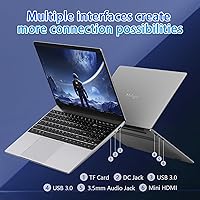
Two USB 3.0 ports cover the majority of everyday peripheral needs — a mouse and an external drive, for instance — and WiFi 5 delivers stable wireless performance across standard home and office networks without dropout complaints in typical conditions.
The Mini HDMI port trips up buyers who do not realize they need a separate adapter to connect to a standard monitor or projector. The absence of a USB-C port is also a meaningful gap as that connector becomes the default for chargers, docks, and peripherals across the industry.
Fingerprint Reader
78%
22%
Buyers appreciate having Windows Hello biometric login on a machine at this price — it is the kind of convenience feature that usually gets cut first on budget hardware. The setup process is quick, and most users find it reliably recognizes their fingerprint during normal desk use.
Recognition speed and consistency are not on par with fingerprint readers on premium devices. A small but consistent group of buyers report needing a second or third tap, particularly when fingers are slightly dry or if the sensor area gets dusty, which erodes some of the convenience benefit.
Webcam Quality
58%
42%
The built-in webcam is functional for video calls on platforms like Zoom or Teams, and for a machine aimed at students and remote workers, that covers the primary use case well enough. Most buyers do not report the camera as a problem for everyday communication.
Image quality is modest — low-light performance is noticeably grainy and color rendering is flat compared to even mid-range external webcams. Buyers who appear on screen frequently for professional calls or content creation will likely want to supplement it with an external camera fairly quickly.
Brand Reliability
51%
49%
Molegar's Amazon storefront provides a point of contact for warranty claims, and the machine itself arrived without defects for the large majority of buyers who reviewed it. Within the warranty window, communication with the seller has been described as responsive by some users who needed support.
The brand's limited history makes long-term reliability difficult to assess confidently. Buyers who value knowing a manufacturer will be around and well-resourced in two or three years have legitimate reason for hesitation — this is a meaningful trade-off at any price when it comes to electronics.
Hinge & Form Factor
82%
18%
The 180-degree flat-opening hinge is genuinely well-received by buyers who have actually used it. It makes sharing the screen across a table, using the laptop on unconventional surfaces, or storing it flat in a tight bag noticeably more practical than a standard hinge allows.
The hinge feels smooth rather than firmly damped, meaning the lid can shift slightly when you nudge the machine. A sturdier resistance mechanism would give it a more premium feel, and a few buyers noted the screen wobbles slightly when typing on an uneven surface.
Thermal Management
61%
39%
Under light workloads — the conditions most buyers use it for — the T152A stays quiet and the palm rest area remains comfortable to the touch. The Celeron chip's modest power draw means the cooling system does not need to work hard during typical daily tasks.
When the processor is pushed harder, chassis warmth around the keyboard area becomes noticeable, and the fan audibility increases in a way that can be distracting in quiet environments. A few buyers flagged sustained thermal throttling during longer demanding sessions, which compounds the performance limitations of the chip.

Suitable for:

The Molegar T152A 15.6″ Laptop was clearly designed with a specific audience in mind, and it delivers well for that crowd. Students who spend their days switching between a learning management system, Google Docs, and a few research tabs will find the 16GB of RAM keeps things moving without the constant freezing that plagues cheaper 8GB machines. Remote workers whose daily routine is email, video conferencing, and light spreadsheet work will also get reliable mileage out of it. Seniors or first-time laptop buyers benefit from the straightforward Windows 11 setup, the large 15.6-inch screen that reduces eye strain, and the fingerprint reader that makes logging in effortless. Families looking for a shared secondary machine — something to park on the kitchen counter or send with a college student — get genuine value without a painful upfront cost. The flat 180-degree hinge and slim profile also make it a practical pick for anyone who travels frequently and needs a machine that packs easily and opens up on a cramped tray table or shared desk.
Not suitable for:

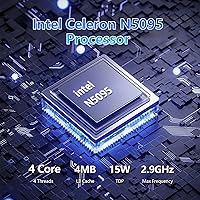
Buyers who need real processing muscle should look elsewhere — the Intel Celeron N5095 at the heart of this budget 15.6-inch machine is an entry-level chip, and it will struggle noticeably once you push beyond basic multitasking into video editing, gaming, software development, or running virtual machines. The integrated Intel UHD graphics rule out any meaningful creative or gaming workloads entirely. Anyone who depends on a laptop for eight or more hours of unplugged use should also temper their expectations: the 38Wh battery is modest, and real-world screen-on time tends to land in the four-to-five-hour range rather than the six hours claimed. Buyers who prioritize brand reliability and robust post-purchase support may find Molegar's limited track record on Amazon a genuine concern, especially since long-term warranty service from newer sellers can be inconsistent. Finally, professionals who need color-accurate displays for design or photo editing work will find the IPS panel adequate for casual viewing but not calibrated or bright enough for serious visual tasks.

Specifications

  • Processor: Intel Celeron N5095 quad-core CPU clocked at up to 2.9GHz, built on a 10nm architecture suited for light computing tasks.
  • RAM: 16GB of DDR4 memory running at 2933MHz, providing comfortable headroom for multitasking across standard productivity applications.
  • Storage: 512GB solid-state drive offers fast read and write speeds compared to traditional spinning hard drives, with ample room for documents, photos, and software.
  • Display: 15.6-inch IPS panel with a native resolution of 1920×1080 pixels and a thin three-sided bezel design for a cleaner viewing area.
  • Graphics: Intel UHD Graphics integrated into the processor handles everyday display output and light media playback, but is not suited for GPU-intensive tasks.
  • Operating System: Windows 11 Home comes pre-installed, requiring no additional purchase or configuration before first use.
  • Battery: 38Wh (5000mAh) lithium battery with a manufacturer-claimed runtime of up to six hours under light usage conditions.
  • Weight: The unit weighs approximately 5.02 pounds, making it portable enough for daily commutes and travel without being unusually heavy for its screen size.
  • Dimensions: Measures 14.13 × 9.06 × 0.75 inches, fitting comfortably within standard 15-inch laptop sleeves and most everyday backpacks.
  • Wireless: WiFi 5 (802.11a/b/g/n/ac) and Bluetooth 4.2 provide standard wireless connectivity for home, office, and campus networks.
  • Ports: Connectivity includes two USB 3.0 ports and one Mini HDMI output for connecting external displays or projectors via an appropriate adapter.
  • Keyboard: Full-size backlit keyboard includes a numeric keypad; the backlight is activated by holding Fn and pressing F5.
  • Security: A built-in fingerprint reader supports Windows Hello biometric login for quick, password-free access.
  • Hinge Design: The lid opens to a full 180 degrees, allowing the laptop to lie completely flat on a surface for collaborative or space-constrained use.
  • Color & Build: Available in silver with a slim chassis profile measuring 0.75 inches thick, giving it a reasonably clean, understated appearance.
  • Model Number: The official model identifier is T152A, sold under the Molegar brand on Amazon with a first availability date of March 2025.

Related Reviews
HP 15 Intel N100 16GB/256GB
77%
88%
Value for Money
83%
Everyday Performance
91%
RAM & Multitasking
67%
Display Quality
72%
Build Quality & Portability
More
HP Laptop 15-fc0099nr
71%
83%
Value for Money
71%
Performance
88%
Battery Life
61%
Display Quality
84%
Touchscreen Responsiveness
More
Dell Inspiron 15 3520 Laptop
74%
76%
Performance & Speed
81%
Display Quality
83%
Touchscreen Responsiveness
89%
Storage & Memory
62%
Battery Life
More
HP 15-DY1031WM 256GB 15.6″ Refurbished Laptop
67%
83%
Value for Money
88%
SSD Performance
74%
Everyday Performance
41%
Battery Life
53%
Display Quality
More
HP 15.6-inch Laptop 15-ef0021nr, Ryzen 3 3200U, 8GB RAM, 256GB SSD
82%
92%
Value for Money
85%
Performance
83%
Build Quality
89%
Portability
81%
Battery Life
More
HP 2020 15 15.6″ HD Touchscreen Laptop, Intel Core i5-1035G1, 16GB RAM, 512GB SSD
82%
89%
Performance
75%
Display Quality
90%
Portability
80%
Battery Life
85%
Build Quality
More
Dell Inspiron 3593 15.6-inch Laptop
68%
74%
Everyday Performance
81%
SSD Speed & Storage
52%
Display Quality
63%
Battery Life
57%
Build Quality
More
HP 15 G9 16GB 1TB Laptop
71%
88%
Value for Money
54%
Performance
83%
RAM & Multitasking
86%
Storage
74%
Display Quality
More
MATEIN 142900PNK Corduroy Laptop Backpack
81%
93%
Visual Appeal
88%
Laptop Protection
82%
Organization
61%
Fabric Durability
69%
Comfort & Ergonomics
More
InnoView 15.6″ Triple Portable Monitor
69%
54%
Setup & Onboarding
78%
Display Quality
61%
Portability
57%
Power Stability
91%
Screen Real Estate
More

FAQ

For most typical student tasks — writing papers, browsing research sites, joining Zoom or Teams calls, and using web-based learning platforms — the T152A handles things without trouble. The 16GB of RAM helps keep multiple tabs and applications open simultaneously, which is where a lot of budget laptops fall short. Just don't expect it to breeze through video editing assignments or heavy software like MATLAB.

The manufacturer claims up to six hours, but in practice most users report landing somewhere between four and five hours with normal screen brightness and mixed use. If you plan to use it unplugged for a full school day or a long work session, bringing the charger along is the safe call. Battery performance can also vary depending on what you have running in the background.

Yes, but you will need a Mini HDMI to standard HDMI adapter, since the port on the machine is Mini HDMI rather than the full-size connector most monitors use. Those adapters are inexpensive and widely available. Once connected, it works fine for extending or mirroring the display at up to 1080p.

Yes, Windows 11 Home comes pre-installed right out of the box. You do not need to purchase a separate license or go through any manual installation. You will still need to complete the initial Windows setup wizard on first boot, which takes just a few minutes.

Molegar is a newer brand on Amazon without the long-established service network of major laptop manufacturers, which is worth factoring in before buying. The seller offers a warranty through the Amazon storefront, so your first point of contact for any issues would be Molegar directly via Amazon messaging. Amazon's own buyer protections also apply, which gives you a reasonable safety net, but if rock-solid post-purchase support matters a lot to you, that is a fair reason to consider a more established name.

Budget laptops in this category are often built with soldered or limited-access internals, and Molegar has not published official upgrade documentation for the T152A. It is best to assume the RAM may not be user-upgradeable. The 512GB SSD might be replaceable depending on the slot type inside, but without confirmed teardown data, opening the machine to modify it could void any warranty you have.

Early buyers have been fairly positive about the keyboard feel, which is a pleasant surprise at this price point. The full-size layout with a numeric keypad gives you plenty of room, and the backlight makes it easier to use in dim environments. It is not a premium typing experience by any stretch, but for writing emails, documents, or taking notes, it holds up well.

Yes, this is actually one of the better use cases for this budget 15.6-inch machine. The 1080p IPS screen looks decent for Netflix, YouTube, and similar services, and the speakers are adequate for casual watching. Playback of standard HD content runs smoothly without the processor breaking a sweat.

Setting it up is straightforward through Windows Hello in the Settings menu — you register your fingerprint once and it handles logins from there. Most users find it convenient for skipping the password screen quickly. Like most budget fingerprint readers, it can occasionally miss on the first tap, but a second press usually does the job.

It lets you lay the laptop completely flat on a table, which comes in handy when you want to share the screen with someone sitting across from you, use it on a surface where tilting the lid back further feels more natural, or just stow it flat in a bag without the lid putting pressure on the screen. It is a small but genuinely useful design detail that most laptops at this price do not bother including.