Overview

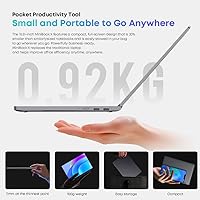
The CHUWI MiniBook X N150 16GB/512GB sits in an interesting corner of the market — a genuinely compact Windows convertible that doesn't ask you to sacrifice meaningful specs to get there. Weighing under 2 lbs and barely 0.67 inches thick at its thickest point, this mini convertible is built for people who actually move around. The Intel N150 chip paired with 16GB LPDDR5 RAM and a 512GB SSD is a stronger foundation than most competitors offer at this price tier. The 360-degree hinge adds real flexibility, letting you flip between laptop, tent, and tablet modes depending on what the moment calls for.
Features & Benefits

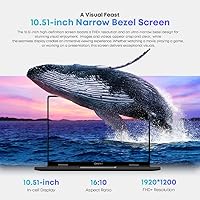
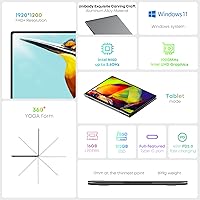
The 10.51-inch IPS display is one of the clearest reasons to consider this compact 2-in-1. At 1920×1200 with a 16:10 aspect ratio and 100% sRGB coverage, it produces sharp, color-accurate visuals that feel surprisingly premium for the category. The N150 processor handles browsing, documents, video calls, and light multitasking without complaint — just don't expect it to push through video editing or heavy creative work. WiFi 6 and Bluetooth 5.2 keep wireless performance current, and the dual full-function USB-C ports offer flexibility for charging and peripherals. The M.2 2280 expansion slot supporting up to 2TB is a welcome upgrade path few rivals include.

Best For

The MiniBook X is a strong fit for frequent travelers and commuters who want a real Windows machine — not a Chromebook compromise — without the bulk of a standard laptop. Students will find it useful as a secondary device for reading, annotating PDFs, and writing on the go. Remote workers who occasionally present or sketch in meetings will appreciate the touchscreen and tent mode. It also makes sense for anyone coming from an aging budget netbook who wants a noticeably better display and more RAM without climbing to the price range of a GPD Pocket or a premium ultracompact like the Lenovo ThinkPad X1 Fold.

User Feedback

Buyers consistently praise the display quality and portability, with many noting it exceeds expectations for a sub-400 device. The 16GB RAM allocation gets specific callouts from users who stress-test with multiple browser tabs open simultaneously. That said, honest criticism surfaces too. Battery life rarely hits the rated six hours under real workloads — four to five hours is a more grounded expectation. Fan noise under load bothers some users, and a few report lid flex that undercuts the otherwise solid metal chassis feel. The keyboard layout divides opinion; the keys are smaller than standard, which takes adjustment. Some early buyers also flagged minor Windows activation and driver quirks worth knowing before purchasing.

Pros

  • 16GB LPDDR5 RAM is unusually generous at this price tier, handling multi-tab browsing without slowdown.
  • The 2K IPS touchscreen with 100% sRGB coverage looks noticeably sharper than competing budget panels.
  • Weighing under 2 lbs, this mini convertible genuinely disappears into any bag or backpack.
  • WiFi 6 and Bluetooth 5.2 keep wireless performance current and stable on crowded networks.
  • The M.2 2280 expansion slot lets buyers upgrade storage up to 2TB when needed.
  • 360-degree hinge unlocks practical tablet and tent modes for reading, media, and presentations.
  • 512GB PCIe SSD provides a generous starting point for a device in this class.
  • Windows 11 comes pre-installed and activated — no extra setup cost or licensing hassle.
  • The metal chassis feels more premium than the price suggests on first handling.
  • Dual full-function USB-C ports support simultaneous charging and peripheral use.

Cons

  • Real-world battery life typically lands between four and five hours, not the rated six.
  • Port selection is extremely limited — no USB-A, no HDMI, no SD card reader included.
  • Fan noise becomes noticeable during sustained workloads, which can disrupt quiet environments.
  • The display lid exhibits flex under light pressure, undermining the otherwise solid build feel.
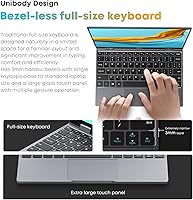
  • Compact keyboard layout requires an adjustment period and tires fast typists during long sessions.
  • Thermal throttling under prolonged CPU load reduces sustained performance meaningfully.
  • Some buyers report needing driver updates shortly after unboxing to resolve wireless stability issues.
  • Preinstalled bloatware slows down initial setup and requires manual cleanup for a clean experience.
  • The small screen size, while sharp, demands scroll-heavy navigation on standard desktop interfaces.
  • Hinge firmness reportedly loosens after several months of regular open-and-close use.

Ratings

The CHUWI MiniBook X N150 16GB/512GB earns a nuanced set of scores here — not a clean sweep in either direction, which is exactly what honest analysis looks like for a budget mini-convertible. These ratings are generated by AI after systematically analyzing verified global user reviews, with spam, incentivized posts, and bot activity actively filtered out. Both the genuine strengths and the real frustrations buyers encounter are reflected transparently below.
Display Quality
84%
Users consistently call out the 1920×1200 IPS panel as one of the best reasons to choose this machine. The 16:10 ratio and 100% sRGB coverage make it genuinely useful for reading documents, watching video, and color-sensitive work — impressive for a 10.51-inch screen at this price point.
Brightness tops out at a level that works indoors but struggles in direct sunlight or bright outdoor environments. A small number of users also noted minor backlight bleed at the corners, which becomes noticeable during dark-scene video playback.
Performance & Speed
72%
28%
For everyday productivity — browsing with a dozen tabs open, video calls, Office apps, and light media — the N150 chip combined with 16GB LPDDR5 RAM keeps things moving without frustrating pauses. The RAM headroom is the real differentiator here versus rivals running 8GB.
Push it into sustained workloads like video encoding, large spreadsheet processing, or multiple simultaneous heavy apps and it starts to throttle noticeably. This is not a machine for creative professionals or anyone running compute-intensive software regularly.
Portability & Form Factor
93%
At under 2 lbs and barely 0.67 inches thick, this compact 2-in-1 genuinely disappears into a bag. Commuters and frequent flyers repeatedly highlight how easy it is to pull out on a plane tray table or café counter without rearranging everything around it.
The small chassis means some physical compromises — port count is minimal, and the screen size, while sharp, is simply small. Users coming from 13-inch or larger laptops report a real adjustment period before the form factor feels natural rather than limiting.
Build Quality
67%
33%
The metal chassis gives the MiniBook X a feel that defies its budget positioning — it reads as a more expensive device when you first pick it up, which matters to buyers who carry it daily and want something that doesn't feel disposable.
Flex in the display lid is a recurring complaint, with some users noting it creaks under light pressure. A few also reported that the hinge, while functional, doesn't hold its position as firmly as expected after several months of regular use.
Battery Life
58%
42%
Under light use — reading, note-taking, or streaming at moderate brightness — some users manage to reach close to the rated six hours. For a device this thin, even hitting that ceiling is a reasonable achievement in the ultracompact category.
Real-world battery life under typical mixed workloads lands closer to four to four-and-a-half hours for most users, which falls short of the manufacturer claim. Anyone expecting a full workday away from a charger will likely be disappointed without bringing a USB-C power bank.
Keyboard & Typing Experience
61%
39%
The backlit keyboard is a practical feature that buyers genuinely use — working in dim meeting rooms or on overnight flights is more comfortable with it. The layout tries to fit a near-full-sized key arrangement into a compact footprint, which many users appreciate after an adjustment period.
Key travel is shallow and individual keys are narrower than a standard laptop, leading to higher error rates for fast typists until muscle memory adjusts. Users with larger hands find it tiring during extended writing sessions, and the trackpad size leaves little room for comfortable gesture use.
Touchscreen Responsiveness
78%
22%
The touchscreen works reliably for basic input — scrolling, tapping, pinching to zoom — and the 360-degree hinge makes tablet mode genuinely practical for reading PDFs or annotating documents. Users who use it primarily in tablet mode for content consumption report a smooth experience.
Palm rejection during stylus-style input is imprecise, and the display lacks active stylus support, limiting how useful it is for detailed drawing or handwriting. In laptop mode, accidental touch inputs occasionally interrupt typing workflows.
Thermal Management
63%
37%
The inclusion of an active cooling fan is a meaningful choice in this chassis size — it allows the N150 to sustain its performance longer than passive-cooled alternatives at comparable prices. Light-task users rarely hear it at all during normal operation.
Under sustained load, the fan becomes audible enough to notice in quiet environments, which some users find distracting during video calls or late-night work sessions. Thermal throttling has been reported by buyers running CPU-intensive tasks for extended periods, reducing sustained performance noticeably.
Wireless Connectivity
86%
WiFi 6 support is a legitimate upgrade from the WiFi 5 found in many competing budget devices — users in dense apartment buildings or busy offices report notably more stable connections and better throughput. Bluetooth 5.2 pairs reliably with headphones, mice, and keyboards without dropout issues.
A small number of users reported needing to update wireless drivers after initial setup to get stable WiFi performance, suggesting the out-of-box configuration is not always optimal. Range at the edge of home network coverage is average rather than exceptional.
Port Selection
54%
46%
Having two full-function USB-C ports rather than one is a deliberate and appreciated choice — users can charge while simultaneously connecting an external display or peripheral without needing a hub. Both ports support data transfer and power delivery, which adds real flexibility.
Beyond the two USB-C ports and a 3.5mm headphone jack, there is nothing else — no USB-A, no HDMI, no SD card slot. Users who regularly work with USB-A peripherals, flash drives, or wired accessories quickly find themselves dependent on a hub or dongle, adding bulk to a machine sold on its compactness.
Software & Out-of-Box Experience
59%
41%
Windows 11 comes pre-installed and activates without requiring any additional purchase, which is a genuine positive compared to some Chinese OEM devices that ship with unactivated or home-edition Windows. Basic drivers are in place and the machine is usable almost immediately after first boot.
Several early buyers flagged the presence of preinstalled bloatware that slows down the initial setup experience. A handful of users also reported needing to manually update drivers — particularly for the display and wireless adapter — to resolve stability issues that appeared in the first few days of use.
Value for Money
81%
19%
At its price point, finding a 2-in-1 Windows laptop with 16GB LPDDR5 RAM, a 2K touchscreen, WiFi 6, and an SSD expansion slot is genuinely difficult. For buyers whose needs align with what the hardware can deliver, it represents strong component value relative to cost.
The value calculation changes if buyers need to add a USB hub, carry an external battery, or upgrade the SSD shortly after purchase — costs that erode the initial savings. Users who expected mainstream laptop performance from a budget mini-convertible tend to feel the value proposition less strongly.
Audio Quality
55%
45%
For casual media consumption — YouTube, podcasts, video calls — the dual speakers get loud enough to fill a quiet room and the sound is clear at moderate volumes. Users who primarily use headphones via the 3.5mm jack report no issues with audio output quality.
Bass response is minimal and the speakers distort at higher volumes, which is a direct consequence of fitting audio hardware into such a thin chassis. Users who care about media audio quality consistently recommend headphones or an external Bluetooth speaker for anything beyond background listening.
Storage & Expandability
82%
18%
A 512GB PCIe SSD is a generous starting point for a device in this class, and the accessible M.2 2280 slot supporting up to 2TB gives technically comfortable buyers a meaningful upgrade path. Users who have swapped in a larger drive report the process is straightforward.
The drive slot, while present, requires disassembling the bottom panel — not a difficult task, but one that voids the warranty if done within the coverage period. Users who want more storage immediately without DIY intervention have no out-of-box option beyond the included 512GB.

Suitable for:

The CHUWI MiniBook X N150 16GB/512GB is a strong match for anyone whose primary requirement is a real Windows machine that barely registers in a bag. Frequent travelers and daily commuters who work from coffee shops, airport lounges, or train seats will find the sub-2-lb weight and thin profile genuinely freeing rather than a marketing claim. Students who need a secondary device for lectures, reading, and light writing — and who don't want to risk a more expensive machine in a packed backpack — get solid value here. Remote workers who occasionally flip into tablet or tent mode to present slides or mark up PDFs will also find the 360-degree hinge earns its keep in practice. Anyone upgrading from an older budget netbook with 4GB or 8GB of RAM will notice an immediate and meaningful improvement in day-to-day responsiveness, especially with browser-heavy workflows.
Not suitable for:

The CHUWI MiniBook X N150 16GB/512GB is the wrong tool for buyers expecting mainstream laptop performance from a compact chassis. The N150 processor, capable as it is for light tasks, will frustrate anyone running video editing software, large data sets, complex design applications, or modern games — thermal throttling under sustained load is a real constraint, not a theoretical one. Power users who need to work untethered for a full eight-hour day should look elsewhere, since real-world battery life consistently falls short of the rated figure under typical mixed use. The minimal port selection — two USB-C ports and a headphone jack, nothing else — will drive accessory-dependent users toward purchasing a hub, which undermines the portability advantage. People who type for long stretches professionally will also likely find the compact keyboard layout tiring over time, and anyone who needs a primary machine for client-facing work may find the 10.51-inch screen simply too small for sustained productivity.
Specifications

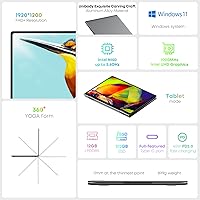
  • Display: 10.51″ IPS touchscreen with 1920×1200 resolution, 16:10 aspect ratio, 100% sRGB color coverage, and an anti-glare coating.
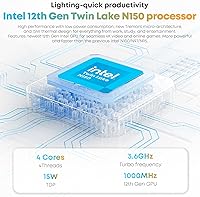
  • Processor: Intel N150 quad-core processor clocked at up to 3.6GHz with a 15W TDP, built on Intel's 12th Gen architecture.
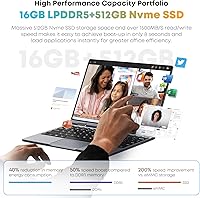
  • RAM: 16GB LPDDR5 memory, soldered to the motherboard and not user-upgradeable.
  • Storage: 512GB PCIe SSD included, with an accessible M.2 2280 slot supporting aftermarket drives up to 2TB.
  • Operating System: Windows 11 Home comes pre-installed and pre-activated, ready to use out of the box.
  • Hinge & Form Factor: 360-degree rotating hinge enables laptop, tent, stand, and tablet usage modes.
  • Dimensions: The device measures 9.6 × 6.5 × 0.67 inches, making it compact enough to fit in most small bags and pouches.
  • Weight: The unit weighs 1.96 lbs, placing it among the lightest full Windows convertibles in its size class.
  • Wireless: WiFi 6 (802.11ax) dual-band support provides faster and more reliable wireless performance than previous WiFi standards.
  • Bluetooth: Bluetooth 5.2 enables stable, low-latency pairing with peripherals including headphones, keyboards, and mice.
  • Ports: Connectivity includes two full-function USB-C ports supporting power delivery and data transfer, plus a 3.5mm headphone jack.
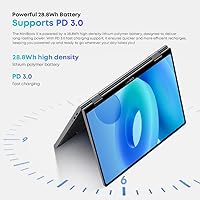
  • Battery: The built-in lithium-ion battery is rated at approximately 6 hours, though real-world endurance under mixed workloads typically falls closer to 4–5 hours.
  • Keyboard: Full-size backlit keyboard with an ultra-narrow bezel layout; backlight can be toggled via Fn+F5.
  • Graphics: Intel UHD integrated graphics handles light media, browsing, and casual visual tasks but is not suited for gaming or GPU-intensive applications.
  • Audio: Dual built-in speakers provide stereo output balanced across frequency ranges, suitable for casual media and voice calls.
  • Display Coating: The screen features an anti-glare coating to reduce reflections in indoor lighting conditions.
  • Expansion: One M.2 2280 PCIe slot is accessible via bottom panel removal, supporting NVMe SSDs up to 2TB for storage upgrades.
  • Voltage: The device operates at 120V and charges via USB-C, compatible with standard USB Power Delivery chargers.

Related Reviews

BOSGAME Mini PC E3 (N150, 16GB/512GB)
79%
88%
Value for Money
74%
Processing Performance
91%
Multi-Display Support
89%
Connectivity & Ports
76%
Build Quality & Design
More
KAMRUI Essenx E2 N150 Mini PC, 16GB RAM, 512GB SSD
86%
88%
Performance
92%
Value for Money
90%
Cooling and Noise Level
85%
Dual Display Support
80%
Build Quality
More
CHUWI FreeBook 13.4″ 16GB/512GB
72%
83%
Build Quality
88%
Display Quality
76%
Touchscreen Responsiveness
67%
Performance (CPU & RAM)
61%
Stylus Experience
More
Samsung Galaxy Book4 Edge 15.6-inch Laptop, Snapdragon X Plus, 16GB RAM, 512GB SSD
85%
93%
Battery Life
86%
Performance
84%
Display Quality
90%
Portability
91%
Charging Speed
More
MSI Radeon RX 6800 Gaming X Trio 16GB
85%
94%
4K Gaming Performance
92%
Cooling Efficiency
86%
Ease of Installation
88%
Build Quality
70%
Size and Compatibility
More
KAMRUI GK3Plus Mini PC (N95, 16GB RAM, 512GB SSD)
81%
89%
Multitasking Performance
92%
Value for Money
86%
Thermal Management
84%
Display Versatility
81%
4K Media Playback
More
GEEKOM Air12 Mini PC 16GB/512GB
82%
88%
Value for Money
82%
Everyday Performance
71%
Build Quality
74%
Thermal Management & Noise
91%
Connectivity & Port Selection
More
Blackview Acebook 6 Laptop, 16GB RAM, 512GB SSD
81%
91%
Value for Money
83%
Performance
88%
Battery Life
80%
Build Quality
85%
Portability
More
KLEVV CRAS X RGB DDR4 16GB (2x8GB) 3200MHz
88%
91%
Performance
94%
RGB Customization
88%
Overclocking Capability
86%
Heat Management
92%
Installation Ease
More
KLEVV CRAS X RGB DDR4 16GB (2x8GB) 3600MHz
86%
89%
Performance
91%
RGB Customization
85%
Value for Money
95%
Ease of Installation
88%
Compatibility with Intel Systems
More

FAQ

The confirmed specification is 16GB LPDDR5. The 12GB figure appearing in some Amazon listing fields appears to be a data entry error on the product page. The CHUWI MiniBook X N150 16GB/512GB is sold specifically as the 16GB variant, and user reports consistently confirm 16GB is what ships.
Yes, there is an accessible M.2 2280 slot under the bottom panel that supports NVMe SSDs up to 2TB. The process requires removing a few screws and is fairly straightforward, though it will void the warranty if done within the coverage period. Many users have upgraded successfully and report no issues.

The RAM is soldered directly to the motherboard and cannot be upgraded. What you get at purchase — 16GB LPDDR5 — is what you have for the life of the device. The good news is 16GB is a generous allocation for this class of machine, so most users never feel constrained.

No stylus or pen is included, and the display does not support active stylus input. The touchscreen works well for finger touch — scrolling, tapping, zooming — but if you need precise pen input for drawing or handwriting, this is not the right device for that workflow.

Under light tasks like browsing, streaming, or document work, the fan is quiet enough that most users don't notice it. It becomes audible when the processor is under sustained load — things like file compression, multiple heavy apps running simultaneously, or extended video calls. In a quiet room it can be distracting, but it is not unusually loud for a fanless-adjacent form factor.

Expect around 4 to 5 hours under typical mixed use — some browsing, a few apps open, moderate screen brightness. The rated 6 hours appears to be based on light, controlled testing. If you plan to be away from a charger for a full workday, bringing a USB-C power bank is a practical precaution.

It charges via standard USB-C and is compatible with USB Power Delivery chargers. Most modern USB-C laptop chargers at 45W or higher should work fine. This is a genuine convenience for travelers who already carry USB-C chargers for other devices.

Light, older, or less demanding titles may run at reduced settings, but this mini convertible is not designed for gaming. The integrated Intel UHD graphics and N150 processor simply don't have the headroom for modern or graphically intensive games. Casual browser-based games and older 2D titles are fine, but manage expectations accordingly.

Yes, Windows 11 Home comes pre-installed and activated with a genuine license tied to the hardware. It will receive standard Microsoft updates automatically at no additional cost, just like any retail Windows device.

This is genuinely a mixed bag. The keys are narrower than a standard laptop to fit the compact chassis, and key travel is shallower than most people are used to. Many users adapt within a week and find it workable for moderate typing. That said, if you write for several hours a day, the smaller layout will likely cause fatigue, and an external Bluetooth keyboard might be worth considering for desk use.