Overview

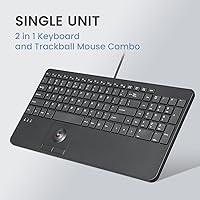
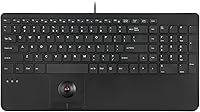
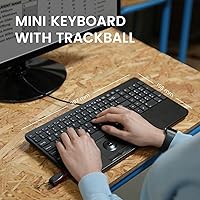
The Perixx PERIBOARD-538 Wired Trackball Keyboard is one of those rare input devices that solves a genuinely specific problem: how do you fit a keyboard, mouse, and numpad into a workspace that barely has room for one? At roughly 15.6 inches wide and under 1.5 inches tall, it packs a built-in optical trackball and full numpad into a low-profile footprint that most standard keyboards simply cannot match. It connects via USB-A with no drivers needed, covering Windows 7 through 11 right out of the box. This is a mid-range tool aimed squarely at professionals — not a novelty item dressed up with unnecessary features.
Features & Benefits

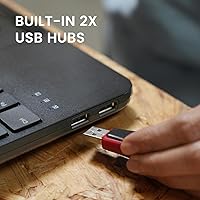
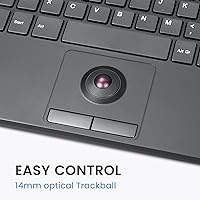
The trackball at the heart of this all-in-one input device is a 14mm optical unit — small, but responsive enough for everyday cursor navigation. Honest caveat: 14mm is genuinely compact, so users accustomed to full-size trackballs may need a deliberate adjustment period. The X-type scissor switches are the quiet workhorse here, delivering tactile feedback that feels closer to a quality laptop keyboard than a cheap membrane board, with a rated lifespan of 10 million keystrokes. Two USB 2.0 passthrough ports let you dock a flash drive or secondary peripheral without reaching behind your machine. Abrasion-resistant keycap printing and a nearly 6-foot cable round out a thoughtfully constructed package.

Best For

This trackball keyboard was clearly built with a particular type of user in mind. Point-of-sale operators, kiosk technicians, and industrial workstation users who cannot afford two input devices cluttering a confined panel will find it purpose-built for their setup. It also makes a strong case for home office workers who run tight on desk space but refuse to sacrifice a numpad for data entry. Accessibility is another angle worth noting — keeping your hand on a single device rather than shuttling between a keyboard and mouse reduces strain over a full workday. What it is not is a casual or gaming keyboard; the design priorities are efficiency and consolidation, full stop.

User Feedback

Sitting at 4.1 stars, the PERIBOARD-538 earns its rating with consistent praise around space-saving design and the convenience of having cursor control built right into the keyboard. Long-term buyers note the scissor switches and keycap legends hold up well after extended daily use — a good sign for real-world durability. On the critical side, some users find the 14mm trackball takes genuine time to master, and a few flag the scroll button placement as awkward during natural hand positioning. The built-in USB hubs draw occasional complaints about speeds being capped at USB 2.0. Compared to pricier niche alternatives, most buyers conclude the overall value is solid for the intended professional use case.

Pros

  • Integrates keyboard, trackball, numpad, and dual USB hubs into a single compact unit — a genuinely rare combination.
  • Scissor switches feel noticeably better than typical membrane keyboards at this price tier.
  • Plug-and-play setup requires no driver installation across Windows 7 through 11.
  • The nearly 6-foot cable gives enough reach for panel-mounted or under-desk computer setups.
  • Keycap legends resist fading well, holding up under sustained daily use according to long-term owners.
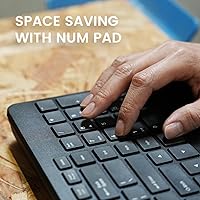
  • Built-in numpad is a standout inclusion for a keyboard this size — most compact boards drop it entirely.
  • At 2.11 pounds, it is solid enough to stay put on a desk without feeling flimsy or toy-like.
  • The all-in-one input device earns a 4.1-star average, reflecting broad satisfaction among its target audience.
  • Low-profile key travel suits users already comfortable with laptop-style typing.
  • Two USB passthrough ports reduce cable clutter at workstations with limited port access.

Cons

  • The 14mm trackball is quite small and requires a real adjustment period, especially for users new to trackball navigation.
  • Scroll button placement draws consistent complaints about awkward hand positioning during normal use.
  • USB hubs are limited to USB 2.0 speeds, which bottlenecks faster storage devices.
  • No wireless option exists, which limits flexibility for users who occasionally need a cable-free setup.
  • Windows-only compatibility officially excludes Mac and Linux users without workarounds.
  • The trackball size makes precise cursor control noticeably harder in detail-oriented tasks.
  • Some users find the numpad layout slightly cramped relative to a dedicated external numpad.
  • At 2.11 pounds, it is heavier than expected for a compact board, which can be a factor for portable use.
  • No backlighting makes low-light environments uncomfortable for users who are not touch typists.
  • Buyers comparing it to pricier trackball keyboard alternatives note the trackball feel lags behind premium competitors.

Ratings

The scores below for the Perixx PERIBOARD-538 Wired Trackball Keyboard were generated by our AI rating engine after analyzing verified purchase reviews from buyers worldwide, with spam, bot activity, and incentivized feedback actively filtered out. Each category reflects the honest distribution of real user experiences — strengths and frustrations weighted equally — so you get a transparent picture of where this all-in-one input device genuinely delivers and where it falls short.
Space Efficiency
93%
Among all the praise this trackball keyboard receives, the space-saving design comes up most consistently. Users running kiosk stations, compact home offices, or panel-mounted workstations repeatedly describe it as the only input device they need on an otherwise crowded surface — keyboard, trackball, numpad, and USB hub all in one footprint.
A small number of users note that despite the compact width, the depth of the unit (nearly 7.8 inches) is wider than a standard tenkeyless keyboard, which can feel counterintuitive when desk depth — not width — is the real constraint.
Typing Experience
78%
22%
The scissor switches win genuine praise from users coming from membrane keyboards, with many describing the key travel as closer to a quality laptop keyboard than anything in the same price bracket. Day-to-day data entry and office typing feel accurate and quiet enough for shared workspaces.
Touch typists with a preference for deeper, more tactile mechanical switches find the low-profile travel unsatisfying over long sessions. A few users also note that the key spacing around the integrated numpad feels slightly tighter than a standard layout, requiring a brief adjustment period.
Trackball Usability
62%
38%
For users who simply need to move a cursor, click, and scroll without reaching for a separate mouse, the built-in optical trackball handles everyday navigation tasks competently. Workers at fixed kiosk or POS terminals report genuine productivity gains from keeping both hands anchored to one device.
The 14mm trackball is small enough that precise cursor positioning — selecting fine text, navigating detailed spreadsheets, or any design-adjacent work — requires real patience and effort. Scroll button placement draws consistent complaints, with users noting it sits at an angle that forces an awkward thumb or finger reach during natural hand positioning.
Build Quality
81%
19%
The keyboard feels reassuringly solid for its size and price tier. Users in industrial and professional settings report the ABS chassis holds up well under daily handling, and the unit stays planted on the desk without sliding. Long-term owners note no significant flex or creaking even after extended use.
A few users point out that the ABS plastic, while durable, does not feel premium to the touch compared to metal-bodied competitors. The trackball housing area in particular has been flagged by some as feeling slightly less robust than the rest of the chassis.
Keycap Durability
83%
The abrasion-resistant printing on the ABS keycaps holds up better than many buyers expect. Long-term users — including some reporting over a year of daily professional use — note that the legends remain clear and legible without the shine or fading common on cheaper ABS boards.
ABS plastic inherently develops a glossy sheen on the most-used keys over time, and this keyboard is no exception for heavy typists. Users who prefer the matte, textured feel of PBT keycaps will notice the difference, especially on keys like E, A, S, and the spacebar.
Trackball Precision
54%
46%
For basic office navigation — moving between browser tabs, clicking menu items, or positioning a cursor in a word processor — the 14mm optical sensor does the job without requiring a separate mouse. Users at fixed workstations with simple navigation needs rarely complain about accuracy at this level of use.
The small trackball diameter fundamentally limits fine motor control, and this is the single most common source of frustration in critical reviews. Users who need reliable precision for detailed tasks consistently rate this aspect poorly, and several note that pixel-accurate cursor placement is effectively out of reach without significant practice.
USB Hub Utility
71%
29%
Having two USB passthrough ports built directly into the keyboard is a practical convenience that buyers in space-constrained setups genuinely appreciate. Plugging in a flash drive, a barcode scanner, or a secondary mouse at the keyboard level — rather than reaching behind a tower — saves meaningful time and effort in daily workflows.
The USB 2.0 ceiling becomes a real limitation for users who want to use the hubs for anything beyond low-bandwidth tasks. Transfer speeds from fast USB drives are noticeably throttled, and buyers who purchase expecting USB 3.0 performance are uniformly disappointed when they benchmark actual throughput.
Setup & Compatibility
88%
Plug-and-play performance across Windows 7 through 11 is rock solid — users report the keyboard, trackball, and USB hubs all activate the moment the cable is connected, with zero driver installs or configuration steps required. IT professionals deploying across multiple machines particularly value this frictionless setup.
The hard Windows-only stance shuts out Mac and Linux users entirely, which feels like a meaningful gap for a device marketed partly toward professional and industrial environments where mixed OS setups are common. There is no official workaround from Perixx for non-Windows platforms.
Cable Quality
76%
24%
The 5.9-foot cable gives users enough reach to comfortably route the keyboard away from a tower or wall-mounted PC without needing an extension. The cable feels reasonably durable and maintains its flexibility well, without the stiffness that plagues some wired peripherals in this category.
The cable is permanently attached, which is a limitation for users who want to swap connections or travel with the keyboard. A detachable cable would have made this a far more versatile option for IT administrators who move between machines frequently.
Numpad Integration
79%
21%
Including a full numpad within a compact keyboard footprint is a genuinely uncommon engineering choice, and users who depend on number entry for accounting, data input, or point-of-sale work consistently cite it as a key reason they chose this board over alternatives. It functions exactly as expected with no compromises on key size.
The numpad keys sit in close proximity to the main key cluster, and users with larger hands occasionally report accidental keypresses near the boundary between the two sections. The layout prioritization also means there is no dedicated arrow key cluster, which some users find they miss more than expected.
Ergonomics
61%
39%
The flat, low-profile design suits users who prefer a minimal wrist angle and already work on flat surfaces without a wrist rest. For shorter typing sessions at a kiosk or workstation, the ergonomic demands are modest and manageable for most users.
Extended typing sessions reveal the lack of any wrist rest or tilt adjustment as a meaningful comfort gap. The fixed flat angle and small trackball position mean users with larger hands or those prone to wrist fatigue will need to think carefully about their setup before committing to this as a full-time daily driver.
Value for Money
74%
26%
For a device that legitimately replaces a keyboard, mouse, numpad, and USB hub in one purchase, the mid-range price point strikes most buyers in the target audience as fair. Users in professional and industrial settings particularly appreciate the consolidation value relative to buying four separate peripherals.
Buyers comparing it directly to full-size premium trackball keyboards or dedicated ergonomic input devices note that the trackball precision and overall typing feel do not quite reach the level the price might suggest. Those expecting a budget deal or a premium experience are both likely to feel underwhelmed from their respective perspectives.
Noise Level
84%
The scissor switches keep the typing noise well below what most mechanical keyboards produce, making this all-in-one input device a practical choice for shared office environments, library workstations, or any setting where noise is a genuine concern. Multiple users specifically mention switching from clicky keyboards to this one for exactly this reason.
The trackball click buttons produce a slightly sharper sound than the keyboard switches themselves, which a small number of noise-sensitive users flag as inconsistent with the overall quiet typing profile. It is a minor issue, but noticeable in very quiet environments.
Portability
58%
42%
At 2.11 pounds and with a relatively slim profile, the keyboard is light enough to move between workstations in the same building without difficulty. Users who rotate between a desk and a server room or between two machines on a cart find it manageable to carry.
The permanently attached 5.9-foot cable is bulky to coil and store for transport, and the fixed connection makes it less practical for users who genuinely need a pack-and-go peripheral. It is portable in a limited sense, but not in the way a wireless or detachable-cable keyboard would be.

Suitable for:

The Perixx PERIBOARD-538 Wired Trackball Keyboard was clearly designed with a specific professional in mind, and if you fit that profile, it delivers in ways that few other keyboards can. Industrial workstation operators, point-of-sale cashiers, and kiosk technicians who need a single, contained input device will appreciate how much this consolidates without asking for much desk real estate. Home and office workers running cramped setups — think a wall-mounted PC, a small rolling cart workstation, or a media center tucked into a cabinet — get a full numpad and cursor control without adding a second device. IT administrators and lab techs who rotate between tight-rack machines will find the long cable and plug-and-play simplicity genuinely practical. Accessibility-conscious users who want to reduce repetitive hand movement between a keyboard and mouse will also find real ergonomic value in keeping everything under one hand zone.
Not suitable for:

The Perixx PERIBOARD-538 Wired Trackball Keyboard is a purpose-built tool, and that focus cuts both ways — if your needs sit outside its design intent, the trade-offs become hard to ignore. The 14mm optical trackball is small by any standard, which means graphic designers, CAD users, or anyone who depends on fine cursor precision will likely find it frustrating rather than liberating. Gamers and power typists who demand a full-size key layout with dedicated media controls and wrist space should look elsewhere entirely. The USB 2.0 hubs are fine for flash drives and low-draw peripherals, but anyone hoping to push high-bandwidth devices through those ports will run into speed limitations. Mac users are also out of luck — Windows 7 through 11 is the stated compatibility range, and there is no mention of macOS or Linux support. If you are a casual home user without a genuine space constraint, the trade-offs in trackball ergonomics probably are not worth it compared to a standard keyboard-and-mouse combo at a similar price.
Specifications

  • Dimensions: The keyboard measures 15.63 x 7.8 x 1.46 inches (397 x 198 x 37mm), keeping the footprint compact enough for tight workstation setups.
  • Weight: The unit weighs 2.11 pounds, giving it a solid, stable feel on the desk without being difficult to reposition.
  • Cable Length: A wired USB-A cable measuring 5.9 ft (1.8m) is attached, offering enough reach for most desktop and panel-mounted configurations.
  • Connectivity: The keyboard connects via a standard USB-A plug and is fully plug-and-play, requiring no driver installation on supported systems.
  • Trackball Type: A 14mm optical trackball is embedded directly into the keyboard layout for integrated cursor control without an external mouse.
  • Key Switch: X-type scissor switches provide low-profile, tactile key actuation with a rated lifespan of 10 million keystrokes per key.
  • Keycap Material: Keycaps are made from ABS plastic with abrasion-resistant printing to maintain legibility through extended daily use.
  • Numpad: A full integrated numpad is included within the compact layout, which is an uncommon feature at this keyboard size.
  • USB Hubs: Two built-in USB 2.0 passthrough ports allow users to connect low-power peripherals such as flash drives or a secondary mouse.
  • OS Compatibility: Officially supported operating systems are Windows 7, 8, 10, and 11; no macOS or Linux support is stated by the manufacturer.
  • Special Features: The keyboard includes hotkeys and media keys for quick access to common functions without leaving the home typing position.
  • Color: Available in black with a modern, low-profile aesthetic suited to professional and industrial environments.
  • Key Profile: The low-profile key design keeps total keyboard height under 1.5 inches, making it well-suited for shallow-clearance mounting situations.
  • Warranty: Perixx includes a 12-month limited warranty with the keyboard, covering manufacturing defects under normal use conditions.
  • Brand: Manufactured by Perixx, a brand specializing in ergonomic and specialty input devices for professional and accessibility-focused users.
  • Model Number: The official model number is PERIBOARD-538, item model 12189, as listed by the manufacturer.

Related Reviews
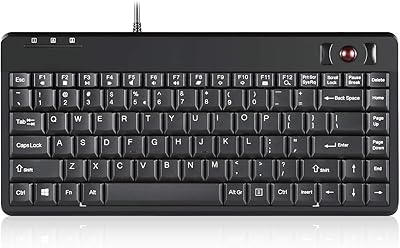
Perixx PERIBOARD-505H Wired Mini Keyboard with Trackball
86%
92%
Value for Money
87%
Trackball Performance
85%
Ease of Use
80%
Build Quality
91%
Compact Design
More
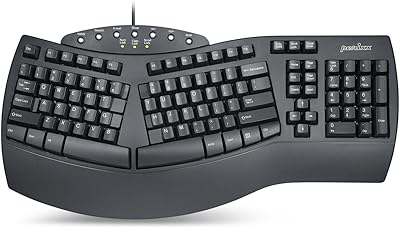
Perixx PERIBOARD-512B Wired Ergonomic Keyboard
83%
87%
Ergonomics & Comfort
84%
Key Layout & Typing Experience
82%
Build Quality & Durability
91%
Wrist Support
95%
Setup & Installation
More
Perixx PERIBOARD-536B Wired Ergonomic Compact Keyboard
85%
89%
Ergonomics
91%
Comfort
85%
Build Quality
78%
Typing Experience
92%
Design/Compactness
More
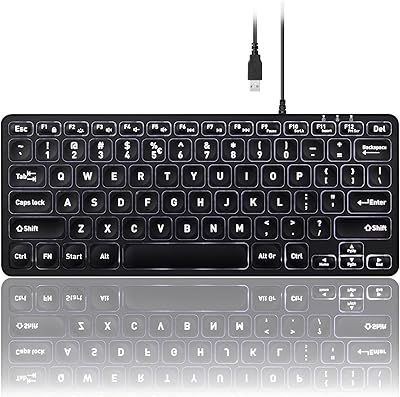
Perixx PERIBOARD-333RGB Wired Backlit USB Keyboard
85%
88%
Typing Comfort & Responsiveness
84%
RGB Backlighting Customization
79%
Build Quality & Durability
91%
Value for Money
83%
Multimedia Key Functionality
More
Perixx PERIBOARD-332
81%
83%
Typing Comfort
74%
Build Quality
69%
Backlighting Quality
91%
Compact Design & Portability
67%
Cross-Platform Compatibility
More
Perixx PERIBOARD-317R Wired Backlit Keyboard
78%
93%
Key Readability
74%
Backlighting Quality
61%
Typing Feel
68%
Build Quality
82%
Setup & Compatibility
More
Perixx PERIBOARD-210C Wired USB-C Keyboard
84%
88%
Typing Experience
83%
Build Quality
91%
Quietness of Keys
87%
Compatibility
85%
Portability
More
Perixx PERIBOARD-517 Wired Washable USB Keyboard
85%
88%
Durability & Build Quality
93%
Ease of Cleaning
76%
Typing Comfort
90%
Water & Dust Resistance (IP65 Rating)
80%
Ergonomics & Key Design
More
Perixx PERIBOARD-326 Wired Mini Backlit USB Keyboard
85%
87%
Typing Comfort
80%
Build Quality
90%
Backlighting Performance
91%
Portability
72%
Key Response
More
Perixx PERIBOARD-535BR Wired Ergonomic Mechanical Split Keyboard
86%
88%
Ergonomics and Comfort
90%
Build Quality
85%
Performance
92%
Key Switch Feel
87%
Macro Functionality
More

FAQ

Officially, no — Perixx lists Windows 7 through 11 as the only supported operating systems. Some users have reported basic functionality on Linux since it is a standard HID device, but this is not guaranteed or supported. Mac users should look elsewhere, as there is no stated compatibility.

It depends heavily on your background. If you have never used a trackball before, expect at least a week or two of adjustment before cursor movement feels natural. The trackball is only 14mm in diameter, which is on the small side, so fine precision tasks like image editing will feel awkward at first. For everyday office navigation — clicking links, scrolling documents, moving between windows — most users adapt reasonably quickly.

Yes, the two built-in USB 2.0 ports support standard low-power peripherals including a mouse, so you can effectively bypass the trackball entirely if needed. Keep in mind these are USB 2.0 ports, so they are not suitable for high-bandwidth devices like fast external hard drives.

The trackball on this all-in-one input device is a fixed optical unit, not a removable ball-style trackball. Cleaning is generally limited to wiping around the sensor area with a dry or lightly dampened cloth. You will not be able to pop it out for deep cleaning the way you can with traditional trackball mice.

No drivers or software are required — it is completely plug-and-play on Windows. Just connect the USB cable and the keyboard, trackball, and hub ports all activate automatically. There is no companion app mentioned for customizing button mapping or trackball sensitivity.

No, the scissor switches are notably quiet compared to mechanical keyboards. The key travel is short and the actuation is firm enough to avoid accidental presses, but the sound level is well within acceptable range for shared office or open-plan workspaces.

The cable is approximately 5.9 feet (1.8 meters) long and is permanently attached — there is no detachable cable option. For most desk setups this length is plenty, but if your PC is across the room or mounted far from the keyboard, you may need a USB extension cable.

Perixx uses abrasion-resistant printing on the ABS keycaps, and long-term users generally report that the legends hold up well under daily use. That said, ABS is not as durable as PBT plastic, so heavy typists may eventually notice some surface wear on the most-used keys over years of use.

No, there is no backlighting of any kind. If you frequently work in dim or dark environments and are not a confident touch typist, this is worth factoring into your decision before purchasing.

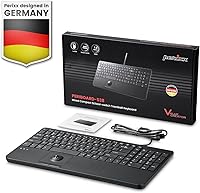
The package includes the keyboard itself, a printed user manual, and documentation for the 12-month limited warranty. There are no extra accessories, replacement parts, or USB adapters included in the box.

Where to Buy