Overview

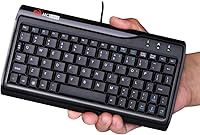
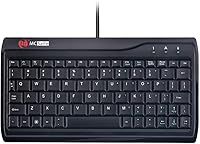
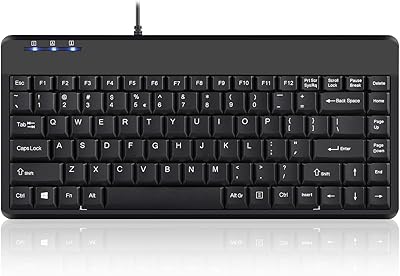
The MCSaite Super Mini 78-Key USB Keyboard is a compact wired option built for anyone who needs a fully functional layout without sacrificing desk real estate. At roughly 280g and just under nine inches wide, it sits comfortably beside a monitor or slips into a laptop bag without adding much bulk. The keys are laser engraved rather than pad-printed, which matters for longevity — the legends won't fade after months of heavy use the way cheaper keyboards tend to. It plugs in and works immediately, no software setup required. For the price, it targets practical users over enthusiasts, and that positioning shapes everything about how it feels and performs.

Features & Benefits

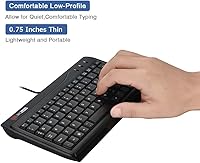
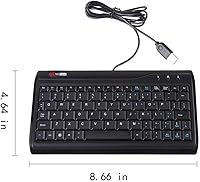
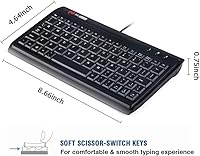
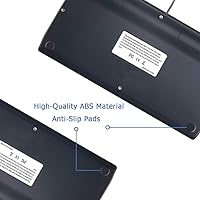
Fitting 78 keys into an 8.66 x 4.65-inch frame means the compact keyboard skips the numpad but keeps everything else — function row, arrow keys, and all standard punctuation. The 1.5-meter USB cable is long enough for most setups without snaking across the desk. Anti-slip rubber feet on the base keep it planted during fast typing sessions, which is something cheaper keyboards often neglect. The low-profile design, just 0.76 inches tall, suits a flat wrist angle. PVC construction won't win awards, but it holds up under daily wear. The one-million-keystroke rating is a manufacturer claim, though it aligns with similar budget keyboards that do survive years of regular use.

Best For

This slim USB keypad makes obvious sense for anyone working at a cramped desk or a shared workstation where space is genuinely limited. It also travels well — light enough to toss in a bag alongside a laptop without thinking twice about weight. Industrial and point-of-sale environments where keyboards take a beating tend to appreciate the no-driver simplicity; plug it in, it works, end of story. Wired purists who have given up on wireless after too many connectivity drops will find it reliable. It is not the right pick for heavy typists who care about key feel or tactile feedback — this is a practical utility keyboard, not a typing enthusiast tool.

User Feedback

With a 4.2 out of 5 rating across nearly 800 reviews, the mini wired keyboard lands solidly in satisfied territory for its category. Buyers frequently praise ease of setup and the space-saving size, particularly those using it in tight office corners or on crowded industrial benches. The criticisms worth noting center on key travel — the switches feel shallow and somewhat stiff out of the box, which takes adjustment for anyone coming from a full-size keyboard. A handful of users flagged the connector feeling slightly loose over time. Build quality generally tracks with what you pay, neither impressive nor disappointing. Cable length rarely comes up as an issue, which suggests the 1.5-meter reach covers most real-world placements.

Pros

  • Fits comfortably on the smallest desks without dropping any essential keys from the layout.
  • Plug-and-play setup works instantly across virtually any Windows or Linux machine.
  • Laser-engraved key legends resist fading, keeping the keyboard readable after years of daily use.
  • Anti-slip rubber base holds firm on wooden, laminate, and metal surfaces during active typing.
  • At under 280g, it travels easily in a laptop bag without adding meaningful weight.
  • The 1.5-meter cable reaches most desktop setups without excess slack or cable clutter.
  • Consistent reliability makes it a practical choice for shared workstations and industrial terminals.
  • Holds up well under regular daily use, with buyers reporting stable key function after extended ownership.
  • All-black low-profile design blends cleanly into professional and minimalist desk environments.

Cons

  • Key travel is shallow and actuation feels stiff, which becomes tiring during long typing sessions.
  • Transitioning from a full-size keyboard involves a noticeable layout adjustment and frequent early misstrikes.
  • The USB connector can feel slightly loose after months of repeated plugging and unplugging.
  • No tilt legs or adjustable feet, so users who prefer a raised typing angle have no options.
  • The plastic chassis flexes slightly under firm typing pressure near the center of the board.
  • Spacebar and larger keys can develop a faint rattle over extended use.
  • No spill resistance or dust protection makes it unsuitable for genuinely harsh working environments.
  • Fingerprints and smudges show clearly on the glossy surface and are difficult to keep clean.
  • Mac users will find no macOS key labeling, creating ongoing confusion when switching between systems.

Ratings

The MCSaite Super Mini 78-Key USB Keyboard has been scored by our AI rating system after deep analysis of verified global buyer reviews, with spam, bot-generated, and incentivized feedback actively filtered out. The scores below reflect real-world usage patterns from office workers, industrial users, and everyday typists — strengths and frustrations included in equal measure. No category has been softened to flatter the product.

Portability & Size
91%
Most buyers specifically chose this compact keyboard because of how little space it takes up — on a cluttered desk, in a drawer, or tucked into a laptop bag. At under 280g, it genuinely travels without adding noticeable weight, and users in shared workspaces or mobile setups repeatedly called the footprint a major win.
A small number of users noted that the compact size came with a layout adjustment period, particularly for those switching from full-size keyboards. The missing numpad is an obvious trade-off that occasional spreadsheet-heavy users found inconvenient.
Ease of Setup
94%
Plug-and-play functionality with zero driver installation is one of the most consistently praised aspects across reviews. Users in office and industrial environments valued being able to swap keyboards quickly between machines without any software friction or IT involvement.
A few users on older operating systems or locked-down corporate machines reported minor recognition delays, though these cases were uncommon. There are no configuration options available, which limits any customization for power users.
Typing Experience
61%
39%
For light office typing, data entry, and general use, most buyers found the keys functional and adequately responsive. Users who primarily type emails, fill forms, or handle basic document work reported no serious issues after a short break-in period.
Key travel is shallow and the actuation feels stiffer than expected straight out of the box, which drew consistent complaints from touch typists and anyone coming from a quality membrane or mechanical keyboard. The overall feedback is flat, and extended typing sessions can feel fatiguing.
Build Quality
72%
28%
The PVC construction holds up reasonably well under daily office or light industrial use, and the anti-slip base keeps the keyboard stable on smooth desks. Laser-engraved legends mean the key labels physically cut into the surface rather than printed on top, so they do not fade with regular use the way cheaper keyboards often do.
The overall chassis feels lightweight in a way that reads as hollow rather than portable to some buyers. A subset of reviewers noted that the plastic feels thin under pressure, and a few reported minor flex in the board when typing firmly near the center.
Cable Quality & Length
68%
32%
The 1.5-meter cable covers most standard desk setups comfortably, and buyers using it with desktop towers or docking stations rarely flagged length as a problem. The cable itself is reasonably tidy and does not coil aggressively out of the box.
Several long-term users noted the USB connector felt slightly loose after months of repeated plugging and unplugging. The cable is not braided or reinforced at the stress points, which raises durability questions for users who frequently disconnect and reconnect it.
Key Durability
78%
22%
The one-million-keystroke endurance claim aligns with what longer-term buyers reported — most users who had the keyboard for over a year noted no significant degradation in key function. Laser engraving holds up visually even on heavily used keys like spacebar and backspace.
While key function held up, a few buyers observed that the key stabilizers on larger keys like the spacebar developed minor rattle over time. The longevity rating is a manufacturer figure and real-world variance depends heavily on typing force and environment.
Compatibility
89%
Works across Windows and most Linux distributions without any configuration, which industrial and IT users appreciated for quick deployment across multiple machines. Compatible with virtually any device that accepts a standard USB-A connection.
Mac compatibility exists at a basic level but the key labeling does not reflect macOS conventions, which caused confusion for users switching between operating systems. There is no mention of official Chrome OS support, though basic functionality has been reported by some users.
Value for Money
83%
At a budget price point, this compact keyboard delivers a functional, durable enough daily driver for users who need simplicity over sophistication. For secondary setups, shared workstations, or environments where keyboards get hard use, the cost-to-function ratio is genuinely solid.
Buyers expecting a premium typing feel at this price will be let down. Compared to similarly priced keyboards from more established brands, the typing feedback and build finish trail slightly, and some reviewers felt a few extra dollars could buy a noticeably better experience.
Stability & Desk Grip
81%
19%
The rubber mat base performs well on wooden and laminate surfaces, preventing the lateral slide that plagues lightweight keyboards during fast typing. Multiple users in industrial settings specifically noted it stayed put even on metal workbench surfaces.
On glass desks or highly polished surfaces, the grip is less effective and some movement was reported. The keyboard also lacks adjustable feet, so users who prefer a raised typing angle have no option to tilt it.
Key Layout & Spacing
66%
34%
For a 78-key layout, the key spacing is reasonable and most standard keys are in expected positions. Users doing basic data entry or document work adapted within a day or two, especially if they were already familiar with compact keyboard layouts.
The compressed layout shifts some punctuation and modifier keys slightly, catching fast typists off guard repeatedly. Users who rely on muscle memory from full-size keyboards reported consistent misstrikes on keys like backslash, brackets, and right shift during the first week of use.
Noise Level
74%
26%
The keyboard operates at a moderate noise level that works in shared office environments without drawing complaints. It is noticeably quieter than clicky mechanical keyboards, which open-plan office users appreciated.
It is not silent — the keystroke sound has a hollow, plasticky tone that some users found distracting in very quiet settings like libraries or late-night home offices. There is no dampening mechanism built into the switch or housing.
Aesthetic & Profile
69%
31%
The all-black low-profile look is clean and unobtrusive, fitting neatly into professional or industrial environments where visual clutter is unwanted. The slim silhouette looks appropriate next to modern monitors and minimalist desk setups.
The finish shows fingerprints and smudges easily and lacks the matte texture that helps premium keyboards stay looking clean. There are no color options beyond black, which limits its appeal for users building color-coordinated workstations.
Industrial & Professional Fit
86%
Several verified buyers specifically mentioned deploying this keyboard in point-of-sale terminals, factory control stations, and server room setups where simplicity and reliability matter more than comfort. Plug-and-play behavior in locked-down systems was a consistent positive for this audience.
The lack of a sealed or spill-resistant design is a real gap for genuinely harsh industrial environments. Users in workshops or food service settings expressed concern about dust and liquid exposure since there is no meaningful protection built in.

Suitable for:

The MCSaite Super Mini 78-Key USB Keyboard is a strong match for anyone who needs a fully functional keyboard without sacrificing desk space or carrying weight. Office workers in tight cubicles, shared workstations, or dual-monitor setups will appreciate getting all the standard keys in a footprint that leaves room for a mouse, notebook, or coffee. Industrial users — think point-of-sale terminals, factory control panels, or server rooms — benefit from the plug-and-play simplicity and the fact that the key labels are physically engraved rather than printed, so they hold up under repeated daily use without fading. Remote workers and frequent travelers who bring a keyboard on the road will find the 280g weight and slim profile easy to justify in a bag. It also works well as a secondary or backup keyboard for home media centers, spare desktops, or any setup where a no-fuss wired connection is preferable to dealing with batteries or Bluetooth pairing.

Not suitable for:

Buyers who spend several hours a day typing intensively should think carefully before committing to this slim USB keypad. The shallow key travel and somewhat stiff actuation feel are functional for light use but can become fatiguing during long writing sessions, coding marathons, or any workflow that demands fast, accurate touch typing. Anyone transitioning from a full-size keyboard will face a layout adjustment period — punctuation placement and modifier key positions shift enough to cause consistent misstrikes until muscle memory catches up, which some buyers found genuinely frustrating. Mac-centric users will also find the key labeling mismatch a persistent annoyance since there are no macOS-specific legends. Buyers working in genuinely harsh environments involving liquids, heavy dust, or food service should note there is no spill resistance or sealed construction. And if tactile or auditory feedback matters to you — whether for typing satisfaction or accessibility reasons — the flat, plasticky keystroke feel of this compact keyboard will likely disappoint.

Specifications

  • Key Count: The keyboard features 78 keys in a compact full-function layout, retaining the function row, arrow keys, and all standard punctuation while omitting the numpad.
  • Dimensions: The keyboard measures 8.66″ long by 4.65″ wide by 0.76″ tall, making it significantly smaller than a standard full-size keyboard.
  • Weight: The unit weighs approximately 280g (10.4 oz), light enough to carry daily in a laptop bag without added bulk.
  • Interface: Connects via a standard USB-A wired connection with no adapter required for most modern desktops and laptops.
  • Cable Length: The attached USB cable measures 1.5 meters, providing adequate reach for typical desk and workstation configurations.
  • Keycap Printing: Key legends are laser engraved, meaning the characters are etched into the keycap surface rather than printed on top, which prevents fading over time.
  • Switch Profile: Keys use a low-profile design at 0.76″ tall, suited to a flat wrist posture and shallow typing angle.
  • Base Material: The keyboard housing is constructed from high-grade PVC, offering basic impact resistance and structural rigidity for everyday use.
  • Base Grip: A rubber anti-slip mat is integrated into the underside of the keyboard to prevent movement on smooth desk surfaces during active typing.
  • Keystroke Rating: The keyboard is rated for over one million keystrokes per key, reflecting the manufacturer's stated durability benchmark for regular daily use.
  • Connectivity: The keyboard is plug-and-play compatible, requiring no driver installation or software setup on supported operating systems.
  • OS Compatibility: Designed for use with Windows and Linux-based systems; basic functionality is also reported on macOS, though key labels do not reflect macOS conventions.
  • Color: Available in black only, with a uniform matte-finish housing suited to professional and industrial desk environments.
  • Layout Type: The layout is a compact tenkeyless-style (no numpad) configuration that preserves all primary key functions in a reduced footprint.
  • Manufacturer: Produced by M MC Saite, a peripheral manufacturer specializing in compact and industrial-use input devices.
  • Spill Resistance: The keyboard has no rated spill resistance or sealed construction and should be kept away from liquids and excessive dust exposure.
  • Tilt Adjustment: The keyboard does not include adjustable tilt feet, so the typing angle remains fixed at the default low-profile height.
  • Backlighting: The keyboard offers single-color backlighting support, though lighting intensity and customization options are limited at this product tier.

Related Reviews
Perixx PERIBOARD-409H Mini Keyboard with USB Hubs
82%
92%
Compact Design & Size
88%
Ease of Setup
85%
USB Hub Functionality
80%
Key Feel & Durability
82%
Build Quality & Materials
More
Perixx PERIBOARD-326 Wired Mini Backlit USB Keyboard
85%
87%
Typing Comfort
80%
Build Quality
90%
Backlighting Performance
91%
Portability
72%
Key Response
More
Perixx PERIBOARD-525
79%
83%
Build Quality
78%
Typing Experience
71%
Touchpad Responsiveness
63%
Touchpad Size & Usability
74%
USB Hub Functionality
More
LICHIFIT 8 Keys Keyboard USB Interface Custom Copy Paste Shortcuts
86%
91%
Customization Options
94%
Ease of Setup
88%
Ergonomics and Comfort
92%
Cross-Platform Compatibility
85%
Build Quality
More
RØDE NT-USB Mini
RØDE NT-USB Mini
86%
94%
Build Quality
91%
Vocal Clarity
96%
Setup Simplicity
67%
Background Noise Rejection
83%
Software Integration
More
Logitech MX Keys Mini
87%
94%
Portability & Size
88%
Typing Comfort & Ergonomics
85%
Multi-Device Compatibility
72%
Backlighting & Visibility
90%
Battery Life
More
Atelus USB Wired Backlit Keyboard
87%
91%
Typing Comfort
88%
Backlight Visibility
83%
Build Quality
86%
Key Responsiveness
85%
Ergonomics
More
FeiTian K40 USB Security Key
85%
93%
Security Performance
88%
Ease of Use
90%
Compatibility with Devices
91%
Build Quality
85%
Setup & Installation
More
NZXT Capsule Mini USB Microphone
85%
92%
Audio Quality
85%
Build Quality
89%
Usability & Setup
90%
Design & Compactness
80%
Software Experience (NZXT CAM)
More
FeiTian A4B USB Security Key
87%
94%
Ease of Use
92%
Portability
89%
Security Features
87%
Compatibility with Devices
85%
Build Quality
More

FAQ

It will function at a basic level on macOS since it is a standard USB HID device — no drivers needed. That said, the key labels are designed for Windows, so modifier keys like Alt and the Windows key do not match their Mac equivalents. If you switch between Windows and Mac regularly, the label mismatch can get confusing fast.

No, the MCSaite Super Mini 78-Key USB Keyboard is fully plug-and-play. Plug it into any available USB-A port and it will be recognized and ready to use within seconds on Windows and most Linux distributions. There is no companion app, no driver disc, and nothing to configure.

No, the cable is permanently attached to the keyboard. The 1.5-meter cord cannot be swapped or removed, so if the cable develops a fault near the connector over time, the whole unit would need to be replaced.

Honest answer — it feels functional but not particularly satisfying. The keys have shallow travel and the actuation is a bit stiff out of the box, which improves slightly with break-in use but never becomes what you would call comfortable for extended typing. For occasional or light use it is fine; for someone who types several hours a day, it can become tiring.

This is actually one of this compact keyboard's stronger points. The legends are laser engraved directly into the keycap surface rather than printed on, so there is no ink layer to peel or fade. Even with heavy daily use over months, the characters should remain fully legible.

It works through a USB hub in most cases since the power draw of a basic wired keyboard is minimal. That said, if you experience any recognition issues, plugging it directly into a port on your computer rather than through a hub will resolve them in almost every scenario.

It handles typical industrial use cases like point-of-sale terminals and control panel inputs reasonably well. The plug-and-play setup is convenient in environments where keyboards get swapped between machines. However, there is no dust or water protection built in, so if the environment involves active liquid exposure or heavy particulate dust, it may not hold up long-term.

The rubber mat on the underside does a solid job on most surfaces including wood, laminate, and textured metal. On very smooth or glass desks, the grip is less reliable and some users reported slight movement during fast typing sessions.

No, the layout does not include a numpad and there is no official companion numpad accessory from the manufacturer. If you regularly work with numbers and need a dedicated numpad, this slim USB keypad may not be the right fit unless you are willing to add a separate standalone numpad to your setup.

Start by trying a different USB port directly on the machine rather than through a hub. If it still does not register, try it on another computer to rule out a hardware fault. Since there are no drivers involved, a simple replug or reboot resolves most recognition issues. If the connector feels loose or intermittent, that is a hardware issue and a sign the unit may need to be replaced.