
Overview

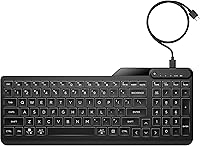
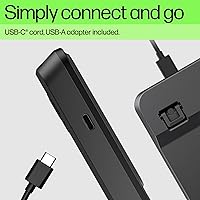
The HP 400 Backlit Wired Keyboard is designed for people who move between workspaces regularly and want a reliable, no-fuss typing solution they can actually carry around. Unlike most keyboards in this price range that chase RGB aesthetics, this HP wired keyboard takes a different approach with a warm white backlight that feels far less aggressive in dim environments. It ships with a USB-C cable and a USB-A adapter, so compatibility is rarely an issue. The full-size layout — numpad included — fits into a footprint that won't dominate a bag or a small desk. Expectations should be realistic: this is a solid mid-range peripheral, not a mechanical enthusiast board.

Features & Benefits

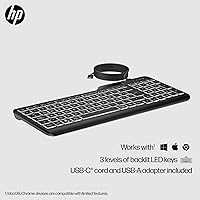
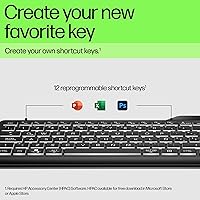
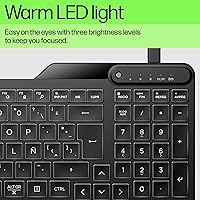
The warm white LED is arguably the standout detail here — three adjustable brightness levels let you dial in just enough light without the harsh blue-toned glow common on cheaper backlit options. The quiet membrane keys keep noise to a minimum, which matters in shared or open-plan spaces. Twelve keys can be programmed as custom shortcuts directly on the hardware with no software download required, a practical convenience rather than a headline feature. The surface is both spill-resistant and easy to wipe down — genuinely useful if the keyboard lives on a kitchen desk or gets passed between colleagues. The USB-C connection keeps things tidy and modern.

Best For

This backlit keyboard makes the most sense for hybrid workers who rotate between home, office, and co-working spaces and want one keyboard that handles all three without complaints. If you work late at night or in a room that can't always be well lit, the backlight's warm tone is noticeably easier on the eyes than most alternatives in this range. It's also a reasonable pick for shared environments — medical offices, reception desks, or family computers — where the ability to wipe it down cleanly is a real consideration. Anyone who needs a full numpad but can't justify a large, non-portable keyboard will find the form factor genuinely appealing.

User Feedback

With a 4.3-star average across nearly 100 ratings, the HP 400 sits in comfortable territory — people generally like it, though few would call it extraordinary. Buyers consistently praise the backlight quality and how quickly it gets up and running straight out of the box. Portability earns positive mentions from commuters who appreciate a full layout without the bulk. On the critical side, some users note the key travel feels shallower than expected, and a few wish the cable were longer for desktop setups. Long-term durability remains an open question given the relatively recent release, but early buyer reports suggest it holds up well under daily use.

Pros

  • Warm white backlight is noticeably easier on the eyes than the harsh blue-toned LEDs common at this price point.
  • Three brightness levels give you real control without overcomplicating a simple feature.
  • Full numpad is retained in a compact footprint — rare for a keyboard designed with portability in mind.
  • Ships with both a USB-C cable and USB-A adapter, so device compatibility is rarely an issue.
  • Quiet membrane keys keep noise low enough for open offices, shared spaces, or late-night work.
  • The spill-resistant, sanitizable surface adds practical value for shared or high-traffic desk environments.
  • Twelve programmable shortcut keys work without downloading any additional software.
  • Plug-and-play setup means no driver installation or configuration headaches out of the box.
  • Multi-OS support makes it a flexible option across Windows, macOS, and most other platforms.
  • At its price point, the overall build quality and brand reliability hold up well against generic competitors.

Cons

  • Key travel is shallower than many buyers expect, which can feel unsatisfying during extended typing sessions.
  • The cable length may be too short for users with desktop towers positioned away from the keyboard.
  • Only a single backlight color is available — no option to change tone or add any color variety.
  • Membrane key feel is unlikely to impress anyone coming from a mechanical or premium scissor-switch keyboard.
  • No wireless mode at all, which limits flexibility for clean desk setups or multi-device switching.
  • The programmable keys offer basic customization only and lack the depth of dedicated macro software.
  • At 2.05 pounds, it is manageable but not the lightest option for daily commuters carrying a full bag.
  • Long-term durability data is still limited given the keyboard only launched in early 2024.
  • No dedicated media controls or volume wheel, which can be a minor frustration for everyday desktop use.
  • Black colorway only — no lighter or alternative finish for users who prefer a cleaner desk aesthetic.

Ratings

Our AI rating system analyzed verified global buyer reviews for the HP 400 Backlit Wired Keyboard, actively filtering out incentivized, duplicate, and bot-generated feedback to surface what real users actually experience day to day. The scores below reflect an honest cross-section of opinions — the genuine strengths that keep buyers satisfied and the recurring friction points that hold this keyboard back from a higher tier. Both sides are represented transparently so you can make a well-informed decision.

Typing Experience
67%
33%
For casual office tasks — writing emails, filling spreadsheets, browsing — the quiet membrane keys get the job done without fatigue. Users who upgraded from older, noisier keyboards tend to appreciate how unobtrusive the HP 400 feels during a typical workday.
Anyone with a background in mechanical keyboards will notice the shallow key travel and soft, undifferentiated feedback almost immediately. Several buyers described extended typing sessions as tiring, specifically because there is little tactile signal confirming each keystroke.
Backlight Quality
83%
The warm white LED tone stands out in a market crowded with harsh blue-tinted or gimmicky RGB backlights. Users working late nights or in dim home offices consistently praise how the soft glow illuminates keys without creating glare or straining their eyes over long sessions.
There is no option to change the backlight color or enable per-key effects, which limits appeal for anyone wanting even basic customization. A small number of users also noted the backlight does not distribute perfectly evenly across all keys, with corner keys appearing slightly dimmer.
Build Quality
71%
29%
The chassis feels solid enough for daily commuting and regular packing into a laptop bag without wobbling or creaking noticeably. For a keyboard in this price range, the construction generally meets expectations and does not feel cheap to the touch.
The plastic housing lacks the rigidity you get from higher-end keyboards, and a few buyers noted the keycaps develop a slight shine from oils after a couple of months of heavy use. Long-term durability remains somewhat uncertain given the product only launched in early 2024.
Portability
88%
At 2.05 pounds and with a relatively slim profile, this HP wired keyboard genuinely earns its claim as a travel-friendly option. Hybrid workers who pack and unpack their gear daily report that it fits neatly alongside a laptop without adding meaningful bulk to a bag.
It is not the lightest keyboard in the category — dedicated ultra-portable options do exist at similar price points. Users who prioritize absolute minimal weight for air travel or extended commutes may find slightly trimmer alternatives worth investigating.
Connectivity & Compatibility
86%
The bundled USB-C cable paired with a USB-A adapter covers an impressively broad range of devices out of the box — laptops, desktop towers, and even most modern tablets. Setup is truly plug-and-play across Windows and macOS with no driver installation required.
The cable length has drawn criticism from users with desktop setups where the port is not close to the desk surface. There is also no wireless option, which is a hard stop for anyone committed to a cable-free workspace.
Noise Level
84%
In open-plan offices and shared spaces, the quiet membrane mechanism keeps keystroke noise low enough that colleagues rarely notice. Several remote workers specifically mentioned the keyboard does not register audibly on video call microphones, which matters more than many buyers initially expect.
It is not silent — a soft thud is still audible in a very quiet room, such as a library or late-night home office where others are sleeping nearby. Users expecting near-silent performance may be slightly surprised at moderate typing speeds.
Programmable Keys
63%
37%
The 12 programmable shortcut keys work without any software download, which is convenient for users who just want to assign a few quick-launch functions without dealing with companion apps. For basic workflow shortcuts, the feature delivers on its promise.
The customization depth is limited — there is no layering, no macro scripting, and no visual configuration tool to manage assignments easily. Power users who rely on complex macro setups will find this implementation too rudimentary to replace a proper programmable keyboard.
Spill Resistance
77%
23%
The spill-resistant design offers genuine peace of mind for people who keep a coffee or water bottle on their desk while working. Users in kitchens or casual home office setups appreciate having some buffer against accidental splashes without treating the keyboard like fragile equipment.
The rating covers minor spills only — a full glass poured directly on the keyboard would likely cause damage. Buyers who expected full waterproofing based on the product listing have occasionally been disappointed when modest liquid exposure caused issues.
Sanitization & Hygiene
81%
19%
The ability to wipe the surface with standard disinfectant cloths is a meaningful practical advantage in shared offices, medical front desks, and multi-user family computers. The keycap surface holds up well to repeated cleaning without visible degradation in most reported cases.
Cleaning between the keys still requires compressed air or a soft brush — the sanitizable claim applies to the surface only, not the gaps. Users who want a truly hygienic deep-clean option will still need to put in manual effort beyond a simple wipe-down.
Value for Money
74%
26%
For buyers stepping up from a basic non-backlit membrane keyboard, the HP 400 represents a genuine upgrade at a reasonable outlay. The combination of a full numpad, warm white backlight, spill resistance, and USB-C connectivity in a single package is hard to match at this tier.
At its price point, a handful of competing keyboards offer better key feel or wireless functionality, which makes the value proposition feel slightly less clear-cut for well-informed buyers. Those who research broadly before purchasing may find alternatives that edge it out on specific priorities.
Setup & Ease of Use
91%
Unboxing to typing in under a minute is a realistic expectation — there is no software, no pairing process, and no configuration required. This is consistently one of the most praised aspects among buyers who are frustrated by keyboards that demand app installs or firmware updates before first use.
The brightness adjustment and programmable key controls are not documented intuitively, and the included manual is minimal. A few users spent time figuring out the key combinations for these functions, which could be smoother with clearer out-of-box guidance.
Numpad Utility
82%
18%
Retaining a full numpad in a keyboard thin and light enough to travel with is a genuine engineering trade-off that HP got right for its target audience. Accountants, data-entry professionals, and spreadsheet-heavy users regularly call out the numpad as the deciding factor in their purchase.
The overall keyboard width, driven by the numpad, does make it wider than tenkeyless or compact alternatives. For users with small desks or those who primarily want portability with no numerical input needs, the numpad adds unnecessary footprint.
Keycap Legends & Visibility
78%
22%
With the warm white backlight active, key legends are clear and easy to read in low-light conditions — a practical benefit for touch-typists who occasionally glance down or for users still building typing fluency. The black keycap and white legend contrast holds up well across all three brightness settings.
In full daylight or under strong overhead office lighting with the backlight off, the legends on certain keys can appear less distinct due to the dark-on-dark color scheme. Users in very bright environments may find the visibility without backlighting slightly underwhelming.
Cable Management
58%
42%
Having a USB-C connection rather than a fixed older USB-A cable is a forward-thinking choice that keeps the setup clean and compatible with newer laptops. The cable itself is reasonably flexible and does not add noticeable drag or stiffness to the keyboard's position.
The cable length is a recurring pain point for desktop users, with many reporting it falls short for setups where the computer sits on the floor or further back on a desk. There is no cable routing channel on the underside of the keyboard, which can lead to messy desk situations.

Suitable for:

The HP 400 Backlit Wired Keyboard is a strong fit for hybrid workers who split their time between home and office and need a keyboard that travels without complaint. If you regularly work in dim environments — a dark home office, an early-morning café, or a late-night desk setup — the warm white backlight is genuinely thoughtful rather than just decorative. People in shared workspaces, medical reception areas, or any setting where hygiene matters will appreciate that the surface can be wiped down without worry. It also makes practical sense for professionals in finance, accounting, or data entry who need a numpad but cannot justify lugging around a full-sized desktop keyboard. Anyone upgrading from a basic membrane keyboard with no backlighting will find the step up in usability immediately noticeable.

Not suitable for:

Buyers who care deeply about typing feel should look elsewhere — the HP 400 Backlit Wired Keyboard uses a quiet membrane mechanism, and while that suits office environments, it will not satisfy anyone accustomed to mechanical switches or even high-quality scissor keys. RGB enthusiasts or users who want per-key lighting customization will find the single warm white backlight limiting by design. Wireless-first users who dislike cable management or frequently connect to devices far from their desk may find the wired-only setup inconvenient. If you are a heavy typist who logs many hours daily and expects a premium tactile response, this keyboard is unlikely to hold your attention long-term. Similarly, gamers looking for fast actuation or programmable macros tied to dedicated software will find the feature set too basic for their needs.

Specifications

  • Brand & Model: Manufactured by HP under model number 7N7C0AA#ABA, released in April 2024.
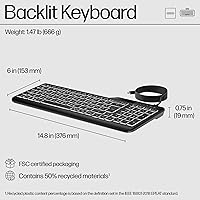
  • Dimensions: The keyboard measures 7.8″ in length, 16.8″ in width, and 1.2″ in height.
  • Weight: Total unit weight is 2.05 pounds, keeping it manageable for regular transport.
  • Key Mechanism: Uses a quiet membrane switch design intended to reduce noise in shared or open-plan environments.
  • Layout: Full-size layout with a dedicated numeric keypad on the right side.
  • Backlight Color: Single-color warm white LED illumination with no RGB or color customization options.
  • Brightness Levels: Backlight supports three distinct brightness levels, adjustable directly via keyboard controls.
  • Programmable Keys: Includes 12 programmable shortcut keys that can be configured without third-party software.
  • Connectivity: Connects via USB-C; a USB-A adapter is included in the box for broader device compatibility.
  • Power Source: Bus-powered through the wired USB connection — no batteries or external power supply required.
  • OS Compatibility: Compatible with multiple operating systems including Windows and macOS without additional drivers.
  • Spill Resistance: The keyboard is rated as spill-resistant, offering basic protection against minor liquid incidents.
  • Sanitization: The surface material is designed to withstand standard cleaning agents, making it safe to wipe down regularly.
  • Color: Available in black only; no alternative colorway options are currently offered.
  • Cable Type: Detachable USB-C cable is included alongside a USB-A adapter for legacy port compatibility.
  • Series: Part of the HP 400 peripheral series, positioned as an accessible, office-focused product line.

Related Reviews
Atelus Full Size Retro Backlit Wired Keyboard
72%
83%
Value for Money
61%
Typing Experience
84%
Noise Level
78%
Backlight Quality
54%
Build Quality
More
MOWUX SK-693EL Wired Backlit Keyboard
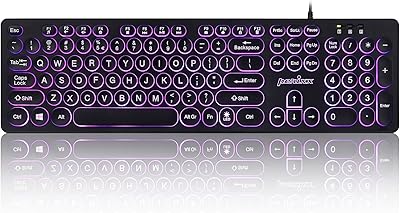
73%
83%
Value for Money
67%
Typing Experience
71%
Backlight Quality
62%
Build Quality
94%
Ease of Setup
More
Perixx PERIBOARD-332
81%
83%
Typing Comfort
74%
Build Quality
69%
Backlighting Quality
91%
Compact Design & Portability
67%
Cross-Platform Compatibility
More
POWZAN KB770
POWZAN KB770
79%
83%
Typing Experience
88%
Build Quality
91%
Noise Level
67%
RGB Backlighting
74%
Mac Compatibility
More
Perixx PERIBOARD-317R Wired Backlit Keyboard
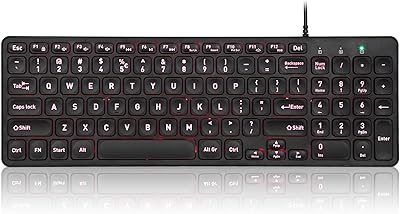
78%
93%
Key Readability
74%
Backlighting Quality
61%
Typing Feel
68%
Build Quality
82%
Setup & Compatibility
More
Perixx PERIBOARD-333RGB Wired Backlit USB Keyboard
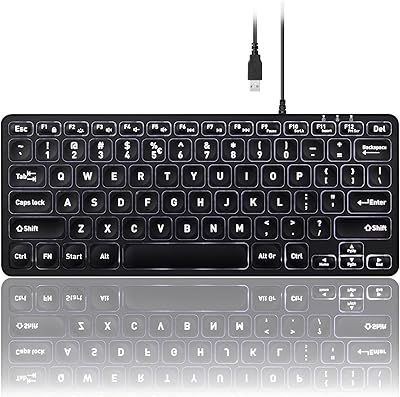
85%
88%
Typing Comfort & Responsiveness
84%
RGB Backlighting Customization
79%
Build Quality & Durability
91%
Value for Money
83%
Multimedia Key Functionality
More
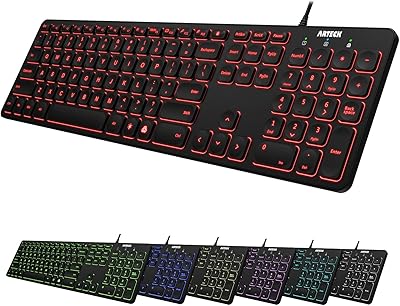
Arteck HA305-3B USB Wired Backlit Keyboard
80%
97%
Ease of Setup
83%
Typing Experience
74%
Backlight Quality
71%
Build Quality & Durability
92%
Value for Money
More
seenda KUW01 Ergonomic Split Keyboard
78%
83%
Ergonomic Design
79%
Typing Comfort
71%
Wrist Rest Quality
91%
Cross-Platform Compatibility
74%
Backlight Performance
More
Perixx PERIBOARD-326 Wired Mini Backlit USB Keyboard
85%
87%
Typing Comfort
80%
Build Quality
90%
Backlighting Performance
91%
Portability
72%
Key Response
More
Evoluent EKB Compact Wired Keyboard
71%
84%
Ergonomic Design
67%
Typing Feel
73%
Build Quality
61%
Hotkey Usability
91%
Connectivity & Setup
More

FAQ

It is fully plug-and-play. Just connect the USB-C cable — or use the included USB-A adapter — and your computer should recognize it immediately with no driver installation needed.

It is genuinely practical for low-light use. The warm white tone is noticeably softer than the cool white or blue-tinted backlights you find on most keyboards in this range, so it does not create the same eye strain during late-night or dim-room sessions. Three brightness levels give you enough control to dial it in for your environment.

Yes, it works on macOS without any special setup. Some key labels will correspond to Windows conventions, so you may need a moment to adjust to which modifier keys map to Command and Option functions, but day-to-day use is straightforward.

The 12 programmable keys can be set up directly on the hardware without downloading any additional software. That said, the customization options are basic compared to keyboards that come with dedicated macro software, so do not expect deep layering or complex scripting.

The spill-resistant rating covers minor splashes and small amounts of liquid, not a full glass of water poured directly onto it. If something spills on it, wipe it down quickly and let it dry before reconnecting. Treat it as a safety buffer rather than waterproofing.

Yes, the membrane keys are noticeably quieter than most standard keyboards. It will not be completely silent, but it produces a soft, muffled sound that tends not to carry in shared spaces or register noticeably on microphones during calls.

HP does not publish an exact cable length in the official product specs, and some buyers have noted it feels on the shorter side for certain desktop configurations. If your tower sits on the floor or away from your desk, you may want to keep a USB extension cable handy.

Since it connects via USB-C (with a USB-A adapter included), it can technically work with tablets that support USB peripherals. Compatibility depends on the tablet's OS and whether it recognizes wired keyboards — most modern Android tablets and iPads with USB-C support should handle it fine.

Honestly, there is a real difference. This HP wired keyboard uses membrane switches, which feel softer and less tactile than mechanical switches. If you are used to typing on a mechanical board and value that click or bump feedback, the transition will feel noticeably mushier. For everyday office typing it is perfectly adequate, but it is not a mechanical replacement.

The surface is designed to be sanitizable, and the keys can be wiped down with standard disinfectant cloths without damaging the finish. Getting into the gaps between keys is harder — a can of compressed air helps — but the overall build makes routine surface cleaning straightforward, which is part of why it works well in shared environments.

Where to Buy