

Overview

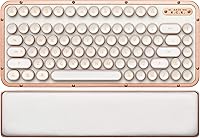
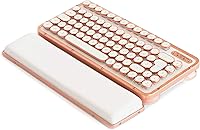
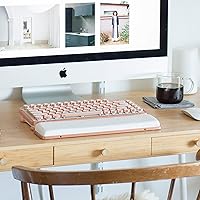
The Azio Retro Compact Mechanical Keyboard is one of those rare peripherals that makes people stop and ask what it is. Its genuine leather top plate and chrome-trimmed aluminum frame give it a desk presence most keyboards simply cannot match. This is a compact board with an integrated wrist rest — so it sits comfortably without extra accessories cluttering the space. It connects via Bluetooth or USB, works across Mac, PC, and Chrome OS, and ships with keycap sets for both platforms. At its price point, it clearly targets buyers who treat their workspace as an extension of their personal style.

Features & Benefits

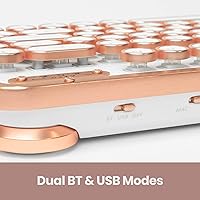
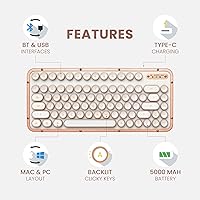
The leather top plate is genuinely striking — warm, slightly textured, and noticeably different from the matte plastic covering nearly every other keyboard at any price. The aluminum alloy frame adds real heft; at 2.8 pounds, the Azio Retro Compact stays put on the desk. The mechanical keys carry a satisfying clicky response that channels old typewriter energy without feeling gimmicky, and single-color backlighting adds a polished touch for low-light use. Connectivity is flexible — pair wirelessly over Bluetooth or plug in via USB, with a built-in battery handling the wireless side. The integrated wrist rest is a practical bonus that keeps the overall footprint tidy.

Best For

This retro mechanical keyboard is a natural fit for anyone who has looked at their desk and wished the hardware matched the care put into the rest of the space. Writers, designers, and creatives tend to gravitate toward it — the tactile feedback rewards long typing sessions and the look rewards everything else. It suits minimalist home office setups especially well, where every item on the desk is chosen with intention. It also makes a genuinely distinctive gift for someone who appreciates craftsmanship. That said, anyone who relies on a numeric keypad or a traditional full-size layout may find the compact format a real adjustment.

User Feedback

With a 4.1 out of 5 rating across more than 300 reviews, the Azio Retro Compact lands solidly in positive territory. Most buyers highlight the build quality and leather aesthetic as the main reasons they chose it over more conventional options, and the clicky key feel earns consistent praise from typists who enjoy tactile feedback. On the critical side, the compact layout draws the most complaints — users coming from full-size boards often need adjustment time, and some never fully adapt. A handful of buyers also note that at 2.8 pounds, it feels less portable than expected for a wireless board. Creative professionals tend to rate it notably higher than those buying purely for output speed.

Pros

  • Genuine leather top plate looks and feels unlike any standard keyboard on the market.
  • Aluminum alloy frame is solid and well-built with no flex or cheap plastic feel.
  • Clicky mechanical keys deliver satisfying tactile feedback that rewards long typing sessions.
  • Bluetooth and USB connectivity gives real flexibility depending on your setup.
  • Works across Mac, PC, and Chrome OS with both keycap sets included in the box.
  • Integrated wrist rest means one less accessory to buy or find space for.
  • Single-color backlighting looks polished and is practical for dim or nighttime use.
  • The Azio Retro Compact stands out as a genuinely distinctive gift option in a category full of lookalike products.
  • Rechargeable battery is included, so the wireless setup is ready to use immediately.
  • Strong overall rating from verified buyers reflects consistent satisfaction with build and aesthetics.

Cons

  • Compact layout removes the numeric keypad entirely, which is a real loss for data-entry or spreadsheet-heavy users.
  • At 2.8 pounds, this retro mechanical keyboard is noticeably heavier than most wireless boards, making it impractical to carry.
  • Clicky switches produce audible noise that can disturb colleagues in shared or open office environments.
  • Premium price point is difficult to justify for buyers who prioritize typing performance over visual appeal.
  • Transitioning from a full-size keyboard layout can take significant time and cause frustration early on.
  • Single-color backlighting offers no customization for buyers who prefer RGB or per-key lighting control.
  • Leather top plate requires care to maintain over time and may show wear depending on hand oils and environment.
  • Bluetooth pairing experience varies across devices and has drawn occasional criticism in user reviews.
  • The chrome finish, while attractive, can show fingerprints and smudges more readily than matte alternatives.

Ratings

The Azio Retro Compact Mechanical Keyboard has been evaluated by our AI system after analyzing hundreds of verified global buyer reviews, with spam, bot-generated feedback, and incentivized responses actively filtered out to ensure accuracy. Scores reflect the full picture — not just what works, but where real users hit friction — so you can make a genuinely informed decision before buying.

Build Quality
91%
The aluminum alloy frame and genuine leather top plate consistently earn high marks from buyers who have handled a lot of keyboards. Users frequently describe it as feeling more like a crafted object than a peripheral — solid, weighty, and assembled with care that is immediately apparent when you first pick it up.
A small number of reviewers noted that the chrome plating on the frame shows fine scratches over time, particularly around the edges where wrists make regular contact. The leather surface, while durable, can show oil transfer from hands if not occasionally wiped down.
Aesthetic Design
94%
This is where the Azio Retro Compact earns near-universal praise — buyers in design, photography, writing, and creative fields repeatedly describe it as the most visually striking keyboard they have ever owned. The leather and chrome combination photographs beautifully and draws comments from visitors in home office video calls.
Design is subjective, and a handful of buyers found the vintage aesthetic too ornate for their minimalist tastes once it arrived in person. The Posh white leather can also yellow slightly over years of heavy use if not maintained, which some long-term owners flagged as a concern.
Typing Experience
83%
The clicky tactile switches deliver genuine satisfaction for writers and anyone who enjoys the physical feedback of each keystroke. Reviewers who type long documents daily — journalists, novelists, copywriters — consistently describe the experience as immersive and even motivating in a way that membrane keyboards simply cannot replicate.
Users who prefer lighter, linear switches find the tactile resistance tiring over very long sessions. The clicky nature is divisive — what one buyer calls the best part of the board, another finds fatiguing or simply too loud for focused concentration work.
Noise Level
58%
42%
For solo home office users, the audible click is considered a feature rather than a flaw — it reinforces the vintage typewriter experience the keyboard is designed to evoke, and many buyers specifically sought out this board for that sound signature.
In shared spaces, open-plan offices, or households where others are nearby, the click noise is genuinely disruptive. Multiple reviewers mentioned that partners, roommates, or colleagues asked them to stop using it during calls or quiet work periods, which is a real-world limitation worth weighing carefully.
Wireless Performance
71%
29%
Bluetooth pairing works reliably during initial setup on most modern laptops and desktops, and the included rechargeable battery means there are no AA batteries to keep in stock. For a stationary desk setup with a single paired device, most users report a stable daily experience.
Reconnection after sleep or device switching can be inconsistent — a pattern that appears frequently enough in reviews to be considered a recurring issue rather than isolated incidents. Users who regularly switch between a laptop and desktop over Bluetooth may find the re-pairing process frustrating enough to default to the USB cable.
Battery Life
67%
33%
For moderate daily use in a home office setting, the battery holds up well enough that most buyers do not find themselves reaching for the charging cable more than once or twice a week. The USB wired mode is always available as an instant fallback when the battery runs low.
Heavy typists who leave backlighting on throughout the day report shorter battery spans that can require more frequent charging. Azio does not publish an official battery life specification, which leaves buyers without a reliable benchmark and has led to some disappointment when real-world performance fell short of expectations.
Layout & Usability
61%
39%
For writers, coders, and general office users who do not rely on a number pad, the compact layout keeps the desk clean and positions the mouse closer to the keyboard — a comfort benefit during long work sessions that several reviewers specifically mentioned.
Buyers transitioning from a full-size or tenkeyless board face a real learning curve with the shortened layout, and those who use the numeric keypad regularly for data entry, accounting, or number-heavy workflows have consistently described the omission as a dealbreaker. This is the single most cited source of disappointment across negative reviews.
Ergonomics & Wrist Rest
78%
22%
The integrated wrist rest is a practical inclusion that reviewers appreciate — it reduces desk clutter, provides consistent positioning, and feels cohesive with the overall design rather than like an afterthought. Writers who type for several hours continuously found it meaningfully more comfortable than typing on a board without one.
The wrist rest is fixed and cannot be detached, which means users with specific ergonomic preferences or those who prefer a steeper typing angle cannot adjust it to suit their posture. Buyers with larger hands have also noted that the compact spacing between the rest and the keys feels slightly cramped.
Multi-Platform Compatibility
88%
Including both Mac and Windows keycap sets in the box is a genuinely thoughtful touch that saves buyers the hassle of sourcing replacements separately. Switching between operating systems requires no driver installation, and the keyboard is recognized immediately on Chrome OS as well, making it broadly versatile across different work setups.
Some Mac-specific shortcuts and function key behaviors require manual remapping, and a few macOS users noted that the keyboard does not fully replicate the native Mac keyboard shortcut experience without extra configuration. The function row behavior in particular drew criticism from users on macOS who expected more seamless integration.
Backlighting
66%
34%
The single-color backlight is clean and functional — it provides enough key visibility in dim environments without being distracting, and the consistent glow complements the leather and chrome aesthetic nicely during evening use at a home desk.
In a market where RGB customization is standard even on mid-range mechanical keyboards, the fixed single-color backlighting feels like a missed opportunity at this price point. Buyers who expected adjustable brightness levels or color options were notably disappointed, and a few mentioned it as a deciding factor in their regret.
Portability
44%
56%
The compact footprint does make the keyboard physically smaller than a standard board, and Bluetooth support removes the dependency on a cable for everyday desk use — both are factors that suggest portability on paper.
At 2.8 pounds, this leather keyboard is significantly heavier than most users expect from a compact wireless peripheral, and reviewers who purchased it hoping to use it on the go — at cafes, co-working spaces, or between home and office — frequently described it as too cumbersome to carry regularly. It is best treated as a permanent desk fixture.
Value for Money
69%
31%
For buyers whose primary goal is a desk-defining aesthetic object that also functions as a capable mechanical keyboard, the price feels justified — the materials are genuinely premium and the construction matches the cost in a way that cheaper imitations do not. Creative professionals in particular tend to feel the investment was worthwhile.
Buyers who approached this as a pure typing tool and compared it against other mechanical keyboards in the same price range found the value proposition weaker — there are boards with superior switch options, better Bluetooth stability, and more layout flexibility available for the same or less money. The premium here is primarily for the design, not the underlying keyboard technology.
Setup & Out-of-Box Experience
82%
18%
Unboxing the Azio Retro Compact is a notably positive experience — the packaging matches the premium positioning, and having both keycap sets included means most buyers are desk-ready within minutes without needing to order anything additional. The rechargeable battery being pre-included is a small but appreciated detail.
The instruction documentation is minimal, and a few buyers found the initial Bluetooth pairing process less intuitive than expected without a clearly written guide. Users less comfortable with manual key remapping for Mac shortcuts also noted that getting the keyboard fully configured required more effort than anticipated.

Suitable for:

The Azio Retro Compact Mechanical Keyboard is a strong match for anyone who genuinely cares about how their desk looks and feels, not just how it performs. Writers, designers, photographers, and other creatives who spend long hours at a carefully arranged workspace will find that this retro mechanical keyboard fits naturally into a curated setup rather than clashing with it. The integrated wrist rest and clicky mechanical keys make it comfortable for extended typing sessions, while Bluetooth connectivity keeps the desk free of unnecessary cables. It works equally well on Mac and PC out of the box, which makes it practical for people who switch between platforms. If you are also considering it as a gift, few keyboards at any price point carry this kind of visual impact — it reads immediately as a thoughtful, high-quality choice.

Not suitable for:

Buyers who prioritize pure typing efficiency or need a numeric keypad for spreadsheet-heavy work should look elsewhere before committing to the Azio Retro Compact Mechanical Keyboard. The compact layout removes the number row shortcuts and function clusters that power users rely on, and adapting to a smaller board can cost real productivity during the transition. At 2.8 pounds, this leather keyboard is also heavier than most wireless options, so anyone hoping to toss it in a bag regularly will likely find it cumbersome. Budget-conscious buyers should be honest with themselves about whether the aesthetic value justifies the premium price — if you mostly care about typing speed and responsiveness, more conventional mechanical keyboards deliver comparable performance at a lower cost. The clicky switches, while satisfying in a private office, can be intrusive in open-plan or shared workspaces where noise matters.

Specifications

  • Brand: Manufactured by Azio, a peripheral brand known for design-forward keyboards and input devices.
  • Model Number: The official model identifier is MK-RCK-L-02-US, corresponding to the Posh leather variant in the Retro Compact series.
  • Dimensions: The keyboard measures 12.9″ long by 5.6″ wide by 1.7″ tall, including the integrated wrist rest.
  • Weight: The unit weighs 2.8 pounds, which is notably heavier than most compact or wireless keyboards in its category.
  • Top Plate Material: The top plate is constructed from genuine leather in the Posh colorway, offering a warm, textured surface that differs visually and tactilely from standard plastic decks.
  • Frame Material: The keyboard frame is built from aluminum alloy finished in chrome or satin plating, providing structural rigidity and a premium desk presence.
  • Key Type: Keys use tactile, clicky mechanical switches designed to replicate the feedback feel associated with vintage typewriters.
  • Backlighting: The keyboard features single-color LED backlighting across all keys, suitable for low-light typing environments.
  • Layout: The board uses a compact QWERTY layout without a dedicated numeric keypad, aimed at space-conscious desk setups.
  • Connectivity: The keyboard supports both Bluetooth wireless and USB 2.0 wired connection, giving users flexibility based on their desk configuration.
  • Compatible Platforms: Fully compatible with Windows, macOS, and Chrome OS, with replacement keycap sets included for both Mac and PC layouts.
  • Power Source: Wireless operation is powered by a rechargeable lithium-ion battery, which is included in the box.
  • Wrist Rest: An integrated wrist rest is built directly into the keyboard chassis, eliminating the need for a separate ergonomic accessory.
  • In the Box: The package includes the keyboard, a set of Windows keycaps, a set of Mac keycaps, and the necessary charging hardware for the battery.
  • BSR Ranking: Ranked #2,149 in the Computer Keyboards category on Amazon at the time of review, reflecting a solid niche position in the premium segment.

Related Reviews
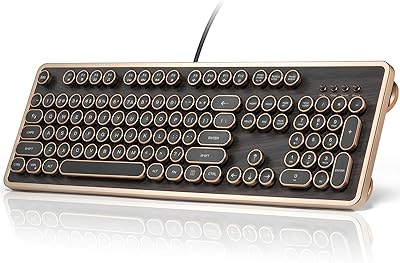
BOYI K104Pro Retro Mechanical Keyboard
78%
88%
Typing Feel
84%
Switch Performance
71%
Wireless Reliability
79%
Battery Life
86%
Keycap Quality
More
GLENCREAG RK104 Mechanical Keyboard
75%
91%
Aesthetic Design
83%
Typing Feel
76%
Build Quality
72%
Keycap Quality
79%
Switch Performance
More
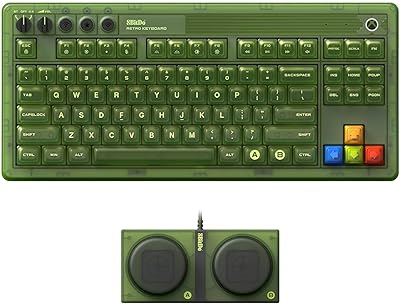
8BitDo Retro Xbox Edition TKL Mechanical Keyboard
78%
83%
Build Quality
88%
Switch Performance
91%
Hot-Swap Functionality
76%
Wireless Performance
86%
Battery Life
More
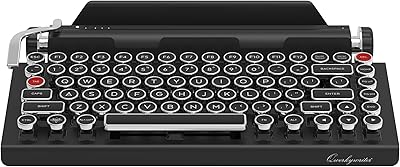
Qwerkytoys Qwerkywriter Typewriter Inspired Retro Mechanical Keyboard
84%
89%
Typing Experience
93%
Design & Aesthetic
92%
Battery Life
88%
Build Quality
77%
Ergonomics & Comfort
More
Cherry KW X ULP Mechanical Keyboard

74%
84%
Typing Experience
62%
Build Quality
91%
Portability
78%
Multi-Device Connectivity
61%
Value for Money
More
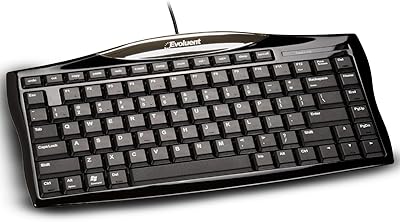
Evoluent EKB Compact Wired Keyboard
71%
84%
Ergonomic Design
67%
Typing Feel
73%
Build Quality
61%
Hotkey Usability
91%
Connectivity & Setup
More
Merdia Triple Mode 100-Key Wireless Mechanical Keyboard
74%
88%
Value for Money
84%
Wireless Connectivity
81%
Typing Experience
83%
Hot-Swap Functionality
67%
Build Quality
More
Satechi SM3 Full-Size Mechanical Keyboard
79%
91%
Build Quality
88%
Typing Experience
86%
Multi-Device Connectivity
89%
Mac Compatibility
83%
Battery Life
More
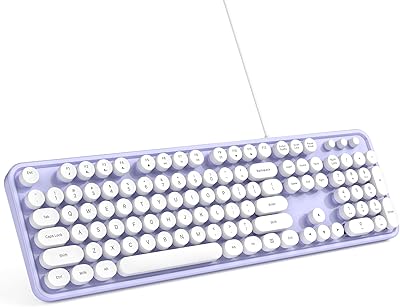
MOWUX Retro Typewriter Wired Keyboard
78%
93%
Aesthetic Design
67%
Typing Feel
63%
Build Quality
91%
Setup & Compatibility
82%
Value for Money
More
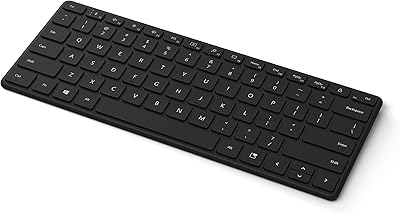
Microsoft Designer Compact Bluetooth Keyboard
78%
78%
Build Quality
72%
Typing Experience
69%
Bluetooth Connectivity
93%
Battery Life
81%
Multi-Device Pairing
More

FAQ

Yes, the Azio Retro Compact Mechanical Keyboard ships with two sets of keycaps — one for Mac and one for Windows — so you can swap them to match whichever platform you use. It also supports Chrome OS. Switching between operating systems is straightforward, and no special drivers are required for basic functionality.

The keyboard pairs over standard Bluetooth and connects to a single device at a time. Pairing is initiated through a dedicated key combination and is generally quick on most modern computers and tablets. Some users have reported occasional pairing hiccups, particularly when reconnecting after sleep, so if you switch between devices frequently, using the USB cable may give you a more consistent experience.

The switches are intentionally clicky and tactile — that is a core part of what this retro mechanical keyboard is designed to deliver. In a private home office, the sound is deeply satisfying for many typists. In an open-plan workspace or shared room, though, the click noise will almost certainly be noticeable to those nearby. If quiet operation matters, this board is probably not the right choice.

Genuine leather holds up well with basic care, but it does require a little more attention than a plastic keyboard deck. Avoid harsh chemical cleaners — a lightly dampened microfiber cloth works for general dust and residue. Over time, the leather can develop a subtle patina from regular hand contact, which many owners actually appreciate as part of the material's character.

Azio does not publish an official battery life figure for this model, so real-world estimates vary. Most users find the battery lasts through several days of moderate daily use before needing a recharge. The USB cable connection is always available as a fallback if the battery runs low at an inconvenient time.

The Azio Retro Compact is primarily designed with typing and office work in mind. The compact layout lacks dedicated function shortcuts and a number pad that many gamers rely on, and the aesthetic focus means it was never optimized for gaming performance metrics like polling rate or anti-ghosting depth. Casual gaming is possible, but dedicated gamers will find purpose-built mechanical gaming keyboards a better fit.

Yes, plugging in the USB cable both charges the battery and allows the keyboard to function as a wired device simultaneously. This means you are never locked out of using it even if the battery is fully drained — just connect the cable and keep working.

At 2.8 pounds, this leather keyboard is on the heavier end for a compact wireless board. It sits very comfortably on a desk and stays firmly in place during use, but it is not something most people would want to pack in a backpack daily. If portability is a priority, there are lighter compact mechanical options worth considering.

Posh is Azio's name for the white genuine leather variant of the Retro Compact series. Other versions of the board use different materials or finishes — such as dark leather or wood top plates — and each has its own variant name. The Posh version features a lighter, cream-toned leather that contributes to its distinctive premium look.

It depends on how heavily you rely on the number pad and extended function rows. If you rarely use the numeric keypad, you may adjust within a few days of regular use. If you work with spreadsheets, accounting software, or data entry tools that make constant use of dedicated number keys, the transition will be considerably harder and may not be worth the frustration. It is worth being honest with yourself about your actual daily workflow before committing.

Where to Buy