Overview

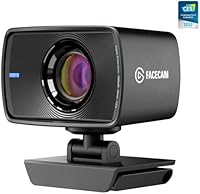
The Elgato Facecam 1080p60 Webcam is built squarely for creators who want professional-looking video without the complexity of a full camera rig. It sits comfortably in the premium webcam segment, competing with options like the Logitech Brio and Razer Kiyo Pro, but carves out a distinct identity through one key capability: uncompressed video output. Most webcams compress footage before it ever reaches your software; this streaming webcam sends raw image data instead, which means cleaner source quality in OBS and fewer artifacts in your final stream. Underpinning all of this is a Sony STARVIS CMOS sensor, optimized specifically for indoor use. That context matters — this cam thrives in a dedicated desk setup, not a backpack.

Features & Benefits

The Sony STARVIS sensor is where this creator-focused cam earns its reputation. In a typical streaming room with a desk lamp or ring light, it handles shadows and contrast well without the washed-out look common in cheaper sensors. The f/2.4 aperture on the 24mm all-glass prime lens contributes a natural background separation — not a virtual blur, but actual optical softening. Video is delivered uncompressed over USB 3.0, which matters if you care about what OBS is actually receiving as source material. Then there is Camera Hub software, which gives you manual shutter, ISO, and white balance controls. It is genuinely powerful, though the interface has a real learning curve and occasionally behaves inconsistently.

Best For

This streaming webcam is a strong fit for streamers and video creators who want serious image control without buying into a full mirrorless setup. If you use OBS or Streamlabs and actually tweak your source settings, Camera Hub integration will feel like a natural extension of that workflow. It also works well for remote professionals who appear on video calls regularly and want their setup to look polished. If you are already in the Elgato ecosystem — running a Stream Deck or a capture card — the unified software experience adds real convenience. That said, the fixed focus and USB 3.0 requirement make this a desk-bound tool; it is simply not built to travel.

User Feedback

Among the several thousand reviews the Facecam has accumulated, consistent praise centers on image sharpness and color accuracy — buyers regularly note it outperforms expectations relative to other options at this price tier. Low-light performance in indoor rooms gets specific callouts from streamers using standard desk lighting. On the other side, the fixed focus lens frustrates users who sit closer or farther than the sweet spot, and Camera Hub has drawn criticism for occasional crashes and a steeper-than-expected setup process. The absence of a built-in microphone catches some buyers off guard — worth knowing before purchasing. Dedicated streamers tend to rate it highly; those using it purely for casual calls find it harder to justify.

Pros

  • Uncompressed 1080p60 output gives OBS and Streamlabs the cleanest possible source signal.
  • Sony STARVIS sensor handles indoor low-light conditions better than most competing webcams.
  • The f/2.4 all-glass prime lens produces genuine optical background softening, not just a software blur.
  • Camera Hub software offers rare manual controls like shutter speed, ISO, and white balance.
  • Image sharpness and color accuracy consistently earn praise from long-term users.
  • Compact and lightweight at under 4 ounces, making desk mounting straightforward.
  • Works natively with both PC and Mac without driver headaches.
  • Advanced light correction helps recover usable footage in uneven or backlit room conditions.
  • Integrates cleanly into the Elgato ecosystem for creators already using Stream Deck or capture cards.

Cons

  • No built-in microphone, which is a real gap for buyers expecting an all-in-one streaming solution.
  • Fixed focus lens frustrates users who sit closer or farther than the intended optimal distance.
  • Camera Hub software has a noticeable learning curve and occasional stability issues.
  • Requires a USB 3.0 port, which can be a hard constraint on older hardware.
  • Strictly a desk-bound tool — not practical for mobile or multi-location setups.
  • Overkill for casual video callers who have no interest in manual image controls.
  • Camera Hub updates have historically been inconsistent, leaving some settings unreliable after patches.
  • No autofocus means any change in seating distance requires manual software adjustment.

Ratings

The Elgato Facecam 1080p60 Webcam has been scored by our AI system after analyzing thousands of verified global user reviews, with spam, bot-submitted, and incentivized feedback actively filtered out. The scores below reflect a transparent picture of where this creator-focused cam genuinely excels and where real buyers have run into friction. Both the standout strengths and the recurring pain points are weighted into every category.

Image Quality
91%
Sharpness and color reproduction consistently earn top marks from streamers and video professionals alike. Users switching from mid-range webcams frequently describe the difference as immediately visible, particularly in fine detail like hair and fabric texture during close-up shots.
Results are closely tied to controlled indoor lighting conditions. In genuinely dim or harshly backlit environments, the image quality advantage narrows compared to competing sensors with wider dynamic range.
Low-Light Performance
78%
22%
The Sony STARVIS sensor handles typical desk setups — a single ring light or a nearby window — with noticeably less grain than most webcams at this tier. Streamers using standard room lighting at night report clean, usable footage without heavy post-processing.
It is not a low-light miracle worker. Very dark rooms or mixed artificial lighting can still produce some grain and color shift, and without a dedicated key light, performance falls short of what a mirrorless camera would deliver.
Video Smoothness
93%
Sixty frames per second at full 1080p makes a real, visible difference during fast head movements and hand gestures on stream. Viewers and collaborators on calls have noted the footage looks distinctly more fluid and broadcast-like compared to standard 30fps webcams.
The 60fps advantage is only meaningful if your streaming setup can handle the uncompressed data throughput. On machines that struggle with USB 3.0 bandwidth or CPU headroom, users have occasionally observed dropped frames under heavy system load.
Uncompressed Output
89%
Sending raw, uncompressed video to OBS or Streamlabs means the encoding happens on your terms, not inside the camera. Creators who have previously dealt with macro-blocking artifacts or soft edges from compressed webcam feeds describe the improvement as immediately obvious in their stream VODs.
The benefit is largely invisible to anyone not running dedicated streaming or recording software. Casual users on Zoom or Teams will not notice the difference, making this a feature that only justifies itself for a specific type of buyer.
Manual Controls & Software
71%
29%
Camera Hub offers shutter speed, ISO, white balance, and exposure controls that are genuinely rare in the webcam category. For streamers who have dialed in their room lighting and want to lock those settings permanently, this level of control is a meaningful differentiator.
Camera Hub has a documented history of occasional crashes and inconsistent behavior after software updates. New users often find the interface more confusing than expected, and several reviewers have noted that certain settings do not always persist correctly between sessions.
Build & Hardware Design
82%
18%
The compact matte black housing feels dense and well-assembled for its size. At just over three ounces, it clips securely to most monitors without wobbling, and the minimal footprint suits clean desk aesthetics that streamers typically prioritize.
The mounting clip, while functional, feels like the weakest physical component. A small subset of users report the hinge loosening over extended use, particularly on thicker-bezel monitors where the clip is stretched further than its intended range.
Ease of Setup
84%
Plug-and-play functionality works reliably on both Windows and Mac — most users are up and running in under a minute without installing anything. OBS and Teams detect it immediately, which removes a common frustration point for new streamers or remote workers.
Camera Hub installation adds a layer of complexity that not all users are prepared for. Finding the right manual settings for a given room takes experimentation, and the software's learning curve means the full benefit of the webcam is not immediately accessible out of the box.
Lens & Optics
88%
The 24mm all-glass prime lens produces noticeably sharper edges and more natural-looking background separation than the plastic lens assemblies found in most competing webcams. Reviewers specifically mention that faces look rendered rather than flattened, which matters on camera.
Fixed focus is the one optical trade-off that divides buyers. Users who sit at a consistent desk distance will never notice it, but anyone who occasionally leans in closer for a reaction shot or sits back for a wider frame will see the focus plane miss noticeably.
Compatibility
86%
Works across Windows 10 and macOS 11.0, including Apple Silicon Macs, without driver issues. It integrates smoothly with every major streaming and conferencing platform tested, from OBS and Streamlabs to Zoom, Teams, and Google Meet.
The USB 3.0 requirement is a hard cutoff that catches some buyers off guard. Older laptops or desktops with only USB 2.0 ports simply cannot use this streaming webcam, which is a dealbreaker that Elgato could communicate more prominently on the packaging.
Audio Solution
31%
69%
The absence of a microphone is, in a narrow sense, a design philosophy choice — Elgato assumes their target buyer already owns a dedicated mic, and not including one keeps the audio signal chain clean without a built-in mic picking up keyboard or room noise.
In practice, the missing microphone is the single most common complaint across user reviews, particularly from buyers who did not read the specs carefully. For anyone expecting a single-cable solution for video calls or streaming, discovering there is no audio input is a frustrating and costly surprise.
Value for Money
74%
26%
For dedicated streamers who will actually use the uncompressed output and manual controls, the price is defensible against alternatives that compromise on sensor quality or image processing. Users in this category consistently rate it as worth the investment.
For casual users, remote workers with basic needs, or anyone who does not use OBS-style software, the value proposition weakens considerably. Competing options at lower price points cover those use cases without requiring a separate microphone purchase on top.
Ecosystem Integration
83%
Buyers who already own Elgato hardware — Stream Decks, HD60 capture cards, Key Lights — benefit from a unified Camera Hub interface that manages everything in one place. The consistency of the Elgato software environment is a genuine workflow convenience for committed users.
The ecosystem benefit is meaningless to anyone outside it. If you do not own other Elgato products, the software integration angle adds no value, and Camera Hub simply becomes another standalone app to maintain rather than a hub for anything.
Streaming Workflow Fit
92%
For OBS and Streamlabs users specifically, this creator-focused cam fits into existing workflows with minimal friction. The uncompressed source, manual exposure lock, and consistent framing mean fewer mid-stream adjustments and a more stable, professional-looking output over long sessions.
Its fitness for streaming workflows comes at the expense of general-purpose flexibility. The fixed focus, desk-bound design, and software dependency make it a poor candidate for anything outside a stationary streaming or recording setup.

Suitable for:

The Elgato Facecam 1080p60 Webcam is purpose-built for streamers and content creators who want a serious upgrade in video quality without committing to a full mirrorless camera setup. If you run a dedicated desk streaming station and already use OBS or Streamlabs, this creator-focused cam slots in naturally — the uncompressed output means your streaming software is working with the best possible source material, which shows in the final picture. Work-from-home professionals who spend significant time on video calls and care about how they are perceived on screen will also find real value here, particularly if they have a reasonably controlled lighting environment. It fits especially well within the broader Elgato ecosystem; if you already own a Stream Deck or an Elgato capture card, the unified Camera Hub software makes managing your whole setup more cohesive. Anyone who wants manual control over shutter speed, ISO, and white balance — features practically unheard of in this category — will appreciate what this cam makes possible.

Not suitable for:

The Elgato Facecam 1080p60 Webcam is a poor match for buyers who need a flexible, mobile, or all-in-one solution. The fixed focus lens is calibrated for a standard desk distance, so if you frequently shift your seating position or want to use it at varying ranges, you will likely run into soft or inconsistent focus. There is no built-in microphone, which means anyone expecting a single cable to handle both audio and video will need to budget for a separate mic. The USB 3.0 requirement rules out older machines or setups where only USB 2.0 ports are available. Casual video call users who just want something that works out of the box with minimal configuration may find the Camera Hub software more complicated than it is worth for their needs. If portability matters — say, for a laptop setup that moves between locations — the desk-bound design and software dependency make this streaming webcam a frustrating fit.

Specifications

  • Resolution: Captures video at 1080p (1920×1080) for sharp, detailed footage suitable for live streaming and professional video calls.
  • Frame Rate: Delivers a full 60 frames per second at 1080p, producing smooth motion that is noticeably more fluid than standard 30fps webcams.
  • Sensor: Uses a Sony STARVIS CMOS sensor optimized for indoor low-light environments, reducing grain and preserving color accuracy in typical desk setups.
  • Lens: Features a 24mm all-glass prime lens with an f/2.4 aperture, enabling natural optical background separation and consistent edge-to-edge sharpness.
  • Focus Type: Fixed focus design locks the focal plane at a standard desk distance, ensuring consistent sharpness without autofocus hunting during streams.
  • Video Output: Outputs uncompressed video over USB 3.0, eliminating encoding artifacts at the source before footage reaches streaming or recording software.
  • Interface: Connects via USB 3.0, which is required to handle the uncompressed data bandwidth; USB 2.0 ports are not supported.
  • Software: Controlled through Elgato Camera Hub, which provides manual adjustment of shutter speed, ISO, white balance, and other image parameters.
  • Compatibility: Supports Windows 10 (64-bit) with Intel or AMD CPU, and macOS 11.0 or later with Intel or Apple Silicon CPU.
  • Microphone: No built-in microphone is included; a separate audio input device is required for streaming or video call audio.
  • Weight: Weighs 3.63 ounces, making it lightweight enough for standard monitor-top mounting without stressing most clip mounts.
  • Dimensions: Measures 2.28 × 3.15 × 1.89 inches, compact enough to sit unobtrusively on top of most monitors or displays.
  • Light Correction: Includes an onboard advanced light correction engine that automatically compensates for backlit or unevenly lit room conditions.
  • Platform: Compatible with both PC and Mac, and works with major streaming and conferencing platforms including OBS, Zoom, and Microsoft Teams.
  • Build Material: Housing is constructed with a matte black finish designed to minimize glare and blend into typical streaming desk environments.

Related Reviews
Elgato Facecam 4K 60fps

87%
94%
Video Quality
89%
Ease of Setup
91%
Low-Light Performance
80%
Software Experience (Camera Hub)
88%
Build Quality
More
HuddleCamHD HC-WEBCAM-94
77%
83%
Video Quality (Daylight)
51%
Low-Light Performance
91%
Field of View
94%
Ease of Setup
57%
Audio Quality
More
Elgato Prompter
Elgato Prompter
79%
83%
Setup & Installation
76%
Display Quality
91%
Camera Compatibility
94%
Eye Contact Quality on Camera
81%
Build Quality & Materials
More
PEATOP 4K-C80CCMD Webcam
75%
74%
Video Quality
68%
Autofocus Performance
61%
Low-Light Performance
63%
Microphone Quality
93%
Setup & Compatibility
More
Elgato HD60 X
Elgato HD60 X
86%
94%
Setup & Driverless Installation
92%
VRR Passthrough Stability
91%
High Refresh Rate Passthrough
86%
Mac & iPad Versatility
78%
Hardware Connectivity & Ports
More
Lusinx 4K Webcam
Lusinx 4K Webcam
86%
91%
Video Quality
88%
Noise Cancellation Performance
87%
Low-Light Performance
94%
Setup & Installation
75%
Microphone Clarity
More
AVerMedia PW310P Webcam
86%
91%
Video Quality
88%
Autofocus Performance
94%
Ease of Setup
72%
Microphone Quality
89%
Privacy Features
More
Diccik 4K Webcam
Diccik 4K Webcam
85%
91%
Video Quality
75%
Microphone Performance
94%
Ease of Setup
88%
Light Adjustment
89%
Compatibility
More
Elgato Key Light
Elgato Key Light
85%
94%
Light Output Quality
91%
Color Temperature Range
86%
App Control & Usability
71%
Wi-Fi Setup & Connectivity
88%
Build Quality & Materials
More
MOERTEK 4K Webcam
MOERTEK 4K Webcam
87%
91%
Video Quality
89%
Noise Reduction
85%
Auto Framing
94%
Ease of Setup
88%
Privacy Features
More

FAQ

Yes, the Facecam is recognized as a standard video capture device by OBS and Streamlabs immediately after plugging in. You do not need to install any drivers for basic use. Camera Hub is a separate optional install that unlocks manual image controls, but it is not required to get video running in your streaming software.

No, there is no built-in microphone. This is one of the more important things to know before buying — if you need audio, you will have to connect a separate USB or XLR microphone. Elgato clearly designed this cam for creators who already have a dedicated audio setup.

Because the lens is fixed focus, moving significantly closer or farther from the camera will result in a softer, out-of-focus image. The fixed focal point is calibrated for a typical arms-length desk distance of roughly 60 to 80 centimeters. If your seating distance varies often, this is a real limitation worth considering before purchasing.

You need USB 3.0 or higher. The uncompressed video stream generates substantially more data than a compressed webcam, and USB 2.0 simply does not have enough bandwidth to handle it. Most computers made in the last several years include USB 3.0 ports, but it is worth checking your specific machine before buying.

The two serve slightly different priorities. The Brio supports 4K resolution and has autofocus, making it more versatile across different distances and use cases. The Facecam counters with uncompressed output and more granular manual controls via Camera Hub, which gives streamers a cleaner source signal and more precise image tuning. If you shoot at a fixed distance and care about what OBS actually receives, the Facecam has an edge; if you want flexibility and 4K capability, the Brio is worth considering.

No, Camera Hub is optional. Without it, the cam functions as a plug-and-play device with automatic image settings. Camera Hub is only necessary if you want to take manual control of shutter, ISO, white balance, or other image parameters. That said, getting the best image for your specific lighting situation often does benefit from at least some manual tuning.

Yes, it is compatible with macOS 11.0 and later on both Intel and Apple Silicon Macs, including M1, M2, and newer chips. Camera Hub also runs natively on Apple Silicon, so there are no Rosetta compatibility concerns to worry about.

It works perfectly well with Zoom, Teams, Google Meet, and most other conferencing platforms — any software that recognizes a standard webcam input will pick it up. Whether the premium image quality justifies the cost for calls alone is a personal decision, but technically there are no compatibility barriers.

The Sony STARVIS sensor handles typical indoor ambient lighting — a desk lamp or overhead room lighting — reasonably well. You do not necessarily need a dedicated ring light to get acceptable results. That said, like any camera, it performs best with good light; if your room is genuinely dark, adding even a simple key light will make a noticeable difference.

The included clip is designed for standard flat monitor tops and works well on most conventional displays. Ultrawide monitors with thicker frames or curved monitors with steep curvature can sometimes cause the clip to sit at an angle. In those cases, a separate adjustable webcam arm or desk mount typically produces a better result.