Overview

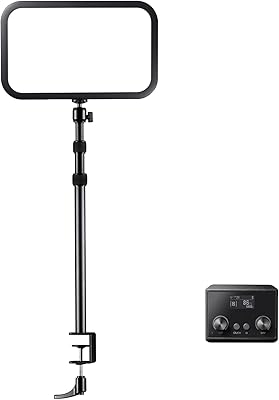
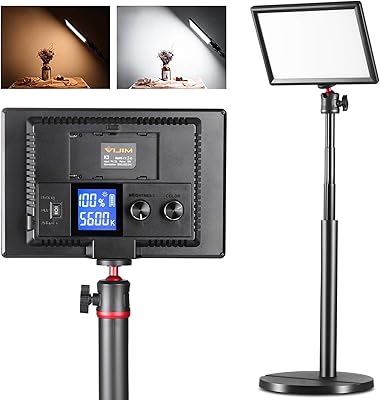
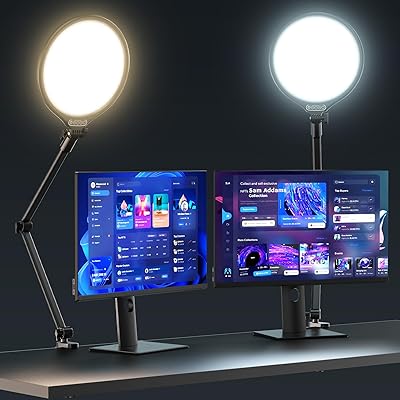
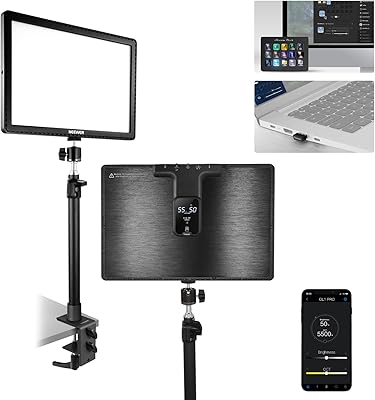
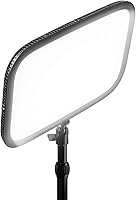
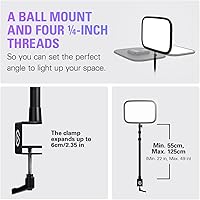
The Elgato Key Light is the kind of studio light that makes you wonder how you ever tolerated a ring light. Built for content creators, streamers, and remote workers who take their on-camera presence seriously, it sits in the premium tier for good reason. The desk clamp mount keeps your surface clear, extending anywhere from 22 to 49 inches to position the panel exactly where you need it. What sets this desk lighting panel apart from a basic lamp isn't just the output — it's the Wi-Fi app control that lets you dial in brightness and color temperature without ever touching the light itself. The build feels deliberate and solid, not like a consumer accessory.

Features & Benefits

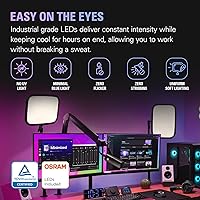
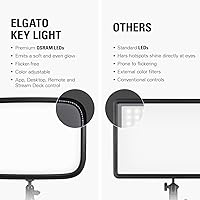
Pull up the app on your phone or desktop and you realize quickly why app control matters — adjusting color temperature from a warm 2900K to a crisp 7000K in seconds, without leaving your chair, changes how you approach a stream or call entirely. The 2800 lumens of output is substantial: bright enough to eliminate shadows across your whole desk, but the dimming range means you can pull it back to something softer for late-night sessions. Behind the opal glass diffuser, 160 OSRAM LEDs spread light so evenly that hotspots are essentially gone. Heat stays low even during multi-hour streams, which is a real advantage over traditional softboxes.

Best For

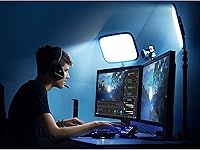
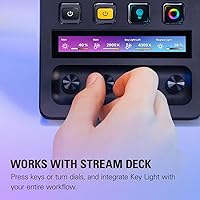
This studio light makes the most sense for streamers and YouTubers who are tired of fiddling with light placement every time they go live. Remote workers logging hours on video calls will notice the difference immediately — consistent, flattering light makes a real impression. The clamp mount is a genuine space-saver for tighter desk setups, keeping the panel off the surface entirely. If you're already using a Stream Deck, the integration is worth mentioning — you can trigger lighting changes as part of a scene switch without touching the app. Anyone stepping up from a ring light or a budget LED panel will find the diffusion and control here are in a different class altogether.

User Feedback

Buyers consistently report that the light improves their camera image right out of the box, and many note that the app felt intuitive once they got past initial setup. That first pairing step is worth flagging honestly: Wi-Fi configuration can be frustrating on certain routers or network setups, and a handful of users needed a second attempt before things clicked. The desk clamp draws strong praise for stability and reach. Predictably, the price generates debate — it isn't an impulse buy, but most owners conclude the investment holds up once they see the results on camera. Very few mention wanting to go back to whatever they were using before.

Pros

  • Light output is broad, even, and flattering — a noticeable upgrade over ring lights immediately.
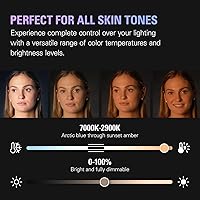
  • Color temperature adjusts across a wide range, covering warm evening tones to crisp daylight.
  • The opal glass diffuser eliminates hotspots and produces natural-looking skin tones on camera.
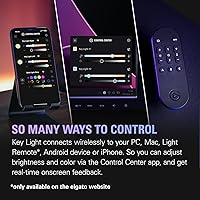
  • App control across Mac, Windows, iOS, and Android is responsive and well-designed post-setup.
  • Runs cool even during multi-hour streaming sessions, unlike traditional softboxes.
  • The desk clamp mount keeps your work surface completely clear and positions cleanly in tight setups.
  • Stream Deck integration allows lighting scene changes without interrupting a live broadcast.
  • Supports both 2.4 GHz and 5 GHz Wi-Fi, offering more network flexibility than most smart desk accessories.
  • Build quality feels deliberate and professional, not like a consumer-tier product.

Cons

  • Initial Wi-Fi pairing is a recurring pain point, especially on mesh networks or custom router setups.
  • No physical controls on the unit itself — all adjustments require the app or an Elgato accessory.
  • Occasional app updates have been known to disrupt device discovery and require re-pairing.
  • The clamp arm uses plastic joints that feel less premium than the panel it supports.
  • At maximum brightness in a small room, output can feel overpowering when sitting close to the panel.
  • The power brick runs noticeably warm during extended high-brightness sessions.
  • Stream Deck integration only benefits users already invested in the Elgato product ecosystem.
  • The price point places it firmly in considered-purchase territory — not easy to justify for casual or infrequent use.
  • Very warm color temperature settings can read as orange rather than neutral on some webcam sensors.

Ratings

The Elgato Key Light has been put through its paces by a wide range of buyers — from full-time streamers to remote professionals upgrading their home office setup — and the scores below reflect what they actually experienced. Our AI analyzed thousands of verified global reviews, actively filtering out incentivized, bot-generated, and low-effort feedback to surface honest patterns. The results capture both where this desk lighting panel genuinely excels and where a few friction points are worth knowing before you commit.

Light Output Quality
94%
The sheer evenness of the illumination is what catches most buyers off guard — there are no hotspots, no harsh center glow, just a wide, flat wash of light that makes faces look natural on camera. Streamers report that their webcam exposure stabilizes almost immediately after switching on the panel, requiring far less post-processing or in-app correction.
At maximum output, a small number of users in compact rooms find 2800 lumens slightly overpowering, particularly when sitting closer than 3 feet from the panel. Dimming solves this, but it means you are rarely using the light at its full rated capacity in tighter spaces.
Color Temperature Range
91%
Spanning from a warm 2900K amber to a cool 7000K daylight tone, the range covers virtually every scenario — early morning calls, late-night streams, and everything in between. Users who film product reviews or tutorials particularly appreciate being able to match their ambient room lighting without color cast bleeding into the shot.
A handful of buyers note that the very low end of the warm range can look slightly orange on certain webcams rather than a neutral warm white. This is more of a camera white-balance issue than a flaw in the light itself, but it catches some new users off guard during their first session.
App Control & Usability
86%
Once the initial pairing is done, the desktop and mobile app controls are responsive and genuinely well-designed. Adjusting brightness mid-stream without interrupting your workflow — or triggering a scene change via Stream Deck — is the kind of convenience that buyers quickly stop noticing because it just works reliably every session.
The initial Wi-Fi pairing step earns consistent criticism, especially from users on mesh networks or routers with custom DNS settings. Several buyers report needing two or three attempts before the light shows up in the app, which is a frustrating introduction to an otherwise polished experience.
Wi-Fi Setup & Connectivity
71%
29%
Supporting both 2.4 GHz and 5 GHz bands gives the Key Light more flexibility than most smart devices in this category, and once it is on your network, the connection stays stable across long sessions without dropouts. Users with straightforward home routers generally get through setup in under five minutes.
The setup process is the single most common pain point in user reviews. Buyers on enterprise-style home networks, VPNs, or certain ISP-provided routers frequently hit walls that require workarounds like temporarily creating a separate 2.4 GHz hotspot just to complete pairing. For a premium-priced product, this friction feels disproportionate.
Build Quality & Materials
88%
The panel itself has a solid, considered feel — the opal glass diffuser sits flush and sturdy, and nothing flexes or rattles during repositioning. Users who have owned cheaper LED panels note immediately that this one feels like it belongs in a professional studio rather than a consumer electronics aisle.
The arm and clamp assembly, while functional, uses mostly plastic construction at the joint points, which a small group of buyers feel does not quite match the premium positioning of the panel itself. No reported failures, but the tactile experience of adjusting the arm is noticeably less premium than the light panel it holds.
Desk Clamp & Mount System
83%
Keeping the light entirely off the desk surface is a genuine quality-of-life improvement for anyone working in a tight space. The arm extends to nearly 49 inches, giving real flexibility in positioning — whether you want the light high and angled, or closer and softer, the range accommodates most desk configurations.
The clamp works best on desks with a standard edge thickness, and users with thicker or irregular desk surfaces occasionally struggle to get a fully secure grip. The recommended 90 cm arm extension also means the full setup has a fairly wide footprint when fully extended, which can crowd multi-monitor desks.
Heat Management
92%
Running four or five hours straight through a streaming session, the panel stays noticeably cool to the touch — a practical advantage over older softbox-style lights that warm up a room meaningfully over time. This makes the Key Light genuinely comfortable to sit near for extended periods without any ambient heat buildup.
There is very little to criticize here, though a small number of users note the power brick runs warm during extended high-brightness use. It is not a safety concern by any measure, but worth knowing if your desk has limited ventilation around power accessories.
Stream Deck Integration
89%
For users already embedded in the Elgato ecosystem, the Stream Deck integration is one of those features that quickly becomes indispensable. Assigning lighting scenes to a single button press — switching from a bright interview setup to a moodier gaming configuration without touching anything else — saves real time during live content.
This feature only delivers value to users who already own a Stream Deck or are willing to invest in one. For buyers outside the Elgato ecosystem, it reads as a nice-to-have rather than a compelling reason to choose this studio light over alternatives with comparable output.
Diffusion & Glare Reduction
93%
The opal glass panel in front of the 160 LEDs does a remarkably effective job of spreading light without any visible point-source artifacts. Buyers who previously used bare-LED panels or ring lights with thin diffusers immediately notice the difference — skin tones look more natural and reflective surfaces in the background do not flare up as badly.
In some shooting environments with very light-colored walls directly behind the subject, the broad diffusion can create a slightly flat, shadowless look that more experienced videographers may want to counteract with a secondary light source. Not a flaw so much as a characteristic of wide-panel diffusion design.
Value for Money
74%
26%
The majority of buyers who commit to this desk lighting panel ultimately conclude the price is justified — the build longevity, light quality, and app ecosystem together make a case that cheaper alternatives do not match over time. Users who upgraded from sub-$50 ring lights describe the difference in output quality as immediately apparent.
At its price point, this is not a casual purchase, and buyers looking for a basic improvement to their video call setup may find the investment harder to rationalize. The absence of a physical control dial — requiring the app or a Stream Deck for all adjustments — also draws criticism from users who prefer tactile hardware controls at this price tier.
Software Stability
78%
22%
Day-to-day app performance is reliably stable for the majority of users — the light responds quickly to adjustments, presets save correctly, and the interface has not changed in ways that break existing workflows. Cross-platform support across Mac, Windows, iOS, and Android is genuinely broad for a product in this category.
A recurring complaint across longer-term reviews involves occasional app updates that temporarily break device discovery or require the user to re-pair. These issues tend to get patched within a few weeks, but they surface often enough in the feedback pool to represent a pattern rather than isolated incidents.
Compatibility & Ecosystem Fit
85%
The breadth of platform support — covering Windows, macOS, iOS, and Android — means this studio light fits comfortably into almost any content creation workflow without forcing a platform choice. Works reliably alongside major streaming and capture software without any reported conflicts.
Users outside the Elgato product ecosystem get a solid standalone experience, but they are effectively leaving the best features on the table. Buyers expecting plug-and-play integration with non-Elgato gear sometimes find the app ecosystem feels slightly walled-off compared to more open smart-lighting platforms.
Setup & Installation
76%
24%
Physical assembly is quick — attaching the panel to the arm and clamping it to a desk takes most users less than ten minutes without any tools. The included instructions cover the hardware side clearly, and the clamp mechanism is straightforward enough that most buyers have the light positioned and powered on well within the first quarter hour.
The software side of setup is where the experience stumbles, as noted across the connectivity scores. Hardware assembly is fine; it is the network pairing that consistently adds unexpected time to the full out-of-box experience for a meaningful share of buyers.

Suitable for:

The Elgato Key Light is purpose-built for anyone who spends serious time on camera and has grown frustrated with the inconsistent, unflattering results that cheaper lighting alternatives produce. Full-time streamers and content creators will get the most out of it — the ability to shift color temperature and brightness on the fly, without interrupting a live session, genuinely changes how you manage your on-screen presence. Remote workers who join multiple video calls each day will also notice a real improvement: colleagues and clients will see a cleaner, more professional image without you needing to touch any settings mid-meeting. The desk clamp design makes it particularly well-suited to compact home office setups where surface space is already spoken for. And if you are already running a Stream Deck, the integration tightens your whole studio workflow in a way that feels less like a peripheral and more like a natural extension of your setup. Upgraders stepping away from ring lights or thin bare-LED panels will find the diffusion quality here is a meaningful step forward.

Not suitable for:

If you are looking for a simple, affordable lighting boost for the occasional video call, the Elgato Key Light is likely more light — and more investment — than your situation requires. Buyers who are not comfortable with a Wi-Fi pairing process, or who run complex home network configurations like mesh systems or VPN-enabled routers, should know upfront that the initial setup can be genuinely frustrating and may require troubleshooting. This studio light also lacks any physical control dial or button on the unit itself, which means every adjustment — from brightness to color temperature — runs through an app or a compatible Elgato accessory; buyers who prefer tactile hardware controls will find that approach limiting. It is not a great fit for photographers who need precise, calibrated output for color-accurate product work, as it is optimized for on-camera video rather than controlled studio photography. Anyone on a tight budget who just needs basic illumination will find the price hard to justify compared to capable alternatives at a fraction of the cost.

Specifications

  • Brightness: Delivers a maximum output of 2800 lumens, with full dimming capability down to a low ambient glow.
  • Color Temperature: Adjustable from 2900K warm amber through to 7000K cool daylight in fine increments via the companion app.
  • LED Count: Houses 160 OSRAM LEDs arranged behind an opal glass diffuser panel for uniform, shadow-free illumination.
  • Diffuser: Opal glass face panel distributes light evenly across the entire panel surface, eliminating hotspots and glare.
  • Panel Dimensions: The light panel measures 13.78″ x 9.84″ x 1.38″ (350 x 250 x 35 mm).
  • Weight: The panel unit weighs 2.75 lbs (1.25 kg), not including the mount arm assembly.
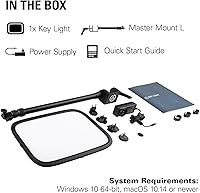
  • Mount Arm Length: The included Master Mount L arm adjusts from a minimum of 22″ (55 cm) to a maximum of 49″ (125 cm), with 35″ (90 cm) recommended for typical desk use.
  • Connectivity: Connects to your local network over Wi-Fi on both 2.4 GHz and 5 GHz bands using the 802.11 a/b/g/n standard.
  • Wi-Fi Security: Supports WPA and WPA2 encryption protocols for standard home and office network security.
  • Power Consumption: Draws up to 45W at maximum brightness output during normal operation.
  • App Support: Compatible with the Elgato Control Center app on macOS 10.14 or newer and Windows 10 (64-bit), as well as iOS and Android devices for initial setup and ongoing control.
  • Stream Deck Support: Natively integrates with the Elgato Stream Deck and Elgato Light Remote for hands-free lighting adjustments during live content.
  • Heat Output: Produces significantly less ambient heat than equivalent softbox lighting solutions, remaining cool to the touch during extended sessions.
  • Hardware Interface: Connects to power via a standard USB-based power supply; no direct PC USB data connection is used during normal operation.
  • First Available: This product was first made available in January 2019 and has not been discontinued by the manufacturer.
  • BSR Ranking: Ranks among the top 10 products in the Continuous Output Lighting category on Amazon at the time of writing.

Related Reviews
Elgato Key Light Neo
89%
91%
Ease of Setup
95%
Lighting Quality
85%
Mounting Flexibility
92%
Adjustable Settings
89%
Packaging Sustainability
More
Godox ES45 Key Light
85%
89%
Brightness Control
91%
Ease of Setup
84%
Adjustability of Stand
93%
Lighting Quality
76%
Remote Control Convenience
More
UBeesize 10″ Key Light with Adjustable Arm
75%
91%
Ease of Setup
88%
Arm Stability
74%
Light Quality
78%
Clamp Grip & Desk Compatibility
67%
Bluetooth Reliability
More
ULANZI LED Key Light Desktop
86%
91%
Value for Money
94%
Brightness & Light Quality
88%
Ease of Setup
93%
Color Temperature Adjustment
90%
Portability & Flexibility
More
Logitech G Litra Beam LX Streaming Key Light
86%
88%
Lighting Quality
91%
Ease of Use
85%
RGB Customization
92%
Skin Tone Accuracy (TrueSoft Technology)
78%
Brightness
More
NEEWER 25W 12.9″ Streaming Key Light GL25B
86%
91%
Lighting Quality
88%
Ease of Setup
93%
Adjustability and Flexibility
84%
Wireless Control Experience
96%
Color Accuracy (CRI Rating)
More
NEEWER 15.5″ LED Streaming Key Light GL1 Pro
84%
92%
Brightness & Lighting Quality
88%
Ease of Setup & Installation
89%
Compatibility with Devices & Apps
91%
Fanless Design & Noise Control
85%
Color Temperature & Dimming Adjustments
More
Keys Soulcare It's Like Skin 2-In-1 Concealer + Tint, 160 C Light Cool Peach
85%
86%
Effectiveness & Coverage
91%
Hydration & Skin Feel
89%
Radiance & Finish
84%
Texture & Blendability
83%
Shade Match & Range
More
AceTaken Workbench Light 8-inch USB Ring Light
84%
90%
Brightness Control
78%
Clamp Flexibility
85%
Portability
88%
Ease of Setup
92%
Value for Money
More
Milani Retouch + Erase Light-Lifting Concealer - Medium Light
88%
89%
Coverage Quality
92%
Ease of Application
85%
Longevity
91%
Blendability
87%
Buildable Coverage
More

FAQ

You can use either. The Elgato Key Light pairs with the Control Center app on Mac and Windows for desktop control, but it also supports iOS and Android for initial setup and day-to-day adjustments. Most users find the phone app handy for quick changes without switching focus away from their work.

For most people on a standard home router, the pairing process takes around five to ten minutes. That said, if you are running a mesh network, a router with AP isolation enabled, or a VPN on your device during setup, things can get tricky. The most reliable workaround is to temporarily connect your phone to a straightforward 2.4 GHz network to complete the initial pairing, then switch back to your usual setup.

There is no physical button or dial on the panel itself, so all brightness and color temperature adjustments go through the app. If you want hardware control without reaching for your phone, the Elgato Light Remote or a Stream Deck can handle that for you.

The Key Light does not plug directly into OBS or Streamlabs, but if you pair it with a Stream Deck, you can create scene-based lighting triggers that fire automatically as part of your stream workflow. Without a Stream Deck, you would manage it through the standalone Control Center app running alongside your streaming software.

One panel covers the majority of streaming and video call setups well — the 2800 lumen output is broad enough to illuminate your face and reduce shadows effectively from a single angle. Many creators do run two units for a more cinematic look with a key and fill light setup, but it is absolutely not required for a clean, professional result.

The main differences come down to diffusion quality and flexibility. Ring lights produce a characteristic circular catch light in the eyes and can create uneven illumination across the face. This desk lighting panel spreads light much more evenly across a wide rectangular area, which looks more natural on camera and avoids the telltale ring reflection in eyeglasses. The app-controlled color temperature adjustment is also a meaningful step up from most ring lights in this price bracket.

The clamp is designed for standard desk edge thicknesses and handles most common desk profiles without issue. Very thick or unusually shaped desk edges — such as those with rounded undersides or decorative trim — can make getting a secure grip more difficult. If your desk edge is thicker than about 2 inches, it is worth checking compatibility before purchasing.

Not in any meaningful way. The OSRAM LEDs run considerably cooler than traditional tungsten or fluorescent studio lights, and even after several hours at high brightness, the panel surface stays comfortable to touch. The power brick can get slightly warm under sustained heavy use, but it is nothing out of the ordinary for a 45W device.

This is a fair concern with any Wi-Fi-dependent hardware. Currently the app is actively maintained and updated. Without the app, you would lose the ability to adjust settings, though some third-party integrations have emerged that can communicate with the light directly over the local network API. It is a known trade-off of the app-dependent control model.

It works well for video-focused use cases — streaming, conferencing, and YouTube recording — but it is not calibrated or marketed as a color-accurate photography light. Professional product photographers or portrait photographers who need precise, measurable color accuracy would typically gravitate toward lights with a published CRI rating and more controlled beam characteristics. For casual content photography and video, though, the output quality is genuinely impressive.