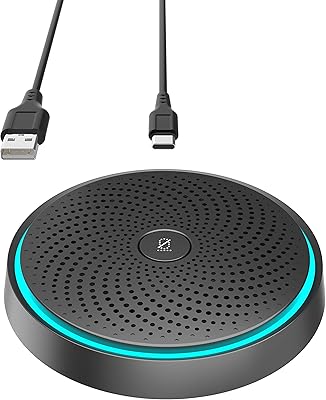
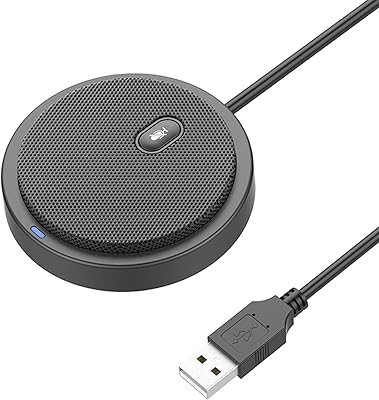
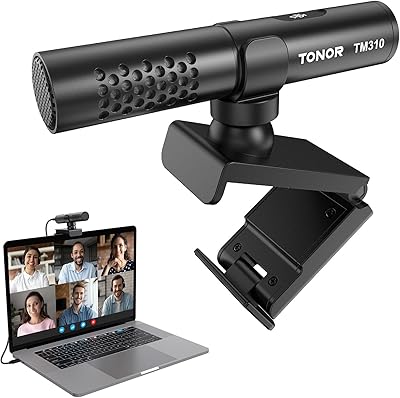
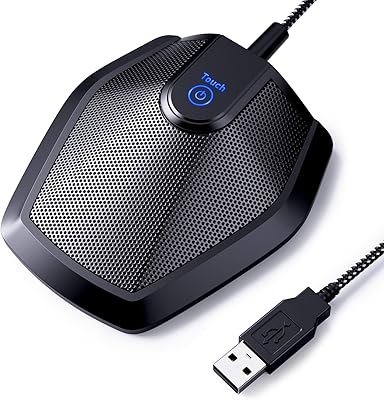
Overview

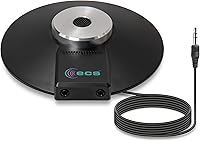
The ECS WordForum ECS-WFCM3.5 Omnidirectional Conference Microphone offers an easy-to-use, high-quality audio solution for meetings, video calls, and teleconferencing. This 360° omnidirectional microphone is designed to capture sound from all directions, ensuring clear communication. Whether you're working in a conference room or setting up a home office, this microphone connects effortlessly via a 3.5mm TRS plug, providing broad compatibility with PCs and laptops. Its compact size and durable design make it a versatile choice for anyone needing a reliable microphone for group conversations.
Features & Benefits

The ECS microphone stands out with its omnidirectional design, which allows it to capture sound from all angles, ensuring more accurate and natural recordings. With an 8-foot cable, you have the flexibility to position the microphone as needed during meetings or conference calls. It also supports daisy-chaining with additional microphones, making it a perfect choice for multi-user setups. The wide frequency response enhances voice clarity, and its plug-and-play functionality ensures ease of use without complicated setup. This microphone is designed for users who prioritize reliability and sound quality in professional settings.

Best For

This conference microphone is ideal for small to medium-sized conference rooms, home offices, and any environment where clear audio is critical. It's best suited for users who need a straightforward, plug-and-play solution for video conferencing or Skype calls. Its omnidirectional pattern makes it an excellent choice for teams or groups who require a microphone capable of picking up voices from all around the room. The microphone's easy setup and versatility also make it perfect for educators, business professionals, and remote teams looking to improve their virtual communication.

User Feedback

Many users appreciate the microphone’s clear sound quality and its ease of setup, especially in video conferences where crisp audio is key. It has received positive feedback for its ability to pick up voices from multiple people in a room, making it a reliable tool for group meetings. However, some users have noted that the microphone performs best with powered TRS jacks, which may require adapters for certain devices. While most users find the microphone to be highly effective, those using non-powered jacks might experience some limitations with volume and clarity.

Pros

  • This microphone captures sound clearly from all directions, making it ideal for group calls and teleconferencing.
  • The 8-foot cable provides enough length for flexible positioning during meetings or video calls.
  • Setup is straightforward, with no drivers required, ensuring easy plug-and-play use.
  • The wide frequency response enhances voice clarity, especially in video conferencing settings.
  • Users appreciate the option to daisy-chain multiple microphones for larger group setups.
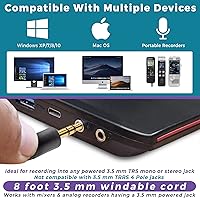
  • It’s compatible with PCs, laptops, and many recorders via the 3.5mm TRS plug, offering broad device compatibility.

Cons

  • Performance may suffer in larger spaces, as the microphone picks up background noise more easily.
  • Some users report that it works best with powered TRS jacks, which may require additional adapters.
  • The microphone’s design might not be sturdy enough for frequent travel or heavy-duty use in demanding environments.
  • It might not deliver optimal results in environments with a lot of echo or acoustic issues.
  • While versatile, it may not meet the needs of users looking for advanced noise-canceling features.
  • Inconsistent performance noted when used with non-powered devices, limiting flexibility for some users.

Ratings

After analyzing verified user reviews worldwide from a variety of platforms and languages, we have compiled the scores for the ECS WordForum ECS-WFCM3.5 Omnidirectional Conference Microphone. Only authentic, high-quality feedback informed these results, filtering out any spam, bot-generated, or off-topic content. Both strengths and pain points have been reflected in the final scores, providing a balanced view of the product’s performance across different environments and use cases.

Sound Quality
88%
Many users are impressed by the clear and crisp audio captured by this conference microphone. It does a great job of picking up voices from different angles, ensuring that everyone in a meeting or call is heard clearly. The wide frequency response also enhances the clarity of voices, making it ideal for teleconferencing.
Some users noted that while the sound quality is generally good, it can sometimes pick up unwanted background noise in noisy environments. Additionally, certain users mentioned that the mic's sensitivity might not always work well in very large or echo-prone rooms.
Ease of Setup
91%
The plug-and-play design of this microphone is a major plus for users who need a quick and hassle-free setup. Buyers highlight how easy it is to connect to PCs, laptops, and even digital recorders without the need for drivers or complicated configurations. The simplicity of setup is appreciated by those with little technical expertise.
A few users mentioned that, while the setup is generally simple, they had some difficulties connecting the microphone to certain devices, especially those without a powered TRS jack. This might require additional adapters, which some found inconvenient.
Build Quality
85%
The microphone has a sturdy design that holds up well in both office and home settings. Users find it durable enough for regular use without worrying about wear and tear. The build quality is generally considered reliable, and the compact form factor is easy to store when not in use.
However, a few users reported that the plastic construction feels somewhat lightweight and may not hold up as well in more demanding environments. Some found the mic's base to be slightly less stable on certain surfaces, though this is less of an issue for most buyers.
Versatility for Group Use
84%
Several users appreciated the microphone's ability to capture sound from all directions, making it perfect for small to medium-sized groups. This feature ensures that everyone in the room is clearly heard, which is a crucial benefit during meetings or video calls with multiple participants.
However, some users found that the microphone's performance declined in larger rooms, especially those with high ceilings or excessive background noise. In these situations, a higher-quality or more powerful microphone may be needed for optimal clarity.
Cable Length & Flexibility
89%
The 8-foot cable provides excellent flexibility in positioning the microphone during calls or meetings. Users report that the length is ideal for most desk setups and allows for a more comfortable arrangement without having to worry about being tethered too closely to the device.
On the downside, a few users pointed out that the cable might be too short for larger conference rooms or more complex setups. If you're trying to place the microphone further from your computer or audio equipment, an extension cable may be necessary.
Microphone Sensitivity
80%
20%
The microphone is generally responsive and picks up voices clearly from various directions, making it effective for small meetings or group calls. Users found it particularly useful for capturing soft-spoken voices without distortion, which is crucial in a teleconferencing environment.
Some users did report that the microphone's sensitivity can be inconsistent in very quiet or very loud environments. In some cases, background sounds might interfere with the clarity of voices, and adjusting the mic’s placement or settings might not completely solve the issue.
Compatibility with Devices
78%
22%
This microphone is compatible with a wide range of devices, including PCs, laptops, and recorders with 3.5mm TRS jacks. Users appreciate the broad compatibility as it eliminates the need for specialized equipment, making it versatile for different setups.
However, a number of users noted that it may require additional adapters or powered TRS jacks for use with certain devices. This can be an inconvenience, particularly for those without the right accessories or for devices lacking a TRS port.
Voice Clarity in Video Calls
92%
Users have praised the clarity of voices during video calls, with many highlighting how effectively the microphone picks up voices from different angles in a room. This feature is especially beneficial for group calls, where ensuring everyone is heard clearly is essential for a productive conversation.
Some users felt that the clarity diminished in larger or more acoustically challenging rooms, where background noise or echo could interfere with voice pickup. While effective in smaller spaces, the microphone may struggle in very large, open environments.
Multi-Microphone Setup (Daisy-Chaining)
75%
25%
The ability to daisy-chain additional microphones is a key advantage for users who need to set up a larger microphone array. This feature allows for flexible setups in environments where multiple participants need to be heard from different locations around the room.
However, some users found the daisy-chaining feature difficult to set up, especially when connecting to devices that don't support multiple microphones at once. The additional microphones may also require powered jacks, which adds complexity to the setup process.
Value for Money
87%
Many users find the microphone to offer great value for its price, especially considering its solid performance in small-to-medium setups. The ease of use, good sound quality, and versatility make it an affordable option for personal or office teleconferencing needs.
On the flip side, some users felt that the microphone didn’t offer the same level of performance as higher-end models, particularly in larger spaces or more complex audio setups. While it’s a great option for casual use, those seeking more advanced features might need to invest in a more expensive model.
Power Requirements for TRS Jack
72%
28%
For most users, the microphone works well with standard TRS jacks, providing a reliable audio connection. Those who have powered TRS jacks on their devices benefit from enhanced performance, as the microphone works optimally in such setups.
A common issue among some buyers was that the microphone didn’t perform as well with non-powered TRS jacks, resulting in weaker sound or poor clarity. As a result, users needed additional adapters or powered ports, which could be inconvenient and increase the overall cost of use.
Overall User Satisfaction
83%
Overall, users are generally satisfied with the microphone's performance, particularly in video conferencing and group settings. Its affordability, ease of setup, and clear sound make it a solid choice for home offices or small conference rooms.
While most users are satisfied, there are a few complaints about its performance in larger, noisier spaces. Additionally, some users found the need for additional adapters or powered TRS jacks a bit of a hassle, which detracted from the overall experience.

Suitable for:

The ECS WordForum ECS-WFCM3.5 Omnidirectional Conference Microphone is ideal for small to medium-sized conference rooms, home offices, and group calls. Users who need a simple, plug-and-play microphone for clear audio during video conferencing or teleconferencing will benefit most. This microphone excels in environments where participants are within a reasonable distance, offering consistent sound quality and voice clarity from all directions. It’s also a great option for those who need flexibility with an 8-foot cable and the option to daisy-chain additional microphones for larger groups. Those looking for an affordable, easy-to-use solution for regular meetings, whether at work or for personal projects, will find this microphone fits their needs well.
Not suitable for:

This microphone may not be the best choice for large or acoustically challenging environments, such as large conference rooms or spaces with excessive background noise. While it captures sound from all directions, its performance can be inconsistent in larger areas, and some users have noted issues with sensitivity in such settings. Additionally, those relying on devices without powered TRS jacks might face compatibility issues, as the microphone works best with powered connections. For users seeking a more advanced microphone with superior noise-canceling capabilities or the ability to capture sound in very large rooms, this microphone may not meet those expectations.

Specifications

  • Microphone Type: Omnidirectional microphone captures sound from all directions for more accurate recording.
  • Connector Type: Uses a 3.5mm TRS plug for compatibility with most PCs, laptops, and analog/digital recorders.
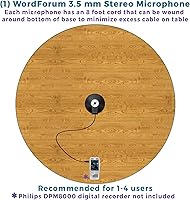
  • Cable Length: The microphone features an 8-foot cable for flexible positioning during meetings or calls.
  • Polar Pattern: Omnidirectional polar pattern ensures clear audio capture from multiple angles.
  • Frequency Response: Wide frequency response provides enhanced voice clarity, making it ideal for teleconferencing.
  • Signal-to-Noise Ratio: Has a 52 dB signal-to-noise ratio, ensuring clear and accurate sound reproduction.
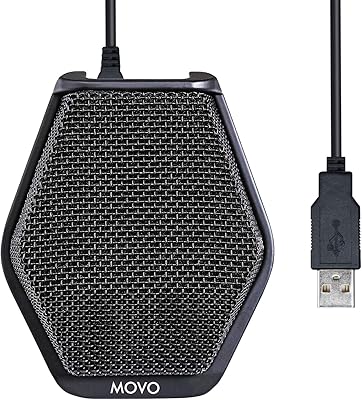
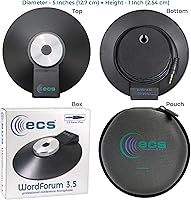
  • Form Factor: Boundary microphone design offers easy placement on a flat surface for optimal sound capture.
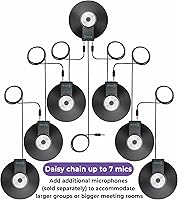
  • Daisy-Chaining: Supports daisy-chaining of additional microphones for multi-user setups in larger spaces.
  • Power Requirements: Works best with powered TRS jacks, which may require adapters for certain devices.
  • Compatibility: Compatible with PCs, laptops, and devices with a 3.5mm TRS jack input.
  • Ideal Use: Best suited for video conferencing, teleconferencing, and group calls in small to medium-sized rooms.
  • Plug-and-Play: No drivers or software required; the microphone is ready to use as soon as it is plugged in.
  • Weight: The microphone is lightweight and portable, making it easy to transport for meetings or events.
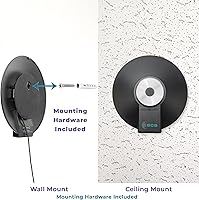
  • Mounting Options: Can be placed directly on a table or desk for clear, hands-free audio capture.
  • Durability: Designed for regular use, but may not be suited for extreme wear or travel environments.

FAQ

Setup is simple and requires no additional drivers. Just plug the microphone’s 3.5mm TRS jack into your computer or audio device. It’s a plug-and-play microphone, so you can start using it right away for video calls or meetings.

This microphone is compatible with PCs, laptops, and many analog or digital recorders that feature a 3.5mm TRS input. However, some users report that it works best with powered TRS jacks, so you may need an adapter for certain devices.

The ECS microphone features an omnidirectional pickup pattern, meaning it captures sound from all directions within its range. This makes it great for group discussions, as it picks up voices from multiple angles and distances around the mic.

The ECS microphone is best suited for small to medium-sized spaces like home offices or small meeting rooms. For larger conference rooms, you may want to daisy-chain multiple microphones together for more coverage.

The microphone comes with an 8-foot cable, giving you plenty of flexibility to position it on a table or desk for optimal sound capture during meetings or calls.

Yes, this microphone can be daisy-chained to additional microphones, making it ideal for larger meetings or group calls where multiple microphones are needed to capture voices from all participants.

No, the microphone is completely plug-and-play. There are no drivers or software to install, so you can quickly connect it to your PC or laptop and begin using it for calls or recordings.

This microphone is great for quiet, controlled environments like home offices and small conference rooms. It can pick up clear, accurate sound in these settings, making it ideal for video conferencing and teleconferencing.

In environments with significant background noise or echo, the microphone may pick up unwanted sounds. It’s best used in spaces where background noise is minimal, or you might need to add noise cancellation or acoustic treatments.

The microphone is designed for regular use, but it may not be the best option for heavy-duty environments or frequent travel. The build quality is good, but it may not withstand extreme wear and tear.