Overview

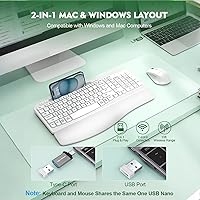
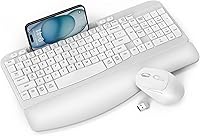
The EAYBLLY Wave Keys Keyboard and Mouse Combo is a budget-friendly ergonomic wireless set that arrived in early 2025 and has already earned a spot near the top of Amazon's keyboard combo bestseller list. That kind of traction for a newcomer brand is worth paying attention to. What sets this ergonomic combo apart from the sea of flat, generic wireless keyboards is its wave-shaped key layout and a cushioned palm rest built right in — not sold separately. Setup takes about thirty seconds: plug in the single USB receiver, and both devices are immediately recognized. A USB-C adapter is included in the box, which is a practical touch for anyone running a modern laptop alongside a desktop.
Features & Benefits

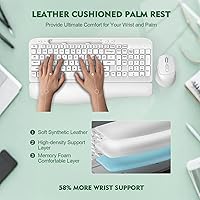
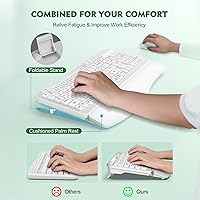
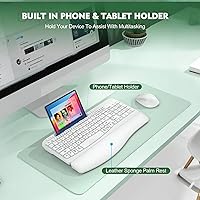
The wave-shaped key layout is the centerpiece here — the keys arch gently upward in the middle, encouraging your hands to rest at a slightly outward angle rather than flat on a surface. Over a long workday, that shift in posture can reduce wrist fatigue, though the degree of relief genuinely depends on your hand size and how you naturally hold your wrists. The memory foam palm rest is soft without feeling flimsy, and it stays put on the desk. A practical bonus is the built-in phone slot, wide enough for most tablets, which keeps a second screen in view without any extra accessories. The mouse clicks quietly and offers three DPI levels to adjust tracking speed as needed.

Best For

This wireless keyboard-and-mouse bundle hits a sweet spot for a fairly specific type of user. If you spend most of your workday typing — whether you are a student writing papers, an office worker grinding through emails, or someone upgrading from a crumbling basic keyboard — the wrist cushioning alone makes the step up worthwhile. It also suits anyone who keeps a phone propped on their desk, since having that slot built in removes a small but constant annoyance. Open-plan office workers will appreciate the near-silent mouse. One honest caveat: if you need mechanical key feedback or a heavy-duty plastic chassis, this may fall short. For everyday home or light office use, though, it punches well above its weight class.

User Feedback

With over 840 ratings and a 4.1-star average for a product barely a year old, the Wave Keys set has clearly found a receptive audience. Buyers consistently highlight easy setup and genuine palm rest comfort during extended typing sessions. On the critical side, some users feel the key travel is shallower than expected — a fair point if you are used to a tactile mechanical feel — and a few mention the plastic chassis feeling lighter than anticipated. There are occasional reports of the mouse losing responsiveness at longer distances from the receiver. One thing that catches buyers off guard: batteries are not included for either device, so have a fresh set of AAs ready before you unbox.

Pros

  • The wave-shaped key layout encourages a more natural wrist angle, noticeably reducing tension during long typing sessions.
  • Memory foam palm rest is genuinely soft and stays in place on a desk without sliding around.
  • Single USB receiver handles both devices — setup takes under a minute with zero driver installation.
  • Included USB-C adapter means the Wave Keys set works right away with modern laptops and MacBooks.
  • Built-in phone and tablet slot is a practical, clutter-free solution for dual-screen desk setups.
  • The mouse operates almost silently, making it considerate in shared offices or quiet home environments.
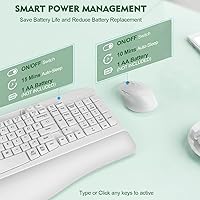
  • Physical power switches on both devices let you cut power completely, helping stretch battery life.
  • At a value price point, this ergonomic combo delivers features that usually cost significantly more.
  • Compatible across Windows, Mac, and even smart TVs, making it genuinely versatile across different setups.
  • Impressive early traction with over 840 ratings and a 4.1-star average for a product under a year old.

Cons

  • Key travel is shallow and soft — typists who prefer a tactile or clicky feel will likely find it underwhelming.
  • The plastic chassis feels noticeably lightweight, which raises some questions about long-term durability.
  • Batteries are not included for either device, which catches many buyers off guard right out of the box.
  • Mouse DPI tops out at 1600, which is insufficient for users needing high-precision or fast-response tracking.
  • A handful of users report occasional wireless dropout when the receiver is further from the devices.
  • The ergonomic benefits vary considerably depending on hand size and individual typing posture — not universally effective.
  • EAYBLLY is a relatively unknown brand with a limited track record, making long-term reliability harder to predict.
  • No backlighting on the keyboard, which is a real limitation for anyone working in low-light conditions.

Ratings

The scores below for the EAYBLLY Wave Keys Keyboard and Mouse Combo were generated by our AI engine after analyzing verified global buyer reviews, actively filtering out incentivized, duplicate, and bot-generated feedback to reflect genuine user experiences. Each category score weighs both the praise and the frustrations real users reported during everyday use — nothing is smoothed over or inflated. The result is an honest, multi-dimensional picture of where this wireless keyboard-and-mouse bundle genuinely delivers and where it falls short.
Typing Comfort
78%
22%
The wave-shaped key layout earns consistent praise from users who type for hours at a stretch, with many noting that their wrists feel noticeably less tense by the end of a workday compared to flat keyboards. The arch is subtle enough that most people adapt within a couple of days without having to relearn their muscle memory.
Users with larger hands sometimes find the wave curve places certain keys in slightly awkward positions, and the benefit is far less pronounced for people who already use a wrist rest with a separate flat keyboard. Ergonomic relief is not universal here — it is real, but your mileage will genuinely vary.
Palm Rest Quality
82%
18%
The integrated memory foam palm rest is one of the most frequently praised features across buyer reviews, with users specifically calling out how the soft leather-like surface stays cool during long sessions and does not slide around the desk. For office workers who rest their palms while thinking between paragraphs, the cushioning feels like a genuine upgrade over bare desk contact.
After extended daily use over several months, a handful of buyers report that the foam begins to compress and lose some of its initial softness — a predictable limitation of memory foam at this price tier. The leather-like coating also shows surface scuffs more visibly than matte plastic alternatives.
Build Quality
63%
37%
For a value-tier wireless combo from a newer brand, the fit and finish is clean enough that most users do not feel short-changed straight out of the box. Keys are evenly spaced, the mouse does not creak underhand, and the phone slot feels solid rather than flimsy when holding a device.
The lightweight plastic chassis is the most common complaint, with buyers describing it as noticeably less substantial than branded competitors in the same category. A few users reported the keyboard flex slightly when pressing keys near the edges, which becomes more noticeable after the novelty wears off.
Mouse Performance
67%
33%
Day-to-day navigation — browsing, document editing, general office tasks — is handled smoothly enough, and the three DPI settings give users a practical way to dial in cursor speed for different monitors or tasks. The silent click mechanism is consistently praised by people working in open-plan offices or late-night home setups.
The maximum 1600 DPI ceiling limits usefulness for anyone who works across large or multiple monitors, and several buyers noted the tracking feels slightly imprecise during faster movements. Occasional wireless dropout reports when the mouse is used at the far end of the stated range suggest the real-world reliable distance is closer to 20 feet than 33.
Wireless Reliability
71%
29%
For typical desk setups where the receiver sits within 10 to 15 feet of the user, the 2.4GHz connection is stable and responsive with no perceptible input lag during normal typing and clicking. Users in home offices and dorm rooms report that the single shared receiver keeps things tidy and interference-free under standard conditions.
Connection issues surface more frequently when the receiver is behind a desktop tower, inside a USB hub, or at distances beyond roughly 20 feet. A minority of users also report intermittent reconnection pauses after the devices wake from sleep, which adds a brief but frustrating delay when jumping back to work.
Setup Experience
91%
Plug-and-play is genuinely accurate here — insert the receiver, flip the power switches, and both devices are recognized within seconds on Windows and Mac alike. Buyers who have dealt with driver-dependent peripherals in the past specifically note how refreshingly frictionless the initial setup feels, including with the USB-C adapter on newer laptops.
A small number of users on older operating systems or smart TVs found that one of the two devices occasionally failed to connect on the first attempt and required re-plugging the receiver. There is no indicator light confirming pairing status, which makes troubleshooting feel like guesswork when something does not connect immediately.
Phone & Tablet Holder
84%
The 7.28-inch built-in slot is wide enough to hold most modern smartphones even in thick cases, and users who keep a reference app, messaging platform, or video call open on their phone while working at a computer find it surprisingly useful for reducing desk clutter. It sits at a comfortable viewing angle without requiring any adjustment.
Thicker tablet cases can make the fit feel tight, and the slot does not accommodate devices in landscape orientation as naturally as portrait. Users who do not regularly use a second screen while at their desk will find this feature essentially invisible — it adds bulk to the keyboard footprint regardless of whether you use it.
Key Feel & Travel
59%
41%
The low-profile keycaps have a smooth, quiet action that works well for light-touch typists and people who prefer a softer keystroke during meetings or late-night work sessions. Users coming from membrane keyboards with heavy actuation force tend to find the light touch a welcome change.
Typists who prefer the tactile feedback of mechanical switches or even a firmer membrane keyboard often describe the keystrokes as feeling mushy or indistinct. The lack of any audible or tactile confirmation of a registered keypress is a recurring frustration in negative reviews from experienced typists who rely on that feedback to maintain accuracy at speed.
Battery Life
69%
31%
The combination of auto-sleep after 10 minutes and physical power switches gives users genuine control over battery consumption, and buyers who develop the habit of switching devices off at the end of each day report several weeks of use per set of batteries. The dual power management system is thoughtfully designed for the price point.
Batteries are not included in the box, which surprises buyers who do not read the spec sheet closely before purchasing — arriving at a new peripheral and not being able to use it immediately is a small but real friction point. Users who forget to toggle the physical switches off report battery drain faster than expected, especially with the mouse.
Value for Money
83%
Considering the combination of an ergonomic key layout, an integrated palm rest, a phone holder, a silent mouse, and a USB-C adapter at the price point offered, buyers consistently rate the overall package as excellent value compared to purchasing a wrist rest and a wireless combo separately. For first-time ergonomic keyboard buyers especially, the value proposition is hard to argue with.
The value calculation shifts for users who need the keyboard to last several years under heavy daily use, as the lighter build may not hold up as well as pricier competitors. Buyers who end up unsatisfied with the key feel or mouse performance have limited recourse given that EAYBLLY is a newer brand with a less established customer support track record.
Compatibility
88%
Broad out-of-the-box compatibility across Windows, macOS, and even smart TVs is a genuine strength, and the bundled USB-C adapter removes the frustration that typically comes with connecting older USB-A peripherals to newer devices. Buyers who switch between a Windows desktop and a MacBook throughout the day appreciate not needing two separate setups.
Bluetooth is not available, which means users who prefer wireless without occupying a USB port — common on ultrabooks with limited ports — may find the dongle approach less convenient than expected. The combo also cannot connect to two computers simultaneously, requiring a physical receiver swap each time.
Noise Level
86%
Both the keyboard and the mouse operate at a noticeably lower noise level than standard peripherals, which is a meaningful practical benefit in shared homes, open offices, and late-night work sessions. The mouse in particular draws repeated praise for how unobtrusive its clicks are during video calls when using a laptop microphone nearby.
The keyboard is quieter than average but is not marketed as fully silent, and in a completely quiet room the keystrokes are still faintly audible. Users expecting near-total silence comparable to a dedicated quiet mechanical keyboard may find the noise reduction adequate but not exceptional.
Ergonomic Design
74%
26%
The combination of the wave key layout and foam palm rest addresses two distinct ergonomic concerns simultaneously — wrist angle and palm pressure — which is uncommon at this price tier. Users recovering from mild wrist fatigue or those trying to prevent repetitive strain report that the design noticeably changes how their arms feel after a full workday.
The ergonomic benefits are meaningful but modest — this is not a split keyboard or a fully contoured ergonomic design, and users with existing repetitive strain injuries or strong ergonomic requirements will likely need a more specialized solution. The improvements are real enough for everyday prevention but should not be overstated as a medical-grade intervention.
Desk Footprint
66%
34%
The full-sized layout covers the essentials without an extended number pad, and the integrated palm rest means users do not need a separate wrist rest taking up additional space beside the keyboard. For a minimalist desk setup, having the phone slot built in also removes the need for a standalone phone stand.
Despite lacking a number pad, the keyboard footprint is wider than many users anticipate due to the depth added by the palm rest, which can crowd smaller desks or tight corner setups. Users accustomed to tenkeyless or compact keyboard layouts may find adjusting to the overall size of the Wave Keys set requires more desk rearrangement than expected.

Suitable for:

The EAYBLLY Wave Keys Keyboard and Mouse Combo is a strong fit for anyone who spends several hours a day at a desk and wants meaningful wrist comfort without spending a lot. Students writing papers, remote workers powering through long email threads, and home office setups where the desk needs to stay tidy will all get real value from this bundle. The built-in phone slot is a genuine convenience for people who reference their phone constantly while working — no extra stand, no clutter. If you are upgrading from a basic flat keyboard for the first time and want a noticeable step up in typing comfort, the wave-key layout and foam palm rest together make that transition feel worthwhile. It also suits anyone sharing a workspace or working near others who would appreciate a mouse that clicks without drawing attention.
Not suitable for:

The EAYBLLY Wave Keys Keyboard and Mouse Combo is not the right call for anyone who demands tactile, clicky key feedback or the kind of deep key travel associated with mechanical keyboards — the typing feel here is soft and low-profile by design, which some experienced typists find unsatisfying. Competitive gamers or graphic designers who need precise, high-sensitivity mouse tracking will likely find the three DPI settings too limited for their workflows. The lighter plastic build, while totally reasonable for everyday home use, may not hold up well in demanding professional environments or under heavy daily abuse over several years. Users who regularly work more than 30 feet from their computer may also encounter occasional wireless inconsistency. Finally, since batteries are not included for either device, buyers who want to unbox and start immediately should plan ahead — this is a small but real inconvenience worth knowing before purchase.
Specifications

  • Brand & Model: Manufactured by EAYBLLY under model number KG812-05.
  • Connectivity: Both devices connect via a single shared 2.4GHz USB wireless receiver included in the box.
  • USB-C Support: A USB-C adapter is included, allowing the receiver to plug into USB-C-only devices such as modern MacBooks and laptops.
  • Wireless Range: The combo operates reliably at distances of up to 33 feet between the devices and the USB receiver.
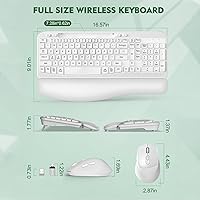
  • Keyboard Layout: Full-sized keyboard with a wave-shaped key layout that arches upward in the center to promote a more natural hand position.
  • Palm Rest: Integrated memory foam palm rest with a leather-like surface runs the full width of the keyboard base.
  • Phone Slot: A built-in holder slot measuring 7.28 inches wide accommodates smartphones and smaller tablets for hands-free viewing.
  • Mouse DPI: The wireless mouse offers three selectable sensitivity levels: 800, 1200, and 1600 DPI.
  • Mouse Noise: The mouse features whisper-quiet click mechanisms designed to minimize audible noise during use.
  • Auto-Sleep: Both the keyboard and mouse enter an automatic sleep mode after 10 minutes of inactivity to preserve battery charge.
  • Power Switches: Physical on/off switches on both the keyboard and mouse allow users to cut power entirely when not in use.
  • Dimensions: The keyboard measures 16.57 x 9.01 x 1.37 inches, providing a full-sized layout without a numeric keypad extension.
  • Combo Weight: The keyboard and mouse together weigh approximately 2.61 pounds.
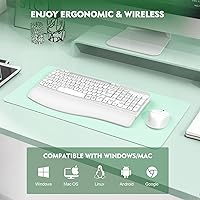
  • Compatibility: Works with Windows and macOS operating systems across desktops, laptops, and smart TVs with USB ports.
  • Driver Requirement: No software or driver installation is required; the combo is fully plug-and-play upon connecting the receiver.
  • Battery: Both the keyboard and mouse are battery-powered; batteries are not included and must be purchased separately.
  • Key Profile: The keyboard uses low-profile keycaps designed for a quieter, lighter keystroke compared to standard-height keys.
  • Color Option: Available in white as the standard color configuration.

Related Reviews

HP 18H24AA Wireless Keyboard and Mouse Combo
79%
91%
Value for Money
93%
Ease of Setup
74%
Keyboard Typing Experience
63%
Mouse Comfort & Ergonomics
86%
Wireless Reliability
More
Trueque Wireless Keyboard and Mouse Combo
78%
83%
Value for Money
81%
Typing Comfort & Ergonomics
78%
Backlight Quality
74%
Mouse Performance
88%
Noise Level
More
Logitech Wave Keys MK670 Combo
81%
88%
Ergonomic Comfort
79%
Typing Experience
83%
Mouse Performance
91%
Noise Level
86%
Wireless Reliability
More
Vssoplor Wireless Keyboard and Mouse Combo
82%
91%
Value for Money
84%
Keyboard Typing Experience
61%
Mouse Ergonomics
88%
Wireless Connectivity & Stability
72%
Battery Life
More
Kootop Wireless Keyboard Mouse Combo
87%
89%
Ergonomics and Comfort
91%
Typing Experience
85%
Wireless Connectivity
87%
Design and Aesthetics
83%
Battery Life
More
MOFII Wireless Keyboard and Mouse Combo
84%
94%
Ease of Setup
85%
Ergonomics and Comfort
90%
Wireless Connectivity
88%
Design and Aesthetics
83%
Battery Life
More
Arteck HB086 Bluetooth Keyboard Mouse Combo
76%
78%
Build Quality
74%
Keyboard Typing Feel
88%
Battery Life
71%
Bluetooth Connectivity
61%
Mouse Comfort
More
QUASIO Wireless Keyboard and Mouse Combo
77%
88%
Value for Money
93%
Setup & Ease of Use
79%
Typing Comfort
84%
Wireless Connectivity & Range
72%
Mouse Performance
More
seenda Wireless Keyboard and Mouse Combo
88%
89%
Typing Comfort
87%
Ergonomics
82%
Wireless Connectivity
94%
Setup & Installation
88%
Key Spacing & Accuracy
More
SABLUTE Wireless Keyboard and Mouse Combo
84%
88%
Typing Comfort
92%
Battery Life
85%
Ergonomics
73%
Connectivity Stability
80%
Backlighting Performance
More

FAQ

No, there is nothing to install. Just plug the USB receiver into your computer, switch on both devices, and they connect automatically within seconds. It works the same way on Windows and Mac.

Batteries are not included for either the keyboard or the mouse, so you will want to have some on hand before you unbox. Both devices run on standard AA batteries, which are easy to find at any store.

Yes, the EAYBLLY Wave Keys Keyboard and Mouse Combo ships with a USB-C adapter specifically for this situation. You slot the USB receiver into the adapter, plug it into your USB-C port, and it works just like a standard USB connection.
It is genuinely soft — the memory foam has a noticeable give when you rest your palms on it, and the leather-like surface feels smooth rather than sticky or rough. That said, comfort is personal, so if you prefer a firmer wrist support, this may feel a little too cushioned for your taste.

The slot is 7.28 inches wide, which comfortably holds most modern smartphones including larger models. Compact tablets like a small iPad may fit too, though thicker cases could make it a tighter squeeze — it is worth testing before relying on it.

Yes, the mouse clicks are noticeably subdued compared to a standard mouse. You can still faintly hear a click if the room is completely silent, but in any typical office environment it will not bother colleagues nearby.

Battery life will vary based on how much you use the devices and whether you remember to switch them off at the end of the day. The auto-sleep feature and physical power switches help extend battery life considerably. In general, moderate daily use should give you several weeks to a couple of months on a fresh set.

The receiver is plug-and-play, so you can physically move it between computers whenever you like. However, this combo does not support multi-device pairing or switching at the press of a button — you would need to physically unplug and replug the receiver to change computers.

Most people adapt within a day or two. The arch is subtle rather than dramatic, so it does not feel alien straight away. Buyers who type without looking at the keys tend to adjust fastest, while hunt-and-peck typists occasionally need a little longer to find their rhythm on the curved layout.

The plastic shell is lighter than what you might find on a premium keyboard, and that is something to be aware of going in. For everyday home or office typing it holds up fine, but if you are rough with your equipment or need something built to take real punishment, the construction may not fully satisfy you over the long term. For the price point, the overall quality is reasonable and the early user ratings reflect that.