Overview

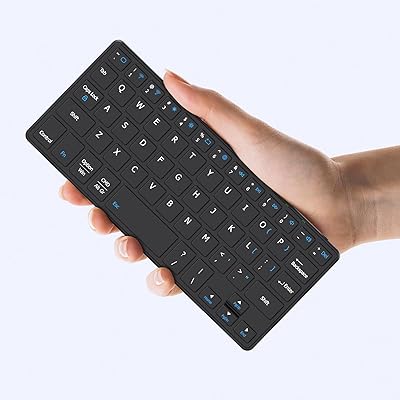
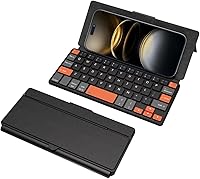
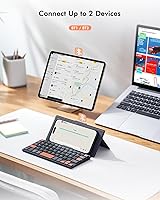
The Doohoeek Universal Bluetooth Mini Keyboard arrived in early 2025 and quickly earned a spot among Amazon's top 100 in its category — a strong signal for such a new entry. What makes this mini keyboard stand out at first glance is its bold aesthetic: orange-accented navigation keys against a compact plastic frame that folds flat and slips into most bags without a second thought. It pairs with two devices simultaneously, which puts it ahead of many budget rivals that lock you into a single connection. The integrated stand is a quiet but practical touch — no separate dock needed when you want to prop up your phone or tablet.
Features & Benefits

Switch between your work tablet and personal phone with a single key combo — dual-device switching alone saves real frustration when you bounce between gadgets throughout the day. The orange navigation keys aren't just a style choice; they genuinely help you locate arrow and function keys without looking down, which matters more than you'd think when you're typing on a small screen. The built-in stand holds phones and tablets at a range of angles, removing the need to prop your device against a coffee cup. Auto OS detection means the keyboard adapts its shortcuts when you switch devices, with no manual mode fiddling required. All of this folds into a profile under an inch thick.

Best For

This compact Bluetooth keyboard is a natural fit for anyone who types regularly on a phone or small tablet but refuses to lug a laptop everywhere. Galaxy Z Fold users in particular get a lot of mileage out of it — the unfolded screen paired with a physical keyboard creates a surprisingly capable pocket workstation. Students will appreciate how easily the Doohoeek keypad slips into a bag alongside an iPad mini, ready for quick note-taking between classes. Commuters who toggle between a personal device and a work phone will find the two-channel setup genuinely useful rather than a gimmick. On-screen keyboard skeptics, this one is squarely aimed at you.

User Feedback

Buyers tend to praise the build quality more than you might expect from a budget-tier plastic keyboard — most find it feels solid in hand despite being so light. The physical keys draw consistent positive reactions; people who switched from on-screen typing report noticeably fewer errors and faster input. That said, reviewers with larger hands flag cramped key spacing as a real challenge, and occasional pairing hiccups do come up. To be fair, the included reset procedure usually resolves connectivity issues quickly, but it's worth knowing the option exists. Battery life reports are generally positive. A few buyers mention the weight listed on the product page doesn't match the physical specs — a minor but notable discrepancy.

Pros

  • Folds flat and slips into a bag or coat pocket without taking up meaningful space
  • Dual-device switching lets you move between a phone and tablet with a single key combo
  • The integrated stand eliminates the need for a separate device prop — a genuinely useful pairing
  • Orange navigation keys are easier to locate by feel, which reduces errors during fast typing sessions
  • Auto OS detection adjusts shortcut behavior without any manual mode switching between devices
  • Compatible with a wide range of hardware including Galaxy Z Fold and Flip series, iPads, and Lenovo Tabs
  • Rechargeable battery is included out of the box, so you're not hunting for disposables
  • For its price tier, the build feels more solid than the plastic construction might suggest
  • Quick to reach a top-100 ranking in its Amazon category shortly after a February 2025 launch
  • Works across Android, iOS, Windows, and Fire OS without needing separate pairing profiles

Cons

  • Key spacing is tight enough that users with larger hands will likely see a higher typo rate
  • Some buyers report occasional Bluetooth pairing drops that require a reset procedure to clear
  • The listed weight figure appears inconsistent across different sections of the product page — worth clarifying before purchase
  • Plastic construction is functional but does not feel premium, which may disappoint buyers with higher build-quality expectations
  • The Fn-key combinations needed for basic functions like Escape and keyboard lock add a learning curve
  • Key travel and tactile feedback are adequate but unlikely to satisfy anyone coming from a mechanical keyboard
  • No backlight, which limits usability in dim environments like long-haul flights or evening commutes
  • Only two device channels — users who regularly switch across three or more devices will hit a ceiling quickly

Ratings

Our AI rating system analyzed verified buyer reviews from multiple global markets for the Doohoeek Universal Bluetooth Mini Keyboard, actively filtering out incentivized, bot-generated, and duplicate submissions to surface what real users consistently report. The scores below reflect a transparent synthesis of both what this compact keypad does well and where it genuinely falls short — no category has been inflated to flatter the product. Whether you are considering it as a travel typing companion or a phone productivity tool, these ratings are designed to help you make an honest, informed call.

Portability
91%
Users repeatedly single out how easily this mini keyboard fits into a jacket pocket, small tote, or carry-on without adding noticeable bulk. Commuters and students especially value being able to pull it out, unfold it, and start typing within seconds — no case or adapter required.
At 8.8 ounces, it is slightly heavier than some users expect given its compact footprint, and the weight figure listed on the product page appears inconsistent across sections, which has caused mild confusion for buyers comparing it to lighter rivals.
Dual-Device Switching
86%
The Fn plus 1 or 2 shortcut for jumping between two paired devices is fast enough to feel practical in real-world use — remote workers toggling between a work phone and a personal tablet during a commute consistently report that the switch is responsive and reliable most of the time.
Only two channels are available, which is a ceiling that multi-device users hit quickly if they work across a phone, tablet, and laptop. The switching also occasionally requires a reconnect rather than an instant resume, which breaks the rhythm when you are mid-task.
Connectivity Stability
67%
33%
Initial pairing is straightforward for most users across Android, iOS, and Windows devices, and the auto-detection feature removes the need to manually set an OS mode each time, which reduces setup friction considerably for buyers who switch between platforms.
A meaningful share of reviewers report intermittent Bluetooth drops during regular use, particularly after the keyboard has been idle. The manufacturer-provided reset procedure does resolve most of these cases, but having to walk through a reset on a budget keyboard is a friction point that accumulates over time.
Key Usability
71%
29%
For users with average or smaller hands, the key layout is workable for sustained typing sessions, and the physical keys draw strong praise from anyone switching away from on-screen input — even a compact physical keyboard dramatically cuts the error rate for most mobile typists.
The narrow key spacing is the most commonly cited frustration, especially among users with larger hands who report a stubbornly high typo rate that does not fully resolve with practice. The Fn-key combinations required for basic functions like Escape also add a learning overhead that some find annoying.
Orange Key Design
83%
The high-visibility orange navigation keys have a real functional payoff — users who type quickly report that locating arrow and function keys by sight becomes faster within a short adjustment period, reducing the need to break focus and look down carefully during active typing.
Opinion on the aesthetic is split; some buyers find the color combination bold in a way that clashes with their setup, and a handful of reviewers note the orange print on keycaps shows wear faster than the surrounding black keys under heavy daily use.
Integrated Stand
78%
22%
The built-in stand removes the need for a separate phone prop, which users traveling light — students especially — appreciate when setting up at a café table or in a lecture hall. It handles phones and small tablets at moderate viewing angles without tipping.
The stand feels less sturdy at steeper angles, and heavier tablets like a full-size iPad push its stability limits noticeably. It functions well for casual use but does not inspire the kind of confidence you would get from a dedicated adjustable stand.
Build Quality
69%
31%
For its price bracket, the keyboard feels more substantial in hand than the all-plastic construction might suggest on paper — most buyers report that it does not flex or creak during normal typing, which is a bar that cheap accessories at this tier often fail to clear.
It is undeniably plastic throughout, and buyers expecting anything resembling a premium finish will be disappointed. A few reviewers note that the hinge mechanism feels less durable after extended folding and unfolding, raising questions about longevity under daily travel conditions.
Battery Life
74%
26%
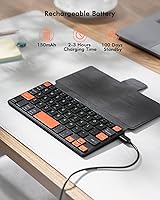
Most users report comfortably getting through several days of moderate typing sessions on a single charge, which is sufficient for a travel or commute keyboard that is not in constant use. The included battery means it is ready to use without a separate purchase.
Heavy users who type for extended periods daily find the battery drains faster than the product description implies, and the lack of a visible battery indicator means you rarely know the charge level until the keyboard stops responding unexpectedly.
OS Compatibility
84%
The auto OS-detection works reliably across Android, iOS, and Windows for the vast majority of users, and Fire OS tablet users confirm that basic typing functions correctly without any special configuration — a genuinely broad compatibility range for a keyboard at this price point.
Some OS-specific shortcuts behave inconsistently depending on the device, particularly on older Android versions, and advanced function-key behavior on Windows occasionally requires manual adjustment that the auto-detection does not fully cover.
Setup & Pairing Ease
72%
28%
First-time pairing is quick for most buyers — the process of holding Fn plus a channel key for five seconds is intuitive enough that the majority of users are up and running within two minutes of opening the box, which is the right experience for a device marketed at non-technical users.
The existence of a dedicated reset procedure in the product instructions signals that pairing failures are common enough to warrant a documented fix, and buyers who encounter connectivity issues during initial setup often describe the troubleshooting process as more involved than expected.
Value for Money
79%
21%
The combination of dual-device pairing, an integrated stand, auto OS-detection, and a foldable form factor at this price point is genuinely competitive — buyers consistently note that comparable keyboards from better-known brands charge meaningfully more for a similar feature set.
The plastic construction and occasional connectivity issues make it harder to argue this is a buy-once-keep-forever purchase, and users who have dealt with pairing resets or worn keycaps within a few months start to question whether the upfront savings hold over a longer ownership period.
Typing Comfort
66%
34%
Users with smaller hands or those primarily composing short messages, emails, and notes report a comfortable enough experience, particularly when compared to the fatigue that builds up from extended on-screen typing on a phone or compact tablet.
The compressed layout means there is no wrist rest and very little key travel, which leads to hand strain during longer writing sessions. It is clearly designed for burst typing rather than sustained document work, and users who push it beyond that use case notice it quickly.
Compact Footprint
88%
The folded dimensions genuinely earn the travel-keyboard label — it fits in the same pocket as a large smartphone and does not add enough weight to be noticeable in a day bag, making it one of the more honest compact promises in this crowded product category.
The compact footprint is a deliberate design trade-off rather than a flaw, but buyers who realize only after purchase that the key layout is significantly smaller than a standard keyboard sometimes feel the product description understated how compact the typing surface actually is.

Suitable for:

The Doohoeek Universal Bluetooth Mini Keyboard was clearly designed with mobile-first users in mind, and it delivers best for those who spend real time typing on phones or compact tablets. Galaxy Z Fold owners are probably the sweetest spot — the unfolded screen finally has a keyboard companion that's proportionate and pocketable. Students who haul an iPad mini to class or a café get a physical typing setup that weighs less than most textbooks. Frequent travelers and commuters who toggle between a personal phone and a work device will genuinely use the dual-channel switching rather than treat it as a checkbox feature. If on-screen keyboards have been your long-running frustration and a full-size Bluetooth keyboard feels like overkill, this compact keypad sits neatly in the gap between those two options.
Not suitable for:

The Doohoeek Universal Bluetooth Mini Keyboard is not the right call for anyone who types for hours at a stretch or who needs a full-sized key layout for comfortable, high-volume writing. Users with larger hands will likely find the compact key spacing a source of irritation rather than a minor quirk — typos tend to accumulate quickly when the keys don't match your reach. It is also not a strong fit for buyers who need rock-solid, zero-configuration pairing every single time; some users have encountered connectivity hiccups that require a reset procedure to resolve, which can be disruptive mid-session. Those expecting desktop-grade build quality from a budget-tier plastic keyboard will need to reset their expectations. Finally, anyone who relies on a full row of function keys or complex OS-specific shortcuts for professional work should look at a larger keyboard that doesn't ask you to memorize Fn-key combinations for basic tasks.
Specifications

  • Brand: Manufactured and sold by Doohoeek.
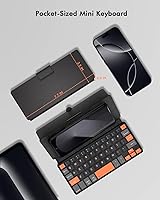
  • Dimensions: The keyboard measures 7.68″ in length, 0.59″ in width, and 0.59″ in height when folded.
  • Weight: The unit weighs approximately 8.8 ounces according to the product specifications.
  • Material: The chassis and keycaps are constructed from plastic.
  • Connectivity: Connects via Bluetooth and supports pairing with up to two devices simultaneously across channels 1 and 2.
  • Device Switching: Users switch between paired devices by pressing Fn plus the 1 or 2 key.
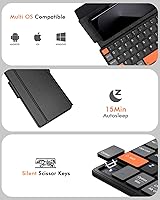
  • OS Compatibility: Compatible with Android, iOS, Windows, and Fire OS, with auto OS-detection for shortcut adaptation.
  • Device Support: Works with smartphones, Galaxy Z Fold and Flip series, iPads, Galaxy Tabs, Lenovo Tabs, and Pixel Tabs.
  • Power Source: Powered by a built-in rechargeable battery; a battery is included in the box.
  • Key Design: Navigation keys are finished in high-visibility orange to improve location speed and reduce input errors.
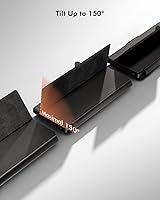
  • Stand: Features an integrated any-angle stand that props up phones and small tablets without a separate accessory.
  • Foldable: The keyboard folds flat for storage and travel, reaching a folded profile of 0.59″ thick.
  • Auto OS Detection: Shortcut behavior adapts automatically to the connected operating system without requiring manual mode selection.
  • Pairing Mode: Pairing mode is entered by pressing Fn plus 1 or 2 for five seconds, or by using the full reset key sequence.
  • Keyboard Lock: The keyboard can be locked and unlocked using the Fn plus Caps Lock key combination.
  • Escape Function: An Escape function is accessible via the Fn plus spacebar combination.
  • BSR Rank: Ranked number 98 in the Computer Keyboards category on Amazon as of its listing date.
  • Availability Date: First made available for purchase on February 26, 2025.

Related Reviews

Arteck Universal Wave Bluetooth Keyboard
75%
78%
Typing Comfort
83%
Multi-Device Switching
63%
Bluetooth Connection Stability
67%
Palm Rest Quality
81%
Key Feel & Travel
More
Kenkor K08 Portable Bluetooth Keyboard
75%
91%
Portability & Form Factor
63%
Typing Experience
74%
Battery Life
82%
Dual-Device Switching
86%
Value for Money
More
Dupad Story D8 Mini Wireless Keyboard
74%
61%
Build Quality
68%
Touchpad Performance
57%
Typing Experience
83%
Backlighting
86%
Battery Life
More
UBOTIE Retro 84-Key Wireless Bluetooth Keyboard
78%
93%
Design & Aesthetics
58%
Typing Experience
86%
Multi-Device Connectivity
63%
Battery Life
79%
Value for Money
More
Dupad Story M9 Mini Bluetooth Keyboard
68%
78%
Value for Money
61%
Build Quality
54%
Keyboard Comfort & Typing
57%
Touchpad Performance
49%
Voice Input
More
iClever BK50 Compact Bluetooth Keyboard
79%
83%
Typing Experience
91%
Portability
88%
Multi-Device Switching
78%
Battery Life
82%
Build Quality
More
Links9+ Retro Typewriter Wireless Keyboard
74%
91%
Design & Aesthetics
62%
Typing Feel
76%
Wireless Connectivity
58%
Build Quality
83%
Value for Money
More
FELICON 308i Bluetooth Keyboard
86%
89%
Design & Aesthetics
94%
Bluetooth Connectivity
76%
Typing Comfort
92%
Portability & Size
85%
Battery Life & Power Saving
More
OMOTON Bluetooth Keyboard for Mac
77%
91%
Value for Money
88%
Mac Compatibility
67%
Bluetooth Reliability
78%
Multi-Device Switching
74%
Typing Experience
More
iClever BK10 Bluetooth Keyboard
79%
83%
Typing Feel
78%
Multi-Device Switching
61%
Battery Life
71%
Build Quality
67%
Key Stability & Longevity
More

FAQ

Press Fn plus the 1 or 2 key and hold for about five seconds to enter pairing mode on that channel. Your device should detect it as a wireless keyboard in the Bluetooth settings. Once paired, that channel remembers your device so future connections happen automatically when you power the keyboard on.

Yes, the Doohoeek Universal Bluetooth Mini Keyboard supports two simultaneous Bluetooth pairings. You assign one device to channel 1 and another to channel 2, then tap Fn plus 1 or Fn plus 2 to jump between them. It is fast enough to feel practical rather than awkward.
The most reliable fix is a full reset: turn the keyboard on, then press and hold the first and last keys in the top row until all indicator lights start flashing. After that, re-enter pairing mode and search for it on your device again. Most users find this clears the issue entirely.

Yes, you can pair your iPhone to one channel and your iPad to the other. Switching between them takes a single key combo, so moving from a message on your phone to a document on your iPad is fairly quick.

It is genuinely useful, not just decorative. The orange navigation and function keys are easier to find at a glance, which reduces the time you spend hunting for arrow keys or shortcuts, especially on such a compact layout. Whether you like the look is personal, but the contrast does serve a real purpose.

That is where this compact keypad shows its limits most clearly. The key spacing is narrower than a standard keyboard, and users with larger hands tend to report a higher typo rate until they adjust — and some never fully do. If hand size is a concern, try to find a hands-on demo or check the return policy before committing.

The stand handles phones and small tablets reasonably well at moderate angles. It is not a premium hinge, so very steep angles or heavier tablets may feel less secure, but for typical use — propping up a phone while you type — it does the job without needing a separate stand.

No, that is one of the more practical features on this mini keyboard. It detects the operating system of the connected device automatically and adjusts shortcut behavior accordingly, so you do not need to press a mode button or dig through a manual every time you switch.

Battery life reports from users vary, but most find it lasts through several days of moderate use on a single charge. Heavy daily use will drain it faster. The battery is included and already installed, so you are ready to go out of the box.

Yes, basic typing functionality works with Fire OS devices. The auto OS-detection shortcuts are optimized for Android, iOS, and Windows, but the core typing experience functions on Fire tablets without any special setup.