Overview

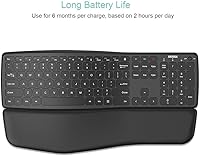
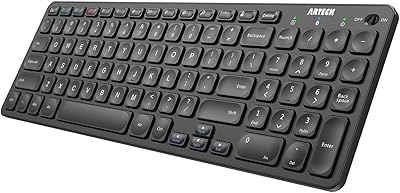
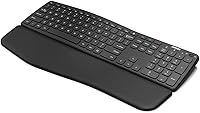
The Arteck Universal Wave Bluetooth Keyboard is a full-size wireless keyboard aimed at home office users who want a gentle ergonomic upgrade without spending heavily. Its gently curved key layout and detachable cushioned palm rest set it apart from the flat, no-frills Bluetooth keyboards that dominate this price range. It pairs with up to three devices simultaneously and works across Windows, iOS, iPadOS, and Android — a broad compatibility range that suits people juggling a laptop, tablet, and phone throughout the day. Rechargeable via USB-C, it sidesteps the frustration of disposable batteries entirely.
Features & Benefits

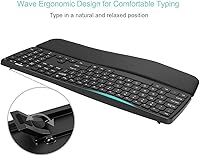
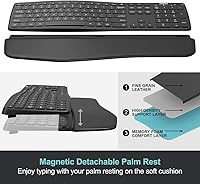
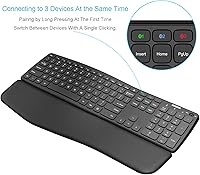
The wave-shaped frame subtly tilts the keys so your wrists sit at a more relaxed angle — it is not a dramatic split design, but it takes no adjustment period either. Switching between paired devices takes a single key press, which genuinely changes how useful this ergonomic Bluetooth keyboard feels when you are moving between a desktop and an iPad in the same afternoon. The detachable palm rest gives you flexibility: clip it on for long writing sessions, pull it off when you need to pack light. A full number pad is included, which many wireless keyboards in this category quietly drop.

Best For

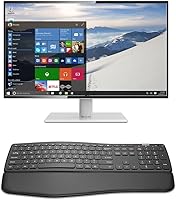
This wave keyboard makes the most sense for multi-device home office setups — think someone who types on a Windows PC in the morning and switches to an iPad for notes or sketches later. It also suits tablet users who want a proper full-size typing experience rather than a cramped portable option. If you are starting to feel wrist fatigue from long typing sessions on a flat keyboard, the mild wave curve offers a reasonable first step. Students and remote workers who need broad OS compatibility without wrestling with complicated pairing menus will also find it straightforward to live with.

User Feedback

Buyers generally appreciate the key travel and typing feel for the price — several mention it holds up well against pricier options in daily use. The multi-device switching earns consistent praise as a practical convenience rather than a gimmick. That said, the wave curve is subtle enough that users with serious RSI concerns may find it underwhelming. Bluetooth stability draws mixed responses; most report solid connections, but a handful note occasional drops depending on device and distance. The palm rest attachment divides opinion too — some find it solid, others say it shifts. At a 3.9-star average across hundreds of ratings, satisfaction is real but not universal.

Pros

  • One-tap switching between three paired Bluetooth devices is a genuine daily-use convenience, not a gimmick.
  • The wave design reduces wrist tension during long typing sessions without any adjustment period.
  • Full-size layout with a number pad — a feature many wireless keyboards at this price quietly drop.
  • USB-C charging means one less proprietary cable cluttering your desk drawer.
  • Broad compatibility across Windows, iOS, iPadOS, and Android covers almost any device mix.
  • Detachable palm rest gives you the option to travel light or type comfortably — on your terms.
  • Key travel feels punchy and satisfying for a keyboard in this price range.
  • Pairing is fast and straightforward with no software installation required.
  • The Arteck wave keyboard punches above its weight in features relative to its accessible price point.
  • Hotkeys and media controls work reliably on Windows and iOS for everyday volume and playback needs.

Cons

  • Bluetooth connection drops are reported often enough across independent reviews to be a real concern.
  • The plastic build shows visible wear around high-frequency keys after several months of daily use.
  • Palm rest attachment is inconsistent — some units clip firmly, others shift with minor disturbance.
  • No backlighting makes this a poor choice for anyone who regularly types in dim environments.
  • The wave curve is too subtle to meaningfully help users with serious RSI or chronic wrist conditions.
  • At over 41 inches wide, it is simply too large for compact or cluttered desk setups.
  • Hotkey behavior across Android is unreliable, frustrating shortcut-dependent workflows on that platform.
  • Re-pairing after resetting or adding a new device is not clearly documented in the included guide.
  • Some users report the device switching occasionally requires a second key press after an idle period.

Ratings

The Arteck Universal Wave Bluetooth Keyboard has been evaluated by our AI rating system after analyzing hundreds of verified global purchases, with spam, incentivized, and bot-generated reviews actively filtered out. Scores reflect the genuine distribution of real buyer experiences — strengths and frustrations weighted equally. The result is an honest picture of where this ergonomic Bluetooth keyboard earns its place and where it falls short.
Typing Comfort
78%
22%
The wave-shaped frame makes a noticeable difference during long writing sessions — users consistently describe their wrists sitting at a more relaxed angle compared to flat keyboards. For people who type for several hours daily, the reduction in wrist tension is the most frequently cited reason they kept this keyboard over alternatives.
The wave curve is mild enough that users dealing with diagnosed RSI or chronic wrist pain often report it is not sufficient on its own. A few buyers noted they expected a more pronounced ergonomic angle and felt underwhelmed once the keyboard arrived.
Multi-Device Switching
83%
Single-key device switching between up to three paired devices is genuinely useful in a multi-device workflow. Users who bounce between a Windows laptop and an iPad during the day call this out as the feature they use most, describing it as fast and reliable during normal desk use.
A small number of users report that switching occasionally requires a second key press before the new device registers, particularly after the keyboard has been idle. It is not a consistent issue, but it is frequent enough to appear across multiple independent reviews.
Bluetooth Connection Stability
63%
37%
For the majority of buyers using the keyboard within a typical desk setup — within a few feet of their devices — Bluetooth connectivity holds steady throughout the workday. Most users on Windows and iPadOS report clean pairing with no setup friction.
Connection drops are the most divisive topic in user feedback. Some buyers report occasional disconnects when switching between devices or when the keyboard sits idle, and a subset note reduced stability at greater distances. It is not universal, but it surfaces often enough to warrant caution.
Palm Rest Quality
67%
33%
The cushioned palm rest adds genuine comfort during extended typing sessions, and its detachable design means you are not stuck with it when portability matters. Users who travel between a home desk and a bag appreciated being able to leave it behind without compromising the keyboard itself.
Attachment security divides buyers almost evenly. Some report the palm rest clips on firmly and stays put through heavy use, while others say it slides or detaches with minor disturbance. The inconsistency suggests quality control variability rather than a universal design flaw.
Key Feel & Travel
81%
19%
Key travel is frequently praised as punchy and satisfying for a keyboard at this price point. Buyers comparing it to similarly priced flat wireless keyboards consistently rate the tactile feedback higher, with several noting they type faster and more accurately after switching to this wave keyboard.
The keys are not backlit, which a notable number of buyers mention as a missing feature for low-light environments. For users who work in dim rooms or late at night, this is a genuine limitation that no amount of key feel compensates for.
Build Quality
62%
38%
The keyboard feels solid enough on a desk during everyday use, and the plastic construction keeps the weight manageable at under two pounds. For a budget-range wireless keyboard, the structural rigidity is acceptable and does not flex noticeably during normal typing.
The all-plastic build is one of the most common points of criticism in longer-term reviews. Users who have owned it for several months describe the surface showing wear around high-use keys, and the overall feel does not hold up well against slightly pricier competitors.
Cross-Platform Compatibility
84%
Working across Windows, iOS, iPadOS, and Android from a single keyboard is a genuine advantage for users who mix operating systems throughout their day. iPad users in particular find the dedicated iPadOS hotkeys a useful touch that generic wireless keyboards often skip.
A handful of Android users report that certain media keys do not function as expected on non-Samsung tablets, and hotkey mapping inconsistencies across platforms frustrate a small subset of users who rely on those shortcuts heavily.
USB-C Charging
88%
The move to USB-C is straightforwardly appreciated — buyers no longer need to keep a specific proprietary cable on hand, and the same cable used for a phone or tablet works here. Battery life between charges is described as solid for typical office use over several days.
A few users note the keyboard does not charge and operate simultaneously in a useful way during heavy use, which is a minor inconvenience if the battery runs low mid-session. Charge time feedback is largely neutral with no strong complaints.
Full-Size Layout & Number Pad
86%
Keeping a full number pad on a wireless keyboard at this size is a meaningful differentiator. Accountants, data entry workers, and spreadsheet-heavy users specifically mention the number pad as the reason they chose this over smaller Bluetooth alternatives.
The full-size footprint does eat up significant desk space, and users with compact setups occasionally express regret that a smaller layout was not offered. At 41.9 inches long, it is not a keyboard that fits comfortably on a crowded or small desk.
Setup & Pairing Ease
82%
18%
Pairing is straightforward across all supported platforms, with most users describing a first-time connection taking under two minutes. The lack of complicated software or driver installation is specifically mentioned as a plus by non-technical buyers.
Re-pairing after a factory reset or when adding a fourth device requires clearing existing pairings, which a few users found confusing without clearer documentation. The included welcome guide is described as basic at best.
Portability
58%
42%
The detachable palm rest does reduce bulk when packing, and the keyboard itself is thin at 0.4 inches. Users who occasionally move it between a desk and a bag find it manageable when the palm rest is removed.
At 1.76 pounds and over 41 inches wide, this is not a keyboard designed with portability in mind. Users who bought it hoping to use it regularly on the go — on trains or in cafes — report it is too cumbersome for that use case.
Value for Money
77%
23%
At its price point, the combination of ergonomic wave design, multi-device Bluetooth, full number pad, and USB-C charging represents strong overall value. Buyers frequently note they would have expected to pay more for this feature set from a branded competitor.
The plastic build quality and occasional Bluetooth inconsistencies chip away at the perceived value over time. Users who encounter connectivity issues early feel the price-to-reliability ratio tips unfavorably compared to slightly more expensive but more dependable alternatives.
Hotkeys & Media Controls
71%
29%
Dedicated media keys for play, pause, volume, and brightness are functional and well-placed, working reliably on Windows and iOS. Home office users who switch tracks or adjust volume regularly without touching their device find these keys a small but daily convenience.
Cross-platform hotkey behavior is inconsistent — keys that work perfectly on Windows may do nothing on Android, and the documentation does not clearly map out what works where. Power users who rely on shortcut-heavy workflows will hit friction quickly.

Suitable for:

The Arteck Universal Wave Bluetooth Keyboard is a strong fit for home office workers who regularly split their time across two or three devices — for instance, someone who writes on a Windows desktop in the morning and reviews documents on an iPad in the afternoon. The one-tap multi-device switching removes a genuine daily friction point that a single-device keyboard simply cannot address. Tablet users, especially those on iPadOS, will appreciate the full-size layout and dedicated shortcut keys that turn an iPad into something much closer to a laptop experience. Students and remote workers on a budget who need broad OS compatibility without dealing with drivers, dongles, or complicated setup will find this wave keyboard easy to live with from day one. If you are starting to notice wrist fatigue from long hours on a flat keyboard but are not ready to commit to a steep ergonomic learning curve, the mild wave design offers a sensible, low-risk first step in the right direction.
Not suitable for:

Buyers dealing with diagnosed repetitive strain injury or serious chronic wrist pain should approach the Arteck Universal Wave Bluetooth Keyboard with tempered expectations — the wave curve is subtle and provides gentle positional support, but it is not a therapeutic device and should not be treated as one. Power users who depend heavily on keyboard shortcuts across multiple platforms may run into inconsistent hotkey behavior, particularly on Android, where certain media and function keys do not map reliably. Anyone prioritizing portability as a primary requirement should look elsewhere; at over 41 inches wide and nearly two pounds, this is a desk keyboard that tolerates occasional relocation rather than one built for a bag. Users who type in low-light conditions will miss backlighting, which this ergonomic Bluetooth keyboard simply does not offer. And if you need a keyboard that doubles as a precision tool for gaming or professional creative work, the plastic build and occasional Bluetooth instability reports suggest it is not engineered for that level of demand.
Specifications

  • Connectivity: Connects via Bluetooth to up to 3 devices simultaneously, with single-key switching between paired devices.
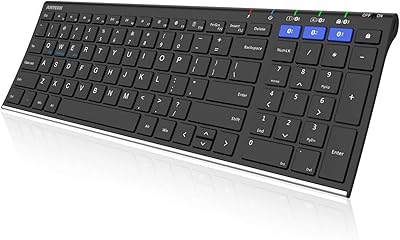
  • Layout: Full-size keyboard layout including a dedicated numeric keypad on the right side.
  • Ergonomic Design: Wave-shaped key frame gently angles keys to position wrists and forearms in a more natural resting posture.
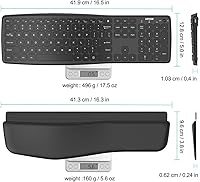
  • Palm Rest: Cushioned palm rest is detachable and attaches along the front edge of the keyboard for extended typing comfort.
  • Charging: Rechargeable internal battery via USB-C; a USB-C charging cable is included in the box.
  • OS Compatibility: Supports Windows, iOS, iPadOS, and Android operating systems across computers, tablets, and smartphones.
  • Dimensions: Measures 41.9″ long by 12.8″ wide and 0.4″ thin when the palm rest is detached.
  • Weight: Weighs 1.76 pounds without packaging, making it a mid-weight full-size wireless keyboard.
  • Material: Housing and key caps are constructed from plastic with a smooth matte-style surface finish.
  • Color: Available in Black with a modern, understated aesthetic suited to most desk setups.
  • Special Keys: Includes hotkeys, media control keys, and customizable display keys for cross-platform shortcut access.
  • Warranty: Backed by a 24-month manufacturer warranty from Arteck, with customer support included.
  • In the Box: Package includes the keyboard, detachable cushioned palm rest, USB-C charging cable, and a welcome guide.
  • Model Number: Official model identifier is Arteck-BT-UniversalWave as listed by the manufacturer.
  • First Available: This keyboard was first made available for purchase in June 2022.
  • BSR Ranking: Holds a Best Sellers Rank of #1,066 in the Computer Keyboards category on Amazon.
  • User Rating: Carries an average rating of 3.9 out of 5 stars based on 429 verified ratings.

Related Reviews
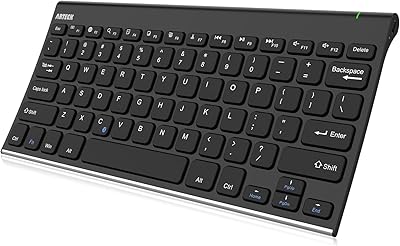
Arteck HB193 Bluetooth Keyboard
81%
88%
Multi-Device Switching
84%
Build Quality
71%
Typing Experience
86%
Battery Life
91%
Layout & Key Coverage
More
Arteck Bluetooth Keyboard HB086
86%
93%
Portability & Size
94%
Battery Life
83%
Ergonomics & Comfort
90%
Ease of Use & Setup
88%
Multi-Device Compatibility
More
Arteck Bluetooth Keyboard and Mouse Combo
84%
89%
Battery Life
92%
Ergonomics and Comfort
67%
Bluetooth Connectivity
83%
Build Quality
90%
Portability and Design
More
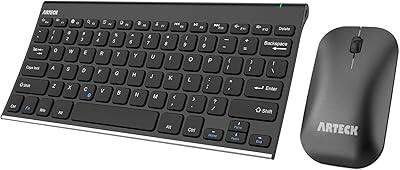
Doohoeek Universal Bluetooth Mini Keyboard
85%
92%
Portability
90%
Ease of Use
75%
Bluetooth Connectivity
85%
Ergonomics
88%
Typing Speed & Accuracy
More
Kenkor K08 Universal Wireless Bluetooth Keyboard
84%
91%
Portability & Design
80%
Typing Comfort
88%
Battery Life
85%
Connectivity & Range
92%
Compatibility with Devices
More
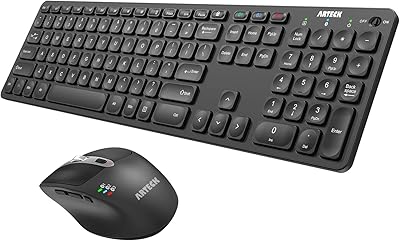
Arteck HB305-2 Bluetooth Keyboard
81%
88%
Multi-Device Switching
83%
Typing Experience
79%
Battery Life
61%
Build Quality
72%
Bluetooth Connectivity Stability
More
Arteck HB305-3 Bluetooth Keyboard and Mouse Combo
78%
86%
Multi-Device Switching
82%
Keyboard Typing Experience
63%
Mouse Comfort & Ergonomics
88%
Battery Life
61%
Build Quality & Materials
More
GEODMAER Foldable Bluetooth Keyboard
82%
93%
Portability
71%
Typing Experience
88%
Multi-Device Switching
63%
Touchpad Usability
91%
Battery Life
More
Arteck HW305 Wireless Keyboard
79%
91%
Value for Money
94%
Ease of Setup
74%
Typing Experience
63%
Build Quality
69%
Battery Life
More
FELICON 308i Bluetooth Keyboard
86%
89%
Design & Aesthetics
94%
Bluetooth Connectivity
76%
Typing Comfort
92%
Portability & Size
85%
Battery Life & Power Saving
More

FAQ

Each of the three Bluetooth channels has a dedicated key on the keyboard. To switch, you simply press the key assigned to the device you want to connect to, and the keyboard transitions to that device. Most users report the switch happens within a second or two under normal conditions.

Yes, it is compatible with both iPhone and iPad running iOS and iPadOS respectively. Pairing follows the standard Bluetooth process — go to your device settings, put the keyboard into pairing mode, and select it from the list. Some media keys work differently on iPhone versus iPad, but core typing functions are consistent across both.

It is genuinely subtle — this is not a split keyboard or a dramatically angled design. The wave gently curves the key rows so your wrists sit at a slightly more relaxed angle than a completely flat keyboard. Most users adapt to it immediately without any relearning period, but if you are expecting a pronounced ergonomic shape, you may find it understated.

Technically the USB-C port is used for charging, but this wave keyboard is not specifically designed for wired passthrough use during a session. It is best treated as a wireless keyboard that you charge periodically between uses rather than one you leave plugged in continuously.

Arteck does not publish a specific hour-based battery life figure for this model, but user feedback generally describes the battery as lasting several days of regular office use before needing a top-up. Heavy users who type for six or more hours daily may find they charge it more frequently than casual users.

Feedback on this is genuinely mixed. Some buyers report the palm rest clips on firmly and stays in place through long sessions, while others find it shifts slightly with movement. If a secure attachment is important to you, it may be worth checking recent buyer reviews to see if the issue persists across newer production batches.

This ergonomic Bluetooth keyboard is officially listed as compatible with Windows, iOS, iPadOS, and Android — macOS is not included in the stated compatibility list. Some hotkeys may function partially on a Mac through standard Bluetooth connectivity, but full hotkey support is not guaranteed and your experience may vary.

This is a Bluetooth-only keyboard — there is no USB dongle or 2.4 GHz wireless receiver option. If your device does not support Bluetooth or you prefer a dongle-based connection for more stable performance, you would need to look at a different product.

No, this keyboard does not have backlighting of any kind. If you frequently type in low-light conditions or at night, that is a meaningful limitation worth factoring into your decision before purchasing.

The box contains the keyboard itself, the detachable cushioned palm rest, a USB-C charging cable, and a welcome guide with basic setup instructions. No additional software, USB dongle, or carrying case is included.