
Overview

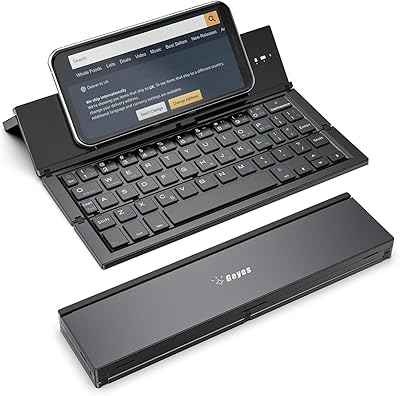
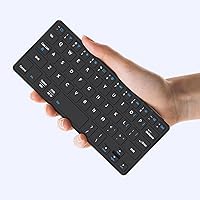
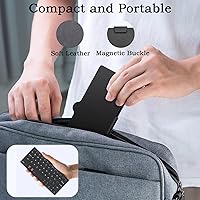
The Kenkor K08 Portable Bluetooth Keyboard is a compact folding keyboard built for tablet and mobile users who need to type on the move without lugging around a full-sized peripheral. It sits firmly in the budget-friendly tier — accessible enough that it doesn't require much deliberation before buying. What makes it stand out at this price is that it ships with a PU leather case that doubles as an adjustable stand, so you're not buying accessories separately. Fold it up and it's roughly wallet-sized, weighing under 200g. Kenkor is a smaller, newer brand, so keep that in mind when weighing the overall value proposition.

Features & Benefits

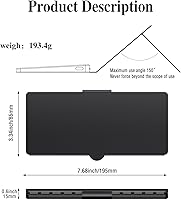
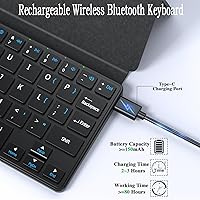
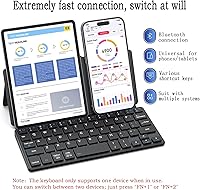
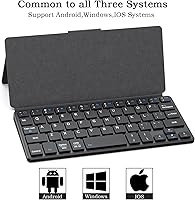
The dual-device pairing is probably the most practical feature here — pressing FN+1 or FN+2 switches instantly between two connected devices, handy if you're bouncing between a tablet and a phone without wanting to re-pair each time. The built-in 180 mAh battery is rated for over 80 hours of use per charge, which is a manufacturer claim worth treating with some skepticism in real-world conditions, though the USB-C charging at least means topping up is straightforward. Bluetooth coverage reaches up to 10 meters, and the keyboard works across Android, iOS, iPadOS, and Windows. At 7.68 inches wide and just 0.6 inches thick, this mini travel keyboard slips into almost any bag.

Best For

This compact Bluetooth keyboard makes the most sense for tablet-first users — students, remote workers, or anyone who travels with an iPad or Android tablet and occasionally needs to dash off emails or fill out forms without hunting for a desktop setup. It's also well-suited to frequent travelers who want something genuinely pocketable that won't run out of charge mid-trip. That said, it's probably not the right tool for heavy writing sessions or anyone who types for hours at a stretch; the compact layout means keys are tighter than a standard board. If you need two devices paired simultaneously, fast device switching adds real practical value at this price point.

User Feedback

The Kenkor folding keyboard holds a 4.4-star average across around 137 ratings — a decent score, though the sample size is still relatively small for a brand that launched in mid-2024. Buyers tend to highlight the portability and case quality as genuine strengths, and pairing reportedly goes smoothly across devices. On the other side, some users with larger hands mention that the key spacing takes adjustment, and a few question whether the battery truly delivers the advertised longevity under sustained use. Connectivity hiccups — occasional lag or dropped connections — appear in a handful of reviews, which isn't unusual at this price point but is worth knowing before you buy.

Pros

  • The folding, wallet-sized form factor makes this one of the more genuinely pocketable keyboards available at this price point.
  • Bundling the PU leather case and adjustable stand removes the need to buy accessories separately, which adds real value.
  • Dual-device switching via FN+1 and FN+2 is a practical feature that most keyboards in this price range simply do not offer.
  • USB-C charging keeps things modern and convenient, and the claimed 80-plus hours of battery life means it rarely needs topping up.
  • Broad OS compatibility across Android, iOS, iPadOS, and Windows means it works across virtually any device a traveler might carry.
  • A 10-meter Bluetooth range is more than enough for typical desk or couch use without interruption.
  • Early buyer ratings average a solid 4.4 stars, suggesting most purchasers feel they got fair value for the price paid.
  • The keyboard pairs quickly without lengthy setup, which matters when you just want to sit down and start typing.

Cons

  • Key spacing is tighter than a standard keyboard, which increases typo frequency until muscle memory adjusts — if it ever fully does.
  • The compact layout means some keys are repositioned or shared, which can frustrate touch typists used to full-size boards.
  • Battery life figures are manufacturer-stated and may not hold up consistently under heavier real-world usage patterns.
  • Kenkor is a relatively new and lesser-known brand, so long-term durability and after-sales support are still unproven.
  • Some users report occasional Bluetooth lag or dropped connections, a known risk with budget wireless keyboards.
  • PU leather offers decent protection but is unlikely to hold up as well as genuine leather or hard-shell cases over years of travel.
  • With only 137 ratings at the time of writing, the review pool is still too small to draw firm conclusions about reliability trends.
  • The keyboard supports only one active device at a time despite dual pairing, which may confuse buyers expecting true simultaneous use.

Ratings

The scores below for the Kenkor K08 Portable Bluetooth Keyboard were generated by our AI after analyzing verified buyer reviews from global marketplaces, with automated filtering applied to remove incentivized, bot-generated, and repetitive feedback. Each category reflects the honest spread of real user experiences — strengths are recognized where they exist, but recurring frustrations are weighted into the scores just as transparently. The result is a balanced picture of what this mini travel keyboard genuinely delivers, and where it falls short.

Portability & Form Factor
91%
Buyers who carry this in a jacket pocket or small crossbody bag consistently describe it as the most genuinely pocketable keyboard they have owned. At under 200g and roughly the footprint of a wallet when folded, it disappears into travel gear without demanding its own compartment.
A small number of users note that the folding hinge feels less confidence-inspiring than the rest of the build, and there are occasional reports of the mechanism loosening slightly after extended daily use. The keyboard is also only available in black, which limits options for buyers who prefer color-matched accessories.
Typing Experience
63%
37%
For light tasks — replying to emails, filling out a form, jotting a quick note — most buyers find the typing experience perfectly adequate and far better than tapping on a touchscreen. The key feedback is responsive enough that casual typists rarely complain during short bursts of input.
Extended typing sessions reveal the compromises that come with a compact mini layout. Key spacing is noticeably tighter than a standard board, and users who type quickly tend to report more frequent errors until muscle memory adjusts — something that can take weeks rather than days for heavy typists.
Battery Life
74%
26%
The vast majority of travel users report that a single charge easily covers several days of intermittent use — airport lounges, hotel rooms, and coffee shop sessions — without needing to hunt for a cable. For the intended use pattern, the battery holds up well enough that it rarely becomes an obstacle.
The manufacturer's 80-hour claim is based on ideal conditions, and heavier users report noticeably shorter real-world endurance. A few reviewers specifically flag that battery performance dips faster than expected when the keyboard is used in colder environments or kept connected to a device in standby for extended periods.
Dual-Device Switching
82%
18%
Buyers who use both a tablet and a phone throughout the day consistently highlight this as the feature that genuinely sets this mini travel keyboard apart from similarly priced alternatives. The FN+1 and FN+2 shortcut approach is quick enough that switching feels practical rather than fiddly.
The two-device limit is adequate for most users but can feel restrictive for anyone managing three or more devices regularly. A small number of reviewers also report that the switch occasionally requires a second press to register, particularly when one of the paired devices has gone to sleep.
Value for Money
86%
Getting a keyboard, a protective case, and an adjustable stand in one package at this price point is difficult to argue with, and it is the aspect of this compact Bluetooth keyboard that buyers most consistently highlight in positive reviews. For budget-conscious shoppers, the all-in-one proposition is a genuine strong point.
Value perception does take a hit for users who encounter connectivity issues or key layout frustrations, since those pain points loom larger when the expectation was a simple, trouble-free solution. A handful of buyers feel the PU leather case shows wear sooner than expected, which affects the long-term value equation.
Build Quality
67%
33%
For a budget-tier keyboard, the overall construction is more solid than some buyers expect, with the ABS frame giving the case a structured feel that prevents it from flopping around during transport. Most users report no major durability issues during the first several months of casual use.
The PU leather on the case is the clearest weak point — it scuffs and peels with regular use in a way that genuine leather or hard-shell alternatives would not. The keyboard body itself also has a slightly hollow, plasticky feel under the fingers that signals its price tier fairly clearly.
Bluetooth Connectivity
69%
31%
For typical use at a desk or on a café table, the Bluetooth connection holds steady without noticeable interruptions. Initial pairing is fast and uncomplicated, and the 10-meter range is more than enough for any realistic seated typing scenario.
A consistent thread in lower-rated reviews involves unexpected disconnections, particularly in environments with high Bluetooth traffic such as open-plan offices or busy airports. Reconnecting is usually quick, but the unpredictability is disruptive enough that users relying on it for focused, time-sensitive work take note.
Key Layout & Spacing
58%
42%
For users already accustomed to mini or travel keyboards, the layout is familiar and the adjustment period is manageable. Number and symbol placement follows a logical pattern, and most function shortcuts work as expected across the supported operating systems.
The compressed key spacing is the most frequently cited usability complaint across all reviews, especially from buyers upgrading from full-size keyboards or those with wider finger profiles. Certain punctuation and special character keys sit in non-standard positions, which causes persistent errors for touch typists who rely heavily on muscle memory.
Setup & Pairing
86%
Most reviewers describe the initial pairing process as quick and frustration-free, with the keyboard appearing in device Bluetooth menus without the need for additional drivers or apps. Reconnection after powering off is equally smooth and typically happens within seconds.
A small subset of users report occasional difficulty getting the keyboard recognized on first use, particularly on older Android devices. There is no clearly labeled physical pairing button, which causes brief confusion for first-time users until they locate the power-on mechanism.
OS Compatibility
83%
The cross-platform support is broad and functional, covering the four major operating systems most tablet and phone users actually rely on. Buyers who regularly switch between an Apple iPad and a Windows laptop report that the Kenkor folding keyboard adapts between them without needing reconfiguration.
Fire OS and ChromeOS users fall outside the officially supported platforms, meaning basic typing works but dedicated shortcut keys may not function correctly. Users on less common or legacy operating systems should verify compatibility before committing to a purchase.
Case & Stand Quality
76%
24%
The integrated case-and-stand design is consistently praised as a practical solution that eliminates the need for a separate tablet stand. Most buyers find the stand stable enough for typing at a desk or on an airplane tray table, and the multi-angle adjustability is a appreciated given the price.
The viewing angle range is limited compared to dedicated tablet stands, and at very shallow or steep angles the stand can feel precarious on smooth surfaces. Over time, the PU leather tends to show creases and surface wear along the fold lines, diminishing the overall appearance.
Charging Convenience
81%
19%
USB-C charging is the right call for a modern portable accessory, and buyers appreciate being able to use the same cable they already carry for their phone or tablet rather than hunting for a proprietary connector. The two-to-three-hour charge time is reasonable given how infrequently most users need to top it up.
There is no dedicated battery indicator beyond the status LED, making it hard to know at a glance how much charge remains during use. A few users also note that the charging port position requires laying the keyboard flat while charging, which is a minor but recurring inconvenience.
Key Feel & Feedback
65%
35%
For a keyboard at this price, the key response is adequate — there is enough tactile feedback that casual typists know when a keypress has registered. The keys are also quiet enough for use in libraries or meetings, which some buyers specifically mention as a positive. For short typing sessions, it handles the job without complaint.
Touch typists accustomed to mechanical keyboards or quality membrane boards will notice the shallow key travel immediately. The keys feel somewhat mushy at the bottom of their travel, and without an audible click, typing feedback relies almost entirely on a subtle tactile bump that not all users find satisfying.

Suitable for:

The Kenkor K08 Portable Bluetooth Keyboard is a genuinely practical pick for anyone whose primary computing device is a tablet or smartphone and who needs a physical keyboard for occasional, on-the-go typing. Students working from a café or library will appreciate having a real keyboard without dedicating bag space to a larger accessory. Remote workers who travel frequently and just need to handle emails, fill out forms, or take meeting notes will find the balance between size and functionality hard to beat at this price. The built-in case-and-stand combo is particularly useful for anyone who has dealt with the frustration of propping up a tablet at a workable angle while also managing a separate keyboard. People who regularly switch between two Bluetooth devices — say, an iPad and an Android phone — will find the one-button device switching more useful than they might expect. Budget-conscious buyers who want a complete typing kit without buying a keyboard and a case separately are also well-served here.

Not suitable for:

The Kenkor K08 Portable Bluetooth Keyboard is likely the wrong tool for anyone who spends serious hours typing each day. Writers, developers, or anyone producing long-form content will quickly find the compact key layout tiring; the keys are measurably tighter than a standard board, and there is no substitute for proper key travel and spacing during extended sessions. People with larger hands may find the layout cramped enough to affect accuracy, which negates the convenience the keyboard is meant to provide. Those who need rock-solid, lag-free connectivity for time-sensitive work should also be cautious — budget Bluetooth peripherals can introduce occasional hiccups that become genuinely disruptive in professional settings. If you're expecting the keyboard to replace a dedicated laptop keyboard for full-time use, it will fall short. Finally, buyers who strongly prioritize proven brand track records with large review bases may want to look at more established names, as Kenkor is still building its reputation.

Specifications

  • Brand: This keyboard is manufactured and sold under the Kenkor brand.
  • Model Number: The model designation for this keyboard is K08.
  • Dimensions: The keyboard measures 7.68″ long, 3.34″ wide, and 0.6″ thick in its unfolded, ready-to-use position.
  • Weight: It weighs approximately 193.4g (about 8.1 oz), keeping it among the lighter options in its category.
  • Connectivity: The keyboard connects to devices wirelessly using Bluetooth technology, with no dongle or wired connection required.
  • Wireless Range: Bluetooth range is rated at up to 10 meters (approximately 33 feet) under typical conditions.
  • Battery: Power comes from a built-in 180 mAh lithium polymer battery that is not user-replaceable.
  • Battery Life: Kenkor rates the battery at over 80 hours of use per full charge, based on the manufacturer's own testing conditions.
  • Charging: The keyboard recharges via a USB-C cable, which is included in the box, and reaches a full charge in approximately 2 to 3 hours.
  • Device Pairing: Two devices can be paired at the same time, with active connection switching handled by the FN+1 and FN+2 key combinations.
  • OS Support: The keyboard officially supports Android, iOS, iPadOS, and Windows operating systems.
  • Case Material: The included protective case is made from PU leather with a structural ABS plastic frame.
  • Stand: An integrated stand is built into the case, offering an adjustable viewing angle for both typing and reading positions.
  • Layout: The keyboard uses a compact mini layout, with keys scaled down and repositioned relative to a standard full-size board.
  • Color: The keyboard and case are available in black only.

Related Reviews
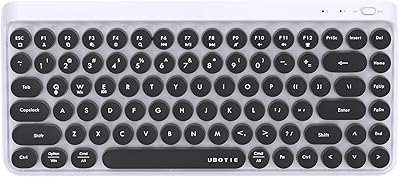
UBOTIE Retro 84-Key Wireless Bluetooth Keyboard
78%
93%
Design & Aesthetics
58%
Typing Experience
86%
Multi-Device Connectivity
63%
Battery Life
79%
Value for Money
More
YIDAOYI ITB060 Portable Bluetooth Speaker
75%
73%
Sound Quality
81%
Battery Life
91%
Portability
67%
Build Quality
84%
Connectivity
More
iClever BK50 Compact Bluetooth Keyboard
79%
83%
Typing Experience
91%
Portability
88%
Multi-Device Switching
78%
Battery Life
82%
Build Quality
More
OMOTON Bluetooth Keyboard for Mac
77%
91%
Value for Money
88%
Mac Compatibility
67%
Bluetooth Reliability
78%
Multi-Device Switching
74%
Typing Experience
More
ANCOBER ACB-002 Portable Bluetooth Speaker
77%
78%
Sound Quality
91%
RGB Lighting & Visual Design
74%
TWS Dual Pairing
61%
Battery Life
84%
Portability & Build
More
iClever BK10 Bluetooth Keyboard
79%
83%
Typing Feel
78%
Multi-Device Switching
61%
Battery Life
71%
Build Quality
67%
Key Stability & Longevity
More
FELICON 308i Bluetooth Keyboard
86%
89%
Design & Aesthetics
94%
Bluetooth Connectivity
76%
Typing Comfort
92%
Portability & Size
85%
Battery Life & Power Saving
More
ProtoArc K90-A Compact Wireless Mac Keyboard
80%
83%
Typing Experience
86%
Multi-Device Connectivity
68%
Battery Life
72%
Backlight Quality
79%
Value for Money
More
GEODMAER Foldable Bluetooth Keyboard
82%
93%
Portability
71%
Typing Experience
88%
Multi-Device Switching
63%
Touchpad Usability
91%
Battery Life
More
Arteck HB086 Bluetooth Keyboard
77%
91%
Value for Money
93%
Battery Life
92%
Portability
88%
Cross-Platform Compatibility
63%
Typing Experience
More

FAQ

Switch the keyboard on and open Bluetooth settings on your iPad. The keyboard should appear in the list of available devices — tap it to connect. The initial pairing usually completes in under a minute, and once done, it reconnects automatically each time you power the keyboard on near that device.

Yes, and this is genuinely one of the more useful features on this mini travel keyboard. You pair two devices upfront — say, a tablet and a phone — and then toggle the active connection by pressing FN+1 or FN+2. Only one device receives input at a time, but the switching is quick and you never have to go back into Bluetooth settings.

That figure is Kenkor's manufacturer-stated estimate, likely measured under light, intermittent use rather than sustained heavy typing. Real-world results will vary, and it's fair to expect somewhat less in practice. That said, most everyday users — people handling emails and notes rather than marathon typing sessions — find they rarely need to charge it during a typical trip.

Yes, the case folds back and doubles as a stand for your tablet, propping it at an adjustable angle while you type. It stays in place rather than flopping around, and the overall setup is reasonably stable on a flat surface. It's a well-thought-out two-in-one design for this price range.

Basic typing should work on Fire tablets since they support standard Bluetooth keyboard input. However, Fire OS is not one of the four officially supported platforms, so some shortcut keys or function commands may not behave as expected. For simple text entry, it's likely fine — just don't count on every key mapping correctly.

No, there is no keyboard backlight on this model. If you regularly type in low-light settings like a dim café or a plane cabin at night, that's a meaningful limitation to factor in before buying.

It charges via USB-C, and a cable is included so you don't need to source one separately. Any standard USB-C cable will also work if you ever lose the included one. A full charge takes around 2 to 3 hours, which is reasonable given how infrequently most users will need to plug it in.

Honestly, this is worth thinking about carefully. The compact layout means the keys are closer together than on a standard keyboard, and users with wider fingers often report a higher typo rate until they adjust — and some never fully do. If you're a heavy typist or have larger hands, it's worth trying a layout this size before committing.

For slower-paced games — strategy titles, turn-based RPGs, or anything where response time isn't critical — this compact Bluetooth keyboard can work just fine. For fast-action games where milliseconds of input lag matter, budget Bluetooth keyboards are generally not ideal, and this one is no exception. It was designed for productivity, not competitive gaming.

Occasional disconnects are a known limitation with budget Bluetooth keyboards in general, and a handful of buyers have flagged it with the Kenkor folding keyboard specifically. The usual fix is to toggle the keyboard off and on, which typically restores the connection within seconds. If you're in a space with heavy Bluetooth traffic — a busy coworking space, for example — interference may make drops more frequent. For most casual, everyday use it tends not to be a persistent issue.