DJI RS 4 Gimbal Stabilizer
Overview
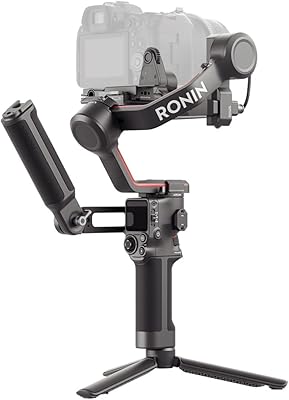
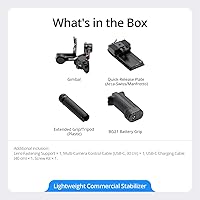
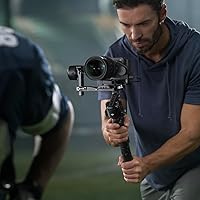
The DJI RS 4 Gimbal Stabilizer is DJI's most polished RS-series release to date, built for videographers who want meaningful upgrades without starting over from scratch. If you've used an RS 3 Pro, the foundation will feel familiar — but this gimbal brings enough practical refinements that the jump makes sense. A redesigned vertical plate, Teflon-coated axis arms, and an extended tilt axis represent real workflow improvements rather than spec-sheet padding. Out of the box, you get the gimbal, BG21 Battery Grip, quick-release plate, and an extended grip/tripod combo. The price positions it firmly in semi-pro to professional territory, so casual shooters should think carefully before committing.
Features & Benefits
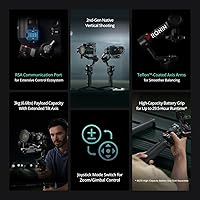
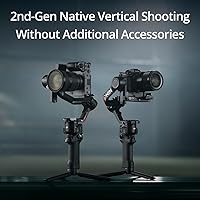
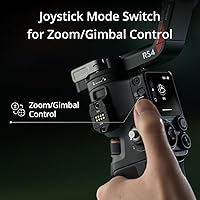
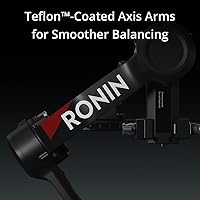
What sets the RS 4 apart from its predecessor starts with native vertical shooting — the redesigned horizontal plate releases and locks into portrait orientation without any adapter. For creators churning out Reels or Shorts, that alone saves real time on set. The joystick doubles as a mode switch, letting you flip between Pan Follow, Pan-Tilt Follow, and FPV modes with one hand. Teflon coating on all three axis arms makes balancing noticeably smoother — less friction, more precision. The tilt axis is also 8.5mm longer than the RS 3's, which opens up room for heavier lens-and-body combos within the 3kg payload cap. A new RSA port adds meaningful room for accessory expansion.
Best For
DJI's latest stabilizer makes the most sense for solo content creators who regularly shoot vertical video — the kind of person bouncing between a landscape interview and a portrait B-roll clip without wanting to stop and re-rig. Event videographers and documentary shooters will also find value here; the standard 12-hour battery life handles a full day, and the optional BG70 grip stretches that to nearly 30 hours. Broad compatibility with Canon, Sony, Nikon, Fujifilm, and Panasonic mirrorless systems means most working professionals won't run into issues. Where it's less compelling is for run-and-gun travel shooters who prioritize portability above all — lighter, cheaper alternatives exist for that specific use case.
User Feedback
Owners consistently praise the balancing experience — most report the process is noticeably faster than on the RS 3, with the Teflon arms getting specific credit. The vertical shooting upgrade also lands well, with many creators calling it a practical time-saver in real shoots. On the critical side, one friction point worth knowing: DJI's Ronin app was removed from Google Play, so Android users need to download it directly from DJI's site. It's a minor inconvenience but comes up enough in reviews to be worth flagging. Some owners also question whether the price premium over the RS 3 Pro is justified if they rarely shoot vertical content. That said, build quality almost never draws complaints.
Pros
- Native vertical shooting works without any adapter — a real time-saver for social content creators.
- Teflon-coated axis arms make balancing noticeably faster and less frustrating compared to previous RS gimbals.
- The extended tilt axis adds meaningful clearance for heavier camera and lens combinations up to 3kg.
- Twelve hours of standard battery life handles a full shooting day without needing a recharge.
- The optional BG70 grip stretches runtime to nearly 30 hours and charges your camera simultaneously via USB-C.
- Quick mode switching via the joystick lets operators adapt mid-shoot without stopping to navigate menus.
- The RSA port opens up genuine ecosystem expansion for complex single-operator rigs.
- Broad mirrorless compatibility means most working professionals won't hit a compatibility wall.
- The included accessory kit — grip, quick-release plate, and tripod — gets you shooting without extra purchases.
- Build quality draws consistent praise from professionals who've used multiple gimbal generations.
Cons
- The Ronin app is absent from Google Play, requiring Android users to manually sideload it from DJI's website.
- RS 3 Pro owners will find the practical day-to-day differences smaller than the price gap implies.
- At 1.55kg before adding a camera, extended handheld shoots can lead to real arm fatigue.
- Unlocking the full battery potential requires purchasing the BG70 grip separately at additional cost.
- The vertical lock mechanism feels less solid than expected given the overall price positioning.
- First-time gimbal users face a steep initial learning curve that the included documentation doesn't adequately address.
- Motor hunting can occur near the 3kg payload ceiling, especially with longer telephoto lenses.
- The joystick mode switch is difficult to operate accurately while wearing gloves in cold conditions.
Ratings
The DJI RS 4 Gimbal Stabilizer has been put through its paces by a wide range of videographers worldwide, and our AI-driven scoring reflects that — built by analyzing thousands of verified buyer reviews while actively filtering out incentivized, bot-generated, and low-signal feedback. Scores are calibrated to surface both where this gimbal genuinely delivers and where real users have hit walls. Nothing here is padded; the numbers reflect honest consensus from working creators.
Stabilization Performance
Balancing Experience
Native Vertical Shooting
Build Quality & Materials
Battery Life
Mode Switching & Controls
App & Connectivity
Payload Capacity & Compatibility
Portability & Form Factor
Ecosystem & Expandability
Out-of-Box Experience
Value for Money
Joystick Precision & Response
Setup & Learning Curve
Suitable for:
The DJI RS 4 Gimbal Stabilizer is purpose-built for creators who treat video production as serious work rather than a casual hobby. It hits its stride with solo videographers who regularly produce short-form vertical content — the kind of operator jumping between a landscape interview and a portrait cutaway multiple times in a single shoot day. Event videographers and documentary crews will find the 12-hour standard battery life and broad mirrorless compatibility with Canon, Sony, Nikon, Fujifilm, and Panasonic systems covers most professional scenarios without compromise. Professionals already embedded in the DJI ecosystem will get the most out of the new RSA port, since it opens the door to tethered handles, remote rings, and follow focus integrations that tighten up complex single-operator setups. If you regularly hit the limits of a lighter gimbal and have been patching together vertical shooting with adapters, this gimbal removes those friction points in a way that genuinely adds up over a busy production schedule.
Not suitable for:
The DJI RS 4 Gimbal Stabilizer is a harder sell for buyers who don't have a clear professional use case to justify the premium price tag. Casual videographers shooting family events or occasional travel vlogs will find the balancing process, mode configurations, and learning curve disproportionate to their needs — lighter, more beginner-friendly gimbals exist at a fraction of the cost. Shooters prioritizing ultra-portability for extended handheld work or backpacking-style travel will also feel the weight over time; at 1.55kg before adding a camera, arm fatigue is a real consideration during long days. Android users should know upfront that the companion app isn't available on Google Play and requires a manual download from DJI's website — a minor but real inconvenience that catches some buyers off guard. Finally, RS 3 Pro owners who rarely shoot vertical content and don't need RSA port expansion may find the incremental upgrade difficult to justify based on day-to-day shooting differences alone.
Specifications
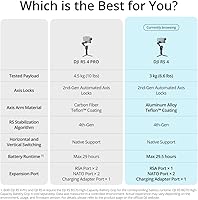
- Payload Capacity: Supports camera and lens combinations up to 3kg (6.6lbs), accommodating most mainstream mirrorless bodies with mid-range zoom lenses.
- Battery Life: Standard runtime is 12 hours on a full charge using the included BG21 Battery Grip.
- Extended Runtime: When paired with the optional BG70 High-Capacity Battery Grip (sold separately), total runtime extends to 29.5 hours.
- Weight: The gimbal weighs 1.55kg (3.41 lbs) without a camera mounted, which is typical for a professional 3-axis stabilizer in this payload class.
- Folded Dimensions: Folds down to 24.5×25.5×7.5 cm, compact enough to fit in most professional camera bags and carry-on luggage.
- Unfolded Dimensions: Measures 14.57×7.52×7.44 inches when fully deployed and ready for use.
- Axis Coating: All three axis arms feature a Teflon coating that reduces friction during balancing and contributes to smoother motor-driven movement.
- Tilt Axis Extension: The tilt axis is 8.5mm longer than the previous RS 3 generation, providing expanded balancing room for larger camera-lens combinations.
- Stabilization Axes: Three-axis motorized stabilization covers pan, tilt, and roll for comprehensive handheld camera movement control.
- Shooting Modes: Supports Pan Follow (PF), Pan-Tilt Follow (PTF), FPV, 3D Roll 360, and Custom modes, selectable via the physical joystick mode switch.
- Vertical Shooting: Features 2nd-generation native vertical shooting via a redesigned horizontal plate that repositions without additional accessories.
- Connectivity: Includes a newly added RSA communication port for connecting DJI tethered control handles and compatible third-party accessories.
- Camera Compatibility: Compatible with mirrorless and DSLR cameras from Canon, Sony, Panasonic, Nikon, and Fujifilm within the supported payload range.
- USB-C Power Output: When using the optional BG70 grip, the gimbal can power a connected camera and accessories at up to 18W via the USB-C port at the base.
- In-Box Contents: Package includes the gimbal unit, BG21 Battery Grip, Quick-Release Plate, and an Extended Grip/Tripod for solo shooting setups.
- Companion App: Controlled via the DJI Ronin app, which is available for iOS through the App Store and for Android via direct download from the DJI official website.
- Batteries Required: Requires one C-type battery, which is included in the box.
- BSR Ranking: Holds a Best Sellers Rank of #3 in the Professional Video Stabilizers category on Amazon as of its listing data.
Related Reviews
DJI RS 4 Mini Combo
DJI RS 4 Pro Combo
DJI RS 2 3-Axis Gimbal Stabilizer
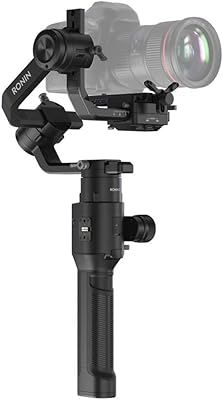
DJI Ronin-S Camera Gimbal Stabilizer
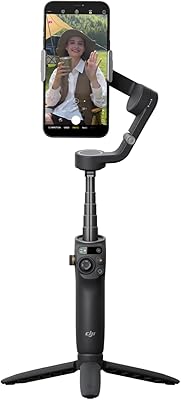
DJI Osmo Mobile 6 Smartphone Gimbal
hohem iSteady Pro 4 Action Camera Gimbal
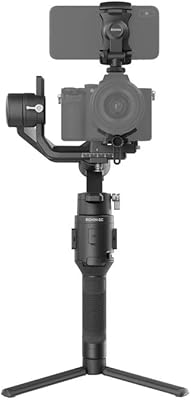
DJI Ronin-SC Pro Combo Handheld Gimbal
ZHIYUN Crane 4 Combo 3-Axis Gimbal Stabilizer
DJI RSC 2 Pro Combo 3-Axis Gimbal Stabilizer