
Overview

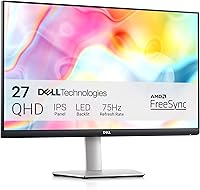
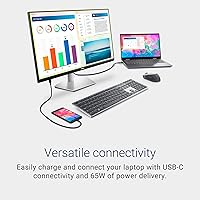
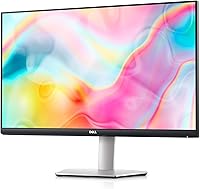
The Dell S2722DC 27-inch USB-C Monitor is a mid-range productivity display built around one genuinely useful idea: plug in a single cable and your laptop is charged, connected, and ready to work. That single-cable USB-C setup is what sets it apart from similarly priced competitors. The QHD 1440p resolution is a real step up from 1080p — text is noticeably crisper, spreadsheets feel less cramped, and you get more working space without the expense of a 4K panel. Add a fully adjustable stand at this price tier, and you have a monitor that takes the practical needs of a home office seriously. Just don't expect a color-critical or high-performance gaming display.

Features & Benefits

The 65W USB-C power delivery is the headline feature — one cable from your laptop to this 27-inch desk display handles charging, video output, audio, and data transfer simultaneously, which clears a surprising amount of clutter from a typical desk. The QHD IPS panel renders text sharply at normal working distances, making long reading and writing sessions noticeably more comfortable than on a 1080p screen. AMD FreeSync at 75Hz is a welcome bonus for casual gaming, keeping tearing minimal without needing a powerful GPU. A side-mounted USB Type-A port lets you plug in a flash drive or phone without fumbling behind your laptop, and the built-in speakers handle video calls adequately without adding a separate device to the desk.

Best For

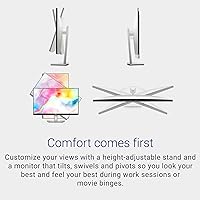
This Dell USB-C monitor makes the most sense for laptop users who want a proper desk setup without a tangle of cables — MacBook and Windows users alike benefit from the single-cable connection. Home office workers who log long hours will genuinely appreciate the height, swivel, tilt, and pivot adjustments; a fixed-tilt stand gets uncomfortable fast, and the S2722DC sidesteps that problem entirely. It also suits students or remote workers making their first move from 1080p to 1440p, where the clarity difference is immediately obvious. Casual gamers who have no need for 144Hz or beyond will find 75Hz FreeSync more than sufficient. Minimalists after a tidier workspace will feel right at home here.

User Feedback

Across nearly 1,000 ratings, the S2722DC holds a 4.6-star average, and the pattern in buyer reviews is consistent. The USB-C single-cable experience draws the most praise by far — people genuinely notice the difference on their desk day to day. Color accuracy and brightness earn solid marks for office work and casual media consumption, though nobody buying this is expecting a professional-grade color panel. The ergonomic stand gets frequent positive mentions from buyers who previously lived with fixed monitors. On the critical side, the built-in speakers are workable for calls but thin for music or movies — most users eventually reach for headphones. A handful of reviewers also flag the lack of KVM support and modest HDR performance as missed opportunities.

Pros

  • Single USB-C cable handles power, video, audio, and data simultaneously — a genuine desk-tidying upgrade.
  • 65W power delivery is enough to charge most mainstream laptops at full speed while you work.
  • QHD 1440p resolution makes text noticeably sharper and gives you meaningfully more screen real estate than 1080p.
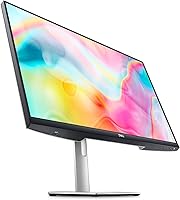
  • The fully adjustable stand — height, tilt, swivel, and pivot — is rare at this price point and genuinely useful for long sessions.
  • AMD FreeSync at 75Hz keeps casual gaming smooth without requiring a high-end graphics card.
  • The side-mounted USB Type-A port makes plugging in a drive or phone quick and easy without reaching behind your laptop.
  • Matte screen surface handles reflections well in typical home office lighting conditions.
  • Dell backs the monitor with a one-year Advanced Exchange warranty, shipping a replacement before you return the faulty unit.
  • At this price tier, the IPS panel delivers solid color accuracy and brightness for everyday productivity and video calls.
  • Built-in speakers keep the desk clean for users who only need audio for meetings and don't want a separate speaker.

Cons

  • 75Hz refresh rate is a hard ceiling — not suitable for anyone who plays fast-paced games competitively.
  • HDR support exists on paper but delivers no meaningful improvement in contrast or peak brightness in practice.
  • No KVM switch means switching between two connected computers requires manual cable swapping.
  • Built-in speakers are thin and lack low-end response, making them inadequate for music, movies, or anything beyond voice calls.
  • Only one USB-C upstream port limits flexibility if you need to connect multiple high-bandwidth devices.
  • The stand, while adjustable, is not removable without VESA mounting, which adds a step for users who prefer monitor arms.
  • No USB-C daisy-chaining support, so expanding your setup requires additional hubs or adapters.
  • Color gamut coverage is adequate for office use but does not meet the standards expected by photographers or video editors.

Ratings

The scores below reflect our AI-driven analysis of verified global buyer reviews for the Dell S2722DC 27-inch USB-C Monitor, with spam, bot submissions, and incentivized feedback actively filtered out before scoring. Each category is weighted against real-world usage patterns — not just star averages — so both the strengths that drive repeat purchases and the pain points that generate returns are represented transparently.

USB-C Connectivity
93%
The single-cable USB-C experience is the feature owners talk about most, and for good reason. Plugging one cable into a laptop and instantly getting a charged battery, extended display, and connected peripherals removes a layer of daily friction that users genuinely notice and appreciate after years of multi-cable setups.
The monitor offers only one USB-C upstream port, which limits flexibility for users with more complex desk setups. Those who need to switch between two computers quickly will find the lack of a second USB-C input or a KVM switch frustrating in practice.
Image Clarity
88%
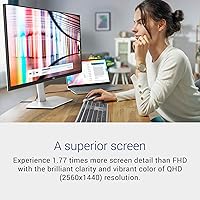
Moving from 1080p to 1440p on a 27-inch panel is immediately noticeable — text is sharper, spreadsheet columns are easier to read, and browser tabs feel less crowded. Owners who work with documents or code all day consistently describe the jump in clarity as one of the best upgrades they have made.
Color accuracy, while solid for office use, does not satisfy users who need a calibrated panel for photo or video work. A small but consistent group of reviewers note that out-of-box color temperature runs slightly cool, requiring manual adjustment to feel natural.
Ergonomic Stand
91%
Height adjustment, tilt, swivel, and full 90-degree pivot in a monitor at this price tier is genuinely uncommon, and owners who spend six or more hours at their desk notice the difference quickly. People switching from a fixed-tilt monitor frequently mention the stand in reviews as one of the first things they appreciated after setup.
The stand base occupies a moderate footprint on the desk, which can feel bulky for users with smaller workspaces. Removing it for a monitor arm also requires partial disassembly, which is a minor inconvenience compared to monitors with tool-free VESA release mechanisms.
Value for Money
86%
For a QHD IPS panel with USB-C power delivery and a fully ergonomic stand, buyers consistently feel they received more than they paid for relative to competing options at this price tier. The combination of features in a single purchase — especially the stand — removes the need for add-on accessories that would raise the total cost elsewhere.
A handful of reviewers feel the value proposition weakens slightly once you factor in the nominal HDR support and the absence of a KVM switch, both of which require spending more to address. At a marginally higher price, competing models close some of those gaps.
Build Quality
82%
18%
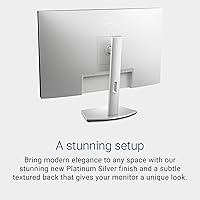
The chassis feels solid and the stand mechanism operates smoothly without wobble or creaking during height or angle adjustments. The Platinum Silver finish looks professional in person and holds up well to daily handling without showing smudges or surface wear easily.
Some users note that the plastic housing, while sturdy, does not feel premium compared to monitors from competitors at a similar tier. The cable management clip integrated into the stand is functional but feels flimsy and has a tendency to loosen over time with repeated cable adjustments.
Display Brightness
74%
26%
In typical indoor lighting conditions — a home office with curtains, standard overhead lighting — the brightness level is entirely comfortable for a full workday without causing eye fatigue. The matte coating helps considerably by diffusing ambient light rather than letting it bounce off the screen.
In brighter environments or near large windows with direct afternoon light, the panel can feel undersaturated and washed out. Users who work in high-ambient-light settings report that they run the brightness near maximum and still wish it had more headroom, particularly for HDR content.
Gaming Performance
68%
32%
AMD FreeSync support at 75Hz does a solid job of eliminating screen tearing in slower-paced games and makes casual play — strategy titles, RPGs, indie games — feel noticeably smoother than a non-FreeSync 60Hz panel. For users who game occasionally rather than competitively, it is a welcome feature.
Competitive gamers will find 75Hz limiting almost immediately, and the 4ms response time, while acceptable, is not fast enough to satisfy anyone chasing a performance edge. The monitor was not designed with gaming as a priority, and it shows once you push it beyond casual use cases.
HDR Quality
41%
59%
The monitor formally supports HDR, which means HDR-flagged content from streaming services will activate the mode and occasionally produce slightly elevated contrast in darker scenes. For users who are not actively evaluating HDR performance, it passes without drawing attention.
In practice, the HDR implementation is disappointing — peak brightness is insufficient to produce the bright highlights or deep shadow detail that HDR content actually requires. Most users who test it deliberately end up disabling HDR mode because the standard picture often looks better without it.
Color Accuracy
77%
23%
For productivity-focused buyers — spreadsheets, document editing, web browsing, and video calls — the color output from the IPS panel is natural and consistent enough to use comfortably all day without any calibration. Casual photo viewing and streaming also look pleasant at default settings.
Out-of-box calibration leaves something to be desired for users with higher expectations: the color temperature is slightly cool and saturation can feel restrained. Those with a colorimeter and the patience to calibrate will get better results, but it should not require that level of effort at this tier.
Speaker Quality
52%
48%
The built-in stereo speakers do exactly what is needed for video calls and occasional system audio, keeping one more external device off the desk for users whose audio needs are minimal. At low to moderate volume, voice clarity during meetings is acceptable without additional hardware.
Anyone expecting to use these speakers for music, movies, or any content with meaningful dynamic range will be disappointed quickly — bass is essentially absent and the overall output sounds thin and flat at higher volumes. Most owners end up using headphones or an external speaker within weeks of setup.
Port Selection
71%
29%
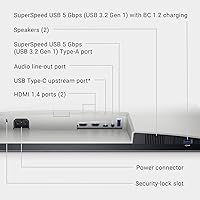
The combination of USB-C, HDMI, and a front-accessible USB-A port covers the essential bases for most laptop users without requiring a separate hub. The placement of the USB-A port on the side of the monitor is a practical detail that makes plugging in a flash drive or phone cable noticeably easier.
The port count is lean — there is no DisplayPort input, only one downstream USB-A port, and no additional USB-C downstream ports for accessories. Users who need a more complete hub experience will likely need to add a separate dock, which partially undermines the clean single-cable appeal.
Setup & Installation
89%
Assembly out of the box is straightforward: the stand clicks into the monitor base without tools, cables are clearly labeled, and most users report being up and running in under ten minutes. The single-cable USB-C connection means there is genuinely less to configure than a traditional multi-cable monitor setup.
The on-screen display menu, while functional, has a learning curve — the button layout is not immediately intuitive, and navigating to brightness or input settings during the first week requires some trial and error. It is a minor friction point but one that comes up repeatedly in early user reviews.
Eye Comfort
83%
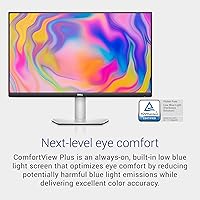
The matte IPS panel, combined with flicker-free backlighting and a ComfortView low blue light mode, makes extended work sessions noticeably less taxing on the eyes than glossy or lower-quality panels. Users who work eight or more hours a day at the desk tend to highlight this positively.
The blue light filter mode shifts the color temperature noticeably warm, which some users find off-putting for color-sensitive work. There is no granular adjustment that allows users to dial in a middle ground between full blue light filtering and the default cool color tone.
Warranty & Support
84%
Dell's one-year Advanced Exchange Service is a meaningful differentiator — if a hardware fault is confirmed, a replacement ships before you return the defective unit, minimizing downtime for users who rely on the monitor for daily work. Buyers consistently cite this as a confidence builder at purchase.
The warranty covers only one year, which feels short given the monitor's intended role as a long-term desk fixture. Extended coverage requires purchasing Dell Premium Support separately, and not all regions receive next-business-day exchange service at the same speed as primary markets.

Suitable for:

The Dell S2722DC 27-inch USB-C Monitor was clearly designed with the modern laptop worker in mind, and it delivers where that audience needs it most. If you use a MacBook, Dell XPS, or any USB-C laptop as your primary machine, plugging a single cable into this display and having your screen extended, your laptop charged, and your peripherals connected is a genuinely satisfying experience that makes a real difference in daily workflow. Home office professionals who spend six or more hours at their desk will also find the fully adjustable stand — height, tilt, swivel, and pivot — worth its weight alone, since many competing monitors at this tier still ship with fixed or tilt-only stands. Students making their first jump from a 1080p screen to 1440p will notice the clarity improvement immediately, particularly for reading, writing, and working with multiple windows side by side. Casual gamers who want smoother visuals without building a dedicated gaming rig will find the 75Hz FreeSync support a useful bonus on top of an otherwise productivity-focused panel.

Not suitable for:

Buyers with more demanding or specialized needs will likely find the S2722DC falls short in a few meaningful areas. Serious gamers chasing high refresh rates will hit the ceiling fast — 75Hz is entry-level by today's gaming standards, and there is no path to 144Hz or beyond with this panel. Creative professionals who need accurate, calibrated color for photo editing, video grading, or graphic design should look elsewhere, as this is an IPS panel tuned for office use rather than color-critical work. The built-in HDR support is nominal at best and does not deliver the contrast or brightness lift that HDR-capable content actually requires. Users who regularly switch between two or more computers at the same desk will miss a built-in KVM switch, which the Dell S2722DC 27-inch USB-C Monitor does not include — a workaround is manageable but adds friction. Finally, anyone who relies on DisplayPort or a full HDMI 2.0 setup for higher bandwidth connections may find the port selection limiting.

Specifications

  • Screen Size: The panel measures 27 inches diagonally, providing ample working space for multitasking without requiring an ultrawide footprint.
  • Resolution: Native resolution is 2560x1440 (QHD / 1440p), delivering noticeably sharper text and images compared to a standard 1080p display.
  • Panel Type: Uses an IPS panel, which provides consistent colors and wide viewing angles suitable for everyday productivity and media consumption.
  • Refresh Rate: Supports a maximum refresh rate of 75Hz, sufficient for smooth everyday use and casual gaming with AMD FreeSync enabled.
  • Response Time: Rated at 4ms response time, which is adequate for general office work and casual gaming but not optimized for competitive play.
  • USB-C Power: The USB-C port delivers up to 65W of power, enough to charge most mainstream laptops at full speed while simultaneously transmitting video and data.
  • Connectivity: Ports include one USB-C (upstream, 65W PD), one HDMI, and one USB 3.2 Gen 1 Type-A, covering the essential connection needs for most users.
  • AMD FreeSync: AMD FreeSync is supported over the full 48–75Hz range, reducing screen tearing during casual gaming without requiring a high-end GPU.
  • Aspect Ratio: Standard 16:9 widescreen aspect ratio, compatible with virtually all content formats and productivity layouts.
  • Screen Surface: Matte anti-glare coating reduces reflections from ambient light, making it comfortable to use in typical home office and office environments.
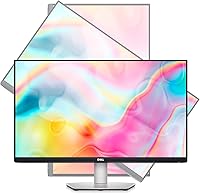
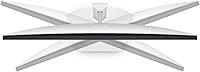
  • Ergonomics: The included stand supports height adjustment, tilt, swivel, and 90-degree pivot rotation, allowing a wide range of ergonomic configurations.
  • VESA Support: The monitor is VESA mount compatible (100x100mm), allowing users to attach it to a third-party monitor arm if preferred.
  • Built-in Audio: Integrated stereo speakers are included for basic audio output, suitable for video calls but not intended as a primary audio solution.
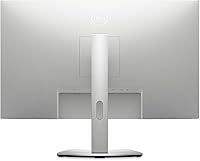
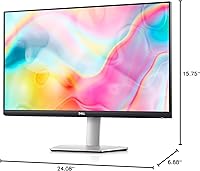
  • Dimensions: With the stand attached, the monitor measures approximately 6.88 x 24.08 x 15.75 inches (D x W x H) and weighs 11.91 pounds.
  • Color & Finish: Available in Platinum Silver, giving it a clean, professional aesthetic that pairs well with most modern laptop and desk setups.
  • HDR Support: The monitor lists basic HDR support, though peak brightness limitations mean real-world HDR performance is minimal rather than impactful.
  • Warranty: Dell includes a 1-Year Advanced Exchange Service, under which a replacement unit is shipped the next business day if a hardware issue is confirmed.
  • Power Input: Operates on AC input up to 240 volts, making it compatible with both North American and international power standards with the appropriate adapter.

Related Reviews

Dell S2725QC 27-inch 4K USB-C Monitor
81%
93%
Image Clarity
88%
Color Accuracy
91%
USB-C Connectivity
86%
Refresh Rate & Smoothness
89%
Build Quality & Design
More
Dell S2722QC 27-inch 4K USB-C Monitor
74%
91%
Image Sharpness & Clarity
88%
USB-C Connectivity
86%
Ergonomics & Stand
83%
Value for Money
67%
Color Accuracy
More
Dell UltraSharp U2723QE 27″ 4K Monitor
78%
93%
Color Accuracy
88%
Contrast & Black Depth
91%
USB-C Hub & Connectivity
89%
Eye Comfort
87%
Build Quality & Stand
More
ASUS ZenScreen MS27UC 27-inch 4K Smart Monitor
77%
91%
Picture Quality
83%
Smart TV Integration
93%
USB-C Connectivity
67%
Speaker Performance
71%
Build Quality
More
Dell UltraSharp U3821DW 38-inch Curved USB-C Hub Monitor
87%
91%
Display Quality
87%
Ergonomics & Comfort
89%
Multitasking Performance
92%
Color Accuracy
90%
Connectivity Options
More
Dell 34 Plus USB-C Curved Monitor S3425DW 34-inch
86%
91%
Display Quality
94%
Color Accuracy
85%
Gaming Performance
88%
Build Quality
92%
Ease of Setup
More
Dell S2725DS 27-inch QHD Monitor
81%
91%
Image Clarity & Resolution
88%
Eye Comfort & Low Fatigue
89%
Ergonomics & Stand Flexibility
79%
Refresh Rate & Motion Smoothness
74%
Contrast & Black Levels
More
Dell P2721Q 27-inch 4K Monitor
75%
93%
Image Sharpness
81%
Color Accuracy
89%
USB-C Connectivity
63%
Build Quality
77%
Ergonomics & Adjustability
More
Dell P2714H 27-inch IPS Monitor
70%
78%
Color Accuracy
47%
Text Sharpness
87%
Ergonomic Range
74%
Build Quality
83%
Viewing Angles
More
Dell SE2722HX 27-inch FHD Monitor
84%
91%
Value for Money
87%
Display Quality
83%
Build Quality
88%
Ease of Setup
85%
Ergonomics & Comfort
More

FAQ

Yes, as long as your MacBook Pro supports USB-C charging and does not require more than 65W to charge at full speed. Most MacBook Air and 13-inch MacBook Pro models charge comfortably at 65W. The 14-inch and 16-inch MacBook Pro models may charge at a reduced rate or maintain battery level rather than actively gaining charge under heavy load.

The monitor typically ships with a USB-C cable in the box, so most users can get up and running without buying anything extra. That said, if your cable goes missing or you need a longer run, make sure you use a USB-C cable rated for video output and power delivery — not all USB-C cables support both.

You can use it with a desktop PC via the HDMI port, which works just fine for standard video output. The USB-C single-cable convenience is specific to laptop users, but the S2722DC functions as a solid display for any machine with a compatible video output.

It depends entirely on what you play. For slower-paced games, strategy titles, RPGs, or indie games, 75Hz with FreeSync feels smooth and responsive. If you play fast-paced shooters or other competitive titles where 144Hz and above makes a real difference, this monitor will feel limiting — it was not designed with high-refresh gaming as a priority.

They are adequate for video calls and occasional background audio, but not much beyond that. Bass is thin, volume headroom is limited, and you will notice the difference quickly if you try to listen to music or watch a film with any real audio dynamics. Most users eventually plug in headphones or a small external speaker for anything beyond meetings.

Yes, the Dell S2722DC 27-inch USB-C Monitor is VESA compatible with a standard 100x100mm pattern, so you can attach it to any compatible monitor arm. Just keep in mind that removing the stand means you lose the built-in ergonomic adjustability, but a good monitor arm more than compensates for that.

The matte anti-glare coating does a solid job of diffusing reflections, making it more comfortable than glossy panels in typical home office lighting. It is not completely glare-proof in direct sunlight, but for rooms with indirect or controlled lighting it performs well throughout the day.

Absolutely. At 27 inches, 1080p starts to show its limits — text can look slightly soft and pixel density feels low. At 1440p on the same screen size, text is meaningfully sharper and you get more usable space for open windows and applications side by side. Most people who make the jump do not want to go back.

The monitor will still deliver a video signal and data connection normally. However, the actual charging rate will be negotiated between your laptop and the monitor, and your laptop may charge more slowly than its maximum rated speed. This is a laptop-side limitation rather than a monitor defect, and day-to-day use is typically unaffected.

For most people who sit at a desk for several hours a day, yes — it makes a genuine difference. Being able to raise or lower the screen to eye level, rotate it for portrait mode, or adjust the angle without propping the monitor on books or boxes is a comfort upgrade that adds up over time. Many monitors at this price tier only offer tilt, so the full adjustability here is a real practical advantage.

Where to Buy