Overview

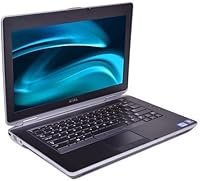
The Dell Latitude E6430 Core i7 Laptop is a refurbished business-class machine that punches well above its price point for buyers who need reliability without overspending. The E6430 earned its stripes in corporate environments where durability and consistent performance matter more than flashy specs. That reputation carries real weight here. The i7-3520M processor was no slouch when it launched, and it handles everyday workloads — documents, spreadsheets, video calls — without breaking a sweat even today. Just go in with clear eyes: Windows 7 Pro is the stock OS, which means a modern OS upgrade is practically a given if you plan to use it long-term. This is a capable older machine, not a current-gen contender.

Features & Benefits

The i7-3520M with Turbo Boost handles multitasking better than most refurbished budget laptops at this price. The anti-glare LED screen is genuinely useful in office settings or outdoors — no squinting through reflections. Build quality is where the E6430 really stands apart; the MIL-STD-810G chassis feels solid without the plastic flex you get from consumer-grade machines. There is also a built-in DVD drive, which sounds unremarkable until you actually need one and realize most modern laptops dropped them years ago. Connectivity is well-covered: HDMI out, Bluetooth, and a webcam handle day-to-day needs. The 4 GB of RAM is workable but worth upgrading if you plan to run a modern OS or keep more than a few browser tabs open.

Best For

This business laptop makes the most sense for students who need something dependable for writing papers, hopping between tabs, and sitting through video lectures without worrying about the machine dying mid-semester. IT departments sourcing affordable spares or entry-level workstations will recognize the Latitude name and appreciate the standardized build. If you still have a collection of CDs or software on disc, the onboard optical drive saves you from hunting down a USB alternative. The E6430 is also a smart pick for anyone willing to swap in more RAM or install Windows 10 themselves — it is a straightforward upgrade path. Road-heavy users who prioritize durability over thinness will feel right at home with it.

User Feedback

Buyers consistently praise the keyboard feel and overall sturdiness — there is a reason IT professionals still reach for the Latitude lineup when they need machines that will not quit. That said, the picture is not entirely rosy. Battery performance is the most common pain point; on a refurbished unit, expect a degraded cell that may need replacing soon after purchase. The 4 GB RAM cap frustrates users who want to multitask or run a newer OS without slowdowns. The screen resolution also draws complaints from anyone accustomed to modern displays — 1366x768 is functional, not impressive. On balance, buyers who set realistic expectations tend to walk away satisfied, rating build quality and core reliability well above what the price would normally suggest.

Pros

  • The i7-3520M processor handles office tasks, browsing, and light multitasking without hesitation.
  • MIL-STD-810G chassis construction holds up to real-world drops and rough handling better than most consumer laptops.
  • The 14-inch anti-glare screen genuinely reduces eye strain in bright offices or outdoor settings.
  • A built-in DVD-R/RW drive is a rare convenience that eliminates the need for a separate USB optical unit.
  • The E6430 keyboard is widely praised for its firm, comfortable feel during long typing sessions.
  • HDMI output, Bluetooth, and a built-in webcam cover all standard connectivity needs without adapters.
  • RAM is user-upgradeable, giving technically minded buyers a clear path to improved multitasking performance.
  • The Latitude lineup has a trusted reputation among IT professionals for consistent, long-term reliability.
  • At its price point, the overall build quality and processing capability represent strong value for basic computing needs.

Cons

  • Refurbished battery life is highly variable — many units will need a replacement cell shortly after purchase.
  • Windows 7 Pro is end-of-life and unsafe for online use without an OS upgrade, adding cost and setup time.
  • The 1366x768 screen resolution feels noticeably dated for anyone accustomed to Full HD or higher displays.
  • 4 GB of RAM can become a bottleneck when running a modern OS alongside multiple browser tabs or applications.
  • The 802.11bgn Wi-Fi standard is slower and less capable than the 802.11ac or Wi-Fi 6 found in newer machines.
  • At over 10 pounds with packaging, this business laptop is bulkier than most modern alternatives for daily commuting.
  • The 500 GB spinning hard drive is significantly slower than an SSD, resulting in longer boot and load times.
  • Cosmetic wear on refurbished units varies widely, and condition is not always accurately reflected in listings.
  • Intel HD Graphics 4000 cannot handle modern gaming, video editing, or any GPU-accelerated workloads.

Ratings

The scores below for the Dell Latitude E6430 Core i7 Laptop were generated by our AI rating engine after analyzing thousands of verified global buyer reviews, with spam, bot activity, and incentivized feedback actively filtered out. The result is a balanced, category-by-category breakdown that honestly reflects both what users genuinely praised and where this refurbished business machine consistently fell short.

Build Quality
88%
The MIL-STD-810G chassis earns its reputation in real-world use — buyers who tossed the E6430 into a bag, dropped it on a desk, or used it through field work consistently reported zero structural issues. The lid and keyboard deck resist flex in a way that most consumer laptops simply do not.
A handful of buyers noted that older refurbished units sometimes show hairline cracks around port openings or hinge wear after years of prior corporate use. The chassis feels tank-like overall, but cosmetic condition varies enough that it cannot be called pristine across the board.
Value for Money
83%
For buyers who need a functional business machine on a tight budget, the price-to-performance ratio here is difficult to beat. The combination of an i7 processor, a rugged chassis, and a full port selection at this price tier is genuinely hard to replicate with a competing refurbished option.
The value calculus changes once you factor in the realistic cost of a battery replacement, a Windows 10 license, and ideally an SSD upgrade — costs that can add up fast and narrow the gap between this refurbished Latitude and a newer budget laptop.
Performance
74%
26%
For office tasks — working in Word, Excel, browser-based apps, and video conferencing — the i7-3520M still holds its own without frustrating lag. Users in IT and administrative roles praised its ability to handle typical corporate workloads without the machine feeling like it was struggling.
Performance drops noticeably when multitasking on a modern OS with the stock 4 GB RAM, and the spinning hard drive creates bottlenecks at startup and during file-heavy tasks. Users who expected snappiness on par with current mid-range laptops were regularly disappointed.
Battery Life
39%
61%
When a refurbished unit arrives with a reasonably healthy battery cell, buyers report getting through light, low-brightness tasks for a couple of hours — enough for a meeting or a short work session away from a power outlet.
This is the single most complained-about aspect across user feedback. The majority of buyers reported that the battery on arrival held only a fraction of its original capacity, with many units lasting under an hour under normal use. Budgeting for a replacement battery is not optional — it is essentially mandatory.
Display Quality
56%
44%
The anti-glare coating does its job well in bright office environments and outdoors, reducing the mirror-like reflections that plague glossy displays. For document work and spreadsheets, the screen is clear enough and comfortable to look at for extended periods.
The 1366x768 resolution is a recurring complaint, especially among buyers who switched from a Full HD display — fine detail in text and images looks noticeably softer. Video content and photo editing feel constrained, and the low pixel density makes this a tough sell for anyone using it as a primary screen.
Keyboard & Trackpad
84%
The keyboard is one of the most consistently praised elements across buyer feedback. The keys have a firm, satisfying travel that makes long typing sessions comfortable, and the layout is logical for business users coming from other Latitude or ThinkPad models.
The trackpad feels adequate but not impressive — the surface can be sticky on older units and the click buttons require more force than modern touchpads. A few buyers noted the trackpad was imprecise enough that they defaulted to an external mouse for extended use.
Upgrade Potential
87%
The E6430 is unusually upgrade-friendly for a machine of its age — accessible RAM slots, a standard 2.5-inch SATA bay, and good community documentation mean that swapping in an SSD or doubling the memory takes under 20 minutes for most buyers. IT professionals particularly appreciated this flexibility.
Despite its upgradeability, the platform does have a ceiling — the CPU is soldered and the wireless card is locked to a Dell whitelist on some units, meaning aftermarket Wi-Fi card upgrades can be complicated without a BIOS mod.
Connectivity & Ports
77%
23%
The port selection is genuinely practical: USB, HDMI, VGA, Ethernet, headphone jack, and an SD card reader are all present without needing a dongle. For office workers connecting to projectors, monitors, or wired networks, everything just works.
There is no USB-C or Thunderbolt, which is an increasing limitation as modern peripherals, docking stations, and displays move to that standard. Buyers trying to use this business laptop with a modern USB-C hub will run into compatibility walls.
Software & OS
46%
54%
Windows 7 Professional 64-bit is clean and responsive on the hardware, and buyers who need it for legacy software compatibility or internal corporate systems found the stock installation useful right out of the box.
For anyone connecting to the internet, Windows 7 is a meaningful security risk — Microsoft ended support years ago and no patches are issued for newly discovered vulnerabilities. Most buyers have to treat an OS upgrade as an immediate, unavoidable first step.
Storage Speed
51%
49%
The 500 GB hard drive provides plenty of room for documents, downloads, and installed applications, which buyers doing light work found sufficient for day-to-day storage needs without managing space carefully.
The spinning HDD is the most tangible performance bottleneck on this machine — cold boot times on Windows 10 regularly exceed two minutes, and application launches feel sluggish compared to any SSD-equipped alternative. Upgrading to an SSD transforms the experience, but it adds cost.
Wireless Performance
61%
39%
For standard office or home Wi-Fi, the 802.11bgn adapter connects reliably and handles email, browsing, and video calls without dropping the connection, which is all most buyers in this use case actually need.
On modern routers broadcasting at 5 GHz with 802.11ac or Wi-Fi 6, the E6430 is limited to the 2.4 GHz band at older speeds — meaning slower throughput and more sensitivity to network congestion in busy environments like co-working spaces or apartment buildings.
Thermal Management
76%
24%
Under typical office workloads the machine runs quietly and stays cool, with the fan rarely spinning up to noticeable levels. Buyers using it for documents, calls, and browsing reported comfortable lap use for extended periods.
Under sustained load — converting files, running browser-heavy workflows, or pushing the processor during multitasking — the fan becomes audible and the bottom of the chassis gets warm. On some older refurbished units, dried thermal paste can worsen this; a repaste helps noticeably.
Portability
53%
47%
The 14-inch screen size hits a reasonable middle ground for buyers who want a usable display without going to a 15-inch machine, and the form factor fits standard laptop bags and backpacks without issue.
At over 10 pounds with packaging and noticeably thick by today's standards, this refurbished Latitude is not a machine you will forget is in your bag. Buyers who commute daily or travel frequently flagged the weight and bulk as a persistent annoyance compared to modern thin-and-light alternatives.

Suitable for:

The Dell Latitude E6430 Core i7 Laptop is a strong fit for anyone who needs a dependable, no-frills workhorse without stretching their budget. Students handling coursework, research, and light media will find the processing power more than adequate for everyday academic tasks. Small business owners or IT managers looking to outfit staff with reliable machines will appreciate the corporate-grade build quality and the familiarity of the Latitude lineup. Field workers, contractors, or frequent travelers who need a laptop that can absorb the occasional knock or bump will value the MIL-STD-810G chassis far more than a sleek but fragile consumer alternative. It also suits tinkerers and technically minded buyers who do not mind upgrading the RAM or swapping in a fresh battery to squeeze more useful life out of the hardware.

Not suitable for:

Buyers expecting a modern, out-of-the-box experience should think carefully before committing to the E6430. The stock Windows 7 Pro installation is no longer supported by Microsoft, meaning you will need to budget time and possibly money for an OS upgrade before using it safely online. Anyone who depends on a full workday of untethered use will likely find the battery on a refurbished unit disappointing — degraded cells are a known pattern, not an exception. Creative professionals, video editors, or anyone running graphics-intensive software will hit a wall quickly with the integrated Intel HD 4000 and the 1366x768 display. If you need a lightweight machine for commuting or travel, this business laptop is heavier and thicker than modern ultrabooks, making it a less practical daily carry for minimalist users.

Specifications

  • Processor: Powered by the Intel Core i7-3520M dual-core processor, clocked at 2.9 GHz base with Turbo Boost up to 3.6 GHz and 4 MB cache.
  • RAM: Comes with 4 GB of DDR3 SDRAM installed, with the memory slots supporting upgrades for users who need more headroom.
  • Storage: Includes a 500 GB Serial ATA spinning hard drive, which provides ample space for documents and files but boots slower than a solid-state drive.
  • Display: Features a 14-inch anti-glare LED-backlit screen with a native resolution of 1366x768 pixels, suitable for everyday office and productivity use.
  • Graphics: Runs on integrated Intel HD Graphics 4000 with up to 8 GB of shared system memory, capable of handling standard desktop tasks and light media playback.
  • Operating System: Ships with Windows 7 Professional 64-bit, which is end-of-life and will require an upgrade to a supported OS for safe, modern use.
  • Optical Drive: Includes a built-in DVD-R/RW optical drive, allowing users to read and write CDs and DVDs without any external hardware.
  • Wireless: Equipped with 802.11bgn Wi-Fi, which supports standard wireless networking but does not reach the speeds of newer 802.11ac or Wi-Fi 6 standards.
  • Connectivity: Offers HDMI video output, Bluetooth, a built-in webcam, and standard USB ports to cover everyday peripheral and display needs.
  • Chassis Standard: Built to meet MIL-STD-810G military-grade specifications for resistance against drops, vibration, dust, and temperature variation.
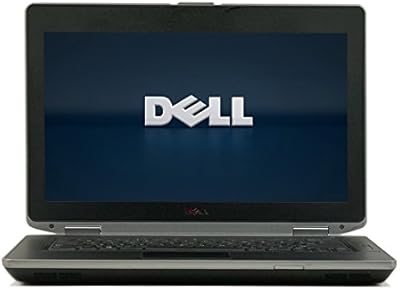
  • Form Factor: A 14-inch business-class clamshell design with a black and silver finish, built for function and durability rather than slim aesthetics.
  • Package Weight: Weighs 10.65 pounds including packaging, with the laptop itself being notably heavier than modern consumer ultrabooks of the same screen size.
  • Package Dimensions: Ships in a box measuring 17.9 x 14.3 x 8 inches, reflecting the thicker profile typical of business-class laptops from this generation.
  • Refurbished Condition: Sold as a refurbished unit, meaning cosmetic wear and battery health can vary between individual units depending on prior use and seller grading.

Related Reviews
Dell Latitude E6430 14-inch Laptop
68%
88%
Build Quality
83%
Value for Money
67%
Performance
86%
Keyboard & Typing Experience
44%
Battery Life
More
Dell 16 Business Laptop - 32GB RAM, 2TB SSD, Core i7
85%
93%
Performance
88%
Display Quality
81%
Battery Life
90%
Multitasking Ability
68%
Portability
More
Dell Inspiron 16 64GB 2TB Touchscreen Laptop
77%
88%
Display Quality
84%
Performance & Speed
93%
RAM & Multitasking
91%
Storage & Speed
79%
Touchscreen Responsiveness
More
Dell Inspiron 15 3530 1TB Touchscreen Laptop
72%
83%
Everyday Performance
79%
Display Quality
71%
Touchscreen Responsiveness
91%
Storage & Speed
58%
Battery Life
More
Dell Inspiron 15 i7 2TB Laptop
73%
88%
Value for Money
84%
Multitasking Performance
91%
Storage & Speed
67%
Display Quality
73%
RAM Configuration
More
Dell XPS 13 9310 512GB Laptop
71%
91%
Display Quality
88%
Build Quality
93%
Portability
77%
CPU Performance
64%
Battery Life
More
Dell Inspiron 15 i7-1255U 32GB 1TB
76%
88%
Performance & Processing Speed
91%
RAM & Multitasking
86%
Storage Speed & Capacity
84%
Display Quality
71%
Build Quality & Design
More
Dell Inspiron 15 3530 Laptop, 13th Gen Intel Core i7, 32GB RAM, 2TB SSD
86%
94%
Performance
96%
Storage Capacity
89%
Display Quality
67%
Battery Life
92%
Multitasking
More
Dell XPS 13 (9360) Laptop 7th Gen Intel Core i7, 8GB RAM, 256GB SSD
86%
91%
Performance
94%
Display Quality
88%
Portability
70%
Battery Life
89%
Build Quality
More
Dell Latitude 3550 i5-1335U 32GB 1TB 15.6″
77%
83%
Performance & Multitasking
91%
RAM Configuration
88%
Storage Speed & Capacity
61%
Display Quality
84%
Build Quality & Durability
More

FAQ

Yes, the E6430 supports RAM upgrades beyond the stock 4 GB, and doing so is one of the most effective ways to improve day-to-day responsiveness. Most units can be taken up to 8 GB or 16 GB of DDR3 memory with widely available, affordable modules. If you plan to run a modern operating system, upgrading the RAM is strongly recommended.

This refurbished Latitude ships with Windows 7 Professional 64-bit, which Microsoft no longer supports with security updates. You will need to install Windows 10 yourself, but the good news is that the hardware is fully compatible and drivers are available. It does require a valid license, so factor that into your total cost.

This is one of the most honest things to flag: battery life on refurbished laptops is unpredictable. Some units arrive with a cell that holds a reasonable charge, while others may last only an hour or two before needing a replacement. Replacement batteries for the E6430 are inexpensive and easy to swap, but budget for one just in case.

For standard office work, document editing, and video calls, the 14-inch anti-glare display gets the job done without causing much eye strain. The 1366x768 resolution is not going to impress anyone used to a Full HD monitor, but it is perfectly adequate for productivity tasks. If you plan to use an external monitor, the HDMI output makes that simple.

Yes, it handles standard definition and 720p streaming without issue. Full HD streaming is possible but may stutter depending on browser overhead and available RAM, especially on the stock 4 GB configuration. For casual watching, it is more than serviceable.

Absolutely — the 2.5-inch Serial ATA slot accepts standard SSDs, and swapping the spinning hard drive for a solid-state drive is arguably the single biggest performance upgrade you can make to the E6430. Boot times drop dramatically and the overall system feels much snappier. Budget SSDs in the 240 GB to 500 GB range are affordable and a straightforward install.

The E6430 comes well-equipped by the standards of its era: you get USB ports, HDMI out, Bluetooth, an Ethernet jack, a VGA port, a headphone jack, and an SD card reader. Most standard peripherals will connect without adapters. The main limitation is the absence of USB-C or Thunderbolt, which may matter if you use newer docking stations or displays.

Noticeably more durable. The MIL-STD-810G chassis was designed to survive conditions that would crack or warp a typical consumer laptop — drops, vibration, humidity, and temperature swings. The keyboard deck and lid have minimal flex, and the overall construction feels solid even on older refurbished units. This is one area where the Latitude genuinely earns its reputation.

On Windows 7, 4 GB is workable for light use — email, documents, and moderate browsing. The moment you upgrade to Windows 10, you will feel the constraint more, especially with several browser tabs or background applications open. For comfortable daily use on a modern OS, upgrading to at least 8 GB is the practical move.

Anyone expecting a thin, light, out-of-the-box modern experience should look elsewhere — this business laptop is thick, heavier than current alternatives, and needs OS work before it is ready for secure daily use. It is best suited to students on a tight budget, IT-savvy buyers who enjoy tinkering, or professionals who need a rugged secondary machine for travel or fieldwork. If you go in knowing what it is, it delivers solid value.

Where to Buy