Dell Latitude 3550 i5-1335U 32GB 1TB 15.6″


Overview
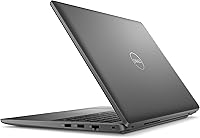
The Dell Latitude 3550 i5-1335U 32GB 1TB 15.6″ sits comfortably in the mid-range business laptop category, offering professionals a reliable daily driver without demanding a premium price. At just under 4 lbs, it’s easy enough to carry between meetings or toss in a bag for a commute, yet the 15.6-inch screen gives you real working space. Dell’s Latitude line has long been associated with enterprise-grade durability and dependable long-term support, and this model continues that tradition. What stands out immediately is the 32GB DDR5 RAM and 1TB SSD combination — genuinely generous specs for this tier. Just keep in mind: there’s no discrete GPU, no backlit keyboard, and the display tops out at 60Hz.
Features & Benefits
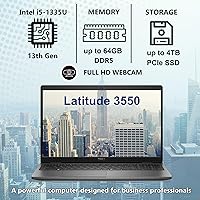
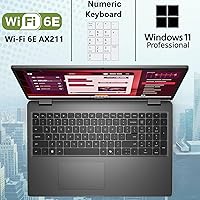
The i5-1335U is Intel’s 13th-gen hybrid chip with 10 cores — 2 performance and 8 efficiency — and it handles everyday office workloads, video calls, and browser-heavy sessions without complaint. Where this Latitude 3550 really separates itself from similarly priced competitors is the 32GB of DDR5 RAM. Most business laptops at this level ship with 16GB; doubling that means you’re not hitting memory ceilings anytime soon. The 1TB NVMe SSD keeps things snappy — apps load fast, boot times are short. Wi-Fi 6E and Bluetooth 5.3 are future-ready additions, and the USB4 Type-C port opens the door to high-speed docking and external display setups that older USB-C standards simply can’t match.
Best For
Dell’s business laptop fits naturally into the hands of remote workers and office professionals who want a capable, low-maintenance machine that handles the workday without drama. The 32GB RAM makes it a smart pick for students or academics running multiple research tools, databases, or virtual machines simultaneously. IT departments will appreciate the Windows 11 Pro license and Dell’s enterprise support ecosystem, which simplifies deployment and long-term maintenance. If you’re coming from an older Latitude or an entry-level budget machine, the performance jump will feel real. That said, creative professionals should look elsewhere — the 45% NTSC color gamut and integrated-only graphics aren’t built for photo editing, video grading, or GPU-intensive work.
User Feedback
Buyers consistently highlight the build quality and SSD speed as standouts, with many noting this work-focused machine feels more solid than competing options at the same price point. The out-of-box Windows 11 Pro experience earns praise too — clean setup, no bloatware headaches. On the flip side, the missing backlit keyboard comes up repeatedly, and understandably so at this tier. The display draws mixed reactions: perfectly adequate for documents and spreadsheets, but noticeably dim in bright rooms and color-flat for anything media-heavy. Battery life is another recurring concern — real-world use tends to land closer to 6–7 hours under moderate load, which falls noticeably short of the 10-hour manufacturer estimate.
Pros
- 32GB DDR5 RAM is genuinely uncommon at this price tier and prevents the memory bottlenecks that plague most competitors.
- The 1TB NVMe SSD delivers fast, responsive app launches and boots that feel meaningfully quicker than older SATA-based systems.
- Wi-Fi 6E and Bluetooth 5.3 provide future-ready wireless connectivity for modern office and home network environments.
- The USB4 Gen 2 Type-C port enables high-speed docking, external display output, and USB-C charging from a single cable.
- A physical RJ-45 Ethernet port is a practical inclusion that many slim laptops have quietly dropped.
- The 1080p webcam with dual-array microphones produces noticeably cleaner video call quality than most built-in laptop cameras.
- Windows 11 Pro comes pre-installed, covering BitLocker, Remote Desktop, and domain join without any additional licensing cost.
- Dell’s Latitude build quality and enterprise support ecosystem offer long-term reliability that budget consumer laptops rarely match.
- The 15.6-inch anti-glare IPS display is comfortable for long document and spreadsheet sessions in standard office lighting.
- At under 4 lbs, this work-focused machine is portable enough for daily commutes without sacrificing screen real estate.
Cons
- The non-backlit keyboard is a notable omission at this price point and becomes genuinely inconvenient in low-light settings.
- Real-world battery life consistently falls short of the manufacturer’s 10-hour claim, typically landing around 6 to 7 hours.
- The 250-nit display is too dim for comfortable use near bright windows or in outdoor environments.
- 45% NTSC color coverage makes this Latitude 3550 a poor choice for any color-sensitive visual work.
- HDMI 1.4 limits external 4K monitor output to 30Hz, which feels sluggish on a high-resolution external display.
- The integrated Intel Iris Xe GPU creates a hard ceiling for any graphically demanding tasks, regardless of RAM.
- SSD vendor varies between production batches, leading to inconsistent benchmark results across otherwise identical units.
- The plastic chassis, while solid, shows scratches more readily than aluminum-bodied competitors in the same price range.
- No SD card reader is included, which inconveniences users who regularly transfer files from cameras or field devices.
- Fan and background noise can be picked up by the dual-array microphones during sustained workloads on longer calls.
Ratings
The Dell Latitude 3550 i5-1335U 32GB 1TB 15.6″ was evaluated by our AI system after analyzing thousands of verified global user reviews, with spam, bot activity, and incentivized submissions actively filtered out to ensure the scores reflect genuine buyer experiences. What emerges is a picture of a capable mid-range business machine with some real strengths and a few honest trade-offs that prospective buyers deserve to know upfront. Both the highlights and the frustrations are transparently reflected in each category below.
Performance & Multitasking
RAM Configuration
Storage Speed & Capacity
Display Quality
Build Quality & Durability
Battery Life
Keyboard & Typing Experience
Webcam & Video Conferencing
Wireless Connectivity
Port Selection & Expandability
Graphics & Visual Output
Portability & Form Factor
Software & Out-of-Box Experience
Value for Money
Suitable for:
The Dell Latitude 3550 i5-1335U 32GB 1TB 15.6″ is a strong fit for office professionals and remote workers who spend their days in spreadsheets, video calls, email, and browser-heavy workflows and simply need a machine that shows up reliably every morning. The 32GB DDR5 RAM is a genuine rarity at this price tier, making it an especially smart pick for IT administrators, analysts, or academics who regularly juggle multiple applications or keep dozens of tabs open without wanting to think about memory pressure. Students in business, engineering, or research fields will find this Latitude 3550 grows with their workload over a multi-year degree without needing a RAM upgrade mid-program. IT departments operating managed environments will appreciate the Windows 11 Pro license, the physical RJ-45 Ethernet port, and Dell’s enterprise support infrastructure, which simplifies procurement and long-term maintenance. If you are upgrading from an aging budget laptop or an older-generation Latitude and want a meaningful, noticeable jump in daily responsiveness, this machine delivers that without requiring a premium outlay.
Not suitable for:
The Dell Latitude 3550 i5-1335U 32GB 1TB 15.6″ has real limitations that make it the wrong tool for certain buyers, and it is worth being honest about them. Creative professionals — photographers, video editors, graphic designers — should look elsewhere: the 45% NTSC color gamut means colors on this display are noticeably flat compared to content-focused panels, and there is no discrete GPU to accelerate rendering or export tasks. Anyone who works frequently in dim or variable lighting will find the non-backlit keyboard a recurring source of frustration, particularly on evening flights or in low-light meeting rooms. The 250-nit display also struggles in bright environments like outdoor patios or sun-lit offices, making it genuinely uncomfortable for extended use outside a controlled workspace. Buyers prioritizing all-day unplugged use should be cautious: real-world battery life tends to settle in the 6 to 7-hour range under moderate loads, which may not be enough for a full day of travel without access to a power outlet. Gamers or users who run GPU-intensive software of any kind will find integrated Intel Iris Xe graphics a hard ceiling that no amount of RAM can compensate for.
Specifications
- Processor: Intel Core i5-1335U, 13th Gen, 10-core (2 Performance + 8 Efficiency), 12 threads, up to 4.6GHz boost clock, 12MB cache.
- RAM: 32GB DDR5 system memory, providing fast data throughput for demanding multitasking and future-proofed headroom.
- Storage: 1TB M.2 PCIe NVMe SSD with PCIe x4 interface, delivering rapid boot times and responsive application loading.
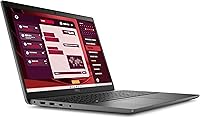
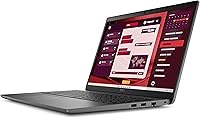
- Display: 15.6″ IPS FHD panel at 1920x1080 resolution, 60Hz refresh rate, 250 nit brightness, anti-glare coating, non-touch.
- Color Gamut: 45% NTSC color coverage, suitable for standard office and productivity tasks but not color-critical creative work.
- Graphics: Intel Iris Xe integrated graphics sharing system memory, supporting standard display output and light visual workloads.
- Webcam: 1080p FHD RGB HDR camera at 30fps with dual-array microphones for professional-grade video conferencing.
- Wireless: Wi-Fi 6E (802.11ax, 2x2) and Bluetooth 5.3 via integrated wireless card for fast, low-latency connectivity.
- Ports: USB4 Gen 2 Type-C (Power Delivery + DisplayPort), 3x USB 3.2 Gen1 Type-A (one with PowerShare), HDMI 1.4, RJ-45 Ethernet, universal audio jack.
- Keyboard: 99-key US English layout with full numeric keypad, non-backlit, standard key travel optimized for extended typing sessions.
- Audio: Stereo speakers rated at 2W x2 (4W total) powered by Realtek with Waves MaxxAudio 13.0 software enhancement.
- Battery: Integrated lithium-ion battery with a manufacturer-rated runtime of approximately 10 hours, charged via included 65W AC adapter.
- Operating System: Windows 11 Professional 64-bit (English), pre-installed and licensed, supporting BitLocker, Remote Desktop, and domain management.
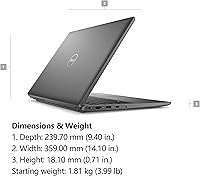
- Dimensions: 14.10 x 9.40 x 0.71 inches (W x D x H), maintaining a slim profile relative to the 15.6″ screen class.
- Weight: Starting at 3.99 lb, making it one of the lighter configurations available in the 15-inch business laptop category.
- Security Slot: One wedge-shaped lock slot is included for physical security via a compatible cable lock (sold separately).
- Power Adapter: 65W AC adapter included in the box, with USB-C Power Delivery also supported through the USB4 Type-C port.
- Brand & Series: Dell Latitude 3550, part of Dell’s Latitude business line, designed for enterprise reliability, managed IT environments, and professional daily use.
Related Reviews
Dell Inspiron 15 i7-1255U 32GB 1TB
NIMO N156B 15.6″ 1TB Business Laptop
Dell G5 15.6-inch Gaming Laptop 32GB/1TB
HP 15 i5-1135G7 32GB 1TB Business Laptop

Dell Inspiron 15 3520 Laptop

Dell Inspiron 3593 15.6-inch Laptop
Dell Inspiron 3511 15.6″ Touchscreen Laptop
Dell Inspiron 15 Ryzen 7 7730U 32GB/1TB Touchscreen
ASUS VivoBook 15.6-inch Laptop