Overview

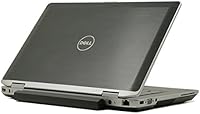
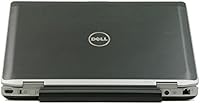
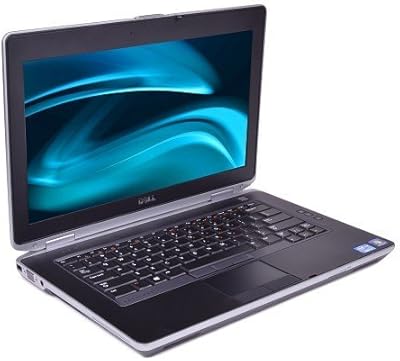
The Dell Latitude E6430 14-inch Laptop is a refurbished business machine that punches above its price class when you understand what you're actually buying. Dell's Latitude line has long been known for enterprise-grade durability — these aren't consumer-grade machines that flex and creak; they're built to survive daily professional use. That said, buying refurbished means managing expectations upfront. You're getting older hardware, and the Windows 7 Professional OS is both a feature and a caveat — great for legacy software compatibility, but Microsoft ended support years ago. Go in with eyes open, and this business laptop can still deliver real value.

Features & Benefits

The Intel Core i5-3210M processor handles everyday tasks — email, spreadsheets, video calls, light document work — without complaint. Paired with 8GB of DDR3 RAM, multitasking feels reasonably responsive for a machine this age. Where you'll notice the limits is storage: the 320GB hard drive runs at 5400RPM, which means boot times and application launches are slow by modern standards. Many owners swap it for an SSD within weeks, and the difference is significant. The 14-inch display at 1366x768 is functional but nothing special. Intel HD Graphics 4000 covers presentations and basic media just fine, but don't expect more. Wi-Fi connectivity via 802.11n is reliable for office and home environments.

Best For

This refurbished Dell Latitude makes the most sense for buyers who need a dependable office machine without spending much. Students working on assignments, small business owners setting up basic workstations, and remote workers who just need a reliable way to handle email and documents will find it fits the bill. It also suits anyone locked into specific Windows 7 software — legacy business applications that simply won't run on newer operating systems. Light travelers will appreciate the compact 14-inch footprint. Just don't expect it to handle video editing or anything graphics-intensive. Know your use case, and value-focused buyers will rarely feel shortchanged.

User Feedback

Buyers consistently praise the E6430's keyboard feel and build quality — hallmarks of the Latitude line that hold up even years after manufacturing. The chassis doesn't feel cheap, which matters when you're buying used. The most common complaint? The stock hard drive. Slow boot times frustrate many users, though plenty report that an SSD upgrade transforms the machine entirely. Battery life on refurbished units is another recurring concern — replacement batteries are sometimes needed right out of the box. A few buyers have also flagged issues around Windows 7 license authenticity and driver availability. On balance, most feel it represents solid value for what it is.

Pros

  • Enterprise-grade Latitude build quality holds up well even on refurbished units.
  • 8GB of RAM handles everyday multitasking — email, spreadsheets, and browser tabs — without fuss.
  • The i5-3210M processor keeps up comfortably with standard office and productivity workloads.
  • Compact 14-inch form factor is practical for desk use and occasional travel.
  • Windows 7 Professional is a genuine asset for users running legacy business software.
  • Excellent keyboard feel is a consistent highlight among buyers who use this business laptop daily.
  • Upgrading to an SSD is straightforward and dramatically improves overall responsiveness.
  • Solid wireless connectivity via 802.11n works reliably in home and office environments.
  • Price point makes it one of the more accessible entry points into business-class hardware.

Cons

  • The stock 5400RPM hard drive makes boot times and app launches frustratingly slow.
  • Windows 7 is end-of-life and poses real security risks on internet-connected machines.
  • Refurbished battery life is inconsistent — replacement batteries are often needed quickly.
  • The 1366x768 display resolution feels limiting compared to modern laptop screens.
  • At 8.55 pounds, the E6430 is noticeably heavy for anyone who travels frequently.
  • No optical drive included, which can catch buyers off guard.
  • OS licensing authenticity varies by seller and should be verified before purchase.
  • 802.11n Wi-Fi lacks the speed of newer wireless standards found on current machines.
  • Driver availability for Windows 10 or 11 upgrades can be spotty, complicating OS transitions.

Ratings

Our AI rating engine analyzed thousands of verified global buyer reviews for the Dell Latitude E6430 14-inch Laptop, actively filtering out incentivized, duplicate, and bot-generated submissions to surface what real users actually experienced. The scores below reflect an honest cross-section of sentiment — strengths are credited where earned, and recurring frustrations are never glossed over. Whether you are deciding between refurbished options or just trying to understand if this machine fits your workflow, these ratings are designed to give you a clear, unbiased picture.

Build Quality
88%
The Latitude chassis earns consistent praise from buyers who have handled a lot of laptops. It feels solid in hand — no flex in the lid, no creaking around the keyboard deck — which is rare at this price point. Professionals who carry it between meetings or home and office routinely remark on how well it holds up physically.
A handful of refurbished units show up with scuffs, worn hinge covers, or slightly loose port covers, which is expected given the age and prior corporate use. Cosmetic condition varies significantly between sellers, so photos before purchase matter.
Value for Money
83%
For buyers who know what they need — a reliable office workhorse without a big outlay — the E6430 delivers a strong return. The combination of a business-grade build, a capable processor, and 8GB of RAM at this price tier is hard to match in the refurbished market.
Value perception drops quickly if the buyer ends up needing a replacement battery and an SSD upgrade shortly after purchase, as those added costs can shift the math. Buyers who skip the research and expect plug-and-play readiness sometimes feel shortchanged.
Performance
67%
33%
The i5-3210M handles everyday computing without complaint — spreadsheets, email, browser sessions with multiple tabs, and video calls all run smoothly. Users working in office environments with predictable, moderate workloads consistently describe the experience as adequate and stable.
The bottleneck is almost always the 5400RPM hard drive, not the CPU. Boot times frustrate new owners, and opening large files feels sluggish compared to any modern machine. Users who upgrade to an SSD report a dramatically different experience, but that is an extra step many buyers did not anticipate.
Keyboard & Typing Experience
86%
This is one of the most praised aspects of the entire Latitude line among long-term users. The key travel feels deliberate and tactile — something that people who type for hours a day genuinely appreciate. Writers and office workers frequently single out the keyboard as the reason they keep coming back to this machine.
The layout is older and some users transitioning from modern chiclet-style keyboards notice an adjustment period. A few refurbished units have shown up with sticky or unresponsive individual keys, likely from prior use — worth testing all keys before committing.
Battery Life
44%
56%
When the battery is in good condition — either a newer replacement or a well-preserved original — the E6430 can manage a reasonable half-day of light use. Some buyers who sourced units with refreshed batteries report getting through a morning of meetings without hunting for an outlet.
This is the most common complaint across verified reviews by a significant margin. Refurbished battery cells are often degraded, and many buyers find they get under two hours on a full charge. Budgeting for a replacement battery upfront is essentially mandatory for anyone who needs unplugged reliability.
Display Quality
61%
39%
The 14-inch LED panel is bright enough for indoor office environments and handles standard document work without causing eye strain during normal hours. For users coming from older or lower-quality displays, it reads as perfectly serviceable.
The 1366x768 resolution is a noticeable step behind anything manufactured in the last several years. Users who regularly work with multiple windows side by side, or who are used to full HD displays, will find the screen cramped and detail somewhat soft on finer text and images.
Storage Capacity & Speed
52%
48%
The 320GB drive offers enough room for a standard suite of productivity software, documents, and moderate file storage without immediately running out of space. For users with lean setups who rely on cloud storage for most of their files, it is workable.
The 5400RPM spin speed makes this the most performance-limiting component on the entire machine. Application launch times, file transfers, and even shutting down the system all feel noticeably slow compared to any SSD-equipped laptop. An upgrade is strongly recommended and widely reported as transformative.
Portability
58%
42%
The 14-inch footprint keeps desk use comfortable and makes it manageable for short commutes or carrying between rooms. Buyers who use it as a semi-stationary office machine appreciate the size without feeling locked to a desk.
At 8.55 pounds, this business laptop is noticeably heavy compared to modern equivalents. Daily commuters or anyone carrying it in a backpack for extended periods will feel the weight. It is not designed to compete with lightweight travel notebooks and should not be evaluated against that standard.
Software & OS Experience
55%
45%
Windows 7 Professional is stable and familiar, and for users running specific legacy business applications that do not function on newer operating systems, it is a genuine asset. In controlled or offline environments, the OS performs reliably and without the friction of forced updates.
Windows 7 has had no security updates since January 2020, making it a real liability for any internet-connected machine. Users who want to upgrade to Windows 10 often encounter driver compatibility gaps, and the process is not always smooth. This is not a machine you should run on an open network without additional security measures.
Connectivity & Ports
77%
23%
The E6430 carries a practical port selection typical of business-class machines from this era — USB ports, video output, and audio jacks are all present. Users who need to connect monitors, peripherals, or external storage will find the basics covered without needing a hub for standard setups.
There is no USB-C or Thunderbolt, which limits compatibility with newer docking stations and accessories. Wireless connectivity tops out at 802.11n, meaning it will not take advantage of faster modern routers, though for typical office and home use the speed difference is rarely a practical issue.
Upgrade Potential
81%
19%
The E6430 is relatively friendly to upgrades compared to many modern laptops. Swapping the hard drive for an SSD and bumping RAM to 16GB are both achievable by someone with basic technical comfort, and both meaningfully extend the machine's useful life. The community of users who have done this is large and well-documented.
Upgrades require time, additional spend, and at least some technical confidence. Buyers expecting a ready-to-go experience without any further investment may find the upgrade requirement frustrating rather than empowering. Parts are readily available but add to the total cost of ownership.
Reliability & Longevity
74%
26%
The Latitude line's corporate heritage means these machines were built to be serviced, maintained, and used hard over years. Many buyers report running their units daily for extended periods without hardware failures, which is a reflection of the original engineering standards.
Longevity heavily depends on how the refurbished unit was treated before it reached the buyer. There is inherent variability in the used hardware market, and some units show early signs of wear or intermittent issues. Buying from reputable sellers with return policies significantly reduces this risk.
Seller & Licensing Transparency
59%
41%
Reputable sellers in this category often provide clear descriptions of cosmetic condition, battery health, and license type, which helps buyers make informed decisions. When sellers are transparent, the buying experience is generally straightforward and matched to expectations.
OS licensing authenticity is a recurring concern flagged in reviews. Some units arrive with volume licenses or unverified activations that leave buyers uncertain about long-term legality. Verifying the COA sticker and activation status immediately upon receipt is consistently recommended by experienced refurbished buyers.

Suitable for:

The Dell Latitude E6430 14-inch Laptop is a strong fit for value-conscious buyers who need a dependable machine for basic professional or academic work. Students writing papers, browsing research, and managing coursework will find the E6430 more than capable without draining their budget. Small business owners who need affordable workstations for data entry, email, and office productivity will appreciate the solid build quality that Latitude machines are known for. It also serves anyone still reliant on Windows 7-compatible legacy software — particularly in regulated industries where older environments are maintained deliberately. Buyers who are comfortable with refurbished hardware and willing to invest a little time in an SSD upgrade will get the most out of this business laptop.

Not suitable for:

The Dell Latitude E6430 14-inch Laptop is not the right choice for anyone expecting modern performance straight out of the box. Users who work with video editing, graphic design, or any creative software will quickly run into the limits of integrated Intel HD Graphics 4000 and the slow 5400RPM hard drive. Security-conscious buyers should think carefully too — Windows 7 has been unsupported for years, making it a real liability on any internet-connected machine without additional safeguards. Gamers will find nothing here to work with. Anyone expecting a lightweight travel companion may also be disappointed by the 8.55-pound chassis, which is noticeably heavier than today's ultrabooks. Finally, buyers who need plug-and-play simplicity without any hardware tinkering should know this machine often benefits from upgrades before it feels truly current.

Specifications

  • Processor: Powered by an Intel Core i5-3210M dual-core processor clocked at 2.5GHz, suited for standard office and productivity workloads.
  • RAM: Comes equipped with 8GB of DDR3 SDRAM, providing enough memory to handle everyday multitasking without significant slowdowns.
  • Storage: Includes a 320GB Serial ATA hard drive spinning at 5400RPM, which is functional but slower than modern solid-state alternatives.
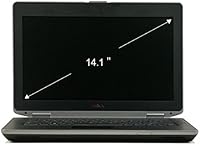
  • Display: Features a 14-inch LED-backlit screen with a native resolution of 1366x768 pixels, offering adequate clarity for document work and general browsing.
  • Graphics: Runs on integrated Intel HD Graphics 4000, capable of handling standard video playback and presentation duties but not designed for demanding visual tasks.
  • Operating System: Ships with Windows 7 Professional, which supports legacy business software but has been end-of-life since January 2020 with no further security updates from Microsoft.
  • Wireless: Includes 802.11n Wi-Fi, delivering reliable wireless connectivity suitable for home and office network environments.
  • Dimensions: Measures 8.95 x 12.36 x 0.7 inches (LxWxH), making it a reasonably compact footprint for a 14-inch business notebook.
  • Weight: Weighs 8.55 pounds, which is on the heavier side compared to modern ultrabooks of the same screen size.
  • Optical Drive: This unit does not include an optical drive, so external media for CD or DVD use will require a separate peripheral.
  • Processor Cores: The i5-3210M is a dual-core chip with Hyper-Threading, effectively handling two threads per core for a total of four logical processors.
  • Chipset: Built on an Intel platform chipset designed for third-generation Core processors, supporting the memory and storage configurations of this generation.
  • Color: Available in black, consistent with the professional, understated aesthetic typical of Dell's Latitude business line.
  • Model Number: Identified by Dell model number 469-3148, useful when sourcing replacement parts, drivers, or compatible accessories.
  • Memory Type: Uses DDR3 SDRAM, a memory standard common to this processor generation, with upgrade headroom depending on the specific motherboard variant.
  • Hard Drive Interface: The storage drive connects via Serial ATA interface, making it straightforward to swap out for a compatible 2.5-inch SSD if desired.
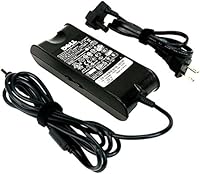
  • Battery: Requires one product-specific Dell battery; on refurbished units, battery health varies and replacement may be needed to achieve acceptable runtime.
  • Chassis Build: Constructed to Latitude business-line standards, reflecting Dell's enterprise durability requirements for professional use environments.

Related Reviews

Dell Inspiron 14 5440 Laptop, 14-inch, Intel Core i5, 8GB RAM, 512GB SSD
86%
88%
Performance
91%
Build Quality
94%
Portability
81%
Battery Life
75%
Display Quality
More
Dell 14 Plus Laptop DB14250-14-inch 2.5K, Intel Core Ultra 7, 16GB RAM, 1TB SSD
85%
91%
Performance
94%
Display Quality
85%
Battery Life
88%
Build Quality
86%
Keyboard Usability
More
Dell Latitude E6430 14″ Core i7-3520M 4GB RAM 500GB HDD
81%
86%
Performance
91%
Build Quality
80%
Battery Life
65%
Display Quality
55%
Weight and Portability
More
Dell Latitude 5450 14″ Touchscreen Business Laptop, Intel Core Ultra 7, 32GB RAM, 1TB SSD
86%
92%
Performance
88%
Display Quality
86%
Build Quality
79%
Battery Life
84%
Portability
More
HP 14-dq0020nr 14-inch Laptop 64GB
80%
72%
Performance
94%
Portability
88%
Battery Life
81%
Build Quality
75%
Display Quality
More
Dell P1424H 14-inch Portable Monitor
79%
93%
Portability
91%
Setup & Ease of Use
88%
Display Clarity
61%
Brightness & Visibility
58%
Stand & Adjustability
More
HP 14 Celeron 14-inch Touchscreen Laptop

68%
74%
Value for Money
52%
Performance
43%
Storage Adequacy
91%
Portability
61%
Display Quality
More
HP 14 Inch Laptop
HP 14 Inch Laptop
83%
92%
Value for Money
89%
Portability & Weight
90%
Battery Life
80%
Performance
84%
Build Quality
More
Dell 14 Plus Laptop DB14250
84%
94%
Performance
89%
Display Quality
91%
Build Quality
85%
Portability
77%
Battery Life
More
ASUS Chromebook CM14 (CM1402CM2A-DS44)
72%
83%
Value for Money
88%
Build Quality & Durability
74%
Performance & Speed
58%
Display Quality
84%
Battery Life
More

FAQ

Yes, for standard office tasks it holds up well. Email, word processing, spreadsheets, video calls, and general web browsing all run without major issues. Just keep expectations realistic given the hardware age — it is not a speed demon, but it gets the job done for routine productivity.

Absolutely, and honestly most owners recommend doing it as one of the first things after purchase. The stock 5400RPM drive is the biggest performance bottleneck on this machine. Swapping in a 2.5-inch SATA SSD is relatively straightforward and makes a noticeable difference in boot times and overall responsiveness.

It depends on how you plan to use it. Windows 7 reached end-of-life in January 2020, meaning no more security patches from Microsoft. If you are connecting it to the internet regularly, that is a real concern. Some buyers upgrade to Windows 10, though driver availability can be inconsistent — others keep it on a closed or controlled network specifically to run legacy software.

This is one area where refurbished laptops can disappoint. Battery cells degrade over time, and the original pack on the E6430 may only last an hour or two depending on its condition. It is worth asking the seller about battery health upfront, or budgeting for a replacement battery if you need reliable unplugged use.

Windows 10 can technically be installed, and many users have done it successfully, though some drivers — particularly for certain hardware features — may not be officially available from Dell. Windows 11 is a different story; the E6430 does not meet Microsoft's official hardware requirements for Windows 11, so that upgrade path is not straightforward.

For everyday tasks like browsing, documents, and video calls it is perfectly usable. The 1366x768 resolution is modest by current standards — text and images are clear enough, but if you are accustomed to a full HD or higher display you will notice the difference. It is not ideal for detailed photo work or watching high-resolution video.

Check the Certificate of Authenticity label on the bottom of the machine, and verify activation status once the laptop is running. If it was a business machine, it may carry a volume license — which is legal but worth understanding. When in doubt, buy from a seller who explicitly states the license type and offers some form of return policy.

At 8.55 pounds it is heavier than most modern 14-inch laptops. If you are commuting with it daily in a bag, that weight adds up. It is more suited to desk use or occasional short trips than being your primary travel machine. Think of it as a portable desktop rather than a lightweight ultrabook.

No, this particular configuration does not include an optical drive. If you regularly use CDs or DVDs, you would need an external USB optical drive, which is an inexpensive add-on but worth knowing about before you buy.

The E6430 supports up to 16GB of DDR3 RAM across its two memory slots. This unit comes with 8GB already installed, which is adequate for most everyday tasks, but if you plan to run memory-intensive applications or multiple programs simultaneously, upgrading to 16GB is a cost-effective option given how affordable DDR3 modules are today.