

Overview

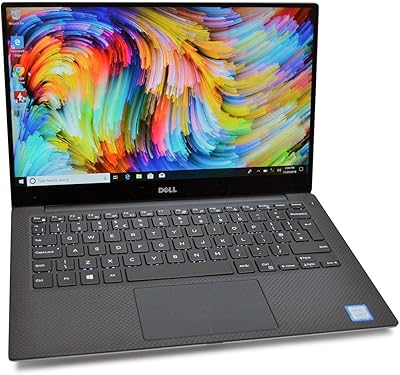
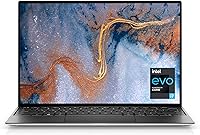
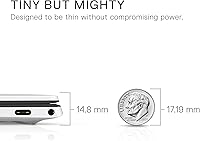
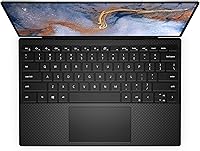
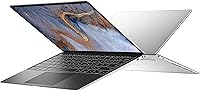
The Dell XPS 13 9310 512GB Laptop is Dell's flagship ultrabook built for professionals who refuse to compromise between portability and performance. Machined from aluminum and weighing just 2.8 pounds with a profile under 0.6 inches thick, this Dell ultrabook holds its own against the MacBook Air in the portability conversation — without switching ecosystems. That said, set your expectations accordingly: with Intel Iris Xe integrated graphics, this is a productivity powerhouse, not a creative workstation. Launched in late 2020 with 11th-gen Tiger Lake silicon, it competes with the LG Gram 13 and ThinkPad X1 Carbon, though newer XPS generations have since arrived.

Features & Benefits

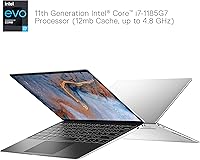
The 13.4-inch InfinityEdge touch display is one of the XPS 13 9310's strongest selling points — the 16:10 aspect ratio gives you noticeably more vertical space than a typical widescreen panel, which makes a real difference when scrolling through documents or juggling browser tabs. The i7-1185G7 handles multitasking, coding, and Office workloads with confidence, boosting up to 4.8 GHz when needed. The 16GB of soldered LPDDR4x RAM is fast but non-upgradeable, so plan accordingly rather than assuming you can expand later. Wi-Fi 6 connectivity delivers a genuine speed improvement on compatible routers. Port selection, however, is thin — two Thunderbolt 4 ports and one USB-C means a hub is almost certainly in your future.

Best For

This Dell ultrabook is a natural fit for remote workers and travelers — it slips into a backpack without adding bulk and handles a full workday of video calls, spreadsheets, and browser-heavy tasks without complaint. Business professionals who care more about screen quality and build than raw GPU muscle will find it hard to beat at this tier. Students in writing, business, or design programs get a premium experience without hauling extra weight between classes. That said, this is not the machine for video editors, 3D modelers, or anyone who games. If your desk setup still relies on full-size USB-A or HDMI, budget for a dock from day one.

User Feedback

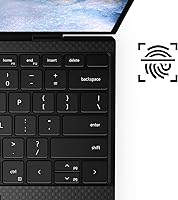
Across a broad pattern of owner reviews, display quality earns consistent praise — brightness, color accuracy, and the narrow bezels make it one of the better screens in this class. The keyboard splits opinion: users coming from ThinkPads often find the key travel too shallow, while others adapt quickly and appreciate the spacing. Thermal throttling under sustained CPU loads is a recurring concern; the slim chassis simply does not allow for aggressive cooling, and you will notice it during extended rendering or large compilations. The webcam is underwhelming for video calls. Battery life is inconsistent — light users get through a full day, heavy users will not. Port scarcity remains the most common frustration of all.

Pros

  • The 13.4-inch 16:10 display delivers noticeably more vertical screen space than typical widescreen laptops, reducing scrolling fatigue during long work sessions.
  • At 2.8 pounds and under 0.6 inches thick, this Dell ultrabook ranks among the most portable Windows laptops available.
  • The i7-1185G7 processor handles everyday multitasking, coding, and Office workloads with reliable speed and no perceivable lag.
  • A fast 512GB NVMe SSD delivers near-instant boot times and quick file transfers right out of the box.
  • Wi-Fi 6 support provides a real-world speed advantage on compatible routers, especially in congested office or home network environments.
  • Thunderbolt 4 ports support fast data transfer, external displays, and single-cable charging — keeping desk setups clean and flexible.
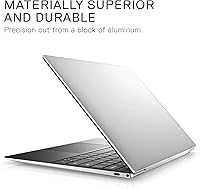
  • The machined aluminum chassis feels solid and well-built, holding up reliably through daily commutes and frequent travel.
  • A 500-nit anti-reflective panel handles bright office environments and outdoor use considerably better than lower-brightness competitors.

Cons

  • The 16GB of RAM is soldered onboard and cannot be upgraded, locking you into today's configuration for the laptop's entire lifespan.
  • Thermal throttling under sustained CPU loads is well-documented; expect reduced performance during extended rendering, compiling, or heavy multitasking.
  • With only two Thunderbolt 4 ports and one USB-C connector, most users will need a hub or dock immediately.
  • The 0.92MP webcam produces soft, underwhelming video — a real drawback for professionals who rely on daily video conferencing.
  • Battery life is inconsistent; users pushing the processor hard report considerably shorter runtimes than the all-day claim suggests.
  • The keyboard's shallow key travel divides users — those accustomed to deeper typing experiences, like ThinkPad keyboards, often find it hard to adapt.
  • Launched in 2020, the XPS 13 9310 runs on older 11th-gen Intel silicon that newer competing ultrabooks have since surpassed.

Ratings

The scores below for the Dell XPS 13 9310 512GB Laptop were generated by our AI system after analyzing thousands of verified owner reviews from global markets, with automated filters applied to remove incentivized, duplicate, and bot-submitted feedback. Every category reflects both the genuine strengths that make this ultrabook a compelling choice and the real frustrations that have surfaced consistently across buyers — nothing has been softened or omitted. Whether you are weighing portability, daily performance, or long-term value, the breakdown below gives you an honest picture of where this machine earns its reputation and where it falls short.

Display Quality
91%
Users consistently single out the 13.4-inch FHD+ panel as one of the machine's standout strengths — 500 nits of brightness holds up well in lit conference rooms and outdoor settings alike. The 16:10 aspect ratio adds meaningful vertical screen space that reduces scrolling fatigue during long document work or multi-tab research sessions, and color accuracy earns consistent praise from everyday users.
The anti-glare coating manages reflections adequately, but the glossy touch layer introduces a faint haze that some users notice when switching from a high-quality matte display. Color accuracy is strong for general productivity but stops short of the calibration precision that dedicated photographers or video professionals would want from a panel at this price tier.
Build Quality
88%
The machined aluminum chassis draws consistent praise from owners who carry this ultrabook through airports, coffee shops, and daily commutes — it feels genuinely premium and exhibits little flex even under pressure. The sub-0.6-inch profile and narrow InfinityEdge bezels give it a refined, purposeful quality that holds up well after months of heavy daily use.
The Platinum Silver finish shows fingerprints and light surface scuffs more readily than darker laptop finishes, requiring more frequent wiping to keep it looking its best. A handful of owners have also noted that hinge tension loosens slightly with heavy use over time, though structural integrity rarely becomes a serious concern.
Portability
93%
At 2.8 pounds and just over half an inch thick, the XPS 13 9310 practically disappears into most bags and backpacks, which frequent flyers and daily commuters have called out as a decisive advantage over heavier business laptops. It sits comfortably on a lap during long flights without the bulk that tends to make larger ultrabooks awkward in tight economy seating.
The slim profile does impose real trade-offs — there is no room for legacy ports or a more robust cooling system, and the chassis warms up noticeably during longer sessions in warm environments. Users who prefer working with a wrist rest or a wider keyboard deck may find the compact footprint somewhat limiting for extended desk-based use.
CPU Performance
77%
23%
The i7-1185G7 handles the everyday workloads this machine is designed for — Office suites, browser-heavy workflows, light coding, and multitasking across a dozen or more tabs — without hesitation or lag. Single-core burst performance is strong for a thin-and-light processor, and most users running productivity software report a consistently responsive experience throughout a normal workday.
Sustained multi-core tasks expose the machine's cooling limits fairly quickly — thermal throttling is a frequently cited complaint from developers and analysts who push the CPU for extended periods. Large file conversions, lengthy compiling sessions, or running multiple demanding applications simultaneously will see clock speeds reduced noticeably as the chassis struggles to dissipate accumulated heat.
Battery Life
64%
36%
For light-to-moderate use — writing, video calls, and web browsing at moderate brightness — a meaningful share of owners report comfortably reaching the end of a standard workday without charging. The USB-C charging setup is also convenient for topping up quickly during short breaks, which partially compensates for the variable runtime in heavier workflows.
Battery life is one of the most divisive topics across verified reviews, with results varying widely based on usage intensity. Users running demanding tasks, maintaining high screen brightness, or multitasking heavily report runtimes that fall well short of the all-day claim, and the gap between best-case and worst-case performance is wider than most buyers at this price tier expect.
Keyboard Experience
71%
29%
Key spacing is comfortable for touch typing, and the consistent backlighting is well-suited to working in dim cabins or low-lit hotel rooms during travel. Many users who came in without strong preconceptions adapted quickly and find the layout intuitive and accurate enough for sustained daily writing and coding tasks.
Shallow key travel is the recurring sticking point for users migrating from ThinkPad-style keyboards or older machines with deeper actuation mechanisms. The shorter key press can increase typing errors during the adjustment period, and some writers and developers report noticeable fatigue during marathon sessions that a deeper-travel keyboard would have reduced.
Thermal Management
54%
46%
During lighter workloads — document editing, video calls, and casual web browsing — the fans stay quiet and the chassis remains comfortable enough to use on your lap without distraction. The cooling system manages heat adequately when the processor is operating well below its limits, which covers the majority of everyday productivity scenarios for most users.
Under sustained CPU loads, thermal throttling is a well-documented and commonly cited limitation — the slim chassis lacks the cooling headroom to maintain peak clock speeds for extended periods. Users running video encoding, large-scale data processing, or extended compiling sessions report performance drops that persist until the machine has had time to cool down between bursts.
Port Selection
41%
59%
The two Thunderbolt 4 ports are highly capable connectors that support fast data transfer, external display output, and USB-C charging simultaneously — a genuine convenience for users already invested in a modern USB-C peripheral ecosystem. For those running a Thunderbolt dock at a fixed desk, the port limitations become significantly more manageable in practice.
The absence of USB-A, HDMI, and an SD card slot is the single most cited frustration across owner reviews, and even buyers who knew about the limitations beforehand report being caught off guard by how often the need for an adapter surfaces in daily use. Most owners end up purchasing a hub or dock, adding cost and partially undermining the portability advantage.
Webcam Quality
36%
64%
The above-display webcam placement delivers a natural, eye-level angle during video calls — a genuine improvement over awkward bottom-bezel positioning found on some competing designs. For low-stakes internal check-ins or casual calls in well-lit rooms, the camera functions acceptably as a baseline.
At 0.92MP, the webcam consistently draws criticism from professionals who rely on video conferencing for client meetings or presentations — output is noticeably soft and degrades quickly in anything less than bright, even lighting. Compared to the improved camera modules now standard in competing ultrabooks at the same price tier, this remains one of the most glaring weak points in the XPS 13 9310 package.
Wireless Performance
83%
Wi-Fi 6 on the Killer AX1650 adapter delivers a tangible throughput improvement for users with compatible routers — downloads feel noticeably faster and video calls remain stable even in environments dense with competing wireless devices. Bluetooth 5.1 pairs reliably with peripherals and maintains clean, uninterrupted connections throughout extended work sessions.
The speed benefits are only realized on Wi-Fi 6-capable routers, meaning users on older home or hotel network infrastructure will not see any advantage over a standard Wi-Fi 5 device. A subset of owners has also reported intermittent Killer driver instability requiring software updates shortly after initial setup, which is an unnecessary friction point on a machine at this price level.
Value for Money
67%
33%
For buyers who need a Windows ultrabook with an excellent display, premium construction, and strong everyday performance packed into a sub-3-pound chassis, the XPS 13 9310 delivers a coherent and well-executed package. Users who prioritize screen quality and build refinement above all else tend to feel their investment was justified after extended daily use.
The premium price is harder to defend when weighed against the soldered non-upgradeable RAM, substandard webcam, minimal port selection, and the fact that this is a 2020-era platform. Newer competing ultrabooks now offer more modern silicon, better webcams, and comparable build quality at similar or lower prices, which makes the value case noticeably less compelling than it was at launch.
Storage Speed
86%
The 512GB M.2 PCIe NVMe SSD delivers fast boot times and snappy application launches from day one — Windows loads in seconds and large file transfers between drives complete in a fraction of the time compared to older SATA-based storage. Day-to-day responsiveness feels consistently quick for the productivity-focused tasks this machine is designed to handle.
512GB fills up faster than most buyers anticipate once the operating system, applications, and working project folders begin to accumulate, and the storage cannot be supplemented internally without technical intervention and potential warranty implications. Users working with large media libraries, virtual machines, or extensive local archives will likely need an external drive solution sooner than they planned.
Software & Drivers
73%
27%
Windows 10 Pro comes preinstalled with a relatively clean software experience by PC standards — business users in particular value having the Pro edition for BitLocker encryption, remote desktop access, and domain join functionality available immediately out of the box. The hardware also supports a free upgrade to Windows 11 for users who want the newer interface and security features.
Some owners have reported that the Killer Wi-Fi drivers required post-setup updates to perform reliably, which is an avoidable friction point on a machine positioned at a premium price. Dell's bundled software update utilities can also feel cluttered and occasionally intrusive compared to the more streamlined update experience that buyers familiar with Apple hardware tend to expect.

Suitable for:

The Dell XPS 13 9310 512GB Laptop is best suited for professionals and frequent travelers who want a Windows ultrabook that comfortably fits into a carry-on without feeling like a compromise. At 2.8 pounds and under 0.6 inches thick, it's the kind of machine you stop noticing in your bag, which matters considerably on long travel days. Business users running Office 365, browser-heavy workflows, and video calls will find the 16:10 display a meaningful upgrade over typical widescreen laptops — more content visible at once and less scrolling throughout the workday. Students in writing, design, or business programs also land squarely in the sweet spot: premium feel, manageable weight, and enough processing headroom for coursework without hauling a heavier machine between classes. If you're already working within a USB-C or Thunderbolt 4 ecosystem and plan to use a modern dock at your desk, the limited port selection becomes far less of a practical obstacle.

Not suitable for:

The Dell XPS 13 9310 512GB Laptop is a poor fit for anyone who depends on dedicated GPU performance — video editors, 3D modelers, and gamers should look elsewhere, as Intel Iris Xe integrated graphics simply cannot handle those workloads at a competitive level. The soldered 16GB of RAM is fast but cannot be upgraded after purchase, which is a real concern for buyers planning to use a laptop for five or more years as software demands grow. Anyone transitioning from an older machine with full-size USB-A ports or HDMI will need to budget for a hub or dock from day one, since this machine offers no legacy connectivity at all. The 0.92MP webcam is a notable weak spot — those spending significant time on Zoom or Teams will likely be disappointed by the image quality relative to competing ultrabooks at a similar price. This is also a 2020-era machine; if cutting-edge silicon and the latest platform features matter to you, newer XPS generations offer considerably more modern foundations.

Specifications

  • Display: The 13.4″ FHD+ IPS touch panel delivers a 1920×1200 resolution at 500 nits with an anti-reflective coating for comfortable viewing in bright environments.
  • Aspect Ratio: The 16:10 display format provides more vertical screen space than a standard 16:9 panel, which is noticeably beneficial for reading documents and browsing web pages.
  • Processor: An Intel Core i7-1185G7 with 4 cores, 12MB cache, and a boost clock of up to 4.8 GHz handles the processing workload.
  • RAM: 16GB of LPDDR4x memory runs at 4267MHz and is soldered directly to the motherboard, making post-purchase upgrades impossible.
  • Storage: A 512GB M.2 PCIe NVMe SSD provides fast read and write speeds for boot times and file transfers, with no optical drive included.
  • Graphics: Intel Iris Xe integrated graphics share system memory and are suited for productivity, light photo editing, and casual creative tasks rather than GPU-intensive workloads.
  • Wireless: A Killer Wi-Fi 6 AX1650 (2×2) adapter supports the 802.11ax standard for faster throughput and reduced congestion on compatible routers.
  • Bluetooth: Bluetooth 5.1 is included for pairing wireless peripherals such as mice, keyboards, and headphones.
  • Ports: Connectivity consists of 2× Thunderbolt 4, 1× USB-C 3.2 Gen 2, and a 3.5mm combination audio jack; there are no full-size USB-A or HDMI ports on the chassis.
  • Webcam: A 0.92MP front-facing camera is positioned above the display for video calls and conferencing.
  • Operating System: Windows 10 Pro comes preinstalled, and the hardware meets the general requirements for a free upgrade to Windows 11 via Windows Update.
  • Weight: The laptop weighs 2.8 pounds, placing it among the lightest options in the 13-inch Windows ultrabook category.
  • Dimensions: The chassis measures 11.64″ long × 7.82″ wide × 0.58″ thick, allowing it to slip into most standard laptop sleeves and carry-on bags without difficulty.
  • Battery: A single built-in lithium-ion cell at 7.6V powers the system, with real-world runtime varying considerably depending on workload intensity.
  • Chassis: The machined aluminum body is finished in Platinum Silver with a contrasting black palmrest and keyboard surround.

Related Reviews
Dell XPS 9350 13.3-inch Laptop
74%
91%
Build Quality
88%
Display Quality
93%
Portability
84%
Keyboard & Typing Experience
67%
Battery Life
More
Dell XPS 13 7390 Laptop, 10th Gen Intel i5, 8GB RAM, 256GB SSD
81%
83%
Performance
92%
Portability
75%
Battery Life
88%
Build Quality
85%
Display Quality
More
Dell XPS 13 (9360) Laptop 7th Gen Intel Core i7, 8GB RAM, 256GB SSD
86%
91%
Performance
94%
Display Quality
88%
Portability
70%
Battery Life
89%
Build Quality
More
Microsoft Surface Laptop 4 13.5-inch 512GB
74%
91%
Display Quality
88%
Build Quality
87%
Keyboard & Trackpad
74%
Performance
71%
Battery Life
More
CHUWI FreeBook 13.4″ 16GB/512GB
72%
83%
Build Quality
88%
Display Quality
76%
Touchscreen Responsiveness
67%
Performance (CPU & RAM)
61%
Stylus Experience
More
Dell Inspiron 15 5505 Laptop, Ryzen 7 4700U, 16GB RAM, 512GB SSD
81%
88%
Performance
75%
Battery Life
85%
Build Quality
81%
Display Quality
90%
Portability
More
Dell Inspiron 15 3525 15.6″ Laptop
71%
88%
Value for Money
84%
Everyday Performance
79%
Display Quality
91%
SSD Speed & Responsiveness
57%
Battery Life
More
Dell Inspiron 14 5420 Laptop
78%
88%
Display Quality
84%
Screen Ergonomics
81%
CPU Performance
57%
RAM Performance
86%
Storage Speed
More
Dell Inspiron 14 5440 Laptop
76%
88%
Display Quality
74%
Performance
61%
RAM & Multitasking
82%
Build Quality
67%
Battery Life
More
Dell Inspiron 15 3535
68%
83%
Value for Money
76%
Performance & Speed
78%
Display Quality
81%
Keyboard & Typing Experience
58%
Battery Life
More

FAQ

The Dell XPS 13 9310 512GB Laptop has its RAM soldered directly onto the motherboard, so the 16GB is permanent — there is no upgrade path for memory after purchase. The SSD is an M.2 PCIe NVMe module and is technically replaceable by a qualified technician, but doing so may void your warranty. If 512GB feels tight for your needs, it is worth factoring that in before you buy.

It is one of the weaker aspects of this machine. The 0.92MP camera produces soft, lower-quality video even in good lighting, and it tends to disappoint users who spend a meaningful part of their day on video calls. If remote conferencing is central to your work, pairing this ultrabook with a dedicated external webcam is a practical solution.

Real-world results vary quite a bit depending on your usage. For lighter tasks — web browsing, writing, and video calls — many users comfortably get through a full workday on a single charge. Push the processor harder with sustained tasks like compiling, large spreadsheet calculations, or media playback at high brightness, and the runtime drops noticeably. Keep a charger accessible if your day involves heavier workloads.

For most people, yes. The XPS 13 9310 offers only two Thunderbolt 4 ports and one USB-C 3.2 connector — there is no USB-A, no HDMI, and no SD card slot. If you use a USB flash drive, wired Ethernet, or an older external monitor with an HDMI input, a compact USB-C hub will be necessary from day one. Budget an extra amount for one when you're calculating the overall cost.

Yes, under sustained loads it does throttle. During everyday tasks the machine stays cool and quiet, but the slim chassis has limited space for cooling, and the processor will reduce its clock speed during extended rendering, compiling, or anything that keeps the CPU pegged for several minutes straight. This is a known limitation of ultrabooks this thin, not a defect unique to this model.

It can be an excellent choice for the right student. If you are in a business, writing, or design program and want something genuinely light to carry around all day, the XPS 13 9310 fits the brief well. That said, the premium price is a significant consideration, and students who need to run virtual machines, CAD software, or heavy development environments may find the integrated graphics and fixed RAM limiting over time.

Yes — both Thunderbolt 4 ports support DisplayPort output, so you can connect a compatible monitor using a USB-C to DisplayPort cable or through a Thunderbolt dock. There is no native HDMI port on the laptop itself, so if your monitor only has HDMI inputs, you will need a USB-C to HDMI adapter or a multi-port hub.

They are both strong machines, but they have different strengths. The MacBook Air M1 generally edges ahead on battery life and sustained performance within a passively cooled chassis, while this 13-inch Dell laptop runs Windows natively, includes a touch display, and features the taller 16:10 screen that some users strongly prefer for productivity work. If staying on Windows is a requirement, this is one of the more competitive options at this price tier; if platform flexibility is on the table, the comparison is close.

It ships with Windows 10 Pro preinstalled. The hardware is generally compatible with Windows 11, and Microsoft offers a free upgrade path through Windows Update. Most owners have made the transition without issues, but it is worth running Microsoft's PC Health Check tool first to confirm your unit meets the official requirements before committing to the upgrade.

It depends on your baseline. The keyboard offers reasonable key spacing and includes backlighting, and many users adapt to it quickly. However, if you are coming from a laptop with deeper key travel — like a ThinkPad — the shallower feel of this keyboard tends to require an adjustment period. It is not a dealbreaker for most, but across user reviews it is consistently one of the more divided topics about this machine.

Where to Buy