






Overview

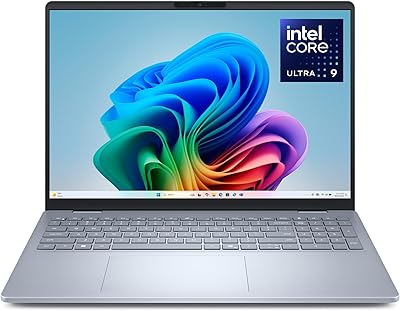
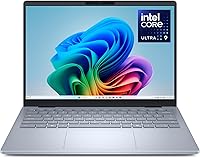
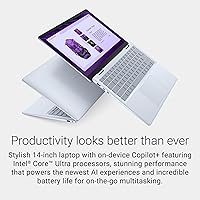
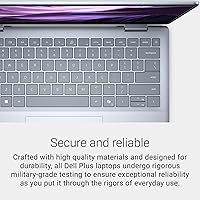
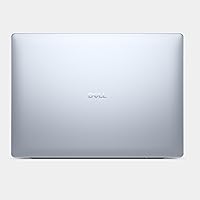
The Dell 14 Plus 1TB Laptop is the kind of machine that quietly checks a lot of boxes without making a spectacle of itself. Built around Intel's latest Lunar Lake architecture, it targets hybrid workers and creators who need real processing power without lugging around a heavy chassis. The Ice Blue aluminum build weighs just 3.42 pounds — noticeably lighter than most workstation-class competitors. That 14-inch 2.5K display runs at a 16:10 aspect ratio, which gives you meaningfully more vertical space than a standard widescreen panel — a small detail that adds up fast when you're splitting windows or scrolling long documents. It's also passed military-grade durability testing, which provides some genuine reassurance without being the headline feature.

Features & Benefits

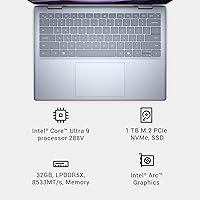
The 2560x1600 display is one of the strongest arguments for this slim AI laptop. That extra vertical resolution makes documents feel less cramped, video timelines breathe, and split-screen work genuinely comfortable. The Intel Core Ultra 9 288V handles multitasking with ease, and 32GB of LPDDR5X RAM at 8533MHz means you won't hit memory walls anytime soon. Intel Arc Graphics handles light photo editing and smooth video playback capably, though heavy 3D rendering isn't its strength. The 1TB SSD suits most users well, and Wi-Fi 7 keeps connections fast in crowded office environments. The Copilot key opens Microsoft's AI assistant instantly — handy for drafting text or summarizing documents, though its daily value depends heavily on your specific workflow.

Best For

This Dell 14 Plus is a natural pick for remote professionals who spend long days on calls, documents, or browser-heavy workflows and need a machine that won't weigh down their bag. Content creators doing photo editing or light video work will appreciate the high-resolution display and the headroom that 32GB of RAM provides. It's also a smart choice for grad students or researchers who need durability and screen real estate in equal measure. Business users who want an aluminum chassis and a refined typing experience without crossing into workstation-class pricing will feel at home here. That said, if raw GPU performance or extensive port connectivity is non-negotiable, this slim AI laptop may leave you wanting more.

User Feedback

Buyers consistently highlight the display quality as a standout strength — colors look accurate and the anti-glare coating holds up reasonably well in bright offices. Keyboard feel also earns consistent praise. The more common complaints center on port selection: with just two USB-A ports and limited expansion options, power users who rely on multiple peripherals may find themselves reaching for a hub immediately. Battery life tends to land somewhere between good and great depending on workload — expect solid all-day performance on lighter tasks, but heavier use will cut that shorter. A handful of users mention software bloat out of the box. The Db14250 delivers a strong experience for its intended audience, but it carries real trade-offs buyers should weigh before purchasing.

Pros

  • The 2.5K 16:10 display gives you noticeably more vertical screen space than standard widescreen laptops.
  • 32GB of fast LPDDR5X RAM handles heavy multitasking and future AI workloads without breaking a sweat.
  • At 3.42 pounds, this slim AI laptop is genuinely easy to carry through long travel days.
  • The aluminum chassis feels premium and has passed military-grade durability testing for real-world peace of mind.
  • Wi-Fi 7 support means faster, more stable connections in crowded offices and co-working spaces.
  • Keyboard feel earns consistent praise from buyers — comfortable for long typing sessions.
  • Intel Core Ultra 9 288V delivers a meaningful generational leap over older Intel laptop platforms.
  • The anti-glare display coating performs well in bright indoor environments.
  • 1TB SSD storage is sufficient for most users and offers fast read and write speeds.
  • The Copilot key provides quick access to AI-assisted drafting and summarization directly within Windows 11.

Cons

  • Only two USB-A ports means most users will need a hub immediately out of the box.
  • Internal storage cannot be upgraded after purchase, so what you configure is what you live with.
  • Intel Arc Graphics struggles under sustained GPU-heavy workloads like 3D rendering or serious video encoding.
  • Real-world battery life under heavier workloads falls short of the all-day claims in marketing materials.
  • The Db14250 ships with pre-installed software bloat that requires cleanup before the system feels lean.
  • Fan noise becomes noticeable during sustained CPU-intensive tasks, which can be distracting in quiet environments.
  • The Copilot key adds little value for users who don't actively use Microsoft's AI assistant ecosystem.
  • Display brightness may not be sufficient for comfortable outdoor use in direct sunlight.
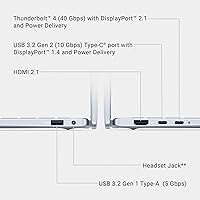
  • No Thunderbolt 4 port limits high-bandwidth peripheral and external display options.
  • Competing thin-and-light laptops at a similar price point offer better port variety or stronger GPU options.

Ratings

The Dell 14 Plus 1TB Laptop earns its place as a compelling thin-and-light option for professionals and creators, and these scores reflect what real buyers around the world actually experienced after living with it. Our AI analyzed thousands of verified purchase reviews, actively filtering out incentivized, bot-generated, and low-quality feedback to surface the honest majority. Both the genuine strengths and the recurring frustrations are captured here without spin.

Display Quality
91%
Buyers consistently call the 2.5K 16:10 panel one of the best screens at this price point. The extra vertical real estate is genuinely felt during document work, coding sessions, and video calls — it is not a marketing gimmick. Colors look accurate and the anti-glare coating makes long indoor sessions comfortable.
A handful of users found peak brightness limiting when working near bright windows or in sunlit rooms. Outdoor usability in direct sunlight is a real weakness, and a few buyers noted that the display cannot match the color volume of OLED panels found on some competing machines.
Build Quality
88%
The aluminum chassis draws frequent praise for feeling solid and premium without adding bulk. At 3.42 pounds, it travels easily and does not flex or creak under normal handling. The MIL-SPEC certification gives buyers added confidence for daily commuting and occasional travel bumps.
Some users observed that the Ice Blue finish picks up fingerprints and light scratches more readily than expected for an aluminum body. The hinge mechanism also received a few comments about feeling slightly stiffer than ideal during one-handed lid opening.
Performance
86%
The Intel Core Ultra 9 288V handles multitasking, browser-heavy workflows, and AI-assisted tasks without hesitation. Users coming from older Intel platforms describe the performance jump as immediately noticeable in everyday use. The 32GB RAM configuration means even demanding workloads rarely cause slowdowns.
Sustained heavy workloads — extended compiling, batch processing, or GPU-accelerated creative tasks — can trigger throttling as the slim chassis limits sustained thermal headroom. Users pushing the processor hard for long stretches report performance dipping from its peak after the initial burst.
Battery Life
74%
26%
On balanced or light workloads — document editing, web browsing, video calls — most users report comfortably reaching a full working day. The Lunar Lake architecture's efficiency improvements are real and buyers upgrading from older platforms notice the difference immediately during travel days.
Real-world battery life under heavier use falls noticeably short of Dell's advertised claims. Users running AI features, keeping brightness high, or multitasking intensively frequently report hitting the charger by mid-afternoon, which can be frustrating for all-day road warriors who planned on skipping the adapter.
Keyboard & Typing
84%
Key travel and feedback earn consistent praise from buyers who type for hours daily. Writers and coders in particular appreciate the comfortable layout and the backlit keys that hold up well in dim environments. The Copilot key sits in an intuitive position without causing accidental presses during regular typing.
A small number of users found the key spacing slightly cramped compared to larger 15-inch or 16-inch laptops they previously used. The Copilot key itself drew mixed opinions — useful for Microsoft 365 power users, but a wasted key position for those who prefer not to use the AI assistant.
Touchpad
81%
19%
The touchpad surface is smooth and responsive, with gesture recognition that works reliably for multi-finger scrolling, pinching, and swiping. Most buyers found it accurate enough to avoid reaching for an external mouse during typical productivity sessions.
A few users noted that the touchpad surface is a palm-rejection sensitivity — accidental cursor movements during typing were occasionally reported. At its size it is adequate but not class-leading compared to the larger, more precise pads found on some competing ultraportables.
Port Selection
51%
49%
The two USB 3.0 ports and wireless connectivity cover the basics for minimal setups, and Wi-Fi 7 performance is genuinely fast and stable in modern office environments. Bluetooth pairing is reliable and quick for wireless peripherals.
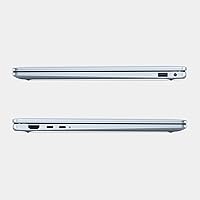
Two USB-A ports is the most common complaint across all buyer reviews, and for good reason — connecting a mouse, an external drive, and a wired peripheral simultaneously exhausts the available slots immediately. The absence of a Thunderbolt 4 port also limits external display and high-bandwidth peripheral options significantly.
Thermal Management
69%
31%
During light to moderate workloads, the system runs cool and quiet — an important detail for users in shared offices or library settings. The thermal design manages everyday productivity tasks well without the fans kicking in noticeably.
Under sustained CPU pressure the fans spin up to audible levels, and some users report the bottom of the chassis becoming uncomfortably warm during extended sessions on a lap. The slim form factor inherently limits how aggressively the cooling system can manage peak thermal output.
Display Brightness
72%
28%
For indoor work under typical office lighting conditions, most buyers found the brightness level perfectly comfortable throughout the day. The anti-glare panel reduces eye strain during extended sessions at reasonable brightness settings.
The panel struggles when ambient light is high — working near a sunlit window or outdoors requires pushing brightness to its ceiling, and even then glare and visibility remain suboptimal. Buyers expecting to work frequently outdoors or in bright, open-plan spaces were the most likely to flag this as a disappointment.
Software & Bloatware
62%
38%
Windows 11 Home runs smoothly on the hardware and the Copilot integration works as intended for users already embedded in the Microsoft ecosystem. Setup is relatively straightforward and the out-of-box experience is polished.
Pre-installed bloatware is a recurring complaint, with buyers noting that Dell's own applications and third-party trial software require a cleanup session before the system feels lean. A few users also found Copilot less useful than the dedicated key implies, particularly for those outside the Microsoft 365 ecosystem.
Value for Money
78%
22%
For what this slim AI laptop delivers — a 2.5K 16:10 display, 32GB of fast RAM, and a Lunar Lake processor in an aluminum chassis — most buyers consider the pricing reasonable within its competitive tier. Buyers upgrading from mid-range or older premium machines tend to feel the value most acutely.
At this price point, competing options from LG and ASUS offer better port selection or a more refined display depending on the model. Buyers who do not need the full RAM configuration may feel the premium is harder to justify when alternatives deliver similar everyday performance for less.
GPU & Graphics
58%
42%
Intel Arc handles everyday visual tasks — photo browsing, YouTube, light Lightroom edits, and Windows UI — without any hiccups. For users who do not depend on GPU acceleration, it is genuinely sufficient and the integrated approach keeps thermals and weight in check.
Creative professionals who run GPU-accelerated rendering, serious video encoding, or any 3D work will hit Arc's ceiling quickly. Compared to laptops with even a mid-range discrete GPU, the Db14250 trails significantly in GPU-heavy benchmarks, and this is the single biggest reason some buyers returned it.
Audio Quality
71%
29%
Speakers produce clear, reasonably full sound for a laptop this thin, making video calls and casual media consumption pleasant without reaching for external speakers. Dialogue in video calls and meetings is crisp and easy to follow.
Bass response is thin and volume at the highest setting does not fill a large room comfortably. For music listening or movie watching in any ambient noise environment, most users will want headphones or a Bluetooth speaker for a satisfying audio experience.
Webcam & Video Calls
76%
24%
The built-in camera performs well in typical indoor lighting, producing a clear enough image for professional video calls and remote meetings. Colors look natural rather than oversaturated, which is appreciated in business settings.
In low-light conditions, image quality drops noticeably and the camera struggles to compensate without introducing grain. Users who participate in video calls from home in the evenings or in poorly lit offices found themselves reaching for an external webcam sooner than expected.
Portability
89%
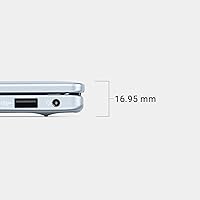
At 3.42 pounds and just 0.67 inches thin, this is a machine that genuinely disappears in a bag. Daily commuters and frequent travelers consistently mention that it is one of the easier laptops to carry without thinking about it, even across long travel days.
The compact chassis comes with real trade-offs in port availability and cooling capacity that buyers need to weigh carefully. A slim profile is a meaningful advantage until it is not — users who outgrow the connectivity or thermal limits quickly feel the weight of those compromises.

Suitable for:

The Dell 14 Plus 1TB Laptop makes the most sense for professionals who spend their days in browsers, document editors, and video calls — people who need a reliable, capable machine that doesn't feel like a burden in a backpack. Remote workers and frequent travelers will appreciate the sub-3.5 lb aluminum chassis paired with a high-resolution 16:10 display that genuinely improves how much you can see and do at once. Content creators doing photo editing, light video work, or design reviews will find the 2.5K panel accurate and comfortable for extended sessions. Graduate students and researchers who need durability, long battery life under moderate workloads, and enough RAM to keep dozens of tabs and apps open simultaneously will also be well served. If you're upgrading from a machine that's several Intel generations old, the performance difference here will feel substantial and worth the investment.

Not suitable for:

The Dell 14 Plus 1TB Laptop is not the right tool for users who depend on a dedicated GPU for 3D rendering, serious video encoding, or any GPU-accelerated creative pipeline — Intel Arc integrated graphics has its limits, and those limits become obvious fast under demanding visual workloads. Power users who rely on multiple peripherals simultaneously will likely find the two USB-A ports frustrating from day one, and the lack of internal upgrade options means the storage you buy is the storage you keep. Gamers looking for smooth frame rates in modern titles should look elsewhere entirely. If your workflow demands sustained peak performance over long stretches — compiling large codebases, running local AI models, or batch processing high-res video — the thermal management of this slim chassis may throttle performance more than you'd like. Anyone who prioritizes expandability, port density, or raw compute power over portability and display quality would be better served by a different class of machine.

Specifications

  • Display Size: The laptop features a 14-inch panel with a 2560x1600 (2.5K) resolution and a 16:10 aspect ratio for extra vertical screen space.
  • Aspect Ratio: The 16:10 panel format provides more usable vertical area compared to standard 16:9 widescreen displays common at this size.
  • Processor: An Intel Core Ultra 9 288V (Lunar Lake generation) powers the system, running at up to 3.3 GHz across its 8-core configuration.
  • RAM: The system ships with 32GB of LPDDR5X memory running at 8533MHz, soldered to the motherboard and not user-upgradeable.
  • Storage: A 1TB solid-state drive handles onboard storage; the drive interface is internal and the capacity cannot be expanded post-purchase.
  • Graphics: Intel Arc integrated graphics handle display output, light creative tasks, video playback, and AI inference workloads.
  • Wireless: Wi-Fi 7 (802.11be) and Bluetooth are built in, supporting faster throughput and lower latency than previous wireless generations.
  • Operating System: Windows 11 Home comes pre-installed, with native support for the dedicated Copilot key on the keyboard.
  • Keyboard: The backlit keyboard includes a dedicated Copilot key that launches Microsoft's AI assistant with a single press.
  • Display Coating: An anti-glare coating is applied to the panel surface to reduce reflections in bright indoor environments.
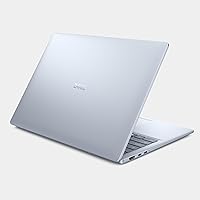
  • Chassis Material: The outer body is constructed from aluminum, giving the laptop a premium feel and contributing to its structural rigidity.
  • Durability: The Db14250 has undergone military-grade (MIL-SPEC) testing for resilience against drops, vibration, humidity, and temperature extremes.
  • Weight: The laptop weighs 3.42 pounds, placing it firmly in the thin-and-light category for a 14-inch productivity machine.
  • Dimensions: The chassis measures 8.9 x 12.36 x 0.67 inches, keeping the profile notably slim for a full-featured laptop.
  • USB Ports: Two USB 3.0 Type-A ports are included; users requiring additional peripherals will likely need an external hub.
  • Optical Drive: No optical drive is included, which is standard for ultraportable laptops in this class.
  • Color Finish: The laptop is available in an Ice Blue finish that distinguishes it visually from the typical silver or grey aluminum designs.
  • Voltage: The unit is rated at 240 Volts AC, and compatibility with local power standards should be confirmed before international use.

Related Reviews

Dell 14 Plus Laptop DB14250-14-inch 2.5K, Intel Core Ultra 7, 16GB RAM, 1TB SSD
85%
91%
Performance
94%
Display Quality
85%
Battery Life
88%
Build Quality
86%
Keyboard Usability
More
Dell Inspiron 14 5441 1TB Laptop
74%
91%
Battery Life
88%
Portability
84%
Performance (Everyday)
57%
App Compatibility
67%
Display Quality
More
Dell Latitude 5450 14″ Business Laptop

77%
88%
Performance & Speed
91%
Build Quality
67%
Display Quality
84%
Keyboard & Trackpad
72%
Portability
More
Dell Inspiron 14 5440 Laptop
76%
88%
Display Quality
74%
Performance
61%
RAM & Multitasking
82%
Build Quality
67%
Battery Life
More
Dell 16 Plus DB16250
77%
91%
Display Quality
88%
Build Quality & Design
87%
Performance & Processing Speed
93%
Memory & Multitasking
89%
Storage Capacity & Speed
More
Dell Inspiron 3511 15.6″ Touchscreen Laptop
72%
88%
Value for Money
81%
Multitasking Performance
91%
Storage & Speed
73%
Display Quality
79%
Touchscreen Usability
More
Dell Inspiron 15 Ryzen 7 7730U 32GB/1TB Touchscreen
74%
84%
Performance & Multitasking
91%
RAM & Memory Headroom
88%
Storage Speed & Capacity
79%
Touchscreen Display
63%
Build Quality & Chassis
More
HP 14 Ryzen 3 1TB Laptop
69%
83%
Value for Money
54%
Processing Performance
91%
Storage
79%
RAM & Multitasking
66%
Display Quality
More
Dell Inspiron 15 3530 1TB Touchscreen Laptop
72%
83%
Everyday Performance
79%
Display Quality
71%
Touchscreen Responsiveness
91%
Storage & Speed
58%
Battery Life
More
Dell Inspiron 16 5645 Laptop
76%
83%
Performance
86%
Display Quality
67%
Build Quality
74%
Battery Life
88%
Value for Money
More

FAQ

Unfortunately, no. The 32GB of LPDDR5X memory is soldered directly to the motherboard, and the SSD configuration on this chassis is not designed for user replacement. What you order is what you get long-term, so it is worth thinking carefully about your storage needs upfront.

The 2.5K panel is genuinely well-regarded for everyday creative work. Colors are accurate enough for photo editing and light design tasks, and the anti-glare coating keeps things comfortable under office lighting. It is not a factory-calibrated professional display, but for most creators it will be more than adequate.

Light to moderate video editing — think timeline work in 1080p or even some 4K cuts — is manageable. The Intel Core Ultra 9 and 32GB of RAM provide solid headroom, but Intel Arc integrated graphics will slow down GPU-accelerated effects and rendering compared to a machine with a dedicated GPU. For heavy video production workflows, you may want to look at a more GPU-capable system.

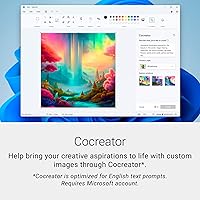
It opens Microsoft Copilot, the AI assistant built into Windows 11. From there you can ask it to draft emails, summarize text, answer questions, or generate images. Its usefulness depends on how integrated you are with Microsoft 365 — casual users may find themselves ignoring it, while heavy Office users tend to get more out of it.

On lighter workloads — document editing, browsing, video calls — you can expect a solid full working day. Push the processor harder with sustained tasks or keep the display at peak brightness, and you will see that number come down noticeably. Dell's marketing claims lean optimistic, so plan conservatively if you work away from outlets regularly.

Fan noise is present under sustained CPU-intensive work, and some users find it noticeable in quiet environments. During light tasks like browsing or document editing, the system tends to run quietly. It is not unusually loud for its class, but it is not silent either.

The LG Gram typically edges it out on weight and battery life, while the ASUS Zenbook often offers a more refined display or a wider port selection depending on the model. This slim AI laptop differentiates itself with a stronger RAM configuration and the 16:10 display ratio, which many users find more productive. Your priorities will determine which trade-offs matter most.

Yes, it holds up well in everyday carry scenarios. The aluminum chassis is rigid, it has passed MIL-SPEC testing, and at 3.42 pounds it does not add much strain to a bag. A sleeve or light case is still recommended to protect the finish from scratches.

For minimal setups — a mouse and a USB drive — two ports will cover you. If you use external drives, a webcam, a wired keyboard, or multiple peripherals simultaneously, you will almost certainly want a USB hub or a USB-C dock from day one. Port selection is one of the more honest compromises on this machine.

The anti-glare coating helps in bright indoor environments and does a reasonable job near windows. Full outdoor use in direct sunlight is trickier — the panel is not among the brightest in this category, so working outside on a sunny day can be a bit of a strain. For indoor and shade use, most buyers find it perfectly comfortable.

Where to Buy

Best Buy
In stock $1,689.99
B&H Photo Video Audio
In stock $1,706.88
B&H Photo-Video-Audio
In stock $1,706.88
eBay
In stock $1,756.84
Tecisoft
In stock $1,688.63
Microless.com
In stock $1,495.89
SHI International
In stock $2,466.00
ExcelDisc
In stock $1,490.00
CompSource
In stock $1,622.16