Overview

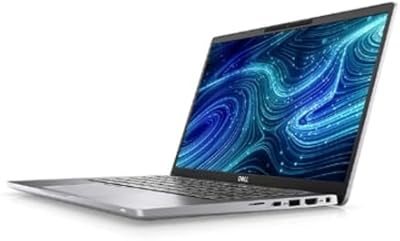
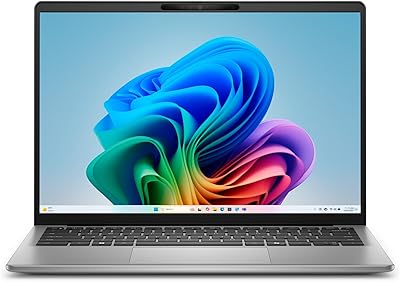
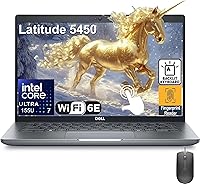
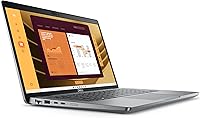
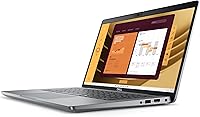
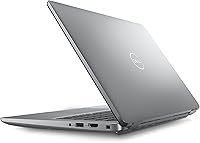
The Dell Latitude 5450 14″ Business Laptop is Dell's latest entry in its long-running Latitude enterprise line — a series that has earned genuine trust from IT departments and road warriors over the years. Launched in late 2024, this Latitude 5450 slots into the mid-to-premium business segment with a profile just 0.83 inches thin and weighing under six pounds, making it a practical travel companion without feeling flimsy. It won't win any awards for discrete graphics performance — integrated GPU means creative pros and gamers should look elsewhere — but for the professional who needs reliable daily productivity, it is built with that singular purpose in mind.

Features & Benefits

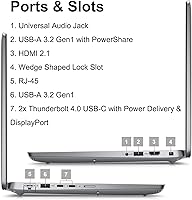
At the core of this business laptop sits Intel's Core Ultra 7 155U — a chip that brings a built-in neural processing unit for AI-assisted tasks like background noise suppression in calls and real-time transcription. In practice, think modest but tangible workflow improvements, not a dramatic transformation. The 32GB of DDR5 RAM paired with a 1TB NVMe SSD means juggling dozens of browser tabs, a video call, and several office apps rarely causes hesitation. Connectivity is genuinely strong: dual Thunderbolt 4 ports, HDMI 2.1, wired Ethernet, and WiFi 6E make this a docking-station-ready machine. The fingerprint reader built into the power button is a small but welcome touch for anyone logging into enterprise systems dozens of times a day.

Best For

Dell's Latitude 14 is a natural fit for corporate professionals, remote workers, and small-business teams that value a reliable, secure platform over flashy hardware specs. If your workday involves video conferences, cloud applications, and document-heavy workflows, the hardware headroom here is more than adequate. IT managers will appreciate the Windows 11 Pro foundation, which supports domain management, BitLocker encryption, and remote administration out of the box. Frequent travelers will welcome the slim form factor and solid port selection. That said, if you work in video production, 3D rendering, or anything demanding a discrete GPU, this is not your machine. It is a productivity-first laptop — and it makes no apologies for that focused identity.

User Feedback

Buyers who have used this Latitude 5450 tend to praise its sturdy build quality, comfortable keyboard for long typing sessions, and the speed of the SSD under everyday workloads. Those coming from older machines often mention noticeably snappier application launches. On the critical side, some users flag the 300-nit display as underwhelming in brightly lit offices or near windows — adequate, but power users hoping for a vibrant screen may feel shortchanged. At 5.79 pounds, a few find it heavier than expected for a 14-inch machine. The touchscreen gets mixed reactions — handy for quick annotation, largely ignored otherwise. One notable gap: battery life details are absent from the official listing, so verify that figure independently before purchasing.

Pros

  • Generous 32GB of DDR5 RAM handles demanding multitasking without slowdown, even with many browser tabs and apps open simultaneously.
  • The 1TB NVMe SSD delivers fast boot times and snappy application launches that feel noticeably quicker than older SATA-based machines.
  • Dual Thunderbolt 4 ports make this business laptop an excellent docking station companion for multi-monitor desk setups.
  • Built-in RJ45 Ethernet port is a practical rarity on slim 14-inch laptops, ideal for stable office or hotel connections.
  • WiFi 6E support ensures fast, low-latency wireless performance on modern routers and enterprise networks.
  • Fingerprint reader integrated into the power button keeps login fast and secure without adding bulk or complexity.
  • Windows 11 Pro comes pre-installed, removing the headache of OS upgrades for IT-managed or compliance-sensitive environments.
  • The backlit keyboard makes typing comfortable in dim conference rooms or on evening flights.
  • Intel Core Ultra 7 processor with NPU brings useful AI-assisted features like noise cancellation that genuinely improve video call quality.
  • Slim 0.83-inch profile and sub-6-pound weight make it portable enough for frequent travelers without sacrificing a full port selection.

Cons

  • Battery life specifications are not published, which is a serious transparency gap for any laptop marketed at mobile professionals.
  • The 300-nit display ceiling makes this Latitude 5450 uncomfortable to use near bright windows or outdoors in daylight.
  • At 5.79 pounds, it sits on the heavier end of the 14-inch business laptop category compared to rivals like the ThinkPad X1 Carbon.
  • The 60Hz refresh rate panel feels dated at this price point, where competitors increasingly offer smoother 90Hz or 120Hz options.
  • Integrated graphics mean any GPU-accelerated workload — from light video editing to data visualization — will hit a performance ceiling quickly.
  • The touchscreen earns mixed reactions in practice; many users treat it as incidental rather than a feature they actively use.
  • No optical drive and no SD card slot limit versatility for users who still work with physical media or camera cards regularly.
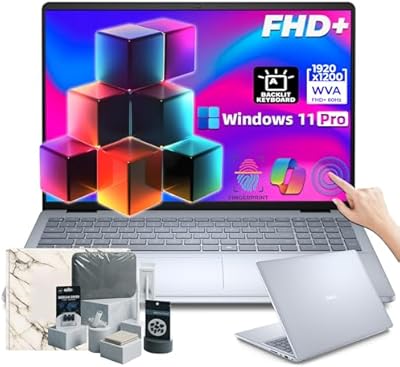
  • The bundled wired mouse and AZ-XUT cable add little practical value for most buyers and suggest a padded accessory bundle.
  • Only a 60Hz IPS panel at FHD resolution feels like a missed opportunity given the premium positioning of this business laptop.
  • Lack of a dedicated numeric keypad may frustrate finance or data-entry professionals who rely on one for efficiency.

Ratings

The scores below reflect an AI-driven analysis of verified global user reviews for the Dell Latitude 5450 14″ Business Laptop, with spam, incentivized submissions, and bot activity actively filtered out to ensure only genuine buyer experiences inform each category. This Latitude 5450 earns strong marks where it counts for business use, but the analysis does not shy away from the real frustrations users have reported — from display brightness to the absence of published battery data.

Performance & Speed
88%
Users consistently report that this business laptop handles demanding office workloads — simultaneous video calls, large spreadsheets, cloud platforms, and heavy browser sessions — without noticeable hesitation. The combination of a fast NVMe SSD and ample DDR5 RAM makes the system feel responsive from cold boot through a full workday.
Performance is firmly bounded by the integrated GPU, and users running any GPU-accelerated software quickly notice the ceiling. Tasks like video transcoding, rendering in design tools, or even some data visualization workloads expose the processor's limits when graphical load is sustained.
Build Quality
91%
Buyers frequently praise the chassis rigidity, noting it does not flex noticeably when typing or when carried by one corner — a real-world test that cheaper laptops fail. The Latitude line's enterprise heritage shows in the hinge construction and the solid feel of the lid, which inspires confidence during daily commutes and travel.
The all-gray plastic-forward exterior lacks the premium tactile feel of magnesium-alloy competitors at similar price points. A few users mention that the surface picks up fingerprints and light scratches over time, which matters to those who keep their equipment looking professional in client-facing settings.
Display Quality
67%
33%
The IPS panel delivers accurate color reproduction and wide viewing angles, which is appreciated in meeting rooms where a colleague is viewing the screen from the side. For indoor office work in controlled lighting, the 14-inch FHD resolution provides crisp text and clear detail without obvious pixel grain.
At 300 nits, the display becomes a genuine problem near windows or in any brightly lit environment — multiple users describe having to reposition themselves or crank other settings just to see their screen clearly. The 60Hz refresh rate also feels underwhelming at this price tier, where competitors increasingly ship 90Hz or 120Hz panels as standard.
Keyboard & Trackpad
84%
The backlit keyboard draws consistent praise from users who type heavily throughout the day, with key travel and feedback described as comfortable even after extended writing sessions. The backlighting is practical rather than decorative, making it genuinely useful on early morning flights or in dim conference rooms.
The absence of a numeric keypad frustrates finance professionals and data-entry-heavy users who rely on it for speed. The trackpad, while functional, receives occasional criticism for inconsistent multi-finger gesture responsiveness, particularly compared to the smoother experiences found on competing business laptops.
Portability
72%
28%
The 0.83-inch slim profile makes this Latitude 14 easy to slide into a laptop sleeve or a crowded bag alongside other work gear. Users who travel between multiple offices in a day appreciate that it does not feel bulky when tucked under an arm or carried through an airport.
At 5.79 pounds, it is noticeably heavier than ultra-light business laptops like certain ThinkPad or EliteBook configurations, and users who do a lot of long-haul travel mention feeling that extra weight by the end of the day. For buyers whose priority is the lightest possible carry, this machine asks for a meaningful trade-off.
Connectivity & Ports
93%
The port selection is one of the most frequently praised aspects of this business laptop — users highlight the dual Thunderbolt 4 ports, wired Ethernet jack, and HDMI 2.1 as a combination that makes docking effortless and eliminates the dongle dependency that plagues slimmer competitors. WiFi 6E performance is reported as fast and stable across enterprise and home networks.
There is no built-in SD card reader or SIM card slot, which creates friction for photographers integrating the machine into a hybrid workflow or professionals who need mobile data without a separate hotspot device. A small but vocal group of users feel the omission of a card reader is a missed opportunity at this price point.
Battery Life
54%
46%
Users running light productivity loads — email, documents, and occasional video calls — report getting through a solid portion of a workday on a single charge, suggesting the hardware is at least reasonably efficient under mild use conditions.
Battery life is one of the most discussed pain points in user feedback, and the absence of an officially published battery rating compounds the frustration. Users who stretch this Latitude 5450 with video calls, screen sharing, and browser-heavy sessions report the battery draining faster than expected, making a charger a near-constant travel companion.
Security Features
89%
The fingerprint reader built into the power button earns specific praise for how naturally it integrates into the wake-and-login routine — press the button, and you are authenticated before the screen even fully loads. Combined with Windows 11 Pro's BitLocker support, users in compliance-sensitive industries feel the security baseline is well covered.
No IR camera for facial recognition is confirmed in the specs, which means Windows Hello facial login is likely not available — a step behind some competitors at this tier who offer both biometric options simultaneously. For enterprise deployments where facial recognition is a policy standard, this is worth verifying before procurement.
Touchscreen Usability
61%
39%
Users who annotate PDFs, sign documents, or work in tablet-adjacent modes appreciate having the touch layer available without reaching for a separate device. The screen is responsive to finger input, and for occasional use cases, it adds real convenience without meaningfully affecting the non-touch experience.
The majority of users treat the touchscreen as a rarely used bonus rather than a primary input method, and several note that a 14-inch clamshell form factor is not naturally suited to sustained touch interaction. The 60Hz panel also means touch scrolling does not feel as fluid as it does on higher-refresh-rate alternatives.
Software & OS
86%
Windows 11 Pro out of the box is a meaningful advantage for business buyers who would otherwise pay separately or deal with upgrade complexity — IT administrators specifically highlight domain join, Group Policy support, and BitLocker as immediately deployable without extra setup steps.
Some users flag Dell's pre-installed software suite as heavier than necessary, with a handful of bundled utilities that feel redundant or intrusive on first boot. Cleaning up the software environment adds a minor setup burden that home users especially notice.
Value for Money
74%
26%
For a corporate procurement context, the hardware configuration — particularly the memory, storage, and port selection — delivers genuine capability that justifies the premium tier positioning. Buyers who need a reliable, IT-manageable machine with Windows 11 Pro pre-installed find the overall package coherent and well-considered.
Individual buyers and small-business owners scrutinizing the price against competitors find that certain trade-offs — the 300-nit display, the weight, and the unconfirmed battery life — make the value proposition harder to defend against rivals offering brighter panels or lighter chassis at comparable or lower prices.
Thermal Management
78%
22%
Under typical office workloads, users report that Dell's Latitude 14 runs quietly and stays cool to the touch, which matters during long video calls or when the machine is resting on a lap in a meeting. The thermal profile reflects the efficiency-focused nature of the U-series processor.
When workloads spike — particularly sustained CPU-intensive tasks like large file compression or extended video encoding — some users report noticeable fan ramp-up and warmth around the keyboard area. It is not extreme, but it is perceptible in quiet environments like libraries or small meeting rooms.
Audio Quality
66%
34%
The built-in speakers are adequate for video calls and occasional media consumption, and users on conference calls note that the microphone pickup is clean enough for professional use without an external headset in a quiet office environment.
For anything beyond calls and ambient background audio, the speakers feel thin and lacking in bass depth — a common trade-off in slim business laptops but one that disappoints users who expected more from a machine at this price point. Headphones are effectively mandatory for serious audio work or media viewing.
Setup & Out-of-Box Experience
81%
19%
Most buyers report a straightforward initial setup experience, with Windows 11 Pro guiding them through configuration cleanly and the fingerprint reader pairing with Windows Hello in under a minute. IT departments deploying multiple units find the process consistent and predictable.
A portion of users mention that Dell's pre-loaded applications and account prompts add friction to the first-boot experience, requiring manual dismissal or uninstallation before the system feels clean. The bundled wired mouse and cable are appreciated by some but feel like filler inclusions to others.

Suitable for:

The Dell Latitude 5450 14″ Business Laptop was built with a clear audience in mind: professionals who spend their days in meetings, on flights, and switching between a desk dock and a conference room without wanting to think twice about their hardware. Corporate employees managing email, video calls, cloud platforms, and sprawling spreadsheets will find the generous RAM and fast storage keep things moving without interruption. IT administrators and small-business owners will appreciate the Windows 11 Pro foundation, which makes domain integration, remote management, and drive encryption straightforward rather than an afterthought. Remote workers who need dependable wired and wireless connectivity options — including a real Ethernet port, which many slim laptops have abandoned — will feel at home here. If your priority is a machine that simply works, day after day, without drama, this Latitude 5450 is built precisely for that kind of trust.

Not suitable for:

The Dell Latitude 5450 14″ Business Laptop draws a firm line at productivity work, and buyers who need anything beyond that will run into its limits quickly. Video editors, motion graphics artists, and 3D modelers require discrete GPU power that integrated Intel graphics simply cannot deliver — this machine will struggle with rendering workloads or any GPU-intensive software. Gamers should not consider it at any level. Design-conscious buyers expecting the ultra-slim elegance of a consumer ultrabook will find this Latitude leans into enterprise utility rather than aesthetics, and at nearly six pounds it is heavier than several competing 14-inch options. The 60Hz, 300-nit touchscreen will also disappoint anyone who does color-sensitive work or regularly uses the laptop in bright outdoor environments. Finally, battery life is notably absent from the official product specs — a genuine red flag for buyers whose workday takes them away from a power outlet for extended stretches, and one worth investigating thoroughly before committing.

Specifications

  • Processor: Intel Core Ultra 7 155U, a 12-core chip with a base clock of 1.7GHz and burst speeds up to 4.8GHz, including a dedicated neural processing unit for AI-assisted tasks.
  • Memory: 32GB of DDR5 SDRAM provides fast, dual-channel memory bandwidth suited to heavy multitasking and modern productivity applications.
  • Storage: 1TB M.2 PCIe NVMe SSD delivers rapid read and write speeds for fast boot times, quick file transfers, and responsive application launches.
  • Display: 14″ FHD IPS touchscreen at 1920x1080 resolution with a 60Hz refresh rate, 300 nits brightness, and an anti-glare coating.
  • Graphics: Intel integrated graphics with AI Boost NPU handle everyday display output and light visual tasks; no discrete GPU is included.
  • Wireless: Intel Wi-Fi 6E AX211 supports the 6GHz band for faster, less congested wireless connections, paired with Bluetooth for peripheral connectivity.
  • Ports: Two Thunderbolt 4 ports (40 Gbps, with DisplayPort and USB4 support), one HDMI 2.1, two USB 3.2 Gen 1 ports, one RJ45 Ethernet, and one universal audio jack.
  • Operating System: Windows 11 Pro (64-bit) comes pre-installed, supporting enterprise features including BitLocker encryption, remote desktop, and domain management.
  • Security: A fingerprint reader is integrated directly into the power button, enabling fast biometric login without requiring a separate sensor footprint.
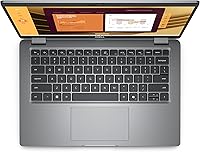
  • Keyboard: 79-key English US backlit keyboard with standard layout; no numeric keypad is included.
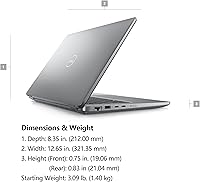
  • Dimensions: The chassis measures 12.65 x 8.35 x 0.83 inches, keeping the overall footprint compact despite housing a full-size port array.
  • Weight: At 5.79 pounds, this business laptop is portable but sits toward the heavier end of the 14-inch category compared to ultra-light competitors.
  • Battery: Battery capacity and rated life are not published in the official product listing; buyers should verify this specification directly before purchasing.
  • Color & Build: Finished in business gray with a chassis designed to meet Dell Latitude enterprise durability standards rather than consumer aesthetic trends.
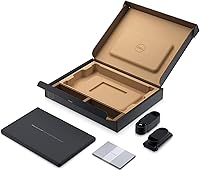
  • In the Box: Package includes the laptop, a wired mouse, and an AZ-XUT cable; a power adapter is expected but confirm contents with the seller.

Related Reviews
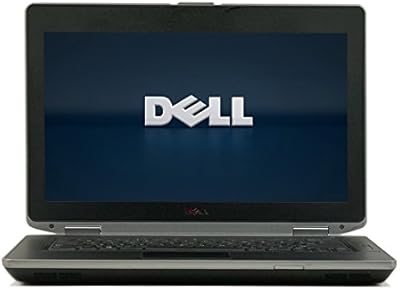
Dell Latitude E6430 14-inch Laptop

68%
88%
Build Quality
83%
Value for Money
67%
Performance
86%
Keyboard & Typing Experience
44%
Battery Life
More
Dell Inspiron 14 5440 Laptop
76%
88%
Display Quality
74%
Performance
61%
RAM & Multitasking
82%
Build Quality
67%
Battery Life
More
Dell 14 Plus Laptop DB14250-14-inch 2.5K, Intel Core Ultra 7, 16GB RAM, 1TB SSD
85%
91%
Performance
94%
Display Quality
85%
Battery Life
88%
Build Quality
86%
Keyboard Usability
More
Dell 14 Plus 1TB Laptop
75%
91%
Display Quality
88%
Build Quality
86%
Performance
74%
Battery Life
84%
Keyboard & Typing
More
Dell Latitude 7420 i5 16GB 256GB Grade A
80%
88%
Build Quality
91%
Value for Money
84%
Performance
86%
RAM & Multitasking
87%
Storage Speed
More
ASUS ZenBook 14 Pro OLED Laptop
76%
93%
Display Quality
81%
Performance
47%
RAM & Upgradability
88%
Build Quality
62%
Battery Life
More
Dell 16 Business Laptop - 32GB RAM, 2TB SSD, Core i7
85%
93%
Performance
88%
Display Quality
81%
Battery Life
90%
Multitasking Ability
68%
Portability
More
Dell Latitude E6430 Core i7 Laptop
67%
88%
Build Quality
83%
Value for Money
74%
Performance
39%
Battery Life
56%
Display Quality
More
Dell Inspiron 14 5441 1TB Laptop
74%
91%
Battery Life
88%
Portability
84%
Performance (Everyday)
57%
App Compatibility
67%
Display Quality
More
Dell Inspiron 14 5420 Laptop
78%
88%
Display Quality
84%
Screen Ergonomics
81%
CPU Performance
57%
RAM Performance
86%
Storage Speed
More

FAQ

Yes, this is actually one of its stronger suits. With 32GB of DDR5 RAM and a fast NVMe SSD, the Dell Latitude 5450 14″ Business Laptop handles that kind of multi-app workload comfortably. You are unlikely to notice slowdowns during typical office use, even with a dozen or more browser tabs open alongside a video conference.

Honestly, it depends on your habits. Users who annotate documents, sign PDFs, or prefer tapping UI elements find it genuinely useful. That said, many buyers treat it as a nice-to-have rather than a daily driver, especially since the 14-inch form factor is not as natural for touch as a tablet or convertible. Do not buy this Latitude 5450 specifically for the touchscreen — think of it as a bonus.

Yes, and the port selection is well suited for it. The two Thunderbolt 4 ports each support DisplayPort Alt Mode, and there is an HDMI 2.1 port as well, so multi-monitor desk setups are straightforward. Most Thunderbolt 4 docks will work without issue, and you keep wired Ethernet and USB peripherals connected through the dock simultaneously.

At 300 nits, the display is workable in a typical indoor office environment but will struggle in direct sunlight or beside a bright window. It is a common brightness level for business laptops in this category, but if you regularly work in very bright conditions, you may find it frustrating. Worth considering before you commit.

This is a genuine gap in the available information — Dell has not published a rated battery life figure for this particular configuration in its Amazon listing. Real-world battery performance depends heavily on workload and screen brightness, so we strongly recommend verifying this with Dell directly or checking independent reviews before purchasing if battery longevity is critical to your workflow.

Light, browser-based design tools like Canva or basic Figma work will run fine on this business laptop. However, anything involving heavy image processing, large layered files, or video rendering will hit the ceiling quickly because there is no discrete GPU. For casual design tasks in the context of a broader office workflow, it is adequate. For serious creative work, it is not the right machine.

For individual consumers, the Pro edition can feel unnecessary. But for anyone in a managed business environment, it matters quite a bit. Windows 11 Pro supports BitLocker full-disk encryption, Azure Active Directory join, Remote Desktop hosting, and Group Policy management — all of which are standard requirements in corporate IT environments. If you are buying this for a company device, Pro is the right choice.

The reader is built directly into the power button, so pressing the button to wake the machine simultaneously authenticates you — a small but genuinely useful workflow improvement. In practice, fingerprint readers on modern business laptops are reliable and fast. It ties into Windows Hello, so initial setup takes about a minute and works consistently after that.

At 5.79 pounds, it is on the heavier side for a 14-inch laptop. Ultra-light business competitors like the Lenovo ThinkPad X1 Carbon come in well under three pounds, which is a meaningful difference over a long travel day. The Latitude 5450 is not uncomfortable to carry, but if low weight is your top priority, there are lighter options worth comparing.

Neither an SD card slot nor a built-in SIM or eSIM slot is listed among the confirmed specifications for this configuration. If you regularly transfer files from a camera or need built-in cellular connectivity for travel, you would need an external USB card reader or a cellular hotspot device. It is worth double-checking with the seller if these features are important to you.