Overview

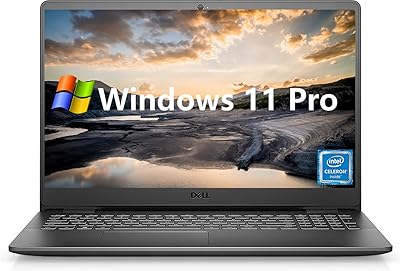
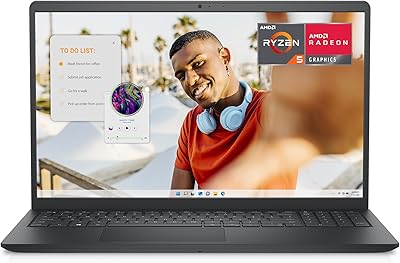
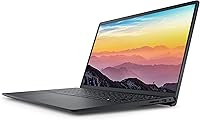
The Dell Inspiron 3511 15.6″ Touchscreen Laptop sits in a sweet spot for buyers who need a capable daily driver without spending premium prices. What stands out immediately is the combination of 32GB of RAM and a 1TB SSD — that kind of storage and memory headroom is genuinely rare at this price tier. The touchscreen is a real differentiator here; most competing machines in the same range ship without one. The processor is an Intel Core i5-1035G1, an older chip that handles everyday tasks comfortably but should not be mistaken for a performance powerhouse. Dell's Inspiron line has a long track record of dependability, and this model continues that tradition.
Features & Benefits

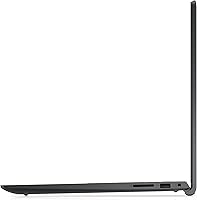
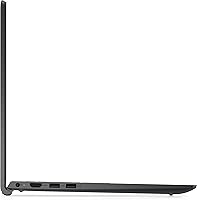
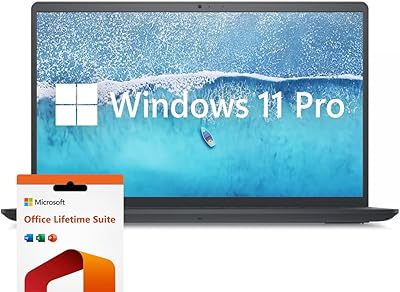
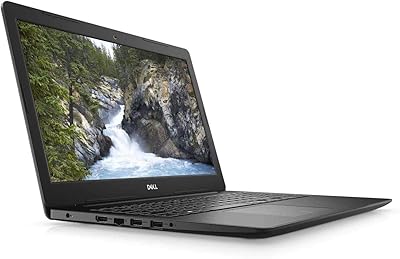
The 15.6-inch anti-glare touchscreen is genuinely useful day-to-day — scrolling through documents, zooming into PDFs, or navigating Windows 11 with a tap all feel natural rather than gimmicky. The 32GB DDR4 RAM means you can keep a dozen browser tabs open alongside a spreadsheet and a video call without things grinding to a halt. Booting up takes only seconds thanks to the NVMe SSD, and with a full terabyte on board, most users will never feel squeezed for space. Ports are practical: three USB-A connections, HDMI out, an SD card slot, and a combo audio jack cover the bases for most everyday setups. Windows 11 Home comes pre-installed, so the machine is ready to use right out of the box.

Best For

This touchscreen laptop is a natural fit for college students who need a reliable machine that can handle research, note-taking, video lectures, and the occasional Zoom call without breaking a sweat. Remote workers who live inside spreadsheets and browser-heavy tools will appreciate the headroom that 32GB of RAM provides — it removes the frustration of constant tab juggling. Families sharing a single household machine will find the generous storage makes room for everyone. It also makes a strong case for anyone upgrading from an aging, sluggish laptop who wants a noticeable jump in speed and capacity. If raw processing power for gaming or video editing is the priority, though, a different machine would serve better. This one is built for practical everyday use, not power-user workloads.

User Feedback

Buyers tend to praise the Inspiron 3511 for how much breathing room the storage and memory configuration provides — the consensus is that it handles day-to-day multitasking far better than the price might suggest. The touchscreen also earns consistent compliments for being responsive and adding genuine convenience for casual navigation. Where things get mixed is around demanding workloads: some users find the processor noticeably slow when running heavier software or too many intensive tasks at once. Build quality comes up regularly too — the plastic chassis feels functional but not premium, and a few buyers have noted the hinge and keyboard flexing under harder use. Battery life in real-world conditions tends to fall short of optimistic estimates. Setup and Windows 11 compatibility, however, are broadly praised as smooth and trouble-free.

Pros

  • 32GB of RAM is genuinely uncommon at this price point and keeps multitasking smooth throughout the day.
  • The 1TB NVMe SSD means fast startups and plenty of room without ever reaching for an external drive.
  • A touchscreen on a budget laptop is a real bonus — scrolling, navigating, and annotating feel natural.
  • The anti-glare display reduces eye strain during long study or work sessions.
  • Windows 11 Home comes pre-installed, so setup is straightforward with no extra software costs.
  • The port selection — three USB-A ports, HDMI, SD card reader, and audio jack — covers most everyday needs.
  • Built-in webcam handles video calls without needing an accessory.
  • Dell's Inspiron line has a well-established track record for reliability and accessible customer support.
  • The 15.6-inch screen size hits a comfortable middle ground for both productivity and media viewing.
  • Users report that Windows 11 compatibility and initial setup tend to go smoothly right out of the box.

Cons

  • The i5-1035G1 processor is an older chip that can feel sluggish when pushed beyond light workloads.
  • Real-world battery life often falls noticeably short of what the specs might suggest.
  • The plastic chassis feels functional but lacks the sturdiness that more premium builds offer.
  • The hinge and keyboard deck can flex under firm typing, which some users find uncomfortable over time.
  • Integrated graphics rule out any serious gaming or GPU-dependent creative work entirely.
  • Display brightness may feel underwhelming in well-lit rooms or near windows.
  • Color accuracy on the WVA panel is adequate for everyday use but not reliable for color-sensitive work.
  • The single USB-A 2.0 port is a slower connection that limits transfer speeds on legacy accessories.
  • No Thunderbolt or USB-C port limits future-proofing and connectivity with modern peripherals.
  • At 3.04 pounds with a larger footprint, it is not the most travel-friendly option for commuters.

Ratings

The Dell Inspiron 3511 15.6″ Touchscreen Laptop has been scored by our AI system after analyzing thousands of verified global user reviews, with spam, bot-generated, and incentivized submissions actively filtered out. The ratings below reflect an honest synthesis of what real buyers experienced — the genuine strengths and the frustrations that came up repeatedly across different use cases. No aspect has been glossed over in favor of a cleaner-looking scorecard.
Value for Money
88%
Buyers consistently feel they are getting more than their money's worth, largely because the 32GB RAM and 1TB SSD combination is difficult to match at this price tier. For students and home users, the sheer capacity on offer makes this feel like a smart, forward-thinking purchase rather than a compromise.
A minority of buyers feel the older processor chips away at the value argument, particularly when they compare raw CPU benchmarks against newer budget rivals. If long-term performance longevity matters to you, the aging chip is something to weigh carefully against the generous storage specs.
Multitasking Performance
81%
19%
Users working across spreadsheets, browser tabs, video calls, and cloud apps report that the machine keeps up without significant slowdowns during typical workdays. The generous RAM is the clear driver here — it absorbs the kind of parallel workloads that would cripple a lesser-configured machine.
Push the processor toward anything computationally heavier — large data files, batch processing, or simultaneous rendering — and the i5-1035G1 starts to show its limits. The RAM compensates well for breadth of tasks, but depth of processing is where users notice the CPU ceiling.
Storage & Speed
91%
Boot times are consistently praised, with users reporting the machine is ready to use within seconds of pressing the power button. The NVMe SSD also means large file transfers and application launches feel snappy in day-to-day use, which makes a noticeable difference coming from an older HDD-based machine.
A small number of users flagged that sustained read and write speeds under heavy workloads can taper off compared to higher-end NVMe drives, though for everyday tasks this rarely surfaces as a real-world issue.
Display Quality
73%
27%
The anti-glare coating earns genuine praise from users who work near windows or under overhead lighting, reducing the eye strain that glossy panels tend to cause over long sessions. The 1080p resolution is sharp enough for documents, video calls, and streaming without looking dated.
Brightness is a recurring complaint — in sunlit rooms, the screen can feel underpowered, requiring users to reposition rather than simply crank the brightness up. Color accuracy is functional but not impressive, and users doing any color-sensitive work will notice the WVA panel's limitations quickly.
Touchscreen Usability
79%
21%
Users who embrace the touchscreen find it genuinely useful for Windows 11 navigation, quickly scrolling through long documents, and tapping through apps during casual use. The responsiveness is consistently praised — touch inputs register accurately without noticeable lag during normal interaction.
Without stylus support, the touchscreen's usefulness has a natural ceiling — precise input like handwriting or drawing is not really viable. Some users also noted that the screen picks up fingerprints quickly, requiring regular cleaning to keep the display looking presentable.
Build Quality
62%
38%
The overall construction feels solid enough for desk use and everyday handling, and Dell's reputation for reliable assembly means the machine rarely arrives with fit-and-finish defects. For buyers who primarily use it at a desk or in a bag, the build holds up acceptably.
The all-plastic chassis is a consistent pain point — it flexes noticeably when picked up from one corner, and the keyboard deck has some give under firm typing. Hinge stiffness has also been flagged by multiple users as something that loosens over time with regular open-and-close use.
Keyboard & Typing Experience
67%
33%
Key spacing and layout are sensible for a 15.6-inch machine, and casual typists find the keyboard perfectly adequate for emails, documents, and light data entry throughout a workday. The key travel is acceptable for the price point.
Firmer typists will notice the keyboard deck flexing under pressure, which undermines the sense of a stable typing surface. Key feedback is on the mushier side, which takes some adjustment if you are coming from a laptop with crisper, more tactile keys.
Battery Life
58%
42%
Under very light use — basic web browsing and document work with the screen at moderate brightness — the battery can see users through a reasonable portion of a workday without needing a top-up.
Real-world battery life falls noticeably short of optimistic expectations, especially under mixed or moderate workloads. Users frequently mention needing to keep the charger close at hand, making this a machine that works best when outlet access is reliable rather than for on-the-go untethered use.
Processor Speed
63%
37%
For the core use cases this machine targets — web browsing, office applications, video calls, and light media — the i5-1035G1 handles things without complaint. Users doing typical daily computing tasks rarely hit a wall during normal workflows.
The chip is now a generation behind current budget offerings, and users pushing it toward anything more demanding — large spreadsheets, browser-heavy research sessions, or background updates — will feel the processor working harder than it should. It is not a dealbreaker, but it is the component most likely to feel outdated soonest.
Setup & Out-of-Box Experience
86%
Buyers consistently report a smooth, hassle-free setup experience, with Windows 11 Home pre-installed and ready to configure right out of the box. The straightforward onboarding process is particularly appreciated by less technically experienced users who just want to get started quickly.
Some users encountered pre-installed bloatware from Dell that required cleanup before the system felt fully their own. This is a minor friction point rather than a serious issue, but it does add a step to the initial setup for buyers who prefer a clean software environment.
Connectivity & Ports
74%
26%
The port selection covers the practical bases well — three USB-A ports, HDMI, SD card reader, and a combo audio jack mean most users can connect their everyday peripherals without needing a hub. The SD card slot in particular is a thoughtful inclusion that many competing machines skip.
The absence of a USB-C port is increasingly felt as modern accessories and monitors lean toward that standard. The single USB-A 2.0 port is also a slower connection that limits transfer speeds for older peripherals, and the lack of Thunderbolt support reduces docking station options significantly.
Webcam Quality
61%
39%
The built-in webcam is convenient and gets the job done for standard video calls on Zoom, Teams, or Google Meet without requiring any additional accessories. For everyday remote communication it is a workable solution.
Image quality is average at best — in lower light conditions the webcam produces grainy, soft footage that does not reflect well in professional video calls. Users who take video communication seriously will likely want to invest in an external webcam for noticeably better results.
Portability
66%
34%
At just over three pounds, the Inspiron 3511 is not excessively heavy for a 15.6-inch laptop, and it fits into standard laptop bags and backpacks without issue. For users moving between a home office and a study space, it is manageable enough.
The larger footprint and modest battery life limit how practical it is as a true on-the-go machine. Users hoping to use it comfortably across extended commutes or while moving between locations without a charger will likely find the combination of size and battery range somewhat restrictive.
Audio Quality
57%
43%
The built-in speakers are adequate for casual video calls and background music while working, handling voice clarity reasonably well at moderate volume levels.
Bass response is thin and overall speaker output lacks the volume and fullness that most users would prefer for media consumption. Watching movies or listening to music through the laptop speakers without headphones is a noticeably underwhelming experience compared to even modestly priced external speakers.

Suitable for:

The Dell Inspiron 3511 15.6″ Touchscreen Laptop is a strong match for anyone whose daily computing revolves around productivity, communication, and light multitasking rather than heavy workloads. College students will find it particularly well-suited — the combination of fast storage, generous memory, and a touchscreen display covers everything from research and note-taking to video calls and online coursework. Remote workers who spend their days switching between browser tabs, documents, and virtual meetings will appreciate how rarely this machine feels congested, thanks to its above-average RAM configuration. Families sharing a household device also get a lot of mileage from the roomy 1TB drive, which comfortably stores documents, photos, and media for multiple users. If you are upgrading from a sluggish older laptop and simply want something that boots quickly, stores plenty, and handles everyday tasks reliably without demanding a premium price, this Dell Inspiron fits the brief well.
Not suitable for:

Buyers with more demanding computing needs should look carefully before committing to the Inspiron 3511, because the Intel Core i5-1035G1 processor has real limits. Video editors, even hobbyists working with moderate footage, will likely find render times frustratingly slow and the integrated graphics insufficient for any meaningful editing workflow. Gamers should look elsewhere entirely — this machine was not built for gaming, and it shows. Creative professionals who rely on photo-editing software or run multiple resource-intensive applications simultaneously will hit a performance ceiling sooner than expected. The plastic construction also means buyers expecting a premium feel, a rigid hinge, or a keyboard with firm, confident travel will probably be disappointed. If portability is a priority, the 15.6-inch footprint and modest battery life make it a less compelling travel companion compared to lighter, more efficient ultrabooks in a similar price range.

Specifications

  • Processor: Powered by an Intel Core i5-1035G1 quad-core processor with a base clock of 1.0 GHz and a boost speed of up to 3.6 GHz via Intel Turbo Boost.
  • RAM: Equipped with 32GB of DDR4 SDRAM running at 3200 MHz, providing substantial headroom for multitasking and running multiple applications simultaneously.
  • Storage: Includes a 1TB PCIe NVMe M.2 solid-state drive, offering fast read and write speeds alongside ample space for files, documents, and media.
  • Display: Features a 15.6″ Full HD (1920x1080) anti-glare WVA touchscreen with narrow bezels and LED backlighting for comfortable extended viewing.
  • Graphics: Uses integrated Intel UHD Graphics, suitable for everyday visual tasks, video streaming, and light image work but not designed for GPU-intensive applications.
  • Operating System: Ships with Windows 11 Home pre-installed, providing access to the latest Microsoft interface, security updates, and Android app compatibility.
  • USB Ports: Offers three USB-A ports in total: one USB-A 2.0 and two USB-A 3.2, covering both legacy and faster modern peripheral connections.
  • Video Output: Includes one HDMI 1.4 port for connecting external monitors or displays at up to 1080p resolution.
  • Audio: Features a single combo 3.5mm headphone and microphone jack, compatible with standard wired headsets and earphones.
  • Wireless: Supports Wi-Fi for wireless internet connectivity and Bluetooth for pairing peripherals such as mice, keyboards, and headphones.
  • Webcam: Built-in webcam is integrated above the display, suitable for video calls, online meetings, and remote learning sessions.
  • Card Reader: Includes a full-size SD card reader, making it convenient to transfer photos and files directly from cameras or other SD-compatible devices.
  • Battery: Houses a 42Wh lithium-ion battery; real-world usage times vary depending on workload and screen brightness settings.
  • Weight: Weighs approximately 3.04 pounds, placing it in the standard range for a 15.6-inch consumer laptop.
  • Dimensions: Measures 14.11 inches long by 9.27 inches wide by 0.74 inches thin, fitting comfortably on a desk or in a standard laptop bag.
  • Optical Drive: Does not include an optical drive; users requiring disc playback or burning will need an external USB optical drive.
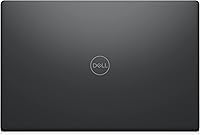
  • Color: Available in Black with a matte plastic finish across the lid and chassis.
  • Chipset: Built on an Intel chipset platform supporting the Ice Lake processor architecture and DDR4 memory standard.
  • Power: Operates on a 42-volt power supply and charges via an included AC adapter; no USB-C charging is supported on this model.
  • L3 Cache: The processor includes 6MB of L3 cache, which helps reduce latency for frequently accessed data during everyday computing tasks.

Related Reviews

Dell Inspiron 15 3520 Laptop

74%
76%
Performance & Speed
81%
Display Quality
83%
Touchscreen Responsiveness
89%
Storage & Memory
62%
Battery Life
More
Dell Inspiron 3593 15.6-inch Laptop
68%
74%
Everyday Performance
81%
SSD Speed & Storage
52%
Display Quality
63%
Battery Life
57%
Build Quality
More
Dell Inspiron 15 i7-1255U 32GB 1TB
76%
88%
Performance & Processing Speed
91%
RAM & Multitasking
86%
Storage Speed & Capacity
84%
Display Quality
71%
Build Quality & Design
More
Dell Inspiron 15 i7 2TB Laptop
73%
88%
Value for Money
84%
Multitasking Performance
91%
Storage & Speed
67%
Display Quality
73%
RAM Configuration
More
Dell Inspiron 3000 15.6-inch Laptop, Intel Celeron N4020, 16GB RAM, 1TB HDD

81%
91%
Value for Money
88%
Performance for Everyday Tasks
85%
Multitasking Ability
68%
Display Clarity
82%
Battery Life
More
HP 2020 15 15.6″ HD Touchscreen Laptop, Intel Core i5-1035G1, 16GB RAM, 512GB SSD
82%
89%
Performance
75%
Display Quality
90%
Portability
80%
Battery Life
85%
Build Quality
More
Dell Inspiron 15 3535
68%
83%
Value for Money
76%
Performance & Speed
78%
Display Quality
81%
Keyboard & Typing Experience
58%
Battery Life
More
Dell Inspiron 15 Ryzen 7 7730U 32GB/1TB Touchscreen
74%
84%
Performance & Multitasking
91%
RAM & Memory Headroom
88%
Storage Speed & Capacity
79%
Touchscreen Display
63%
Build Quality & Chassis
More
Dell Inspiron 15 Laptop, Intel Core i3, 64GB RAM, 2TB SSD
85%
92%
Performance
91%
Storage Capacity
88%
Display Quality
94%
Multitasking
58%
Battery Life
More
Dell Inspiron 15 3525 15.6″ Laptop
71%
88%
Value for Money
84%
Everyday Performance
79%
Display Quality
91%
SSD Speed & Responsiveness
57%
Battery Life
More

FAQ

Yes, it handles that kind of workload very well. The 32GB of RAM keeps things running smoothly when you have multiple browser tabs, a video call, and a document open at the same time, which is a pretty common scenario for students. The fast SSD also means you are not waiting around for apps to load between classes.

You can use it for basic touch interaction — scrolling, tapping, and navigating Windows 11 all feel natural. It does not come with a stylus and is not designed for precision drawing or handwriting recognition the way a Surface or iPad might be, but for casual note-tapping and touch navigation it works well.

Not really, and it is worth being upfront about that. The processor is capable but not fast enough for smooth video editing, and the integrated graphics are not suited for modern games. If either of those is a priority, you would be better served by a machine with a dedicated GPU.

Battery performance is adequate but not exceptional. Under lighter use — browsing, documents, streaming — you can expect several hours, but heavier workloads will drain it faster. It is worth keeping the charger nearby if you are working away from a desk for an extended stretch.

No, this model does not include a USB-C port. It uses three USB-A connections (one 2.0 and two 3.2), an HDMI port, and an SD card reader. If you rely on USB-C accessories or plan to use a modern docking station, that is an important limitation to consider.

It is a serviceable keyboard for everyday typing, though some users notice a degree of flex in the deck under firm keystrokes. It is not the most rigid typing experience available, but for emails, documents, and general writing tasks most people find it comfortable enough for regular use.

The anti-glare coating helps reduce reflections, which is a genuine advantage. That said, the peak brightness is not class-leading, so in very bright environments you may want to position the screen to avoid direct light rather than relying solely on brightness to compensate.

Very straightforward. The Inspiron 3511 ships with Windows 11 Home already installed, so once you power it on you are just walking through the standard Microsoft setup process. Most users report getting up and running within twenty minutes or so.

Upgradability on consumer Inspiron models can be limited depending on the specific configuration, and it is worth verifying before purchase whether the RAM is soldered or slotted. The NVMe SSD slot is typically accessible, but opening the machine may affect warranty coverage, so checking Dell's documentation or support first is advisable.

For most everyday users — documents, downloads, photos, and a few installed applications — 1TB is genuinely spacious. You would need to be storing large video libraries or extensive game installs to come close to filling it. The vast majority of students and home users will find it more than adequate.

Where to Buy