


Overview

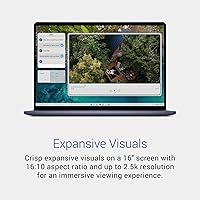
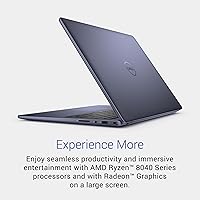
The Dell Inspiron 16 5645 Laptop sits in a comfortable mid-range spot — capable enough to handle real work, priced to not require justification. The AMD Ryzen 7-8840U gives this machine genuine performance headroom at this tier, and the 16:10 FHD+ display is a quiet but meaningful upgrade over the 16:9 panels found on most rivals. Documents and spreadsheets simply show more content without constant scrolling. The Midnight Blue finish and slim 0.68-inch profile look a cut above typical budget-leaning machines. One thing to know upfront: integrated graphics only — if gaming or heavy video rendering is on your list, this is not that laptop.

Features & Benefits

The Ryzen 7-8840U processor is the real story here — eight cores handling browser tabs, video calls, document editing, and background tasks without breaking a sweat. Paired with 16GB of DDR5 RAM at 5600 MHz, this mid-range Dell laptop does not feel sluggish under the kind of multitasking most people actually do. The 1TB NVMe SSD boots fast and gives you room to store years of files without an immediate upgrade. On the communication side, the FHD webcam with AI-assisted noise reduction and a physical privacy shutter are genuinely practical for hybrid workers. A fingerprint reader and hardware TPM round out a surprisingly solid security package.

Best For

This Dell Inspiron 16 is built for people who spend most of their day in a browser, a spreadsheet, or a video call. Remote and hybrid professionals will appreciate the screen size, webcam quality, and the endurance-focused design. College and grad students get a lot of machine for their money — a large 16-inch workspace without lugging something that feels like a brick. If you are upgrading from a five- or six-year-old laptop, the speed difference will be obvious immediately. Light photo editors can work here too, though heavy Premiere or DaVinci users will hit the integrated GPU ceiling quickly.

User Feedback

Owners of the Inspiron 5645 consistently highlight the keyboard comfort and display as standout positives — the extra vertical screen space gets mentioned often, especially by people switching from a standard 15.6-inch machine. Day-to-day speed draws steady praise across the board. Criticism tends to cluster in familiar places: the plastic chassis, while not flimsy, does not carry a premium feel in hand, and the speakers are just adequate. Fan noise under sustained load gets flagged occasionally. Battery life feedback skews positive for light to moderate use, though heavier sessions reportedly fall short of advertised numbers. The Dell Migrate setup tool earns mixed reactions — useful for some, redundant for others.

Pros

  • The AMD Ryzen 7-8840U handles real-world multitasking with noticeable headroom — browsers, calls, and office apps run without hesitation.
  • 16GB of DDR5 RAM is a meaningful step above what most competitors offer at this price, keeping the machine responsive as workloads grow.
  • The 16:10 display ratio shows more vertical content than standard widescreen laptops, which makes a real difference in daily document and spreadsheet work.
  • A 1TB NVMe SSD means fast boots and enough space that most users will not need an external drive for years.
  • The physical webcam privacy shutter is a small but genuinely reassuring feature for anyone on frequent video calls.
  • Fingerprint reader and hardware TPM make secure sign-in quick and add a layer of data protection that entry-level rivals often skip.
  • Military-grade durability testing gives this mid-range Dell laptop more confidence for travel and daily bag throws than its price suggests.
  • The included one-year onsite warranty means a technician comes to you if something goes wrong — not a given at this price tier.
  • ENERGY STAR 8.0 and EPEAT Climate+ certifications point to responsible power consumption and environmentally conscious manufacturing.
  • The full-size keyboard with a number pad is a practical bonus for anyone doing data entry or financial work regularly.

Cons

  • The plastic chassis feels functional but does not carry the solid, premium feel buyers get from aluminum-bodied rivals.
  • Integrated AMD Radeon graphics rule out gaming, 3D work, and any GPU-accelerated creative pipeline entirely.
  • Fan noise under sustained load has been flagged by multiple owners — it becomes noticeable during longer rendering or compilation tasks.
  • Speaker output is average at best; anyone who listens to music or watches content without headphones will likely feel shortchanged.
  • Real-world battery life under heavier workloads tends to fall short of the rated figures, which matters for long days away from an outlet.
  • At 4.71 pounds, the Inspiron 5645 is on the heavier end for a 16-inch laptop — not ideal for commuters or frequent travelers.
  • No OLED or high-refresh-rate display option exists for this configuration, which is a gap compared to some rivals at similar price points.
  • The Dell Migrate tool, while included, receives uneven feedback — useful for non-technical users, but tech-savvy buyers may find it unnecessary.
  • Port selection covers the basics but lacks Thunderbolt 4, which limits high-speed peripheral and external display flexibility.
  • The 1920x1200 resolution on a 16-inch panel looks sharp enough for productivity but may feel soft to buyers accustomed to higher-density screens.

Ratings

The Dell Inspiron 16 5645 Laptop scores reflect patterns distilled by our AI system after analyzing thousands of verified buyer reviews from global markets, with bot-generated, incentivized, and outlier feedback actively filtered out. Every category score captures what real owners experienced after extended daily use — not first impressions. Both the genuine strengths and the recurring frustrations are represented honestly, so you can make a clear-headed purchase decision.

Performance
83%
The Ryzen 7-8840U handles everyday multitasking with real confidence — switching between a dozen browser tabs, a video call, and a live spreadsheet happens without hesitation or lag. Users upgrading from older Intel Core i5 machines consistently report a speed jump that makes daily productivity feel noticeably more fluid and less frustrating.
The integrated AMD Radeon graphics are a hard ceiling for anyone who strays beyond productivity tasks — photo batch exports slow down and anything GPU-intensive stalls noticeably. Buyers who discover this limitation post-purchase, particularly those who assumed mid-range hardware meant capable gaming, tend to express the loudest dissatisfaction.
Display Quality
86%
The 16:10 aspect ratio is the feature owners mention most positively — it genuinely shows more of a document or webpage without extra scrolling, and that adds up meaningfully over a long workday. Brightness and color reproduction are consistently rated well for the price tier, making extended reading and productivity sessions comfortable.
The panel is not OLED and lacks the deep contrast or color accuracy that photographers and videographers expect for serious color work. There is no high-refresh-rate option in this configuration either, which buyers transitioning from gaming-adjacent machines notice immediately when scrolling and animations feel comparatively ordinary.
Build Quality
67%
33%
The slim 0.68-inch profile and Midnight Blue finish give this machine a look that punches above the segment visually, and military-grade durability testing adds real confidence for buyers who move between locations or occasionally drop a bag. For the price tier, the overall assembly feels deliberate rather than thrown together.
The plastic chassis is the most common complaint in buyer feedback — it does not flex dangerously, but it lacks the solid, planted feel of aluminum-bodied rivals at similar or slightly higher price points. Several owners specifically note lid flex under normal handling pressure, which erodes the premium first impression the design initially suggests.
Battery Life
74%
26%
For standard office workloads — emails, documents, and browser tabs at moderate brightness — most owners comfortably reach a full workday on a single charge without anxiety. The power management built into the Ryzen 7-8840U helps stretch runtime further during lighter sessions compared to previous-generation platform equivalents.
Push the machine harder with sustained workloads or keep brightness high, and real-world battery duration falls noticeably short of advertised figures — a pattern that shows up consistently in buyer feedback. Heavy-session users working in demanding applications report needing to find an outlet by early afternoon on longer days.
Value for Money
88%
Few competing 16-inch laptops pair a current-generation 8-core processor, 16GB of DDR5 RAM, and a 1TB NVMe SSD at this price tier without cutting corners that immediately surface in daily use. Buyers consistently cite this hardware-per-dollar ratio as the primary reason they chose this machine over alternatives — and most feel vindicated after a few weeks of ownership.
The value calculation shifts meaningfully for buyers who need discrete graphics or a premium chassis, where spending more on a different machine is simply the better decision. The plastic build and average speakers are the most visible areas where costs were contained to hit the price point, and buyers with higher expectations on those fronts tend to feel the value proposition less strongly.
Keyboard & Trackpad
82%
18%
The full-size keyboard with dedicated number pad receives consistent praise from users who handle spreadsheets, financial data, or any number-heavy workflow daily — having that numpad without a workaround is genuinely appreciated. Key travel and spacing earn additional positive mentions from buyers coming off cramped smaller-form-factor machines.
A noticeable minority of owners find the key feel a touch shallow compared to business-class keyboards from Lenovo or HP at the same tier. The trackpad is functional and smooth for everyday navigation, but draws occasional criticism for click response that feels imprecise rather than crisp under firm input.
Webcam & Microphone
79%
21%
The FHD webcam holds up noticeably better in varied lighting than the 720p cameras still common on competing machines at this price, and the AI noise reduction on the dual mics does real work suppressing background hum during calls. The physical privacy shutter is a feature remote workers consistently cite as a practical and reassuring addition.
In low-light conditions, the webcam still produces visible grain even with wide dynamic range processing active, which becomes distracting on longer or higher-stakes video calls. Some users also note that the AI noise reduction occasionally clips softer speech when background noise levels fluctuate quickly, producing a slightly choppy audio experience.
Thermal Management
71%
29%
Under typical productivity loads — browsing, writing, and calls — the Inspiron 5645 runs quietly and the keyboard surface stays cool to the touch throughout a normal session. The built-in sensor that detects stable surface placement and adjusts thermals accordingly is a practical feature that genuinely delivers what it promises.
Push the machine with sustained CPU-heavy tasks and the fan ramp-up becomes clearly audible, particularly in quiet environments like a library or open office space where it draws attention. A portion of owners also report noticeable bottom surface warmth during extended sessions, though feedback consistently places it short of uncomfortable levels.
Speaker Quality
58%
42%
The speakers handle occasional YouTube videos, quick audio previews, and low-volume background music without serious distortion at moderate levels, which covers the basics for desk use. For brief or casual content consumption in a private space, most users find them acceptable in a pinch.
Bass is essentially absent, and at higher volumes the sound becomes noticeably thin and compressed. Buyers who regularly watch content or listen to music without headphones report reaching for external speakers or earphones within the first week — the speakers are genuinely the weakest link in an otherwise reasonable package.
Port Selection
69%
31%
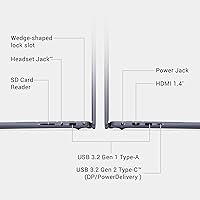
Three USB 3.0 Type-A ports cover the practical basics for most users — a wireless receiver, an external drive, and a USB hub can all connect at once without an immediate dongle situation. The additional connectivity options are sufficient for building a functional everyday desk setup without supplemental adapters.
The absence of Thunderbolt 4 is a real limitation for users who want high-speed external SSD transfers or efficient multi-monitor daisy-chaining, and it increasingly feels like a gap as peripherals catch up to the standard. The lack of an SD card slot also frustrates photographers who transfer images regularly and prefer not to carry a separate reader.
Security Features
84%
The fingerprint reader works reliably and earns consistent positive feedback from users who dislike typing passwords repeatedly throughout a busy workday — it is fast, accurate, and unobtrusive. Having both a hardware TPM for data encryption and a physical webcam shutter in the same machine at this price tier is uncommon and clearly valued.
The fingerprint reader placement draws occasional criticism for being positioned in a spot that feels slightly awkward during initial setup, with a short learning curve before it becomes second nature. TPM and security features are largely invisible to non-technical users, meaning buyers who are not IT-aware may not feel the full benefit of what is included.
Setup & Software
72%
28%
Windows 11 Home runs cleanly out of the box, and buyers who use the Dell Migrate tool to transfer data from an older Windows PC generally find it straightforward and time-saving for a non-technical audience. The onsite warranty activation process during initial setup is also handled quickly with minimal friction.
Dell's pre-installed software package includes several applications that experienced buyers consider unnecessary bloatware, requiring a cleanup pass before the system feels fully owned. The Dell Migrate tool also earns mixed feedback overall — technically comfortable users find it redundant, and its built-in six-month expiration feels arbitrarily limiting rather than generous.
Portability & Design
73%
27%
At 0.68 inches thin, this mid-range Dell laptop slides into a bag without dominating available space, and the Midnight Blue finish reads as noticeably more refined than the flat matte black plastic common on budget-tier rivals. The design aesthetic attracts genuine positive comments from buyers who care about how their workspace looks.
The 4.71-pound weight sits at the heavier end of the 16-inch category, and daily commuters who walk or cycle between locations tend to notice the cumulative strain by the end of the day. It is perfectly manageable for occasional portability but does not compete with ultralight alternatives for buyers whose priority is a lighter daily carry.

Suitable for:

The Dell Inspiron 16 5645 Laptop is a strong fit for anyone whose daily computing revolves around productivity rather than pushing hardware limits. Remote workers and hybrid professionals will get the most out of it — the taller 16:10 display means less scrolling through long documents and emails, and the FHD webcam with noise-reduction mics holds up well on back-to-back video calls. College and graduate students who want a large, capable screen without spending heavily will find the balance here hard to beat at this price tier. It also makes a genuinely satisfying upgrade for someone coming off a five- or six-year-old laptop, where the jump in everyday speed and display quality is immediately obvious. Light photo editors and casual content reviewers can use this mid-range Dell laptop comfortably, provided their work stays within Lightroom-style editing rather than GPU-intensive rendering pipelines.

Not suitable for:

The Dell Inspiron 16 5645 Laptop is not the right machine for buyers whose priorities include gaming, 3D rendering, or any workflow that leans on a discrete GPU — the integrated AMD Radeon graphics simply cannot compete with a dedicated card, and expecting otherwise will lead to disappointment. Video editors working with high-resolution timelines or effects-heavy projects in DaVinci Resolve or Premiere Pro will run into real performance walls under sustained load. Power users who want a premium tactile build — magnesium alloy chassis, OLED display, or near-zero flex — should look at thin-and-light business ultrabooks in a higher tier, since the Inspiron 5645 uses a plastic body that feels functional but not refined. Buyers who travel daily and want a sub-4-pound machine will also find the 4.71-pound weight a consistent friction point. Finally, anyone expecting audiophile-grade speakers or a high-refresh-rate display will need to reset those expectations before purchasing.

Specifications

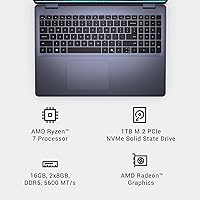
  • Processor: Powered by the AMD Ryzen 7-8840U, an 8-core chip with a 3.3 GHz base clock, designed for sustained productivity workloads with efficient power management.
  • RAM: Comes equipped with 16GB of DDR5 memory running at 5600 MHz, offering faster data throughput than the DDR4 found in most competing mid-range machines.
  • Storage: Ships with a 1TB NVMe SSD, delivering quick boot times and broad file storage capacity without requiring an immediate external drive or upgrade.
  • Display: Features a 16-inch FHD+ IPS panel at 1920x1200 resolution with a 16:10 aspect ratio, providing more usable vertical screen space than standard 16:9 displays.
  • Graphics: Uses AMD Radeon integrated graphics built into the Ryzen 7-8840U, suitable for everyday visual tasks but not intended for discrete GPU workloads or gaming.
  • Operating System: Ships with Windows 11 Home pre-installed, including access to Microsoft Teams and Windows Studio Effects for hybrid work and video communication.
  • Webcam: Includes a Full HD camera with wide dynamic range and temporal noise reduction, along with a mechanical privacy shutter that physically blocks the lens.
  • Microphone: Built-in dual microphones with AI-based noise reduction help suppress background sound during calls, improving audio clarity in typical home and office environments.
  • Security: Equipped with a fingerprint reader for biometric login, a hardware Trusted Platform Module (TPM) for data encryption, and the physical webcam privacy shutter.
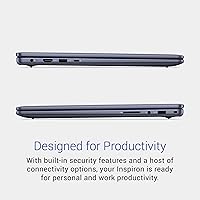
  • Ports: Provides three USB 3.0 Type-A ports alongside additional connectivity options to support peripherals, external displays, and accessories for a productive desk setup.
  • Wireless: Supports Bluetooth wireless connectivity for pairing peripherals; Wi-Fi capability is built in to support modern home and office network standards.
  • Keyboard: Full-size keyboard layout includes a dedicated number pad, making it practical for users who regularly handle data entry, financial spreadsheets, or numerical input.
  • Weight: Weighs 4.71 pounds, which is typical for a 16-inch productivity laptop though worth considering for buyers who carry their machine daily.
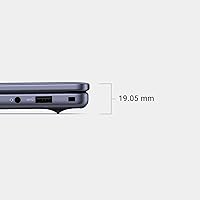
  • Dimensions: Measures 14.04 x 9.82 x 0.68 inches, keeping the footprint relatively slim for a 16-inch class machine at under an inch thin.
  • Battery: Houses a built-in lithium polymer battery designed for all-day use under light to moderate workloads, with actual runtime varying by screen brightness and task intensity.
  • Certifications: Holds ENERGY STAR 8.0 certification, EPEAT Silver registration, and the EPEAT Climate+ designation recognizing adherence to industry decarbonization practices.
  • Durability: Has undergone military-grade reliability testing to validate resilience against common environmental stressors including temperature variation, humidity, and physical shock.
  • Warranty: Comes with a one-year onsite service plan, meaning a Dell technician will travel to the owner's location if a covered hardware issue cannot be resolved remotely.

Related Reviews
Dell 16 Plus DB16250
77%
91%
Display Quality
88%
Build Quality & Design
87%
Performance & Processing Speed
93%
Memory & Multitasking
89%
Storage Capacity & Speed
More
Dell Inspiron 16 64GB 2TB Touchscreen Laptop
77%
88%
Display Quality
84%
Performance & Speed
93%
RAM & Multitasking
91%
Storage & Speed
79%
Touchscreen Responsiveness
More
Dell Inspiron 16 5635 16-inch Laptop
72%
88%
Display Quality
83%
Processing Performance
57%
Battery Life
66%
Build Quality
79%
Value for Money
More
Dell Inspiron 15 3535
68%
83%
Value for Money
76%
Performance & Speed
78%
Display Quality
81%
Keyboard & Typing Experience
58%
Battery Life
More
Dell Inspiron 3511 15.6″ Touchscreen Laptop
72%
88%
Value for Money
81%
Multitasking Performance
91%
Storage & Speed
73%
Display Quality
79%
Touchscreen Usability
More
Dell Inspiron 15 Ryzen 7 7730U 32GB/1TB Touchscreen
74%
84%
Performance & Multitasking
91%
RAM & Memory Headroom
88%
Storage Speed & Capacity
79%
Touchscreen Display
63%
Build Quality & Chassis
More
Dell 16 Business Laptop - 32GB RAM, 2TB SSD, Core i7
85%
93%
Performance
88%
Display Quality
81%
Battery Life
90%
Multitasking Ability
68%
Portability
More
Dell Inspiron 15 Laptop, Intel Core i3, 64GB RAM, 2TB SSD
85%
92%
Performance
91%
Storage Capacity
88%
Display Quality
94%
Multitasking
58%
Battery Life
More
Dell Inspiron 15 3525 15.6″ Laptop
71%
88%
Value for Money
84%
Everyday Performance
79%
Display Quality
91%
SSD Speed & Responsiveness
57%
Battery Life
More
Dell Inspiron 14 5441 1TB Laptop
74%
91%
Battery Life
88%
Portability
84%
Performance (Everyday)
57%
App Compatibility
67%
Display Quality
More

FAQ

Not in any meaningful sense. The Dell Inspiron 16 5645 Laptop relies entirely on AMD Radeon integrated graphics, which can handle light browser-based games or older low-demand titles, but will struggle with modern games at playable settings. If gaming is a priority, you will want a machine with a discrete GPU.

Upgradeability on the Inspiron 5645 is limited compared to older Dell designs — while the SSD may be replaceable by an experienced user, the RAM configuration is worth verifying against current teardown reports before assuming easy access. If storage capacity is a long-term concern, the 1TB included is generous enough for most users to go years without running short.

For light tasks like browsing, note-taking, and video calls at moderate brightness, most owners report getting through a solid workday on a single charge. Push it harder with multiple heavy applications running simultaneously and that number drops noticeably. Keeping screen brightness at around 60 to 70 percent makes a real difference in how long the battery lasts.

It is a strong option for most college use cases. The 16-inch 16:10 display gives you more room to work with research papers, coding environments, or spreadsheets side by side, and the Ryzen 7 processor handles everything a typical student workload demands. The weight is worth considering if you carry your bag across campus all day.

No, this configuration does not include a touchscreen. It is a standard clamshell laptop with a traditional non-touch FHD+ display. If touchscreen input is important to your workflow, you would need to look at a different model or configuration.

Better than most laptops at this price tier. The Full HD camera with wide dynamic range handles varied lighting reasonably well, and the AI noise reduction on the dual microphones does a solid job suppressing background sounds like fans or ambient room noise. For daily calls on Teams or Zoom, it holds up without needing an external webcam.

For casual or hobby-level photo editing in Lightroom or similar tools, the display is workable and the screen size gives you enough real estate to work comfortably. It is not a color-calibrated professional panel, so serious photographers who need accurate color reproduction should verify the sRGB coverage before relying on it for print-ready work.

During routine tasks like browsing, document editing, or video calls, the fan is barely noticeable. Under sustained load — think long export jobs, large compilations, or extended video playback — the fan does spin up and becomes audible. It is not unusually loud for the segment, but it is worth knowing if you work in quiet environments.

You get three USB 3.0 Type-A ports alongside additional connectivity options for peripherals and display output. There is no Thunderbolt 4, which is a limitation if you rely on high-speed external drives or daisy-chained displays. For most everyday setups involving a mouse, USB hub, and external monitor, the port selection is adequate.

It depends on your comfort level with technology. For users switching from an older Windows machine who want a straightforward way to move files, browser data, and personal settings over, the six-month access to Dell Migrate is genuinely convenient. If you are comfortable manually transferring files or using built-in Windows backup tools, you probably will not touch it.

Where to Buy