Overview

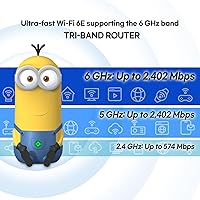
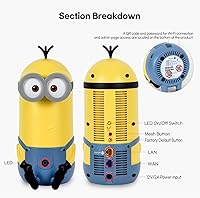
The Davolink AXE-5400 Kevin Wi-Fi 6 Router enters a crowded mid-range market with a spec sheet that punches reasonably well for its price tier and a design that turns heads — it's shaped like Kevin from the Minions franchise, which is either charming or distracting depending on who's asking. Underneath the novelty exterior, this is a dual-band Wi-Fi 6 unit capable of covering medium-sized homes with solid, consistent wireless performance. Worth flagging early: the listing tosses around both dual-band and tri-band descriptions, so buyers should know they are getting a two-band router. The mesh-ready architecture is a genuine selling point, letting you add nodes later without tearing up walls or running Ethernet.

Features & Benefits

Built on the 802.11ax standard, the Kevin Wi-Fi 6 router brings technologies like OFDMA and 1024-QAM that make a real difference when a dozen family members are all online at once — the network stays organized rather than choking under load. Theoretical combined speeds reach 1.77Gbps, though real-world throughput will be lower; the 5GHz band is where you will notice the biggest gains for streaming and gaming. Security gets a proper upgrade too, with WPA3 encryption keeping your data better protected than most older routers allow. Gigabit Ethernet ports round things out nicely for anyone who wants a wired connection for a console or desktop.

Best For

This Minions-themed router is a strong match for renters or homeowners in medium-sized spaces — think a two-bedroom apartment or a single-story house — who want dependable whole-home Wi-Fi without a complicated setup process. It also suits budget-conscious gamers and streamers who need stable 5GHz performance without paying for a flagship device. Households running 20-plus smart devices will appreciate the capacity headroom that Wi-Fi 6 provides. The fun Kevin design makes it a natural fit for a shared family space or a kid's room. If you are still running a Wi-Fi 5 router, upgrading to this unit is a straightforward step up in both speed and network efficiency.

User Feedback

With around 150 early ratings averaging 4.4 out of 5, this mesh-ready Wi-Fi 6 unit has built a cautiously optimistic track record. Buyers regularly highlight easy out-of-box setup and strong signal performance in mid-sized homes, and the design earns frequent compliments from parents picking it up for a kids' space. On the critical side, a handful of users have questioned the tri-band labeling given the dual-band hardware, and some report that real-world speeds fall noticeably short of the theoretical ceiling. App reliability and long-term firmware support remain open questions, so it is worth keeping an eye on how Davolink handles updates as the review pool grows.

Pros

  • Wi-Fi 6 technology handles busy home networks noticeably better than older routers when many devices are online at once.
  • Setup takes under 15 minutes for most users, with no technical background required.
  • WPA3 encryption provides stronger baseline security than the vast majority of budget-tier competitors.
  • Gigabit LAN ports deliver clean, reliable wired speeds for consoles, desktops, and NAS drives.
  • Mesh-ready design lets you extend coverage later without running new cables through walls.
  • The Kevin Wi-Fi 6 router holds a 4.4-star average rating, suggesting most buyers are genuinely satisfied.
  • Smart home households with IoT-heavy setups report stable 2.4GHz connections for sensors, bulbs, and locks.
  • The Minions Kevin design is a standout choice for family spaces where aesthetics actually matter.
  • Real-world 5GHz performance is strong enough for 4K streaming and casual online gaming in close range.

Cons

  • Real-world speeds fall well short of the theoretical maximums printed on the box.
  • The product listing incorrectly implies tri-band capability — it is a dual-band router.
  • Mesh performance over wireless bridging competes with client traffic since there is no dedicated backhaul band.
  • The companion app feels unfinished, with occasional connectivity drops and limited advanced controls.
  • Signal range drops off noticeably in larger homes or through multiple walls.
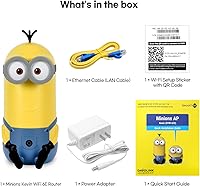
  • No Ethernet cable is included in the box, which is a minor but avoidable frustration.
  • Long-term firmware support and security update history from Davolink remain unproven.
  • Some users report the router needs a manual restart after several weeks of continuous uptime.
  • No QoS or traffic prioritization tools are available for users who need to manage bandwidth deliberately.

Ratings

The scores below were generated by AI after analyzing verified buyer reviews for the Davolink AXE-5400 Kevin Wi-Fi 6 Router from multiple global sources, with spam, bot activity, and incentivized feedback actively filtered out. Each category reflects real ownership experiences — not manufacturer claims — so both the standout strengths and the recurring frustrations are represented honestly. Whether you are trying to gauge day-to-day reliability or figure out where this router falls short, the breakdown below gives you a transparent, balanced picture.
Wireless Performance
76%
24%
On the 5GHz band, users in medium-sized apartments and single-floor homes consistently report stable throughput for 4K streaming and online gaming with noticeably fewer drops than their older Wi-Fi 5 setups. The OFDMA technology helps when multiple family members are all online simultaneously.
Real-world speeds land well below the theoretical 1.77Gbps ceiling, which catches some buyers off guard. Users in larger or multi-story homes find the signal weakens considerably beyond two rooms from the router, limiting its practical range.
Setup & Ease of Use
84%
Getting this router up and running is one of its clearest wins — most buyers report being connected within 10 to 15 minutes without needing to consult a manual. The WPS button simplifies adding devices quickly, which non-technical users in particular appreciated.
A portion of reviewers found the companion app less polished than expected, with occasional hiccups during initial configuration. Advanced users looking for granular controls like QoS settings or detailed traffic monitoring may find the interface underwhelming.
Mesh & Coverage Expansion
68%
32%
The wireless bridging mesh capability means users can extend coverage to a backyard office or a far bedroom without pulling Ethernet cable, which is genuinely convenient in rental properties where drilling walls is not an option.
Mesh pairing reliability received mixed feedback — some users report the second node occasionally drops its connection and requires a manual reboot. The lack of a dedicated backhaul band (given the dual-band hardware) means mesh performance competes with client traffic on the same channels.
Device Capacity & Network Stability
79%
21%
Households with 20 to 30 connected smart devices — a mix of phones, smart TVs, thermostats, and voice assistants — report that the network handles the load without obvious slowdowns during peak evening hours. Wi-Fi 6's improved scheduling makes a tangible difference here.
Pushing toward the claimed 100-device ceiling is where stability starts to waver, at least based on early user reports. Small home offices with several laptops running video calls simultaneously noted occasional stuttering that required a router restart.
Security Features
83%
WPA3 encryption is a meaningful upgrade over the WPA2 standard still found on many budget routers, and buyers with privacy-conscious households appreciated Enhanced Open for guest network scenarios. It provides solid baseline protection without requiring any manual configuration.
There is no mention of built-in VPN server support or advanced parental control tools, which limits appeal for users who want security features beyond basic encryption. Firmware update history is still sparse given the product's relatively recent release date.
Build Quality & Design
72%
28%
The Minions Kevin form factor is genuinely well-executed — the plastic casing feels sturdier than the playful design suggests, and the unit sits firmly on a shelf or desk without wobbling. Parents setting it up in a family room or a child's bedroom get a lot of positive reactions.
The novelty design is not for everyone, and buyers who prefer a router that blends into a home office setup may find it visually out of place. The internal antennas, while tidy, mean you cannot reposition them to optimize signal direction the way external antenna models allow.
Value for Money
74%
26%
At its price point, getting Wi-Fi 6 technology with mesh capability and WPA3 security in a single package represents reasonable value for buyers making their first jump into the current wireless generation. The feature set would have cost significantly more even two years ago.
More established brands offer comparable or better real-world performance at similar prices, which makes the value equation tighter than it first appears. The marketing inconsistency around dual-band versus tri-band also makes some buyers feel the product description overpromises.
Gaming & Low Latency
71%
29%
Casual and mid-level gamers using a wired connection through the Gigabit LAN port report clean, low-ping sessions in online multiplayer titles. The 5GHz band holds up reasonably well for wireless gaming in the same room or an adjacent one.
There is no dedicated gaming mode, traffic prioritization dashboard, or QoS configuration visible to users, which enthusiast gamers will miss. Latency consistency over Wi-Fi drops off when other household members are streaming simultaneously.
Wired Port Performance
81%
19%
The Gigabit WAN and LAN ports deliver solid wired throughput for connected desktops, NAS drives, and gaming consoles. Users who run a desktop and a console wired while relying on Wi-Fi for everything else report this works exactly as expected.
With only a small number of LAN ports available, households that rely heavily on wired connections will likely need an additional switch. Port count is a real limitation for home office users juggling multiple wired devices.
App & Remote Management
61%
39%
The app covers the essentials — network visibility, basic device management, and guest network toggling — which is enough for casual users who just want a simple dashboard to check who is connected.
Reviewers describe the app experience as functional but rough around the edges, with occasional connectivity drops between the app and router and a UI that feels like an early build rather than a polished product. Remote management outside the home network is reportedly unreliable.
Signal Consistency Over Time
66%
34%
Many users in the review pool report that performance holds steady over weeks of daily use without needing frequent reboots, which is a baseline most buyers expect but not all budget routers deliver reliably.
A recurring thread in critical reviews involves the router needing occasional restarts after extended uptime — typically after several weeks. Whether this is a firmware issue or a hardware limitation is not yet clear given the limited long-term review data available.
Packaging & Unboxing
78%
22%
The box presentation leans into the Minions theme in a fun way that makes this a gift-worthy purchase. Included accessories are neatly organized, and the quick-start guide is clear enough that most users never need to visit a support page.
There is no Ethernet cable included in the box, which is a minor but common frustration for buyers who expected one. A few users also noted that the power adapter cable is shorter than ideal for flexible router placement.
Firmware & Long-Term Support
57%
43%
The router shipped with a functional baseline firmware, and early adopters have not reported any critical security vulnerabilities or bricking incidents, which is a reasonable start for a newer brand in a competitive category.
Davolink's track record for ongoing firmware updates and long-term software support is still largely unproven. Buyers who plan to keep a router for three or more years face genuine uncertainty about whether security patches and feature improvements will continue to arrive.
2.4GHz Band Reliability
73%
27%
Smart home devices — door locks, sensors, bulbs — that depend on the 2.4GHz band connect and stay connected without much fuss. Users running a busy smart home ecosystem found this band handled the IoT load comfortably in day-to-day use.
In apartment buildings with heavy neighboring Wi-Fi traffic, the 2.4GHz band shows interference sensitivity that causes slower speeds and occasional drops. The 2x2 MIMO configuration limits the band's top-end throughput compared to routers with more spatial streams.
Marketing Accuracy
48%
52%
The core Wi-Fi 6 capabilities and security features are accurately represented, and buyers who focused on those fundamentals report getting what they expected in terms of daily performance.
The repeated tri-band references in product listings — when the hardware is dual-band — is a transparency problem that has frustrated multiple reviewers who felt misled. This kind of spec confusion erodes trust and is the most consistent criticism across negative reviews.

Suitable for:

The Davolink AXE-5400 Kevin Wi-Fi 6 Router is a solid pick for renters and homeowners in medium-sized spaces — think a two-bedroom apartment or a compact single-story home — who want a genuine Wi-Fi 6 upgrade without navigating a complicated setup process. Families with 20 or more connected devices scattered across phones, smart TVs, tablets, and IoT gadgets will find that the network handles everyday load better than older Wi-Fi 5 hardware. Budget-conscious gamers and casual streamers who primarily game from a wired connection or stay within a room or two of the router will get clean, low-latency performance at a price that does not require a major commitment. The mesh-ready architecture is a meaningful bonus for renters who cannot run Ethernet cable through walls, since adding a second node later to cover a dead zone is straightforward. Parents who want a fun, conversation-starting piece of hardware in a shared family space or a child's bedroom will also find the Minions Kevin aesthetic a genuine draw rather than a gimmick.

Not suitable for:

Buyers expecting the Davolink AXE-5400 Kevin Wi-Fi 6 Router to blanket a large multi-story home with strong signal from a single unit will likely be disappointed — the dual-band hardware and internal antennas simply were not designed for that scale. Power users who rely on advanced features like QoS traffic prioritization, a built-in VPN server, or detailed per-device bandwidth controls should look elsewhere, as the management software does not support that level of customization. The repeated tri-band claims in the product listing are misleading, so anyone who specifically needs a true tri-band router with a dedicated backhaul channel for mesh performance needs to keep shopping. Enthusiast gamers running multiple devices simultaneously with strict latency requirements will hit the ceiling of what this router can reliably deliver under congestion. Finally, buyers who plan to keep a router for four or five years and want guaranteed long-term firmware and security patch support should consider a brand with a longer, more proven track record in that area.

Specifications

  • Wi-Fi Standard: Built on 802.11ax (Wi-Fi 6), offering improved efficiency and throughput compared to the previous Wi-Fi 5 (802.11ac) generation.
  • Frequency Bands: Dual-band operation covering 2.4GHz and 5GHz simultaneously, despite some tri-band references in the product listing.
  • Max Combined Speed: Theoretical combined wireless throughput reaches up to 1.77Gbps across both bands under ideal laboratory conditions.
  • 2.4GHz Speed: The 2.4GHz band delivers theoretical speeds of up to 573Mbps, suited for IoT devices and smart home accessories.
  • 5GHz Speed: The 5GHz band reaches up to 1.2Gbps theoretically, providing the faster lane for streaming, gaming, and data-heavy tasks.
  • MIMO Config: Uses a 2x2 MIMO antenna configuration, supporting two simultaneous spatial streams per band for improved throughput efficiency.
  • Key Technologies: Incorporates OFDMA and 1024-QAM modulation to reduce network congestion and improve performance in multi-device environments.
  • Device Capacity: Rated to support up to 100 simultaneous device connections, covering smartphones, laptops, consoles, and smart home hardware.
  • Security Protocol: Supports WPA3 encryption and Enhanced Open, providing stronger data protection than the WPA2 standard found on older routers.
  • Ethernet Ports: Equipped with 1Gbps Gigabit WAN and LAN ports for wired connections to modems, gaming consoles, desktops, and NAS devices.
  • Mesh Support: Mesh expansion is available via wireless bridging, allowing additional nodes to extend coverage without requiring physical Ethernet cabling between units.
  • WPS Support: Includes a WPS button for simplified, one-press wireless pairing of compatible devices without entering a password manually.
  • Antenna Type: Uses internal antennas for a cleaner external appearance, though this limits the ability to manually adjust antenna direction for signal optimization.
  • Dimensions: The unit measures 4.2 x 4.8 x 9.6 inches, shaped in the likeness of the Minions character Kevin for a distinctive tabletop presence.
  • Weight: Weighs 3.39 pounds, making it a stable, moderately substantial desktop unit that sits firmly without requiring wall mounting.
  • Model Number: Officially designated as model AXE-5400, manufactured by Davolink under the broader Minions Series product line.
  • Design Theme: Styled after the Minions character Kevin, featuring yellow and blue coloring intended to appeal to families and novelty-conscious buyers.
  • Connectivity: Connects to devices exclusively over Wi-Fi and Ethernet; no USB ports are included for network storage or printer sharing functionality.

Related Reviews

LNN 788 Wi-Fi 6 Router
74%
91%
Ease of Setup
78%
Wi-Fi Speed Performance
67%
Coverage & Range
82%
Multi-Device Handling
79%
Gaming & Streaming Quality
More
Synology WRX560 Dual-Band Wi-Fi 6 Router
77%
91%
Network Security
88%
Software & Firmware
86%
VLAN & Network Segmentation
83%
Wired Connectivity
71%
Wireless Performance
More
ExpressVPN Aircove Wi-Fi 6 VPN Router
75%
91%
Ease of Setup
78%
VPN Performance
93%
Device Grouping
69%
Wi-Fi Coverage
54%
Value for Money
More
Cudy AX1500 Wi-Fi 6 Router WR1500
83%
92%
Value for Money
88%
Wi-Fi Performance (5GHz)
79%
Wi-Fi Performance (2.4GHz)
74%
Range and Coverage
93%
Ease of Setup
More
Reyee RG-E4 Wi-Fi 6 Router
78%
78%
Wi-Fi Coverage
83%
Wi-Fi Speed
86%
Setup & Ease of Use
88%
Device Capacity
81%
Gaming Performance
More
Netgear Nighthawk AX4 RAX40 Wi-Fi 6 Router
84%
92%
Wi-Fi Speed & Performance
88%
Ease of Setup & Installation
85%
Coverage Range
78%
App Usability
90%
Stability for Gaming & Streaming
More
Synology RT6600ax Tri-Band Wi-Fi 6 Router
84%
91%
Wi-Fi Performance
89%
Coverage Area
84%
Setup & Installation
90%
Security Features
86%
Reliability & Stability
More
TP-Link Archer AX55
TP-Link Archer AX55
76%
83%
Wireless Performance
74%
Coverage & Range
86%
Device Handling & Congestion
91%
Setup & Ease of Use
78%
Build Quality & Design
More
Ubiquiti Dream Router Wi-Fi 6 Router
79%
93%
Network Stability & Reliability
54%
Setup & Initial Configuration
78%
Wi-Fi 6 Performance
91%
UniFi Controller Integration
74%
Value for Money
More
TP-Link TL-WR1502X Travel Router
81%
91%
Ease of Setup
94%
Portability & Form Factor
88%
Captive Portal Handling
79%
Wi-Fi Performance
86%
Multi-Mode Versatility
More

FAQ

Good catch — the Davolink AXE-5400 Kevin Wi-Fi 6 Router is a dual-band device operating on 2.4GHz and 5GHz. The tri-band references in the product listing appear to be a marketing inconsistency. If you specifically need a true tri-band router with a dedicated wireless backhaul channel for mesh use, this unit does not qualify.

Setup is one of this router's strongest points. Most users report being fully connected within 10 to 15 minutes using the companion app, and the WPS button lets you add devices without typing in a password. You should not need any technical background to get it running.

For a medium-sized apartment or a compact single-floor home, a single unit should provide adequate coverage. Larger homes, split-level layouts, or spaces with thick concrete walls will likely need a second mesh node to eliminate dead zones. The router supports wireless mesh bridging, so adding a compatible node later is an option.

Wired connections through the Gigabit LAN port work well for gaming, and the 5GHz band holds up reasonably for wireless gaming in the same room. However, there is no built-in QoS or traffic prioritization feature, so if multiple people are streaming or downloading simultaneously, you may notice latency spikes. Serious competitive gamers who want granular network control may find it limiting.

Yes, a 30-device household is well within the comfortable operating range of the Kevin Wi-Fi 6 router. The OFDMA technology in Wi-Fi 6 is specifically designed to manage many simultaneous connections more efficiently than older standards. Users with similar setups generally report stable performance during peak evening hours.

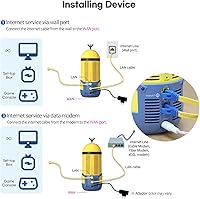
In almost all cases, yes. The router connects to your ISP modem via the Gigabit WAN port using a standard Ethernet cable, which is how virtually every consumer router operates. Just plug it in, run through the app setup, and it should recognize your internet connection automatically. The one thing to check is whether your ISP uses any special connection type like PPPoE — most home broadband connections do not require this, but it is worth confirming.

No, an Ethernet cable is not included. You will need to have one on hand to connect the router to your modem. Most households have a spare cable lying around, but if you do not, pick up a Cat 6 cable before it arrives.

The product is marketed under a Minions Series branding by Davolink, styled after the Kevin character with yellow and blue coloring. It is worth verifying official licensing details directly with the manufacturer if that matters to you, as the product listing does not explicitly confirm a formal licensing agreement with the franchise owners.

The mesh expansion uses wireless bridging rather than a proprietary mesh protocol, which means it should work with compatible nodes. However, for best results and guaranteed compatibility, using another unit from the same Davolink Minions Series lineup is the safest approach. Cross-brand wireless bridging can be hit-or-miss depending on the devices involved.

This is a fair concern. Davolink is a relatively newer brand in the router space, and their track record for sustained firmware updates over multiple years is not yet well established. The router shipped with WPA3 security, which is a solid foundation, but if you plan to keep this unit for three to five years and want guaranteed ongoing security patches, a more established brand with a documented update history may be the safer long-term bet.

Where to Buy