Overview

The DATO DP700Pro 512GB M.2 NVMe SSD arrived on the market in early 2025 from DATOTEK, a brand that won't ring bells for most buyers but is quietly building a reputation in the value storage space. If you're limping along on an aging hard drive or a SATA SSD that feels sluggish, this Gen3 NVMe drive makes a compelling case purely on its price-to-performance ratio. The 5-year limited warranty is a genuine differentiator at this tier — most budget drives offer three years at best, so that extra coverage matters when you're trusting a lesser-known name with your data.
Features & Benefits

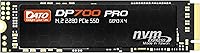
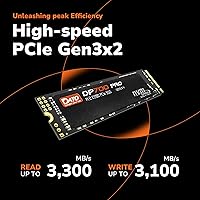
On paper, the peak sequential speeds — 3300 MB/s read and 3100 MB/s write — sound impressive, but what does that mean day-to-day? Think Windows booting in under ten seconds, large game folders copying in a fraction of the time an old HDD would take, and near-instant app launches. This Gen3 SSD uses the NVMe 1.4 protocol, which trims latency compared to older NVMe revisions. Worth noting: it ships without a heatsink. In a well-ventilated desktop or a standard laptop chassis, that is rarely a problem — but in thermally tight mini-PC builds or under sustained workloads, keep an eye on temperatures. Low power consumption is a real plus for laptop users watching battery life.

Best For

This NVMe drive hits a sweet spot for a specific kind of buyer. If your laptop is still running a mechanical hard drive or an older SATA SSD, swapping in the DATO DP700Pro will feel like a genuine transformation — not because it is a top-tier drive, but because the baseline you are replacing is so slow. It also works well as a secondary M.2 slot drive for games or scratch storage in a desktop. Anyone on a motherboard without Gen4 support does not need to chase the latest spec; this Gen3 NVMe covers everyday productivity, light content work, and general computing without issues.

User Feedback

With a 4.4-star average across over 300 ratings, the DATO DP700Pro earns its score mostly through straightforward installation and a real-world speed improvement that buyers coming from HDDs or SATA drives notice immediately. The recurring praise is consistent: fast, easy to fit, noticeable difference from day one. On the critical side, a handful of reviewers flag the importance of verifying M.2 slot compatibility before buying — not a flaw in the drive, but worth heeding. A few users also question long-term reliability, which is a fair concern for any newer brand. So far, no widespread complaints have surfaced, and that track record, however short, is encouraging.

Pros

  • Delivers noticeably faster boot and load times compared to SATA SSDs and mechanical drives.
  • PCIe Gen3x4 speeds hold up well for everyday tasks without requiring a Gen4-capable system.
  • The 5-year limited warranty is a rare and reassuring offer at this price tier.
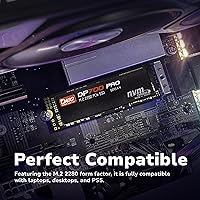
  • M.2 2280 form factor fits a wide range of laptops, desktops, and mini-PCs.
  • Low power consumption makes this Gen3 SSD a smart pick for battery-sensitive laptop use.
  • NVMe 1.4 protocol brings lower latency than older NVMe revisions without a price premium.
  • Backward compatible with PCIe 3.0 slots, so older systems are not left out.
  • Installation is straightforward — the drive is lightweight and slots in without complications.
  • Over 300 ratings averaging 4.4 stars is a credible early signal for a brand this new.
  • Works well as a secondary game or scratch drive without eating into a tight upgrade budget.

Cons

  • DATO is a newer brand with a limited long-term reliability track record, which requires a degree of trust.
  • No heatsink is included, which can be a concern in thermally constrained or fanless builds.
  • 512GB fills up faster than expected once an OS, apps, and a few games are installed.
  • Real-world sustained write speeds may fall short of the advertised peak figures under heavy load.
  • Brand recognition is low, which could complicate warranty claims or customer support interactions.
  • Not a sensible choice if your motherboard already supports PCIe Gen4 and you want full performance.
  • Limited independent benchmark data is publicly available for this specific drive model.
  • Buyers with older or non-standard M.2 slots should verify compatibility before purchasing.

Ratings

The DATO DP700Pro 512GB M.2 NVMe SSD has been scored below by our AI system after processing verified buyer reviews from multiple global markets, with spam, bot-submitted, and incentivized feedback actively filtered out. Scores reflect the real distribution of user sentiment — strengths are credited where earned, and recurring frustrations are weighted honestly. The result is a transparent, balanced picture of where this Gen3 SSD delivers and where it falls short.
Read/Write Performance
83%
Buyers upgrading from SATA drives consistently report a dramatic improvement in boot times and file transfer speeds. For everyday tasks like launching applications, loading games, or copying large folders, the Gen3x4 bandwidth makes a tangible difference that users notice within the first few hours.
Sustained write speeds under prolonged heavy loads tend to drop noticeably once the drive's cache fills, which is a common limitation at this price tier. Users running large sequential writes — think video exports or bulk file migrations — may see performance dip below advertised peaks.
Value for Money
91%
For its price bracket, this Gen3 SSD offers a compelling performance-per-dollar ratio that is hard to argue with. Buyers who just needed a fast, reliable upgrade without overspending repeatedly called it a smart purchase, particularly for laptop refreshes or secondary slot installs.
The value equation weakens slightly if you compare it against occasional sale prices from more established brands. When flagship Gen3 drives from Samsung or WD dip in price, the gap narrows enough that some buyers felt they could have spent marginally more for a name with a longer track record.
Installation Ease
94%
The standard M.2 2280 form factor means it drops straight into virtually any compatible slot without adapters or fiddling. First-time builders and laptop upgraders both highlighted how physically easy the install was — it is a single screw and a firm seat into the connector.
A small number of buyers ran into compatibility surprises because their M.2 slot turned out to be SATA-only rather than NVMe-capable. This is a system-side limitation, not a drive flaw, but the product listing could do more to flag the distinction upfront and save buyers a frustrating return.
Thermal Management
61%
39%
In typical laptop and mid-tower desktop use with reasonable airflow, most buyers report no heat-related issues during day-to-day workloads. General productivity tasks, web browsing, and gaming sessions do not push this drive into problematic temperature territory under normal conditions.
The absence of a heatsink is a genuine concern for compact or thermally restrictive builds. Users in fanless mini-PCs or very slim ultrabooks reported occasional thermal throttling during sustained transfers, and a couple noted that temperatures climbed higher than expected even during moderate workloads in confined spaces.
Brand Trust & Reliability
67%
33%
The 5-year limited warranty signals that DATOTEK is willing to stand behind the product, and early user feedback — mostly from the first few months of ownership — has been largely positive with few reports of failure or degradation. For buyers entering the relationship with realistic expectations, confidence has been reasonably well-placed.
DATO simply does not yet have the multi-year reliability data that established brands carry. Buyers who prioritize peace of mind for critical or irreplaceable data storage expressed hesitation, and a handful noted that customer support responsiveness for warranty inquiries was harder to assess given the brand's limited public-facing history.
Random Read/Write (4K)
74%
26%
For typical desktop workloads — opening files, switching between apps, loading operating system components — the random I/O performance feels responsive and capable. Users coming from HDDs in particular found even light file operations felt almost instant by comparison.
Power users who ran benchmark tools noticed the random 4K figures land closer to mid-pack for Gen3 drives rather than near the top. This does not affect casual use meaningfully, but for database workloads or virtual machines that hammer random I/O continuously, the limits become more apparent.
Capacity Adequacy
69%
31%
For a dedicated boot drive running Windows plus a suite of productivity software, 512GB is genuinely workable and keeps the system feeling nimble. Many buyers specifically chose this size knowing they had a secondary drive for media, and found it more than sufficient for that configuration.
As a sole storage drive in 2025, 512GB fills up faster than most buyers anticipate once a few modern games enter the picture — several titles alone can consume 100GB or more. Users who did not plan ahead found themselves managing storage more actively than expected within a few months of use.
Compatibility Range
78%
22%
The backward compatibility with PCIe 3.0 slots genuinely broadens the pool of supported devices, covering a wide range of laptops and desktops from roughly 2017 onward. Most buyers found it worked with their system without any configuration changes required.
Users with very old hardware occasionally hit BIOS-level NVMe boot support issues, requiring a firmware update before the drive was recognized as a boot device. A smaller subset found their M.2 slot was SATA-only, which is a compatibility mismatch that led to returns.
Power Efficiency
86%
Laptop users were the most vocal about appreciating the low power draw, with several noting that battery life did not take a hit after swapping out their old drive for this NVMe drive. For a portable machine where storage activity happens throughout the day, that is a practical and measurable benefit.
Power consumption figures are not officially published in detail, so buyers looking for precise TDP numbers for power-budget calculations had to rely on third-party testing. This is a minor transparency gap but worth noting for system integrators or ultra-low-power build enthusiasts.
Boot Time Improvement
88%
This was one of the most frequently praised real-world benefits across user reviews. Buyers who replaced mechanical hard drives reported cutting boot times from over a minute down to under fifteen seconds, and even SATA SSD users noticed a meaningful reduction in time to desktop.
The improvement is largely dependent on the baseline being replaced — buyers already running a mid-range NVMe drive saw minimal gains and a couple felt the upgrade was not as dramatic as expected. Managing expectations around incremental NVMe-to-NVMe upgrades is important.
Build & Physical Quality
79%
21%
The PCB feels solid and the component layout looks clean to buyers who inspected it closely before installation. At roughly 10 grams, it is predictably light, and the standard M.2 connector seated firmly in every slot users tested without wobble or resistance.
There is no external casing or protective layer beyond the bare PCB, which is standard for M.2 drives but still leaves the components exposed during handling. A few buyers mentioned wanting more visible quality indicators — like a labeled sticker with model confirmation — for reassurance before install.
Warranty Experience
71%
29%
The 5-year coverage period genuinely stands out in the budget NVMe segment and was cited by multiple buyers as a deciding factor. Having that length of coverage on a newer brand helped reduce the perceived risk of the purchase for cautious shoppers.
Because DATOTEK is a relatively new market presence, actual warranty claim experiences are limited in available public feedback. Buyers could not point to a well-established support infrastructure or find many documented cases of smooth warranty resolutions, leaving the real-world claim process somewhat unproven.
Game Load Times
81%
19%
Gamers who installed titles directly onto this Gen3 SSD reported solid load time reductions compared to their previous SATA or HDD setups. Open-world games with large asset streaming in particular showed a noticeable improvement in how quickly environments loaded and transitioned.
Buyers coming from a premium Gen4 NVMe drive for gaming purposes found the load time differences negligible in most titles, as the bottleneck increasingly lies elsewhere. For that audience, the upgrade does not justify itself on gaming performance alone.
Software & Tooling Support
53%
47%
The drive works plug-and-play with standard OS tools for disk management, partitioning, and basic health monitoring through Windows Device Manager and third-party utilities like CrystalDiskInfo. No proprietary software is required for basic operation.
DATOTEK does not offer a dedicated SSD management utility, which means buyers miss out on features like firmware update tools, drive health dashboards, or secure erase functions that brands like Samsung provide through their own software. For buyers who like to monitor and manage their storage actively, this is a real gap.

Suitable for:

The DATO DP700Pro 512GB M.2 NVMe SSD is a strong fit for budget-conscious buyers who want a meaningful speed upgrade without paying a premium price. If your laptop or desktop is still running a mechanical hard drive or an older SATA SSD, this Gen3 NVMe drive will make a day-to-day difference you can actually feel — faster boot times, quicker file access, and snappier app launches. It also suits anyone with a PCIe 3.0 motherboard who has no practical reason to pay extra for a Gen4 drive their system cannot fully utilize anyway. Secondary slot users looking to add fast scratch storage or offload a game library will find this Gen3 SSD does the job without fuss. The 5-year warranty adds a layer of reassurance that is genuinely uncommon at this price point, making it a reasonable gamble on a newer brand.

Not suitable for:

The DATO DP700Pro 512GB M.2 NVMe SSD is not the right call for power users who push their storage hard on a regular basis. Video editors working with large RAW files, 3D artists rendering directly from disk, or anyone running sustained heavy workloads will likely want a drive with a built-in heatsink and a longer track record of thermal stability. The 512GB capacity, while fine for a focused install or secondary drive, will feel tight if you are managing a large game library, a creative project archive, or a primary drive for a media-heavy workflow. DATO is also a newer name without the deep reliability history of established brands like Samsung or Western Digital, which may be a dealbreaker for buyers storing irreplaceable data. If your motherboard supports PCIe Gen4, spending a bit more to actually use that bandwidth is probably the smarter long-term move.

Specifications

  • Capacity: This drive offers 512GB of usable storage, suitable for an operating system, core applications, and a moderate game or file library.
  • Interface: It connects via PCIe Gen3x4, delivering up to four lanes of third-generation PCI Express bandwidth for fast data throughput.
  • Protocol: NVMe 1.4 is used as the communication protocol, providing lower command latency compared to the older NVMe 1.3 standard.
  • Form Factor: The drive follows the M.2 2280 standard, measuring 80mm in length — the most widely supported M.2 size across laptops and desktops.
  • Sequential Read: Peak sequential read speed is rated at up to 3,300 MB/s under optimal conditions.
  • Sequential Write: Peak sequential write speed is rated at up to 3,100 MB/s, which is competitive for a PCIe Gen3 drive.
  • Heatsink: No heatsink is included or attached, so thermal management depends entirely on the host system's airflow or chassis design.
  • Compatibility: The drive is backward compatible with PCIe 3.0 M.2 slots and works with desktops, laptops, notebooks, and compatible tablets.
  • Installation: It is designed for internal installation, requiring a Phillips-head screwdriver and a free M.2 2280 slot in the target device.
  • Dimensions: Physical dimensions are 3.15 x 0.87 x 0.09 inches (approximately 80 x 22 x 2.3mm), conforming to the standard 2280 footprint.
  • Weight: The drive weighs approximately 0.353 oz (around 10g), making it one of the lightest internal storage components available.
  • Power Draw: Power consumption is low by design, helping preserve battery life in laptops during regular read and write operations.
  • Warranty: DATOTEK provides a 5-year limited warranty on the DP700Pro series, which is notably generous for a value-tier drive.
  • Manufacturer: The drive is manufactured by DATOTEK, a storage-focused brand that entered the consumer SSD market with this series in early 2025.
  • Release Date: This model was first made available in February 2025, making it a recent addition to the budget NVMe SSD segment.

Related Reviews

DATO DP800 Pro 512GB M.2 NVMe SSD
90%
94%
Performance
95%
Speed/Read-Write Performance
87%
Installation Ease
90%
Power Efficiency
88%
Durability (Shock Resistance)
More
ORICO M.2 NVMe SSD 512GB with Heatsink
86%
89%
Performance
92%
Cooling Efficiency
85%
Installation Ease
90%
Read/Write Speeds
88%
Capacity for Gaming & Everyday Use
More
KingSpec NE 512GB M.2 NVMe SSD
74%
91%
Value for Money
83%
Read/Write Speed
94%
Installation Ease
88%
Compatibility
41%
NAND Transparency
More
DATO DP330 512GB M.2 2230 NVMe SSD
79%
78%
Read/Write Speed
94%
Form Factor Fit
88%
Installation Ease
83%
Value for Money
53%
Thermal Management
More
Vansuny X15 512GB NVMe M.2 SSD
75%
88%
Value for Money
74%
Read/Write Performance
91%
Installation Ease
69%
Build Quality
62%
Long-Term Reliability
More
KingSpec NE-512 2242 512GB M.2 NVMe SSD
77%
88%
Value for Money
79%
Read Performance
71%
Write Performance
93%
Installation Ease
91%
Form Factor Compatibility
More
Ediloca EN600 PRO 512GB NVMe M.2 SSD
85%
91%
Performance
88%
Speed for Gaming
83%
Thermal Management
65%
Compatibility with Older Systems
90%
Build Quality
More
Samsung PM9C1A 512GB M.2 2230 NVMe SSD
87%
94%
Performance
92%
Speed
89%
Value for Money
88%
Ease of Installation
90%
Compatibility
More
Kioxia BG4 512GB M.2 2230 NVMe SSD
87%
91%
Performance Speed
87%
Compatibility with Devices
88%
Build Quality & Durability
85%
Ease of Installation
93%
Size & Form Factor
More
SABRENT Rocket NVMe 2242 512GB SSD
81%
96%
Form Factor Compatibility
83%
Sequential Read Performance
61%
Sustained Write Performance
91%
Power Efficiency
88%
Value for Money
More

FAQ

Yes, it will. The DATO DP700Pro 512GB M.2 NVMe SSD is specifically designed to be backward compatible with PCIe 3.0 M.2 slots. You will not get PCIe Gen4 speeds, but that is fine — the drive is a Gen3 product and performs exactly as intended in those slots.
In most cases, no. Windows 10 and Windows 11 both include native NVMe drivers that recognize this type of drive automatically. On Linux, support is also built into modern kernels. You may want to check for firmware or chipset driver updates on older systems, but out-of-the-box it should work without manual driver installation.

It depends on how you use your machine. For general productivity, browsing, and a handful of applications, 512GB is workable. If you install several large games or work with video files regularly, you will feel the squeeze. Many buyers use this Gen3 SSD as a boot and apps drive while keeping a larger secondary drive for media storage.

Under light to moderate use — booting, browsing, office work — heat is not typically a concern. During prolonged heavy transfers or sustained writes, any drive without a heatsink can warm up. In a laptop or a case with decent airflow, this is rarely a real-world problem. If you are building a fanless or very compact mini-PC, it is worth checking your chassis thermal specs.

The difference is real and noticeable. A typical SATA SSD tops out around 550 MB/s sequential read, while this NVMe drive can hit several times that figure. In practice, that means faster boot times, quicker large file copies, and snappier application launches — especially in tasks that hit storage repeatedly.

Yes, it is fully suitable as a Windows 11 boot drive. Just make sure your system's BIOS or UEFI has NVMe boot support enabled, which is standard on most machines from the last several years. During installation, Windows will detect the drive automatically.

It is a fair concern and worth being honest about. DATO and its parent DATOTEK are newer entrants without the decades-long track record of brands like Samsung or WD. That said, the 4.4-star average from hundreds of buyers and the 5-year warranty suggest the company is standing behind the product. If you are storing irreplaceable data, a backup strategy is always smart regardless of the brand.

A standard Phillips-head screwdriver — typically a PH1 or PH0 size — is all you need. The M.2 slot uses a small retention screw to hold the drive at an angle before seating it flat. Most laptop toolkits include the right size.

Yes, as long as the slot is keyed for M.2 NVMe (M-key or M+B key) and supports PCIe, this Gen3 SSD will work. However, if your M.2 slot only supports SATA mode — some older boards have this limitation — the drive will not be recognized. Check your motherboard or laptop manual to confirm NVMe support before buying.

Yes, you can use disk cloning software to migrate your existing Windows setup. Free tools like Macrium Reflect or Clonezilla can copy your current drive to this one. Just make sure you clone before installing the new drive as your sole storage, and verify the destination drive has enough space for your current data.