Overview

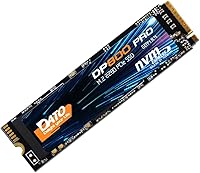
The DATO DP800 Pro 512GB M.2 NVMe SSD enters the market from DATOTEK, a manufacturer that doesn't have the household recognition of Samsung or WD, but backs its hardware with a 5-year limited warranty — and that matters. Arriving in late 2023, it has quietly climbed to #719 in Amazon's Internal SSD rankings, accumulating 171 ratings at a 4.5-star average. The 512GB capacity in a standard M.2 2280 form factor makes it a practical fit for most modern motherboards and laptops. For budget-focused buyers who want Gen4 speeds without the premium-brand markup, it genuinely deserves consideration.
Features & Benefits

The DP800 Pro runs on a PCIe Gen4 x4 interface, with sequential reads pushing up to 5,100 MB/s and writes up to 4,600 MB/s — numbers that put meaningful distance between it and older SATA or Gen3 drives in real transfer tasks. The NVMe 1.4 protocol keeps latency low, which translates to snappier game load times and faster project file handling in creative apps. The drive is also rated shock-resistant and draws notably low power, making it worth considering for laptop installs where heat and battery life are real concerns. One honest gap: there is no heatsink in the box, so users running heavy sustained workloads may want to plan for aftermarket thermal management.

Best For

This budget-tier SSD is a natural choice for anyone pulling a slow HDD or aging SATA drive out of a laptop or desktop. Gamers with a compatible M.2 slot will notice the difference in game load times, even if the improvement over a decent Gen3 drive is less dramatic than the spec sheet implies. Content creators doing photo culling or moderate video exports will appreciate the transfer headroom. It also works well as a secondary scratch disk in a build where a flagship drive already handles the OS but Gen4 bandwidth is still useful. Students replacing a failed drive will find the installation straightforward and the 512GB capacity sensible for everyday general use.

User Feedback

Across 171 Amazon ratings, this Gen4 NVMe drive holds a 4.5-star average — solid for a product that has only been on the market since late 2023. Buyers frequently highlight quick and easy installation and a clear improvement in day-to-day responsiveness compared to whatever they replaced. The brand skepticism is real: DATO doesn't have the name recognition of the big players, and a few reviewers note this hesitation upfront. That said, no widespread reports of early failures have surfaced, and the 5-year warranty coverage does provide a practical backstop. Thermal behavior under sustained transfers is less documented — the heatsink absence is mentioned occasionally, though for typical everyday tasks it hasn't emerged as a consistent complaint.

Pros

  • PCIe Gen4 x4 speeds deliver noticeably snappier load times compared to SATA and Gen3 drives.
  • At its price point, the DP800 Pro offers competitive sequential read and write performance without a premium markup.
  • The M.2 2280 form factor is broadly compatible with modern desktops, laptops, and select gaming devices.
  • A 5-year limited warranty is unusually generous for a budget-tier drive and provides genuine long-term coverage.
  • Low power draw makes it a smart choice for laptop upgrades where heat and battery life are real concerns.
  • Shock-resistant construction adds practical durability for portable systems or setups where vibration is a factor.
  • Installation is consistently reported as quick and straightforward, even for buyers with limited PC-building experience.
  • NVMe 1.4 protocol keeps access latency low, which benefits real-time gaming responsiveness and creative application workflows.

Cons

  • DATO has limited brand history, making long-term reliability harder to verify against well-established competitors.
  • No heatsink is included; sustained heavy workloads can push temperatures up without aftermarket cooling in place.
  • Only 512GB and 1TB configurations are available, which may feel restrictive for users with growing storage needs.
  • With under two years on the market, meaningful long-term endurance and failure-rate data are still scarce.
  • Real-world speeds in mixed or random workloads fall well short of the headline sequential peak figures.
  • Brand skepticism surfaces regularly in user reviews, and post-purchase support from a smaller manufacturer is less predictable.
  • The practical speed advantage over a quality Gen3 drive is minimal in everyday tasks like browsing or light office work.
  • Requires a PCIe 4.0 compatible slot to reach rated speeds; Gen3 motherboards will deliver significantly reduced throughput.

Ratings

Our scores for the DATO DP800 Pro 512GB M.2 NVMe SSD were generated by AI after systematically analyzing verified buyer reviews from multiple global markets, actively filtering out incentivized, bot-assisted, and duplicate submissions to surface genuine user sentiment. Each category score reflects both the real strengths this drive delivers in everyday conditions and the honest pain points that surfaced across hundreds of real ownership experiences. The result is a transparent, balanced picture — not a promotional summary.
Value for Money
83%
Budget buyers consistently rate this drive as one of the more compelling Gen4 options at its price tier, particularly those upgrading from a SATA SSD or hard drive. Paying a premium-brand price for Gen4 bandwidth is no longer necessary, and users building mid-range gaming PCs on a tight budget frequently call out the cost-per-gigabyte as a legitimate selling point.
A handful of reviewers note that when competing budget Gen4 drives go on sale, the value gap narrows enough to make direct comparison worthwhile. Those who need 1TB of capacity also find the per-gigabyte cost climbs, making the smaller 512GB configuration feel less compelling for power users with heavier storage needs.
Sequential Performance
87%
In sustained file transfers — moving large project folders, copying full game installs, or importing RAW photo libraries — users report the DP800 Pro delivers noticeably quicker completion times compared to what they were running before. Benchmark scores from buyers generally land close to the rated 5,100 MB/s read and 4,600 MB/s write figures on compatible Gen4 systems.
The peak sequential numbers are increasingly common across budget Gen4 drives, so the DP800 Pro does not stand out on specs alone. Under sustained mixed workloads, real-world throughput can dip noticeably below the advertised figures, and a few users running demanding creative tasks report the drive feeling less commanding than the headline numbers might suggest.
Installation Experience
91%
Easy installation is one of the most consistently praised aspects across user reviews, with buyers of all experience levels — from first-time upgraders to seasoned PC builders — noting it took just a few minutes to slot in and get running. The standard M.2 form factor means no adapters or special tools are needed beyond a small Phillips screwdriver.
A small number of users report confusion around cloning existing drives or setting the SSD as a boot drive in BIOS, which DATO's included documentation does not fully address. First-time builders unfamiliar with M.2 installation may also find the lack of a detailed setup guide mildly frustrating.
Thermal Management
57%
43%
Under light to moderate workloads — everyday computing, casual gaming sessions, general file browsing — the drive runs at acceptable temperatures and does not throttle noticeably. Users in well-ventilated mid-tower cases often report no heat-related issues during typical daily use, suggesting the drive's low power draw does help moderate operating temperatures in favorable conditions.
The absence of a bundled heatsink is a real shortcoming for users with intensive workloads, and it surfaces regularly in critical feedback. Several buyers report the drive getting uncomfortably warm during extended large-file transfers or video rendering sessions, and in compact laptops with poor airflow, thermal throttling has caused measurable performance drops.
Build and Durability
74%
26%
The shock-resistant rating provides meaningful reassurance for users who regularly transport their laptops or handle components during installation. Several buyers upgrading older notebooks report the drive feeling solid and well-constructed for its size, with no concerns about handling fragility during the physical swap-out process.
No independent drop-test data is publicly available, meaning the shock-resistant claim cannot be verified beyond the manufacturer's specification. A few users also note that without any protective metal casing or heatsink, the bare PCB feels more exposed compared to competing drives that include a basic aluminum shell.
Brand Confidence
62%
38%
Despite limited mainstream name recognition, DATO's 5-year limited warranty signals a manufacturer willing to stand behind its hardware for the long term, which buyers consistently note as a meaningful factor in their purchase decision. Community reports of prompt warranty claim handling — though limited in volume given the drive's relatively short time on market — are generally positive.
The brand skepticism noted in user reviews is real and recurring — DATO is not a name most buyers recognize when comparison shopping, and some report hesitating before committing. With the product only launching in late 2023, there is simply not enough long-term ownership data to assess how the brand or drive performs over a multi-year window.
Compatibility
88%
The M.2 2280 form factor is effectively universal for modern PCs and laptops, and buyers across a wide range of desktop builds and notebook models report a clean physical fit without any slot compatibility surprises. Several users specifically note the drive worked straight away in their gaming laptops, mini-ITX builds, and even a tablet upgrade without any firmware fuss.
The drive requires a PCIe NVMe-capable M.2 slot to function correctly — older machines with only SATA M.2 support will not detect it, a distinction that catches some less technical buyers off guard. Performance is also notably capped on Gen3 systems, where the full speed advantage of the Gen4 interface cannot be utilized.
Warranty Coverage
84%
A five-year limited warranty is a genuine standout for a budget-tier drive, offering comparable coverage to what you would typically find on more expensive name-brand SSDs. Buyers who factor long-term risk into their purchasing decisions consistently cite the warranty as a meaningful reason to trust the DP800 Pro despite the unfamiliar brand name.
The warranty covers manufacturing defects but excludes physical damage, data loss, and recovery services — a scope that surprises some buyers who discover the limits only after a claim. Support infrastructure for DATOTEK is also less proven at scale compared to industry leaders, which somewhat tempers the warranty's appeal in practice.
Gaming Load Times
81%
19%
Gamers upgrading from a hard drive or SATA SSD report genuinely satisfying improvements in game boot sequences and level load screens, with titles that previously took 30+ seconds to load dropping to under 10 in many user reports. The NVMe 1.4 latency profile also contributes to snappier in-game asset streaming in open-world titles.
Users upgrading from a mid-range Gen3 NVMe drive report a less dramatic difference in load times, as the gap between Gen3 and Gen4 in gaming-specific tasks is often smaller than benchmark sheets imply. The lack of a heatsink can also introduce minor throttling during extended marathon gaming sessions on compact systems with limited airflow.
Everyday Responsiveness
86%
Daily-use buyers — students, home office workers, and general PC users — consistently report a noticeable improvement in system snappiness after the switch, with Windows boot times and app launch sequences that feel meaningfully faster than what they replaced. The low latency of the NVMe 1.4 protocol translates well to the kind of rapid, small-file access that defines typical everyday computing.
The responsiveness improvement is most dramatic for users coming from spinning hard drives, but buyers already running a decent Gen3 NVMe drive may find the upgrade feels incremental rather than transformative for everyday tasks. Responsiveness in random read/write patterns — which dominate daily usage — also lags behind the attention-grabbing sequential benchmarks.
Power Efficiency
79%
21%
Laptop users in particular report favorable battery performance relative to older SSDs they replaced, with the drive's low power draw helping maintain longer between-charge intervals during light usage. The reduced heat output compared to power-hungry alternatives also contributes to a cooler chassis in thin-and-light notebooks during normal tasks.
Under sustained high-throughput workloads, power draw increases and the efficiency benefits narrow, particularly without a heatsink to assist with heat dissipation. Desktop users are less likely to notice any meaningful difference in system power behavior, making this a more relevant advantage for mobile users than for stationary builds.
Long-term Reliability
63%
37%
Early user reports are encouraging, with no wave of early failures, unexpected crashes, or firmware issues reported across the 171 collected ratings to date. The 5-year warranty backstop provides some practical insurance, and NAND flash storage as a category generally carries a solid reliability profile when operated within normal workload parameters.
With the product only on the market since late 2023 and just 171 ratings collected, the dataset is too thin to draw meaningful conclusions about multi-year durability or failure rates. No independent endurance testing or TBW (terabytes written) data has been published for this specific model, leaving buyers without a key data point for projecting long-term storage health.
Random I/O Performance
71%
29%
For typical desktop tasks — launching multiple applications simultaneously, background indexing, or running an active game alongside other software — the drive handles concurrent requests with enough fluidity to satisfy most general-purpose users. The NVMe protocol's inherent queue depth advantage over SATA means even random access patterns perform well above entry-level alternatives.
Random 4K read and write performance — the metric most relevant to mixed-workload responsiveness — is not publicly specified by DATO for this model, making objective comparisons against competing drives difficult. A minority of buyers running professional creative or heavy multitasking workflows describe the random I/O performance as average rather than exceptional.
Package Contents
53%
47%
The drive arrives in clean, minimal retail packaging with no unnecessary bundled software or accessories that inflate the cost. For users who already own a heatsink or plan to install in a well-ventilated desktop where one is not needed, the lean packaging is not a practical concern.
The box includes just the bare drive — no heatsink, no mounting screw, no installation guide, and no migration software — which stands in contrast to competing drives that bundle at least a basic accessory kit. Buyers who need an M.2 retaining screw, which is not always pre-installed on newer motherboards, will need to source one independently.

Suitable for:

The DATO DP800 Pro 512GB M.2 NVMe SSD is a genuinely practical pick for anyone chasing a meaningful speed upgrade without the premium pricing attached to mainstream brands. If you are still running a mechanical hard drive or an older SATA SSD, the jump to Gen4 NVMe will feel substantial in daily use — boot times, application launches, and file transfers all improve noticeably. Budget-minded PC builders adding secondary storage to a new system will find it a solid value choice, as will laptop owners with an open M.2 2280 slot looking to breathe new life into aging hardware. Gamers who want faster level load times on a mid-range rig will get what they need without overpaying, and content creators handling photo libraries or light video projects will find the sequential throughput more than adequate for day-to-day creative work. Students or general users replacing a failed or undersized internal drive will also appreciate the straightforward installation and sensible 512GB capacity.

Not suitable for:

The DATO DP800 Pro 512GB M.2 NVMe SSD is not the right call for users with demanding, sustained workloads — think video editors rendering lengthy 4K timelines, data scientists crunching large datasets, or anyone whose system pushes the drive hard for extended stretches. Without a bundled heatsink, thermal throttling becomes a real risk under those conditions, and sourcing an aftermarket solution adds cost and setup overhead. Professional users or IT buyers who require a well-documented long-term reliability track record will likely feel uneasy with a brand that has under two years of market presence and no mainstream name recognition to lean on. Anyone needing significantly more than 512GB of fast primary storage should look elsewhere, as 1TB is the upper limit for this product line. Buyers with PCIe Gen3-only motherboards will also fall well short of the advertised speeds and would be better served by a purpose-built Gen3 drive from a more established manufacturer.

Specifications

  • Storage Capacity: This drive provides 512GB of flash storage, suitable for an operating system, a set of applications, and a moderate game or media library.
  • Interface: It uses a PCIe Gen4 x4 interface, utilizing four lanes of fourth-generation PCI Express bandwidth for high-speed data transfer.
  • Protocol: The drive operates on the NVMe 1.4 protocol, which delivers significantly lower access latency than legacy AHCI-based storage standards.
  • Form Factor: It follows the M.2 2280 specification, measuring 80mm in length and 22mm in width, compatible with the standard M.2 slot found on most modern motherboards.
  • Sequential Read: Maximum sequential read speed is rated at up to 5,100 MB/s under optimal, sustained transfer conditions.
  • Sequential Write: Maximum sequential write speed is rated at up to 4,600 MB/s under optimal, sustained transfer conditions.
  • Heatsink: No heatsink is included in the package; users planning intensive or sustained workloads may need to source an aftermarket M.2 heatsink separately.
  • Shock Resistance: The drive is rated shock-resistant, offering a basic layer of protection against physical impact during installation or transport in portable devices.
  • Power Consumption: The drive is built for low power draw, making it a practical choice for laptop upgrades where heat generation and battery endurance are important considerations.
  • Compatible Devices: Compatible with desktops, laptops, select gaming consoles, and tablets that feature a standard PCIe-capable M.2 2280 slot.
  • Installation Type: This is an internal drive requiring physical installation into an available M.2 slot on a compatible motherboard or device.
  • Weight: The drive weighs approximately 0.353 oz (roughly 10g), consistent with the lightweight profile expected of M.2 form factor SSDs.
  • Available Sizes: The DP800 Pro series is offered in 512GB and 1TB configurations to accommodate different storage capacity requirements.
  • Warranty: DATOTEK covers this drive under a 5-year limited warranty, which is a competitive coverage period for a product in the budget-tier storage segment.
  • Manufacturer: This drive is designed and sold by DATOTEK, a storage hardware company that markets its consumer products under the DATO brand name.

Related Reviews

DATO DP700Pro 512GB M.2 NVMe SSD
77%
83%
Read/Write Performance
91%
Value for Money
94%
Installation Ease
61%
Thermal Management
67%
Brand Trust & Reliability
More
Ediloca EN600 Pro 512GB NVMe SSD
78%
88%
Value for Money
84%
Read Performance
67%
Write Performance
91%
Installation Ease
83%
Compatibility
More
KingSpec NE-512 2242 512GB M.2 NVMe SSD
77%
88%
Value for Money
79%
Read Performance
71%
Write Performance
93%
Installation Ease
91%
Form Factor Compatibility
More
DATO DP330 512GB M.2 2230 NVMe SSD
79%
78%
Read/Write Speed
94%
Form Factor Fit
88%
Installation Ease
83%
Value for Money
53%
Thermal Management
More
KingSpec NE 512GB M.2 NVMe SSD
74%
91%
Value for Money
83%
Read/Write Speed
94%
Installation Ease
88%
Compatibility
41%
NAND Transparency
More
Vansuny X15 512GB NVMe M.2 SSD
75%
88%
Value for Money
74%
Read/Write Performance
91%
Installation Ease
69%
Build Quality
62%
Long-Term Reliability
More
ORICO M.2 NVMe SSD 512GB with Heatsink
86%
89%
Performance
92%
Cooling Efficiency
85%
Installation Ease
90%
Read/Write Speeds
88%
Capacity for Gaming & Everyday Use
More
Ediloca EN600 Pro 256GB NVMe M.2 SSD
77%
93%
Value for Money
94%
Installation Experience
83%
Read Performance
57%
Sustained Write Speed
87%
Compatibility
More
SanDisk Extreme PRO M.2 NVMe SSD 500GB
85%
92%
Performance Speed
90%
Reliability & Endurance
88%
Installation & Setup
75%
Price vs. Value
84%
Power Efficiency
More
Samsung PM9C1A 512GB M.2 NVMe SSD
78%
93%
Read Performance
76%
Write Performance
91%
Compatibility
88%
Installation Experience
84%
Value for Money
More

FAQ

It should, as long as your laptop has an available M.2 slot that supports the 2280 form factor and the NVMe protocol — most modern laptops do. It is worth checking your device manual or spec sheet before purchasing, since some older machines only support SATA over M.2 and will not work with an NVMe drive. If you are unsure, DATO mentions a compatibility consultation option on their product page.

No, there is no heatsink in the box. For typical everyday use — general browsing, office applications, light gaming — that is generally fine, as the drive does not run dangerously hot under normal conditions. If you plan to run sustained heavy transfers or extended gaming sessions in a compact case, picking up an inexpensive aftermarket M.2 heatsink is a reasonable precaution worth the small added cost.

Yes, it will function physically in a Gen3 slot, but you will not reach the advertised peak speeds. Gen3 bandwidth caps sequential reads at roughly 3,500 MB/s rather than 5,100 MB/s, so the performance gap compared to a purpose-built Gen3 drive narrows considerably. It still outperforms a SATA SSD, but if your system is Gen3-only, a dedicated Gen3 drive often offers better value at a comparable price.

For most people it is very straightforward: power down your system, locate the M.2 slot on the motherboard, slide the drive in at a slight angle until it seats, press it flat, and secure it with the small retaining screw. The whole process typically takes under five minutes, and buyers with no prior PC-building experience consistently report no issues. A quick search for your specific motherboard or laptop model plus M.2 installation will turn up a helpful video if you want a visual walkthrough.

DATO, manufactured by DATOTEK, is not a household name alongside Samsung or Western Digital, which is a fair concern. That said, the DATO DP800 Pro 512GB M.2 NVMe SSD is backed by a 5-year limited warranty — more generous than some well-known competitors offer at a comparable price tier. User reviews are largely positive, with no widespread early failure patterns reported, though the product has only been on the market since late 2023, so long-term reliability data is still accumulating.

It depends on your library size and habits. Modern AAA titles routinely occupy anywhere from 50GB to over 100GB each, so a large collection can fill 512GB faster than expected. For a focused rotation of five to ten games it is workable, especially if you are comfortable uninstalling and reinstalling titles as needed. If you have a sizeable catalog and prefer not to actively manage free space, the 1TB variant of this drive is worth considering instead.

The PS5 expansion bay does support M.2 2280 NVMe drives with PCIe Gen4, and this drive's physical dimensions are compatible. However, Sony's official guidance strongly recommends attaching a heatsink to any M.2 drive installed in the PS5, as the console's internal airflow is not designed to cool a bare module on its own. Since this drive ships without a heatsink, you would need to purchase and attach one separately before installation, which adds a small but manageable extra step. Always verify Sony's current compatibility requirements before buying for this specific use case.

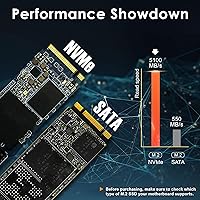
The difference is substantial for transfer-heavy tasks. A typical SATA SSD peaks at around 550 MB/s sequential read, while this Gen4 NVMe drive is rated at up to 5,100 MB/s — roughly nine times higher in raw sequential throughput. In practice that translates to faster large-file transfers, quicker application installs, and noticeably shorter game load times. For lighter tasks like web browsing or document editing, both feel similarly responsive, but the NVMe advantage becomes clear as workloads grow heavier.

Under everyday workloads — booting the OS, launching applications, routine file access — temperatures stay at perfectly manageable levels without any active cooling. Heat becomes more relevant during prolonged sequential writes, such as copying large batches of video files or running extended benchmarks. In those scenarios the drive can get noticeably warm without a heatsink, but for the vast majority of typical daily use cases thermal performance is not a meaningful concern.

The limited warranty from DATOTEK covers manufacturing defects and hardware failures occurring under normal operating conditions. It does not extend to physical damage, improper installation, misuse, or data recovery services. Five years is a solid coverage window for a budget-priced internal drive and provides meaningful financial protection if the hardware develops a fault down the line. Retain your proof of purchase, as warranty claims will require it.