Overview

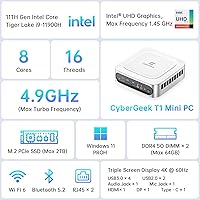
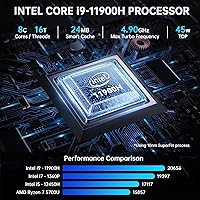
The CyberGeek T1 i9 Mini PC is a compact white desktop that ships with Ubuntu Linux pre-installed — a deliberate choice aimed at business users and power users who want real processing headroom without a full tower eating up desk space. At its core is Intel's 11th Gen Core i9-11900H, an 8-core, 16-thread chip capable of reaching 4.9GHz, well above what most mini PCs offer at this tier. The reviewed configuration pairs that CPU with 16GB DDR4 RAM and a 1TB PCIe NVMe SSD. If you're coming from Windows, plan for an adjustment period — this machine is built for people who are comfortable with Linux or actively prefer it.

Features & Benefits

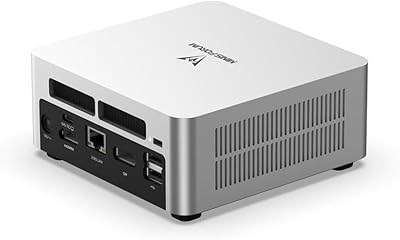
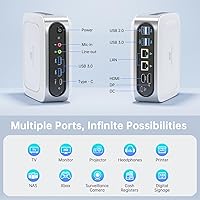
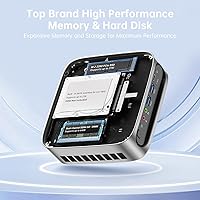
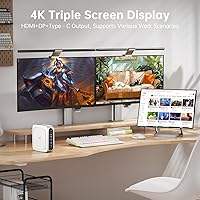
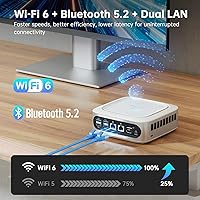
The connectivity spec on this compact Linux desktop is where things get genuinely interesting. Triple 4K display output — via DisplayPort, HDMI, and USB-C simultaneously — is unusual at this price point and useful for anyone running a demanding multi-monitor workflow. Six USB ports handle peripherals without needing a hub, and the dual Gigabit LAN deserves a real mention: if you want to segment a home network or run this box as a lightweight router between two network zones, having two physical LAN interfaces built in removes the need for extra hardware. Wi-Fi 6 and Bluetooth 5.2 are current-gen, and the SODIMM RAM slots mean you can push memory to 64GB down the line.

Best For

This mini PC makes the most sense for a few specific buyer profiles. Developers and IT professionals who live in a terminal will appreciate the Ubuntu environment that's ready without configuration headaches. Small business owners needing a tidy multi-monitor workstation — without the noise and footprint of a tower — will find the triple display output practically useful. Home lab enthusiasts can put the dual LAN to real work, bridging two network segments or experimenting with routing without a dedicated appliance. Intel UHD Graphics handles 4K video playback and light image editing, but this is not a gaming machine — it's a productivity and infrastructure box, and it fills that role well.

User Feedback

Buyers of the CyberGeek T1 frequently highlight boot speed and responsiveness as immediate positives — the NVMe SSD and i9 combination makes the system feel snappy in everyday use. Linux driver compatibility for Wi-Fi 6 and Bluetooth gets mixed mentions; most report it works out of the box, though a handful flagged that the pre-loaded Ubuntu build felt slightly behind the current release. The more consistent concern is fan noise under load: the i9-11900H generates real heat when pushed, and the compact cooling system audibly compensates. On the upside, most buyers describe RAM and SSD access as straightforward, making future upgrades a realistic option rather than a warranty-voiding gamble.

Pros

  • The i9-11900H is a genuine step up from the Celeron and Ryzen 5 chips that dominate this size category.
  • Triple 4K display output — DisplayPort, HDMI, and USB-C simultaneously — is rare at this price tier.
  • Dual Gigabit LAN opens up home lab and network routing use cases most mini PCs simply cannot handle.
  • SODIMM RAM slots mean you can upgrade to 64GB yourself without replacing the whole machine.
  • Ubuntu Linux comes pre-configured, saving developers and IT teams meaningful setup time.
  • Wi-Fi 6 and Bluetooth 5.2 are current-generation — no dongles or adapters needed.
  • The 1TB PCIe NVMe SSD delivers fast boot times and snappy application loading in everyday use.
  • At under 4 lbs and roughly 6 inches square, this mini PC fits almost anywhere, including behind a monitor.
  • Six USB ports reduce the need for an external hub in a typical multi-peripheral desk setup.

Cons

  • No Windows license included — buyers who need it must purchase one separately, adding meaningful cost.
  • Fan noise under sustained CPU load is a real issue in noise-sensitive workspaces.
  • Intel UHD Graphics cannot handle 3D gaming or GPU-accelerated creative workloads in any practical sense.
  • The pre-loaded Ubuntu version may not be the latest release, requiring an immediate update on first setup.
  • Wi-Fi and Bluetooth driver compatibility under Linux can occasionally require manual intervention depending on the kernel version.
  • CyberGeek is a relatively unknown brand with a less established support and warranty track record than major competitors.
  • Long render or compile jobs may cause thermal throttling, since the i9-11900H runs hot in a chassis this compact.
  • No discrete GPU slot or eGPU support limits future graphics expandability for creative professionals.

Ratings

Our AI rating engine analyzed verified global buyer reviews for the CyberGeek T1 i9 Mini PC, filtering out incentivized submissions and bot activity to surface what real users consistently experienced across diverse workflows. Scores reflect the full picture — where this compact Linux desktop genuinely impresses and where it falls short — so you can make an informed call before buying.

Processing Performance
88%
Users running multi-tab browser sessions, code compilation, and parallel virtual machines consistently report that the i9-11900H handles concurrent workloads without hesitation. Developers in particular note that build times feel meaningfully faster than on typical mini PCs in this size class.
A handful of buyers report that during very long sustained workloads — multi-hour renders or extended compiles — the CPU throttles slightly as thermals build up inside the compact chassis, shaving off some of that peak performance headroom.
Thermal Management
67%
33%
For everyday productivity tasks, the active cooling system keeps things composed and the chassis stays only mildly warm to the touch. Buyers using this compact Linux desktop for office work, browsing, and light coding rarely report any thermal concern.
Under sustained high-CPU loads, the fan audibly ramps up and some users report thermal throttling during extended stress scenarios. The i9-11900H is a thermally demanding chip for a box this small, and that trade-off shows up in real-world heavy use.
Multi-Monitor Support
91%
Triple 4K output via DisplayPort, HDMI, and USB-C is a standout feature that buyers consistently praise — many specifically purchased this mini PC to drive a three-screen productivity setup and confirm all three outputs work simultaneously without any workarounds.
A small number of users report that the USB-C display output requires a high-quality active cable or adapter to function reliably at 4K; cheaper passive cables occasionally cause signal dropouts or fail to negotiate the correct resolution.
Connectivity & Ports
93%
The dual Gigabit LAN is the headline here — home lab users love the ability to segment networks or build a lightweight router without extra hardware. Six USB ports, Wi-Fi 6, and Bluetooth 5.2 cover virtually every peripheral need without a hub.
The two USB 2.0 ports feel dated alongside the four USB 3.0 ports, and buyers who need USB4 or Thunderbolt for high-speed external storage or eGPU use will find this machine does not support those standards at all.
Linux Compatibility
79%
21%
Ubuntu comes pre-configured and most hardware — including Wi-Fi 6 and Bluetooth — works at first boot on the shipped kernel, which buyers who chose this machine specifically for Linux find genuinely reassuring compared to self-built alternatives.
Some users note that the Ubuntu version shipped is not always the latest LTS release, requiring an immediate system update. A minority report needing manual firmware or kernel tweaks to get full Wi-Fi stability, which can frustrate less experienced Linux users.
RAM Upgradeability
86%
SODIMM slots are a practical win — buyers who want to expand beyond 16GB find the process familiar, affordable, and reversible. Several users have confirmed successful upgrades to 32GB and 64GB using standard laptop memory modules without issue.
The chassis disassembly process requires some care and is not as tool-free as premium mini PC brands. Users who are not comfortable opening laptops may find the access process fiddly, and CyberGeek does not publish an official upgrade guide.
Storage Performance
89%
The PCIe NVMe SSD delivers fast sequential read and write speeds that make boot times and application launches feel immediate. Users migrating from SATA-based mini PCs consistently note a tangible improvement in day-to-day responsiveness.
The SSD is not user-replaceable without opening the chassis, and some buyers express uncertainty about whether the M.2 slot accepts third-party drives. CyberGeek's documentation on internal storage compatibility is sparse.
Build Quality
74%
26%
The white plastic chassis feels solid enough for desk or VESA-mounted use, and buyers report no flex or rattling during normal handling. The compact form factor is well-executed for the price tier, with ports positioned sensibly on front and rear.
Compared to aluminum-chassis competitors, the plastic housing feels less premium and picks up surface marks over time. A few buyers mention that the chassis runs noticeably warm on the underside during heavy use, which raises minor long-term durability questions.
Fan Noise
61%
39%
At idle and during light tasks, the fan is near-silent — buyers using this machine for document work, video calls, or light coding in quiet home offices rarely mention noise as a concern in those conditions.
Under load, fan noise becomes a genuine issue in noise-sensitive environments. Multiple users describe the fan as noticeably loud during sustained CPU-intensive tasks, which is a real trade-off compared to passively cooled or larger-chassis alternatives.
Value for Money
82%
18%
The combination of an i9-class processor, triple 4K display output, dual LAN, and a 1TB NVMe SSD in a machine this size represents strong hardware density for the asking price. Linux-first buyers in particular see no wasted cost on an OS license.
Windows users need to factor in the cost of a Windows license on top of the purchase price, which shifts the value equation noticeably. Buyers who compare against newer-generation mini PCs running 12th or 13th Gen Intel chips may also question whether the 11th Gen platform justifies the price.
Setup Experience
77%
23%
Ubuntu boots cleanly out of the box with drivers largely functional from the start. Linux-comfortable users report a fast, frustration-free initial setup, and the pre-installed OS avoids the bloatware that plagues Windows mini PC competitors.
Users new to Linux face a steeper learning curve than anticipated, and CyberGeek provides minimal onboarding documentation. Windows users attempting to dual-boot or replace Ubuntu report inconsistent BIOS and driver experiences.
Graphics Capability
55%
45%
Intel UHD Graphics handles 4K video playback, light photo editing, and multi-monitor desktop management without complaint. For the target audience of productivity and business users, integrated graphics are entirely sufficient for daily tasks.
Anyone expecting to run 3D games or GPU-accelerated creative software will be disappointed — integrated Intel UHD Graphics simply cannot handle those workloads, and there is no discrete GPU option or eGPU support on this platform.
Wireless Performance
84%
Wi-Fi 6 delivers strong throughput and stable connections in busy wireless environments, which users in apartments or offices with congested 2.4GHz and 5GHz bands particularly appreciate. Bluetooth 5.2 connects modern peripherals without pairing issues in most cases.
A subset of buyers report intermittent Wi-Fi stability issues on specific kernel versions, requiring a firmware update to resolve. Range is adequate but not exceptional — users at the far end of a large home may prefer a wired connection.
Size & Portability
92%
At just over 6 inches square and under 4 lbs, this mini PC fits almost anywhere and is easy to VESA-mount behind a monitor for a completely clean desk. Buyers who move between home and office locations find it genuinely portable compared to a tower.
The compact size brings trade-offs in thermal headroom and port variety — buyers who occasionally need SD card readers, extra USB-A ports, or audio jacks beyond a headphone output will need adapters or a dock.

Suitable for:

The CyberGeek T1 i9 Mini PC is a strong fit for anyone who needs serious processing power in a small footprint and is either comfortable with Linux or actively prefers it. Developers and software engineers will find Ubuntu pre-loaded and ready for coding workflows, package management, and scripting without any initial configuration overhead. Small business owners who want a tidy multi-monitor setup — triple 4K output across three displays from a box smaller than a hardback book — will appreciate the practical productivity gains without the desk clutter of a tower. Home lab enthusiasts get particular value from the dual Gigabit LAN, which lets you segment a network, experiment with routing, or feed two separate network zones from one machine without purchasing additional hardware. IT managers looking to standardize a fleet of Linux workstations at a consistent spec will also find this compact Linux desktop easy to justify on both capability and cost grounds.

Not suitable for:

The CyberGeek T1 i9 Mini PC is the wrong choice for anyone who needs Windows out of the box — installing a Windows license adds cost and complexity, and not all drivers are guaranteed to cooperate without some tinkering. Gamers should look elsewhere entirely: Intel UHD Graphics handles 4K video playback and basic image editing, but it has no meaningful capacity for 3D gaming, even at modest settings. Users who run sustained, CPU-intensive workloads — think long video renders or heavy compilation jobs — should be aware that the i9-11900H generates significant heat in a chassis this compact, and the cooling system, while active, does produce audible fan noise under pressure. Anyone who wants a completely silent desktop for a noise-sensitive environment will likely find the thermal management a compromise. Finally, buyers who want a fully supported, long-term hardware warranty from a well-established brand may find CyberGeek's after-sales infrastructure less reassuring than larger incumbents in the mini PC space.

Specifications

  • CPU: Intel Core i9-11900H, 8 cores, 16 threads, base clock not specified, boost up to 4.9GHz, built on Intel's 11th Gen Tiger Lake-H architecture.
  • RAM: 16GB DDR4 SODIMM installed as standard, with slots supporting user upgrades up to 64GB total capacity.
  • Storage: 1TB PCIe NVMe SSD provides fast read and write speeds for quick boot times and responsive application loading.
  • GPU: Intel UHD Graphics integrated into the i9-11900H, capable of 4K video output and light media tasks but not designed for 3D gaming.
  • Display Output: Supports up to three simultaneous 4K displays via one DisplayPort, one HDMI, and one USB-C port.
  • Max Resolution: Maximum supported resolution is 4096 x 2160 pixels across connected displays.
  • USB Ports: Six USB ports total: four USB 3.0 and two USB 2.0, all on the chassis with no hub required.
  • Networking: Dual Gigabit Ethernet LAN ports, Wi-Fi 6 (802.11ax), and Bluetooth 5.2 are all built in.
  • Operating System: Ubuntu Linux comes pre-installed; no Windows license is included and none is pre-configured.
  • Dimensions: The chassis measures 6.14 x 6.14 x 2.16 inches, making it compatible with standard VESA mount adapters.
  • Weight: Unit weighs 3.66 lbs, light enough to mount behind a monitor or move between workstations easily.
  • Color: Ships in white; no alternative color options are listed for this model.
  • Power Source: Powered via an included AC adapter; the unit does not have an internal battery.
  • Memory Type: SODIMM form factor RAM is used, which is the same standard found in most laptops and is widely available for purchase.
  • Wireless Standard: Wi-Fi 6 (802.11ax) delivers faster throughput and better performance in congested network environments compared to Wi-Fi 5.
  • Bluetooth: Bluetooth 5.2 supports modern peripherals including wireless keyboards, mice, headsets, and speakers without adapters.
  • Series: This unit belongs to the CyberGeek T1 product line, model number T1, targeted at business and productivity use cases.

Related Reviews
KOOSMILE KT-M9 i9-12900HK 32GB Mini PC
76%
88%
CPU Performance
86%
Multitasking Capability
91%
Built-in Status Display
69%
Thermal Management
83%
Display & Connectivity
More
MINISFORUM UN1290 (32GB/512GB)
77%
89%
CPU Performance
63%
Thermal Management
91%
Multi-Monitor Support
86%
RAM & Expandability
84%
Storage Performance
More
MINISFORUM UN1290 Mini PC
75%
91%
CPU Performance
63%
Thermal Management
58%
Fan Noise
88%
Multi-Monitor Support
93%
Networking
More
GMKtec NucBox K10 Mini PC (Intel Core i9-13900HK, 32GB DDR5, 1TB SSD)
79%
88%
CPU Performance
67%
Thermal Management & Cooling
82%
RAM Speed & Capacity
91%
Storage Performance
89%
Multi-Monitor Support
More
GMKtec EVO-T1 Ultra 9 285H Mini PC
82%
91%
CPU Performance
67%
GPU & Graphics
93%
RAM & Memory
94%
Storage & Expandability
89%
Multi-Display Support
More
GEEKOM MEGAMINI G1 Mini PC (i9-13900HK, RTX 4060, 32GB DDR5, 2TB SSD)
80%
88%
Thermal Management
83%
Gaming Performance
91%
CPU Responsiveness
86%
Build Quality & Design
89%
Connectivity & Port Selection
More
CyberGeek Nano A1 Ubuntu Linux Mini PC, Intel 12th Gen N100, 16GB RAM, 512GB SSD

85%
88%
Performance
90%
Connectivity
85%
Build Quality
84%
Usability
76%
Software/OS Experience
More
Beelink Mini S12 Pro (N100, 16GB, 500GB)

83%
83%
Everyday Performance
91%
Value for Money
76%
Build Quality & Design
84%
Thermal Management & Noise
88%
Connectivity & Ports
More
Beelink Mini S12 Mini PC
78%
88%
Value for Money
82%
Performance for Daily Tasks
79%
Build Quality & Design
91%
Dual Monitor Support
84%
Thermal Management & Noise
More
ACEMAGICIAN Kron Mini K1 Mini PC
73%
83%
Everyday Performance
54%
Gaming Capability
61%
Thermal Management
89%
Display & Connectivity
78%
Value for Money
More

FAQ

It ships with Ubuntu Linux pre-installed — there is no Windows license in the box. If you need Windows, you will have to purchase a separate license and handle the installation yourself, which also means checking driver compatibility for components like Wi-Fi and Bluetooth under Windows.

Yes, three simultaneous displays are genuinely supported through the DisplayPort, HDMI, and USB-C outputs. All three can run at 4K resolution. Just make sure your monitors support the corresponding input types, and use quality cables — a cheap USB-C cable that does not carry a video signal will cause frustration.

The most practical use case is network segmentation — for example, connecting one port to your home router and the second to a separate IoT or lab network, letting this compact Linux desktop act as a bridge or lightweight router between the two. It is also handy if you want to run a NAS-style setup and keep storage traffic on a dedicated network link separate from your general internet connection.

At idle and during light tasks, the fan is quiet and largely unnoticeable. Under sustained CPU load — long compiles, bulk file processing, or anything that pushes the i9-11900H hard — the fan ramps up audibly. It is not disruptively loud by desktop standards, but in a very quiet room you will hear it when the machine is working hard.

The RAM uses SODIMM slots, so upgrading is straightforward and does not require specialist tools — the same process you would follow on a laptop. The NVMe SSD is also user-replaceable. That said, check current teardown guides or community forums before purchasing, as chassis access designs vary and some require more disassembly than expected.

For most users, yes. Wi-Fi 6 and Bluetooth 5.2 are supported under recent Linux kernels, and Ubuntu generally handles these well at first boot. That said, if the shipped Ubuntu version is slightly behind the current release, you may occasionally need to apply a kernel update or a firmware package to get full stability. Running the update manager immediately after setup is always a good idea.

Not really, if you mean 3D gaming. The integrated Intel UHD Graphics can handle casual 2D titles, older games, and video playback at 4K without issue, but it has no meaningful capacity for modern 3D games even at low settings. If gaming is part of your plan, you need a machine with a discrete GPU.

The i9-11900H is a Tiger Lake-H mobile processor with 8 cores and 16 threads, which puts it well above the Celeron, Pentium, and Ryzen 5 chips that populate most mini PCs at lower price points. It is, however, now one generation behind Intel's current lineup, so if you are comparing against newer mini PCs running 12th or 13th Gen Intel chips, those will have architectural efficiency advantages — though for most productivity tasks the real-world difference is modest.

Yes, the chassis dimensions and weight make it a practical candidate for VESA mounting. You will need a compatible VESA mount adapter, which is widely available as a third-party accessory. Mounted behind a monitor, the only cables you see are the display cable and power — it keeps the desk very clean.

CyberGeek is a smaller brand, and that is worth factoring into your decision. Warranty terms are typically listed on the product page and fulfilled through Amazon for purchases made there, which provides some buyer protection. That said, if you have had good experiences with the post-sale support of established brands like Intel NUC alternatives or Beelink, you should weigh that intangible against this machine's spec-per-dollar proposition.